全部產品
Search
文件中心

Alibaba Cloud CLI:卸載阿里雲CLI

更新時間:Jul 02, 2025

本文為您介紹卸載阿里雲CLI的注意事項及操作步驟。

注意事項

  • 為避免版本混淆及潛在的相容性問題,建議您始終使用與初始安裝方法相匹配的卸載方式。例如:

    • 通過Homebrew安裝的阿里雲CLI應優先使用Homebrew進行卸載。不推薦使用其他方式進行升級。

    • 在Linux/macOS上使用自訂安裝目錄安裝的阿里雲CLI,推薦通過命令列介面卸載。

  • 如果您不確定阿里雲CLI的初始安裝方式或安裝目錄,請嘗試使用以下所有卸載方法來確保完全卸載。

卸載步驟

說明

操作步驟中<script_path>為樣本值,執行命令前需替換為實際的指令檔路徑。

Linux/macOS

通過Homebrew卸載

macOS執行如下命令可卸載阿里雲CLI:

brew uninstall aliyun-cli

通過命令列介面卸載

  1. 執行以下命令,刪除阿里雲CLI可執行檔。您也可在圖形化使用者介面中完成此操作。

    sudo sh -c "which aliyun | xargs -r rm -v"
  2. 從環境變數PATH中移除安裝目錄。

    說明

    若您在安裝阿里雲時未使用自訂安裝目錄,可忽略此步驟。

    Linux/macOS環境下常用的環境變數設定檔如下:

    Shell類型

    設定檔

    Bash

    • ~/.bashrc

    • ~/.bash_profile

    • ~/.profile

    • /etc/profile

    Zsh

    • ~/.zshrc

    • ~/.zprofile

    • /etc/zshenv

    • /etc/zprofile

    • /etc/zshrc

    您可以使用文字編輯器或命令列工具(如grep)搜尋與阿里雲CLI安裝目錄相關的改動,並在設定檔中刪除或注釋相關行。例如,在~/.bashrc中查詢:

    grep "PATH" ~/.bashrc

通過Bash指令碼卸載

  1. 建立指令碼檔案,複製以下內容到指令檔中。

    指令碼樣本

    #!/usr/bin/env bash
    
    set -euo pipefail
    
    show_help() {
    cat << EOF
    
          Alibaba Cloud Command Line Interface Uninstaller
    
        -h          Display this help and exit
    
        -C          Remove user config file
    
    EOF
    }
    
    abort() {
      printf "%s\n" "$@" >&2
      exit 1
    }
    
    CLEAN_CONFIG=false
    
    while getopts ":hC" opt; do
      case "$opt" in
        "h")
          show_help
          exit 0
          ;;
        "C")
          CLEAN_CONFIG=true
          ;;
        *)
          echo "Unexpected flag not supported"
          exit 1
          ;;
      esac
    done
    
    echo -e "
    ..............888888888888888888888 ........=8888888888888888888D=..............
    ...........88888888888888888888888 ..........D8888888888888888888888I...........
    .........,8888888888888ZI: ...........................=Z88D8888888888D..........
    .........+88888888 ..........................................88888888D..........
    .........+88888888 .......Welcome to use Alibaba Cloud.......O8888888D..........
    .........+88888888 ............. ************* ..............O8888888D..........
    .........+88888888 .... Command Line Interface(Reloaded) ....O8888888D..........
    .........+88888888...........................................88888888D..........
    ..........D888888888888DO+. ..........................?ND888888888888D..........
    ...........O8888888888888888888888...........D8888888888888888888888=...........
    ............ .:D8888888888888888888.........78888888888888888888O ..............
    "
    
    USER_CONFIG_DIR="${HOME}/.aliyun"
    CONFIG_FILE_PATH="${USER_CONFIG_DIR}/config.json"
    
    remove_aliyun_binary() {
      local binary
      binary=$(which aliyun)
    
      if [ -n "$binary" ]; then
        rm -vf "$binary"
        rmdir --ignore-fail-on-non-empty "$(dirname "$binary")" 2>/dev/null || true
      fi
    }
    
    remove_user_config() {
      if $CLEAN_CONFIG; then
        rm -f "${CONFIG_FILE_PATH}" || abort "Failed to remove config file: ${CONFIG_FILE_PATH}"
    
        if [ -d "${USER_CONFIG_DIR}" ]; then
          rmdir --ignore-fail-on-non-empty "${USER_CONFIG_DIR}" 2>/dev/null || true
        fi
      fi
    }
    
    remove_aliyun_binary
    remove_user_config
    
    echo "Aliyun CLI has been uninstalled."
  2. 參考以下樣本,運行指令碼以卸載阿里雲CLI。

    # 僅卸載可執行檔
    bash <script_path>
    
    # 卸載可執行檔並刪除設定檔
    bash <script_path> -C
    
    # 查看指令碼協助資訊
    bash <script_path> -h

Windows

Windows使用者可通過以下方式卸載阿里雲CLI。

通過圖形化使用者介面卸載

  1. 從檔案總管中進入阿里雲CLI安裝目錄,刪除阿里雲CLI可執行檔。

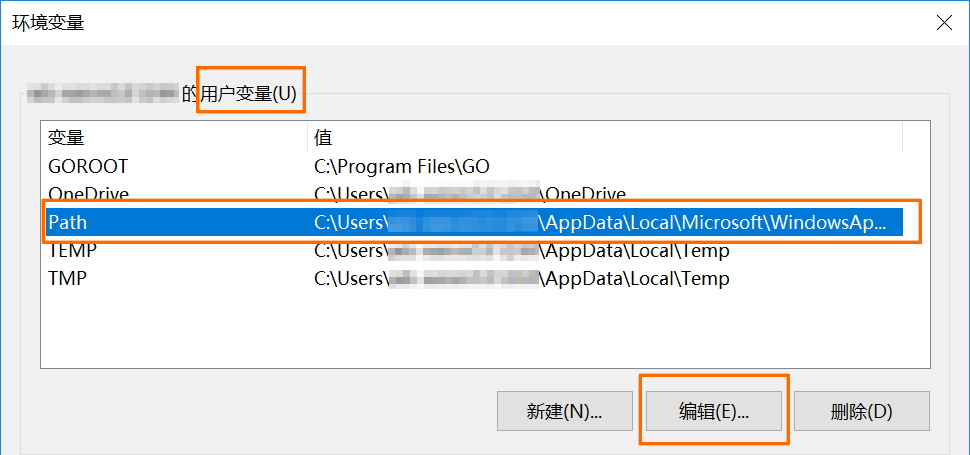
  2. 按下Windows鍵,輸入搜尋關鍵詞“環境變數”。

  3. 在搜尋結果中單擊編輯賬戶的環境變數,即可開啟環境變數設定介面。

  4. 使用者變數中選擇鍵為Path的環境變數,單擊編輯

  5. 在編輯介面中選中阿里雲CLI安裝目錄路徑,單擊刪除,從環境變數Path中移除阿里雲CLI安裝目錄路徑。樣本目錄:C:\ExampleDir(請替換為實際安裝目錄的路徑)。

    image

  6. 在所有相關對話方塊中依次單擊確定以儲存更改。

通過PowerShell指令碼卸載

  1. 建立指令碼檔案,複製以下內容到指令檔中。

    指令碼樣本

    # Uninstall-CLI-Windows.ps1
    # Purpose: Automatically detect and uninstall Aliyun CLI, and delete configuration files in user directory
    
    [CmdletBinding()]
    param (
        [switch]$Clean,
        [switch]$Help
    )
    
    function Show-Usage {
        Write-Output @"
    
          Alibaba Cloud Command Line Interface Uninstaller
    
        -Help                 Display this help and exit
    
        -Clean                Remove user config file
    
    "@
    }
    
    function Remove-DirectoryIfEmpty {
        param([string]$Path)
        if ((Get-ChildItem -Path $Path -Force).Count -eq 0) {
            Remove-Item -Path $Path -Force
        }
    }
    
    function Remove-AliyunCLIFromPath {
        param([string]$PathToRemove)
        $Key = 'HKCU:\Environment'
        $CurrentPath = (Get-ItemProperty -Path $Key -Name PATH).PATH
        if ($CurrentPath -like "*$PathToRemove*") {
            $newPath = ($CurrentPath -split ';' | Where-Object { $_ -ne $PathToRemove }) -join ';'
            Set-ItemProperty -Path $Key -Name PATH -Value $newPath
            $env:PATH = $newPath
        }
    }
    
    function Remove-AliyunCLI {
        $AliyunBinary = (Get-Command aliyun -ErrorAction SilentlyContinue).Source
        if ($AliyunBinary -and (Test-Path $AliyunBinary)) {
            Remove-Item -Path $AliyunBinary -Force
            $AliyunInstallDir = Split-Path -Parent $AliyunBinary
            Remove-DirectoryIfEmpty -Path $AliyunInstallDir
            Remove-AliyunCLIFromPath -PathToRemove $AliyunInstallDir
            Write-Output "Aliyun CLI binary has been removed."
        }
    }
    
    function Remove-ConfigFile {
        $ConfigDir = Join-Path $HOME ".aliyun"
        $ConfigFile = Join-Path $ConfigDir "config.json"
        if (Test-Path $ConfigFile) {
            Remove-Item -Path $ConfigFile -Force
            Remove-DirectoryIfEmpty -Path $ConfigDir
            Write-Output "Aliyun CLI config file has been removed."
        }
    }
    
    if ($PSBoundParameters['Help']) {
        Show-Usage
        exit 0
    }
    
    Write-Output @"
    ..............888888888888888888888 ........=8888888888888888888D=..............
    ...........88888888888888888888888 ..........D8888888888888888888888I...........
    .........,8888888888888ZI: ...........................=Z88D8888888888D..........
    .........+88888888 ..........................................88888888D..........
    .........+88888888 .......Welcome to use Alibaba Cloud.......O8888888D..........
    .........+88888888 ............. ************* ..............O8888888D..........
    .........+88888888 .... Command Line Interface(Reloaded) ....O8888888D..........
    .........+88888888...........................................88888888D..........
    ..........D888888888888DO+. ..........................?ND888888888888D..........
    ...........O8888888888888888888888...........D8888888888888888888888=...........
    ............ .:D8888888888888888888.........78888888888888888888O ..............
    "@
    
    try {
        Remove-AliyunCLI
        if ($PSBoundParameters['Clean']) { Remove-ConfigFile }
        Write-Output "Aliyun CLI has been uninstalled."
    } catch {
        Write-Output "Failed to uninstall Aliyun CLI: $_"
    }
  2. 參考以下樣本,運行指令碼以卸載阿里雲CLI。

    # 僅卸載可執行檔
    powershell.exe -ExecutionPolicy Bypass -File <script_path>
    
    # 卸載可執行檔並刪除設定檔
    powershell.exe -ExecutionPolicy Bypass -File <script_path> -Clean
    
    # 查看指令碼協助資訊
    powershell.exe -ExecutionPolicy Bypass -File <script_path> -Help

刪除設定檔(可選)

阿里雲CLI的設定檔位於您個人使用者目錄下的.aliyun檔案夾中,個人使用者目錄位置因作業系統而異。

  • Windows:C:\Users\<USERNAME>\.aliyun

  • Linux/macOS:~/.aliyun