通過Gateway with Inference Extension組件,您可以在產生式AI推理服務中實現更換、升級使用的基本模型或者對多個LoRA模型進行灰階更新,將服務中斷的時間降至最低。本文介紹如何使用Gateway with Inference Extension組件對產生式AI推理服務進行漸進式灰階發布。
閱讀本文前,請確保您已經瞭解InferencePool和InferenceModel的相關概念。
前提條件
-
已建立帶有GPU節點池的ACK託管叢集。您也可以在ACK託管叢集中安裝ACK Virtual Node組件,以使用ACS GPU算力。
-
已安裝Gateway with Inference ExtensionGateway with Inference Extension並勾選啟用Gateway API推理擴充(需要配合已經部署的推理服務使用)。操作入口,請參見安裝組件。
準備工作
在示範推理服務漸進式灰階發布之前,需要先完成樣本推理服務的部署和驗證。
-
部署基於Qwen-2.5-7B-Instruct基本模型的樣本推理服務。
-
部署InferencePool和InferenceModel資源。
kubectl apply -f- <<EOF apiVersion: inference.networking.x-k8s.io/v1alpha2 kind: InferencePool metadata: name: mymodel-pool-v1 namespace: default spec: extensionRef: group: "" kind: Service name: mymodel-v1-ext-proc selector: app: custom-serving release: qwen targetPortNumber: 8000 --- apiVersion: inference.networking.x-k8s.io/v1alpha2 kind: InferenceModel metadata: name: mymodel-v1 spec: criticality: Critical modelName: mymodel poolRef: group: inference.networking.x-k8s.io kind: InferencePool name: mymodel-pool-v1 targetModels: - name: mymodel weight: 100 EOF -
部署網關和網關路由規則。
-
擷取網關IP。
export GATEWAY_IP=$(kubectl get gateway/inference-gateway -o jsonpath='{.status.addresses[0].value}') -
驗證推理服務。
curl -X POST ${GATEWAY_IP}:8080/v1/chat/completions -H 'Content-Type: application/json' -d '{
    "model": "mymodel",
    "temperature": 0,
    "messages": [
      {
        "role": "user",
        "content": "你是誰?"
      }
    ]
}'
預期輸出:
{"id":"chatcmpl-6bd37f84-55e0-4278-8f16-7b7bf04c6513","object":"chat.completion","created":1744364930,"model":"mymodel","choices":[{"index":0,"message":{"role":"assistant","reasoning_content":null,"content":"我是Qwen,由阿里雲開發的人工智慧模型。我被設計用來提供資訊、回答問題和進行各種對話任務。如果您有任何問題或需要協助,都可以嘗試和我交流!","tool_calls":[]},"logprobs":null,"finish_reason":"stop","stop_reason":null}],"usage":{"prompt_tokens":32,"total_tokens":74,"completion_tokens":42,"prompt_tokens_details":null},"prompt_logprobs":null}預期輸出表明,推理服務已經通過Gateway with Inference Extension正常對外提供服務。
情境一:通過更新InferencePool進行基礎設施和基本模型灰階發布
在實際情境中,通過更新InferencePool可以實現模型服務的灰階發布。例如,您可以配置兩個InferencePool,基於相同的InferenceModel定義和相同的模型名稱,但分別運行在不同計算配置、GPU卡型或基本模型上。適用於以下情境。
-
基礎設施灰階更新:建立新InferencePool,使用新GPU卡型或新的模型配置,通過灰階的方式逐步完成工作負載的遷移。在不中斷推理請求流量的情況下完成節點硬體的升級、驅動程式的更新或安全問題的解決等。
-
基本模型灰階更新:建立新InferencePool,載入新模型架構或微調後的模型權重,通過灰階的方式逐步上線新推理模型,以提升推理服務效能、或解決基本模型相關的問題等。
以下為灰階更新的主要流程。
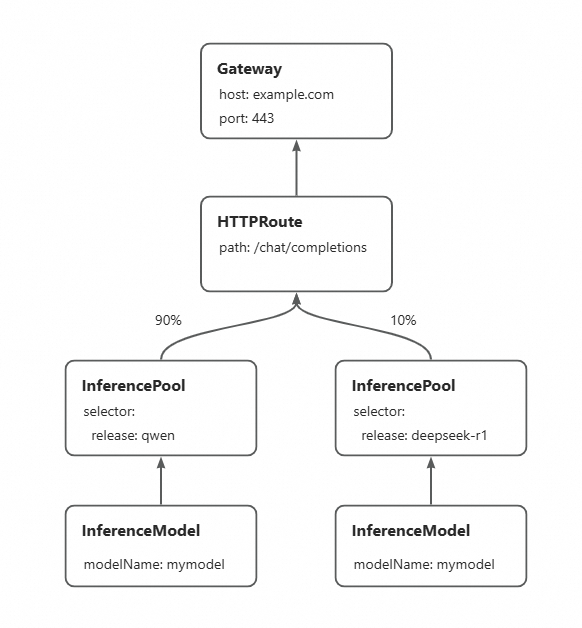
通過為新基本模型建立新的InferencePool,並配置HTTPRoute來分配不同InferencePool之間的流量比例,可逐步將流量灰階到新InferencePool代表的新基本模型推理服務上,實現無中斷的基本模型更新。以下示範如何將部署的Qwen-2.5-7B-Instruct基本模型服務灰階更新為DeepSeek-R1-Distill-Qwen-7B。您可以通過更新HTTPRoute中的流量比例,來體驗基本模型的完全切換。
-
部署基於DeepSeek-R1-Distill-Qwen-7B基本模型的推理服務。
-
配置新的推理服務的InferencePool和InferenceModel。InferencePool
mymodel-pool-v2通過新的標籤選擇基於DeepSeek-R1-Distill-Qwen-7B基本模型的推理服務,並在其中聲明相同模型名稱mymodel的InferenceModel。kubectl apply -f- <<EOF apiVersion: inference.networking.x-k8s.io/v1alpha2 kind: InferencePool metadata: name: mymodel-pool-v2 namespace: default spec: extensionRef: group: "" kind: Service name: mymodel-v2-ext-proc selector: app: custom-serving release: deepseek-r1 targetPortNumber: 8000 --- apiVersion: inference.networking.x-k8s.io/v1alpha2 kind: InferenceModel metadata: name: mymodel-v2 spec: criticality: Critical modelName: mymodel poolRef: group: inference.networking.x-k8s.io kind: InferencePool name: mymodel-pool-v2 targetModels: - name: mymodel weight: 100 EOF -
配置流量灰階策略。
配置HTTPRoute在現有的InferencePool(
mymodel-pool-v1)和新的InferencePool(mymodel-pool-v2)之間分配流量。backendRefs權重欄位控制分配給每個InferencePool的流量百分比,以下樣本配置模型的流量權重為9:1,即將10%流量轉寄給mymodel-pool-v2對應的DeepSeek-R1-Distill-Qwen-7B基礎服務。kubectl apply -f- <<EOF apiVersion: gateway.networking.k8s.io/v1 kind: HTTPRoute metadata: name: inference-route spec: parentRefs: - group: gateway.networking.k8s.io kind: Gateway name: inference-gateway sectionName: llm-gw rules: - backendRefs: - group: inference.networking.x-k8s.io kind: InferencePool name: mymodel-pool-v1 port: 8000 weight: 90 - group: inference.networking.x-k8s.io kind: InferencePool name: mymodel-pool-v2 weight: 10 matches: - path: type: PathPrefix value: / EOF -
驗證基本模型灰階效果。
反覆執行以下指令,通過模型輸出驗證基本模型的灰階效果:
curl -X POST ${GATEWAY_IP}:8080/v1/chat/completions -H 'Content-Type: application/json' -d '{
    "model": "mymodel",
    "temperature": 0,
    "messages": [
      {
        "role": "user",
        "content": "你是誰?"
      }
    ]
}'
大多數請求的預期輸出:
{"id":"chatcmpl-6e361a5e-b0cb-4b57-8994-a293c5a9a6ad","object":"chat.completion","created":1744601277,"model":"mymodel","choices":[{"index":0,"message":{"role":"assistant","reasoning_content":null,"content":"我是Qwen,由阿里雲開發的人工智慧模型。我被設計用來提供資訊、回答問題和進行各種對話任務。如果您有任何問題或需要協助,都可以嘗試和我交流!","tool_calls":[]},"logprobs":null,"finish_reason":"stop","stop_reason":null}],"usage":{"prompt_tokens":32,"total_tokens":74,"completion_tokens":42,"prompt_tokens_details":null},"prompt_logprobs":null}大約10%請求的預期輸出:
{"id":"chatcmpl-9e3cda6e-b284-43a9-9625-2e8fcd1fe0c7","object":"chat.completion","created":1744601333,"model":"mymodel","choices":[{"index":0,"message":{"role":"assistant","reasoning_content":null,"content":"您好!我是由中國的深度求索(DeepSeek)公司開發的智能助手DeepSeek-R1。如您有任何問題,我會盡我所能為您提供協助。\n</think>\n\n您好!我是由中國的深度求索(DeepSeek)公司開發的智能助手DeepSeek-R1。如您有任何問題,我會盡我所能為您提供協助。","tool_calls":[]},"logprobs":null,"finish_reason":"stop","stop_reason":null}],"usage":{"prompt_tokens":8,"total_tokens":81,"completion_tokens":73,"prompt_tokens_details":null},"prompt_logprobs":null}可以看到,大部分推理請求仍由舊的Qwen-2.5-7B-Instruct基本模型提供服務,小部分請求由新的DeepSeek-R1-Distill-Qwen-7B基本模型提供服務。
情境二:通過配置InferenceModel進行LoRA模型灰階發布
在Multi-LoRA情境下,通過Gateway with Inference Extension,您可以在同一基礎大模型上同時部署多個版本的LoRA模型,靈活分配流量進行灰階測試,驗證各版本在效能最佳化、缺陷修複或功能迭代上的效果。
以下以 Qwen-2.5-7B-Instruct 微調的兩個LoRA版本為例,介紹如何通過InferenceModel實現LoRA模型的灰階發布流程。
實現LoRA模型的灰階發布前,需確保新版本模型已成功部署至推理服務執行個體。本樣本中的基礎服務已預先掛載了travel-helper-v1和travel-helper-v2兩個LoRA模型。
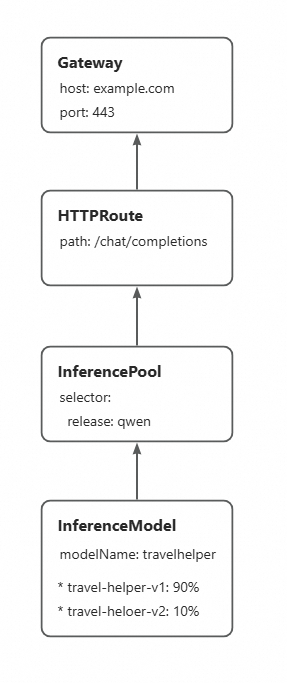
通過更新InferenceModel中不同LoRA模型之間的流量比例,可以逐步增加新版本LoRA模型的流量權重,在不中斷流量的情況下逐步更新到新的LoRA模型。
-
部署InferenceModel配置,定義LoRA模型的多個版本並指定LoRA模型之間的流量比例。完成配置後,請求travelhelper模型時,在後端不同版本的LoRA模型之間進行灰階的流量比例,樣本中配置為9:1。即90%流量發往
travel-helper-v1模型,10%發往travel-helper-v2模型。kubectl apply -f- <<EOF apiVersion: inference.networking.x-k8s.io/v1alpha2 kind: InferenceModel metadata: name: loramodel spec: criticality: Critical modelName: travelhelper poolRef: group: inference.networking.x-k8s.io kind: InferencePool name: mymodel-pool-v1 targetModels: - name: travel-helper-v1 weight: 90 - name: travel-helper-v2 weight: 10 EOF -
驗證灰階效果。
反覆執行以下指令,通過模型輸出驗證LoRA模型的灰階效果:
curl -X POST ${GATEWAY_IP}:8080/v1/chat/completions -H 'Content-Type: application/json' -d '{
    "model": "travelhelper",
    "temperature": 0,
    "messages": [
      {
        "role": "user",
        "content": "我剛來北京,幫我推薦個景點"
      }
    ]
}'
大多數請求的預期輸出:
{"id":"chatcmpl-2343f2ec-b03f-4882-a601-aca9e88d45ef","object":"chat.completion","created":1744602234,"model":"travel-helper-v1","choices":[{"index":0,"message":{"role":"assistant","reasoning_content":null,"content":"北京是一個充滿歷史和文化的城市,有很多值得一遊的景點。以下是一些推薦的景點:\n\n1. 故宮:這是中國最大的古代宮殿,也是世界上最大的古代木結構建築群之一。你可以在這裡瞭解中國古代的宮廷生活和歷史。\n\n2. 長城:北京的長城是最著名的長城之一,你可以在這裡欣賞到壯麗的山景和長城的雄偉。\n\n3. 天安門廣場:這是世界上最大的城市廣場,你可以在這裡看到天安門城樓和人民英雄紀念碑。\n\n4. 頤和園:這是中國最大的皇家園林,你可以在這裡欣賞到美麗的湖泊和山景,以及精美的建築和雕塑。\n\n5. 北京動物園:如果你喜歡動物,這裡有很多種類的動物,你可以在這裡看到大熊貓、金絲猴等珍稀動物。\n\n6. 798藝術區:這是一個充滿藝術氣息的地方,有很多畫廊、藝術工作室和咖啡館,你可以在這裡欣賞到各種藝術作品。\n\n7. 北京751D·PARK:這是一個集藝術、文化、科技於一體的創意園區,你可以在這裡看到各種展覽和活動。\n\n以上就是我為你推薦的北京景點,希望你會喜歡。","tool_calls":[]},"logprobs":null,"finish_reason":"stop","stop_reason":null}],"usage":{"prompt_tokens":38,"total_tokens":288,"completion_tokens":250,"prompt_tokens_details":null},"prompt_logprobs":null}大約10%請求的預期輸出:
{"id":"chatcmpl-c6df57e9-ff95-41d6-8b35-19978f40525f","object":"chat.completion","created":1744602223,"model":"travel-helper-v2","choices":[{"index":0,"message":{"role":"assistant","reasoning_content":null,"content":"北京是一個充滿歷史和文化的城市,有很多值得一遊的景點。以下是一些推薦的景點:\n\n1. 故宮:這是中國最大的古代宮殿建築群,也是世界上儲存最完整的古代皇宮之一。你可以在這裡瞭解到中國古代的宮廷生活和歷史。\n\n2. 長城:北京的長城段落是世界上最著名的長城之一,你可以在這裡欣賞到壯麗的山景和長城的雄偉。\n\n3. 天安門廣場:這是世界上最大的城市廣場,你可以在這裡看到莊嚴的人民英雄紀念碑和天安門城樓。\n\n4. 頤和園:這是中國最大的皇家園林,你可以在這裡欣賞到精美的園林建築和美麗的湖景。\n\n5. 北京動物園:如果你喜歡動物,這裡是一個很好的選擇。你可以看到各種各樣的動物,包括大熊貓。\n\n6. 798藝術區:這是一個充滿藝術氣息的地方,你可以在這裡看到各種各樣的藝術展覽和創意市集。\n\n希望這些建議對你有所協助!","tool_calls":[]},"logprobs":null,"finish_reason":"stop","stop_reason":null}],"usage":{"prompt_tokens":38,"total_tokens":244,"completion_tokens":206,"prompt_tokens_details":null},"prompt_logprobs":null}可以看到,大部分推理請求由
travel-helper-v1LoRA模型提供服務,小部分請求由travel-helper-v2LoRA模型提供服務。