本文介紹在Spark中如何配置和使用動態資源分派(Dynamic Resource Allocation)功能,以最大化叢集資源的利用效率,減少資源閑置,同時提升任務執行的靈活性和整體系統效能。
什麼是動態資源分派?
動態資源分派(Dynamic Resource Allocation,簡稱DRA)是Spark提供的一個機制,可根據工作負載的大小動態調整作業所使用的計算資源。如果某個Executor長時間處於空閑狀態,Driver會自動將其釋放,將資源返還給叢集;而如果某些任務等待的調度時間過長,Driver會申請更多的Executor來執行這些任務。DRA協助Spark靈活應對工作負載變化,避免因資源不足導致作業執行時間過長或因資源過剩導致資源浪費,從而提升叢集整體資源使用率。
資源分派策略
啟用DRA後,當任務存在等待調度的情況時,Driver會請求額外的Executor。如果任務等待時間超過spark.dynamicAllocation.schedulerBacklogTimeout(預設1秒),Driver開始分批次申請Executor。每經過 spark.dynamicAllocation.sustainedSchedulerBacklogTimeout(預設1秒),如果仍有待調度的任務,Driver會繼續申請更多的Executor。每批次申請的Executor數量以指數方式增長,如第一批申請1個,後續批次依次申請 2、4、8 個,以此類推。
資源釋放策略
對於閒置Executor,當其空閑時間超過spark.dynamicAllocation.executorIdleTimeout(預設60秒)時,Driver會自動釋放這些Executors,以最佳化資源使用率。
啟用動態資源分派
Spark的DRA機制在Standalone、YARN、Mesos和Kubernetes運行模式下都可以使用,預設情況下禁用。如需啟用DRA,除了將spark.dynamicAllocation.enabled設定為true外,還需配置以下選項:
啟用外部Shuffle服務:設定
spark.shuffle.service.enabled為true,並在同一叢集的每個工作節點上配置External Shuffle Service(ESS)。啟用Shuffle資料跟蹤:將
spark.dynamicAllocation.shuffleTracking.enabled設為true,Spark會跟蹤Shuffle資料的位置和狀態,確保Shuffle資料不會丟失,並且可以在需要時重新計算這部分資料。啟用節點退役功能:設定
spark.decommission.enabled和spark.storage.decommission.shuffleBlocks.enabled為true,確保Spark在節點被退役時會主動將該節點上的Shuffle資料區塊複製到其他可用節點。配置ShuffleDataIO外掛程式:通過
spark.shuffle.sort.io.plugin.class指定ShuffleDataIO外掛程式類,自訂Shuffle資料的IO操作以實現將Shuffle資料寫入不同的儲存系統中。
在不同的模式下,配置方法不同:
Spark Standalone模式:只需配置選項1。
Spark on Kubernetes模式:
不使用Celeborn作為RSS時:將
spark.dynamicAllocation.shuffleTracking.enabled設定為true(對應選項2)。使用Celeborn作為RSS時:
Spark版本3.5.0及以上:配置
spark.shuffle.sort.io.plugin.class為org.apache.spark.shuffle.celeborn.CelebornShuffleDataIO(對應選項4)。Spark版本小於3.5.0:需為Spark打上相應版本的補丁,無需額外配置。詳情請參見Support Spark Dynamic Allocation。
Spark版本3.4.0及以上:建議將
spark.dynamicAllocation.shuffleTracking.enabled設定為false,可避免executor處於空閑狀態時無法被及時釋放。
本樣本將介紹Spark on Kubernetes模式下的配置方式,包括不使用Celeborn和使用Celeborn作為RSS的情境。
前提條件
- 說明
本樣本中部署時使用了
spark.jobNamespaces=["spark"]。如需不同的命名空間,請相應修改namespace欄位。 已部署ack-spark-history-server組件。
說明本樣本中建立名為
nas-pv的PV和nas-pvc的PVC,並配置Spark History Server從NAS的/spark/event-logs路徑讀取Spark事件記錄。(可選)已部署ack-celeborn組件。
操作步驟
不使用Celeborn作為RSS
在以下Spark 3.5.4版本的樣本中,如果不使用Celeborn作為RSS,並啟用動態資源分派(DRA),請設定以下參數:
啟用動態資源分派:
spark.dynamicAllocation.enabled設定為"true"。啟用shuffle檔案跟蹤,無需依賴ESS實現動態資源分派:
spark.dynamicAllocation.shuffleTracking.enabled: "true"。
根據如下內容建立SparkApplication資訊清單檔並儲存為
spark-pagerank-dra.yaml:apiVersion: sparkoperator.k8s.io/v1beta2 kind: SparkApplication metadata: name: spark-pagerank-dra namespace: spark spec: type: Scala mode: cluster # 需將<SPARK_IMAGE>替換成您自己的Spark鏡像。 image: <SPARK_IMAGE> mainApplicationFile: local:///opt/spark/examples/jars/spark-examples_2.12-3.5.4.jar mainClass: org.apache.spark.examples.SparkPageRank arguments: # 需將<OSS_BUCKET>替換成您的OSS Bucket名稱。 - oss://<OSS_BUCKET>/data/pagerank_dataset.txt - "10" sparkVersion: 3.5.4 hadoopConf: # 支援使用oss://格式訪問OSS資料。 fs.AbstractFileSystem.oss.impl: org.apache.hadoop.fs.aliyun.oss.OSS fs.oss.impl: org.apache.hadoop.fs.aliyun.oss.AliyunOSSFileSystem # OSS 訪問端點,需將<OSS_ENDPOINT>替換成您的OSS訪問端點。 # 例如,北京地區OSS內網訪問端點為oss-cn-beijing-internal.aliyuncs.com fs.oss.endpoint: <OSS_ENDPOINT> # 從環境變數中讀取OSS訪問憑據。 fs.oss.credentials.provider: com.aliyun.oss.common.auth.EnvironmentVariableCredentialsProvider sparkConf: # ==================== # 事件記錄 # ==================== spark.eventLog.enabled: "true" spark.eventLog.dir: file:///mnt/nas/spark/event-logs # ==================== # 動態資源分派 # ==================== # 啟用動態資源分派 spark.dynamicAllocation.enabled: "true" # 啟用shuffle檔案跟蹤,不依賴ESS即可實現動態資源分派。 spark.dynamicAllocation.shuffleTracking.enabled: "true" # Executor 數量的初始值。 spark.dynamicAllocation.initialExecutors: "1" # Executor 數量的最小值。 spark.dynamicAllocation.minExecutors: "0" # Executor 數量的最大值。 spark.dynamicAllocation.maxExecutors: "5" # Executor空閑逾時時間,超過該時間將會被釋放掉。 spark.dynamicAllocation.executorIdleTimeout: 60s # 緩衝了資料區塊的 Executor 空閑逾時時間,超過該時間將會被釋放掉,預設為infinity,即不會釋放。 # spark.dynamicAllocation.cachedExecutorIdleTimeout: # 當存在待調度任務超過該時間後,將會申請更多的Executor。 spark.dynamicAllocation.schedulerBacklogTimeout: 1s # 每間隔該時間後,將會開始下一批次申請Executor。 spark.dynamicAllocation.sustainedSchedulerBacklogTimeout: 1s driver: cores: 1 coreLimit: 1200m memory: 512m envFrom: - secretRef: name: spark-oss-secret volumeMounts: - name: nas mountPath: /mnt/nas serviceAccount: spark-operator-spark executor: cores: 1 coreLimit: "2" memory: 8g envFrom: - secretRef: name: spark-oss-secret volumeMounts: - name: nas mountPath: /mnt/nas volumes: - name: nas persistentVolumeClaim: claimName: nas-pvc restartPolicy: type: Never說明上述樣本作業中使用到的Spark鏡像需要包含Hadoop OSS SDK依賴,您可以參考如下Dockerfile自行構建鏡像並推送到自己的鏡像倉庫中:
ARG SPARK_IMAGE=spark:3.5.4

FROM ${SPARK_IMAGE}

# Add dependency for Hadoop Aliyun OSS support
ADD --chown=spark:spark --chmod=644 https://repo1.maven.org/maven2/org/apache/hadoop/hadoop-aliyun/3.3.4/hadoop-aliyun-3.3.4.jar ${SPARK_HOME}/jars
ADD --chown=spark:spark --chmod=644 https://repo1.maven.org/maven2/com/aliyun/oss/aliyun-sdk-oss/3.17.4/aliyun-sdk-oss-3.17.4.jar ${SPARK_HOME}/jars
ADD --chown=spark:spark --chmod=644 https://repo1.maven.org/maven2/org/jdom/jdom2/2.0.6.1/jdom2-2.0.6.1.jar ${SPARK_HOME}/jars
執行如下命令提交Spark作業。
kubectl apply -f spark-pagerank-dra.yaml預期輸出:
sparkapplication.sparkoperator.k8s.io/spark-pagerank-dra created查看Driver日誌。
kubectl logs -n spark spark-pagerank-dra-driver | grep -a2 -b2 "Going to request"預期輸出:
3544-25/01/16 03:26:04 INFO SparkKubernetesClientFactory: Auto-configuring K8S client using current context from users K8S config file
3674-25/01/16 03:26:06 INFO Utils: Using initial executors = 1, max of spark.dynamicAllocation.initialExecutors, spark.dynamicAllocation.minExecutors and spark.executor.instances
3848:25/01/16 03:26:06 INFO ExecutorPodsAllocator: Going to request 1 executors from Kubernetes for ResourceProfile Id: 0, target: 1, known: 0, sharedSlotFromPendingPods: 2147483647.
4026-25/01/16 03:26:06 INFO ExecutorPodsAllocator: Found 0 reusable PVCs from 0 PVCs
4106-25/01/16 03:26:06 INFO BasicExecutorFeatureStep: Decommissioning not enabled, skipping shutdown script
--
10410-25/01/16 03:26:15 INFO TaskSetManager: Starting task 0.0 in stage 0.0 (TID 0) (192.168.95.190, executor 1, partition 0, PROCESS_LOCAL, 9807 bytes)
10558-25/01/16 03:26:15 INFO BlockManagerInfo: Added broadcast_1_piece0 in memory on 192.168.95.190:34327 (size: 12.5 KiB, free: 4.6 GiB)
10690:25/01/16 03:26:16 INFO ExecutorPodsAllocator: Going to request 1 executors from Kubernetes for ResourceProfile Id: 0, target: 2, known: 1, sharedSlotFromPendingPods: 2147483647.
10868-25/01/16 03:26:16 INFO ExecutorAllocationManager: Requesting 1 new executor because tasks are backlogged (new desired total will be 2 for resource profile id: 0)
11030-25/01/16 03:26:16 INFO ExecutorPodsAllocator: Found 0 reusable PVCs from 0 PVCs
從日誌可以看出,Driver在03:26:06和03:26:16時分別請求了1個Executor。
訪問Spark History Server查看,訪問步驟請參見訪問Spark History Server Web UI。
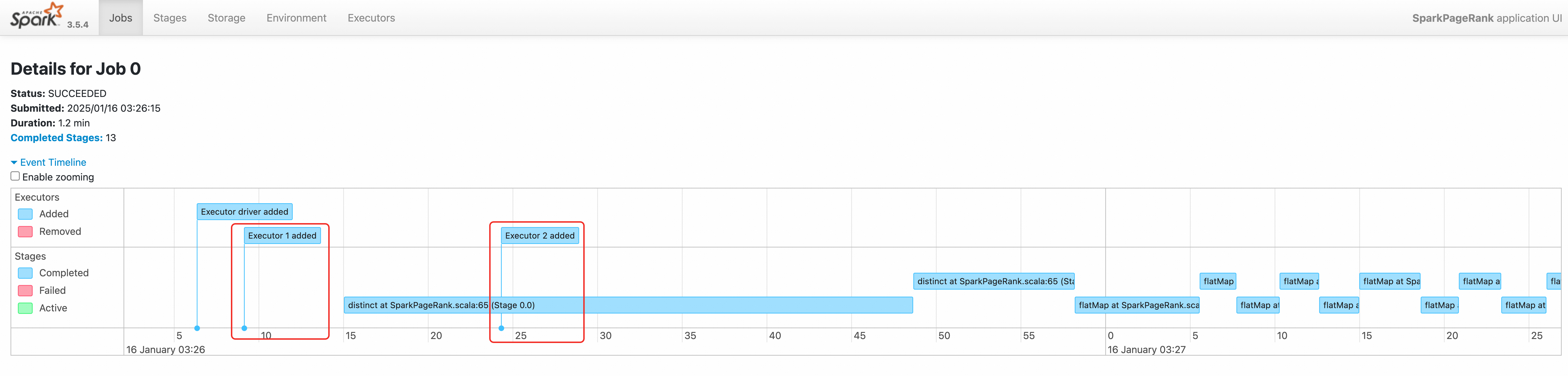
通過查看該作業的事件時間軸,我們也可以看到兩個Executor先後被建立。
使用Celeborn作為RSS
在以下Spark 3.5.4版本的樣本中,如果使用Celeborn作為RSS,並啟用動態資源分派(DRA),請設定以下參數:
啟用動態資源分派:
spark.dynamicAllocation.enabled設定為"true"。支援動態資源分派的配置(適用於Spark3.5.0及以上):
spark.shuffle.sort.io.plugin.class設定為org.apache.spark.shuffle.celeborn.CelebornShuffleDataIO。確保閒置executors及時釋放:
spark.dynamicAllocation.shuffleTracking.enabled設定為"false"。
根據如下內容建立SparkApplication資訊清單檔並儲存為
spark-pagerank-celeborn-dra.yaml:apiVersion: sparkoperator.k8s.io/v1beta2 kind: SparkApplication metadata: name: spark-pagerank-celeborn-dra namespace: spark spec: type: Scala mode: cluster # 需將 <SPARK_IMAGE> 替換成您自己的Spark鏡像,該鏡像中需要包含JindoSDK依賴。 image: <SPARK_IMAGE> mainApplicationFile: local:///opt/spark/examples/jars/spark-examples_2.12-3.5.4.jar mainClass: org.apache.spark.examples.SparkPageRank arguments: # 需將 <OSS_BUCKET> 替換成您的 OSS Bucket名稱。 - oss://<OSS_BUCKET>/data/pagerank_dataset.txt - "10" sparkVersion: 3.5.4 hadoopConf: # 支援使用 oss:// 格式訪問 OSS 資料。 fs.AbstractFileSystem.oss.impl: org.apache.hadoop.fs.aliyun.oss.OSS fs.oss.impl: org.apache.hadoop.fs.aliyun.oss.AliyunOSSFileSystem # OSS 訪問端點,需將 <OSS_ENDPOINT> 替換成您的 OSS 訪問端點 # 例如,北京地區 OSS 內網訪問端點為 oss-cn-beijing-internal.aliyuncs.com fs.oss.endpoint: <OSS_ENDPOINT> # 從環境變數中讀取 OSS 訪問憑據 fs.oss.credentials.provider: com.aliyun.oss.common.auth.EnvironmentVariableCredentialsProvider sparkConf: # ==================== # 事件記錄 # ==================== spark.eventLog.enabled: "true" spark.eventLog.dir: file:///mnt/nas/spark/event-logs # ==================== # Celeborn # Ref: https://github.com/apache/celeborn/blob/main/README.md#spark-configuration # ==================== # Shuffle manager class name changed in 0.3.0: # before 0.3.0: `org.apache.spark.shuffle.celeborn.RssShuffleManager` # since 0.3.0: `org.apache.spark.shuffle.celeborn.SparkShuffleManager` spark.shuffle.manager: org.apache.spark.shuffle.celeborn.SparkShuffleManager # Must use kryo serializer because java serializer do not support relocation spark.serializer: org.apache.spark.serializer.KryoSerializer # 需要根據 Celeborn master 副本數量進行配置。 spark.celeborn.master.endpoints: celeborn-master-0.celeborn-master-svc.celeborn.svc.cluster.local,celeborn-master-1.celeborn-master-svc.celeborn.svc.cluster.local,celeborn-master-2.celeborn-master-svc.celeborn.svc.cluster.local # options: hash, sort # Hash shuffle writer use (partition count) * (celeborn.push.buffer.max.size) * (spark.executor.cores) memory. # Sort shuffle writer uses less memory than hash shuffle writer, if your shuffle partition count is large, try to use sort hash writer. spark.celeborn.client.spark.shuffle.writer: hash # We recommend setting `spark.celeborn.client.push.replicate.enabled` to true to enable server-side data replication # If you have only one worker, this setting must be false # If your Celeborn is using HDFS, it's recommended to set this setting to false spark.celeborn.client.push.replicate.enabled: "false" # Support for Spark AQE only tested under Spark 3 spark.sql.adaptive.localShuffleReader.enabled: "false" # we recommend enabling aqe support to gain better performance spark.sql.adaptive.enabled: "true" spark.sql.adaptive.skewJoin.enabled: "true" # 當 Spark 版本 >= 3.5.0 時,配置該選項以支援動態資源分派 spark.shuffle.sort.io.plugin.class: org.apache.spark.shuffle.celeborn.CelebornShuffleDataIO spark.executor.userClassPathFirst: "false" # ==================== # 動態資源分派 # Ref: https://spark.apache.org/docs/latest/job-scheduling.html#dynamic-resource-allocation # ==================== # 啟用動態資源分派 spark.dynamicAllocation.enabled: "true" # 啟用 shuffle 檔案跟蹤,不依賴 ESS 即可實現動態資源分派。 # 在使用 Celeborn 作為 RSS 時,當 Spark 版本 >= 3.4.0 時,強烈建議關閉該選項。 spark.dynamicAllocation.shuffleTracking.enabled: "false" # Executor 數量的初始值。 spark.dynamicAllocation.initialExecutors: "1" # Executor 數量的最小值。 spark.dynamicAllocation.minExecutors: "0" # Executor 數量的最大值。 spark.dynamicAllocation.maxExecutors: "5" # Executor 空閑逾時時間,超過該時間將會被釋放掉。 spark.dynamicAllocation.executorIdleTimeout: 60s # 緩衝了資料區塊的 Executor 空閑逾時時間,超過該時間將會被釋放掉,預設為 infinity,即不會釋放。 # spark.dynamicAllocation.cachedExecutorIdleTimeout: # 當存在待調度任務超過該時間後,將會申請更多的 executor。 spark.dynamicAllocation.schedulerBacklogTimeout: 1s # 每間隔該時間後,將會開始下一批次申請 Executor。 spark.dynamicAllocation.sustainedSchedulerBacklogTimeout: 1s driver: cores: 1 coreLimit: 1200m memory: 512m envFrom: - secretRef: name: spark-oss-secret volumeMounts: - name: nas mountPath: /mnt/nas serviceAccount: spark-operator-spark executor: cores: 1 coreLimit: "1" memory: 4g envFrom: - secretRef: name: spark-oss-secret volumeMounts: - name: nas mountPath: /mnt/nas volumes: - name: nas persistentVolumeClaim: claimName: nas-pvc restartPolicy: type: Never說明上述樣本作業中使用到的Spark鏡像需要包含Hadoop OSS SDK依賴,您可以參考如下Dockerfile自行構建鏡像並推送到自己的鏡像倉庫中:
ARG SPARK_IMAGE=spark:3.5.4

FROM ${SPARK_IMAGE}

# Add dependency for Hadoop Aliyun OSS support
ADD --chown=spark:spark --chmod=644 https://repo1.maven.org/maven2/org/apache/hadoop/hadoop-aliyun/3.3.4/hadoop-aliyun-3.3.4.jar ${SPARK_HOME}/jars
ADD --chown=spark:spark --chmod=644 https://repo1.maven.org/maven2/com/aliyun/oss/aliyun-sdk-oss/3.17.4/aliyun-sdk-oss-3.17.4.jar ${SPARK_HOME}/jars
ADD --chown=spark:spark --chmod=644 https://repo1.maven.org/maven2/org/jdom/jdom2/2.0.6.1/jdom2-2.0.6.1.jar ${SPARK_HOME}/jars

# Add dependency for Celeborn
ADD --chown=spark:spark --chmod=644 https://repo1.maven.org/maven2/org/apache/celeborn/celeborn-client-spark-3-shaded_2.12/0.5.3/celeborn-client-spark-3-shaded_2.12-0.5.3.jar ${SPARK_HOME}/jars
執行如下命令提交SparkApplication。
kubectl apply -f spark-pagerank-celeborn-dra.yaml預期輸出:
sparkapplication.sparkoperator.k8s.io/spark-pagerank-celeborn-dra created查看Driver日誌。
kubectl logs -n spark spark-pagerank-celeborn-dra-driver | grep -a2 -b2 "Going to request"預期輸出:
3544-25/01/16 03:51:28 INFO SparkKubernetesClientFactory: Auto-configuring K8S client using current context from users K8S config file
3674-25/01/16 03:51:30 INFO Utils: Using initial executors = 1, max of spark.dynamicAllocation.initialExecutors, spark.dynamicAllocation.minExecutors and spark.executor.instances
3848:25/01/16 03:51:30 INFO ExecutorPodsAllocator: Going to request 1 executors from Kubernetes for ResourceProfile Id: 0, target: 1, known: 0, sharedSlotFromPendingPods: 2147483647.
4026-25/01/16 03:51:30 INFO ExecutorPodsAllocator: Found 0 reusable PVCs from 0 PVCs
4106-25/01/16 03:51:30 INFO CelebornShuffleDataIO: Loading CelebornShuffleDataIO
--
11796-25/01/16 03:51:41 INFO TaskSetManager: Starting task 0.0 in stage 0.0 (TID 0) (192.168.95.163, executor 1, partition 0, PROCESS_LOCAL, 9807 bytes)
11944-25/01/16 03:51:42 INFO BlockManagerInfo: Added broadcast_1_piece0 in memory on 192.168.95.163:37665 (size: 13.3 KiB, free: 2.1 GiB)
12076:25/01/16 03:51:42 INFO ExecutorPodsAllocator: Going to request 1 executors from Kubernetes for ResourceProfile Id: 0, target: 2, known: 1, sharedSlotFromPendingPods: 2147483647.
12254-25/01/16 03:51:42 INFO ExecutorAllocationManager: Requesting 1 new executor because tasks are backlogged (new desired total will be 2 for resource profile id: 0)
12416-25/01/16 03:51:42 INFO ExecutorPodsAllocator: Found 0 reusable PVCs from 0 PVCs
可以看到driver在
03:51:30和03:51:42時分別申請了1個Executor資源。訪問Spark History Server查看,訪問步驟請參見訪問Spark History Server Web UI。
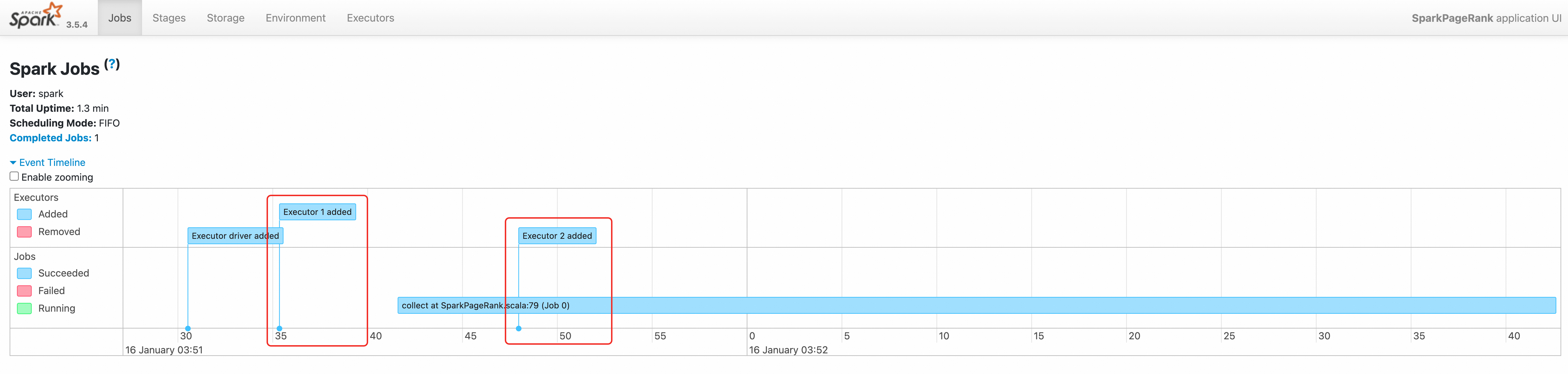
通過查看該作業的事件時間軸,我們也可以看到兩個executor先後被建立。