Combine o Alibaba Cloud Vector Search with Milvus (Milvus) e o modelo de linguagem grande (LLM) Qwen-VL para extrair recursos de imagens e executar buscas multimodais, incluindo texto para imagem, texto para texto, busca por imagem e recuperação de imagem para texto.
Informações básicas
Na busca multimodal, dados não estruturados, como imagens e texto, são convertidos em representações vetoriais, e a tecnologia de busca vetorial encontra conteúdo semelhante. Este tópico utiliza as seguintes ferramentas:
Milvus: banco de dados vetorial eficiente para armazenar e recuperar vetores.
Qwen-VL: extrai descrições e palavras-chave de imagens. Para mais informações, consulte Qwen-VL.
DashScope Embedding API: converte imagens e texto em vetores. Para mais informações, consulte Multimodal-Embedding API details.
Os modos de busca compatíveis são:
Busca de texto para imagem: insira uma consulta de texto para encontrar as imagens mais semelhantes.
Busca de texto para texto: insira uma consulta de texto para encontrar as descrições de imagens mais semelhantes.
Busca por imagem: insira uma imagem como consulta para encontrar as imagens mais semelhantes.
Busca de imagem para texto: insira uma imagem como consulta para encontrar as descrições de imagens mais semelhantes.
Arquitetura do sistema
A figura a seguir mostra a arquitetura geral do sistema de busca multimodal.
Pré-requisitos
Crie uma instância Milvus. Para mais informações, consulte Create a Milvus instance.
Ative o Alibaba Cloud Model Studio e obtenha uma chave de API. Para mais informações, consulte Obtain an API key.
-
Instale os pacotes de dependência necessários.
pip3 install dashscope pymilvus==2.5.0O exemplo neste tópico executa em um ambiente
Python 3.9. -
Baixe e descompacte o conjunto de dados de amostra.
wget https://github.com/milvus-io/pymilvus-assets/releases/download/imagedata/reverse_image_search.zip
unzip -q -o reverse_image_search.zip
O conjunto de dados de amostra contém um arquivo CSV chamado
reverse_image_search.csve vários arquivos de imagem.NotaO conjunto de dados de amostra e as imagens utilizadas neste tópico provêm do projeto open source Milvus.
Introdução ao código principal
Neste exemplo, o modelo Qwen-VL extrai descrições de imagens e as armazena no campo image_description. Em seguida, o modelo de embedding multimodal converte as imagens e suas descrições em representações vetoriais, como image_embedding e text_embedding, para preparar os dados para busca cross-modal.
Para simplificar a demonstração, apenas as primeiras 200 imagens são utilizadas.
import base64
import csv
import dashscope
import os
import pandas as pd
import sys
import time
from tqdm import tqdm
from pymilvus import (
    connections,
    FieldSchema,
    CollectionSchema,
    DataType,
    Collection,
    MilvusException,
    utility,
)

from http import HTTPStatus
import logging

logging.basicConfig(level=logging.INFO)
logger = logging.getLogger(__name__)

class FeatureExtractor:
    def __init__(self, DASHSCOPE_API_KEY):
        self._api_key = DASHSCOPE_API_KEY  # Use an environment variable to store the API key

    def __call__(self, input_data, input_type):
        if input_type not in ("image", "text"):
            raise ValueError("Invalid input type. Must be 'image' or 'text'.")

        try:
            if input_type == "image":
                _, ext = os.path.splitext(input_data)
                image_format = ext.lstrip(".").lower()
                with open(input_data, "rb") as image_file:
                    base64_image = base64.b64encode(image_file.read()).decode("utf-8")
                input_data = f"data:image/{image_format};base64,{base64_image}"
                payload = [{"image": input_data}]
            else:
                payload = [{"text": input_data}]

            resp = dashscope.MultiModalEmbedding.call(
                model="multimodal-embedding-v1",
                input=payload,
                api_key=self._api_key,
            )

            if resp.status_code == HTTPStatus.OK:
                return resp.output["embeddings"][0]["embedding"]
            else:
                raise RuntimeError(
                    f"API call failed. Status code: {resp.status_code}, Error message: {resp.message}"
                )
        except Exception as e:
            logger.error(f"Processing failed: {str(e)}")
            raise

class FeatureExtractorVL:
    def __init__(self, DASHSCOPE_API_KEY):
        self._api_key = DASHSCOPE_API_KEY  # Use an environment variable to store the API key

    def __call__(self, input_data, input_type):
        if input_type not in ("image"):
            raise ValueError("Invalid input type. Must be 'image'.")

        try:
            if input_type == "image":
                payload=[
                            {
                                "role": "system",
                                "content": [{"type":"text","text": "You are a helpful assistant."}]
                            },
                            {
                                "role": "user",
                                "content": [
                                            # {"image": "https://dashscope.oss-cn-beijing.aliyuncs.com/images/dog_and_girl.jpeg"},
                                            {"image": input_data},
                                            {"text": "First, describe this image in under 50 words, and then provide 5 keywords"}
                                            ],
                            }
                        ]

            resp = dashscope.MultiModalConversation.call(
                model="qwen-vl-plus",
                messages=payload,
                api_key=self._api_key,
            )

            if resp.status_code == HTTPStatus.OK:
                return resp.output["choices"][0]["message"].content[0]["text"]
            else:
                raise RuntimeError(
                    f"API call failed. Status code: {resp.status_code}, Error message: {resp.message}"
                )
        except Exception as e:
            logger.error(f"Processing failed: {str(e)}")
            raise

class MilvusClient:
    def __init__(self, MILVUS_TOKEN, MILVUS_HOST, MILVUS_PORT, INDEX, COLLECTION_NAME):
        self._token = MILVUS_TOKEN
        self._host = MILVUS_HOST
        self._port = MILVUS_PORT
        self._index = INDEX
        self._collection_name = COLLECTION_NAME

        self._connect()
        self._create_collection_if_not_exists()

    def _connect(self):
        try:
            connections.connect(alias="default", host=self._host, port=self._port, token=self._token)
            logger.info("Connected to Milvus successfully.")
        except Exception as e:
            logger.error(f"Failed to connect to Milvus: {str(e)}")
            sys.exit(1)

    def _collection_exists(self):
        return self._collection_name in utility.list_collections()

    def _create_collection_if_not_exists(self):
        try:
            if not self._collection_exists():
                fields = [
                    FieldSchema(name="id", dtype=DataType.INT64, is_primary=True, auto_id=True),
                    FieldSchema(name="origin", dtype=DataType.VARCHAR, max_length=512),
                    FieldSchema(name="image_description", dtype=DataType.VARCHAR, max_length=1024),
                    FieldSchema(name="image_embedding", dtype=DataType.FLOAT_VECTOR, dim=1024),
                    FieldSchema(name="text_embedding", dtype=DataType.FLOAT_VECTOR, dim=1024)
                ]

                schema = CollectionSchema(fields)

                self._collection = Collection(self._collection_name, schema)

                if self._index == 'IVF_FLAT':
                    self._create_ivf_index()
                else:
                    self._create_hnsw_index()
                logger.info("Collection created successfully.")
            else:
                self._collection = Collection(self._collection_name)
                logger.info("Collection already exists.")
        except Exception as e:
            logger.error(f"Failed to create or load the collection: {str(e)}")
            sys.exit(1)

    def _create_ivf_index(self):
        index_params = {
            "index_type": "IVF_FLAT",
            "params": {
                        "nlist": 1024, # Number of clusters for the index
                    },
            "metric_type": "L2",
        }
        self._collection.create_index("image_embedding", index_params)
        self._collection.create_index("text_embedding", index_params)
        logger.info("Index created successfully.")

    def _create_hnsw_index(self):
        index_params = {
            "index_type": "HNSW",
            "params": {
                        "M": 64, # Maximum number of neighbors each node can connect to in the graph
                        "efConstruction": 100, # Number of candidate neighbors considered for connection during index construction
                    },
            "metric_type": "L2",
        }
        self._collection.create_index("image_embedding", index_params)
        self._collection.create_index("text_embedding", index_params)
        logger.info("Index created successfully.")

    def insert(self, data):
        try:
            self._collection.insert(data)
            self._collection.load()
            logger.info("Data inserted and loaded successfully.")
        except MilvusException as e:
            logger.error(f"Failed to insert data: {str(e)}")
            raise

    def search(self, query_embedding, field, limit=3):
        try:
            if self._index == 'IVF_FLAT':
                param={"metric_type": "L2", "params": {"nprobe": 10}}
            else:
                param={"metric_type": "L2", "params": {"ef": 10}}

            result = self._collection.search(
                data=[query_embedding],
                anns_field=field,
                param=param,
                limit=limit,
                output_fields=["origin", "image_description"],
            )
            return [{"id": hit.id, "distance": hit.distance, "origin": hit.origin, "image_description": hit.image_description} for hit in result[0]]
        except Exception as e:
            logger.error(f"Search failed: {str(e)}")
            return None

# Load data and generate embeddings
def load_image_embeddings(extractor, extractorVL, csv_path):
    df = pd.read_csv(csv_path)
    image_embeddings = {}

    for image_path in tqdm(df["path"].tolist()[:200], desc="Generating image embeddings"): # Use only the first 200 images for the demo
        try:
            desc = extractorVL(image_path, "image")
            image_embeddings[image_path] = [desc, extractor(image_path, "image"), extractor(desc, "text")]
            time.sleep(1)  # Control the API call frequency
        except Exception as e:
            logger.warning(f"Failed to process {image_path}, skipping: {str(e)}")

    return [{"origin": k, 'image_description':v[0], "image_embedding": v[1], 'text_embedding': v[2]} for k, v in image_embeddings.items()]
Em que:
FeatureExtractor: chama aDashScope Embedding APIpara converter imagens ou texto em representações vetoriais.FeatureExtractorVL: chama o modelo Qwen-VL para extrair descrições de texto e palavras-chave das imagens.MilvusClient: encapsula operações do Milvus, incluindo conexão, criação de coleção, construção de índice, inserção de dados e busca.
Procedimento
Etapa 1: Carregar o conjunto de dados
if __name__ == "__main__":
    # Configure Milvus and DashScope APIs
    MILVUS_TOKEN = "root:****"
    MILVUS_HOST = "c-0aa16b1****.milvus.aliyuncs.com"
    MILVUS_PORT = "19530"
    COLLECTION_NAME = "multimodal_search"
    INDEX = "IVF_FLAT"  # IVF_FLAT OR HNSW
    script_dir = os.path.dirname(os.path.abspath(__file__))
    csv_path = os.path.join(script_dir, "reverse_image_search.csv")

    # Step 1: Initialize the Milvus client
    milvus_client = MilvusClient(MILVUS_TOKEN, MILVUS_HOST, MILVUS_PORT, INDEX, COLLECTION_NAME)

    # Step 2: Initialize the Qwen-VL LLM and the multimodal embedding model
    extractor = FeatureExtractor(DASHSCOPE_API_KEY)
    extractorVL = FeatureExtractorVL(DASHSCOPE_API_KEY)

    # Step 3: Generate embeddings for the image dataset and insert them into Milvus
    embeddings = load_image_embeddings(extractor, extractorVL, csv_path)
    milvus_client.insert(embeddings)
Esta etapa envolve os seguintes parâmetros. Substitua-os pelos seus valores reais.
|
Nome do parâmetro |
Descrição |
|
|
Chave de API do DashScope, usada para chamar os modelos Qwen-VL e de embedding multimodal. |
|
|
Credencial de acesso à instância Milvus, no formato |
|
|
Endpoint interno ou público da instância Milvus, como |
|
|
Número da porta da instância Milvus. O valor padrão é |
|
|
Nome da coleção Milvus usada para armazenar os dados vetoriais de imagens e texto. |
Execute o arquivo Python. Se a saída contiver as seguintes informações, os dados foram carregados com sucesso.
Generating image embeddings:  100%
INFO:__main__:Data inserted and loaded successfully.
Você também pode visit the Attu page e acessar a aba Data para verificar as informações do conjunto de dados carregado.
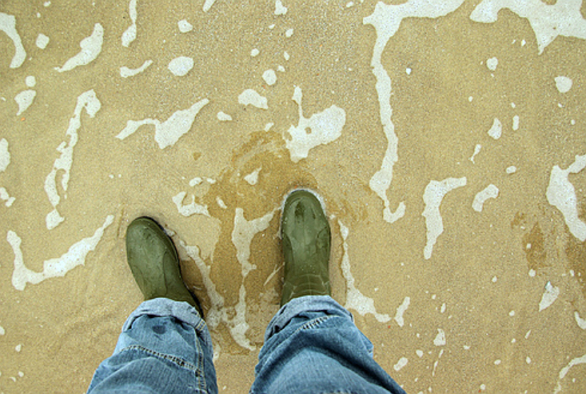
Por exemplo, após a análise de uma imagem pelo LLM Qwen-VL, o resumo de texto extraído descreve a cena: "Uma pessoa de jeans e botas verdes está em uma praia. A areia está coberta com marcas de água. Palavras-chave: praia, pegadas, areia, sapatos, calças".
A descrição usa linguagem concisa para capturar os principais recursos da imagem e fornecer uma representação mental clara da cena.
Etapa 2: Executar busca vetorial multimodal
Exemplo 1: Busca de texto para imagem e texto para texto
Neste exemplo, o texto de consulta é "a brown dog". O modelo de embedding multimodal converte a consulta em uma representação vetorial (embedding). Com base no vetor gerado, o sistema executa uma busca de texto para imagem em image_embedding e uma busca de texto para texto em text_embedding.
No arquivo Python, substitua a seção principal pelo código a seguir e execute-o.
if __name__ == "__main__":
    MILVUS_HOST = "c-xxxxxxxxxxxx.milvus.aliyuncs.com"
    MILVUS_PORT = "19530"
    MILVUS_TOKEN = "root:****"
    COLLECTION_NAME = "multimodal_search"
    INDEX = "IVF_FLAT" # IVF_FLAT OR HNSW
    DASHSCOPE_API_KEY = "<YOUR_DASHSCOPE_API_KEY >"

    # Step 1: Initialize the Milvus client
    milvus_client = MilvusClient(MILVUS_TOKEN, MILVUS_HOST, MILVUS_PORT, INDEX, COLLECTION_NAME)

    # Step 2: Initialize the multimodal embedding model
    extractor = FeatureExtractor(DASHSCOPE_API_KEY)

    # Step 4: Multimodal search example for text-to-image and text-to-text search
    text_query = "a brown dog"
    text_embedding = extractor(text_query, "text")
    text_results_1 = milvus_client.search(text_embedding, field = 'image_embedding')
    logger.info(f"Text-to-image search results: {text_results_1}")
    text_results_2 = milvus_client.search(text_embedding, field = 'text_embedding')
    logger.info(f"Text-to-text search results: {text_results_2}")
As seguintes informações são retornadas.
Como a saída do LLM possui certo grau de aleatoriedade, os resultados deste exemplo podem não ser totalmente reproduzíveis.
INFO:__main__:Text-to-image search results: [
{'id': 456882250782308942, 'distance': 1.338853359222412, 'origin': './train/Rhodesian_ridgeback/n02087394_9675.JPEG', 'image_description': 'A photo of a small dog standing on a carpet. It has brown fur and blue eyes.\nKeywords: puppy, carpet, eyes, fur color, standing'},
{'id': 456882250782308933, 'distance': 1.3568601608276367, 'origin': './train/Rhodesian_ridgeback/n02087394_6382.JPEG', 'image_description': 'This is a brown hound with drooping ears and a collar around its neck. It is looking straight ahead.\n\nKeywords: dog, brown, hound, ears, collar'},
{'id': 456882250782308940, 'distance': 1.3838427066802979, 'origin': './train/Rhodesian_ridgeback/n02087394_5846.JPEG', 'image_description': 'Two puppies are playing on a blanket. One dog is lying on top of the other, with a teddy bear in the background.\n\nKeywords: puppies, playing, blanket, teddy bear, interaction'}]
INFO:__main__:Text-to-text search results: [
{'id': 456882250782309025, 'distance': 0.6969608068466187, 'origin': './train/mongoose/n02137549_7552.JPEG', 'image_description': 'This is a close-up photo of a small brown animal. It has a round face and large eyes.\n\nKeywords: small animal, brown fur, round face, large eyes, natural background'},
{'id': 456882250782308933, 'distance': 0.7110348343849182, 'origin': './train/Rhodesian_ridgeback/n02087394_6382.JPEG', 'image_description': 'This is a brown hound with drooping ears and a collar around its neck. It is looking straight ahead.\n\nKeywords: dog, brown, hound, ears, collar'},
{'id': 456882250782308992, 'distance': 0.7725887298583984, 'origin': './train/lion/n02129165_19310.JPEG', 'image_description': 'This is a close-up photo of a lion. It has a thick mane and sharp eyes.\n\nKeywords: lion, eyes, mane, natural environment, wild animal'}]
Exemplo 2: Busca por imagem e busca de imagem para texto
Neste exemplo, uma busca de similaridade utiliza uma imagem de leão do diretório de teste (caminho: test/lion/n02129165_13728.JPEG).
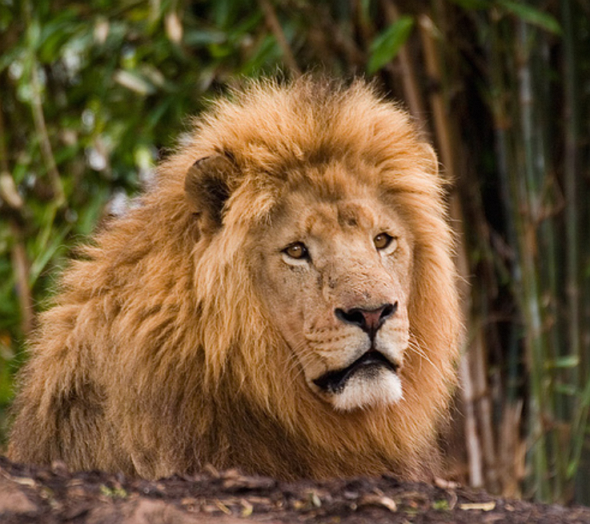
Com a busca por imagem e a busca de imagem para texto, você encontra conteúdo relacionado à imagem-alvo tanto nas modalidades de imagem quanto de texto, alcançando uma correspondência de similaridade multidimensional.
if __name__ == "__main__":
    # Configure Milvus and DashScope APIs
    MILVUS_TOKEN = "root:****"
    MILVUS_HOST = "c-0aa16b1****.milvus.aliyuncs.com"
    MILVUS_PORT = "19530"
    COLLECTION_NAME = "multimodal_search"
    INDEX = "IVF_FLAT"  # IVF_FLAT OR HNSW
    DASHSCOPE_API_KEY = "<YOUR_DASHSCOPE_API_KEY >"

    # Step 1: Initialize the Milvus client
    milvus_client = MilvusClient(MILVUS_TOKEN, MILVUS_HOST, MILVUS_PORT, INDEX, COLLECTION_NAME)

    # Step 2: Initialize the multimodal embedding model
    extractor = FeatureExtractor(DASHSCOPE_API_KEY)

    # Step 5: Multimodal search example for search by image and image-to-text search
    image_query_path = "./test/lion/n02129165_13728.JPEG"
    image_embedding = extractor(image_query_path, "image")
    image_results_1 = milvus_client.search(image_embedding, field = 'image_embedding')
    logger.info(f"Search by image results: {image_results_1}")
    image_results_2 = milvus_client.search(image_embedding, field = 'text_embedding')
    logger.info(f"Image-to-text search results: {image_results_2}")
As seguintes informações são retornadas.
Como a saída do LLM possui certo grau de aleatoriedade, os resultados deste exemplo podem não ser totalmente reproduzíveis.
INFO:__main__:Search by image results: [
{'id': 456882250782308987, 'distance': 0.23892249166965485, 'origin': './train/lion/n02129165_19953.JPEG', 'image_description': 'A majestic lion stands by a rock, with trees and bushes in the background. Sunlight shines on its body.\n\nKeywords: lion, rock, forest, sunlight, wildness'},
{'id': 456882250782308989, 'distance': 0.4113130569458008, 'origin': './train/lion/n02129165_1142.JPEG', 'image_description': 'A lion rests among dense green plants. The background consists of bamboo and trees.\n\nKeywords: lion, grass, green plants, tree trunk, natural environment'},
{'id': 456882250782308984, 'distance': 0.5206397175788879, 'origin': './train/lion/n02129165_16.JPEG', 'image_description': 'The image shows a pair of lions standing on the grass. The male lion has a thick mane, while the female lion appears leaner.\n\nKeywords: lion, grass, male, female, natural environment'}]
INFO:__main__:Image-to-text search results:
[{'id': 456882250782308989, 'distance': 1.0935896635055542, 'origin': './train/lion/n02129165_1142.JPEG', 'image_description': 'A lion rests among dense green plants. The background consists of bamboo and trees.\n\nKeywords: lion, grass, green plants, tree trunk, natural environment'},
{'id': 456882250782308987, 'distance': 1.2102885246276855, 'origin': './train/lion/n02129165_19953.JPEG', 'image_description': 'A majestic lion stands by a rock, with trees and bushes in the background. Sunlight shines on its body.\n\nKeywords: lion, rock, forest, sunlight, wildness'},
{'id': 456882250782308992, 'distance': 1.2725986242294312, 'origin': './train/lion/n02129165_19310.JPEG', 'image_description': 'This is a close-up photo of a lion. It has a thick mane and sharp eyes.\n\nKeywords: lion, eyes, mane, natural environment, wild animal'}]