Os modelos de compreensão visual respondem a perguntas com base nas imagens ou vídeos fornecidos por você. Eles aceitam entrada de uma ou várias imagens e são adequados para diversas tarefas, como geração de legendas para imagens, resposta a perguntas visuais e localização de objetos.
Experimente online: Acesse o console do Alibaba Cloud Model Studio. No canto superior direito da página, selecione a região de destino. Em seguida, acesse a página Vision Models para testar os modelos.
Primeiros passos
Pré-requisitos- Obter uma chave de API e configurá-la como variável de ambiente.
- Para fazer chamadas usando um SDK, instale o SDK. O DashScope Python SDK deve ser versão 2.0.1 ou posterior, e o DashScope Java SDK deve ser versão 2.21.10 ou posterior.
Os exemplos a seguir mostram como chamar um modelo para descrever o conteúdo de uma imagem. Para obter mais informações sobre arquivos locais e limites de imagem, consulte Passar arquivos locais e Limites de imagem.
OpenAI compatible
Python
import os
from openai import OpenAI

client = OpenAI(
    # If the environment variable is not configured, replace the following line with your Model Studio API key: api_key="sk-xxx",
    # API keys vary by region. To obtain an API key, see https://www.alibabacloud.com/help/zh/model-studio/get-api-key
    api_key=os.getenv("DASHSCOPE_API_KEY"),
    # The following URL is for the China (Beijing) region. When you make a call, replace {WorkspaceId} with your actual workspace ID. URLs vary by region.
    base_url="https://{WorkspaceId}.cn-beijing.maas.aliyuncs.com/compatible-mode/v1",
)

completion = client.chat.completions.create(
    model="qwen3.8-max", # This example uses qwen3.7-plus. You can replace it with another model as needed. For a list of models, see https://www.alibabacloud.com/help/zh/model-studio/models
    messages=[
        {
            "role": "user",
            "content": [
                {
                    "type": "image_url",
                    "image_url": {
                        "url": "https://help-static-aliyun-doc.aliyuncs.com/file-manage-files/zh-CN/20241022/emyrja/dog_and_girl.jpeg"
                    },
                },
                {"type": "text", "text": "What scene is depicted in the image?"},
            ],
        },
    ],
)
print(completion.choices[0].message.content)
from openai import OpenAI
import os

client = OpenAI(
    # API keys vary by region. To obtain an API key, see https://www.alibabacloud.com/help/en/model-studio/get-api-key
    api_key=os.getenv("DASHSCOPE_API_KEY"),
    # The following URL is for the Singapore region. When you make a call, replace {WorkspaceId} with your actual workspace ID. URLs vary by region.
    base_url="https://{WorkspaceId}.ap-southeast-1.maas.aliyuncs.com/compatible-mode/v1"
)

completion = client.chat.completions.create(
    model="qwen3.8-max",  # This example uses qwen3.7-plus. You can replace it with another model as needed. For a list of models, see https://www.alibabacloud.com/help/model-studio/getting-started/models
    messages=[
        {
            "role": "user",
            "content": [
                {
                    "type": "image_url",
                    "image_url": {
                        "url": "https://help-static-aliyun-doc.aliyuncs.com/file-manage-files/zh-CN/20241022/emyrja/dog_and_girl.jpeg"
                    },
                },
                {"type": "text", "text": "What scene is depicted in the image?"},
            ],
        },
    ],
)
print(completion.choices[0].message.content)
Resposta
This is a photo taken on a beach. In the photo, a person and a dog are sitting on the sand with the sea and sky in the background. The person and the dog seem to be interacting, with the dog's front paw on the person's hand. Sunlight shines from the right side of the frame, adding a warm atmosphere to the scene.
Node.js
import OpenAI from "openai";

const openai = new OpenAI({
    // If the environment variable is not configured, replace the following line with your Model Studio API key: apiKey: "sk-xxx"
   // API keys vary by region. To obtain an API key, see https://www.alibabacloud.com/help/zh/model-studio/get-api-key
  apiKey: process.env.DASHSCOPE_API_KEY,
  // The following URL is for the China (Beijing) region. When you make a call, replace {WorkspaceId} with your actual workspace ID. URLs vary by region.
  baseURL: "https://{WorkspaceId}.cn-beijing.maas.aliyuncs.com/compatible-mode/v1"
});

async function main() {
  const response = await openai.chat.completions.create({
    model: "qwen3.8-max",  // This example uses qwen3.7-plus. You can replace it with another model as needed. For a list of models, see https://www.alibabacloud.com/help/zh/model-studio/models
    messages: [
      {
        role: "user",
        content: [{
            type: "image_url",
            image_url: {
              "url": "https://help-static-aliyun-doc.aliyuncs.com/file-manage-files/zh-CN/20241022/emyrja/dog_and_girl.jpeg"
            }
          },
          {
            type: "text",
            text: "What scene is depicted in the image?"
          }
        ]
      }
    ]
  });
  console.log(response.choices[0].message.content);
}
main()
import OpenAI from "openai";

const openai = new OpenAI({
  // API keys vary by region. To obtain an API key, see https://www.alibabacloud.com/help/en/model-studio/get-api-key
  // If the environment variable is not configured, replace the following line with your Model Studio API key: apiKey: "sk-xxx"
  apiKey: process.env.DASHSCOPE_API_KEY,
  // The following URL is for the Singapore region. When you make a call, replace {WorkspaceId} with your actual workspace ID. URLs vary by region.
  baseURL: "https://{WorkspaceId}.ap-southeast-1.maas.aliyuncs.com/compatible-mode/v1"
});

async function main() {
  const response = await openai.chat.completions.create({
    model: "qwen3.8-max",   // This example uses qwen3.7-plus. You can replace it with another model as needed. For a list of models, see https://www.alibabacloud.com/help/model-studio/getting-started/models
    messages: [
      {
        role: "user",
        content: [{
            type: "image_url",
            image_url: {
              "url": "https://help-static-aliyun-doc.aliyuncs.com/file-manage-files/zh-CN/20241022/emyrja/dog_and_girl.jpeg"
            }
          },
          {
            type: "text",
            text: "What scene is depicted in the image?"
          }
        ]
      }
    ]
  });
  console.log(response.choices[0].message.content);
}
main()
Resposta
This is a photo taken on a beach. In the photo, a person and a dog are sitting on the sand with the sea and sky in the background. The person and the dog seem to be interacting, with the dog's front paw on the person's hand. Sunlight shines from the right side of the frame, adding a warm atmosphere to the scene.
Java
import com.openai.client.OpenAIClient;
import com.openai.client.okhttp.OpenAIOkHttpClient;
import com.openai.core.http.StreamResponse;
import com.openai.models.chat.completions.*;

import java.util.List;

public class Main {
    public static void main(String[] args) {
        // Create a client using the API key from the environment variable
        OpenAIClient client = OpenAIOkHttpClient.builder()
                // If you have not set an environment variable, replace the following line with your Bailian API key: .apiKey("sk-xxx")
                // API keys vary by region. To obtain an API key, see https://www.alibabacloud.com/help/zh/model-studio/get-api-key
                .apiKey(System.getenv("DASHSCOPE_API_KEY"))
                // The following URL is for the China (Beijing) region. When you make a call, replace {WorkspaceId} with your actual workspace ID. URLs vary by region.
                .baseUrl("https://{WorkspaceId}.cn-beijing.maas.aliyuncs.com/compatible-mode/v1")
                .build();

        // Build the multimodal message content: image + text
        ChatCompletionContentPart imagePart = ChatCompletionContentPart.ofImageUrl(
                ChatCompletionContentPartImage.builder()
                        .imageUrl(ChatCompletionContentPartImage.ImageUrl.builder()
                                .url("https://help-static-aliyun-doc.aliyuncs.com/file-manage-files/zh-CN/20241022/emyrja/dog_and_girl.jpeg")
                                .build())
                        .build());
        ChatCompletionContentPart textPart = ChatCompletionContentPart.ofText(
                ChatCompletionContentPartText.builder()
                        .text("What scene is depicted in the image?")
                        .build());

        // Create a chat request
        ChatCompletionCreateParams chatParams = ChatCompletionCreateParams.builder()
                // This example uses qwen3.8-max. You can replace it with another model as needed. For a list of models, see https://www.alibabacloud.com/help/zh/model-studio/models
                .model("qwen3.8-max")
                .addUserMessageOfArrayOfContentParts(List.of(imagePart, textPart))
                .build();

        StringBuilder fullResponse = new StringBuilder();

        // All code examples use streaming output to clearly show the model output process. For a non-streaming example, see https://www.alibabacloud.com/help/zh/model-studio/text-generation
        try (StreamResponse<ChatCompletionChunk> streamResponse = client.chat().completions().createStreaming(chatParams)) {
            streamResponse.stream().forEach(chunk -> {
                System.out.println(chunk);
                String content = chunk.choices().get(0).delta().content().orElse("");
                if (!content.isEmpty()) {
                    fullResponse.append(content);
                }
            });
            System.out.println(fullResponse);
        } catch (Exception e) {
            System.err.println("Error message: " + e.getMessage());
            System.err.println("See: https://www.alibabacloud.com/help/zh/model-studio/developer-reference/error-code");
        }
    }
}
import com.openai.client.OpenAIClient;
import com.openai.client.okhttp.OpenAIOkHttpClient;
import com.openai.core.http.StreamResponse;
import com.openai.models.chat.completions.*;

import java.util.List;

public class Main {
    public static void main(String[] args) {
        // Create a client using the API key from the environment variable
        OpenAIClient client = OpenAIOkHttpClient.builder()
                // API keys vary by region. To obtain an API key, see https://www.alibabacloud.com/help/en/model-studio/get-api-key
                // If you have not set an environment variable, replace the following line with your Bailian API key: .apiKey("sk-xxx")
                .apiKey(System.getenv("DASHSCOPE_API_KEY"))
                // The following URL is for the Singapore region. When you make a call, replace {WorkspaceId} with your actual workspace ID. URLs vary by region.
                .baseUrl("https://{WorkspaceId}.ap-southeast-1.maas.aliyuncs.com/compatible-mode/v1")
                .build();

        // Build the multimodal message content: image + text
        ChatCompletionContentPart imagePart = ChatCompletionContentPart.ofImageUrl(
                ChatCompletionContentPartImage.builder()
                        .imageUrl(ChatCompletionContentPartImage.ImageUrl.builder()
                                .url("https://help-static-aliyun-doc.aliyuncs.com/file-manage-files/zh-CN/20241022/emyrja/dog_and_girl.jpeg")
                                .build())
                        .build());
        ChatCompletionContentPart textPart = ChatCompletionContentPart.ofText(
                ChatCompletionContentPartText.builder()
                        .text("What scene is depicted in the image?")
                        .build());

        // Create a chat request
        ChatCompletionCreateParams chatParams = ChatCompletionCreateParams.builder()
                // This example uses qwen3.8-max. You can replace it with another model as needed. For a list of models, see https://www.alibabacloud.com/help/model-studio/getting-started/models
                .model("qwen3.8-max")
                .addUserMessageOfArrayOfContentParts(List.of(imagePart, textPart))
                .build();

        StringBuilder fullResponse = new StringBuilder();

        // All code examples use streaming output to clearly show the model output process. For a non-streaming example, see https://www.alibabacloud.com/help/zh/model-studio/text-generation
        try (StreamResponse<ChatCompletionChunk> streamResponse = client.chat().completions().createStreaming(chatParams)) {
            streamResponse.stream().forEach(chunk -> {
                System.out.println(chunk);
                String content = chunk.choices().get(0).delta().content().orElse("");
                if (!content.isEmpty()) {
                    fullResponse.append(content);
                }
            });
            System.out.println(fullResponse);
        } catch (Exception e) {
            System.err.println("Error message: " + e.getMessage());
            System.err.println("See: https://www.alibabacloud.com/help/zh/model-studio/developer-reference/error-code");
        }
    }
}
Resposta
This is a photo taken on a beach. In the photo, a person and a dog are sitting on the sand with the sea and sky in the background. The person and the dog seem to be interacting, with the dog's front paw on the person's hand. Sunlight shines from the right side of the frame, adding a warm atmosphere to the scene.
curl
# ======= Important notes =======
# API keys vary by region. To obtain an API key, see https://www.alibabacloud.com/help/zh/model-studio/get-api-key
# The following URL is for the China (Beijing) region. When you make a call, replace {WorkspaceId} with your actual workspace ID. URLs vary by region.
# === Delete this comment before execution ===

curl --location 'https://{WorkspaceId}.cn-beijing.maas.aliyuncs.com/compatible-mode/v1/chat/completions' \
--header "Authorization: Bearer $DASHSCOPE_API_KEY" \
--header 'Content-Type: application/json' \
--data '{
  "model": "qwen3.8-max",
  "messages": [
  {
    "role": "user",
    "content": [
      {"type": "image_url", "image_url": {"url": "https://help-static-aliyun-doc.aliyuncs.com/file-manage-files/zh-CN/20241022/emyrja/dog_and_girl.jpeg"}},
      {"type": "text", "text": "What scene is depicted in the image?"}
    ]
  }]
}'
# ======= Important notes =======
# The following URL is for the Singapore region. When you make a call, replace {WorkspaceId} with your actual workspace ID. URLs vary by region.
# API keys vary by region. To obtain an API key, see https://www.alibabacloud.com/help/en/model-studio/get-api-key
# === Delete this comment before execution ===

curl --location 'https://{WorkspaceId}.ap-southeast-1.maas.aliyuncs.com/compatible-mode/v1/chat/completions' \
--header "Authorization: Bearer $DASHSCOPE_API_KEY" \
--header 'Content-Type: application/json' \
--data '{
  "model": "qwen3.8-max",
  "messages": [
    {"role": "user",
     "content": [
        {"type": "image_url", "image_url": {"url": "https://help-static-aliyun-doc.aliyuncs.com/file-manage-files/zh-CN/20241022/emyrja/dog_and_girl.jpeg"}},
        {"type": "text", "text": "What scene is depicted in the image?"}
    ]
  }]
}'
Resposta
{
  "choices": [
    {
      "message": {
        "content": "This is a photo taken on a beach. In the photo, a person and a dog are sitting on the sand with the sea and sky in the background. The person and the dog seem to be interacting, with the dog's front paw on the person's hand. Sunlight shines from the right side of the frame, adding a warm atmosphere to the scene.",
        "role": "assistant"
      },
      "finish_reason": "stop",
      "index": 0,
      "logprobs": null
    }
  ],
  "object": "chat.completion",
  "usage": {
    "prompt_tokens": 1270,
    "completion_tokens": 54,
    "total_tokens": 1324
  },
  "created": 1725948561,
  "system_fingerprint": null,
  "model": "qwen3.8-max",
  "id": "chatcmpl-0fd66f46-b09e-9164-a84f-3ebbbedbac15"
}
DashScope
Python
import os
import dashscope

# A configuração abaixo refere-se à região Pequim. Substitua {WorkspaceId} pelo ID real do seu workspace. O valor de region varia conforme a região.
client = dashscope.Client(
    # Se a variável de ambiente não estiver configurada, substitua a linha abaixo pela sua API Key do Model Studio: api_key="sk-xxx"
    # As API Keys variam conforme a região. Para obter uma API Key, consulte https://www.alibabacloud.com/help/zh/model-studio/get-api-key
    api_key=os.getenv('DASHSCOPE_API_KEY'),
    workspace="{WorkspaceId}",
    region="cn-beijing",
)

messages = [
{
    "role": "user",
    "content": [
    {"image": "https://help-static-aliyun-doc.aliyuncs.com/file-manage-files/zh-CN/20241022/emyrja/dog_and_girl.jpeg"},
    {"text": "What scene is depicted in the image?"}]
}]
response = client.multimodal.chat.create(
    model='qwen3.7-plus',  # Este exemplo usa qwen3.7-plus. Você pode substituí-lo por outro modelo conforme necessário. Para obter a lista de modelos, consulte https://www.alibabacloud.com/help/zh/model-studio/models
    messages=messages
)
print(response.output_text)
import os
import dashscope

# A configuração abaixo refere-se à região Singapura. Substitua {WorkspaceId} pelo ID real do seu workspace. O valor de region varia conforme a região.
client = dashscope.Client(
    # Se a variável de ambiente não estiver configurada, substitua a linha abaixo pela sua API Key do Model Studio: api_key="sk-xxx"
    # As API Keys variam conforme a região. Para obter uma API Key, consulte https://www.alibabacloud.com/help/en/model-studio/get-api-key
    api_key=os.getenv('DASHSCOPE_API_KEY'),
    workspace="{WorkspaceId}",
    region="ap-southeast-1",
)

messages = [
{
    "role": "user",
    "content": [
    {"image": "https://help-static-aliyun-doc.aliyuncs.com/file-manage-files/zh-CN/20241022/emyrja/dog_and_girl.jpeg"},
    {"text": "What scene is depicted in the image?"}]
}]

response = client.multimodal.chat.create(
    model='qwen3.7-plus',   # Este exemplo usa qwen3.7-plus. Você pode substituí-lo por outro modelo conforme necessário. Para obter a lista de modelos, consulte https://www.alibabacloud.com/help/model-studio/getting-started/models
    messages=messages
)

print(response.output_text)
Resposta
This is a photo taken on a beach. The photo shows a woman and a dog. The woman is sitting on the sand, smiling and interacting with the dog. The dog is wearing a collar and seems to be shaking hands with the woman. The background is the sea and the sky, and the sunlight shining on them creates a warm atmosphere.
Java
import java.util.Arrays;
import java.util.Collections;
import com.alibaba.dashscope.aigc.multimodalconversation.MultiModalConversation;
import com.alibaba.dashscope.aigc.multimodalconversation.MultiModalConversationParam;
import com.alibaba.dashscope.aigc.multimodalconversation.MultiModalConversationResult;
import com.alibaba.dashscope.common.MultiModalMessage;
import com.alibaba.dashscope.common.Role;
import com.alibaba.dashscope.exception.ApiException;
import com.alibaba.dashscope.exception.NoApiKeyException;
import com.alibaba.dashscope.exception.UploadFileException;
import com.alibaba.dashscope.utils.JsonUtils;
import com.alibaba.dashscope.utils.Constants;

public class Main {

    // The following URL is for the China (Beijing) region. When you make a call, replace {WorkspaceId} with your actual workspace ID. URLs vary by region.
    static {Constants.baseHttpApiUrl="https://{WorkspaceId}.cn-beijing.maas.aliyuncs.com/api/v1";}

    public static void simpleMultiModalConversationCall()
            throws ApiException, NoApiKeyException, UploadFileException {
        MultiModalConversation conv = new MultiModalConversation();
        MultiModalMessage userMessage = MultiModalMessage.builder().role(Role.USER.getValue())
                .content(Arrays.asList(
                        Collections.singletonMap("image", "https://help-static-aliyun-doc.aliyuncs.com/file-manage-files/zh-CN/20241022/emyrja/dog_and_girl.jpeg"),
                        Collections.singletonMap("text", "What scene is depicted in the image?"))).build();
        MultiModalConversationParam param = MultiModalConversationParam.builder()
                 // If the environment variable is not configured, replace the following line with your Model Studio API key: .apiKey("sk-xxx")
                 // API keys vary by region. To obtain an API key, see https://www.alibabacloud.com/help/zh/model-studio/get-api-key
                .apiKey(System.getenv("DASHSCOPE_API_KEY"))
                .model("qwen3.8-max")  // This example uses qwen3.7-plus. You can replace it with another model as needed. For a list of models, see https://www.alibabacloud.com/help/zh/model-studio/models
                .messages(Arrays.asList(userMessage))
                .build();
        MultiModalConversationResult result = conv.call(param);
        System.out.println(result.getOutput().getChoices().get(0).getMessage().getContent().get(0).get("text"));
    }
    public static void main(String[] args) {
        try {
            simpleMultiModalConversationCall();
        } catch (ApiException | NoApiKeyException | UploadFileException e) {
            System.out.println(e.getMessage());
        }
        System.exit(0);
    }
}
import java.util.Arrays;
import java.util.Collections;

import com.alibaba.dashscope.aigc.multimodalconversation.MultiModalConversation;
import com.alibaba.dashscope.aigc.multimodalconversation.MultiModalConversationParam;
import com.alibaba.dashscope.aigc.multimodalconversation.MultiModalConversationResult;
import com.alibaba.dashscope.common.MultiModalMessage;
import com.alibaba.dashscope.common.Role;
import com.alibaba.dashscope.exception.ApiException;
import com.alibaba.dashscope.exception.NoApiKeyException;
import com.alibaba.dashscope.exception.UploadFileException;
import com.alibaba.dashscope.utils.Constants;

public class Main {

    // The following URL is for the Singapore region. When you make a call, replace {WorkspaceId} with your actual workspace ID. URLs vary by region.
    static {
        Constants.baseHttpApiUrl="https://{WorkspaceId}.ap-southeast-1.maas.aliyuncs.com/api/v1";
    }

    public static void simpleMultiModalConversationCall()
            throws ApiException, NoApiKeyException, UploadFileException {
        MultiModalConversation conv = new MultiModalConversation();
        MultiModalMessage userMessage = MultiModalMessage.builder().role(Role.USER.getValue())
                .content(Arrays.asList(
                        Collections.singletonMap("image", "https://help-static-aliyun-doc.aliyuncs.com/file-manage-files/zh-CN/20241022/emyrja/dog_and_girl.jpeg"),
                        Collections.singletonMap("text", "What scene is depicted in the image?"))).build();
        MultiModalConversationParam param = MultiModalConversationParam.builder()
                // API keys vary by region. To obtain an API key, see https://www.alibabacloud.com/help/en/model-studio/get-api-key
                // If the environment variable is not configured, replace the following line with your Model Studio API key: .apiKey("sk-xxx")
                .apiKey(System.getenv("DASHSCOPE_API_KEY"))
                .model("qwen3.8-max")  //  This example uses qwen3.7-plus. You can replace it with another model as needed. For a list of models, see https://www.alibabacloud.com/help/model-studio/getting-started/models
                .messages(Arrays.asList(userMessage))
                .build();
        MultiModalConversationResult result = conv.call(param);
        System.out.println(result.getOutput().getChoices().get(0).getMessage().getContent().get(0).get("text"));
    }
    public static void main(String[] args) {
        try {
            simpleMultiModalConversationCall();
        } catch (ApiException | NoApiKeyException | UploadFileException e) {
            System.out.println(e.getMessage());
        }
        System.exit(0);
    }
}
Resposta
This is a photo taken on a beach. The photo shows a person in a plaid shirt and a dog wearing a collar. The person and the dog are sitting face to face, seemingly interacting. The background is the sea and the sky, and the sunlight shining on them creates a warm atmosphere.
curl
# ======= Important notes =======
# API keys vary by region. To obtain an API key, see https://www.alibabacloud.com/help/zh/model-studio/get-api-key
# The following URL is for the China (Beijing) region. When you make a call, replace {WorkspaceId} with your actual workspace ID. URLs vary by region.
# === Delete this comment before execution ===

curl -X POST https://{WorkspaceId}.cn-beijing.maas.aliyuncs.com/api/v1/services/aigc/multimodal-generation/generation \
-H "Authorization: Bearer $DASHSCOPE_API_KEY" \
-H 'Content-Type: application/json' \
-d '{
    "model": "qwen3.8-max",
    "input":{
        "messages":[
            {
                "role": "user",
                "content": [
                    {"image": "https://help-static-aliyun-doc.aliyuncs.com/file-manage-files/zh-CN/20241022/emyrja/dog_and_girl.jpeg"},
                    {"text": "What scene is depicted in the image?"}
                ]
            }
        ]
    }
}'
# ======= Important notes =======
# The following URL is for the Singapore region. When you make a call, replace {WorkspaceId} with your actual workspace ID. URLs vary by region.
# API keys vary by region. To obtain an API key, see https://www.alibabacloud.com/help/en/model-studio/get-api-key
# === Delete this comment before execution ===

curl -X POST https://{WorkspaceId}.ap-southeast-1.maas.aliyuncs.com/api/v1/services/aigc/multimodal-generation/generation \
-H "Authorization: Bearer $DASHSCOPE_API_KEY" \
-H 'Content-Type: application/json' \
-d '{
    "model": "qwen3.8-max",
    "input":{
        "messages":[
            {
                "role": "user",
                "content": [
                    {"image": "https://help-static-aliyun-doc.aliyuncs.com/file-manage-files/zh-CN/20241022/emyrja/dog_and_girl.jpeg"},
                    {"text": "What scene is depicted in the image?"}
                ]
            }
        ]
    }
}'
Resposta
{
  "output": {
    "choices": [
      {
        "finish_reason": "stop",
        "message": {
          "role": "assistant",
          "content": [
            {
              "text": "This is a photo taken on a beach. The photo shows a person in a plaid shirt and a dog wearing a collar. They are sitting on the sand with the sea and sky in the background. Sunlight shines from the right side of the frame, adding a warm atmosphere to the scene."
            }
          ]
        }
      }
    ]
  },
  "usage": {
    "output_tokens": 55,
    "input_tokens": 1271,
    "image_tokens": 1247
  },
  "request_id": "ccf845a3-dc33-9cda-b581-20fe7dc23f70"
}
Desempenho do modelo
Perguntas e respostas sobre imagens
Descreva o conteúdo de uma imagem ou classifique e rotule seus elementos, identificando pessoas, lugares, animais e plantas.
Qual item desta imagem devo usar se o sol estiver muito forte? | Se o sol estiver muito forte, você deve usar os óculos de sol rosa da imagem. Óculos de sol bloqueiam eficazmente a luz intensa, reduzem os danos causados pelos raios UV aos olhos e ajudam a proteger sua visão, melhorando o conforto visual sob luz solar brilhante. |
|---|

Escrita criativa
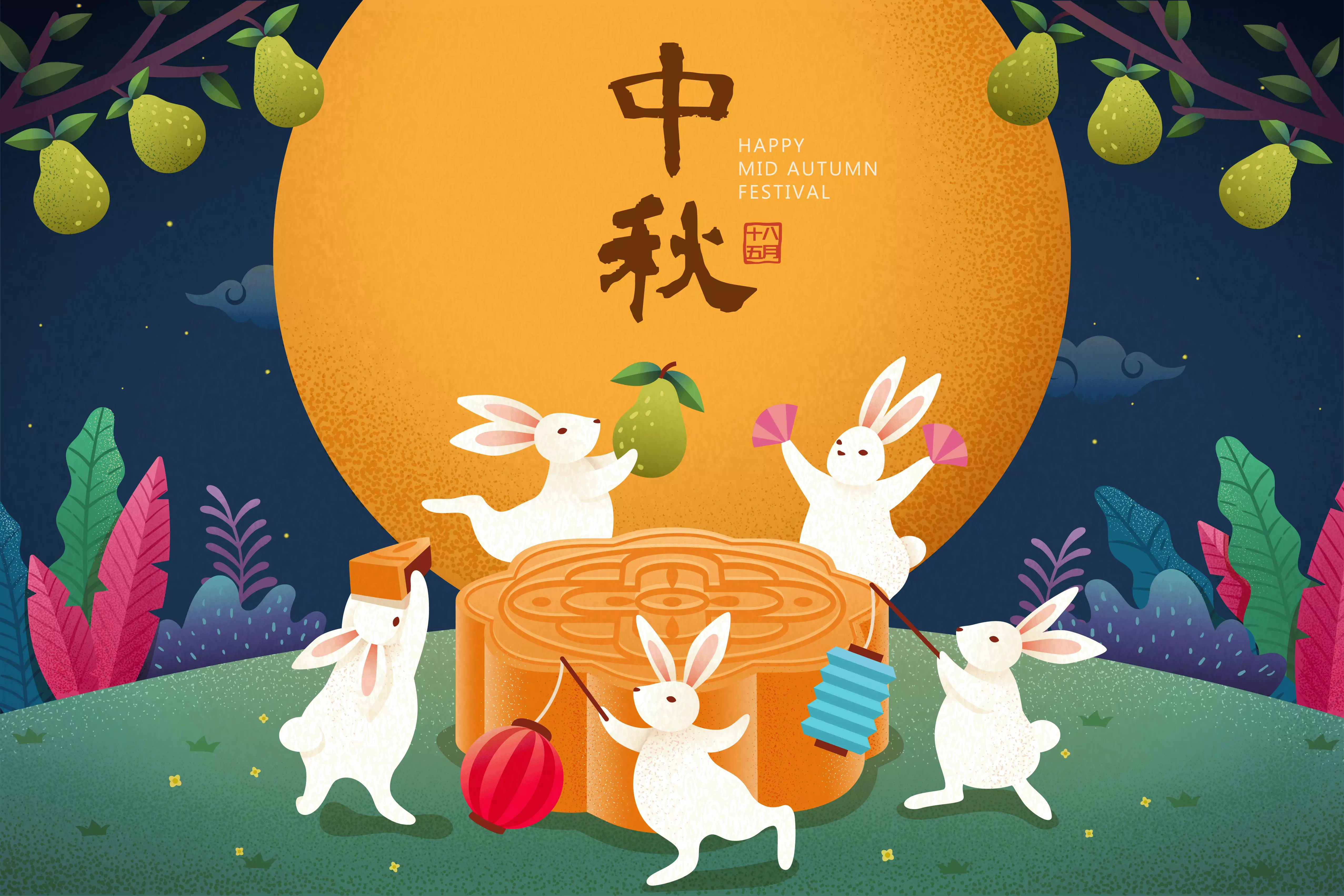
Gere descrições de texto vívidas com base no conteúdo de imagens ou vídeos. Ideal para cenários criativos como redação de histórias, copywriting e roteiros de vídeos curtos.
Por favor, escreva uma postagem interessante para redes sociais com base no conteúdo da imagem. | Claro. Esta imagem é repleta de uma rica atmosfera do Festival de Meio Outono, combinando habilmente elementos clássicos e modernos. Com base nos principais elementos da imagem, preparei várias postagens para redes sociais em diferentes estilos para você escolher. Estilo poético e belo Hoje à noite, a lua brilha para todos verem, mas quem sabe onde cairão os pensamentos de outono? Chang'e voa para a lua e o Coelho de Jade prepara remédios. O romantismo dos antigos se ilumina nesta noite. Que esta lua brilhante ilumine seu caminho de volta para casa e carregue meus pensamentos mais profundos. Feliz Festival de Meio Outono! Estilo de votos calorosos A lua está cheia e as famílias se reencontram. A noite do Meio Outono é a mais gentil. Veja os fogos de artifício florescerem, admire a lua cheia no céu, dê uma mordida em um bolo lunar e deseje boa saúde. Que tudo o que desejamos se torne realidade. Feliz Festival de Meio Outono a todos, e que suas famílias sejam felizes! |
Reconhecimento de texto e extração de informações
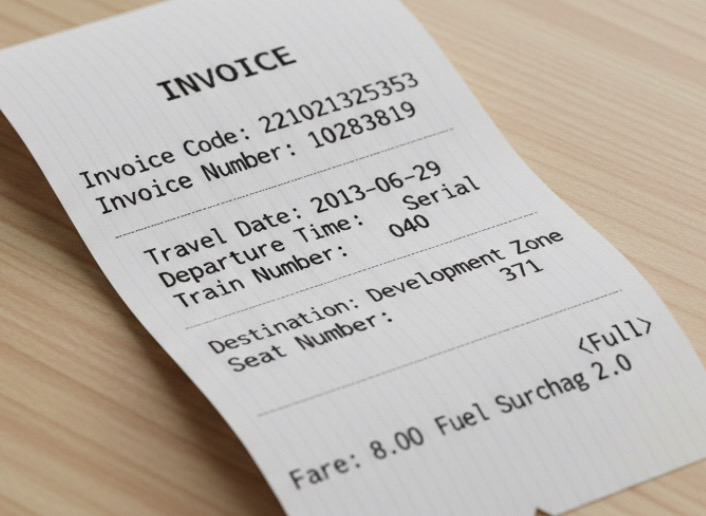
Reconheça textos e fórmulas em imagens ou extraia informações de recibos, certificados e formulários. Oferece suporte à saída de texto formatado.
Extraia o seguinte da imagem: ['Invoice Code', 'Invoice Number', 'Destination', 'Fuel Surcharge', 'Fare', 'Date', 'Departure Time', 'Train Number', 'Seat Number']. Por favor, forneça a saída no formato JSON. | { "Invoice Code": "221021325353", "Invoice Number": "10283819", "Destination": "Development Zone", "Fuel Surcharge": "2.0", "Fare": "8.00<Full>", "Date": "2013-06-29", "Departure Time": "Rolling", "Train Number": "040", "Seat Number": "371" } |
Resolução de problemas multidisciplinares
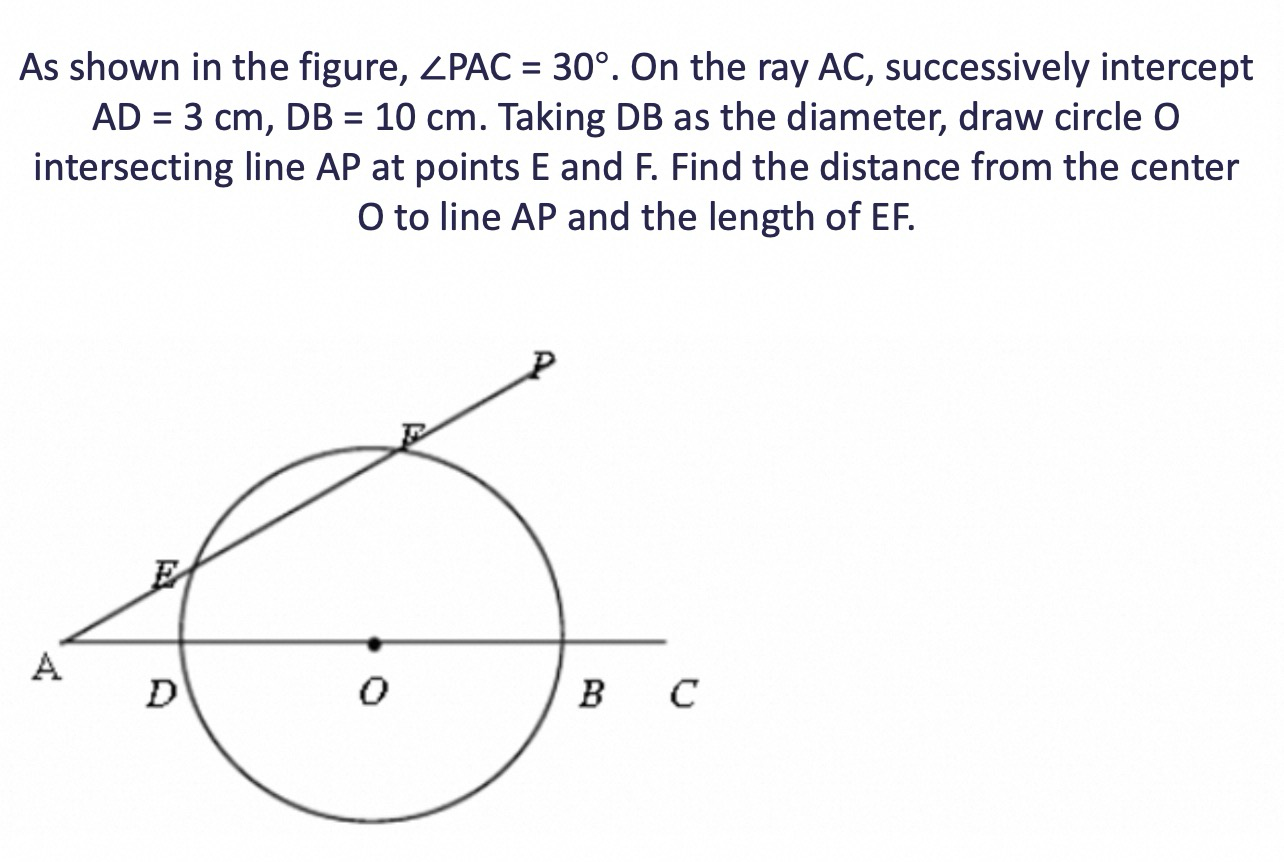
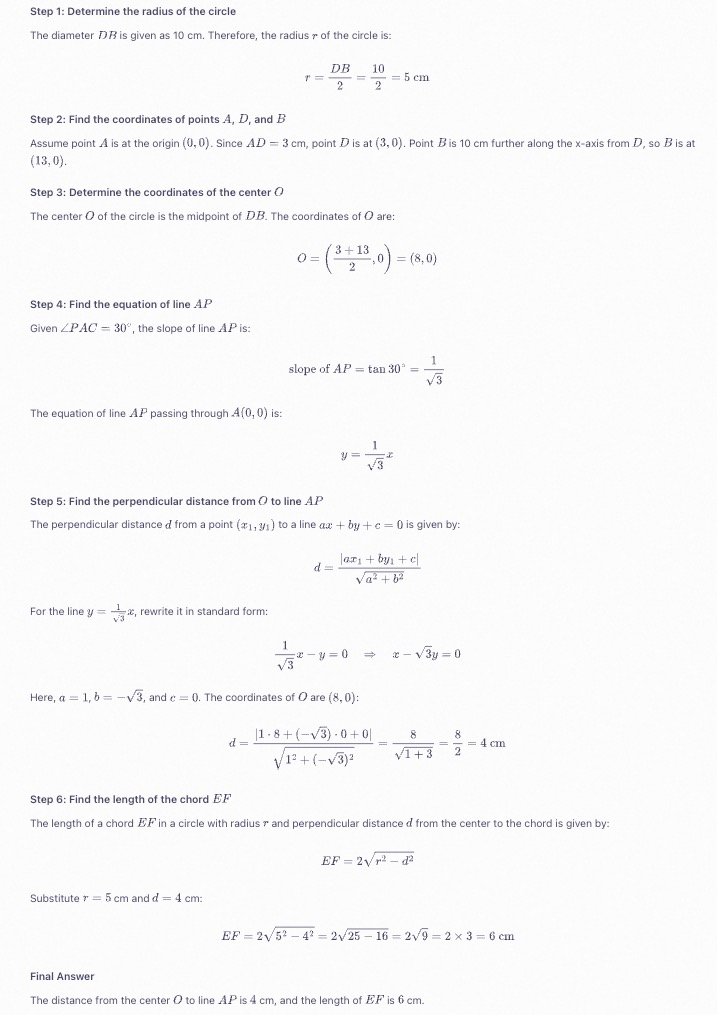
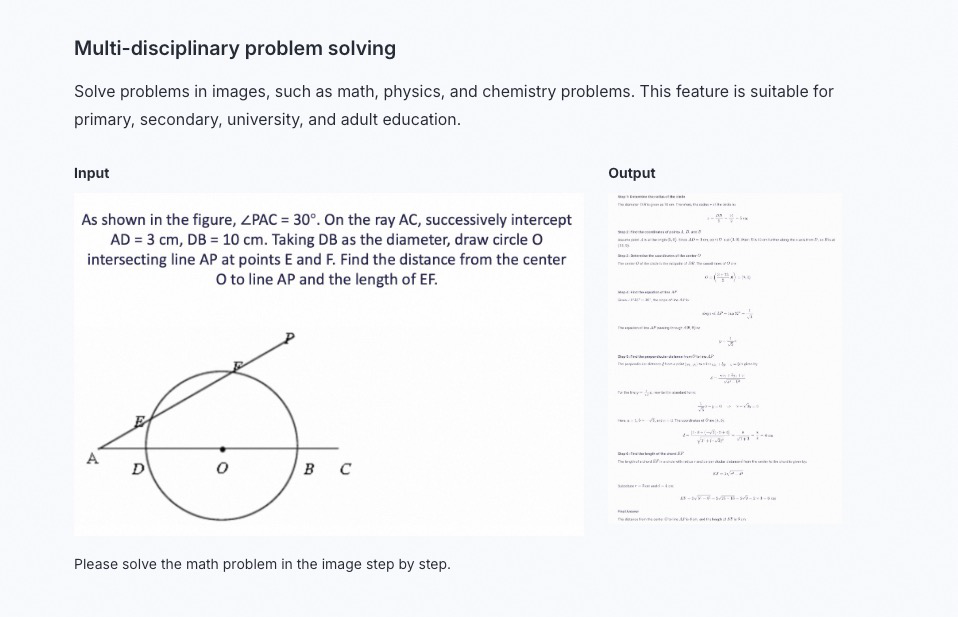
Resolva problemas de matemática, física, química e outras disciplinas presentes em imagens. Adequado para ensino fundamental, médio, universitário e educação de adultos.
Resolva o problema de matemática na imagem passo a passo. |
|
|---|
Programação visual
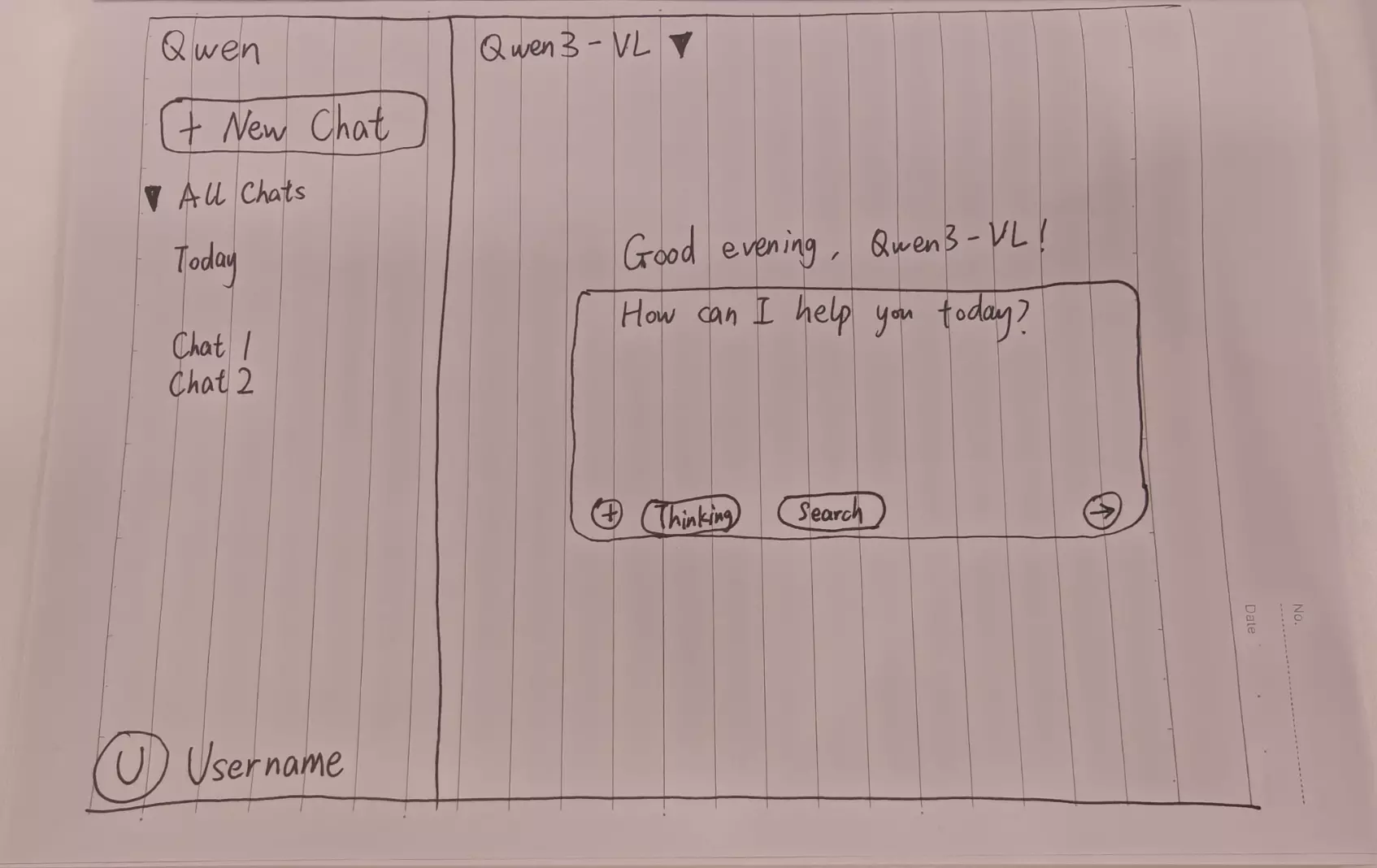
Gere código a partir de imagens ou vídeos. Use este recurso para criar códigos HTML, CSS e JS a partir de rascunhos de design, capturas de tela de sites, entre outros.
Crie uma página web usando HTML e CSS com base no meu esboço. A cor principal deve ser preta. |
Visualização da página web |
|---|

Localização de objetos
Oferece suporte à localização 2D e 3D. Utilize este recurso para determinar a orientação de objetos, mudanças de perspectiva e relações de oclusão. A localização 3D é uma nova capacidade adicionada ao modelo Qwen3-VL.
O desempenho de localização de objetos do modelo Qwen2.5-VL é robusto dentro da faixa de resolução de 480 × 480 a 2560 × 2560. Fora dessa faixa, a precisão da detecção pode diminuir, com desvios ocasionais nos quadros de detecção.
Para obter informações sobre como desenhar os resultados de localização na imagem original, consulte FAQ .
Localização 2D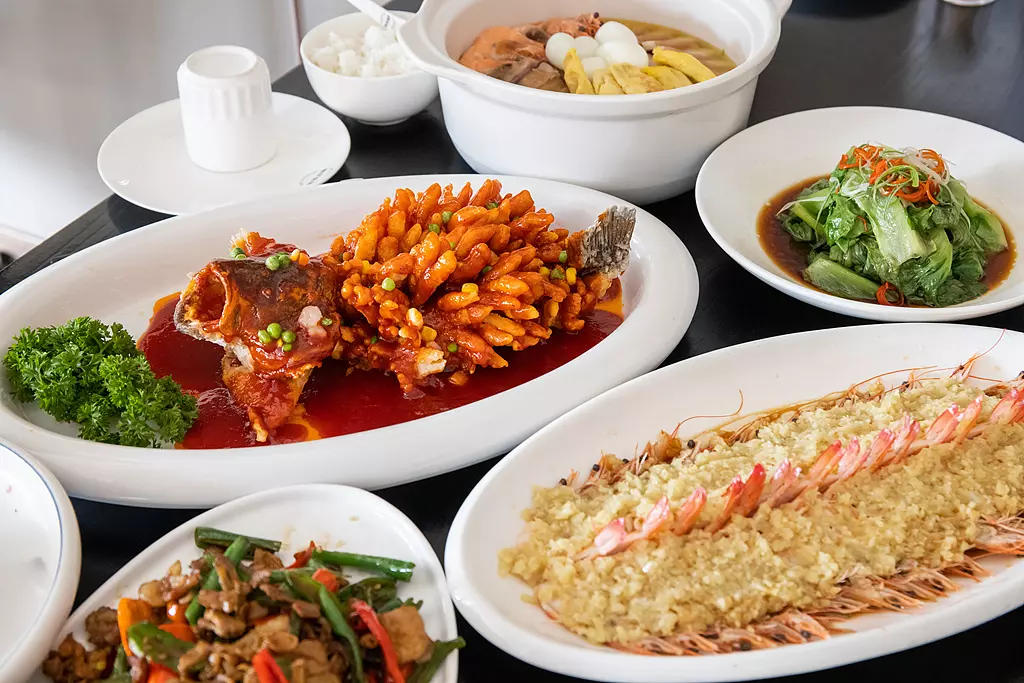
| Visualização dos resultados de localização 2D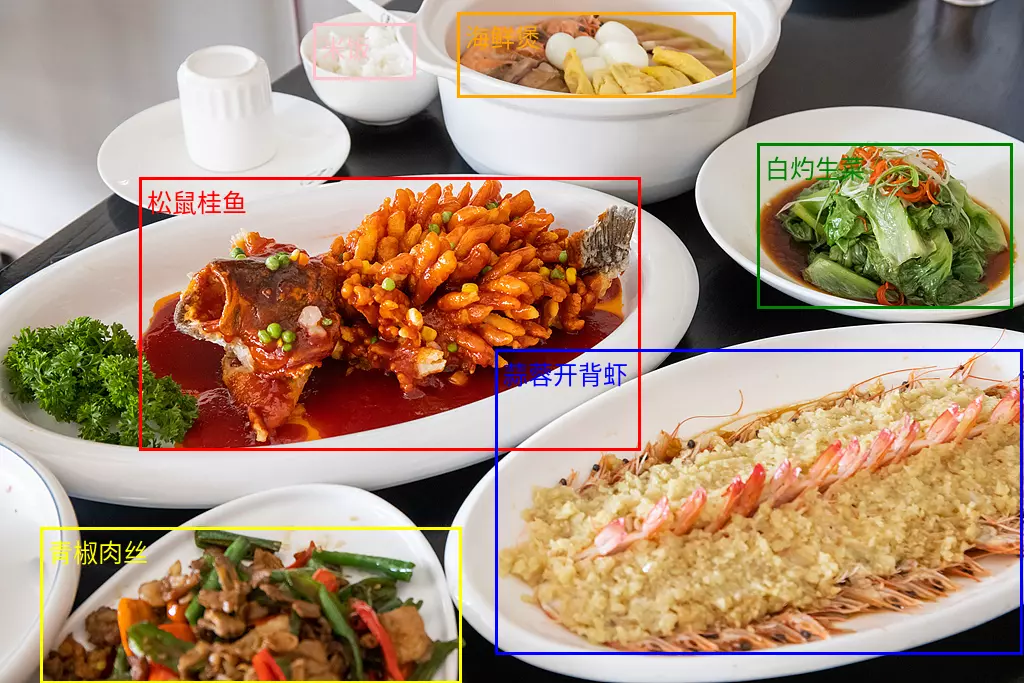 |
Localização 3D 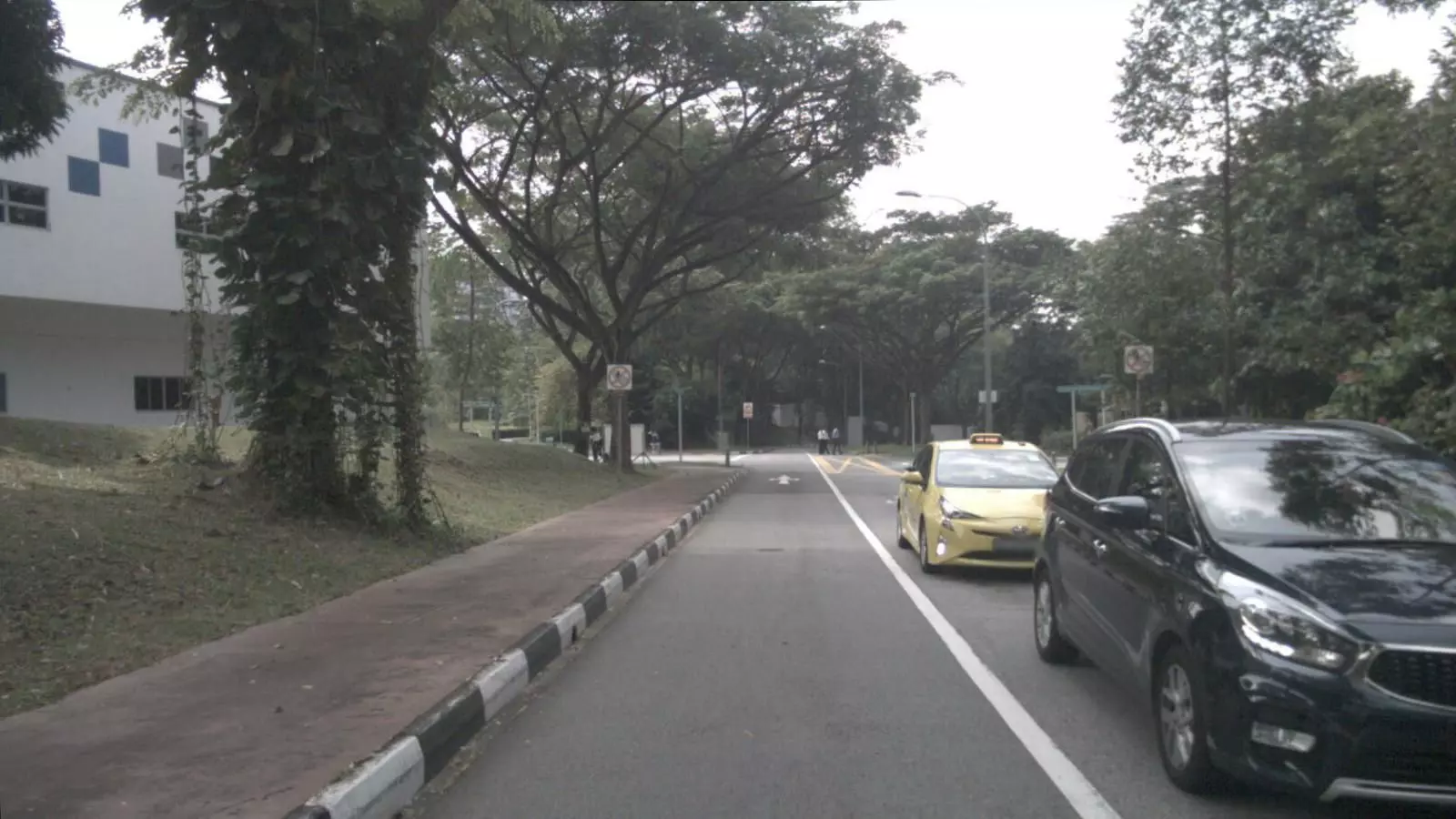 Detecte o carro na imagem e preveja sua posição 3D. Saída JSON: | Visualização dos resultados de localização 3D 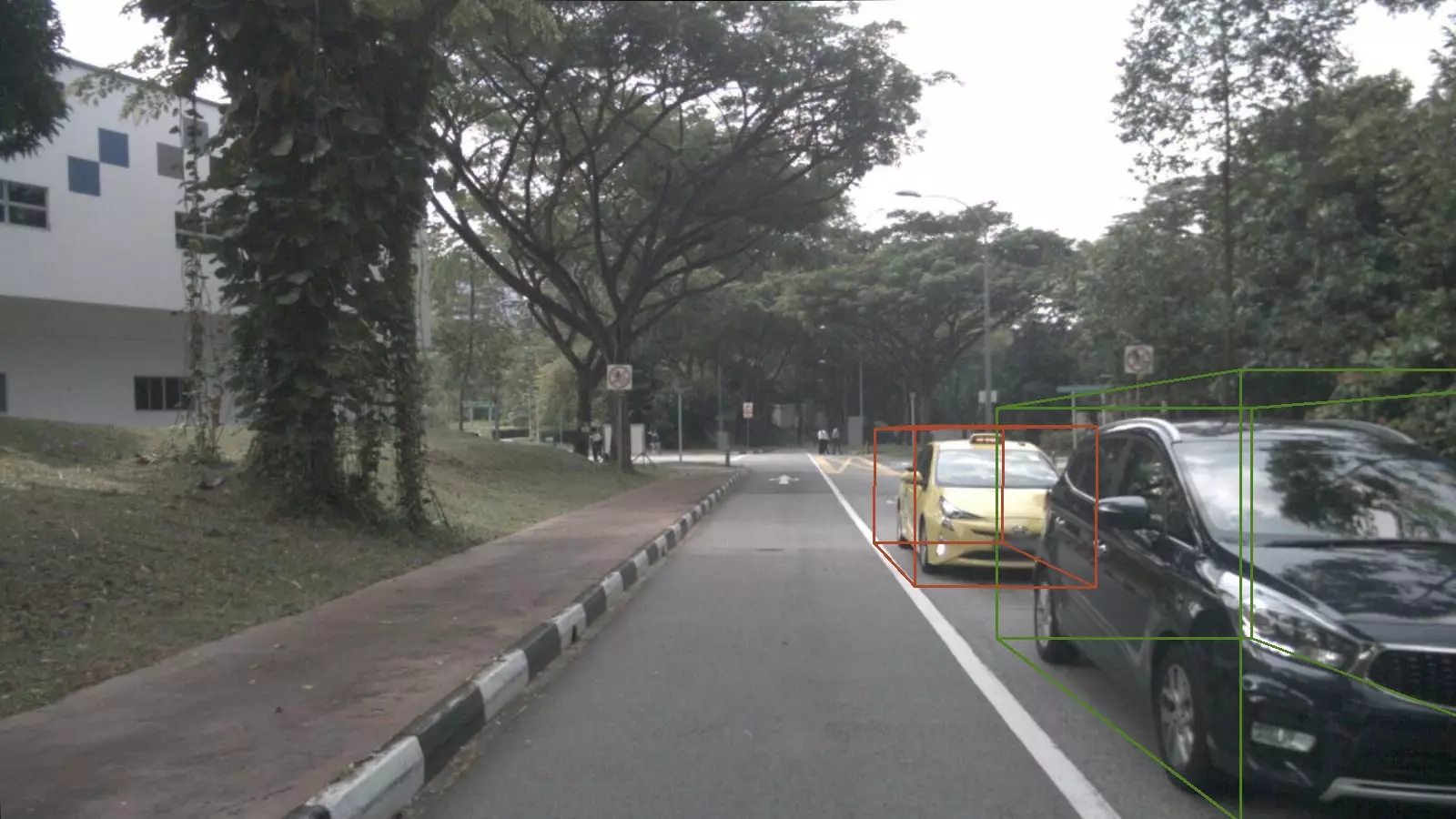 |
Análise de documentos
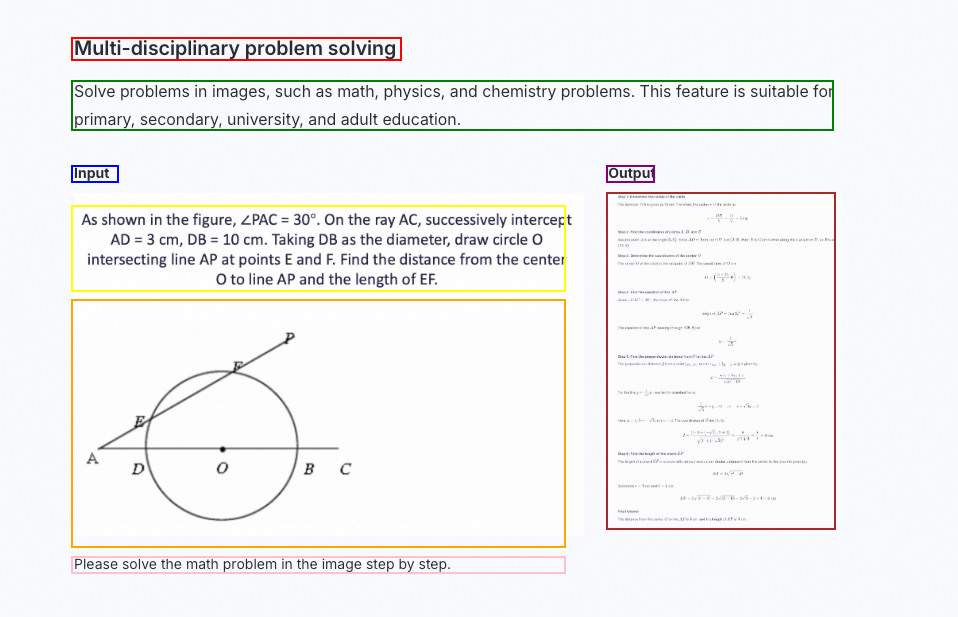
Analise documentos baseados em imagens (como cópias digitalizadas ou PDFs de imagem) para os formatos QwenVL HTML ou QwenVL Markdown. Esse formato não apenas reconhece o texto com precisão, mas também obtém informações de posição de elementos como imagens e tabelas. O modelo Qwen3-VL adiciona a capacidade de análise para o formato Markdown.
Os prompts recomendados são os seguintes:
qwenvl html(para analisar no formato HTML) ouqwenvl markdown(para analisar no formato Markdown).
qwenvl markdown. |
Visualização dos resultados |
|---|
Compreensão de vídeo
Analise o conteúdo de vídeo, localizando eventos específicos e obtendo carimbos de data/hora, ou gerando resumos de períodos-chave.
Descreva a série de ações da pessoa no vídeo. Forneça a hora de início (start_time), hora de término (end_time) e evento (event) no formato JSON. Use HH:mm:ss para o carimbo de data/hora. | { "events": [ { "start_time": "00:00:00", "end_time": "00:00:05", "event": "The person walks towards the table holding a cardboard box and places it on the table." }, { "start_time": "00:00:05", "end_time": "00:00:15", "event": "The person picks up a scanner and scans the label on the cardboard box." }, { "start_time": "00:00:15", "end_time": "00:00:21", "event": "The person puts the scanner back in its place and then picks up a pen to record information in a notebook."}] } |
Recursos principais
Ativar ou desativar o modo de pensamento
-
Os modelos das séries
qwen3.8,qwen3.7,qwen3.6,qwen3.5eqwen3-vl-plussão modelos de pensamento híbrido. Eles podem pensar antes de responder ou gerar a resposta diretamente. Use o parâmetroenable_thinkingpara controlar a ativação do modo de pensamento:true: Ativa o modo de pensamento. O valor padrão para os modelos das sériesqwen3.8,qwen3.7,qwen3.6eqwen3.5étrue.false: Desativa o modo de pensamento. O valor padrão para os modelos da sérieqwen3-vl-pluséfalse.
-
Modelos com o sufixo
thinkingoperam exclusivamente com pensamento. Eles sempre raciocinam antes de responder e não é possível desativar esse comportamento.
Importante
- Configuração do modelo: Em cenários de conversa geral que não envolvem chamadas de ferramentas de Agent, evite definir uma
System Messagepara manter o desempenho ideal. Transmita instruções, como definições de função do modelo e requisitos de formato de saída, por meio daUser Message. - Priorize a saída em streaming: Com o modo de pensamento ativado, tanto a saída em streaming quanto sem streaming são suportadas. Para evitar timeouts causados por respostas excessivamente longas, dê preferência à saída em streaming.
- Limite a extensão do pensamento: Modelos de pensamento profundo às vezes geram processos de raciocínio extensos. Utilize o parâmetro
thinking_budgetpara restringir o tamanho desse processo. Se a quantidade de tokens gerados durante o raciocínio ultrapassar othinking_budget, o conteúdo de inferência será truncado e o modelo iniciará imediatamente a geração da resposta final. O valor padrão dethinking_budgetcorresponde ao comprimento máximo de cadeia de pensamento do modelo. Para mais detalhes, consulte a lista de modelos.
OpenAI compatible
O parâmetro enable_thinking não faz parte do padrão OpenAI. Caso utilize o SDK Python da OpenAI, passe-o por meio de extra_body.
import os
from openai import OpenAI

client = OpenAI(
    # API keys vary by region. To obtain an API key, see https://www.alibabacloud.com/help/en/model-studio/get-api-key
    api_key=os.getenv("DASHSCOPE_API_KEY"),
    # The following URL is for the Singapore region. When you make a call, replace {WorkspaceId} with your actual workspace ID. URLs vary by region.
    base_url="https://{WorkspaceId}.ap-southeast-1.maas.aliyuncs.com/compatible-mode/v1"
)

reasoning_content = ""  # Define the complete thinking process
answer_content = ""     # Define the complete response
is_answering = False   # Determine whether to end the thinking process and start responding
enable_thinking = True
# Create a chat completion request
completion = client.chat.completions.create(
    model="qwen3.8-max",
    messages=[
        {
            "role": "user",
            "content": [
                {
                    "type": "image_url",
                    "image_url": {
                        "url": "https://img.alicdn.com/imgextra/i1/O1CN01gDEY8M1W114Hi3XcN_!!6000000002727-0-tps-1024-406.jpg"
                    },
                },
                {"type": "text", "text": "How do I solve this problem?"},
            ],
        },
    ],
    stream=True,
    # The enable_thinking parameter enables the thinking process, and the thinking_budget parameter sets the maximum number of tokens for the inference process.
    # Use the enable_thinking parameter to switch the thinking mode.
    extra_body={
        'enable_thinking': enable_thinking,
        "thinking_budget": 81920},

    # Uncomment the following lines to return token usage in the last chunk.
    # stream_options={
    #     "include_usage": True
    # }
)

if enable_thinking:
    print("\n" + "=" * 20 + "Thinking process" + "=" * 20 + "\n")

for chunk in completion:
    # If chunk.choices is empty, print the usage.
    if not chunk.choices:
        print("\nUsage:")
        print(chunk.usage)
    else:
        delta = chunk.choices[0].delta
        # Print the thinking process.
        if hasattr(delta, 'reasoning_content') and delta.reasoning_content is not None:
            print(delta.reasoning_content, end='', flush=True)
            reasoning_content += delta.reasoning_content
        else:
            # Start responding.
            if delta.content != "" and is_answering is False:
                print("\n" + "=" * 20 + "Complete response" + "=" * 20 + "\n")
                is_answering = True
            # Print the response process.
            print(delta.content, end='', flush=True)
            answer_content += delta.content

# print("=" * 20 + "Complete thinking process" + "=" * 20 + "\n")
# print(reasoning_content)
# print("=" * 20 + "Complete response" + "=" * 20 + "\n")
# print(answer_content)
import OpenAI from "openai";

// Initialize the OpenAI client
const openai = new OpenAI({
  // API keys vary by region. To obtain an API key, see https://www.alibabacloud.com/help/en/model-studio/get-api-key
  // If the environment variable is not configured, replace the following line with your Model Studio API key: apiKey: "sk-xxx"
  apiKey: process.env.DASHSCOPE_API_KEY,
  // The following URL is for the Singapore region. When you make a call, replace {WorkspaceId} with your actual workspace ID. URLs vary by region.
  baseURL: "https://{WorkspaceId}.ap-southeast-1.maas.aliyuncs.com/compatible-mode/v1"
});

let reasoningContent = '';
let answerContent = '';
let isAnswering = false;
let enableThinking = true;

let messages = [
    {
        role: "user",
        content: [
        { type: "image_url", image_url: { "url": "https://img.alicdn.com/imgextra/i1/O1CN01gDEY8M1W114Hi3XcN_!!6000000002727-0-tps-1024-406.jpg" } },
        { type: "text", text: "Solve this problem" },
    ]
}]

async function main() {
    try {
        const stream = await openai.chat.completions.create({
            model: 'qwen3.7-plus',
            messages: messages,
            stream: true,
          // Note: In the Node.js SDK, non-standard parameters like enableThinking are passed as top-level properties and do not need to be placed in extra_body.
          enable_thinking: enableThinking,
          thinking_budget: 81920

        });

        if (enableThinking){console.log('\n' + '='.repeat(20) + 'Thinking process' + '='.repeat(20) + '\n');}

        for await (const chunk of stream) {
            if (!chunk.choices?.length) {
                console.log('\nUsage:');
                console.log(chunk.usage);
                continue;
            }

            const delta = chunk.choices[0].delta;

            // Process the thinking process.
            if (delta.reasoning_content) {
                process.stdout.write(delta.reasoning_content);
                reasoningContent += delta.reasoning_content;
            }
            // Process the formal response.
            else if (delta.content) {
                if (!isAnswering) {
                    console.log('\n' + '='.repeat(20) + 'Complete response' + '='.repeat(20) + '\n');
                    isAnswering = true;
                }
                process.stdout.write(delta.content);
                answerContent += delta.content;
            }
        }
    } catch (error) {
        console.error('Error:', error);
    }
}

main();
# ======= Important notes =======
# The following URL is for the Singapore region. When you make a call, replace {WorkspaceId} with your actual workspace ID. URLs vary by region.
# API keys vary by region. To obtain an API key, see https://www.alibabacloud.com/help/en/model-studio/get-api-key
# === Delete this comment before execution ===

curl --location 'https://{WorkspaceId}.ap-southeast-1.maas.aliyuncs.com/compatible-mode/v1/chat/completions' \
--header "Authorization: Bearer $DASHSCOPE_API_KEY" \
--header 'Content-Type: application/json' \
--data '{
    "model": "qwen3.8-max",
    "messages": [
    {
      "role": "user",
      "content": [
        {
          "type": "image_url",
          "image_url": {
            "url": "https://img.alicdn.com/imgextra/i1/O1CN01gDEY8M1W114Hi3XcN_!!6000000002727-0-tps-1024-406.jpg"
          }
        },
        {
          "type": "text",
          "text": "Please solve this problem"
        }
      ]
    }
  ],
    "stream":true,
    "stream_options":{"include_usage":true},
    "enable_thinking": true,
    "thinking_budget": 81920
}'
DashScope
import os
import dashscope

# A configuração abaixo refere-se à região Singapura. Substitua {WorkspaceId} pelo ID real do seu workspace. O valor de region varia conforme a região.
client = dashscope.Client(
    # Se a variável de ambiente não estiver configurada, substitua a linha abaixo pela sua API Key do Model Studio: api_key="sk-xxx"
    # As API Keys variam conforme a região. Para obter uma API Key, consulte https://www.alibabacloud.com/help/en/model-studio/get-api-key
    api_key=os.getenv('DASHSCOPE_API_KEY'),
    workspace="{WorkspaceId}",
    region="ap-southeast-1",
)

enable_thinking=True

messages = [
    {
        "role": "user",
        "content": [
            {"image": "https://img.alicdn.com/imgextra/i1/O1CN01gDEY8M1W114Hi3XcN_!!6000000002727-0-tps-1024-406.jpg"},
            {"text": "Solve this problem?"}
        ]
    }
]

stream = client.multimodal.chat.create(
    model="qwen3.8-max",
    messages=messages,
    stream=True,
    # O parâmetro enable_thinking habilita o processo de raciocínio.
    # Use o parâmetro enable_thinking para alternar o modo de raciocínio.
    enable_thinking=enable_thinking,
    # O parâmetro thinking_budget define o número máximo de tokens do processo de inferência.
    thinking_budget=81920,
)

# Processo de raciocínio completo
reasoning_content = ""
# Resposta completa
answer_content = ""
# Determina se o processo de raciocínio terminou e a resposta começou
is_answering = False

if enable_thinking:
    print("=" * 20 + "Processo de raciocínio" + "=" * 20)

for chunk in stream:
    # Obtém o conteúdo do chunk atual (a saída em streaming é incremental por padrão)
    content_text = chunk.choices[0].delta.content or ""
    reasoning_text = chunk.choices[0].delta.reasoning_content or ""
    # Se tanto o processo de raciocínio quanto a resposta estiverem vazios, ignore-os.
    if content_text == "" and reasoning_text == "":
        pass
    else:
        # Se estiver no processo de raciocínio
        if reasoning_text != "" and content_text == "":
            print(reasoning_text, end="")
            reasoning_content += reasoning_text
        # Se estiver respondendo no momento
        elif content_text != "":
            if not is_answering:
                print("\n" + "=" * 20 + "Resposta completa" + "=" * 20)
                is_answering = True
            print(content_text, end="")
            answer_content += content_text

# Imprime o processo de raciocínio e a resposta completos.
# print("=" * 20 + "Processo de raciocínio completo" + "=" * 20 + "\n")
# print(f"{reasoning_content}")
# print("=" * 20 + "Resposta completa" + "=" * 20 + "\n")
# print(f"{answer_content}")
// The DashScope SDK version must be 2.21.10 or later.
import java.util.*;

import org.slf4j.Logger;
import org.slf4j.LoggerFactory;

import com.alibaba.dashscope.common.Role;
import com.alibaba.dashscope.exception.ApiException;
import com.alibaba.dashscope.exception.NoApiKeyException;
import io.reactivex.Flowable;

import com.alibaba.dashscope.aigc.multimodalconversation.MultiModalConversation;
import com.alibaba.dashscope.aigc.multimodalconversation.MultiModalConversationParam;
import com.alibaba.dashscope.aigc.multimodalconversation.MultiModalConversationResult;
import com.alibaba.dashscope.common.MultiModalMessage;
import com.alibaba.dashscope.exception.UploadFileException;
import com.alibaba.dashscope.exception.InputRequiredException;
import java.lang.System;
import com.alibaba.dashscope.utils.Constants;

public class Main {
    // The following URL is for the Singapore region. When you make a call, replace {WorkspaceId} with your actual workspace ID. URLs vary by region.
    static {Constants.baseHttpApiUrl="https://{WorkspaceId}.ap-southeast-1.maas.aliyuncs.com/api/v1";}

    private static final Logger logger = LoggerFactory.getLogger(Main.class);
    private static StringBuilder reasoningContent = new StringBuilder();
    private static StringBuilder finalContent = new StringBuilder();
    private static boolean isFirstPrint = true;

    private static void handleGenerationResult(MultiModalConversationResult message) {
        String re = message.getOutput().getChoices().get(0).getMessage().getReasoningContent();
        String reasoning = Objects.isNull(re)?"":re; // Default value

        List<Map<String, Object>> content = message.getOutput().getChoices().get(0).getMessage().getContent();
        if (!reasoning.isEmpty()) {
            reasoningContent.append(reasoning);
            if (isFirstPrint) {
                System.out.println("====================Thinking process====================");
                isFirstPrint = false;
            }
            System.out.print(reasoning);
        }

        if (Objects.nonNull(content) && !content.isEmpty()) {
            Object text = content.get(0).get("text");
            finalContent.append(content.get(0).get("text"));
            if (!isFirstPrint) {
                System.out.println("\n====================Complete response====================");
                isFirstPrint = true;
            }
            System.out.print(text);
        }
    }
    public static MultiModalConversationParam buildMultiModalConversationParam(MultiModalMessage Msg)  {
        return MultiModalConversationParam.builder()
                // If the environment variable is not configured, replace the following line with your Model Studio API key: .apiKey("sk-xxx")
                // API keys vary by region. To obtain an API key, see https://www.alibabacloud.com/help/en/model-studio/get-api-key
                .apiKey(System.getenv("DASHSCOPE_API_KEY"))
                .model("qwen3.8-max")
                .messages(Arrays.asList(Msg))
                .enableThinking(true)
                .thinkingBudget(81920)
                .incrementalOutput(true)
                .build();
    }

    public static void streamCallWithMessage(MultiModalConversation conv, MultiModalMessage Msg)
            throws NoApiKeyException, ApiException, InputRequiredException, UploadFileException {
        MultiModalConversationParam param = buildMultiModalConversationParam(Msg);
        Flowable<MultiModalConversationResult> result = conv.streamCall(param);
        result.blockingForEach(message -> {
            handleGenerationResult(message);
        });
    }
    public static void main(String[] args) {
        try {
            MultiModalConversation conv = new MultiModalConversation();
            MultiModalMessage userMsg = MultiModalMessage.builder()
                    .role(Role.USER.getValue())
                    .content(Arrays.asList(Collections.singletonMap("image", "https://img.alicdn.com/imgextra/i1/O1CN01gDEY8M1W114Hi3XcN_!!6000000002727-0-tps-1024-406.jpg"),
                            Collections.singletonMap("text", "Please solve this problem")))
                    .build();
            streamCallWithMessage(conv, userMsg);
//             Print the final result.
//            if (reasoningContent.length() > 0) {
//                System.out.println("\n====================Complete response====================");
//                System.out.println(finalContent.toString());
//            }
        } catch (ApiException | NoApiKeyException | UploadFileException | InputRequiredException e) {
            logger.error("An exception occurred: {}", e.getMessage());
        }
        System.exit(0);
    }
}
# ======= Important notes =======
# API keys vary by region. To obtain an API key, see https://www.alibabacloud.com/help/en/model-studio/get-api-key
# The following URL is for the Singapore region. When you make a call, replace {WorkspaceId} with your actual workspace ID. URLs vary by region.
# === Delete this comment before execution ===

curl -X POST https://{WorkspaceId}.ap-southeast-1.maas.aliyuncs.com/api/v1/services/aigc/multimodal-generation/generation \
-H "Authorization: Bearer $DASHSCOPE_API_KEY" \
-H 'Content-Type: application/json' \
-H 'X-DashScope-SSE: enable' \
-d '{
    "model": "qwen3.8-max",
    "input":{
        "messages":[
            {
                "role": "user",
                "content": [
                    {"image": "https://img.alicdn.com/imgextra/i1/O1CN01gDEY8M1W114Hi3XcN_!!6000000002727-0-tps-1024-406.jpg"},
                    {"text": "Please solve this problem"}
                ]
            }
        ]
    },
    "parameters":{
        "enable_thinking": true,
        "incremental_output": true,
        "thinking_budget": 81920
    }
}'
Entradas com múltiplas imagens
Os modelos de compreensão visual aceitam o envio de várias imagens em uma única requisição, permitindo realizar tarefas como comparação de produtos e processamento de documentos multipáginas. Para isso, basta incluir múltiplos objetos de imagem no array content da user message.
ImportanteA quantidade de imagens é limitada pelo total de tokens do modelo para imagens e texto. A soma de tokens de todas as imagens e textos não deve exceder o limite máximo de entrada do modelo.
OpenAI compatible
Python
import os
from openai import OpenAI

client = OpenAI(
    # API keys vary by region. To obtain an API key, see https://www.alibabacloud.com/help/zh/model-studio/get-api-key
    api_key=os.getenv("DASHSCOPE_API_KEY"),
    # The following URL is for the China (Beijing) region. When you make a call, replace {WorkspaceId} with your actual workspace ID. URLs vary by region.
    base_url="https://{WorkspaceId}.cn-beijing.maas.aliyuncs.com/compatible-mode/v1",
)
completion = client.chat.completions.create(
    model="qwen3.8-max", # This example uses qwen3.7-plus. You can replace it with another model as needed. For a list of models, see https://www.alibabacloud.com/help/zh/model-studio/models
    messages=[
       {"role": "user","content": [
           {"type": "image_url","image_url": {"url": "https://help-static-aliyun-doc.aliyuncs.com/file-manage-files/zh-CN/20241022/emyrja/dog_and_girl.jpeg"},},
           {"type": "image_url","image_url": {"url": "https://dashscope.oss-cn-beijing.aliyuncs.com/images/tiger.png"},},
           {"type": "text", "text": "What content do these images depict?"},
            ],
        }
    ],
)

print(completion.choices[0].message.content)
import os
from openai import OpenAI

client = OpenAI(
    # API keys vary by region. To obtain an API key, see https://www.alibabacloud.com/help/en/model-studio/get-api-key
    api_key=os.getenv("DASHSCOPE_API_KEY"),
    # The following URL is for the Singapore region. When you make a call, replace {WorkspaceId} with your actual workspace ID. URLs vary by region.
    base_url="https://{WorkspaceId}.ap-southeast-1.maas.aliyuncs.com/compatible-mode/v1",
)

completion = client.chat.completions.create(
    model="qwen3.8-max",  #  This example uses qwen3.7-plus. You can replace it with another model as needed. For a list of models, see https://www.alibabacloud.com/help/model-studio/getting-started/models
    messages=[
        {"role": "user","content": [
            {"type": "image_url","image_url": {"url": "https://help-static-aliyun-doc.aliyuncs.com/file-manage-files/zh-CN/20241022/emyrja/dog_and_girl.jpeg"},},
            {"type": "image_url","image_url": {"url": "https://dashscope.oss-cn-beijing.aliyuncs.com/images/tiger.png"},},
            {"type": "text", "text": "What content do these images depict?"},
            ],
        }
    ],
)

print(completion.choices[0].message.content)
Resposta
Image 1 shows a scene of a woman and a Labrador retriever interacting on a beach. The woman is wearing a plaid shirt and sitting on the sand, shaking hands with the dog. The background is the ocean waves and the sky, and the whole picture is full of warmth and joy.

Image 2 shows a scene of a tiger walking in a forest. The tiger's coat is orange with black stripes. It is stepping forward, surrounded by dense trees and vegetation, and the ground is covered with fallen leaves. The whole picture gives a feeling of wild nature.
Node.js
import OpenAI from "openai";

const openai = new OpenAI(
    {
        // If the environment variable is not configured, replace the following line with your Model Studio API key: apiKey: "sk-xxx"
        // API keys vary by region. To obtain an API key, see https://www.alibabacloud.com/help/zh/model-studio/get-api-key
        apiKey: process.env.DASHSCOPE_API_KEY,
        // The following URL is for the China (Beijing) region. When you make a call, replace {WorkspaceId} with your actual workspace ID. URLs vary by region.
        baseURL: "https://{WorkspaceId}.cn-beijing.maas.aliyuncs.com/compatible-mode/v1"
    }
);

async function main() {
    const response = await openai.chat.completions.create({
        model: "qwen3.8-max",  // This example uses qwen3.7-plus. You can replace it with another model as needed. For a list of models, see https://www.alibabacloud.com/help/zh/model-studio/models
        messages: [
          {role: "user",content: [
            {type: "image_url",image_url: {"url": "https://help-static-aliyun-doc.aliyuncs.com/file-manage-files/zh-CN/20241022/emyrja/dog_and_girl.jpeg"}},
            {type: "image_url",image_url: {"url": "https://dashscope.oss-cn-beijing.aliyuncs.com/images/tiger.png"}},
            {type: "text", text: "What content do these images depict?" },
        ]}]
    });
    console.log(response.choices[0].message.content);
}

main()
import OpenAI from "openai";

const openai = new OpenAI(
    {
        // API keys vary by region. To obtain an API key, see https://www.alibabacloud.com/help/en/model-studio/get-api-key
        // If the environment variable is not configured, replace the following line with your Model Studio API key: apiKey: "sk-xxx"
        apiKey: process.env.DASHSCOPE_API_KEY,
        // The following URL is for the Singapore region. When you make a call, replace {WorkspaceId} with your actual workspace ID. URLs vary by region.
        baseURL: "https://{WorkspaceId}.ap-southeast-1.maas.aliyuncs.com/compatible-mode/v1"
    }
);

async function main() {
    const response = await openai.chat.completions.create({
        model: "qwen3.8-max",  // This example uses qwen3.7-plus. You can replace it with another model as needed. For a list of models, see https://www.alibabacloud.com/help/model-studio/getting-started/models
        messages: [
          {role: "user",content: [
            {type: "image_url",image_url: {"url": "https://help-static-aliyun-doc.aliyuncs.com/file-manage-files/zh-CN/20241022/emyrja/dog_and_girl.jpeg"}},
            {type: "image_url",image_url: {"url": "https://dashscope.oss-cn-beijing.aliyuncs.com/images/tiger.png"}},
            {type: "text", text: "What content do these images depict?" },
        ]}]
    });
    console.log(response.choices[0].message.content);
}

main()
Resposta
In the first image, a person and a dog are interacting on a beach. The person is wearing a plaid shirt, and the dog is wearing a collar. They seem to be shaking hands or giving a high-five.

In the second image, a tiger is walking in a forest. The tiger's coat is orange with black stripes, and the background is green trees and vegetation.
curl
# ======= Important notes =======
# API keys vary by region. To obtain an API key, see https://www.alibabacloud.com/help/zh/model-studio/get-api-key
# The following URL is for the China (Beijing) region. When you make a call, replace {WorkspaceId} with your actual workspace ID. URLs vary by region.
# === Delete this comment before execution ===

curl -X POST https://{WorkspaceId}.cn-beijing.maas.aliyuncs.com/compatible-mode/v1/chat/completions \
-H "Authorization: Bearer $DASHSCOPE_API_KEY" \
-H 'Content-Type: application/json' \
-d '{
  "model": "qwen3.8-max",
  "messages": [
    {
      "role": "user",
      "content": [
        {
          "type": "image_url",
          "image_url": {
            "url": "https://help-static-aliyun-doc.aliyuncs.com/file-manage-files/zh-CN/20241022/emyrja/dog_and_girl.jpeg"
          }
        },
        {
          "type": "image_url",
          "image_url": {
            "url": "https://dashscope.oss-cn-beijing.aliyuncs.com/images/tiger.png"
          }
        },
        {
          "type": "text",
          "text": "What content do these images depict?"
        }
      ]
    }
  ]
}'
# ======= Important notes =======
# API keys vary by region. To obtain an API key, see https://www.alibabacloud.com/help/en/model-studio/get-api-key
# The following URL is for the Singapore region. When you make a call, replace {WorkspaceId} with your actual workspace ID. URLs vary by region.
# === Delete this comment before execution ===

curl -X POST https://{WorkspaceId}.ap-southeast-1.maas.aliyuncs.com/compatible-mode/v1/chat/completions \
-H "Authorization: Bearer $DASHSCOPE_API_KEY" \
-H 'Content-Type: application/json' \
-d '{
  "model": "qwen3.8-max",
  "messages": [
    {
      "role": "user",
      "content": [
        {
          "type": "image_url",
          "image_url": {
            "url": "https://help-static-aliyun-doc.aliyuncs.com/file-manage-files/zh-CN/20241022/emyrja/dog_and_girl.jpeg"
          }
        },
        {
          "type": "image_url",
          "image_url": {
            "url": "https://dashscope.oss-cn-beijing.aliyuncs.com/images/tiger.png"
          }
        },
        {
          "type": "text",
          "text": "What content do these images depict?"
        }
      ]
    }
  ]
}'
Resposta
{
  "choices": [
    {
      "message": {
        "content": "Image 1 shows a scene of a woman and a Labrador retriever interacting on a beach. The woman is wearing a plaid shirt and sitting on the sand, shaking hands with the dog. The background is a sea view and a sunset sky, making the whole scene look very warm and harmonious.\n\nImage 2 shows a scene of a tiger walking in a forest. The tiger's coat is orange with black stripes. It is stepping forward, surrounded by dense trees and vegetation, and the ground is covered with fallen leaves. The whole picture is full of natural wildness and vitality.",
        "role": "assistant"
      },
      "finish_reason": "stop",
      "index": 0,
      "logprobs": null
    }
  ],
  "object": "chat.completion",
  "usage": {
    "prompt_tokens": 2497,
    "completion_tokens": 109,
    "total_tokens": 2606
  },
  "created": 1725948561,
  "system_fingerprint": null,
  "model": "qwen3.8-max",
  "id": "chatcmpl-0fd66f46-b09e-9164-a84f-3ebbbedbac15"
}
DashScope
Python
import os
import dashscope

# A configuração abaixo refere-se à região Pequim. Substitua {WorkspaceId} pelo ID real do seu workspace. O valor de region varia conforme a região.
client = dashscope.Client(
    # Se a variável de ambiente não estiver configurada, substitua a linha abaixo pela sua API Key do Model Studio: api_key="sk-xxx"
    # As API Keys variam conforme a região. Para obter uma API Key, consulte https://www.alibabacloud.com/help/zh/model-studio/get-api-key
    api_key=os.getenv('DASHSCOPE_API_KEY'),
    workspace="{WorkspaceId}",
    region="cn-beijing",
)

messages = [
    {
        "role": "user",
        "content": [
            {"image": "https://help-static-aliyun-doc.aliyuncs.com/file-manage-files/zh-CN/20241022/emyrja/dog_and_girl.jpeg"},
            {"image": "https://dashscope.oss-cn-beijing.aliyuncs.com/images/tiger.png"},
            {"text": "What content do these images depict?"}
        ]
    }
]

response = client.multimodal.chat.create(
    model='qwen3.7-plus', # Este exemplo usa qwen3.7-plus. Você pode substituí-lo por outro modelo conforme necessário. Para obter a lista de modelos, consulte https://www.alibabacloud.com/help/zh/model-studio/models
    messages=messages
)

print(response.output_text)
import os
import dashscope

# A configuração abaixo refere-se à região Singapura. Substitua {WorkspaceId} pelo ID real do seu workspace. O valor de region varia conforme a região.
client = dashscope.Client(
    # Se a variável de ambiente não estiver configurada, substitua a linha abaixo pela sua API Key do Model Studio: api_key="sk-xxx"
    # As API Keys variam conforme a região. Para obter uma API Key, consulte https://www.alibabacloud.com/help/en/model-studio/get-api-key
    api_key=os.getenv('DASHSCOPE_API_KEY'),
    workspace="{WorkspaceId}",
    region="ap-southeast-1",
)

messages = [
    {
        "role": "user",
        "content": [
            {"image": "https://help-static-aliyun-doc.aliyuncs.com/file-manage-files/zh-CN/20241022/emyrja/dog_and_girl.jpeg"},
            {"image": "https://dashscope.oss-cn-beijing.aliyuncs.com/images/tiger.png"},
            {"text": "What content do these images depict?"}
        ]
    }
]

response = client.multimodal.chat.create(
    model='qwen3.7-plus', #  Este exemplo usa qwen3.7-plus. Você pode substituí-lo por outro modelo conforme necessário. Para obter a lista de modelos, consulte https://www.alibabacloud.com/help/model-studio/getting-started/models
    messages=messages
)

print(response.output_text)
Resposta
These images show some animals and natural scenes. In the first image, a person and a dog are interacting on a beach. The second image is of a tiger walking in a forest.
Java
import java.util.Arrays;
import java.util.Collections;
import com.alibaba.dashscope.aigc.multimodalconversation.MultiModalConversation;
import com.alibaba.dashscope.aigc.multimodalconversation.MultiModalConversationParam;
import com.alibaba.dashscope.aigc.multimodalconversation.MultiModalConversationResult;
import com.alibaba.dashscope.common.MultiModalMessage;
import com.alibaba.dashscope.common.Role;
import com.alibaba.dashscope.exception.ApiException;
import com.alibaba.dashscope.exception.NoApiKeyException;
import com.alibaba.dashscope.exception.UploadFileException;
import java.util.HashMap;
import com.alibaba.dashscope.utils.Constants;

public class Main {

    // The following URL is for the China (Beijing) region. When you make a call, replace {WorkspaceId} with your actual workspace ID. URLs vary by region.
    static {Constants.baseHttpApiUrl="https://{WorkspaceId}.cn-beijing.maas.aliyuncs.com/api/v1";}

    public static void simpleMultiModalConversationCall()
            throws ApiException, NoApiKeyException, UploadFileException {
        MultiModalConversation conv = new MultiModalConversation();
        MultiModalMessage userMessage = MultiModalMessage.builder().role(Role.USER.getValue())
                .content(Arrays.asList(
                        Collections.singletonMap("image", "https://help-static-aliyun-doc.aliyuncs.com/file-manage-files/zh-CN/20241022/emyrja/dog_and_girl.jpeg"),
                        Collections.singletonMap("image", "https://dashscope.oss-cn-beijing.aliyuncs.com/images/tiger.png"),
                        Collections.singletonMap("text", "What content do these images depict?"))).build();
        MultiModalConversationParam param = MultiModalConversationParam.builder()
                // If the environment variable is not configured, replace the following line with your Model Studio API key: .apiKey("sk-xxx")
               // API keys vary by region. To obtain an API key, see https://www.alibabacloud.com/help/zh/model-studio/get-api-key
                .apiKey(System.getenv("DASHSCOPE_API_KEY"))
                .model("qwen3.8-max")  // This example uses qwen3.7-plus. You can replace it with another model as needed. For a list of models, see https://www.alibabacloud.com/help/zh/model-studio/models
                .messages(Arrays.asList(userMessage))
                .build();
        MultiModalConversationResult result = conv.call(param);
        System.out.println(result.getOutput().getChoices().get(0).getMessage().getContent().get(0).get("text"));    }
    public static void main(String[] args) {
        try {
            simpleMultiModalConversationCall();
        } catch (ApiException | NoApiKeyException | UploadFileException e) {
            System.out.println(e.getMessage());
        }
        System.exit(0);
    }
}
import java.util.Arrays;
import java.util.Collections;
import com.alibaba.dashscope.aigc.multimodalconversation.MultiModalConversation;
import com.alibaba.dashscope.aigc.multimodalconversation.MultiModalConversationParam;
import com.alibaba.dashscope.aigc.multimodalconversation.MultiModalConversationResult;
import com.alibaba.dashscope.common.MultiModalMessage;
import com.alibaba.dashscope.common.Role;
import com.alibaba.dashscope.exception.ApiException;
import com.alibaba.dashscope.exception.NoApiKeyException;
import com.alibaba.dashscope.exception.UploadFileException;
import com.alibaba.dashscope.utils.Constants;

public class Main {
    static {
    // The following URL is for the Singapore region. When you make a call, replace {WorkspaceId} with your actual workspace ID. URLs vary by region.
        Constants.baseHttpApiUrl="https://{WorkspaceId}.ap-southeast-1.maas.aliyuncs.com/api/v1";
    }
    public static void simpleMultiModalConversationCall()
            throws ApiException, NoApiKeyException, UploadFileException {
        MultiModalConversation conv = new MultiModalConversation();
        MultiModalMessage userMessage = MultiModalMessage.builder().role(Role.USER.getValue())
                .content(Arrays.asList(
                        Collections.singletonMap("image", "https://help-static-aliyun-doc.aliyuncs.com/file-manage-files/zh-CN/20241022/emyrja/dog_and_girl.jpeg"),
                        Collections.singletonMap("image", "https://dashscope.oss-cn-beijing.aliyuncs.com/images/tiger.png"),
                        Collections.singletonMap("text", "What content do these images depict?"))).build();
        MultiModalConversationParam param = MultiModalConversationParam.builder()
                // API keys vary by region. To obtain an API key, see https://www.alibabacloud.com/help/en/model-studio/get-api-key
                .apiKey(System.getenv("DASHSCOPE_API_KEY"))
                .model("qwen3.8-max")  //  This example uses qwen3.7-plus. You can replace it with another model as needed. For a list of models, see https://www.alibabacloud.com/help/model-studio/getting-started/models
                .messages(Arrays.asList(userMessage))
                .build();
        MultiModalConversationResult result = conv.call(param);
        System.out.println(result.getOutput().getChoices().get(0).getMessage().getContent().get(0).get("text"));    }
    public static void main(String[] args) {
        try {
            simpleMultiModalConversationCall();
        } catch (ApiException | NoApiKeyException | UploadFileException e) {
            System.out.println(e.getMessage());
        }
        System.exit(0);
    }
}
Resposta
These images show some animals and natural scenes.

1. First image: A woman and a dog are interacting on a beach. The woman is wearing a plaid shirt and sitting on the sand, and the dog is wearing a collar and extending its paw to shake hands with the woman.
2. Second image: A tiger is walking in a forest. The tiger's coat is orange with black stripes, and the background is trees and leaves.
curl
# ======= Important notes =======
# API keys vary by region. To obtain an API key, see https://www.alibabacloud.com/help/zh/model-studio/get-api-key
# The following URL is for the China (Beijing) region. When you make a call, replace {WorkspaceId} with your actual workspace ID. URLs vary by region.
# === Delete this comment before execution ===

curl --location 'https://{WorkspaceId}.cn-beijing.maas.aliyuncs.com/api/v1/services/aigc/multimodal-generation/generation' \
--header "Authorization: Bearer $DASHSCOPE_API_KEY" \
--header 'Content-Type: application/json' \
--data '{
    "model": "qwen3.8-max",
    "input":{
        "messages":[
            {
                "role": "user",
                "content": [
                    {"image": "https://help-static-aliyun-doc.aliyuncs.com/file-manage-files/zh-CN/20241022/emyrja/dog_and_girl.jpeg"},
                    {"image": "https://dashscope.oss-cn-beijing.aliyuncs.com/images/tiger.png"},
                    {"text": "What content do these images show?"}
                ]
            }
        ]
    }
}'
# ======= Important notes =======
# The following URL is for the Singapore region. When you make a call, replace {WorkspaceId} with your actual workspace ID. URLs vary by region.
# API keys vary by region. To obtain an API key, see https://www.alibabacloud.com/help/en/model-studio/get-api-key
# === Delete this comment before execution ===

curl --location 'https://{WorkspaceId}.ap-southeast-1.maas.aliyuncs.com/api/v1/services/aigc/multimodal-generation/generation' \
--header "Authorization: Bearer $DASHSCOPE_API_KEY" \
--header 'Content-Type: application/json' \
--data '{
    "model": "qwen3.8-max",
    "input":{
        "messages":[
            {
                "role": "user",
                "content": [
                    {"image": "https://help-static-aliyun-doc.aliyuncs.com/file-manage-files/zh-CN/20241022/emyrja/dog_and_girl.jpeg"},
                    {"image": "https://dashscope.oss-cn-beijing.aliyuncs.com/images/tiger.png"},
                    {"text": "What content do these images show?"}
                ]
            }
        ]
    }
}'
Resposta
{
  "output": {
    "choices": [
      {
        "finish_reason": "stop",
        "message": {
          "role": "assistant",
          "content": [
            {
              "text": "These images show some animals and natural scenes. In the first image, a person and a dog are interacting on a beach. The second image is of a tiger walking in a forest."
            }
          ]
        }
      }
    ]
  },
  "usage": {
    "output_tokens": 81,
    "input_tokens": 1277,
    "image_tokens": 2497
  },
  "request_id": "ccf845a3-dc33-9cda-b581-20fe7dc23f70"
}
Compreensão de vídeo
Os modelos de compreensão visual analisam o conteúdo de vídeo fornecido como uma lista de imagens (frames de vídeo) ou como um arquivo de vídeo. Os exemplos a seguir demonstram como processar vídeos online ou listas de imagens especificadas por uma URL. Para obter mais informações sobre os limites de vídeo ou a quantidade de imagens permitidas em uma lista, consulte Limites de vídeo.
Para obter melhor desempenho ao analisar arquivos de vídeo, utilize as versões de snapshot mais recentes ou atualizadas dos modelos.
Arquivos de vídeo
Os modelos de compreensão visual analisam o conteúdo extraindo uma sequência de frames do vídeo. É possível controlar a estratégia de extração de frames com os dois parâmetros a seguir:
-
fps: Controla a frequência de extração de frames. Um frame é extraído a cada 1/fps segundos. O intervalo de valores é [0.1, 10], e o valor padrão é 2.0.
- Em cenas com movimento rápido, defina um valor de fps mais alto para capturar mais detalhes.
- Para cenas estáticas ou vídeos longos, defina um valor de fps mais baixo para melhorar o desempenho.
-
max_frames: Número máximo de frames a serem extraídos de um vídeo. O sistema calcula o total de frames com base no fps do vídeo. Caso o número total ultrapasse esse limite, o sistema amostra os frames uniformemente de forma automática para respeitar o limite. Este parâmetro está disponível apenas ao usar o DashScope SDK.
Compatível com OpenAI
Ao enviar um arquivo de vídeo diretamente para o modelo de compreensão visual usando o OpenAI SDK ou HTTP, defina o parâmetro
"type"na mensagem do usuário como"video_url".
import os
from openai import OpenAI

client = OpenAI(
    # API keys vary by region. To get an API key, see https://www.alibabacloud.com/help/zh/model-studio/get-api-key
    # If you have not configured the environment variable, replace the following line with your Model Studio API key: api_key="sk-xxx",
    api_key=os.getenv("DASHSCOPE_API_KEY"),
    # The following URL is for the Singapore region. When you make a call, replace {WorkspaceId} with your workspace ID. URLs vary by region.
    base_url="https://{WorkspaceId}.ap-southeast-1.maas.aliyuncs.com/compatible-mode/v1",
)
completion = client.chat.completions.create(
    model="qwen3.8-max",
    messages=[
        {
            "role": "user",
            "content": [
                # When you pass a video file directly, set the value of type to video_url.
                {
                    "type": "video_url",
                    "video_url": {
                        "url": "https://help-static-aliyun-doc.aliyuncs.com/file-manage-files/zh-CN/20241115/cqqkru/1.mp4"
                    },
                    "fps": 2
                },
                {
                    "type": "text",
                    "text": "What is the content of this video?"
                }
            ]
        }
    ]
)

print(completion.choices[0].message.content)
import OpenAI from "openai";

const openai = new OpenAI(
    {
        // API keys vary by region. To get an API key, see https://www.alibabacloud.com/help/zh/model-studio/get-api-key
        // If you have not configured the environment variable, replace the following line with your Model Studio API key: apiKey: "sk-xxx"
        apiKey: process.env.DASHSCOPE_API_KEY,
        // The following URL is for the Singapore region. When you make a call, replace {WorkspaceId} with your workspace ID. URLs vary by region.
        baseURL: "https://{WorkspaceId}.ap-southeast-1.maas.aliyuncs.com/compatible-mode/v1"
    }
);

async function main() {
    const response = await openai.chat.completions.create({
        model: "qwen3.8-max",
        messages: [
            {
                role: "user",
                content: [
                    // When you pass a video file directly, set the value of type to video_url.
                    {
                        type: "video_url",
                        video_url: {
                            "url": "https://help-static-aliyun-doc.aliyuncs.com/file-manage-files/zh-CN/20241115/cqqkru/1.mp4"
                        },
                        "fps": 2
                    },
                    {
                        type: "text",
                        text: "What is the content of this video?"
                    }
                ]
            }
        ]
    });

    console.log(response.choices[0].message.content);
}

main();
# ======= Important =======
# API keys vary by region. To get an API key, see https://www.alibabacloud.com/help/zh/model-studio/get-api-key
# The following URL is for the Singapore region. When you make a call, replace {WorkspaceId} with your workspace ID. URLs vary by region.
# === Delete this comment before execution. ===

curl -X POST https://{WorkspaceId}.ap-southeast-1.maas.aliyuncs.com/compatible-mode/v1/chat/completions \
  -H "Authorization: Bearer $DASHSCOPE_API_KEY" \
  -H 'Content-Type: application/json' \
  -d '{
    "model": "qwen3.8-max",
    "messages": [
      {
        "role": "user",
        "content": [
          {
            "type": "video_url",
            "video_url": {
              "url": "https://help-static-aliyun-doc.aliyuncs.com/file-manage-files/zh-CN/20241115/cqqkru/1.mp4"
            },
            "fps":2
          },
          {
            "type": "text",
            "text": "What is the content of this video?"
          }
        ]
      }
    ]
  }'
DashScope
import dashscope
import os

# A configuração abaixo refere-se à região Singapura. Substitua {WorkspaceId} pelo ID real do seu workspace. O valor de region varia conforme a região.
client = dashscope.Client(
    # Se a variável de ambiente não estiver configurada, substitua a linha abaixo pela sua API Key do Model Studio: api_key="sk-xxx"
    # As API Keys variam conforme a região. Para obter uma API Key, consulte https://www.alibabacloud.com/help/zh/model-studio/get-api-key
    api_key=os.getenv('DASHSCOPE_API_KEY'),
    workspace="{WorkspaceId}",
    region="ap-southeast-1",
)

messages = [
    {"role": "user",
        "content": [
            # O parâmetro fps controla a frequência de extração de quadros do vídeo, ou seja, um quadro é extraído a cada 1/fps segundos. Para o uso completo, consulte: https://www.alibabacloud.com/help/zh/model-studio/use-qwen-by-calling-api?#2ed5ee7377fum
            {"video": "https://help-static-aliyun-doc.aliyuncs.com/file-manage-files/zh-CN/20241115/cqqkru/1.mp4","fps":2},
            {"text": "What is the content of this video?"}
        ]
    }
]

response = client.multimodal.chat.create(
    model='qwen3.7-plus',
    messages=messages
)

print(response.output_text)
import java.util.Arrays;
import java.util.Collections;
import java.util.HashMap;
import java.util.Map;

import com.alibaba.dashscope.aigc.multimodalconversation.MultiModalConversation;
import com.alibaba.dashscope.aigc.multimodalconversation.MultiModalConversationParam;
import com.alibaba.dashscope.aigc.multimodalconversation.MultiModalConversationResult;
import com.alibaba.dashscope.common.MultiModalMessage;
import com.alibaba.dashscope.common.Role;
import com.alibaba.dashscope.exception.ApiException;
import com.alibaba.dashscope.exception.NoApiKeyException;
import com.alibaba.dashscope.exception.UploadFileException;
import com.alibaba.dashscope.utils.Constants;

public class Main {
   static {
            // The following URL is for the Singapore region. When you make a call, replace {WorkspaceId} with your workspace ID. URLs vary by region.
            Constants.baseHttpApiUrl="https://{WorkspaceId}.ap-southeast-1.maas.aliyuncs.com/api/v1";
        }
    public static void simpleMultiModalConversationCall()
            throws ApiException, NoApiKeyException, UploadFileException {
        MultiModalConversation conv = new MultiModalConversation();
        // The fps parameter controls the video frame extraction frequency. It indicates that one frame is extracted every 1/fps seconds. For complete usage, see: https://www.alibabacloud.com/help/zh/model-studio/use-qwen-by-calling-api?#2ed5ee7377fum
        Map<String, Object> params = new HashMap<>();
        params.put("video", "https://help-static-aliyun-doc.aliyuncs.com/file-manage-files/zh-CN/20241115/cqqkru/1.mp4");
        params.put("fps", 2);
        MultiModalMessage userMessage = MultiModalMessage.builder().role(Role.USER.getValue())
                .content(Arrays.asList(
                        params,
                        Collections.singletonMap("text", "What is the content of this video?"))).build();
        MultiModalConversationParam param = MultiModalConversationParam.builder()
                // If you use a model in the China (Beijing) region, you must use an API key for that region. To get an API key, see: https://www.alibabacloud.com/help/zh/model-studio/get-api-key
                // If you have not configured the environment variable, replace the following line with your Model Studio API key: .apiKey("sk-xxx")
                .apiKey(System.getenv("DASHSCOPE_API_KEY"))
                .model("qwen3.8-max")
                .messages(Arrays.asList(userMessage))
                .build();
        MultiModalConversationResult result = conv.call(param);
        System.out.println(result.getOutput().getChoices().get(0).getMessage().getContent().get(0).get("text"));
    }
    public static void main(String[] args) {
        try {
            simpleMultiModalConversationCall();
        } catch (ApiException | NoApiKeyException | UploadFileException e) {
            System.out.println(e.getMessage());
        }
        System.exit(0);
    }
}
# ======= Important =======
# The following URL is for the Singapore region. When you make a call, replace {WorkspaceId} with your workspace ID. URLs vary by region.
# API keys vary by region. To get an API key, see https://www.alibabacloud.com/help/zh/model-studio/get-api-key
# === Delete this comment before execution. ===

curl -X POST https://{WorkspaceId}.ap-southeast-1.maas.aliyuncs.com/api/v1/services/aigc/multimodal-generation/generation \
-H "Authorization: Bearer $DASHSCOPE_API_KEY" \
-H 'Content-Type: application/json' \
-d '{
    "model": "qwen3.8-max",
    "input":{
        "messages":[
            {"role": "user","content": [{"video": "https://help-static-aliyun-doc.aliyuncs.com/file-manage-files/zh-CN/20241115/cqqkru/1.mp4","fps":2},
            {"text": "What is the content of this video?"}]}]}
}'
Lista de imagens
Ao fornecer um vídeo como uma lista de frames pré-extraídos, use o parâmetro fps para especificar o intervalo de tempo entre os frames. Isso ajuda o modelo a compreender melhor a sequência, a duração e as mudanças dinâmicas dos eventos. O parâmetro fps indica que os frames foram extraídos do vídeo original a cada 1/fps segundos. Os modelos Qwen3.6, Qwen3-VL e Qwen2.5-VL oferecem suporte a esse parâmetro.
Compatível com OpenAI
Ao usar o OpenAI SDK ou HTTP para enviar um vídeo como lista de imagens ao modelo de compreensão visual, defina o parâmetro
"type"na mensagem do usuário como"video".
import os
from openai import OpenAI

client = OpenAI(
    # API keys vary by region. To obtain an API key, see https://www.alibabacloud.com/help/zh/model-studio/get-api-key
    # If you have not configured the environment variable, replace the following line with your Model Studio API key: api_key="sk-xxx",
    api_key=os.getenv("DASHSCOPE_API_KEY"),
    # The following URL is for the Singapore region. When you call the API, replace {WorkspaceId} with your actual workspace ID. URLs vary by region.
    base_url="https://{WorkspaceId}.ap-southeast-1.maas.aliyuncs.com/compatible-mode/v1",
)

completion = client.chat.completions.create(
    model="qwen3.8-max", # This example uses qwen3.7-plus. You can replace it with another model name as needed. For a list of models, see https://www.alibabacloud.com/help/zh/model-studio/models
    messages=[{"role": "user","content": [
        # When you input a list of images, the "type" parameter in the user message is "video"
         {"type": "video","video": [
         "https://help-static-aliyun-doc.aliyuncs.com/file-manage-files/zh-CN/20241108/xzsgiz/football1.jpg",
         "https://help-static-aliyun-doc.aliyuncs.com/file-manage-files/zh-CN/20241108/tdescd/football2.jpg",
         "https://help-static-aliyun-doc.aliyuncs.com/file-manage-files/zh-CN/20241108/zefdja/football3.jpg",
         "https://help-static-aliyun-doc.aliyuncs.com/file-manage-files/zh-CN/20241108/aedbqh/football4.jpg"],
         "fps":2},
         {"type": "text","text": "Describe the specific process in this video"},
    ]}]
)

print(completion.choices[0].message.content)
// Make sure you have specified "type": "module" in your package.json file.
import OpenAI from "openai";

const openai = new OpenAI({
    // API keys vary by region. To obtain an API key, see https://www.alibabacloud.com/help/zh/model-studio/get-api-key
    // If you have not configured the environment variable, replace the following line with your Model Studio API key: apiKey: "sk-xxx",
    apiKey: process.env.DASHSCOPE_API_KEY,
    // The following URL is for the Singapore region. When you call the API, replace {WorkspaceId} with your actual workspace ID. URLs vary by region.
    baseURL: "https://{WorkspaceId}.ap-southeast-1.maas.aliyuncs.com/compatible-mode/v1"
});

async function main() {
    const response = await openai.chat.completions.create({
        model: "qwen3.8-max",  // This example uses qwen3.7-plus. You can replace it with another model name as needed. For a list of models, see https://www.alibabacloud.com/help/zh/model-studio/models
        messages: [{
            role: "user",
            content: [
                {
                    // When you input a list of images, the "type" parameter in the user message is "video"
                    type: "video",
                    video: [
                        "https://help-static-aliyun-doc.aliyuncs.com/file-manage-files/zh-CN/20241108/xzsgiz/football1.jpg",
                        "https://help-static-aliyun-doc.aliyuncs.com/file-manage-files/zh-CN/20241108/tdescd/football2.jpg",
                        "https://help-static-aliyun-doc.aliyuncs.com/file-manage-files/zh-CN/20241108/zefdja/football3.jpg",
                        "https://help-static-aliyun-doc.aliyuncs.com/file-manage-files/zh-CN/20241108/aedbqh/football4.jpg"],
                        "fps": 2
                },
                {
                    type: "text",
                    text: "Describe the specific process in this video"
                }
            ]
        }]
    });
    console.log(response.choices[0].message.content);
}

main();
# ======= Important =======
# API keys vary by region. To obtain an API key, see https://www.alibabacloud.com/help/zh/model-studio/get-api-key
# The following URL is for the Singapore region. When you call the API, replace {WorkspaceId} with your actual workspace ID. URLs vary by region.
# === Delete this comment before execution ===

curl -X POST https://{WorkspaceId}.ap-southeast-1.maas.aliyuncs.com/compatible-mode/v1/chat/completions \
-H "Authorization: Bearer $DASHSCOPE_API_KEY" \
-H 'Content-Type: application/json' \
-d '{
    "model": "qwen3.8-max",
    "messages": [{"role": "user","content": [{"type": "video","video": [
                  "https://help-static-aliyun-doc.aliyuncs.com/file-manage-files/zh-CN/20241108/xzsgiz/football1.jpg",
                  "https://help-static-aliyun-doc.aliyuncs.com/file-manage-files/zh-CN/20241108/tdescd/football2.jpg",
                  "https://help-static-aliyun-doc.aliyuncs.com/file-manage-files/zh-CN/20241108/zefdja/football3.jpg",
                  "https://help-static-aliyun-doc.aliyuncs.com/file-manage-files/zh-CN/20241108/aedbqh/football4.jpg"],
                  "fps":2},
                {"type": "text","text": "Describe the specific process in this video"}]}]
}'
DashScope
import os
import dashscope

# A configuração abaixo refere-se à região Singapura. Substitua {WorkspaceId} pelo ID real do seu workspace. O valor de region varia conforme a região.
client = dashscope.Client(
    # Se a variável de ambiente não estiver configurada, substitua a linha abaixo pela sua API Key do Model Studio: api_key="sk-xxx"
    # As API Keys variam conforme a região. Para obter uma API Key, consulte https://www.alibabacloud.com/help/zh/model-studio/get-api-key
    api_key=os.getenv("DASHSCOPE_API_KEY"),
    workspace="{WorkspaceId}",
    region="ap-southeast-1",
)

messages = [{"role": "user",
             "content": [
                  # Quando você passa uma lista de imagens, o parâmetro fps se aplica aos modelos das séries Qwen3.6, Qwen3-VL e Qwen2.5-VL.
                 {"video":["https://help-static-aliyun-doc.aliyuncs.com/file-manage-files/zh-CN/20241108/xzsgiz/football1.jpg",
                           "https://help-static-aliyun-doc.aliyuncs.com/file-manage-files/zh-CN/20241108/tdescd/football2.jpg",
                           "https://help-static-aliyun-doc.aliyuncs.com/file-manage-files/zh-CN/20241108/zefdja/football3.jpg",
                           "https://help-static-aliyun-doc.aliyuncs.com/file-manage-files/zh-CN/20241108/aedbqh/football4.jpg"],
                   "fps":2},
                 {"text": "Describe the specific process in this video"}]}]
response = client.multimodal.chat.create(
    model='qwen3.7-plus',  # Este exemplo usa qwen3.7-plus. Você pode substituí-lo por outro nome de modelo conforme necessário. Para obter a lista de modelos, consulte https://www.alibabacloud.com/help/model-studio/getting-started/models
    messages=messages
)
print(response.output_text)
// The DashScope SDK version must be 2.21.10 or later.
import java.util.Arrays;
import java.util.Collections;
import java.util.HashMap;
import java.util.Map;

import com.alibaba.dashscope.aigc.multimodalconversation.MultiModalConversation;
import com.alibaba.dashscope.aigc.multimodalconversation.MultiModalConversationParam;
import com.alibaba.dashscope.aigc.multimodalconversation.MultiModalConversationResult;
import com.alibaba.dashscope.common.MultiModalMessage;
import com.alibaba.dashscope.common.Role;
import com.alibaba.dashscope.exception.ApiException;
import com.alibaba.dashscope.exception.NoApiKeyException;
import com.alibaba.dashscope.exception.UploadFileException;
import com.alibaba.dashscope.utils.Constants;

public class Main {
    static {
        // The following URL is for the Singapore region. When you call the API, replace {WorkspaceId} with your actual workspace ID. URLs vary by region.
        Constants.baseHttpApiUrl="https://{WorkspaceId}.ap-southeast-1.maas.aliyuncs.com/api/v1";
    }
    private static final String MODEL_NAME = "qwen3.8-max";  // This example uses qwen3.7-plus. You can replace it with another model name as needed. For a list of models, see https://www.alibabacloud.com/help/model-studio/getting-started/models
    public static void videoImageListSample() throws ApiException, NoApiKeyException, UploadFileException {
        MultiModalConversation conv = new MultiModalConversation();
        // When you input a list of images, the fps parameter applies to the Qwen3.6, Qwen3-VL, and Qwen2.5-VL series models.
        Map<String, Object> params = new HashMap<>();
        params.put("video", Arrays.asList("https://help-static-aliyun-doc.aliyuncs.com/file-manage-files/zh-CN/20241108/xzsgiz/football1.jpg",
                        "https://help-static-aliyun-doc.aliyuncs.com/file-manage-files/zh-CN/20241108/tdescd/football2.jpg",
                        "https://help-static-aliyun-doc.aliyuncs.com/file-manage-files/zh-CN/20241108/zefdja/football3.jpg",
                        "https://help-static-aliyun-doc.aliyuncs.com/file-manage-files/zh-CN/20241108/aedbqh/football4.jpg"));
        params.put("fps", 2);
        MultiModalMessage userMessage = MultiModalMessage.builder()
                .role(Role.USER.getValue())
                .content(Arrays.asList(
                        params,
                        Collections.singletonMap("text", "Describe the specific process in this video")))
                .build();
        MultiModalConversationParam param = MultiModalConversationParam.builder()
                // API keys vary by region. To obtain an API key, see https://www.alibabacloud.com/help/zh/model-studio/get-api-key
                // If you have not configured the environment variable, replace the following line with your Model Studio API key: .apiKey("sk-xxx")
                .apiKey(System.getenv("DASHSCOPE_API_KEY"))
                .model(MODEL_NAME)
                .messages(Arrays.asList(userMessage)).build();
        MultiModalConversationResult result = conv.call(param);
        System.out.print(result.getOutput().getChoices().get(0).getMessage().getContent().get(0).get("text"));
    }
    public static void main(String[] args) {
        try {
            videoImageListSample();
        } catch (ApiException | NoApiKeyException | UploadFileException e) {
            System.out.println(e.getMessage());
        }
        System.exit(0);
    }
}
# ======= Important =======
# The following URL is for the Singapore region. When you call the API, replace {WorkspaceId} with your actual workspace ID. URLs vary by region.
# API keys vary by region. To obtain an API key, see https://www.alibabacloud.com/help/zh/model-studio/get-api-key
# === Delete this comment before execution ===

curl -X POST https://{WorkspaceId}.ap-southeast-1.maas.aliyuncs.com/api/v1/services/aigc/multimodal-generation/generation \
-H "Authorization: Bearer $DASHSCOPE_API_KEY" \
-H 'Content-Type: application/json' \
-d '{
  "model": "qwen3.8-max",
  "input": {
    "messages": [
      {
        "role": "user",
        "content": [
          {
            "video": [
              "https://help-static-aliyun-doc.aliyuncs.com/file-manage-files/zh-CN/20241108/xzsgiz/football1.jpg",
              "https://help-static-aliyun-doc.aliyuncs.com/file-manage-files/zh-CN/20241108/tdescd/football2.jpg",
              "https://help-static-aliyun-doc.aliyuncs.com/file-manage-files/zh-CN/20241108/zefdja/football3.jpg",
              "https://help-static-aliyun-doc.aliyuncs.com/file-manage-files/zh-CN/20241108/aedbqh/football4.jpg"
            ],
            "fps":2

          },
          {
            "text": "Describe the specific process in this video"
          }
        ]
      }
    ]
  }
}'
Enviar um arquivo local (codificação Base64 ou caminho do arquivo)
Os modelos de compreensão visual aceitam dois métodos para envio de arquivos locais: codificação Base64 e upload direto pelo caminho do arquivo. Escolha o método mais adequado com base no tamanho do arquivo e no tipo de SDK. Para recomendações, consulte Como escolher um método de upload de arquivo. Ambos os métodos devem atender aos requisitos de arquivo descritos em Limitações de imagem.
Upload usando codificação Base64
Converta o arquivo em uma string codificada em Base64 e envie-a ao modelo. Este método é compatível com os SDKs OpenAI e DashScope, além de requisições HTTP.
Etapas para enviar uma string codificada em Base64 (exemplo com imagem)
-
Codifique o arquivo: converta a imagem local para codificação Base64.
Código de exemplo para converter uma imagem em codificação Base64
# Encoding function: Converts a local file to a Base64-encoded string import base64 def encode_image(image_path): with open(image_path, "rb") as image_file: return base64.b64encode(image_file.read()).decode("utf-8") # Replace xxx/eagle.png with the absolute path of your local image base64_image = encode_image("xxx/eagle.png") -
Construa uma Data URL no seguinte formato:
data:[MIME_type];base64,{base64_image}.- Substitua
MIME_typepelo tipo de mídia real. Verifique se ele corresponde ao valor deMIME Typena tabela Formatos de imagem suportados, comoimage/jpegouimage/png. base64_imageé a string Base64 gerada na etapa anterior.
- Substitua
-
Chame o modelo: passe a
Data URLusando o parâmetroimageouimage_url.
Upload usando o caminho do arquivo
Passe diretamente o caminho do arquivo local para o modelo. Apenas os SDKs Python e Java do DashScope oferecem suporte a este método. Ele não é compatível com requisições HTTP do DashScope nem com o modo compatível com OpenAI.
Consulte a tabela abaixo para especificar o caminho do arquivo conforme sua linguagem de programação e sistema operacional.
Especificar um caminho de arquivo (exemplo com imagem)
Sistema | SDK | Caminho do arquivo a ser passado | Exemplo |
|---|---|---|---|
Sistema Linux ou macOS | Python SDK | file://{caminho absoluto do arquivo} | file:///home/images/test.png |
Java SDK | |||
Sistema Windows | Python SDK | file://{caminho absoluto do arquivo} | file://D:/images/test.png |
Java SDK | file:///{caminho absoluto do arquivo} | file:///D:/images/test.png |
Imagem
Passar usando um caminho de arquivo
import os
import dashscope

# A configuração abaixo refere-se à região Singapura. Substitua {WorkspaceId} pelo ID real do seu workspace. O valor de region varia conforme a região.
client = dashscope.Client(
    # Se a variável de ambiente não estiver configurada, substitua a linha abaixo pela sua API Key do Model Studio: api_key="sk-xxx"
    # As API Keys variam conforme a região. Para obter uma API Key, consulte https://www.alibabacloud.com/help/zh/model-studio/get-api-key
    api_key=os.getenv('DASHSCOPE_API_KEY'),
    workspace="{WorkspaceId}",
    region="ap-southeast-1",
)

# Substitua xxx/eagle.png pelo caminho absoluto da sua imagem local
local_path = "xxx/eagle.png"
image_path = f"file://{local_path}"
messages = [
                {'role':'user',
                'content': [{'image': image_path},
                            {'text': 'What scene is depicted in the image?'}]}]
response = client.multimodal.chat.create(
    model='qwen3.7-plus',  # Este exemplo usa qwen3.7-plus. Você pode trocar o nome do modelo conforme necessário. Para obter a lista de modelos, consulte https://www.alibabacloud.com/help/model-studio/getting-started/models
    messages=messages)
print(response.output_text)
import java.util.Arrays;
import java.util.Collections;
import java.util.HashMap;
import com.alibaba.dashscope.aigc.multimodalconversation.MultiModalConversation;
import com.alibaba.dashscope.aigc.multimodalconversation.MultiModalConversationParam;
import com.alibaba.dashscope.aigc.multimodalconversation.MultiModalConversationResult;
import com.alibaba.dashscope.common.MultiModalMessage;
import com.alibaba.dashscope.common.Role;
import com.alibaba.dashscope.exception.ApiException;
import com.alibaba.dashscope.exception.NoApiKeyException;
import com.alibaba.dashscope.exception.UploadFileException;
import com.alibaba.dashscope.utils.Constants;

public class Main {

    static {
        // The following URL is for the Singapore region. When you call the API, replace {WorkspaceId} with your actual workspace ID. The URL varies by region.
        Constants.baseHttpApiUrl="https://{WorkspaceId}.ap-southeast-1.maas.aliyuncs.com/api/v1";
    }

    public static void callWithLocalFile(String localPath)
            throws ApiException, NoApiKeyException, UploadFileException {
        String filePath = "file://"+localPath;
        MultiModalConversation conv = new MultiModalConversation();
        MultiModalMessage userMessage = MultiModalMessage.builder().role(Role.USER.getValue())
                .content(Arrays.asList(new HashMap<String, Object>(){{put("image", filePath);}},
                        new HashMap<String, Object>(){{put("text", "What scene is depicted in the image?");}})).build();
        MultiModalConversationParam param = MultiModalConversationParam.builder()
                // API keys vary by region. To obtain an API key, see https://www.alibabacloud.com/help/zh/model-studio/get-api-key
                // If you have not configured the environment variable, replace the following line with your Model Studio API key: .apiKey("sk-xxx")
                .apiKey(System.getenv("DASHSCOPE_API_KEY"))
                .model("qwen3.8-max")  // This example uses qwen3.7-plus. You can change the model name as needed. For a list of models, see https://www.alibabacloud.com/help/model-studio/getting-started/models
                .messages(Arrays.asList(userMessage))
                .build();
        MultiModalConversationResult result = conv.call(param);
        System.out.println(result.getOutput().getChoices().get(0).getMessage().getContent().get(0).get("text"));}

    public static void main(String[] args) {
        try {
            // Replace xxx/eagle.png with the absolute path of your local image
            callWithLocalFile("xxx/eagle.png");
        } catch (ApiException | NoApiKeyException | UploadFileException e) {
            System.out.println(e.getMessage());
        }
        System.exit(0);
    }
}
Entrada codificada em Base64
Compatível com OpenAI
Python
from openai import OpenAI
import os
import base64

# Encoding function: Converts a local file to a Base64-encoded string
def encode_image(image_path):
    with open(image_path, "rb") as image_file:
        return base64.b64encode(image_file.read()).decode("utf-8")

# Replace xxxx/eagle.png with the absolute path of your local image
base64_image = encode_image("xxx/eagle.png")
client = OpenAI(
    # API keys vary by region. To obtain an API key, see https://www.alibabacloud.com/help/zh/model-studio/get-api-key
    # If you have not configured the environment variable, replace the following line with your Model Studio API key: api_key="sk-xxx"
    api_key=os.getenv('DASHSCOPE_API_KEY'),
    # The following URL is for the Singapore region. When you call the API, replace {WorkspaceId} with your actual workspace ID. The URL varies by region.
    base_url="https://{WorkspaceId}.ap-southeast-1.maas.aliyuncs.com/compatible-mode/v1",
)
completion = client.chat.completions.create(
    model="qwen3.8-max", # This example uses qwen3.7-plus. You can change the model name as needed. For a list of models, see https://www.alibabacloud.com/help/model-studio/getting-started/models
    messages=[
        {
            "role": "user",
            "content": [
                {
                    "type": "image_url",
                    # When passing Base64 image data, note that the image format (image/{format}) must match the Content Type in the list of supported images. "f" is a method for string formatting.
                    # PNG image:  f"data:image/png;base64,{base64_image}"
                    # JPEG image: f"data:image/jpeg;base64,{base64_image}"
                    # WEBP image: f"data:image/webp;base64,{base64_image}"
                    "image_url": {"url": f"data:image/png;base64,{base64_image}"},
                },
                {"type": "text", "text": "What scene is depicted in the image?"},
            ],
        }
    ],
)
print(completion.choices[0].message.content)
Node.js
import OpenAI from "openai";
import { readFileSync } from 'fs';

const openai = new OpenAI(
    {
        // API keys vary by region. To obtain an API key, see https://www.alibabacloud.com/help/zh/model-studio/get-api-key
        // If you have not configured the environment variable, replace the following line with your Model Studio API key: apiKey: "sk-xxx"
        apiKey: process.env.DASHSCOPE_API_KEY,
        // The following URL is for the Singapore region. When you call the API, replace {WorkspaceId} with your actual workspace ID. The URL varies by region.
        baseURL: "https://{WorkspaceId}.ap-southeast-1.maas.aliyuncs.com/compatible-mode/v1"
    }
);

const encodeImage = (imagePath) => {
    const imageFile = readFileSync(imagePath);
    return imageFile.toString('base64');
  };
// Replace xxx/eagle.png with the absolute path of your local image
const base64Image = encodeImage("xxx/eagle.png")
async function main() {
    const completion = await openai.chat.completions.create({
        model: "qwen3.8-max",  // This example uses qwen3.7-plus. You can change the model name as needed. For a list of models, see https://www.alibabacloud.com/help/model-studio/getting-started/models
        messages: [
            {"role": "user",
            "content": [{"type": "image_url",
                            // Note: When passing Base64 data, the image format (image/{format}) must match the Content Type in the list of supported images.
                           // PNG image:  data:image/png;base64,${base64Image}
                          // JPEG image: data:image/jpeg;base64,${base64Image}
                         // WEBP image: data:image/webp;base64,${base64Image}
                        "image_url": {"url": `data:image/png;base64,${base64Image}`},},
                        {"type": "text", "text": "What scene is depicted in the image?"}]}]
    });
    console.log(completion.choices[0].message.content);
}

main();
curl
- Para obter informações sobre como converter um arquivo em uma string codificada em Base64, consulte o código de exemplo.
- Para fins de demonstração, a string codificada em Base64
"data:image/jpeg;base64,/9j/4AAQSkZJRgABAQAAAQABAAD/2wBDAA..."no código está truncada. Em uso real, certifique-se de passar a string codificada completa.
# ======= Important =======
# API keys vary by region. To obtain an API key, see https://www.alibabacloud.com/help/zh/model-studio/get-api-key
# The following URL is for the Singapore region. When you call the API, replace {WorkspaceId} with your actual workspace ID. The URL varies by region.
# === Delete this comment before execution ===

curl --location 'https://{WorkspaceId}.ap-southeast-1.maas.aliyuncs.com/compatible-mode/v1/chat/completions' \
--header "Authorization: Bearer $DASHSCOPE_API_KEY" \
--header 'Content-Type: application/json' \
--data '{
  "model": "qwen3.8-max",
  "messages": [
  {
    "role": "user",
    "content": [
      {"type": "image_url", "image_url": {"url": "data:image/jpeg;base64,/9j/4AAQSkZJRgABAQAAAQABAAD/2wBDAA"}},
      {"type": "text", "text": "What scene is depicted in the image?"}
    ]
  }]
}'
DashScope
Python
import base64
import os
import dashscope

# A configuração abaixo refere-se à região Singapura. Substitua {WorkspaceId} pelo ID real do seu workspace. O valor de region varia conforme a região.
client = dashscope.Client(
    # Se a variável de ambiente não estiver configurada, substitua a linha abaixo pela sua API Key do Model Studio: api_key="sk-xxx"
    # As API Keys variam conforme a região. Para obter uma API Key, consulte https://www.alibabacloud.com/help/zh/model-studio/get-api-key
    api_key=os.getenv("DASHSCOPE_API_KEY"),
    workspace="{WorkspaceId}",
    region="ap-southeast-1",
)

# Função de codificação: converte um arquivo local em uma string codificada em Base64
def encode_image(image_path):
    with open(image_path, "rb") as image_file:
        return base64.b64encode(image_file.read()).decode("utf-8")

# Substitua xxxx/eagle.png pelo caminho absoluto da sua imagem local
base64_image = encode_image("xxxx/eagle.png")

messages = [
    {
        "role": "user",
        "content": [
            # Nota: ao passar dados em Base64, o formato da imagem (image/{format}) deve corresponder ao Content Type na lista de imagens suportadas. "f" é um método de formatação de strings.
            # Imagem PNG:  f"data:image/png;base64,{base64_image}"
            # Imagem JPEG: f"data:image/jpeg;base64,{base64_image}"
            # Imagem WEBP: f"data:image/webp;base64,{base64_image}"
            {"image": f"data:image/png;base64,{base64_image}"},
            {"text": "What scene is depicted in the image?"},
        ],
    },
]

response = client.multimodal.chat.create(
    model="qwen3.8-max",  # Este exemplo usa qwen3.7-plus. Você pode trocar o nome do modelo conforme necessário. Para obter a lista de modelos, consulte https://www.alibabacloud.com/help/model-studio/getting-started/models
    messages=messages,
)
print(response.output_text)
Java
import java.io.IOException;
import java.util.Arrays;
import java.util.Collections;
import java.util.HashMap;
import java.util.Base64;
import java.nio.file.Files;
import java.nio.file.Path;
import java.nio.file.Paths;

import com.alibaba.dashscope.aigc.multimodalconversation.*;
import com.alibaba.dashscope.common.MultiModalMessage;
import com.alibaba.dashscope.common.Role;
import com.alibaba.dashscope.exception.ApiException;
import com.alibaba.dashscope.exception.NoApiKeyException;
import com.alibaba.dashscope.exception.UploadFileException;
import com.alibaba.dashscope.utils.Constants;

public class Main {

    static {
        // The following URL is for the Singapore region. When you call the API, replace {WorkspaceId} with your actual workspace ID. The URL varies by region.
        Constants.baseHttpApiUrl="https://{WorkspaceId}.ap-southeast-1.maas.aliyuncs.com/api/v1";
    }

    private static String encodeImageToBase64(String imagePath) throws IOException {
        Path path = Paths.get(imagePath);
        byte[] imageBytes = Files.readAllBytes(path);
        return Base64.getEncoder().encodeToString(imageBytes);
    }

    public static void callWithLocalFile(String localPath) throws ApiException, NoApiKeyException, UploadFileException, IOException {

        String base64Image = encodeImageToBase64(localPath); // Base64 encoding

        MultiModalConversation conv = new MultiModalConversation();
        MultiModalMessage userMessage = MultiModalMessage.builder().role(Role.USER.getValue())
                .content(Arrays.asList(
                        new HashMap<String, Object>() {{ put("image", "data:image/png;base64," + base64Image); }},
                        new HashMap<String, Object>() {{ put("text", "What scene is depicted in the image?"); }}
                )).build();

        MultiModalConversationParam param = MultiModalConversationParam.builder()
                // API keys vary by region. To obtain an API key, see https://www.alibabacloud.com/help/zh/model-studio/get-api-key
                .apiKey(System.getenv("DASHSCOPE_API_KEY"))
                .model("qwen3.8-max")
                .messages(Arrays.asList(userMessage))
                .build();

        MultiModalConversationResult result = conv.call(param);
        System.out.println(result.getOutput().getChoices().get(0).getMessage().getContent().get(0).get("text"));
    }

    public static void main(String[] args) {
        try {
            // Replace xxx/eagle.png with the absolute path of your local image
            callWithLocalFile("xxx/eagle.png");
        } catch (ApiException | NoApiKeyException | UploadFileException | IOException e) {
            System.out.println(e.getMessage());
        }
        System.exit(0);
    }
}
curl
- Para obter informações sobre como converter um arquivo em uma string codificada em Base64, consulte o código de exemplo.
- Para fins de demonstração, a string codificada em Base64
"data:image/jpeg;base64,/9j/4AAQSkZJRgABAQAAAQABAAD/2wBDAA..."no código está truncada. Em uso real, certifique-se de passar a string codificada completa.
# ======= Important =======
# The following URL is for the Singapore region. When you call the API, replace {WorkspaceId} with your actual workspace ID. The URL varies by region.
# API keys vary by region. To obtain an API key, see https://www.alibabacloud.com/help/zh/model-studio/get-api-key
# === Delete this comment before execution ===

curl -X POST https://{WorkspaceId}.ap-southeast-1.maas.aliyuncs.com/api/v1/services/aigc/multimodal-generation/generation \
-H "Authorization: Bearer $DASHSCOPE_API_KEY" \
-H 'Content-Type: application/json' \
-d '{
    "model": "qwen3.8-max",
    "input":{
        "messages":[
            {
             "role": "user",
             "content": [
               {"image": "data:image/jpeg;base64,/9j/4AAQSkZJRgABAQAAAQABAAD/2wBDAA..."},
               {"text": "What scene is depicted in the image?"}
                ]
            }
        ]
    }
}'
Arquivo de vídeo
Esta seção utiliza como exemplo um arquivo test.mp4 salvo localmente.
Passagem usando um caminho de arquivo
import os
import dashscope

# A configuração abaixo refere-se à região Singapura. Substitua {WorkspaceId} pelo ID real do seu workspace. O valor de region varia conforme a região.
client = dashscope.Client(
    # Se a variável de ambiente não estiver configurada, substitua a linha abaixo pela sua API Key do Model Studio: api_key="sk-xxx"
    # As API Keys variam conforme a região. Para obter uma API Key, consulte https://www.alibabacloud.com/help/zh/model-studio/get-api-key
    api_key=os.getenv('DASHSCOPE_API_KEY'),
    workspace="{WorkspaceId}",
    region="ap-southeast-1",
)

# Substitua xxxx/test.mp4 pelo caminho absoluto do seu vídeo local
local_path = "xxx/test.mp4"
video_path = f"file://{local_path}"
messages = [
                {'role':'user',
                # O parâmetro fps controla o número de quadros extraídos do vídeo. Ele indica que um quadro é extraído a cada 1/fps segundos.
                'content': [{'video': video_path,"fps":2},
                            {'text': 'What scene does this video depict?'}]}]
response = client.multimodal.chat.create(
    model='qwen3.7-plus',
    messages=messages)
print(response.output_text)
import java.util.Arrays;
import java.util.Collections;
import java.util.HashMap;
import com.alibaba.dashscope.aigc.multimodalconversation.MultiModalConversation;
import com.alibaba.dashscope.aigc.multimodalconversation.MultiModalConversationParam;
import com.alibaba.dashscope.aigc.multimodalconversation.MultiModalConversationResult;
import com.alibaba.dashscope.common.MultiModalMessage;
import com.alibaba.dashscope.common.Role;
import com.alibaba.dashscope.exception.ApiException;
import com.alibaba.dashscope.exception.NoApiKeyException;
import com.alibaba.dashscope.exception.UploadFileException;
import com.alibaba.dashscope.utils.Constants;

public class Main {

    static {
        // The following URL is for the Singapore region. When you call the API, replace {WorkspaceId} with your actual workspace ID. The URL varies by region.
        Constants.baseHttpApiUrl="https://{WorkspaceId}.ap-southeast-1.maas.aliyuncs.com/api/v1";
    }

    public static void callWithLocalFile(String localPath)
            throws ApiException, NoApiKeyException, UploadFileException {
        String filePath = "file://"+localPath;
        MultiModalConversation conv = new MultiModalConversation();
        MultiModalMessage userMessage = MultiModalMessage.builder().role(Role.USER.getValue())
                .content(Arrays.asList(new HashMap<String, Object>()
                                       {{
                                           put("video", filePath);// The fps parameter controls the number of frames extracted from the video. It indicates that one frame is extracted every 1/fps seconds.
                                           put("fps", 2);
                                       }},
                        new HashMap<String, Object>(){{put("text", "What scene does this video depict?");}})).build();
        MultiModalConversationParam param = MultiModalConversationParam.builder()
                // API keys vary by region. To obtain an API key, see https://www.alibabacloud.com/help/zh/model-studio/get-api-key
                // If you have not configured the environment variable, replace the following line with your Model Studio API key: .apiKey("sk-xxx")
                .apiKey(System.getenv("DASHSCOPE_API_KEY"))
                .model("qwen3.8-max")
                .messages(Arrays.asList(userMessage))
                .build();
        MultiModalConversationResult result = conv.call(param);
        System.out.println(result.getOutput().getChoices().get(0).getMessage().getContent().get(0).get("text"));}

    public static void main(String[] args) {
        try {
            // Replace xxxx/test.mp4 with the absolute path of your local video
            callWithLocalFile("xxx/test.mp4");
        } catch (ApiException | NoApiKeyException | UploadFileException e) {
            System.out.println(e.getMessage());
        }
        System.exit(0);
    }
}
Entrada codificada em Base64
Compatível com OpenAI
Python
from openai import OpenAI
import os
import base64

# Encoding function: Converts a local file to a Base64-encoded string
def encode_video(video_path):
    with open(video_path, "rb") as video_file:
        return base64.b64encode(video_file.read()).decode("utf-8")

# Replace xxxx/test.mp4 with the absolute path of your local video
base64_video = encode_video("xxx/test.mp4")
client = OpenAI(
    # API keys vary by region. To obtain an API key, see https://www.alibabacloud.com/help/zh/model-studio/get-api-key
    # If you have not configured the environment variable, replace the following line with your Model Studio API key: api_key="sk-xxx"
    api_key=os.getenv('DASHSCOPE_API_KEY'),
    # The following URL is for the Singapore region. When you call the API, replace {WorkspaceId} with your actual workspace ID. The URL varies by region.
    base_url="https://{WorkspaceId}.ap-southeast-1.maas.aliyuncs.com/compatible-mode/v1",
)
completion = client.chat.completions.create(
    model="qwen3.8-max",
    messages=[
        {
            "role": "user",
            "content": [
                {
                    # When passing a video file directly, set the value of type to video_url
                    "type": "video_url",
                    "video_url": {"url": f"data:video/mp4;base64,{base64_video}"},
                    "fps":2
                },
                {"type": "text", "text": "What scene does this video depict?"},
            ],
        }
    ],
)
print(completion.choices[0].message.content)
Node.js
import OpenAI from "openai";
import { readFileSync } from 'fs';

const openai = new OpenAI(
    {
        // API keys vary by region. To obtain an API key, see https://www.alibabacloud.com/help/zh/model-studio/get-api-key
        // If you have not configured the environment variable, replace the following line with your Model Studio API key: apiKey: "sk-xxx"
        apiKey: process.env.DASHSCOPE_API_KEY,
        // The following URL is for the Singapore region. When you call the API, replace {WorkspaceId} with your actual workspace ID. The URL varies by region.
        baseURL: "https://{WorkspaceId}.ap-southeast-1.maas.aliyuncs.com/compatible-mode/v1"
    }
);

const encodeVideo = (videoPath) => {
    const videoFile = readFileSync(videoPath);
    return videoFile.toString('base64');
  };
// Replace xxxx/test.mp4 with the absolute path of your local video
const base64Video = encodeVideo("xxx/test.mp4")
async function main() {
    const completion = await openai.chat.completions.create({
        model: "qwen3.8-max",
        messages: [
            {"role": "user",
             "content": [{
                 // When passing a video file directly, set the value of type to video_url
                "type": "video_url",
                "video_url": {"url": `data:video/mp4;base64,${base64Video}`},
                "fps":2},
                 {"type": "text", "text": "What scene does this video depict?"}]}]
    });
    console.log(completion.choices[0].message.content);
}

main();
curl
- Para saber como converter um arquivo em uma string codificada em Base64, consulte o código de exemplo.
- Para fins de demonstração, a string codificada em Base64
"data:video/mp4;base64,/9j/4AAQSkZJRgABAQAAAQABAAD/2wBDAA..."no código está truncada. Em uso real, certifique-se de passar a string codificada completa.
# ======= Important =======
# API keys vary by region. To obtain an API key, see https://www.alibabacloud.com/help/zh/model-studio/get-api-key
# The following URL is for the Singapore region. When you call the API, replace {WorkspaceId} with your actual workspace ID. The URL varies by region.
# === Delete this comment before execution ===

curl --location 'https://{WorkspaceId}.ap-southeast-1.maas.aliyuncs.com/compatible-mode/v1/chat/completions' \
--header "Authorization: Bearer $DASHSCOPE_API_KEY" \
--header 'Content-Type: application/json' \
--data '{
  "model": "qwen3.8-max",
  "messages": [
  {
    "role": "user",
    "content": [
      {"type": "video_url", "video_url": {"url": "data:video/mp4;base64,/9j/4AAQSkZJRgABAQAAAQABAAD/2wBDAA..."},"fps":2},
      {"type": "text", "text": "What scene is depicted in the image?"}
    ]
  }]
}'
DashScope
Python
import base64
import os
import dashscope

# A configuração abaixo refere-se à região Singapura. Substitua {WorkspaceId} pelo ID real do seu workspace. O valor de region varia conforme a região.
client = dashscope.Client(
    # Se a variável de ambiente não estiver configurada, substitua a linha abaixo pela sua API Key do Model Studio: api_key="sk-xxx"
    # As API Keys variam conforme a região. Para obter uma API Key, consulte https://www.alibabacloud.com/help/zh/model-studio/get-api-key
    api_key=os.getenv('DASHSCOPE_API_KEY'),
    workspace="{WorkspaceId}",
    region="ap-southeast-1",
)

# Função de codificação: converte um arquivo local em uma string codificada em Base64
def encode_video(video_path):
    with open(video_path, "rb") as video_file:
        return base64.b64encode(video_file.read()).decode("utf-8")

# Substitua xxxx/test.mp4 pelo caminho absoluto do seu vídeo local
base64_video = encode_video("xxxx/test.mp4")

messages = [{'role':'user',
                # O parâmetro fps controla o número de quadros extraídos do vídeo. Ele indica que um quadro é extraído a cada 1/fps segundos.
             'content': [{'video': f"data:video/mp4;base64,{base64_video}","fps":2},
                            {'text': 'What scene does this video depict?'}]}]
response = client.multimodal.chat.create(
    model='qwen3.7-plus',
    messages=messages)

print(response.output_text)
Java
import java.io.IOException;
import java.util.*;
import java.nio.file.Files;
import java.nio.file.Path;
import java.nio.file.Paths;

import com.alibaba.dashscope.aigc.multimodalconversation.*;
import com.alibaba.dashscope.common.MultiModalMessage;
import com.alibaba.dashscope.common.Role;
import com.alibaba.dashscope.exception.ApiException;
import com.alibaba.dashscope.exception.NoApiKeyException;
import com.alibaba.dashscope.exception.UploadFileException;
import com.alibaba.dashscope.utils.Constants;

public class Main {

    static {
        // The following URL is for the Singapore region. When you call the API, replace {WorkspaceId} with your actual workspace ID. The URL varies by region.
        Constants.baseHttpApiUrl="https://{WorkspaceId}.ap-southeast-1.maas.aliyuncs.com/api/v1";
    }

    private static String encodeVideoToBase64(String videoPath) throws IOException {
        Path path = Paths.get(videoPath);
        byte[] videoBytes = Files.readAllBytes(path);
        return Base64.getEncoder().encodeToString(videoBytes);
    }

    public static void callWithLocalFile(String localPath)
            throws ApiException, NoApiKeyException, UploadFileException, IOException {

        String base64Video = encodeVideoToBase64(localPath); // Base64 encoding

        MultiModalConversation conv = new MultiModalConversation();
        MultiModalMessage userMessage = MultiModalMessage.builder().role(Role.USER.getValue())
                .content(Arrays.asList(new HashMap<String, Object>()
                                       {{
                                           put("video", "data:video/mp4;base64," + base64Video);// The fps parameter controls the number of frames extracted from the video. It indicates that one frame is extracted every 1/fps seconds.
                                           put("fps", 2);
                                       }},
                        new HashMap<String, Object>(){{put("text", "What scene does this video depict?");}})).build();

        MultiModalConversationParam param = MultiModalConversationParam.builder()
                // API keys vary by region. To obtain an API key, see https://www.alibabacloud.com/help/zh/model-studio/get-api-key
                // If you have not configured the environment variable, replace the following line with your Model Studio API key: .apiKey("sk-xxx")
                .apiKey(System.getenv("DASHSCOPE_API_KEY"))
                .model("qwen3.8-max")
                .messages(Arrays.asList(userMessage))
                .build();

        MultiModalConversationResult result = conv.call(param);
        System.out.println(result.getOutput().getChoices().get(0).getMessage().getContent().get(0).get("text"));
    }

    public static void main(String[] args) {
        try {
            // Replace xxx/test.mp4 with the absolute path of your local video
            callWithLocalFile("xxx/test.mp4");
        } catch (ApiException | NoApiKeyException | UploadFileException | IOException e) {
            System.out.println(e.getMessage());
        }
        System.exit(0);
    }
}
curl
- Para obter informações sobre como converter um arquivo em uma string codificada em Base64, consulte o código de exemplo.
- Para fins de demonstração, a string codificada em Base64
"f"data:video/mp4;base64,/9j/4AAQSkZJRgABAQAAAQABAAD/2wBDAA..."no código está truncada. Durante o uso real, passe a string codificada completa.
# ======= Important =======
# The following URL is for the Singapore region. When you call the API, replace {WorkspaceId} with your actual workspace ID. The URL varies by region.
# API keys vary by region. To obtain an API key, see https://www.alibabacloud.com/help/zh/model-studio/get-api-key
# === Delete this comment before execution ===

curl -X POST https://{WorkspaceId}.ap-southeast-1.maas.aliyuncs.com/api/v1/services/aigc/multimodal-generation/generation \
-H "Authorization: Bearer $DASHSCOPE_API_KEY" \
-H 'Content-Type: application/json' \
-d '{
    "model": "qwen3.8-max",
    "input":{
        "messages":[
            {
             "role": "user",
             "content": [
               {"video": "data:video/mp4;base64,/9j/4AAQSkZJRgABAQAAAQABAAD/2wBDAA..."},
               {"text": "What scene does this video depict? "}
                ]
            }
        ]
    }
}'
Lista de imagens
Esta seção utiliza como exemplo os arquivos salvos localmente football1.jpg, football2.jpg, football3.jpg e football4.jpg.




Passagem de caminhos de arquivo
import os
import dashscope

# A configuração abaixo refere-se à região Singapura. Substitua {WorkspaceId} pelo ID real do seu workspace. O valor de region varia conforme a região.
client = dashscope.Client(
    # Se a variável de ambiente não estiver configurada, substitua a linha abaixo pela sua API Key do Model Studio: api_key="sk-xxx"
    # As API Keys variam conforme a região. Para obter uma API Key, consulte https://www.alibabacloud.com/help/zh/model-studio/get-api-key
    api_key=os.getenv('DASHSCOPE_API_KEY'),
    workspace="{WorkspaceId}",
    region="ap-southeast-1",
)

local_path1 = "football1.jpg"
local_path2 = "football2.jpg"
local_path3 = "football3.jpg"
local_path4 = "football4.jpg"

image_path1 = f"file://{local_path1}"
image_path2 = f"file://{local_path2}"
image_path3 = f"file://{local_path3}"
image_path4 = f"file://{local_path4}"

messages = [{'role':'user',
              #  Quando você passa uma lista de imagens, o parâmetro fps se aplica aos modelos das séries Qwen3.6, Qwen3-VL e Qwen2.5-VL.
             'content': [{'video': [image_path1,image_path2,image_path3,image_path4],"fps":2},
                         {'text': 'What scene does this video depict?'}]}]
response = client.multimodal.chat.create(
    model='qwen3.7-plus',  # Este exemplo usa qwen3.7-plus. Você pode trocar o nome do modelo conforme necessário. Para obter a lista de modelos, consulte https://www.alibabacloud.com/help/model-studio/getting-started/models
    messages=messages)

print(response.output_text)
// The DashScope SDK version must be 2.21.10 or later.
import java.util.Arrays;
import java.util.Map;
import java.util.Collections;
import java.util.HashMap;
import com.alibaba.dashscope.aigc.multimodalconversation.MultiModalConversation;
import com.alibaba.dashscope.aigc.multimodalconversation.MultiModalConversationParam;
import com.alibaba.dashscope.aigc.multimodalconversation.MultiModalConversationResult;
import com.alibaba.dashscope.common.MultiModalMessage;
import com.alibaba.dashscope.common.Role;
import com.alibaba.dashscope.exception.ApiException;
import com.alibaba.dashscope.exception.NoApiKeyException;
import com.alibaba.dashscope.exception.UploadFileException;
import com.alibaba.dashscope.utils.Constants;

public class Main {

    static {
        // The following URL is for the Singapore region. When you call the API, replace {WorkspaceId} with your actual workspace ID. The URL varies by region.
        Constants.baseHttpApiUrl="https://{WorkspaceId}.ap-southeast-1.maas.aliyuncs.com/api/v1";
    }

    private static final String MODEL_NAME = "qwen3.8-max";  // This example uses qwen3.7-plus. You can change the model name as needed. For a list of models, see https://www.alibabacloud.com/help/model-studio/getting-started/models
    public static void videoImageListSample(String localPath1, String localPath2, String localPath3, String localPath4)
            throws ApiException, NoApiKeyException, UploadFileException {
        MultiModalConversation conv = new MultiModalConversation();
        String filePath1 = "file://" + localPath1;
        String filePath2 = "file://" + localPath2;
        String filePath3 = "file://" + localPath3;
        String filePath4 = "file://" + localPath4;
        Map<String, Object> params = new HashMap<>();
        params.put("video", Arrays.asList(filePath1,filePath2,filePath3,filePath4));
        //  When you pass an image list, the fps parameter applies to the Qwen3.6, Qwen3-VL, and Qwen2.5-VL series models.
        params.put("fps", 2);
        MultiModalMessage userMessage = MultiModalMessage.builder()
                .role(Role.USER.getValue())
                .content(Arrays.asList(params,
                        Collections.singletonMap("text", "Describe the specific process in this video")))
                .build();
        MultiModalConversationParam param = MultiModalConversationParam.builder()
                // API keys vary by region. To obtain an API key, see https://www.alibabacloud.com/help/zh/model-studio/get-api-key
                // If you have not configured the environment variable, replace the following line with your Model Studio API key: .apiKey("sk-xxx")
                .apiKey(System.getenv("DASHSCOPE_API_KEY"))
                .model(MODEL_NAME)
                .messages(Arrays.asList(userMessage)).build();
        MultiModalConversationResult result = conv.call(param);
        System.out.print(result.getOutput().getChoices().get(0).getMessage().getContent().get(0).get("text"));
    }
    public static void main(String[] args) {
        try {
            videoImageListSample(
                    "xxx/football1.jpg",
                    "xxx/football2.jpg",
                    "xxx/football3.jpg",
                    "xxx/football4.jpg");
        } catch (ApiException | NoApiKeyException | UploadFileException e) {
            System.out.println(e.getMessage());
        }
        System.exit(0);
    }
}
Envio via codificação Base64
Compatível com OpenAI
Python
import os
from openai import OpenAI
import base64

# Encoding function: Converts a local file to a Base64-encoded string
def encode_image(image_path):
    with open(image_path, "rb") as image_file:
        return base64.b64encode(image_file.read()).decode("utf-8")

base64_image1 = encode_image("football1.jpg")
base64_image2 = encode_image("football2.jpg")
base64_image3 = encode_image("football3.jpg")
base64_image4 = encode_image("football4.jpg")
client = OpenAI(
    # API keys vary by region. To obtain an API key, see https://www.alibabacloud.com/help/zh/model-studio/get-api-key
    # If you have not configured the environment variable, replace the following line with your Model Studio API key: api_key="sk-xxx",
    api_key=os.getenv("DASHSCOPE_API_KEY"),
    # The following URL is for the Singapore region. When you call the API, replace {WorkspaceId} with your actual workspace ID. The URL varies by region.
    base_url="https://{WorkspaceId}.ap-southeast-1.maas.aliyuncs.com/compatible-mode/v1",
)
completion = client.chat.completions.create(
    model="qwen3.8-max",  # This example uses qwen3.7-plus. You can change the model name as needed. For a list of models, see https://www.alibabacloud.com/help/model-studio/getting-started/models
    messages=[
    {"role": "user","content": [
        {"type": "video","video": [
            f"data:image/jpeg;base64,{base64_image1}",
            f"data:image/jpeg;base64,{base64_image2}",
            f"data:image/jpeg;base64,{base64_image3}",
            f"data:image/jpeg;base64,{base64_image4}",]},
        {"type": "text","text": "Describe the specific process in this video"},
    ]}]
)
print(completion.choices[0].message.content)
Node.js
import OpenAI from "openai";
import { readFileSync } from 'fs';

const openai = new OpenAI(
    {
        // API keys vary by region. To obtain an API key, see https://www.alibabacloud.com/help/zh/model-studio/get-api-key
        // If you have not configured the environment variable, replace the following line with your Model Studio API key: apiKey: "sk-xxx"
        apiKey: process.env.DASHSCOPE_API_KEY,
        // The following URL is for the Singapore region. When you call the API, replace {WorkspaceId} with your actual workspace ID. The URL varies by region.
        baseURL: "https://{WorkspaceId}.ap-southeast-1.maas.aliyuncs.com/compatible-mode/v1"
    }
);

const encodeImage = (imagePath) => {
    const imageFile = readFileSync(imagePath);
    return imageFile.toString('base64');
  };

const base64Image1 = encodeImage("football1.jpg")
const base64Image2 = encodeImage("football2.jpg")
const base64Image3 = encodeImage("football3.jpg")
const base64Image4 = encodeImage("football4.jpg")
async function main() {
    const completion = await openai.chat.completions.create({
        model: "qwen3.8-max",  // This example uses qwen3.7-plus. You can change the model name as needed. For a list of models, see https://www.alibabacloud.com/help/model-studio/getting-started/models
        messages: [
            {"role": "user",
             "content": [{"type": "video",
                        "video": [
                            `data:image/jpeg;base64,${base64Image1}`,
                            `data:image/jpeg;base64,${base64Image2}`,
                            `data:image/jpeg;base64,${base64Image3}`,
                            `data:image/jpeg;base64,${base64Image4}`]},
                        {"type": "text", "text": "What scene does this video depict?"}]}]
    });
    console.log(completion.choices[0].message.content);
}

main();
curl
- Para obter informações sobre como converter um arquivo em uma string codificada em Base64, consulte o código de exemplo.
- Para fins de demonstração, a string codificada em Base64
"data:image/jpeg;base64,/9j/4AAQSkZJRgABAQAAAQABAAD/2wBDAA..."no código está truncada. Em uso real, certifique-se de passar a string codificada completa.
# ======= Important =======
# The following URL is for the Singapore region. When you call the API, replace {WorkspaceId} with your actual workspace ID. The URL varies by region.
# API keys vary by region. To obtain an API key, see https://www.alibabacloud.com/help/zh/model-studio/get-api-key
# === Delete this comment before execution ===

curl -X POST https://{WorkspaceId}.ap-southeast-1.maas.aliyuncs.com/compatible-mode/v1/chat/completions \
-H "Authorization: Bearer $DASHSCOPE_API_KEY" \
-H 'Content-Type: application/json' \
-d '{
    "model": "qwen3.8-max",
    "messages": [{"role": "user",
                "content": [{"type": "video",
                "video": [
                          "data:image/jpeg;base64,/9j/4AAQSkZJRgABAQAAAQABAAD/2wBDAA...",
                          "data:image/jpeg;base64,nEpp6jpnP57MoWSyOWwrkXMJhHRCWYeFYb...",
                          "data:image/jpeg;base64,JHWQnJPc40GwQ7zERAtRMK6iIhnWw4080s...",
                          "data:image/jpeg;base64,adB6QOU5HP7dAYBBOg/Fb7KIptlbyEOu58..."
                          ]},
                {"type": "text",
                "text": "Describe the specific process in this video"}]}]
}'
DashScope
Python
import base64
import os
import dashscope

# A configuração abaixo refere-se à região Singapura. Substitua {WorkspaceId} pelo ID real do seu workspace. O valor de region varia conforme a região.
client = dashscope.Client(
    # Se a variável de ambiente não estiver configurada, substitua a linha abaixo pela sua API Key do Model Studio: api_key="sk-xxx"
    # As API Keys variam conforme a região. Para obter uma API Key, consulte https://www.alibabacloud.com/help/zh/model-studio/get-api-key
    api_key=os.getenv("DASHSCOPE_API_KEY"),
    workspace="{WorkspaceId}",
    region="ap-southeast-1",
)

#  Função de codificação: converte um arquivo local em uma string codificada em Base64
def encode_image(image_path):
    with open(image_path, "rb") as image_file:
        return base64.b64encode(image_file.read()).decode("utf-8")

base64_image1 = encode_image("football1.jpg")
base64_image2 = encode_image("football2.jpg")
base64_image3 = encode_image("football3.jpg")
base64_image4 = encode_image("football4.jpg")

messages = [{'role':'user',
            'content': [
                    {'video':
                         [f"data:image/jpeg;base64,{base64_image1}",
                          f"data:image/jpeg;base64,{base64_image2}",
                          f"data:image/jpeg;base64,{base64_image3}",
                          f"data:image/jpeg;base64,{base64_image4}"
                         ]
                    },
                    {'text': 'Please describe the specific process of this video?'}]}]
response = client.multimodal.chat.create(
    model='qwen3.7-plus',  # Este exemplo usa qwen3.7-plus. Você pode trocar o nome do modelo conforme necessário. Para obter a lista de modelos, consulte https://www.alibabacloud.com/help/model-studio/getting-started/models
    messages=messages)

print(response.output_text)
Java
import java.io.IOException;
import java.util.*;
import java.nio.file.Files;
import java.nio.file.Path;
import java.nio.file.Paths;

import com.alibaba.dashscope.aigc.multimodalconversation.*;
import com.alibaba.dashscope.common.MultiModalMessage;
import com.alibaba.dashscope.common.Role;
import com.alibaba.dashscope.exception.ApiException;
import com.alibaba.dashscope.exception.NoApiKeyException;
import com.alibaba.dashscope.exception.UploadFileException;
import com.alibaba.dashscope.utils.Constants;

public class Main {

    static {
        // The following URL is for the Singapore region. When you call the API, replace {WorkspaceId} with your actual workspace ID. The URL varies by region.
        Constants.baseHttpApiUrl="https://{WorkspaceId}.ap-southeast-1.maas.aliyuncs.com/api/v1";
    }

    private static String encodeImageToBase64(String imagePath) throws IOException {
        Path path = Paths.get(imagePath);
        byte[] imageBytes = Files.readAllBytes(path);
        return Base64.getEncoder().encodeToString(imageBytes);
    }

    public static void videoImageListSample(String localPath1,String localPath2,String localPath3,String localPath4)
            throws ApiException, NoApiKeyException, UploadFileException, IOException {

        String base64Image1 = encodeImageToBase64(localPath1); // Base64 encoding
        String base64Image2 = encodeImageToBase64(localPath2);
        String base64Image3 = encodeImageToBase64(localPath3);
        String base64Image4 = encodeImageToBase64(localPath4);

        MultiModalConversation conv = new MultiModalConversation();
        Map<String, Object> params = new HashMap<>();
        params.put("video", Arrays.asList(
                        "data:image/jpeg;base64," + base64Image1,
                        "data:image/jpeg;base64," + base64Image2,
                        "data:image/jpeg;base64," + base64Image3,
                        "data:image/jpeg;base64," + base64Image4));
        //  When you pass an image list, the fps parameter applies to the Qwen3.6, Qwen3-VL, and Qwen2.5-VL series models.
        params.put("fps", 2);
        MultiModalMessage userMessage = MultiModalMessage.builder()
                .role(Role.USER.getValue())
                .content(Arrays.asList(params,
                        Collections.singletonMap("text", "Describe the specific process in this video")))
                .build();

        MultiModalConversationParam param = MultiModalConversationParam.builder()
                // API keys vary by region. To obtain an API key, see https://www.alibabacloud.com/help/zh/model-studio/get-api-key
                .apiKey(System.getenv("DASHSCOPE_API_KEY"))
                .model("qwen3.8-max")
                .messages(Arrays.asList(userMessage))
                .build();

        MultiModalConversationResult result = conv.call(param);
        System.out.println(result.getOutput().getChoices().get(0).getMessage().getContent().get(0).get("text"));
    }

    public static void main(String[] args) {
        try {
            // Replace xxx/football1.png and other files with the absolute paths of your local images
            videoImageListSample(
                    "xxx/football1.jpg",
                    "xxx/football2.jpg",
                    "xxx/football3.jpg",
                    "xxx/football4.jpg"
            );
        } catch (ApiException | NoApiKeyException | UploadFileException | IOException e) {
            System.out.println(e.getMessage());
        }
        System.exit(0);
    }
}
curl
- Para obter informações sobre como converter um arquivo em uma string codificada em Base64, consulte o código de exemplo.
- Para fins de demonstração, a string codificada em Base64
"data:image/jpeg;base64,/9j/4AAQSkZJRgABAQAAAQABAAD/2wBDAA..."no código está truncada. Em uso real, certifique-se de passar a string codificada completa.
# ======= Important =======
# The following URL is for the Singapore region. When you call the API, replace {WorkspaceId} with your actual workspace ID. The URL varies by region.
# API keys vary by region. To obtain an API key, see https://www.alibabacloud.com/help/zh/model-studio/get-api-key
# === Delete this comment before execution ===

curl -X POST https://{WorkspaceId}.ap-southeast-1.maas.aliyuncs.com/api/v1/services/aigc/multimodal-generation/generation \
-H "Authorization: Bearer $DASHSCOPE_API_KEY" \
-H 'Content-Type: application/json' \
-d '{
  "model": "qwen3.8-max",
  "input": {
    "messages": [
      {
        "role": "user",
        "content": [
          {
            "video": [
                      "data:image/jpeg;base64,/9j/4AAQSkZJRgABAQAAAQABAAD/2wBDAA...",
                      "data:image/jpeg;base64,nEpp6jpnP57MoWSyOWwrkXMJhHRCWYeFYb...",
                      "data:image/jpeg;base64,JHWQnJPc40GwQ7zERAtRMK6iIhnWw4080s...",
                      "data:image/jpeg;base64,adB6QOU5HP7dAYBBOg/Fb7KIptlbyEOu58..."
            ],
            "fps":2
          },
          {
            "text": "Describe the specific process in this video"
          }
        ]
      }
    ]
  }
}'
Processamento de imagens de alta resolução
A API do modelo de compreensão visual possui um limite de tokens visuais para cada imagem codificada. Nas configurações padrão, imagens de alta resolução são compactadas, o que pode causar perda de detalhes e reduzir a precisão da compreensão. Para preservar mais detalhes e melhorar a análise, ative vl_high_resolution_images ou ajuste max_pixels e aumente a quantidade de tokens visuais.
Visualize os pixels por token visual, o limite de tokens e o limite de pixels para cada modelo
Se a contagem de pixels da imagem de entrada exceder o limite de pixels do modelo, a imagem será reduzida para caber dentro desse limite.
Modelo | Pixels por token | vl_high_resolution_images | max_pixels | Limite de tokens | Limite de pixels |
Modelos das séries |
|
|
|
|
|
| Personalizável. O valor padrão é | Determinado por |
| ||
Série open source |
|
|
|
|
|
| Personalizável. O valor padrão é | Determinado por |
|
-
Quando
vl_high_resolution_images=true, a API aplica uma política de resolução fixa e ignora a configuraçãomax_pixels. Essa opção é ideal para reconhecer textos finos, objetos pequenos ou imagens com muitos detalhes. -
Se
vl_high_resolution_images=false, o limite final de pixels dependerá do valor do parâmetromax_pixels.- Em cenários sensíveis a custos, nos quais você deseja reduzir o consumo de tokens visuais: utilize o valor padrão de
max_pixelsou defina um valor menor. O parâmetromax_pixelsafeta principalmente a quantidade de tokens visuais e o custo da chamada. Em nossos testes, reduzi-lo não teve impacto significativo no tempo de resposta de ponta a ponta. - Caso precise focar em detalhes específicos e possa aceitar uma velocidade de processamento menor, aumente o valor de
max_pixelsconforme necessário.
- Em cenários sensíveis a custos, nos quais você deseja reduzir o consumo de tokens visuais: utilize o valor padrão de
OpenAI compatible
O parâmetro vl_high_resolution_images não faz parte do padrão OpenAI. A forma de passá-lo varia entre os diferentes SDKs de linguagem:
- Python SDK: Deve ser transmitido por meio do dicionário
extra_body. - Node.js SDK: Pode ser passado diretamente como um parâmetro de nível superior.
Python
import os
from openai import OpenAI

client = OpenAI(
    # API keys vary by region. To obtain an API key, see https://www.alibabacloud.com/help/zh/model-studio/get-api-key
    api_key=os.getenv("DASHSCOPE_API_KEY"),
    # The following URL is for the China (Beijing) region. When you call the API, replace {WorkspaceId} with your actual workspace ID. The URL varies by region.
    base_url="https://{WorkspaceId}.cn-beijing.maas.aliyuncs.com/compatible-mode/v1",
)

completion = client.chat.completions.create(
    model="qwen3.8-max",
    messages=[
        {"role": "user","content": [
            {"type": "image_url","image_url": {"url": "https://help-static-aliyun-doc.aliyuncs.com/file-manage-files/zh-CN/20250212/earbrt/vcg_VCG211286867973_RF.jpg"},
            # max_pixels represents the maximum pixel threshold for the input image. It is invalid when vl_high_resolution_images=True. When vl_high_resolution_images=False, it is customizable, and the maximum value varies by model.
            # "max_pixels": 16384 * 32 * 32
            },
           {"type": "text", "text": "What festival atmosphere does this image convey?"},
            ],
        }
    ],
    extra_body={"vl_high_resolution_images":True}

)
print(f"Model output: {completion.choices[0].message.content}")
print(f"Total input tokens: {completion.usage.prompt_tokens}")
import os
import time
from openai import OpenAI

client = OpenAI(
    # API keys vary by region. To obtain an API key, see https://www.alibabacloud.com/help/zh/model-studio/get-api-key
    api_key=os.getenv("DASHSCOPE_API_KEY"),
    # The following URL is for the Singapore region. When you call the API, replace {WorkspaceId} with your actual workspace ID. The URL varies by region.
    base_url="https://{WorkspaceId}.ap-southeast-1.maas.aliyuncs.com/compatible-mode/v1",
)

completion = client.chat.completions.create(
    model="qwen3.8-max",
    messages=[
        {"role": "user","content": [
            {"type": "image_url","image_url": {"url": "https://help-static-aliyun-doc.aliyuncs.com/file-manage-files/zh-CN/20250212/earbrt/vcg_VCG211286867973_RF.jpg"},
            # max_pixels represents the maximum pixel threshold for the input image. It is invalid when vl_high_resolution_images=True. When vl_high_resolution_images=False, it is customizable, and the maximum value varies by model.
            # "max_pixels": 16384 * 32 * 32
            },
           {"type": "text", "text": "What festival atmosphere does this image convey"},
            ],
        }
    ],
    extra_body={"vl_high_resolution_images":True}

)
print(f"Model output: {completion.choices[0].message.content}")
print(f"Total input tokens: {completion.usage.prompt_tokens}")
Node.js
import OpenAI from "openai";

const openai = new OpenAI(
    {
        // If you have not configured the environment variable, replace the following line with your Model Studio API key: apiKey: "sk-xxx"
        // API keys vary by region. To obtain an API key, see https://www.alibabacloud.com/help/zh/model-studio/get-api-key
        apiKey: process.env.DASHSCOPE_API_KEY,
        // The following URL is for the China (Beijing) region. When you call the API, replace {WorkspaceId} with your actual workspace ID. The URL varies by region.
        baseURL: "https://{WorkspaceId}.cn-beijing.maas.aliyuncs.com/compatible-mode/v1"
    }
);
 const response = await openai.chat.completions.create({
        model: "qwen3.8-max",
        messages: [
        {role: "user",content: [
            {type: "image_url",
            image_url: {"url": "https://help-static-aliyun-doc.aliyuncs.com/file-manage-files/zh-CN/20250212/earbrt/vcg_VCG211286867973_RF.jpg"},
            // max_pixels represents the maximum pixel threshold for the input image. It has no effect when vl_high_resolution_images=True. When vl_high_resolution_images=False, it is customizable, and the maximum value varies by model.
            // "max_pixels": 2560 * 32 * 32
            },
            {type: "text", text: "What festival atmosphere does this image convey?" },
        ]}],
        vl_high_resolution_images:true
    })

console.log("Model output:",response.choices[0].message.content);
console.log("Total input tokens",response.usage.prompt_tokens);
import OpenAI from "openai";

const openai = new OpenAI(
    {
        // API keys vary by region. To obtain an API key, see https://www.alibabacloud.com/help/zh/model-studio/get-api-key
        // If you have not configured the environment variable, replace the following line with your Model Studio API key: apiKey: "sk-xxx"
        apiKey: process.env.DASHSCOPE_API_KEY,
        // The following URL is for the Singapore region. When you call the API, replace {WorkspaceId} with your actual workspace ID. The URL varies by region.
        baseURL: "https://{WorkspaceId}.ap-southeast-1.maas.aliyuncs.com/compatible-mode/v1"
    }
);

const response = await openai.chat.completions.create({
        model: "qwen3.8-max",
        messages: [
        {role: "user",content: [
            {type: "image_url",
            image_url: {"url": "https://help-static-aliyun-doc.aliyuncs.com/file-manage-files/zh-CN/20250212/earbrt/vcg_VCG211286867973_RF.jpg"},
            // max_pixels represents the maximum pixel threshold for the input image. It has no effect when vl_high_resolution_images=True. When vl_high_resolution_images=False, it is customizable, and the maximum value varies by model.
            // "max_pixels": 2560 * 32 * 32
            },
            {type: "text", text: "What festival atmosphere does this image convey?" },
        ]}],
        vl_high_resolution_images:true
    })

console.log("Model output:",response.choices[0].message.content);
console.log("Total input tokens",response.usage.prompt_tokens);
curl
# ======= Important =======
# API keys vary by region. To obtain an API key, see https://www.alibabacloud.com/help/zh/model-studio/get-api-key
# The following URL is for the China (Beijing) region. When you call the API, replace {WorkspaceId} with your actual workspace ID. The URL varies by region.
# === Delete this comment before execution ===

curl -X POST https://{WorkspaceId}.cn-beijing.maas.aliyuncs.com/compatible-mode/v1/chat/completions \
-H "Authorization: Bearer $DASHSCOPE_API_KEY" \
-H 'Content-Type: application/json' \
-d '{
  "model": "qwen3.8-max",
  "messages": [
    {
      "role": "user",
      "content": [
        {
          "type": "image_url",
          "image_url": {
            "url": "https://help-static-aliyun-doc.aliyuncs.com/file-manage-files/zh-CN/20250212/earbrt/vcg_VCG211286867973_RF.jpg"
          }
        },
        {
          "type": "text",
          "text": "What festival atmosphere does this image convey?"
        }
      ]
    }
  ],
  "vl_high_resolution_images":true
}'
# ======= Important =======
# API keys vary by region. To obtain an API key, see https://www.alibabacloud.com/help/zh/model-studio/get-api-key
# The following URL is for the Singapore region. When you call the API, replace {WorkspaceId} with your actual workspace ID. The URL varies by region.
# === Delete this comment before execution ===

curl -X POST https://{WorkspaceId}.ap-southeast-1.maas.aliyuncs.com/compatible-mode/v1/chat/completions \
-H "Authorization: Bearer $DASHSCOPE_API_KEY" \
-H 'Content-Type: application/json' \
-d '{
  "model": "qwen3.8-max",
  "messages": [
    {
      "role": "user",
      "content": [
        {
          "type": "image_url",
          "image_url": {
            "url": "https://help-static-aliyun-doc.aliyuncs.com/file-manage-files/zh-CN/20250212/earbrt/vcg_VCG211286867973_RF.jpg"
          }
        },
        {
          "type": "text",
          "text": "What festival atmosphere does this image convey?"
        }
      ]
    }
  ],
  "vl_high_resolution_images":true
}'
DashScope
import os
import time

import dashscope

# A configuração abaixo refere-se à região Singapura. Substitua {WorkspaceId} pelo ID real do seu workspace. O valor de region varia conforme a região.
client = dashscope.Client(
    # Se a variável de ambiente não estiver configurada, substitua a linha abaixo pela sua API Key do Model Studio: api_key="sk-xxx"
    # As API Keys variam conforme a região. Para obter uma API Key, consulte https://www.alibabacloud.com/help/zh/model-studio/get-api-key
    api_key=os.getenv('DASHSCOPE_API_KEY'),
    workspace="{WorkspaceId}",
    region="ap-southeast-1",
)

messages = [
    {
        "role": "user",
        "content": [
            {"image": "https://help-static-aliyun-doc.aliyuncs.com/file-manage-files/zh-CN/20250212/earbrt/vcg_VCG211286867973_RF.jpg",
            # max_pixels representa o limite máximo de pixels da imagem de entrada. Ele é inválido quando vl_high_resolution_images=True. Quando vl_high_resolution_images=False, ele pode ser personalizado, e o valor máximo varia conforme o modelo.
            # "max_pixels": 16384 * 32 * 32
            },
            {"text": "What festival atmosphere does this image convey?"}
        ]
    }
]

response = client.multimodal.chat.create(
        model='qwen3.7-plus',
        messages=messages,
        parameters={"vl_high_resolution_images": True}
    )

print("Saída do modelo", response.output_text)
print("Total de tokens de entrada:", response.usage.input_tokens)
import java.util.Arrays;
import java.util.Collections;
import java.util.Map;
import java.util.HashMap;
import com.alibaba.dashscope.aigc.multimodalconversation.MultiModalConversation;
import com.alibaba.dashscope.aigc.multimodalconversation.MultiModalConversationParam;
import com.alibaba.dashscope.aigc.multimodalconversation.MultiModalConversationResult;
import com.alibaba.dashscope.common.MultiModalMessage;
import com.alibaba.dashscope.common.Role;
import com.alibaba.dashscope.exception.ApiException;
import com.alibaba.dashscope.exception.NoApiKeyException;
import com.alibaba.dashscope.exception.UploadFileException;
import com.alibaba.dashscope.utils.Constants;

public class Main {

    static {
        // The following URL is for the Singapore region. When you call the API, replace {WorkspaceId} with your actual workspace ID. The URL varies by region.
        Constants.baseHttpApiUrl="https://{WorkspaceId}.ap-southeast-1.maas.aliyuncs.com/api/v1";
    }

    public static void simpleMultiModalConversationCall()
            throws ApiException, NoApiKeyException, UploadFileException {
        MultiModalConversation conv = new MultiModalConversation();
        Map<String, Object> map = new HashMap<>();
        map.put("image", "https://help-static-aliyun-doc.aliyuncs.com/file-manage-files/zh-CN/20250212/earbrt/vcg_VCG211286867973_RF.jpg");
        // max_pixels represents the maximum pixel threshold for the input image. It is invalid when vl_high_resolution_images=True. When vl_high_resolution_images=False, it is customizable, and the maximum value varies by model.
        // map.put("max_pixels", 2621440);
        MultiModalMessage userMessage = MultiModalMessage.builder().role(Role.USER.getValue())
                .content(Arrays.asList(
                        map,
                        Collections.singletonMap("text", "What festival atmosphere does this image convey?"))).build();
        MultiModalConversationParam param = MultiModalConversationParam.builder()
                // If you have not configured the environment variable, replace the following line with your Model Studio API key: .apiKey("sk-xxx")
                .apiKey(System.getenv("DASHSCOPE_API_KEY"))
                .model("qwen3.8-max")
                .message(userMessage)
                .vlHighResolutionImages(true)
                .build();
        MultiModalConversationResult result = conv.call(param);
        System.out.println(result.getOutput().getChoices().get(0).getMessage().getContent().get(0).get("text"));
        System.out.println(result.getUsage().getInputTokens());
    }

    public static void main(String[] args) {
        try {
            simpleMultiModalConversationCall();
        } catch (ApiException | NoApiKeyException | UploadFileException e) {
            System.out.println(e.getMessage());
        }
        System.exit(0);
    }
}
# ======= Important =======
# API keys vary by region. To obtain an API key, see https://www.alibabacloud.com/help/zh/model-studio/get-api-key
# The following URL is for the Singapore region. When you call the API, replace {WorkspaceId} with your actual workspace ID. The URL varies by region.
# === Delete this comment before execution ===

curl -X POST https://{WorkspaceId}.ap-southeast-1.maas.aliyuncs.com/api/v1/services/aigc/multimodal-generation/generation \
-H "Authorization: Bearer $DASHSCOPE_API_KEY" \
-H 'Content-Type: application/json' \
-d '{
    "model": "qwen3.8-max",
    "input":{
        "messages":[
            {
             "role": "user",
             "content": [
               {"image": "https://help-static-aliyun-doc.aliyuncs.com/file-manage-files/zh-CN/20250212/earbrt/vcg_VCG211286867973_RF.jpg"},
               {"text": "What festival atmosphere does this image convey?"}
                ]
            }
        ]
    },
    "parameters": {
        "vl_high_resolution_images": true
    }
}'
Mais casos de uso
Limites
Limites de arquivos de entrada
Limites de imagem
-
Resolução da imagem:
-
Tamanho mínimo: a largura e a altura da imagem devem ser maiores que
10pixels. -
Proporção: a razão entre o lado maior e o menor, tanto na imagem original quanto na redimensionada, não pode ultrapassar
200:1.Para detalhes sobre a lógica de redimensionamento de imagens, consulte a função
smart_resizeem Calcular tokens de imagem -
Máximo de pixels:
- Mantenha a resolução da imagem dentro de
8K (7680x4320). Resoluções superiores podem causar timeouts na chamada da API devido ao tamanho grande dos arquivos e ao tempo prolongado de transmissão pela rede. - Redimensionamento automático: o modelo ajusta o tamanho da imagem usando
max_pixelsemin_pixels. Fornecer imagens de altíssima resolução não melhora a precisão da detecção; pelo contrário, aumenta o risco de falhas nas chamadas. Redimensione as imagens para um tamanho adequado no cliente antes de fazer o upload.
- Mantenha a resolução da imagem dentro de
-
-
Formatos de imagem suportados
-
Para resoluções abaixo de 4K
(3840x2160), os seguintes formatos são aceitos:Formato de imagem
Extensões comuns
Tipo MIME
BMP
.bmp
image/bmp
JPEG
.jpe, .jpeg, .jpg
image/jpeg
PNG
.png
image/png
TIFF
.tif, .tiff
image/tiff
WEBP
.webp
image/webp
HEIC
.heic
image/heic
-
Para resoluções entre
4K (3840x2160)e8K (7680x4320), apenas os formatos JPEG, JPG e PNG são suportados.
-
-
Tamanho da imagem:
Os limites abaixo se aplicam a cada imagem individualmente. Em entradas com múltiplas imagens, cada uma é avaliada de forma independente, sem soma dos tamanhos.
- Via URL pública: uma única imagem não pode exceder
20 MBpara modelos das séries Qwen3.8, Qwen3.7, Qwen3.6, Qwen3.5 e Qwen3-VL. Para os demais modelos, o limite por imagem é de10 MB. - Via caminho local: uma única imagem não pode ultrapassar
10 MB. - Via codificação Base64 (API compatível com OpenAI): para as séries Qwen3.8, Qwen3.7, Qwen3.6, Qwen3.5 e Qwen3-VL, o arquivo original antes da codificação não pode passar de
20 MB. Nos outros modelos, o limite é10 MB. Em ambos os casos, a string Data URI resultante não pode exceder20 MB. - Via codificação Base64 (API compatível com Anthropic): o corpo total da requisição não pode ultrapassar6 MB. Ao enviar várias imagens, elas compartilham essa cota.
Esses limites dependem do modelo utilizado. Não é possível aumentá-los adquirindo um plano superior ou atualizando a versão do modelo.
Para compactar um arquivo, consulte Como compactar uma imagem ou vídeo para o tamanho necessário .
- Via URL pública: uma única imagem não pode exceder
-
Quantidade de imagens: o número máximo de imagens suportado em entradas múltiplas varia conforme o método de envio:
-
Via URLs públicas ou caminhos locais:
- Séries Qwen3.8-Max e Qwen3.7-Plus: até 2.048 imagens
- Séries Qwen3.7-Flash, Qwen3.6-Plus, Qwen3.6-Flash, Qwen3.5-Plus, Qwen3.5-Flash, Qwen3-VL, Qwen-VL e QVQ: até 256 imagens
- Para a série Qwen-Omni, consulte Omni-modal.
-
Via strings codificadas em Base64: até 250 imagens
-
O total de tokens de todas as imagens também está sujeito ao limite máximo de tokens de entrada do modelo. A soma dos tokens de todas as imagens e textos não deve exceder a capacidade máxima de entrada do modelo.
Limites de vídeo
-
Ao enviar como lista de imagens, a quantidade de itens na lista segue estes limites:
- Séries
qwen3.8,qwen3.7,qwen3.6eqwen3.5: mínimo de 4 imagens e máximo de 8.000 imagens - Série
qwen3-vl-plus: mínimo de 4 imagens e máximo de 2.000 imagens - Outros modelos open source
Qwen3-VL,Qwen2.5-VL(incluindo versões comerciais e open source) e sérieQVQ: mínimo de 4 imagens e máximo de 512 imagens - Demais modelos: mínimo de 4 imagens e máximo de 80 imagens
- Séries
-
Ao enviar como arquivo de vídeo:
-
Tamanho do vídeo:
-
Via URL pública:
- Séries
qwen3.8,qwen3.7,qwen3.6,qwen3.5eQwen3-VL: não pode exceder 2 GB. - Série open source
Qwen2.5-VLe sérieQVQ: não pode exceder 1 GB. - Demais modelos: não pode exceder 150 MB.
- Séries
-
Via string codificada em Base64: a string codificada deve ter menos de 10 MB.
-
Via caminho de arquivo local: o arquivo de vídeo não pode ultrapassar 100 MB.
Para compactar um arquivo, consulte Como compactar uma imagem ou vídeo para o tamanho necessário .
-
-
Duração do vídeo:
- Séries
qwen3.8,qwen3.7,qwen3.6eqwen3.5: de 2 segundos a 2 horas. - Série
qwen3-vl-plus: de 2 segundos a 1 hora. - Outras séries open source
Qwen3-VL: de 2 segundos a 20 minutos. - Série open source
Qwen2.5-VLe sérieQVQ: de 2 segundos a 10 minutos. - Demais modelos: de 2 segundos a 40 segundos.
- Séries
-
Formato de vídeo: MP4, AVI, MKV, MOV, FLV, WMV, entre outros.
-
Dimensões do vídeo: não há limites específicos. O modelo ajusta automaticamente as dimensões usando
max_pixelsemin_pixels. Arquivos de vídeo maiores não resultam em melhor compreensão. -
Quantidade de vídeos: é possível enviar até 64 vídeos.
-
Compreensão de áudio: o modelo não suporta a compreensão da faixa de áudio dos arquivos de vídeo.
-
Tamanho do vídeo:
Métodos de entrada de arquivos
-
URL pública: forneça um endereço de arquivo acessível publicamente que suporte o protocolo HTTP ou HTTPS. Para garantir melhor estabilidade e desempenho, faça upload do arquivo no OSS e obtenha uma URL pública. O Model Studio não consegue acessar endpoints internos do OSS, cujos endereços contêm
-internal, comohttps://<bucket>.oss-cn-hangzhou-internal.aliyuncs.com/image.jpg. Se você usar um endereço interno, o download do arquivo falhará eInvalidParameterserá retornado com a mensagemFailed to download multimodal content. Utilize um endpoint público do OSS, comohttps://<bucket>.oss-cn-hangzhou.aliyuncs.com/image.jpg, ou uma URL pré-assinada do OSS.ImportantePara garantir que o modelo baixe o arquivo com sucesso, o cabeçalho de resposta da URL pública deve incluir Content-Length (tamanho do arquivo) e Content-Type (tipo de mídia, como image/jpeg). Se algum desses campos estiver ausente ou incorreto, o download do arquivo falhará.
-
Codificação Base64: converta o arquivo para uma string codificada em Base64 e envie-o.
-
Caminho de arquivo local (apenas DashScope SDK): informe o caminho de um arquivo local.
Para recomendações sobre como escolher o método de entrada de arquivos, consulte Como escolher um método de upload de arquivo?
Uso em ambiente de produção
-
Pré-processamento de imagens e vídeos: Os modelos de compreensão visual possuem limites de tamanho para arquivos de entrada. Para compactar arquivos, consulte Métodos de compactação de imagem ou vídeo.
-
Processamento de arquivos de texto: Os modelos de compreensão visual aceitam apenas arquivos de imagem e vídeo. Eles não processam TXT, Word (.doc/.docx), PDF ou outros formatos baseados em texto. Utilize uma das seguintes alternativas:
- Converta o arquivo de texto para um formato de imagem. Use uma biblioteca de processamento de imagens, como pdf2image para Python, para converter cada página do arquivo em várias imagens de alta qualidade. Em seguida, envie as imagens ao modelo por meio do método de entrada de múltiplas imagens.
- Utilize o Qwen-Long, que permite o upload de documentos e a realização de conversas mediante a passagem de informações via
file-id.
-
Tolerância a falhas e estabilidade
- Tratamento de timeout: Em chamadas sem streaming, ocorre um erro de timeout caso o modelo não termine de gerar a saída dentro de 300 segundos. Quando isso acontece, o conteúdo já gerado é retornado no corpo da resposta. Um cabeçalho de resposta contendo
x-dashscope-partialresponse: trueindica que houve timeout. Utilize o recurso de modo parcial, disponível em alguns modelos. Adicione o conteúdo gerado ao arraymessagese reenvie a solicitação para que o Large Language Model (LLM) continue a geração. Para mais detalhes, consulte Continuar a geração a partir de uma saída incompleta. - Configuração de timeout no cliente: O timeout mencionado acima ocorre no servidor quando o modelo ultrapassa 300 segundos na geração da saída. Esse comportamento difere do timeout padrão configurado no SDK do lado do cliente. Ao processar imagens grandes, como uma de 4000 x 4000 pixels, a requisição pode exceder o limite padrão do SDK e ser interrompida com um
APITimeoutError, mesmo que o limite de 300 segundos do servidor não tenha sido atingido. Para evitar esse problema, usewith_optionsno SDK Python da OpenAI para aumentar o timeout do cliente:
- Tratamento de timeout: Em chamadas sem streaming, ocorre um erro de timeout caso o modelo não termine de gerar a saída dentro de 300 segundos. Quando isso acontece, o conteúdo já gerado é retornado no corpo da resposta. Um cabeçalho de resposta contendo
client = client.with_options(timeout=1800.0)
response = client.chat.completions.create(
    model="qwen3-vl-plus",
    messages=[...]
)
- Saída em streaming: Defina
stream=Truepara que o modelo retorne o conteúdo incrementalmente, em vez de aguardar uma resposta completa única. Essa configuração evita timeouts no cliente causados por chamadas longas sem streaming durante o processamento de imagens grandes:
stream = client.chat.completions.create(
    model="qwen3-vl-plus",
    messages=[...],
    stream=True
)
for chunk in stream:
    print(chunk.choices[0].delta.content)
- Mecanismo de nova tentativa: Implemente uma lógica adequada de repetição de chamadas de API, como backoff exponencial, para lidar com instabilidades de rede ou indisponibilidade temporária do serviço.
Faturamento e limitação de taxa
-
Faturamento:O custo total é calculado com base na quantidade total de tokens de entrada e saída. Os preços de entrada e saída estão disponíveis no console do Model Studio.
-
Composição dos tokens:Os tokens de entrada incluem tokens de texto e tokens convertidos a partir de imagens ou vídeos. Os tokens de saída correspondem ao texto gerado pelo modelo. No modo de pensamento, o processo de raciocínio do modelo também é contabilizado como tokens de saída. Caso o processo de pensamento não seja exibido nesse modo, o faturamento segue a tabela de preços do modo sem pensamento.
-
Cálculo de tokens para imagens e vídeos:Utilize o código abaixo para estimar o consumo de tokens de imagens ou vídeos. O resultado é apenas uma referência; o uso real consta na resposta da API.
Calcular tokens para imagens e vídeos
Imagens
Fórmula:
Image Tokens = h_bar * w_bar / token_pixels + 2-
h_bar, w_bar: Altura e largura da imagem redimensionada. Antes de processar uma imagem, o modelo executa um pré-processamento para reduzi-la até um limite específico de pixels. Esse limite depende dos valores dos parâmetrosmax_pixelsevl_high_resolution_images. Para mais informações, consulte Processar imagens de alta resolução. -
token_pixels: Valor em pixels correspondente a cadatokenvisual. Esse valor varia conforme o modelo:qwen3.8-series,qwen3.7-series,qwen3.6-series,qwen3.5-series,Qwen3-VL:Cadatokencorresponde a32x32pixels.QVQe demais modelosQwen2.5-VL:Cada token corresponde a28x28pixels.
O código a seguir demonstra a lógica aproximada de redimensionamento de imagens utilizada pelo modelo. Use-o para estimar os tokens de uma imagem. Para o faturamento efetivo, consulte a resposta da API.
import math
from PIL import Image  # pip install Pillow

def smart_resize(image_path, max_pixels, vl_high_resolution_images):
    """Calculates the scaled dimensions of an image based on model parameters to estimate image tokens."""
    image = Image.open(image_path)
    height, width = image.height, image.width

    # The scaling factor is 32 for models such as Qwen3.6, Qwen3.5, and Qwen3-VL. For other models, it is 28.
    factor = 32
    h_bar = round(height / factor) * factor
    w_bar = round(width / factor) * factor

    # Token lower limit: 4 tokens
    min_pixels = 4 * factor * factor

    # If vl_high_resolution_images=True, the token upper limit is fixed at 16384, and max_pixels is ignored.
    if vl_high_resolution_images:
        max_pixels = 16384 * factor * factor

    # Constrains the total number of pixels to the range [min_pixels, max_pixels].
    if h_bar * w_bar > max_pixels:
        beta = math.sqrt((height * width) / max_pixels)
        h_bar = math.floor(height / beta / factor) * factor
        w_bar = math.floor(width / beta / factor) * factor
    elif h_bar * w_bar < min_pixels:
        beta = math.sqrt(min_pixels / (height * width))
        h_bar = math.ceil(height * beta / factor) * factor
        w_bar = math.ceil(width * beta / factor) * factor

    return h_bar, w_bar

if __name__ == "__main__":
    # Note: The values of max_pixels and vl_high_resolution_images must match the parameters passed when calling the model.
    h_bar, w_bar = smart_resize("xxx/test.jpg", max_pixels=2560 * 32 * 32, vl_high_resolution_images=False)
    print(f"Scaled image dimensions: Height {h_bar}, Width {w_bar}")

    # Each image includes one <vision_bos> and one <vision_eos> token.
    token = int(h_bar * w_bar / (32 * 32)) + 2
    print(f"Number of image tokens: {token}")
Vídeos
-
Arquivos de vídeo:
Ao processar um arquivo de vídeo, o modelo extrai quadros primeiro e depois calcula o total de tokens de todos os quadros extraídos. Como esse cálculo é complexo, você pode usar o código abaixo para estimar o consumo total de tokens de um vídeo informando seu caminho:
# Before use, install: pip install opencv-python import math import os import logging import cv2 logger = logging.getLogger(__name__) FRAME_FACTOR = 2 # For models such as Qwen3.6, Qwen3.5, and Qwen3-VL, the image scaling factor is 32. IMAGE_FACTOR = 32 # For other models, the image scaling factor is 28. # IMAGE_FACTOR = 28 # Maximum aspect ratio for video frames MAX_RATIO = 200 # Pixel lower limit for video frames VIDEO_MIN_PIXELS = 4 * 32 * 32 # Pixel upper limit for video frames. For the Qwen3-VL-Plus model, VIDEO_MAX_PIXELS is 640 * 32 * 32. For other models, it is 768 * 32 * 32. VIDEO_MAX_PIXELS = 640 * 32 * 32 # If the user does not pass the FPS parameter, the default value is used for fps. FPS = 2.0 # Minimum number of extracted frames FPS_MIN_FRAMES = 4 # Maximum number of extracted frames (set based on the selected model) FPS_MAX_FRAMES = 2000 # Maximum pixel value for video input. For the Qwen3-VL-Plus model, set VIDEO_TOTAL_PIXELS to 131072 * 32 * 32. For other models, set it to 65536 * 32 * 32. VIDEO_TOTAL_PIXELS = int(float(os.environ.get('VIDEO_TOTAL_PIXELS', 131072 * 32 * 32))) def round_by_factor(number: int, factor: int) -> int: """Returns the integer closest to 'number' that is divisible by 'factor'.""" return round(number / factor) * factor def ceil_by_factor(number: int, factor: int) -> int: """Returns the smallest integer that is greater than or equal to 'number' and divisible by 'factor'.""" return math.ceil(number / factor) * factor def floor_by_factor(number: int, factor: int) -> int: """Returns the largest integer that is less than or equal to 'number' and divisible by 'factor'.""" return math.floor(number / factor) * factor def extract_vision_info(conversations): vision_infos = [] if isinstance(conversations[0], dict): conversations = [conversations] for conversation in conversations: for message in conversation: if isinstance(message["content"], list): for ele in message["content"]: if ( "image" in ele or "image_url" in ele or "video" in ele or ele.get("type","") in ("image", "image_url", "video") ): vision_infos.append(ele) return vision_infos def smart_nframes(ele,total_frames,video_fps): """Calculates the number of extracted video frames. Args: ele (dict): A dictionary containing the video configuration. - fps: Controls the number of input frames extracted for the model. total_frames (int): The original total number of frames in the video. video_fps (int | float): The original frame rate of the video. Raises: An error is reported if nframes is not within the interval [FRAME_FACTOR, total_frames]. Returns: The number of video frames for model input. """ assert not ("fps" in ele and "nframes" in ele), "Only accept either `fps` or `nframes`" fps = ele.get("fps", FPS) min_frames = ceil_by_factor(ele.get("min_frames", FPS_MIN_FRAMES), FRAME_FACTOR) max_frames = floor_by_factor(ele.get("max_frames", min(FPS_MAX_FRAMES, total_frames)), FRAME_FACTOR) duration = total_frames / video_fps if video_fps != 0 else 0 if duration-int(duration)>(1/fps): total_frames = math.ceil(duration * video_fps) else: total_frames = math.ceil(int(duration)*video_fps) nframes = total_frames / video_fps * fps if nframes > total_frames: logger.warning(f"smart_nframes: nframes[{nframes}] > total_frames[{total_frames}]") nframes = int(min(min(max(nframes, min_frames), max_frames), total_frames)) if not (FRAME_FACTOR <= nframes and nframes <= total_frames): raise ValueError(f"nframes should in interval [{FRAME_FACTOR}, {total_frames}], but got {nframes}.") return nframes def get_video(video_path): # Get video information cap = cv2.VideoCapture(video_path) frame_width = int(cap.get(cv2.CAP_PROP_FRAME_WIDTH)) # Get video height frame_height = int(cap.get(cv2.CAP_PROP_FRAME_HEIGHT)) total_frames = int(cap.get(cv2.CAP_PROP_FRAME_COUNT)) video_fps = cap.get(cv2.CAP_PROP_FPS) return frame_height, frame_width, total_frames, video_fps def smart_resize(ele, path, factor=IMAGE_FACTOR): # Get the original width and height of the video height, width, total_frames, video_fps = get_video(path) # Token lower limit for video frames min_pixels = VIDEO_MIN_PIXELS total_pixels = VIDEO_TOTAL_PIXELS # Number of extracted video frames nframes = smart_nframes(ele, total_frames, video_fps) max_pixels = max(min(VIDEO_MAX_PIXELS, total_pixels / nframes * FRAME_FACTOR),int(min_pixels * 1.05)) # The aspect ratio of the video should not exceed 200:1 or 1:200. if max(height, width) / min(height, width) > MAX_RATIO: raise ValueError( f"absolute aspect ratio must be smaller than {MAX_RATIO}, got {max(height, width) / min(height, width)}" ) h_bar = max(factor, round_by_factor(height, factor)) w_bar = max(factor, round_by_factor(width, factor)) if h_bar * w_bar > max_pixels: beta = math.sqrt((height * width) / max_pixels) h_bar = floor_by_factor(height / beta, factor) w_bar = floor_by_factor(width / beta, factor) elif h_bar * w_bar < min_pixels: beta = math.sqrt(min_pixels / (height * width)) h_bar = ceil_by_factor(height * beta, factor) w_bar = ceil_by_factor(width * beta, factor) return h_bar, w_bar def token_calculate(video_path, fps): # Pass the video path and the fps frame extraction parameter. messages = [{"content": [{"video": video_path, "fps": fps}]}] vision_infos = extract_vision_info(messages)[0] resized_height, resized_width = smart_resize(vision_infos, video_path) height, width, total_frames, video_fps = get_video(video_path) num_frames = smart_nframes(vision_infos, total_frames, video_fps) print(f"Original video dimensions: {height}*{width}, Model input dimensions: {resized_height}*{resized_width}, Total video frames: {total_frames}, Total frames extracted when fps is {fps}: {num_frames}", end=", ") video_token = int(math.ceil(num_frames / 2) * resized_height / 32 * resized_width / 32) video_token += 2 # The system automatically adds <|vision_bos|> and <|vision_eos|> visual markers (1 token each). return video_token video_token = token_calculate("xxx/test.mp4", 1) print("Video tokens:", video_token)-
Lista de imagens:
Quando um vídeo é fornecido como uma lista de imagens, significa que a extração de quadros já foi realizada. Utilize o código abaixo para calcular o consumo de tokens informando o caminho e a quantidade de imagens:
# Before use, install: pip install Pillow import math import os import logging from typing import Tuple from PIL import Image logger = logging.getLogger(__name__) # ==================== Constant Definitions ==================== FRAME_FACTOR = 2 # For models such as Qwen3-VL, the scaling factor is 32. IMAGE_FACTOR = 32 # For other models, the scaling factor is 28. # IMAGE_FACTOR = 28 # Constants for token calculation TOKEN_DIVISOR = 32 # Divisor for token calculation VISION_SPECIAL_TOKENS = 2 # <|vision_bos|> and <|vision_eos|> markers # Maximum aspect ratio for video frames MAX_RATIO = 200 # Pixel lower limit for video frames VIDEO_MIN_PIXELS = 4 * 32 * 32 # Pixel upper limit for video frames. For the Qwen3-VL-Plus model, VIDEO_MAX_PIXELS is 640 * 32 * 32. For other models, it is 768 * 32 * 32. VIDEO_MAX_PIXELS = 640 * 32 * 32 # Maximum pixel value for video input. For the Qwen3-VL-Plus model, set VIDEO_TOTAL_PIXELS to 131072 * 32 * 32. For other models, set it to 65536 * 32 * 32. VIDEO_TOTAL_PIXELS = int(float(os.environ.get('VIDEO_TOTAL_PIXELS', 131072 * 32 * 32))) def round_by_factor(number: int, factor: int) -> int: """Returns the integer closest to 'number' that is divisible by 'factor'.""" return round(number / factor) * factor def ceil_by_factor(number: int, factor: int) -> int: """Returns the smallest integer that is greater than or equal to 'number' and divisible by 'factor'.""" return math.ceil(number / factor) * factor def floor_by_factor(number: int, factor: int) -> int: """Returns the largest integer that is less than or equal to 'number' and divisible by 'factor'.""" return math.floor(number / factor) * factor def get_image_size(image_path: str) -> Tuple[int, int]: if not os.path.exists(image_path): raise FileNotFoundError(f"Image file not found: {image_path}") try: image = Image.open(image_path) height = image.height width = image.width image.close() # Close the file promptly return height, width except Exception as e: raise ValueError(f"Cannot read image file {image_path}: {str(e)}") def smart_resize(height: int, width: int, nframes: int, factor: int = IMAGE_FACTOR) -> Tuple[int, int]: """ Calculates the scaled dimensions of an image Args: height: Original image height width: Original image width nframes: Number of video frames factor: Scaling factor, defaults to IMAGE_FACTOR Returns: (resized_height, resized_width) The scaled height and width Raises: ValueError: Aspect ratio exceeds the limit """ # Token lower limit for video frames min_pixels = VIDEO_MIN_PIXELS total_pixels = VIDEO_TOTAL_PIXELS # Number of extracted video frames max_pixels = max(min(VIDEO_MAX_PIXELS, total_pixels / nframes * FRAME_FACTOR), int(min_pixels * 1.05)) # The aspect ratio of the video should not exceed 200:1 or 1:200. aspect_ratio = max(height, width) / min(height, width) if aspect_ratio > MAX_RATIO: raise ValueError( f"Image aspect ratio must be less than {MAX_RATIO}:1, but is currently {aspect_ratio:.2f}:1" ) h_bar = max(factor, round_by_factor(height, factor)) w_bar = max(factor, round_by_factor(width, factor)) if h_bar * w_bar > max_pixels: beta = math.sqrt((height * width) / max_pixels) h_bar = floor_by_factor(height / beta, factor) w_bar = floor_by_factor(width / beta, factor) elif h_bar * w_bar < min_pixels: beta = math.sqrt(min_pixels / (height * width)) h_bar = ceil_by_factor(height * beta, factor) w_bar = ceil_by_factor(width * beta, factor) return h_bar, w_bar def calculate_video_tokens(image_path: str, nframes: int = 1, factor: int = IMAGE_FACTOR, verbose: bool = True) -> int: """ Args: image_path: Path to the video frame file nframes: Number of video frames, factor: Scaling factor, defaults to IMAGE_FACTOR verbose: Whether to print detailed information Returns: The number of tokens consumed Raises: FileNotFoundError: The file does not exist ValueError: The file format is invalid or the aspect ratio exceeds the limit """ # Get the original image dimensions (read only once) height, width = get_image_size(image_path) # Calculate the scaled dimensions resized_height, resized_width = smart_resize(height, width, nframes, factor) # Calculate the number of tokens # Formula: ceil(nframes/2) * (height/TOKEN_DIVISOR) * (width/TOKEN_DIVISOR) + VISION_SPECIAL_TOKENS video_token = int( math.ceil(nframes / 2) * (resized_height / TOKEN_DIVISOR) * (resized_width / TOKEN_DIVISOR) ) # Add visual marker tokens (<|vision_bos|> and <|vision_eos|>) video_token += VISION_SPECIAL_TOKENS if verbose: print(f"Original video frame dimensions: {height}x{width}, Model input dimensions: {resized_height}x{resized_width}, ", end="") return video_token if __name__ == "__main__": try: video_token = calculate_video_tokens("xxx/test.jpg", nframes=30) print(f"Video tokens: {video_token}\n") except Exception as e: print(f"Error: {str(e)}\n") -
-
-
Visualizar faturas:Consulte suas faturas ou recarregue sua conta na página Expenses and Costs do Alibaba Cloud Management Console.
-
Limitação de taxa:Para mais detalhes sobre as condições de limitação de taxa dos modelos de compreensão visual, consulte Limitação de taxa.
-
Cota gratuita(apenas região Singapore): Uma cota gratuita de 1 milhão de tokens está disponível para os modelos de compreensão visual. O período de validade de 90 dias começa na data em que você ativa o Model Studio ou tem sua solicitação de modelo aprovada.
Referência da API
Para obter mais informações sobre os parâmetros de entrada e saída do modelo de compreensão visual, consulte geração de texto.
Perguntas frequentes
Como escolher um método de upload de arquivo?
Escolha o método de upload mais adequado com base no tipo de SDK, no tamanho do arquivo e na estabilidade da rede.
Tipo de arquivo | Especificações do arquivo | DashScope SDK (Python, Java) | Compatível com OpenAI / DashScope HTTP |
|---|---|---|---|
Imagem | Maior que 7 MB e menor que 10 MB | Informe o caminho local | Somente URLs de rede pública são suportadas. Utilize o Alibaba Cloud Object Storage Service |
Menor que 7 MB | Informe o caminho local | Codificação Base64 | |
Vídeo | Maior que 100 MB | Somente URLs de rede pública são suportadas. Utilize o Alibaba Cloud Object Storage Service | Somente URLs de rede pública são suportadas. Utilize o Alibaba Cloud Object Storage Service |
Maior que 7 MB e menor que 100 MB | Informe o caminho local | Somente URLs de rede pública são suportadas. Utilize o Alibaba Cloud Object Storage Service | |
Menor que 7 MB | Informe o caminho local | Codificação Base64 |
A codificação Base64 aumenta o tamanho dos dados. O arquivo original deve ter menos de 7 MB.
Utilize Base64 ou um caminho local para evitar tempos limite de download no servidor e melhorar a estabilidade.
Como compactar uma imagem ou vídeo para o tamanho necessário?
Os modelos de compreensão visual possuem limites de tamanho para arquivos de entrada. Utilize os métodos a seguir para compactar seus arquivos.
Métodos de compactação de imagens
- Ferramentas online: Utilize ferramentas como CompressJPEG para compactar imagens.
- Software local: Utilize softwares como Photoshop para ajustar a qualidade durante a exportação.
- Implementação via código:
# pip install pillow

from PIL import Image
def compress_image(input_path, output_path, quality=85):
    with Image.open(input_path) as img:
        img.save(output_path, "JPEG", optimize=True, quality=quality)

# Pass the local image
compress_image("/xxx/before-large.jpeg","/xxx/after-min.jpeg")

# Batch compress the images in a directory
import glob
import os

def batch_compress(input_dir, output_dir, quality=85):
    files = (
        glob.glob(os.path.join(input_dir, "*.jpg"))
        + glob.glob(os.path.join(input_dir, "*.jpeg"))
        + glob.glob(os.path.join(input_dir, "*.png"))
    )
    for i, f in enumerate(files, 1):
        try:
            compress_image(f, os.path.join(output_dir, os.path.basename(f)), quality)
            print(f"[{i}/{len(files)}] {os.path.basename(f)} done")
        except Exception as e:
            print(f"[{i}/{len(files)}] {os.path.basename(f)} error: {e}")

batch_compress("/xxx/input_dir", "/xxx/output_dir")
Métodos de compactação de vídeos
- Ferramentas online: Utilize ferramentas como FreeConvert para compactar vídeos.
- Software local: Utilize softwares como HandBrake.
- Implementação via código: Utilize a ferramenta FFmpeg. Para mais informações, consulte o site oficial do FFmpeg.
# Basic transform command
# -i, function: input file path, example: input.mp4
# -vcodec, function: video encoder, common values include libx264 (generally recommended) and libx265 (higher compression ratio)
# -crf, function: controls video quality, value range: [18-28]. The smaller the value, the higher the quality and the larger the file size.
# --preset, function: controls the balance between encoding speed and compression efficiency. Common values include slow, fast, and faster.
# -y, function: overwrite an existing file (no value needed)
# output.mp4, function: output file path

ffmpeg -i input.mp4 -vcodec libx264 -crf 28 -preset slow output.mp4
Após o modelo gerar resultados de localização de objetos, como desenhar quadros de detecção na imagem original?
Depois que o modelo de compreensão visual retornar os resultados de localização de objetos, utilize o código a seguir para desenhar os quadros de detecção e suas informações de rótulo na imagem original.
- Qwen2.5-VL: As coordenadas retornadas são valores absolutos em pixels, relativos ao canto superior esquerdo da imagem redimensionada. Para desenhar quadros de detecção, consulte o código em qwen2_5_vl_2d.py.
- Séries Qwen3-VL, Qwen3.5, Qwen3.6 e Qwen3.7 (como qwen3.5-plus, qwen3.6-plus e qwen3.7-plus): As coordenadas retornadas são relativas e normalizadas no intervalo
[0, 999]. Para desenhar quadros de detecção, consulte o código em qwen3_vl_2d.py (localização 2D) ou qwen3_vl_3d.zip (localização 3D).
Códigos de erro
Se uma chamada de modelo falhar, uma mensagem de erro será retornada. Para obter informações sobre como resolver o erro, consulte Códigos de erro.