O agendamento de GPU com reconhecimento de topologia seleciona a combinação ideal de GPUs em nós acelerados por GPU para minimizar a sobrecarga de comunicação entre workers. O ACK implementa esse recurso por meio do Kubernetes Scheduling Framework, o que o torna eficaz para jobs de treinamento distribuído que dependem de interconexões de GPU de alta largura de banda.
Este tópico mostra como ativar o agendamento de GPU com reconhecimento de topologia no ACK e executar jobs de treinamento distribuído do PyTorch com o Arena.
Pré-requisitos
Antes de começar, certifique-se de ter:
Um cluster ACK Pro. Consulte Criar um cluster ACK Pro
Arena instalado. Consulte o repositório do Arena no GitHub
ack-ai-installer instalado. Consulte Instalar o ack-ai-installer
-
Nós que atendam aos seguintes requisitos de versão:
Componente
Versão necessária
Kubernetes
V1.18.8 ou posterior
Helm
3,0 ou posterior
Nvidia
418.87.01 ou posterior
NVIDIA Collective Communications Library (NCCL)
2,7+
Docker
19.03.5
SO
CentOS 7.6, CentOS 7.7, Ubuntu 16.04 e 18.04 e Alibaba Cloud Linux 2
GPU
V100
Limitações
O agendamento de GPU com reconhecimento de topologia aplica-se apenas a jobs de Message Passing Interface (MPI) treinados com framework distribuído.
Todos os pods de um job devem ser agendáveis simultaneamente antes do início da execução. Caso os recursos sejam insuficientes, o job permanecerá pendente até que todos os recursos solicitados estejam disponíveis.
Etapa 1: Rotular nós para agendamento com reconhecimento de topologia
Adicione o rótulo ack.node.gpu.schedule=topology a cada nó em que deseja ativar o agendamento com reconhecimento de topologia:
kubectl label node <your-node-name> ack.node.gpu.schedule=topologyNós rotulados para agendamento com reconhecimento de topologia não podem usar o agendamento regular de GPU simultaneamente. Para reverter um nó para o agendamento regular de GPU, execute:
kubectl label node <your-node-name> ack.node.gpu.schedule=default --overwriteEtapa 2: Enviar um job de treinamento distribuído
Envie um job MPI com as flags --gputopology=true e --gang. A flag --gang ativa o gang scheduling, garantindo a alocação simultânea de todos os workers e evitando deadlocks quando os nós possuem quantidade limitada de GPUs.
arena submit mpi --gputopology=true --gang <other-flags>(Opcional) Exemplos de benchmark e comparação de desempenho
Os exemplos a seguir comparam o throughput entre o agendamento de GPU com reconhecimento de topologia e o agendamento regular utilizando os modelos VGG16 e ResNet50. O ambiente de teste utiliza dois servidores, cada um com oito GPUs V100. Execute esses benchmarks em seu próprio ambiente para avaliar a melhoria em suas cargas de trabalho.
Treinar VGG16 com agendamento com reconhecimento de topologia
-
Envie o job:
arena submit mpi \ --name=pytorch-topo-4-vgg16 \ --gpus=1 \ --workers=4 \ --gang \ --gputopology=true \ --image=registry.cn-hangzhou.aliyuncs.com/kubernetes-image-hub/pytorch-benchmark:torch1.6.0-py3.7-cuda10.1 \ "mpirun --allow-run-as-root -np "4" -bind-to none -map-by slot -x NCCL_DEBUG=INFO -x NCCL_SOCKET_IFNAME=eth0 -x LD_LIBRARY_PATH -x PATH --mca pml ob1 --mca btl_tcp_if_include eth0 --mca oob_tcp_if_include eth0 --mca orte_keep_fqdn_hostnames t --mca btl ^openib python /examples/pytorch_synthetic_benchmark.py --model=vgg16 --batch-size=64" -
Verifique o status do job:
arena get pytorch-topo-4-vgg16 --type mpijobSaída esperada:
Name: pytorch-topo-4-vgg16 Status: RUNNING Namespace: default Priority: N/A Trainer: MPIJOB Duration: 11s Instances: NAME STATUS AGE IS_CHIEF GPU(Requested) NODE ---- ------ --- -------- -------------- ---- pytorch-topo-4-vgg16-launcher-mnjzr Running 11s true 0 cn-shanghai.192.168.16.173 pytorch-topo-4-vgg16-worker-0 Running 11s false 1 cn-shanghai.192.168.16.173 pytorch-topo-4-vgg16-worker-1 Running 11s false 1 cn-shanghai.192.168.16.173 pytorch-topo-4-vgg16-worker-2 Running 11s false 1 cn-shanghai.192.168.16.173 pytorch-topo-4-vgg16-worker-3 Running 11s false 1 cn-shanghai.192.168.16.173 -
Visualize os logs do job:
arena logs -f pytorch-topo-4-vgg16Saída esperada:
Model: vgg16
Batch size: 64
Number of GPUs: 4
Running warmup...
Running benchmark...
Iter #0: 205.5 img/sec per GPU
Iter #1: 205.2 img/sec per GPU
Iter #2: 205.1 img/sec per GPU
Iter #3: 205.5 img/sec per GPU
Iter #4: 205.1 img/sec per GPU
Iter #5: 205.1 img/sec per GPU
Iter #6: 205.3 img/sec per GPU
Iter #7: 204.3 img/sec per GPU
Iter #8: 205.0 img/sec per GPU
Iter #9: 204.9 img/sec per GPU
Img/sec per GPU: 205.1 +-0.6
Total img/sec on 4 GPU(s): 820.5 +-2.5
Treinar VGG16 com agendamento regular de GPU
-
Envie o job:
arena submit mpi \ --name=pytorch-4-vgg16 \ --gpus=1 \ --workers=4 \ --image=registry.cn-hangzhou.aliyuncs.com/kubernetes-image-hub/pytorch-benchmark:torch1.6.0-py3.7-cuda10.1 \ "mpirun --allow-run-as-root -np "4" -bind-to none -map-by slot -x NCCL_DEBUG=INFO -x NCCL_SOCKET_IFNAME=eth0 -x LD_LIBRARY_PATH -x PATH --mca pml ob1 --mca btl_tcp_if_include eth0 --mca oob_tcp_if_include eth0 --mca orte_keep_fqdn_hostnames t --mca btl ^openib python /examples/pytorch_synthetic_benchmark.py --model=vgg16 --batch-size=64" -
Verifique o status do job:
arena get pytorch-4-vgg16 --type mpijobSaída esperada:
Name: pytorch-4-vgg16 Status: RUNNING Namespace: default Priority: N/A Trainer: MPIJOB Duration: 10s Instances: NAME STATUS AGE IS_CHIEF GPU(Requested) NODE ---- ------ --- -------- -------------- ---- pytorch-4-vgg16-launcher-qhnxl Running 10s true 0 cn-shanghai.192.168.16.173 pytorch-4-vgg16-worker-0 Running 10s false 1 cn-shanghai.192.168.16.173 pytorch-4-vgg16-worker-1 Running 10s false 1 cn-shanghai.192.168.16.173 pytorch-4-vgg16-worker-2 Running 10s false 1 cn-shanghai.192.168.16.173 pytorch-4-vgg16-worker-3 Running 10s false 1 cn-shanghai.192.168.16.173 -
Visualize os logs do job:
arena logs -f pytorch-4-vgg16Saída esperada:
Model: vgg16
Batch size: 64
Number of GPUs: 4
Running warmup...
Running benchmark...
Iter #0: 113.1 img/sec per GPU
Iter #1: 109.5 img/sec per GPU
Iter #2: 106.5 img/sec per GPU
Iter #3: 108.5 img/sec per GPU
Iter #4: 108.1 img/sec per GPU
Iter #5: 111.2 img/sec per GPU
Iter #6: 110.7 img/sec per GPU
Iter #7: 109.8 img/sec per GPU
Iter #8: 102.8 img/sec per GPU
Iter #9: 107.9 img/sec per GPU
Img/sec per GPU: 108.8 +-5.3
Total img/sec on 4 GPU(s): 435.2 +-21.1
Treinar ResNet50 com agendamento com reconhecimento de topologia
-
Envie o job:
arena submit mpi \ --name=pytorch-topo-4-resnet50 \ --gpus=1 \ --workers=4 \ --gang \ --gputopology=true \ --image=registry.cn-hangzhou.aliyuncs.com/kubernetes-image-hub/pytorch-benchmark:torch1.6.0-py3.7-cuda10.1 \ "mpirun --allow-run-as-root -np "4" -bind-to none -map-by slot -x NCCL_DEBUG=INFO -x NCCL_SOCKET_IFNAME=eth0 -x LD_LIBRARY_PATH -x PATH --mca pml ob1 --mca btl_tcp_if_include eth0 --mca oob_tcp_if_include eth0 --mca orte_keep_fqdn_hostnames t --mca btl ^openib python /examples/pytorch_synthetic_benchmark.py --model=resnet50 --batch-size=64" -
Verifique o status do job:
arena get pytorch-topo-4-resnet50 --type mpijobSaída esperada:
Name: pytorch-topo-4-resnet50 Status: RUNNING Namespace: default Priority: N/A Trainer: MPIJOB Duration: 8s Instances: NAME STATUS AGE IS_CHIEF GPU(Requested) NODE ---- ------ --- -------- -------------- ---- pytorch-topo-4-resnet50-launcher-x7r2n Running 8s true 0 cn-shanghai.192.168.16.173 pytorch-topo-4-resnet50-worker-0 Running 8s false 1 cn-shanghai.192.168.16.173 pytorch-topo-4-resnet50-worker-1 Running 8s false 1 cn-shanghai.192.168.16.173 pytorch-topo-4-resnet50-worker-2 Running 8s false 1 cn-shanghai.192.168.16.173 pytorch-topo-4-resnet50-worker-3 Running 8s false 1 cn-shanghai.192.168.16.173 -
Visualize os logs do job:
arena logs -f pytorch-topo-4-resnet50Saída esperada:
Model: resnet50
Batch size: 64
Number of GPUs: 4
Running warmup...
Running benchmark...
Iter #0: 331.0 img/sec per GPU
Iter #1: 330.6 img/sec per GPU
Iter #2: 330.9 img/sec per GPU
Iter #3: 330.4 img/sec per GPU
Iter #4: 330.7 img/sec per GPU
Iter #5: 330.8 img/sec per GPU
Iter #6: 329.9 img/sec per GPU
Iter #7: 330.5 img/sec per GPU
Iter #8: 330.4 img/sec per GPU
Iter #9: 329.7 img/sec per GPU
Img/sec per GPU: 330.5 +-0.8
Total img/sec on 4 GPU(s): 1321.9 +-3.2
Treinar ResNet50 com agendamento regular de GPU
-
Envie o job:
arena submit mpi \ --name=pytorch-4-resnet50 \ --gpus=1 \ --workers=4 \ --image=registry.cn-hangzhou.aliyuncs.com/kubernetes-image-hub/pytorch-benchmark:torch1.6.0-py3.7-cuda10.1 \ "mpirun --allow-run-as-root -np "4" -bind-to none -map-by slot -x NCCL_DEBUG=INFO -x NCCL_SOCKET_IFNAME=eth0 -x LD_LIBRARY_PATH -x PATH --mca pml ob1 --mca btl_tcp_if_include eth0 --mca oob_tcp_if_include eth0 --mca orte_keep_fqdn_hostnames t --mca btl ^openib python /examples/pytorch_synthetic_benchmark.py --model=resnet50 --batch-size=64" -
Verifique o status do job:
arena get pytorch-4-resnet50 --type mpijobSaída esperada:
Name: pytorch-4-resnet50 Status: RUNNING Namespace: default Priority: N/A Trainer: MPIJOB Duration: 10s Instances: NAME STATUS AGE IS_CHIEF GPU(Requested) NODE ---- ------ --- -------- -------------- ---- pytorch-4-resnet50-launcher-qw5k6 Running 10s true 0 cn-shanghai.192.168.16.173 pytorch-4-resnet50-worker-0 Running 10s false 1 cn-shanghai.192.168.16.173 pytorch-4-resnet50-worker-1 Running 10s false 1 cn-shanghai.192.168.16.173 pytorch-4-resnet50-worker-2 Running 10s false 1 cn-shanghai.192.168.16.173 pytorch-4-resnet50-worker-3 Running 10s false 1 cn-shanghai.192.168.16.173 -
Visualize os logs do job:
arena logs -f pytorch-4-resnet50Saída esperada:
Model: resnet50
Batch size: 64
Number of GPUs: 4
Running warmup...
Running benchmark...
Iter #0: 313.1 img/sec per GPU
Iter #1: 312.8 img/sec per GPU
Iter #2: 313.0 img/sec per GPU
Iter #3: 312.2 img/sec per GPU
Iter #4: 313.7 img/sec per GPU
Iter #5: 313.2 img/sec per GPU
Iter #6: 313.6 img/sec per GPU
Iter #7: 313.0 img/sec per GPU
Iter #8: 311.3 img/sec per GPU
Iter #9: 313.6 img/sec per GPU
Img/sec per GPU: 313.0 +-1.3
Total img/sec on 4 GPU(s): 1251.8 +-5.3
Comparação de desempenho
A figura a seguir compara o throughput entre o agendamento de GPU com reconhecimento de topologia e o agendamento regular para ambos os modelos.
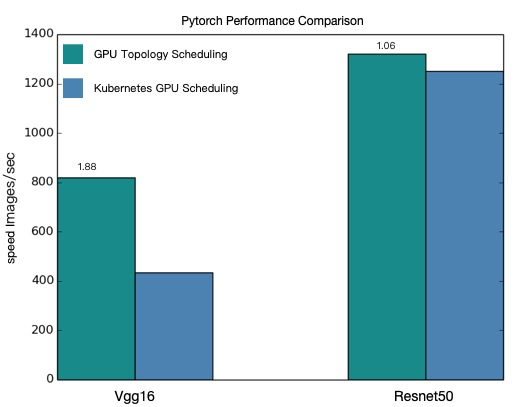
O agendamento de GPU com reconhecimento de topologia proporciona maior throughput para jobs de treinamento distribuído VGG16 e ResNet50.
Os valores de desempenho apresentados neste tópico são teóricos. O desempenho do agendamento de GPU com reconhecimento de topologia varia conforme a arquitetura do modelo e a configuração do cluster. Considere as estatísticas reais de desempenho obtidas em seu ambiente como referência definitiva.