このトピックでは、メディア管理モジュールのAPI操作の使用例を示します。 API操作は、ApsaraVideo VOD SDK for Javaにカプセル化されています。 APIを呼び出して、メディアアセット情報の検索、ビデオ情報の変更、ソースファイル情報の照会を行うことができます。 ビデオや画像を照会して削除することもできます。
使用上の注意
この例では、AccessKeyペアを使用してクライアントインスタンスを初期化します。
この操作のリクエストおよびレスポンスパラメーターの詳細については、「OpenAPI Explorer」をご参照ください。 上部のナビゲーションバーで [APIドキュメント] をクリックすると、API操作に関連する情報が表示されます。
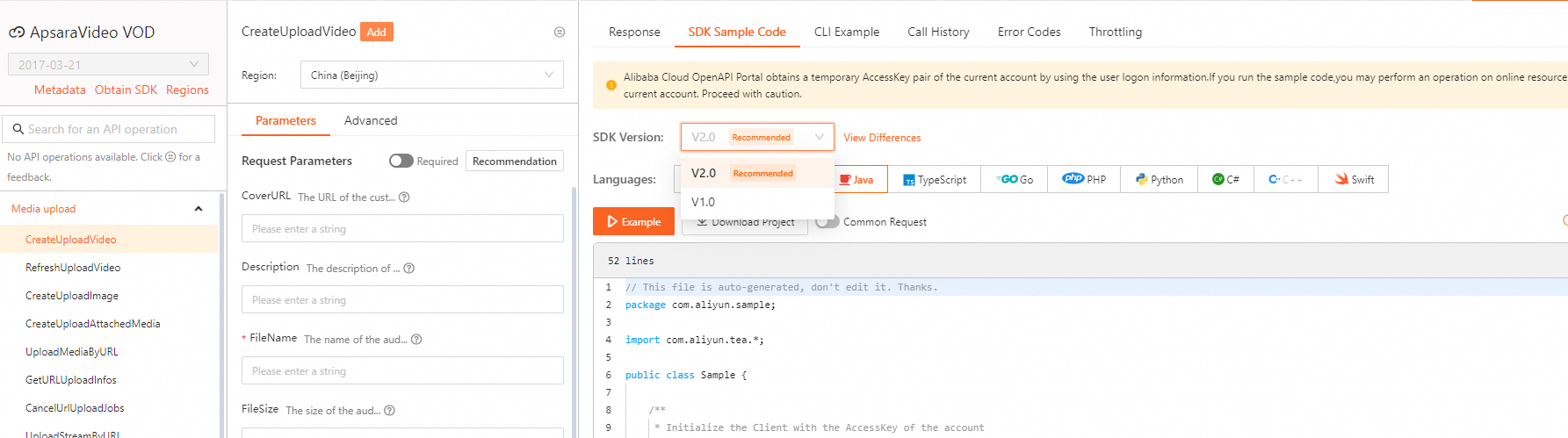
このトピックでは、一部の複雑なAPI操作のサンプルコードのみを示します。 他のAPI操作のサンプルコードを取得するには、次の操作を実行します。 Alibaba Cloud OpenAPI Explorer 左側のナビゲーションウィンドウで、サンプルコードを取得するAPI操作を見つけ、[パラメーター] タブで必要なパラメーターを指定します。 次に、[呼び出しの開始] をクリックします。 [SDKサンプルコード] タブで、サンプルコードを表示およびダウンロードする言語を選択します。
このトピックでは、ApsaraVideo VOD SDK for Java V1.0を使用してAPI操作を呼び出す方法について説明します。 ApsaraVideo VOD SDK for Java V2.0を使用してAPI操作を呼び出す場合、Alibaba Cloud OpenAPI Explorerでサンプルコードを取得するときにV2.0を指定します。
クライアントを初期化
SDKを使用する前に、クライアントを初期化してください。 詳細については、「初期化」をご参照ください。
メディアアセット情報の照会
SearchMedia操作を呼び出して、メディアアセット情報を照会できます。
このAPI操作の詳細については、SearchMediaを参照してください。
サンプルコード:
import com.aliyuncs.auth.AlibabaCloudCredentials;
import com.aliyuncs.auth.EnvironmentVariableCredentialsProvider;
import com.aliyuncs.vod.model.v20170321.SearchMediaRequest;
import com.aliyuncs.vod.model.v20170321.SearchMediaResponse;

 /**
   * Obtain the AccessKey information.
   */
    public static DefaultAcsClient initVodClient() throws ClientException {
    String regionId = "cn-shanghai";  // Specify the region in which ApsaraVideo VOD is activated.
    // The AccessKey pair of an Alibaba Cloud account has permissions on all API operations. We recommend that you use a RAM user to call API operations or perform routine O&M.
    // We recommend that you do not save your AccessKey pair (AccessKey ID and AccessKey secret) in your project code. Otherwise, the AccessKey pair may be leaked. As a result, the security of all resources in your account is compromised.
    // In this example, the system reads the AccessKey pair from environment variables to implement authentication for API access. Before you run the sample code, configure the environment variables ALIBABA_CLOUD_ACCESS_KEY_ID and ALIBABA_CLOUD_ACCESS_KEY_SECRET.
    DefaultProfile profile = DefaultProfile.getProfile(regionId, System.getenv("ALIBABA_CLOUD_ACCESS_KEY_ID"), System.getenv("ALIBABA_CLOUD_ACCESS_KEY_SECRET"));
    DefaultAcsClient client = new DefaultAcsClient(profile);
    return client;
}
/**
 * Search for media asset information.
 * @param client The client that sends a request.
 * @return SearchMediaResponse The information contained in the response.
 * @throws Exception
 */
public static SearchMediaResponse searchMedia(DefaultAcsClient client) throws Exception {
    SearchMediaRequest request = new SearchMediaRequest();
    request.setFields("Title,CoverURL,Status");
    request.setMatch("Status in ('Normal','Checking') and CreationTime = ('2018-07-01T08:00:00Z','2018-08-01T08:00:00Z')");
    request.setPageNo(1);
    request.setPageSize(10);
    request.setSearchType("video");
    request.setSortBy("CreationTime:Desc");
    return client.getAcsResponse(request);
}

// Sample request
public static void main(String[] argv) {
    DefaultAcsClient client = initVodClient();
    SearchMediaResponse response = new SearchMediaResponse();
    try {
        response = searchMedia(client);
        if (response.getMediaList() != null && response.getMediaList().size() > 0) {
            System.out.print("Total = " + response.getTotal() + "\n");
            System.out.print("ScrollToken = " + response.getScrollToken() + "\n");
            for (SearchMediaResponse.Media media : response.getMediaList()) {
                System.out.print("MediaId = " + media.getMediaId() + "\n");
                System.out.print("MediaType = " + media.getMediaType() + "\n");
                System.out.print("CreationTime = " + media.getCreationTime() + "\n");
                System.out.print("Title = " + media.getVideo().getTitle() + "\n");
                System.out.print("CoverURL = " + media.getVideo().getCoverURL() + "\n");
                System.out.print("Status = " + media.getVideo().getStatus() + "\n");
            }
        }
    } catch (Exception e) {
        System.out.print("ErrorMessage = " + e.getLocalizedMessage());
    }
    System.out.print("RequestId = " + response.getRequestId() + "\n");
}
オーディオまたはビデオファイルに関する情報の照会
GetVideoInfo操作を呼び出して、オーディオまたはビデオファイルに関する情報を照会できます。
このAPI操作の詳細については、GetVideoInfoを参照してください。
GetVideoInfos操作を呼び出して、一度に複数のオーディオまたはビデオファイルに関する情報を照会できます。
このAPI操作の詳細については、GetVideoInfosを参照してください。
オーディオまたはビデオファイルに関する情報を変更する
UpdateVideoInfo操作を呼び出して、オーディオまたはビデオファイルに関する情報を変更できます。
このAPI操作の詳細については、UpdateVideoInfoを参照してください。
複数のオーディオまたはビデオファイルに関する情報を変更する
UpdateVideoInfos操作を呼び出して、一度に複数のオーディオまたはビデオファイルに関する情報を変更できます。
このAPI操作の詳細については、UpdateVideoInfosを参照してください。
サンプルコード:
import com.aliyuncs.auth.AlibabaCloudCredentials;
import com.aliyuncs.auth.EnvironmentVariableCredentialsProvider;
import com.aliyuncs.vod.model.v20170321.UpdateVideoInfosRequest;
import com.aliyuncs.vod.model.v20170321.UpdateVideoInfosResponse;
import com.alibaba.fastjson.JSONArray;
import com.alibaba.fastjson.JSONObject;

 /**
   * Obtain the AccessKey information.
   */
    public static DefaultAcsClient initVodClient() throws ClientException {
    String regionId = "cn-shanghai";  // Specify the region in which ApsaraVideo VOD is activated.
    // The AccessKey pair of an Alibaba Cloud account has permissions on all API operations. We recommend that you use a RAM user to call API operations or perform routine O&M.
    // We recommend that you do not save your AccessKey pair (AccessKey ID and AccessKey secret) in your project code. Otherwise, the AccessKey pair may be leaked. As a result, the security of all resources in your account is compromised.
    // In this example, the system reads the AccessKey pair from environment variables to implement authentication for API access. Before you run the sample code, configure the environment variables ALIBABA_CLOUD_ACCESS_KEY_ID and ALIBABA_CLOUD_ACCESS_KEY_SECRET.
    DefaultProfile profile = DefaultProfile.getProfile(regionId, System.getenv("ALIBABA_CLOUD_ACCESS_KEY_ID"), System.getenv("ALIBABA_CLOUD_ACCESS_KEY_SECRET"));
    DefaultAcsClient client = new DefaultAcsClient(profile);
    return client;
}
/**
 * Modify information about multiple video files at a time.
 * @param client The client that sends a request.
 * @return UpdateVideoInfosResponse The information contained in the response.
 * @throws Exception
*/
public static UpdateVideoInfosResponse updateVideoInfos(DefaultAcsClient client) throws Exception {
    UpdateVideoInfosRequest request = new UpdateVideoInfosRequest();
    JSONArray updateContentArray = new JSONArray();
    JSONObject updateContent1 = new JSONObject();
    updateContent1.put("VideoId", "VideoId1");
    // updateContent1.put("Title", "new Title");
    // updateContent1.put("Tags", "new Tag1,new Tag2");
    updateContentArray.add((updateContent1));
    JSONObject updateContent2 = new JSONObject();
    updateContent2.put("VideoId", "VideoId2");
    // updateContent2.put("Title", "new Title");
    // updateContent2.put("Tags", "new Tag1,new Tag2");
    updateContentArray.add((updateContent2));
    request.setUpdateContent(updateContentArray.toJSONString());
    return client.getAcsResponse(request);
}

// Sample request
public static void main(String[] argv) {
    DefaultAcsClient client = initVodClient();
    UpdateVideoInfosResponse response = new UpdateVideoInfosResponse();
    try {
        response = updateVideoInfos(client);
        if (response.getNonExistVideoIds() != null && response.getNonExistVideoIds().size() > 0) {
            System.out.print("======nonexistent VideoIds : ======\n");
            for (String videoId : response.getNonExistVideoIds()) {
                System.out.print(videoId + "\n");
            }
        }
    } catch (Exception e) {
        System.out.print("ErrorMessage = " + e.getLocalizedMessage());
    }
    System.out.print("RequestId = " + response.getRequestId() + "\n");
}
ソースファイル情報の照会 (ダウンロードURLを含む)
GetMezzanineInfo操作を呼び出して、ソースファイル情報を照会できます。
このAPI操作の詳細については、GetMezzanineInfoを参照してください。
オーディオおよびビデオファイルの照会
GetVideoList操作を呼び出して、オーディオおよびビデオファイルを照会できます。
このAPI操作の詳細については、GetVideoListを参照してください。
オーディオファイルとビデオファイルを削除する
DeleteVideo操作を呼び出して、オーディオおよびビデオファイルを削除できます。
このAPI操作の詳細については、DeleteVideoを参照してください。
メディアストリームの削除
DeleteStream操作を呼び出して、メディアストリームを削除できます。
このAPI操作の詳細については、DeleteStreamを参照してください。
複数のソースファイルを削除する
DeleteMezzanines操作を呼び出して、一度に複数のソースファイルを削除できます。
このAPI操作の詳細については、DeleteMezzaninesを参照してください。
複数の画像に関する情報の変更
UpdateImageInfos操作を呼び出して、一度に複数のイメージに関する情報を変更できます。
このAPI操作の詳細については、UpdateImageInfosを参照してください。
サンプルコード:
import com.aliyuncs.auth.AlibabaCloudCredentials;
import com.aliyuncs.auth.EnvironmentVariableCredentialsProvider;
import com.aliyuncs.vod.model.v20170321.UpdateImageInfosRequest;
import com.aliyuncs.vod.model.v20170321.UpdateImageInfosResponse;
import com.alibaba.fastjson.JSONArray;
import com.alibaba.fastjson.JSONObject;

 /**
   * Obtain the AccessKey information.
   */
    public static DefaultAcsClient initVodClient() throws ClientException {
    String regionId = "cn-shanghai";  // Specify the region in which ApsaraVideo VOD is activated.
    // The AccessKey pair of an Alibaba Cloud account has permissions on all API operations. We recommend that you use a RAM user to call API operations or perform routine O&M.
    // We recommend that you do not save your AccessKey pair (AccessKey ID and AccessKey secret) in your project code. Otherwise, the AccessKey pair may be leaked. As a result, the security of all resources in your account is compromised.
    // In this example, the system reads the AccessKey pair from environment variables to implement authentication for API access. Before you run the sample code, configure the environment variables ALIBABA_CLOUD_ACCESS_KEY_ID and ALIBABA_CLOUD_ACCESS_KEY_SECRET.
    DefaultProfile profile = DefaultProfile.getProfile(regionId, System.getenv("ALIBABA_CLOUD_ACCESS_KEY_ID"), System.getenv("ALIBABA_CLOUD_ACCESS_KEY_SECRET"));
    DefaultAcsClient client = new DefaultAcsClient(profile);
    return client;
}
/**
 * Modify information about multiple images at a time.
 * @param client The client that sends a request.
 * @return UpdateImageInfosResponse The information contained in the response.
 * @throws Exception
*/
public static UpdateImageInfosResponse updateImageInfos(DefaultAcsClient client) throws Exception{
        UpdateImageInfosRequest request = new UpdateImageInfosRequest();
        JSONArray updateContentArray = new JSONArray();
        JSONObject updateContent1 = new JSONObject();
        updateContent1.put("ImageId", "ImageId1");
//        updateContent1.put("Title", "new Title");
//        updateContent1.put("Tags", "new Tag1,new Tag2");
        updateContentArray.add((updateContent1));
        JSONObject updateContent2 = new JSONObject();
        updateContent2.put("ImageId", "ImageId2");
//        updateContent2.put("Title", "new Title");
//        updateContent2.put("Tags", "new Tag1,new Tag2");
        updateContentArray.add((updateContent2));
        request.setUpdateContent(updateContentArray.toJSONString());
        return client.getAcsResponse(request);
    }

// Sample request
public static void main(String[] argv) throws Exception {
    DefaultAcsClient client = initVodClient();
    UpdateImageInfosResponse response = new UpdateImageInfosResponse();
    try {
        response = updateImageInfos(client);
        if (response.getNonExistImageIds() != null && response.getNonExistImageIds().size() > 0) {
            System.out.print("======nonexistent ImageIds : ======\n");
            for (String imageId : response.getNonExistImageIds()) {
                System.out.print(imageId + "\n");
            }
        }
    } catch (Exception e) {
        System.out.print("ErrorMessage = " + e.getLocalizedMessage());
    }
    System.out.print("RequestId = " + response.getRequestId() + "\n");
}
イメージに関する情報の照会
GetImageInfo操作を呼び出して、イメージに関する情報を照会できます。
このAPI操作の詳細については、GetImageInfoを参照してください。
画像の削除
DeleteImage操作を呼び出して、画像を削除できます。
このAPI操作の詳細については、DeleteImageを参照してください。
サンプルコード:
import com.aliyuncs.auth.AlibabaCloudCredentials;
import com.aliyuncs.auth.EnvironmentVariableCredentialsProvider;
import com.aliyuncs.vod.model.v20170321.DeleteImageRequest;
import com.aliyuncs.vod.model.v20170321.DeleteImageResponse;

 /**
   * Obtain the AccessKey information.
   */
    public static DefaultAcsClient initVodClient() throws ClientException {
    String regionId = "cn-shanghai";  // Specify the region in which ApsaraVideo VOD is activated.
    // The AccessKey pair of an Alibaba Cloud account has permissions on all API operations. We recommend that you use a RAM user to call API operations or perform routine O&M.
    // We recommend that you do not save your AccessKey pair (AccessKey ID and AccessKey secret) in your project code. Otherwise, the AccessKey pair may be leaked. As a result, the security of all resources in your account is compromised.
    // In this example, the system reads the AccessKey pair from environment variables to implement authentication for API access. Before you run the sample code, configure the environment variables ALIBABA_CLOUD_ACCESS_KEY_ID and ALIBABA_CLOUD_ACCESS_KEY_SECRET.
    DefaultProfile profile = DefaultProfile.getProfile(regionId, System.getenv("ALIBABA_CLOUD_ACCESS_KEY_ID"), System.getenv("ALIBABA_CLOUD_ACCESS_KEY_SECRET"));
    DefaultAcsClient client = new DefaultAcsClient(profile);
    return client;
}
/**
 * Delete images.
 *
 * @param client The client that sends a request.
 * @return DeleteImageResponse The information contained in the response.
 * @throws Exception
*/
public static DeleteImageResponse deleteImage(DefaultAcsClient client) throws Exception {
    DeleteImageRequest request = new DeleteImageRequest();
    // Delete image files based on ImageURL.
    request.setDeleteImageType("ImageURL");
    // Example of ImageURL: http://example.aliyundoc.com/cover-****.jpg.
    String url = "<your image URL>";
    String encodeUrl = URLEncoder.encode(url, "UTF-8");
    request.setImageURLs(encodeUrl);
    // Delete image files based on ImageId.
    //request.setDeleteImageType("ImageId");
    //request.setImageIds("ImageId1,ImageId2");
    // Delete image files of a specified type based on VideoId.
    //request.setDeleteImageType("VideoId");
    //request.setVideoId("VideoId");
    //request.setImageType("SpriteSnapshot");
    return client.getAcsResponse(request);
}

// Sample request
public static void main(String[] argv) throws ClientException {
    DefaultAcsClient client = initVodClient();
    DeleteImageResponse response = new DeleteImageResponse();
    try {
        response = deleteImage(client);
    } catch (Exception e) {
        System.out.print("ErrorMessage = " + e.getLocalizedMessage());
    }
    System.out.print("RequestId = " + response.getRequestId() + "\n");
}