このソリューションでは、Alibaba Cloud Resource Orchestration Service (ROS) を使用して、単一の YAML テンプレートで完全な Web サービス クラスターを作成する方法を説明します。このテンプレートは、1 回のスタック作成で VPC、Nginx がインストールされた ECS インスタンスグループ、Classic Load Balancer (CLB)、Elastic IP Address (EIP) をプロビジョニングします。このソリューションは、高可用性 (HA) Web サービス クラスターの迅速なデプロイメントが必要なシナリオに最適です。
ソリューションの概要
ビジネスシナリオ
Alibaba Cloud の仮想プライベートクラウド (VPC) 内で Elastic Compute Service (ECS) インスタンスを一括で作成します。ECS Cloud Assistant を使用して Nginx を自動的にインストールし、起動します。初期化後、ECS インスタンスを Classic Load Balancer (CLB) インスタンスにアタッチしてトラフィックを分散し、Elastic IP (EIP) を介して HTTP アクセスエンドポイントを公開します。
作成されるリソース
No. | リソース | ROS リソースタイプ | 用途 |
1 | VPC |
| 分離されたネットワーク環境を提供します。 |
2 |
|
| VPC 内のサブネットを分割し、ゾーンを指定します。 |
3 | セキュリティグループ |
| インバウンドの HTTP ポート 80 を開き、すべてのアウトバウンドトラフィックを許可します。 |
4 | ECS インスタンスグループ |
| 複数の ECS インスタンスを作成してデータディスクをマウントし、 |
5 | CLB インスタンス |
| バックエンドの ECS インスタンスにトラフィックを分散する Classic Load Balancer インスタンスです。 |
6 | CLB リスナー |
| CLB の TCP ポート 80 リスナーとヘルスチェックを構成します。 |
7 | バックエンドサーバーのアタッチ |
| ECS インスタンスグループをバックエンドサーバーとして CLB にアタッチします。 |
8 | EIP |
| パブリックネットワークアクセスエントリポイントを提供します。 |
9 | EIP の関連付け |
| EIP を CLB インスタンスに関連付けます。 |
デプロイ後の結果
テンプレートが正常にデプロイされると、以下が作成されます。
完全な VPC ネットワーク環境 (VPC、
vSwitch、およびポート 80 が開放されたセキュリティグループを含む)。データディスクがマウントされ、Nginx が自動的にデプロイされた ECS インスタンスグループ (デフォルトで 2 インスタンス)。
TCP ポート 80 のリスナーとヘルスチェックが設定された CLB インスタンス。
CLB のバックエンドサーバーグループにアタッチされ、重み付けによってトラフィックが分散されるすべての ECS インスタンス。
CLB に関連付けられ、
http://<EIP address>を介してアクセス可能な EIP。
アーキテクチャ図
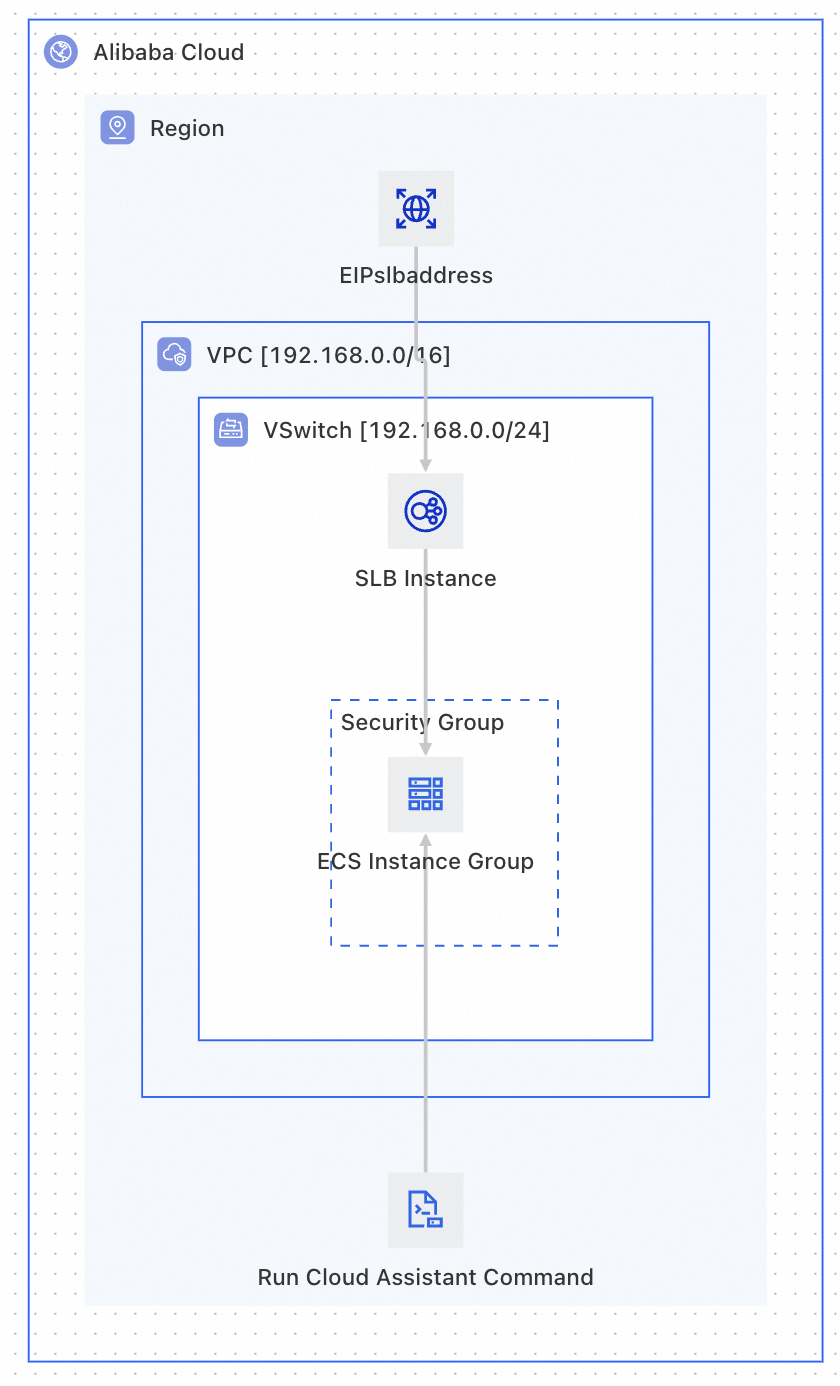
前提条件
このテンプレートを使用する前に、次の点を確認してください。
アカウント権限:Alibaba Cloud アカウントには、ECS、CLB、VPC、および EIP の作成権限が必要です。
基本的な知識:ROS テンプレートの基本的な構文と構造に精通している必要があります。詳細については、「ROS テンプレート クイックスタート」をご参照ください。
テンプレート作成チュートリアル
このチュートリアルでは、テンプレートの作成プロセスを 2 つのフェーズに分けて説明します。
フェーズ 1 (基本テンプレート):固定のパラメーター値を使用し、リソース定義と CLB アタッチメントの関係を理解することに焦点を当てます。
フェーズ 2 (高度なテンプレート):すべての変数構成をパラメーター化し、動的パラメーターのフィルタリング、課金タイプの条件付き表示、およびパラメーターのグループ化を追加します。
フェーズ 1:基本テンプレート — リソースと依存関係の定義
ステップ 1: 基本的なネットワークリソース (VPC + vSwitch + セキュリティグループ) を定義する
ネットワークリソースは他のすべてのリソースの基盤であり、最初に作成する必要があります。セキュリティグループは、Nginx への外部アクセスを許可するために、インバウンドの HTTP ポート 80 を開く必要があります。
Resources:
  # ============================================================
  # ネットワークレイヤー: VPC → vSwitch → セキュリティグループ
  # ============================================================

  Vpc:
    Type: ALIYUN::ECS::VPC  # VPC を作成します
    Properties:
      CidrBlock: 192.168.0.0/16
      VpcName:
        Ref: ALIYUN::StackName  # 疑似パラメータ: スタック名を VPC 名として使用します

  VSwitch:
    Type: ALIYUN::ECS::VSwitch  # VPC 内に vSwitch (サブネット) を作成します
    Properties:
      VSwitchName:
        Ref: ALIYUN::StackName
      VpcId:
        Ref: Vpc  # 暗黙的な依存関係: ROS は最初に Vpc を作成します
      ZoneId: cn-beijing-h  # この例では北京ゾーン H を使用します
      CidrBlock: 192.168.0.0/24

  EcsSecurityGroup:
    Type: ALIYUN::ECS::SecurityGroup  # セキュリティグループを作成します
    Properties:
      SecurityGroupName:
        Ref: ALIYUN::StackName
      VpcId:
        Ref: Vpc
      SecurityGroupIngress:  # インバウンドルール: Nginx 用に HTTP ポート 80 を開放します
        - PortRange: 80/80
          Priority: 1
          SourceCidrIp: 0.0.0.0/0
          IpProtocol: tcp
          NicType: internet
キーコンセプト:
VpcName、VSwitchName、SecurityGroupNameなどのカスタマイズされた名前には疑似パラメータを使用することで、デプロイ後にこのスタックに属するリソースをすばやく見つけることができます。セキュリティグループのルールは、要件に応じてカスタマイズできます。
Web サービスへの外部アクセスを許可するには、インバウンドの HTTP ポート 80 または 8080 を開きます。
SSH ログインを許可するには、インバウンドのポート 22 を開きます。
本番環境では、
SourceCidrIpを0.0.0.0/0ではなく、既知の IP 範囲に制限してください。
ステップ 2: CLB と EIP リソースの定義
CLB インスタンスは、受信トラフィックを複数のバックエンド ECS インスタンスに分散します。EIP はパブリックエントリポイントを提供します。
Resources:
  # ============================================================
  # ロードバランシングレイヤー: CLB + リスナー + EIP
  # ============================================================

  Slb:
    Type: ALIYUN::SLB::LoadBalancer  # Classic Load Balancer インスタンスを作成します
    Properties:
      VpcId:
        Ref: Vpc
      VSwitchId:
        Ref: VSwitch
      LoadBalancerName:
        Fn::Sub: slb-${ALIYUN::StackName}  # Fn::Sub は文字列を連結します
      AddressType: intranet  # イントラネット CLB (EIP 経由でパブリックアクセス)
      LoadBalancerSpec: slb.s1.small
      AutoPay: true

  SlbListener:
    Type: ALIYUN::SLB::Listener  # CLB リスナーを設定します
    DependsOn:
      - Slb  # 明示的な依存関係: リスナーを追加する前に CLB を作成する必要があります
    Properties:
      LoadBalancerId:
        Ref: Slb
      ListenerPort: 80          # フロントエンドリスナーポート
      BackendServerPort: 80     # バックエンドサーバーポート (Nginx のデフォルト: 80)
      Protocol: tcp             # レイヤー 4 TCP 転送
      Bandwidth: -1             # -1 は無制限。CLB の仕様に基づいて調整してください
      Persistence:              # セッション維持を設定します
        StickySession: 'on'
        StickySessionType: insert  # Cookie を挿入します
        CookieTimeout: 60
        PersistenceTimeout: 180
      HealthCheck:              # ヘルスチェックを設定します
        HealthCheckType: tcp    # TCP ポートプローブ
        Port: 80
        Interval: 2             # チェック間隔: 2 秒
        HealthyThreshold: 3     # 3 回成功 = ヘルシー
        UnhealthyThreshold: 3   # 3 回失敗 = アンヘルシー
        Timeout: 5              # プローブタイムアウト: 5 秒

  EipSlbAddress:
    Type: ALIYUN::VPC::EIP  # EIP を作成します
    Properties:
      Name:
        Ref: ALIYUN::StackName
      InternetChargeType: PayByTraffic  # トラフィック課金
      Bandwidth: 10             # 帯域幅上限: 10 Mbps

  EipSlbAddressAssociation:
    Type: ALIYUN::VPC::EIPAssociation  # EIP を CLB に関連付けます
    Properties:
      InstanceId:
        Ref: Slb                # ターゲット: CLB インスタンス
      AllocationId:
        Ref: EipSlbAddress      # EIP リソース ID
キーコンセプト:
暗黙的な依存関係と明示的な依存関係:
RefまたはFn::GetAttを使用してリソースを参照すると、ROS は自動的に依存関係 (暗黙的) を判断します。2 つのリソース間に直接の参照はないものの、ビジネスロジックが特定の作成順序を必要とする場合にのみ
DependsOnを使用します。
CLB は
AddressType: intranet(イントラネット) を使用し、ALIYUN::VPC::EIPAssociationを介して EIP にバインドすることでパブリックアクセスを提供します。これは推奨アーキテクチャパターンです。
手順 3: ECS インスタンスグループを定義し、Cloud Assistant を使用して Nginx をインストールする
ECS インスタンスは、Cloud Assistant を介して初期化スクリプトを実行し、データディスクをマウントして Nginx をインストールします。
Resources:
  EcsInstanceGroup:
    Type: ALIYUN::ECS::InstanceGroup
    Properties:
      VpcId:
        Ref: Vpc
      SecurityGroupId:
        Ref: EcsSecurityGroup
      VSwitchId:
        Ref: VSwitch
      ZoneId: cn-beijing-h
      ImageId: centos_7
      InstanceType: ecs.c5.large
      MaxAmount: 2       # ECS インスタンスを 2 つ作成します
      AllocatePublicIP: false  # パブリック IP なし (CLB + EIP 経由でアクセス)
      IoOptimized: optimized
      SystemDiskCategory: cloud_essd
      SystemDiskSize: 40
      DiskMappings:      # データディスクの設定
        - Category: cloud_essd
          Size: 100
      Password: <YourPassword>  # デプロイ時に実際のパスワードに置き換えてください

  RunSetup:
    Type: ALIYUN::ECS::RunCommand
    DependsOn: EcsInstanceGroup
    Properties:
      InstanceIds:
        Fn::GetAtt:
          - EcsInstanceGroup
          - InstanceIds
      Type: RunShellScript
      Sync: true
      Timeout: 300
      ContentEncoding: PlainText
      CommandContent: |
        #!/bin/bash
        # === データディスクの初期化: パーティション作成、フォーマット、/disk1 へのマウント ===
        cat >> /root/InitDataDisk.sh << 'EOF'
        #!/bin/bash
        echo "p
        n
        p
        w
        " |  fdisk -u /dev/vdb
        EOF
        /bin/bash /root/InitDataDisk.sh
        rm -f /root/InitDataDisk.sh
        mkfs -t ext4 /dev/vdb1
        cp /etc/fstab /etc/fstab.bak
        mkdir /disk1
        echo `blkid /dev/vdb1 | awk '{print $2}' | sed 's/\"//g'` /disk1 ext4 defaults 0 0 >> /etc/fstab
        mount -a

        # === Nginx のインストールと起動 ===
        yum install -y nginx
        systemctl start nginx.service
キーコンセプト:
RefとFn::GetAttの比較:Ref→ リソースの プライマリ識別子 (例:VPC のVpcId) を返します。Fn::GetAtt→ リソースの その他の属性 (例:ECS インスタンスグループのInstanceIds) を返します。
ステップ 4: CLB バックエンドサーバーのアタッチメントを定義する — ECS インスタンスを CLB に接続する
ALIYUN::SLB::BackendServerAttachment を使用して、ECS インスタンスグループを CLB バックエンドにアタッチします。
Resources:
  # ============================================================
  # バインディングレイヤー: ECS インスタンスグループを CLB バックエンドサーバーにアタッチします
  # ============================================================

  SlbBackendServerAttachment:
    Type: ALIYUN::SLB::BackendServerAttachment
    DependsOn:
      - EcsInstanceGroup  # 明示的な依存関係: ECS の作成を待機します
    Properties:
      LoadBalancerId:
        Ref: Slb
      BackendServerList:
        # ECS インスタンスグループからすべてのインスタンス ID を取得します
        Fn::GetAtt:
          - EcsInstanceGroup
          - InstanceIds
      BackendServerWeightList:  # バックエンドサーバーの重みリスト
        - 100  # ECS インスタンス 1: 重み 100
- 100 # ECS インスタンス 2: 重み 100キーコンセプト:BackendServerWeightList のルール
重みの値は 0 から 100 の範囲です。重みが大きいインスタンスほど、より多くのトラフィックが割り当てられます。
BackendServerWeightListのエントリ数がBackendServerListよりも少ない場合、残りの ECS インスタンスはリストの最後の重みの値を使用します。
基本テンプレートの完成
以下は、上記すべてのステップを組み合わせた、デプロイ可能な完全なテンプレートです。
ROSTemplateFormatVersion: '2015-09-01'
Description:
  ja-jp: VPC の作成、Nginx を使用した ECS グループのデプロイ、CLB へのアタッチ、EIP 経由での公開
  en: Create VPC, deploy ECS group with Nginx, attach to CLB, expose via EIP

Resources:
  # === ネットワークレイヤー ===
  Vpc:
    Type: ALIYUN::ECS::VPC
    Properties:
      CidrBlock: 192.168.0.0/16
      VpcName:
        Ref: ALIYUN::StackName
  VSwitch:
    Type: ALIYUN::ECS::VSwitch
    Properties:
      VSwitchName:
        Ref: ALIYUN::StackName
      VpcId:
        Ref: Vpc
      ZoneId: cn-beijing-h
      CidrBlock: 192.168.0.0/24
  EcsSecurityGroup:
    Type: ALIYUN::ECS::SecurityGroup
    Properties:
      SecurityGroupName:
        Ref: ALIYUN::StackName
      VpcId:
        Ref: Vpc
      SecurityGroupIngress:
        - PortRange: 80/80
          Priority: 1
          SourceCidrIp: 0.0.0.0/0
          IpProtocol: tcp
          NicType: internet
      SecurityGroupEgress:
        - PortRange: '-1/-1'
          Priority: 1
          IpProtocol: all
          DestCidrIp: 0.0.0.0/0
          NicType: internet
        - PortRange: '-1/-1'
          Priority: 1
          IpProtocol: all
          DestCidrIp: 0.0.0.0/0
          NicType: intranet

  # === コンピュートレイヤー ===
  EcsInstanceGroup:
    Type: ALIYUN::ECS::InstanceGroup
    Properties:
      VpcId:
        Ref: Vpc
      SecurityGroupId:
        Ref: EcsSecurityGroup
      VSwitchId:
        Ref: VSwitch
      ImageId: centos_7
      InstanceType: ecs.c5.large
      MaxAmount: 2
      AllocatePublicIP: false
      IoOptimized: optimized
      SystemDiskCategory: cloud_essd
      SystemDiskSize: 40
      DiskMappings:
        - Category: cloud_essd
          Size: 100
      Password: <YourPassword>  # デプロイ時に実際のパスワードに置き換えてください
  RunSetup:
    Type: ALIYUN::ECS::RunCommand
    DependsOn: EcsInstanceGroup
    Properties:
      InstanceIds:
        Fn::GetAtt:
          - EcsInstanceGroup
          - InstanceIds
      Type: RunShellScript
      Sync: true
      Timeout: 300
      ContentEncoding: PlainText
      CommandContent: |
        #!/bin/bash
        # === データディスクの初期化: パーティション作成、フォーマット、/disk1 へのマウント ===
        cat >> /root/InitDataDisk.sh << 'EOF'
        #!/bin/bash
        echo "p
        n
        p
        w
        " |  fdisk -u /dev/vdb
        EOF
        /bin/bash /root/InitDataDisk.sh
        rm -f /root/InitDataDisk.sh
        mkfs -t ext4 /dev/vdb1
        cp /etc/fstab /etc/fstab.bak
        mkdir /disk1
        echo `blkid /dev/vdb1 | awk '{print $2}' | sed 's/\"//g'` /disk1 ext4 defaults 0 0 >> /etc/fstab
        mount -a

        # === Nginx のインストールと起動 ===
        yum install -y nginx
        systemctl start nginx.service

  # === ロードバランシングレイヤー ===
  Slb:
    Type: ALIYUN::SLB::LoadBalancer
    Properties:
      VpcId:
        Ref: Vpc
      VSwitchId:
        Ref: VSwitch
      LoadBalancerName:
        Fn::Sub: slb-${ALIYUN::StackName}
      AddressType: intranet
      LoadBalancerSpec: slb.s1.small
      AutoPay: true
  SlbListener:
    DependsOn:
      - Slb
    Type: ALIYUN::SLB::Listener
    Properties:
      LoadBalancerId:
        Ref: Slb
      ListenerPort: 80
      BackendServerPort: 80
      Protocol: tcp
      Bandwidth: -1
      Persistence:
        StickySession: 'on'
        StickySessionType: insert
        CookieTimeout: 60
        PersistenceTimeout: 180
      HealthCheck:
        HealthCheckType: tcp
        Port: 80
        Interval: 2
        HealthyThreshold: 3
        UnhealthyThreshold: 3
        Timeout: 5
  EipSlbAddress:
    Type: ALIYUN::VPC::EIP
    Properties:
      Name:
        Ref: ALIYUN::StackName
      InternetChargeType: PayByTraffic
      Bandwidth: 10
  EipSlbAddressAssociation:
    Type: ALIYUN::VPC::EIPAssociation
    Properties:
      InstanceId:
        Ref: Slb
      AllocationId:
        Ref: EipSlbAddress

  # === バインディングレイヤー ===
  SlbBackendServerAttachment:
    DependsOn:
      - EcsInstanceGroup
    Type: ALIYUN::SLB::BackendServerAttachment
    Properties:
      BackendServerList:
        Fn::GetAtt:
          - EcsInstanceGroup
          - InstanceIds
      LoadBalancerId:
        Ref: Slb
      BackendServerWeightList:
        - 100
        - 100

Outputs:
  Endpoint:
    Description:
      ja-jp: パブリック HTTP エンドポイント
      en: Public HTTP endpoint
    Value:
      Fn::Sub:
        - http://${ServerAddress}
        - ServerAddress:
            Fn::GetAtt:
              - EipSlbAddress
              - EipAddress
キーコンセプト:
テンプレートがリソースを作成した後、Outputs セクションを使用して、CLB にバインドされた EIP アドレスなどのリソース属性をクエリします。
フェーズ 2:高度なテンプレート — パラメータ化と動的設定
基本テンプレートでは、ECS の InstanceType、SystemDiskCategory、および CLB の LoadBalancerSpec に固定値を使用します。これらの値をパラメーター化すると、テンプレートの柔軟性が大幅に向上します。
このテンプレートでは、以下の高度な機能を紹介します:
パラメータ化 (Parameters):可変の設定をパラメーターとして抽出し、デプロイ時に動的に入力されるようにします。
動的パラメーターフィルタリング (AssociationProperty):ROS コンソールが、選択されたパラメーターに基づいて利用可能なオプションを自動的にフィルタリングするようにします。
パラメーターのグループ化 (Metadata):コンソールでパラメーターを論理的なカテゴリごとにグループ化し、設定エクスペリエンスを向上させます。
パラメーターの依存関係図
以下に、ECS インスタンスタイプ、システムディスクタイプ、SLB インスタンス仕様の間の依存関係チェーンを示します:
ZoneId (ゾーン — コアフィルターパラメーター)
  ├── EcsInstanceType (ゾーン + 課金タイプでフィルタリング)
  │     ├── SystemDiskCategory (ゾーン + インスタンスタイプでフィルタリング)
  │     └── DataDiskCategory (ゾーン + インスタンスタイプでフィルタリング)
  └── LoadBalancerSpec (ゾーンでフィルタリング)

PayType (課金タイプ)
  ├── PayPeriodUnit (PrePaid の場合にのみ表示)
  ├── PayPeriod (PrePaid の場合にのみ表示)
└── EcsInstanceType (ゾーン + 課金タイプでフィルタリング)コアロジック:まずゾーンと ECS の課金タイプを選択し、それに応じて ECS インスタンスタイプと SLB 仕様をフィルタリングします。サブスクリプション課金が選択されている場合、課金期間の単位と期間を入力します。最後に、ゾーンと ECS インスタンスタイプに基づいてディスクタイプをフィルタリングします。各ステップでは、現在の条件下で有効なオプションのみが表示され、無効なパラメーターの組み合わせを防ぎます。
AssociationProperty の解説
1. ZoneId — アベイラビリティゾーン (基本パラメーター)
現在のリージョン内のすべてのゾーンを一覧表示するには、AssociationProperty を ALIYUN::ECS::ZoneId に設定します:
ZoneId:
    Type: String
    Label:
      ja-jp: VSwitch アベイラビリティゾーン
      en: VSwitch Availability Zone
    Description:
      ja-jp: VSwitch、ECS、SLB がデプロイされるアベイラビリティゾーンを選択します
      en: Select the availability zone for VSwitch, ECS and CLB will be deployed here
    AssociationProperty: ALIYUN::ECS::ZoneId
このパラメーターは、後続のすべてのパラメーターのフィルターの基礎となります。ゾーンが選択されると、他のすべてのパラメーターのオプションリストが自動的に更新されます。
2. PayType — ECS 課金タイプ
PayType パラメーターを定義し、AssociationPropertyMetadata.Visible.Condition を使用して、Subscription (PrePaid) が選択されている場合にのみ請求期間パラメーターを表示します:
Parameters:
  PayType:
    Type: String
    Label:
      ja-jp: 課金タイプ
      en: Charge Type
    Default: PostPaid
    AllowedValues:
      - PostPaid
      - PrePaid
    AssociationProperty: ChargeType
    AssociationPropertyMetadata:
      LocaleKey: InstanceChargeType
  PayPeriodUnit:
    Type: String
    Default: Month
    AssociationProperty: PayPeriodUnit
    AssociationPropertyMetadata:
      Visible:  # 条件付き表示:PayType が PostPaid でない場合にのみ表示
        Condition:
          Fn::Not:
            Fn::Equals:
              - ${PayType}
              - PostPaid
  PayPeriod:
    Type: Number
    Label:
      ja-jp: 期間
      en: Period
    Default: 1
    AllowedValues:
      - 1
      - 2
      - 3
      - 4
      - 5
      - 6
      - 7
      - 8
      - 9
    AssociationProperty: PayPeriod
    AssociationPropertyMetadata:
      Visible:
        Condition:
          Fn::Not:
            Fn::Equals:
              - ${PayType}
              - PostPaid
ROS コンソールで サブスクリプション (後払い)が選択されると、課金期間パラメーターは自動的に非表示になります。このパラメーターは、サブスクリプション (前払い) が選択された場合にのみ表示されます。
3. EcsInstanceType — ECS インスタンスタイプ
AssociationProperty を ALIYUN::ECS::Instance::InstanceType に設定し、${ZoneId} と ${PayType} でフィルタリングされた利用可能な ECS インスタンスタイプを一覧表示します:
EcsInstanceType:
    Type: String
    Label:
      ja-jp: ECS インスタンスタイプ
    AssociationProperty: ALIYUN::ECS::Instance::InstanceType
    AssociationPropertyMetadata:
      ZoneId: ${ZoneId}
      InstanceChargeType: ${PayType}
インスタンスタイプの可用性はゾーンによって異なります。フィルタリングしないと、ユーザーは選択したゾーンで利用可能な在庫がないインスタンスタイプを選択してしまい、スタックの作成が失敗する可能性があります。
4. SystemDiskCategory — システムディスクタイプ
AssociationProperty を ALIYUN::ECS::Disk::SystemDiskCategory に設定すると、${ZoneId} と ${EcsInstanceType} でフィルタリングされた利用可能なシステムディスクタイプが一覧表示されます。
SystemDiskCategory:
    Type: String
    Label:
      ja-jp: システムディスクタイプ
      en: System Disk Category
    Description:
      ja-jp: システムディスクタイプ。オプション:cloud_essd、cloud_ssd、cloud_efficiency
      en: "System disk type. Options: cloud_essd, cloud_ssd, cloud_efficiency"
    AssociationProperty: ALIYUN::ECS::Disk::SystemDiskCategory
    AssociationPropertyMetadata:
      ZoneId: ${ZoneId}
      InstanceType: ${EcsInstanceType}
システムディスクタイプの可用性は、ゾーン (一部のゾーンでは ESSD をサポートしていません) とインスタンスタイプ (一部のインスタンスタイプは特定のディスクタイプのみをサポートします) の両方に依存します。
5. LoadBalancerSpec — CLB インスタンス仕様
AssociationProperty を ALIYUN::SLB::Instance::InstanceType に設定して、${ZoneId} でフィルタリングされた利用可能な CLB 仕様を一覧表示します:
LoadBalancerSpec:
    Type: String
    Label:
      ja-jp: SLB インスタンス仕様
      en: CLB Instance Spec
    Description:
      ja-jp: SLB インスタンス仕様を選択します
      en: Select CLB instance specification
    AssociationProperty: ALIYUN::SLB::Instance::InstanceType
    AssociationPropertyMetadata:
      ZoneId: ${ZoneId}
動的パラメーターフィルタリングテンプレート
Parameters:
  ZoneId:
    Type: String
    Label:
      ja-jp: VSwitch アベイラビリティゾーン
      en: VSwitch Availability Zone
    Description:
      ja-jp: デプロイ先のアベイラビリティゾーンを選択します
      en: Select the availability zone for deployment
    AssociationProperty: ALIYUN::ECS::ZoneId
  PayType:
    Type: String
    Label:
      ja-jp: 課金タイプ
      en: Charge Type
    Default: PostPaid
    AllowedValues:
      - PostPaid
      - PrePaid
    AssociationProperty: ChargeType
    AssociationPropertyMetadata:
      LocaleKey: InstanceChargeType
  PayPeriodUnit:
    Type: String
    Default: Month
    AssociationProperty: PayPeriodUnit
    AssociationPropertyMetadata:
      Visible:
        Condition:
          Fn::Not:
            Fn::Equals:
              - ${PayType}
              - PostPaid
  PayPeriod:
    Type: Number
    Label:
      ja-jp: 期間
      en: Period
    Default: 1
    AllowedValues:
      - 1
      - 2
      - 3
      - 4
      - 5
      - 6
      - 7
      - 8
      - 9
    AssociationProperty: PayPeriod
    AssociationPropertyMetadata:
      Visible:
        Condition:
          Fn::Not:
            Fn::Equals:
              - ${PayType}
              - PostPaid
  EcsInstanceType:
    Type: String
    Label:
      ja-jp: ECS インスタンスタイプ
      en: ECS Instance Type
    Description:
      ja-jp: ゾーンと課金タイプでフィルタリングされた ECS インスタンスタイプを選択します。
      en: Select ECS instance type, filtered by zone and charge type.
    AssociationProperty: ALIYUN::ECS::Instance::InstanceType
    AssociationPropertyMetadata:
      ZoneId: ${ZoneId}
      InstanceChargeType: ${PayType}
  SystemDiskCategory:
    Type: String
    Label:
      ja-jp: システムディスクタイプ
      en: System Disk Category
    Description:
      ja-jp: システムディスクタイプ
      en: System disk type
    AssociationProperty: ALIYUN::ECS::Disk::SystemDiskCategory
    AssociationPropertyMetadata:
      ZoneId: ${ZoneId}
      InstanceType: ${EcsInstanceType}
  DataDiskCategory:
    Type: String
    Label:
      ja-jp: データディスクタイプ
      en: Data Disk Category
    Description:
      ja-jp: データディスクタイプ
      en: Data disk type
    AssociationProperty: ALIYUN::ECS::Disk::DataDiskCategory
    AssociationPropertyMetadata:
      ZoneId: ${ZoneId}
      InstanceType: ${EcsInstanceType}
  LoadBalancerSpec:
    Type: String
    Label:
      ja-jp: SLB インスタンス仕様
      en: CLB Instance Spec
    Description:
      ja-jp: SLB インスタンス仕様を選択します
      en: Select CLB instance specification
    AssociationProperty: ALIYUN::SLB::Instance::InstanceType
    AssociationPropertyMetadata:
      ZoneId: ${ZoneId}
AssociationProperty の仕組み
ユーザーが ROS コンソールでスタックを作成すると、パラメーター選択が連鎖的にトリガーされます:
ゾーン (
ZoneId) が選択されます。ECS 課金タイプ (
PayType) が選択されています。ECS インスタンスタイプのドロップダウンが自動的に更新され、選択したゾーンで利用可能な在庫があり、選択した課金タイプをサポートするタイプのみが表示されます。
SLB インスタンス仕様のドロップダウンが自動的に更新され、選択したゾーンでサポートされている仕様のみが表示されます。
ECS インスタンスタイプを選択すると、システムディスクタイプとデータディスクタイプのドロップダウンが自動的に更新され、選択したゾーンとインスタンスタイプの両方でサポートされているタイプのみが表示されます。
このアプローチにより、各選択肢には現在の条件下で有効なオプションのみが表示されるため、無効なパラメーターの組み合わせによるデプロイの失敗を根本から防ぎます。
メタデータによるパラメーターのグループ化
Metadata 内の ALIYUN::ROS::Interface を使用すると、パラメーターをラベル付きの論理グループに整理できます。ROS コンソールではパラメーターがグループで表示されるため、設定エクスペリエンスが大幅に向上します。
メタデータ構文
Metadata:
  ALIYUN::ROS::Interface:
    ParameterGroups:           # パラメーターグループリスト (必須)
      - Parameters:            # このグループのパラメーター名リスト (必須)
          - paramName1
          - paramName2
        Label:                 # グループラベル (必須)
          default:
            ja-jp: 日本語ラベル
en: English labelメタデータ構文のルール:
ParameterGroups、Parameters、およびLabelはすべて必須です。Metadata.ALIYUN::ROS::Interface.ParameterGroups.Parametersに記載されているパラメーター名は、テンプレートのParametersセクションで定義されている名前と完全に一致する必要があります。どのグループにも含まれていないパラメーターは、コンソールのグループ化されていないエリアに表示されます。
このテンプレートのパラメーターグループ設計
このテンプレートは、14 のパラメーターを 4 つのグループに整理します:
┌─────────────────────────────────────────────────┐
│  ネットワーク設定                               │
│  ├── VSwitch アベイラビリティゾーン (ZoneId)      │
│  ├── VPC CIDR ブロック (VpcCidrBlock)           │
│  └── vSwitch CIDR ブロック (VSwitchCidrBlock)   │
├─────────────────────────────────────────────────┤
│  課金設定                                       │
│  ├── 課金タイプ (PayType)                       │
│  ├── 課金期間の単位 (PayPeriodUnit)             │
│  └── 期間 (PayPeriod)                           │
├─────────────────────────────────────────────────┤
│  ECS インスタンス設定                           │
│  ├── ECS インスタンスタイプ (EcsInstanceType)     │
│  ├── システムディスクタイプ (SystemDiskCategory)  │
│  ├── システムディスクサイズ (SystemDiskSize)      │
│  ├── データディスクタイプ (DataDiskCategory)      │
│  ├── データディスクサイズ (DataDiskSize)          │
│  └── ECS インスタンスパスワード (InstancePassword) │
├─────────────────────────────────────────────────┤
│  SLB 設定                                       │
│  ├── SLB インスタンス仕様 (LoadBalancerSpec)    │
│  └── EIP 帯域幅 (Bandwidth)                     │
└─────────────────────────────────────────────────┘
メタデータパラメーターグループテンプレート
Metadata:
  ALIYUN::ROS::Interface:
    ParameterGroups:
      - Parameters:
          - ZoneId
          - VpcCidrBlock
          - VSwitchCidrBlock
        Label:
          default:
            ja-jp: ネットワーク設定
            en: Network Configuration
      - Parameters:
          - PayType
          - PayPeriodUnit
          - PayPeriod
        Label:
          default:
            ja-jp: 課金設定
            en: Billing Configuration
      - Parameters:
          - EcsInstanceType
          - SystemDiskCategory
          - SystemDiskSize
          - DataDiskCategory
          - DataDiskSize
          - InstancePassword
        Label:
          default:
            ja-jp: ECS インスタンス設定
            en: ECS Instance Configuration
      - Parameters:
          - LoadBalancerSpec
          - Bandwidth
        Label:
          default:
            ja-jp: SLB 設定
            en: CLB Configuration
高度なテンプレートの完成版
ROSTemplateFormatVersion: '2015-09-01'
Description:
  ja-jp: >-
    パラメータ化されたテンプレート:Nginx を使用して ECS グループを作成し、SLB にアタッチし、EIP 経由で公開します。
    動的選択と従量課金/サブスクリプション課金の切り替えをサポートします。
  en: >-
    Parameterized template: Create ECS group with Nginx, attach to CLB, expose via EIP.
    Supports dynamic selection and PayAsYouGo/Subscription billing switch.

Parameters:
  # ─── 基本的なネットワークパラメーター ───
  ZoneId:
    Type: String
    Label:
      ja-jp: VSwitch アベイラビリティゾーン
      en: VSwitch Availability Zone
    Description:
      ja-jp: デプロイ先のアベイラビリティゾーンを選択します
      en: Select the availability zone for deployment
    AssociationProperty: ALIYUN::ECS::ZoneId

  VpcCidrBlock:
    Type: String
    Label:
      ja-jp: VPC CIDR ブロック
      en: VPC CIDR Block
    Description:
      ja-jp: VPC の IP アドレス範囲
      en: VPC IP address range
    Default: 192.168.0.0/16

  VSwitchCidrBlock:
    Type: String
    Label:
      ja-jp: VSwitch CIDR ブロック
      en: VSwitch CIDR Block
    Description:
      ja-jp: VPC CIDR のサブネットである必要があります
      en: Must be a subnet of VPC CIDR
    Default: 192.168.0.0/24

  # ─── 課金タイプパラメーター ───
  PayType:
    Type: String
    Label:
      ja-jp: 課金タイプ
      en: Charge Type
    Default: PostPaid
    AllowedValues:
      - PostPaid
      - PrePaid
    AssociationProperty: ChargeType
    AssociationPropertyMetadata:
      LocaleKey: InstanceChargeType

  PayPeriodUnit:
    Type: String
    Label:
      ja-jp: 課金期間の単位
      en: Pay Period Unit
    Description:
      ja-jp: サブスクリプション期間の単位。PrePaid の場合にのみ有効です。
      en: Subscription period unit. Only valid for PrePaid.
    Default: Month
    AllowedValues:
      - Month
      - Year
    AssociationProperty: PayPeriodUnit
    AssociationPropertyMetadata:
      Visible:
        Condition:
          Fn::Not:
            Fn::Equals:
              - ${PayType}
              - PostPaid

  PayPeriod:
    Type: Number
    Label:
      ja-jp: 期間
      en: Period
    Default: 1
    AllowedValues:
      - 1
      - 2
      - 3
      - 4
      - 5
      - 6
      - 7
      - 8
      - 9
    AssociationProperty: PayPeriod
    AssociationPropertyMetadata:
      Visible:
        Condition:
          Fn::Not:
            Fn::Equals:
              - ${PayType}
              - PostPaid

  # ─── ECS インスタンスパラメーター ───
  EcsInstanceType:
    Type: String
    Label:
      ja-jp: ECS インスタンスタイプ
      en: ECS Instance Type
    Description:
      ja-jp: ゾーンと課金タイプでフィルタリングされた ECS インスタンスタイプを選択します。
      en: Select ECS instance type, filtered by zone and charge type.
    AssociationProperty: ALIYUN::ECS::Instance::InstanceType
    AssociationPropertyMetadata:
      ZoneId: ${ZoneId}
      InstanceChargeType: ${PayType}

  SystemDiskCategory:
    Type: String
    Label:
      ja-jp: システムディスクタイプ
      en: System Disk Category
    Description:
      ja-jp: システムディスクタイプ
      en: System disk type
    AssociationProperty: ALIYUN::ECS::Disk::SystemDiskCategory
    AssociationPropertyMetadata:
      ZoneId: ${ZoneId}
      InstanceType: ${EcsInstanceType}

  SystemDiskSize:
    Type: Number
    Label:
      ja-jp: システムディスクサイズ (GB)
      en: System Disk Size (GB)
    Description:
      ja-jp: システムディスクサイズ、範囲 40~500 GB
      en: System disk size, range 40-500 GB
    Default: 40
    MinValue: 40
    MaxValue: 500

  DataDiskCategory:
    Type: String
    Label:
      ja-jp: データディスクタイプ
      en: Data Disk Category
    Description:
      ja-jp: データディスクタイプ
      en: Data disk type
    AssociationProperty: ALIYUN::ECS::Disk::DataDiskCategory
    AssociationPropertyMetadata:
      ZoneId: ${ZoneId}
      InstanceType: ${EcsInstanceType}

  DataDiskSize:
    Type: Number
    Label:
      ja-jp: データディスクサイズ (GB)
      en: Data Disk Size (GB)
    Description:
      ja-jp: データディスクサイズ、範囲 20~32768 GB
      en: Data disk size, range 20-32768 GB
    Default: 100
    MinValue: 20
    MaxValue: 32768

  InstancePassword:
    Type: String
    NoEcho: true
    Label:
      ja-jp: ECS インスタンスパスワード
      en: ECS Instance Password
    Description:
      ja-jp: 長さ 8~30 文字、少なくとも 3 種類の文字タイプを含む必要があります
      en: Length 8-30, must contain at least three character types
    MinLength: 8
    MaxLength: 30
    AssociationProperty: ALIYUN::ECS::Instance::Password

  # ─── ロードバランサパラメーター ───
  LoadBalancerSpec:
    Type: String
    Label:
      ja-jp: SLB インスタンス仕様
      en: CLB Instance Spec
    Description:
      ja-jp: SLB インスタンス仕様を選択します
      en: Select CLB instance specification
    AssociationProperty: ALIYUN::SLB::Instance::InstanceType
    AssociationPropertyMetadata:
      ZoneId: ${ZoneId}

  Bandwidth:
    Type: Number
    Label:
      ja-jp: EIP 帯域幅 (Mbps)
      en: EIP Bandwidth (Mbps)
    Description:
      ja-jp: EIP 帯域幅の上限、範囲 1~1000 Mbps
      en: EIP bandwidth cap, range 1-1000 Mbps
    Default: 10
    MinValue: 1
    MaxValue: 1000

Resources:
  # === ネットワークレイヤー ===
  Vpc:
    Type: ALIYUN::ECS::VPC
    Properties:
      CidrBlock:
        Ref: VpcCidrBlock
      VpcName:
        Ref: ALIYUN::StackName
  VSwitch:
    Type: ALIYUN::ECS::VSwitch
    Properties:
      VSwitchName:
        Ref: ALIYUN::StackName
      VpcId:
        Ref: Vpc
      ZoneId:
        Ref: ZoneId
      CidrBlock:
        Ref: VSwitchCidrBlock
  EcsSecurityGroup:
    Type: ALIYUN::ECS::SecurityGroup
    Properties:
      SecurityGroupName:
        Ref: ALIYUN::StackName
      VpcId:
        Ref: Vpc
      SecurityGroupIngress:
        - PortRange: 80/80
          Priority: 1
          SourceCidrIp: 0.0.0.0/0
          IpProtocol: tcp
          NicType: internet
      SecurityGroupEgress:
        - PortRange: '-1/-1'
          Priority: 1
          IpProtocol: all
          DestCidrIp: 0.0.0.0/0
          NicType: internet
        - PortRange: '-1/-1'
          Priority: 1
          IpProtocol: all
          DestCidrIp: 0.0.0.0/0
          NicType: intranet

  # === コンピュートレイヤー ===
  EcsInstanceGroup:
    Type: ALIYUN::ECS::InstanceGroup
    Properties:
      InstanceChargeType:
        Ref: PayType
      PeriodUnit:
        Ref: PayPeriodUnit
      Period:
        Ref: PayPeriod
      IoOptimized: optimized
      SystemDiskCategory:
        Ref: SystemDiskCategory
      SystemDiskSize:
        Ref: SystemDiskSize
      DiskMappings:
        - Category:
            Ref: DataDiskCategory
          Size:
            Ref: DataDiskSize
      VpcId:
        Ref: Vpc
      SecurityGroupId:
        Ref: EcsSecurityGroup
      VSwitchId:
        Ref: VSwitch
      MaxAmount: 2
      ImageId: centos_7
      InstanceType:
        Ref: EcsInstanceType
      Password:
        Ref: InstancePassword
      AllocatePublicIP: false
  RunSetup:
    Type: ALIYUN::ECS::RunCommand
    DependsOn: EcsInstanceGroup
    Properties:
      InstanceIds:
        Fn::GetAtt:
          - EcsInstanceGroup
          - InstanceIds
      Type: RunShellScript
      Sync: true
      Timeout: 300
      ContentEncoding: PlainText
      CommandContent: |
        #!/bin/bash
        # === データディスクの初期化:パーティション、フォーマット、/disk1 へのマウント ===
        cat >> /root/InitDataDisk.sh << 'EOF'
        #!/bin/bash
        echo "p
        n
        p
        w
        " |  fdisk -u /dev/vdb
        EOF
        /bin/bash /root/InitDataDisk.sh
        rm -f /root/InitDataDisk.sh
        mkfs -t ext4 /dev/vdb1
        cp /etc/fstab /etc/fstab.bak
        mkdir /disk1
        echo `blkid /dev/vdb1 | awk '{print $2}' | sed 's/\"//g'` /disk1 ext4 defaults 0 0 >> /etc/fstab
        mount -a

        # === Nginx のインストールと起動 ===
        yum install -y nginx
        systemctl start nginx.service

  # === ロードバランシングレイヤー ===
  Slb:
    Type: ALIYUN::SLB::LoadBalancer
    Properties:
      VpcId:
        Ref: Vpc
      VSwitchId:
        Ref: VSwitch
      LoadBalancerName:
        Fn::Sub: slb-${ALIYUN::StackName}
      PayType:
        Ref: PayType
      PricingCycle:
        Ref: PayPeriodUnit
      Duration:
        Ref: PayPeriod
      AddressType: intranet
      LoadBalancerSpec:
        Ref: LoadBalancerSpec
      AutoPay: true
  EipSlbAddress:
    Type: ALIYUN::VPC::EIP
    Properties:
      Name:
        Ref: ALIYUN::StackName
      InternetChargeType: PayByTraffic
      Bandwidth:
        Ref: Bandwidth
  EipSlbAddressAssociation:
    Type: ALIYUN::VPC::EIPAssociation
    Properties:
      InstanceId:
        Ref: Slb
      AllocationId:
        Ref: EipSlbAddress
  SlbBackendServerAttachment:
    DependsOn:
      - EcsInstanceGroup
    Type: ALIYUN::SLB::BackendServerAttachment
    Properties:
      BackendServerList:
        Fn::GetAtt:
          - EcsInstanceGroup
          - InstanceIds
      LoadBalancerId:
        Ref: Slb
      BackendServerWeightList:
        - 100
        - 100
  SlbListener:
    DependsOn:
      - Slb
    Type: ALIYUN::SLB::Listener
    Properties:
      LoadBalancerId:
        Ref: Slb
      ListenerPort: 80
      BackendServerPort: 80
      Protocol: tcp
      Bandwidth: -1
      Persistence:
        StickySession: 'on'
        StickySessionType: insert
        CookieTimeout: 60
        PersistenceTimeout: 180
      HealthCheck:
        HealthCheckType: tcp
        Port: 80
        Interval: 2
        HealthyThreshold: 3
        UnhealthyThreshold: 3
        Timeout: 5

Outputs:
  Endpoint:
    Description:
      ja-jp: パブリック HTTP エンドポイント
      en: Public HTTP endpoint
    Value:
      Fn::Sub:
        - http://${ServerAddress}
        - ServerAddress:
            Fn::GetAtt:
              - EipSlbAddress
              - EipAddress

# === メタデータ:コンソールパラメーターグループ設定 ===
Metadata:
  ALIYUN::ROS::Interface:
    ParameterGroups:
      - Parameters:
          - ZoneId
          - VpcCidrBlock
          - VSwitchCidrBlock
        Label:
          default:
            ja-jp: ネットワーク設定
            en: Network Configuration
      - Parameters:
          - PayType
          - PayPeriodUnit
          - PayPeriod
        Label:
          default:
            ja-jp: 課金設定
            en: Billing Configuration
      - Parameters:
          - EcsInstanceType
          - SystemDiskCategory
          - SystemDiskSize
          - DataDiskCategory
          - DataDiskSize
          - InstancePassword
        Label:
          default:
            ja-jp: ECS インスタンス設定
            en: ECS Instance Configuration
      - Parameters:
          - LoadBalancerSpec
          - Bandwidth
        Label:
          default:
            ja-jp: SLB 設定
            en: CLB Configuration
ROS 組み込み関数のクイックリファレンス
関数 | 構文例 | このテンプレートでの用途 | 注記 |
|
| パラメーター値または主要なリソース ID を参照します。 | パラメーターを参照する場合はパラメーター値を返し、リソースを参照する場合はプライマリ ID を返します。 |
|
| ECS インスタンスグループからインスタンス ID リストを取得します。 | 作成後にリソースの出力属性 (プライマリ以外の ID) を返します。 |
|
| SLB 名を連結します。 | テンプレート文字列内の |
|
| 課金期間パラメーターを条件付きで表示します。 | 論理否定と等価性比較を組み合わせ、Visible プロパティの条件として使用します。 |
デプロイメント
デプロイメントパラメータ
必須パラメータ (デプロイ時に指定する必要があります)
パラメータ | タイプ | 説明 | 制約 |
| String | ゾーン ID。 | コンソールで動的に選択されます。 |
| String | ECS インスタンスタイプ。 | ゾーンと課金タイプに基づいて自動的にフィルタリングされます。 |
| String | システムディスクタイプ。 | ゾーンとインスタンスタイプに基づいて自動的にフィルタリングされます。 |
| String | データディスクタイプ。 | ゾーンとインスタンスタイプに基づいて自動的にフィルタリングされます。 |
| String | Cloud Load Balancer (CLB) インスタンスの仕様。 | ゾーンに基づいて自動的にフィルタリングされます。 |
オプションパラメータ (デフォルト値があり、空欄にできます)
パラメータ | デフォルト | 説明 |
| 192.168.0.0/16 | Virtual Private Cloud (VPC) の CIDR ブロック。 |
| 192.168.0.0/24 |
|
|
| 課金タイプ (従量課金 / サブスクリプション)。 |
| Month | 課金期間の単位 ( |
| 1 | 課金期間 ( |
| 40 | システムディスクサイズ (GB)。範囲:40~500。 |
| 100 | データディスクサイズ (GB)。範囲:20~32768。 |
| 10 | Elastic IP (EIP) の帯域幅上限 (Mbps)。範囲:1~1000。 |
| — | ECS インスタンスのログインパスワード。長さは 8~30 文字で、大文字、小文字、数字、特殊文字のうち少なくとも 3 種類を含む必要があります。 |
デプロイ方法
方法 1:Resource Orchestration Service (ROS) コンソール経由のデプロイ
ROS コンソールにログインします。
左側メニューで、[スタック] > [スタックの作成] を選択します。
[既存のテンプレートを選択] > [テンプレート内容を入力] を選択し、完全なテンプレートをエディタに貼り付けます。
[次へ] をクリックし、グループごとにパラメータを設定します。
設定を確認した後、[作成] をクリックし、スタックのステータスが
CREATE_COMPLETEに変わるまで待ちます。
方法 2:ROS IaC Code を使用したデプロイ
IaC Code は、クラウドインフラストラクチャ向けの AI を活用したコードとしてのインフラストラクチャ (IaC) アシスタントです。クラウドリソースのユーザーや運用保守エンジニアが、ターミナルワークフローを通じてインフラストラクチャテンプレートを生成、デプロイ、管理するのを支援します。
# プロンプト
次の要件で、ECS インスタンスのグループをデプロイし、Cloud Load Balancer (CLB) にアタッチしてください:
1. 新規作成した Virtual Private Cloud (VPC) と vSwitch を使用する
2. 2 つの ECS インスタンスを作成し、CommandContent を介して Nginx をインストールして起動する
3. WaitCondition を使用して、Nginx のインストールが完了してから CLB にアタッチするまで待機する
4. CLB に TCP ポート 80 のリスナーとヘルスチェックを設定する
5. EIP を作成し、CLB に関連付けて HTTP アクセスを提供する
6. セキュリティグループでインバウンドポート 80 を開放する
7. ECS に 100 GB のデータディスクを設定し、CommandContent で自動的にパーティション分割してマウントする
8. ZoneId、EcsInstanceType、SystemDiskCategory、DataDiskCategory、LoadBalancerSpec に AssociationProperty を設定して、コンソールで動的にフィルタリングできるようにする
9. 従量課金とサブスクリプション課金の切り替えをサポートし、サブスクリプションパラメータには条件付き表示を使用する
よくある質問
Q1:CLB のヘルスチェックが失敗し続け、バックエンドの ECS インスタンスが「異常」と表示される
原因:ECS インスタンス上の Nginx サービスが正しく実行されていないか、セキュリティグループがポート 80 を開いていません。
トラブルシューティングの手順:
ECS インスタンスにログインし、
systemctl status nginxを実行して Nginx が実行されていることを確認します。セキュリティグループのインバウンドルールがポート 80 (
PortRange: 80/80) を開いていることを確認します。CLB のヘルスチェック設定にある
Portが Nginx のリスナーポートと一致することを確認します。必要に応じて
HealthyThreshold(正常しきい値) とInterval(間隔) を増やしてください。
Q2:バックエンドサーバー間のトラフィック分散比率を調整するにはどうすればよいですか?
解決策: SlbBackendServerAttachment の BackendServerWeightList を変更します。
BackendServerWeightList:
  - 100  # ECS インスタンス 1:約 67% のトラフィックを受信
  - 50   # ECS インスタンス 2:約 33% のトラフィックを受信
重み付けの比率は 100:50 です。これは、ECS インスタンス 1 がリクエストの約 2/3 を処理することを意味します。ECS インスタンスを一時的にサービスから外す (グレースケールでのサービス停止) には、その重みを 0 に設定します。
Q3:ECS::RunCommand の Nginx デプロイスクリプトをカスタムアプリケーションに置き換えるにはどうすればよいですか?
解決策: データディスクの初期化ロジックを維持したまま、CommandContent スクリプトのインストールと起動のセクションを変更します:
CommandContent:
  Fn::Sub:
    - |
      #!/bin/bash
      # ... データディスク初期化コード (この部分は変更しません) ...

      # === アプリケーションのデプロイスクリプトに置き換えてください ===
      # 例:Java Spring Boot アプリケーションのデプロイ
      yum install -y java-11-openjdk
      wget -P /disk1 https://your-oss-bucket.oss-cn-hangzhou.aliyuncs.com/app.jar
      nohup java -jar /disk1/app.jar --server.port=80
Q4:CLB を ALB (Application Load Balancer) に置き換えるにはどうすればよいですか?
移行手順:
ALIYUN::SLB::LoadBalancerをALIYUN::ALB::LoadBalancerに置き換えます。ALIYUN::ALB::ServerGroupを使用してサーバーグループを作成し、バックエンド ECS インスタンスを追加します。ALIYUN::ALB::ListenerとALIYUN::ALB::Ruleを使用して、レイヤー 7 の HTTP/HTTPS ルーティングを設定します。ALB はネイティブにパブリックネットワークアクセスをサポートしているため、別途 EIP を関連付ける必要はありません。
Q5:新しい VPC を作成する代わりに、既存の VPC を使用するにはどうすればよいですか?
解決策: VPC と vSwitch を Resources から削除し、代わりにパラメーターとして渡します:
Parameters:
  ExistingVpcId:
    Type: String
    Label:
      ja-jp: 既存の VPC ID
      en: Existing VPC ID
    AssociationProperty: ALIYUN::ECS::VPC::VPCId
  ExistingVSwitchId:
    Type: String
    Label:
      ja-jp: 既存の vSwitch ID
      en: Existing vSwitch ID
    AssociationProperty: ALIYUN::VPC::VSwitch::VSwitchId
    AssociationPropertyMetadata:
VpcId: ${ExistingVpcId}その他の一般的なデプロイの問題については、よくある質問をご参照ください。