MetaSearch は、Object Storage Service (OSS) のオブジェクトメタデータをインデックス化する機能です。カスタム条件を定義して、オブジェクトのリストを迅速にフィルターおよび取得できます。この機能により、データ構造への理解が深まり、後続のオブジェクトのクエリ、分析、管理が簡素化されます。
利用シーン
データ監査
MetaSearch を使用すると、データ監査や規制要件を満たすためにファイルを迅速に特定できます。たとえば、金融サービス業界では、カスタムタグやアクセス権限などのメタデータでファイルをフィルターし、特定の感度レベルまたは権限を持つファイルを検索することで、データ監査の効率を向上させることができます。
企業データのバックアップとアーカイブ
企業データをバックアップおよびアーカイブする際には、MetaSearch を使用して日付またはタイプ別にファイルを迅速に取得できます。作成時刻、ストレージクラス、カスタムタグなどのメタデータでフィルターをかけ、既存データやアーカイブ済みレコードを迅速に特定できます。
制限事項
リージョン制限
MetaSearch は、中国 (杭州)、中国 (上海)、中国 (青島)、中国 (北京)、中国 (張家口)、中国 (深セン)、中国 (広州)、中国 (成都)、中国 (ウランチャブ)、中国 (香港)、シンガポール、インドネシア (ジャカルタ)、ドイツ (フランクフルト)、米国 (バージニア)、米国 (シリコンバレー)、イギリス (ロンドン) リージョンのバケットで利用できます。
バケット制限
MetaSearch を有効にしたバケットには、最大 500 億個のオブジェクトを格納できます。バケット内のオブジェクト数が 500 億を超えると、取得パフォーマンスが低下する可能性があります。より大規模なデータを処理する場合は、テクニカルサポートまでご連絡ください。評価を実施いたします。
マルチパートアップロード
マルチパートアップロードを使用して作成されたオブジェクトについては、クエリ結果に CompleteMultipartUpload 操作によってパーツからアセンブルされた完了済みオブジェクトのみが表示され、開始済みだが完了 (Complete) または中止 (Abort) されていないアップロードのパーツは表示されません。
パフォーマンス
OSS MetaSearch モードの以下のパフォーマンスメトリクスは、参考情報として提供されています。
既存ファイルのインデックス生成時間
単一バケット内のファイル数が 1 億個の場合:4 時間
単一バケット内のファイル数が 10 億個の場合:約 10 時間
単一バケット内のファイル数が 100 億個の場合:約 1~3 日
単一バケット内のファイル数が 200 億個の場合:約 2~4 日
単一バケット内のファイル数が 300 億個の場合:約 3~6 日
単一バケット内のファイル数が 500 億個の場合:約 6~10 日
バケット内にタグ付きファイルが 10 億個以上含まれる場合、インデックス生成に上記の見積もりよりも時間がかかります。
増分ファイルのインデックス更新時間
デフォルトでは、OSS はファイルインデックスの更新処理用に MetaSearch モードに追加で 5,000 QPS を割り当てます。この QPS はバケットの QoS に影響しません。バケット内のファイルの追加、変更、削除に関する QPS が 5,000 QPS の制限値未満の場合、新しくアップロードまたは変更されたファイルは通常数分以内に検索可能になります。レートが 5,000 QPS を超える場合は、テクニカルサポートまでご連絡ください。状況を評価のうえ、支援を提供いたします。
ファイル取得パフォーマンス
取得は数秒で完了します。デフォルトのタイムアウト期間は 30 秒です。
MetaSearch の有効化
OSS コンソール
中国 (杭州)、中国 (上海)、中国 (青島)、中国 (北京)、中国 (張家口)、中国 (深セン)、中国 (広州)、中国 (成都)、中国 (香港)、シンガポール、インドネシア (ジャカルタ)、ドイツ (フランクフルト) リージョンのバケットの場合
-
OSS コンソール にログインします。
-
左側のナビゲーションウィンドウで、バケット をクリックします。表示されたページで、対象のバケット名をクリックします。
左側のナビゲーションウィンドウで、 を選択します。
[データインデックス] ページで、データインデックス機能を初めて使用する場合は、画面上の指示に従って AliyunMetaQueryDefaultRole ロールへの権限付与を行います。これにより、OSS がバケット内のデータを管理できるようになります。権限を付与した後、[データインデックスの有効化] をクリックします。
[MetaSearch] を選択し、[有効化] をクリックします。
説明MetaSearch の有効化には時間がかかります。正確な所要時間はバケット内のオブジェクト数によって異なります。
イギリス (ロンドン)、中国 (ウランチャブ)、米国 (バージニア)、米国 (シリコンバレー) リージョンのバケットの場合
-
OSS コンソール にログインします。
-
左側のナビゲーションウィンドウで、バケット をクリックします。表示されたページで、対象のバケット名をクリックします。
左側のナビゲーションウィンドウで、 を選択します。データインデックス機能を初めて使用する場合は、画面上の指示に従って AliyunMetaQueryDefaultRole ロールへの権限付与を行います。これにより、OSS がバケット内のデータを管理できるようになります。
[メタデータ管理] をオンにします。
説明メタデータ管理の有効化には時間がかかります。正確な所要時間はバケット内のオブジェクト数によって異なります。
Alibaba Cloud SDK
MetaSearch を使用する前に、指定されたバケットに対して MetaSearch 機能を有効にする必要があります。以下のコードはその例です。
Java
import com.aliyun.oss.*;
import com.aliyun.oss.common.auth.*;
import com.aliyun.oss.common.comm.SignVersion;
import com.aliyun.oss.model.MetaQueryMode;

public class OpenMetaQuery {
    public static void main(String[] args) throws com.aliyuncs.exceptions.ClientException {
        // In this example, the endpoint of the China (Hangzhou) region is used.
        String endpoint = "https://oss-cn-hangzhou.aliyuncs.com";
        // Specify the name of the bucket. Example: examplebucket.
        String bucketName = "examplebucket";
        // Obtain access credentials from environment variables.
        // Before you run the sample code, make sure that the OSS_ACCESS_KEY_ID and OSS_ACCESS_KEY_SECRET environment variables are configured.
        EnvironmentVariableCredentialsProvider credentialsProvider = CredentialsProviderFactory.newEnvironmentVariableCredentialsProvider();
        // Specify the region in which the bucket is located. For example, if the bucket is located in the China (Hangzhou) region, set the region to cn-hangzhou.
        String region = "cn-hangzhou";

        // Create an OSSClient instance.
        //Call the shutdown method to release associated resources when the OSSClient instance is no longer used.
        ClientBuilderConfiguration clientBuilderConfiguration = new ClientBuilderConfiguration();
        clientBuilderConfiguration.setSignatureVersion(SignVersion.V4);
        OSS ossClient = OSSClientBuilder.create()
                .endpoint(endpoint)
                .credentialsProvider(credentialsProvider)
                .clientConfiguration(clientBuilderConfiguration)
                .region(region)
                .build();

        try {
            // Enable the MetaSearch feature.
            ossClient.openMetaQuery(bucketName);
        } catch (OSSException oe) {
            System.out.println("Error Message:" + oe.getErrorMessage());
            System.out.println("Error Code:" + oe.getErrorCode());
            System.out.println("Request ID:" + oe.getRequestId());
            System.out.println("Host ID:" + oe.getHostId());
        } catch (ClientException ce) {
            System.out.println("Error Message: " + ce.getMessage());
        } finally {
            // Shut down the OSSClient instance.
            if(ossClient != null){
                ossClient.shutdown();
            }
        }
    }
}
Python
import argparse
import alibabacloud_oss_v2 as oss

# Create a command-line parameter parser and describe the purpose of the script.
parser = argparse.ArgumentParser(description="open meta query sample")
# Specify the --region parameter to indicate the region in which the bucket is located. This parameter is required.
parser.add_argument('--region', help='The region in which the bucket is located.', required=True)
# Specify the --bucket parameter to indicate the bucket. This parameter is required.
parser.add_argument('--bucket', help='The name of the bucket.', required=True)
# Specify the --endpoint parameter to indicate the endpoint for accessing OSS. This parameter is required.
parser.add_argument('--endpoint', help='The domain names that other services can use to access OSS')

def main():
    # Parse the command-line arguments.
    args = parser.parse_args()

    # From the environment variables, load the authentication information required to access OSS.
    credentials_provider = oss.credentials.EnvironmentVariableCredentialsProvider()

    # Use the default configuration of the SDK.
    cfg = oss.config.load_default()
    # Specify the credential provider.
    cfg.credentials_provider = credentials_provider
    # Set the region to the one provided from the command line.
    cfg.region = args.region
    # If a custom endpoint is provided, update the endpoint attribute of the cfg object with the provided endpoint.
    if args.endpoint is not None:
        cfg.endpoint = args.endpoint

    # Create an OSS client.
    client = oss.Client(cfg)

    # Initiate a request to enable metadata-based query.
    result = client.open_meta_query(oss.OpenMetaQueryRequest(
            bucket=args.bucket,
    ))

    # Display the HTTP status code and request ID.
    print(f'status code: {result.status_code},'
          f' request id: {result.request_id},'
          )

# Call the main function when the script is directly run.
if __name__ == "__main__":
    main()
Go
package main
import (
"context"
"flag"
"log"
"github.com/aliyun/alibabacloud-oss-go-sdk-v2/oss"
"github.com/aliyun/alibabacloud-oss-go-sdk-v2/oss/credentials"
)
var (
region string // Specify a variable to store the region information obtained from the command lines.
bucketName string // Specify a variable to store the bucket name obtained from the command lines.
)
// The init function is executed before the main function to initialize the program.
func init() {
// Use a command line parameter to specify the region.
flag.StringVar(®ion, "region", "", "The region in which the bucket is located.")
// Use a command line parameter to specify the bucket name.
flag.StringVar(&bucketName, "bucket", "", "The name of the bucket.")
}
func main() {
flag.Parse() // Parse command line parameters.
// Check if the bucket name is specified. If not, the program outputs default parameters and terminates.
if len(bucketName) == 0 {
flag.PrintDefaults()
log.Fatalf("invalid parameters, bucket name required") // Log the error message and terminate the program.
}
// Check whether the region is specified. If the region is not specified, output the default parameters and exit the program.
if len(region) == 0 {
flag.PrintDefaults()
log.Fatalf("invalid parameters, region required") // Log the error message and terminate the program.
}
// Create and configure a client and use environment variables to pass the credential provider.
cfg := oss.LoadDefaultConfig().
WithCredentialsProvider(credentials.NewEnvironmentVariableCredentialsProvider()).
WithRegion(region)
client := oss.NewClient(cfg) // Use the client configurations to create a new OSSClient instance.
// Create an OpenMetaQuery request to enable the metadata management feature for a specific bucket.
request := &oss.OpenMetaQueryRequest{
Bucket: oss.Ptr(bucketName), // Specify the name of the bucket.
}
result, err := client.OpenMetaQuery(context.TODO(), request) // Execute the request to enable the metadata management feature for the bucket.
if err != nil {
log.Fatalf("failed to open meta query %v", err) // If an error occurs, record the error message and terminate the program.
}
log.Printf("open meta query result:%#v\n", result) // Display the result.
}PHP
<?php

// Import the autoloader file to ensure that dependency libraries can be correctly loaded.
require_once __DIR__ . '/../vendor/autoload.php';

use AlibabaCloud\Oss\V2 as Oss;

// Define the description of command line arguments.
$optsdesc = [
    "region" => ['help' => 'The region in which the bucket is located.', 'required' => True], // The region in which the bucket is located. This parameter is required.
    "endpoint" => ['help' => 'The domain names that other services can use to access OSS.', 'required' => False], // The endpoint that other services can use to access OSS. This parameter is optional.
    "bucket" => ['help' => 'The name of the bucket', 'required' => True], // The name of the bucket. This parameter is required.
];

// Convert the argument description to the long option format required by getopt.
// A colon (:) after each argument indicates that the argument requires a value.
$longopts = \array_map(function ($key) {
    return "$key:";
}, array_keys($optsdesc));

// Parse the command line arguments.
$options = getopt("", $longopts);

// Check whether the required arguments are specified.
foreach ($optsdesc as $key => $value) {
    if ($value['required'] === True && empty($options[$key])) {
        $help = $value['help']; // Obtain the help information of the argument.
        echo "Error: the following arguments are required: --$key, $help" . PHP_EOL;
        exit(1); // If a required argument is not specified, exit the program.
    }
}

// Extract values from the parsed arguments.
$region = $options["region"]; // The region in which the bucket is located.
$bucket = $options["bucket"]; // The name of the bucket.

// Load the credential information from environment variables.
// Use EnvironmentVariableCredentialsProvider to read the Access Key ID and Access Key Secret from environment variables.
$credentialsProvider = new Oss\Credentials\EnvironmentVariableCredentialsProvider();

// Use the default configurations of the SDK.
$cfg = Oss\Config::loadDefault();
$cfg->setCredentialsProvider($credentialsProvider); // Set the credential provider.
$cfg->setRegion($region); // Set the region in which the bucket is located.
if (isset($options["endpoint"])) {
    $cfg->setEndpoint($options["endpoint"]); // If an endpoint is provided, set the endpoint.
}

// Create an OSS client instance.
$client = new Oss\Client($cfg);

// Create an OpenMetaQueryRequest object to enable the scalar retrieval feature for the bucket.
$request = new Oss\Models\OpenMetaQueryRequest(
    bucket: $bucket
);

// Execute the operation to enable the scalar retrieval feature.
$result = $client->openMetaQuery($request);

// Print the result of enabling the scalar retrieval feature.
printf(
    'status code:' . $result->statusCode . PHP_EOL . // The HTTP status code. For example, 200 indicates that the request is successful.
    'request id:' . $result->requestId . PHP_EOL     // The request ID, which is used to debug or track requests.
);
Ossutil
以下の例は、examplebucket という名前のバケットに対して MetaSearch 機能を有効化する方法を示しています。
ossutil api open-meta-query --bucket examplebucketこのコマンドの詳細については、「open-meta-query」をご参照ください。
MetaSearch クエリの実行
OSS コンソール
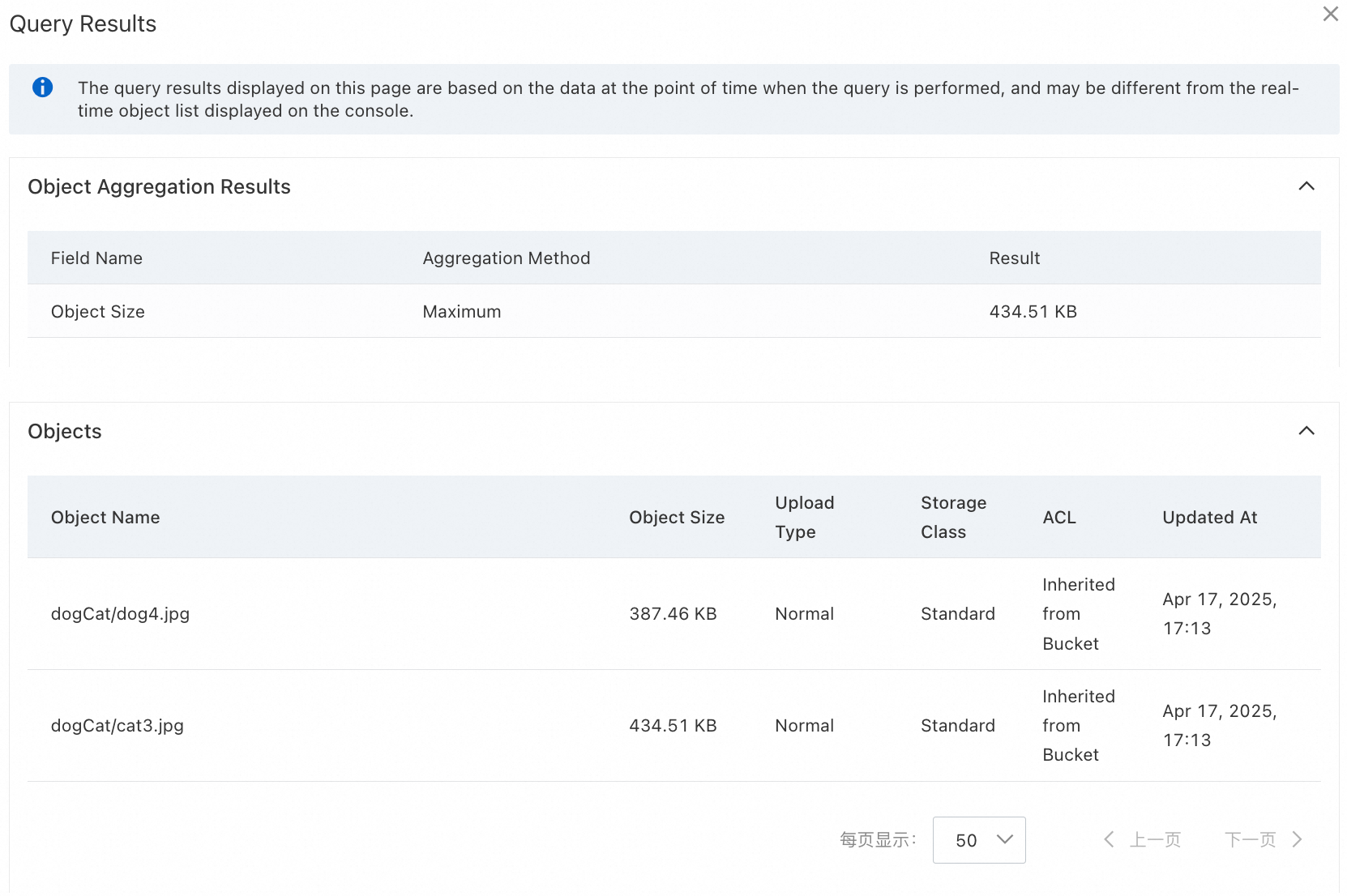
この例では、500 KB 未満で、2024 年 9 月 11 日 00:00 から 2024 年 9 月 12 日 00:00 の間に最終更新されたすべてのオブジェクトを検索します。結果はオブジェクトサイズの昇順で並べ替えられ、クエリは集計として最大のオブジェクトサイズを返します。
-
OSS コンソール にログインします。
-
左側のナビゲーションウィンドウで、バケット をクリックします。表示されたページで、対象のバケット名をクリックします。
左側のナビゲーションウィンドウで、 を選択します。
以下のパラメーターを設定し、他のパラメーターはデフォルト設定のままにします。
[最終更新日時] を 2024 年 9 月 11 日 00:00 から 2024 年 9 月 12 日 00:00 の範囲に設定します。
[オブジェクトサイズ] を 500 KB 未満に設定します。
[その他のフィルター条件] を展開します。
[オブジェクトの並べ替え順序] で、[オブジェクトサイズ] と [昇順] を選択します。
[データ集約] で、[オブジェクトサイズ] の [最大値] を選択します。
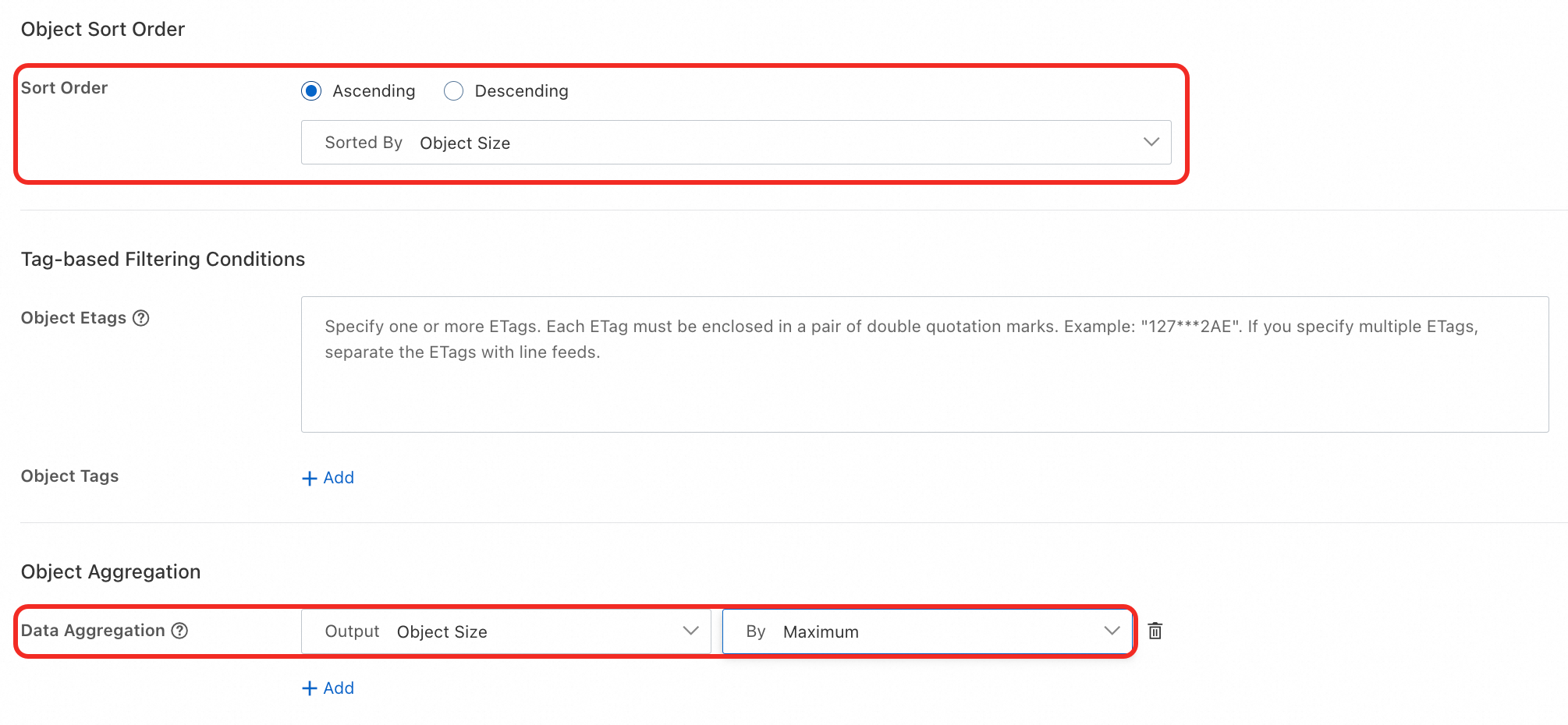
[クエリ] をクリックします。クエリ条件に一致するオブジェクトは 2 つあります。最大のオブジェクトは 434 KB です。
すべてのクエリ条件と出力設定の詳細については、「クエリ条件と出力設定」をご参照ください。
Alibaba Cloud SDK
以下のコード例は、MetaSearch 機能を使用して指定された条件を満たすオブジェクトをクエリする方法を示しています。
Java
その他のコード例については、「MetaSearch (Java SDK V1)」をご参照ください。
import com.aliyun.oss.*;
import com.aliyun.oss.common.auth.*;
import com.aliyun.oss.common.comm.SignVersion;
import com.aliyun.oss.model.*;
import java.util.ArrayList;
import java.util.List;

public class DoMetaQuery {
    public static void main(String[] args) throws Exception {
        // In this example, the endpoint of the China (Hangzhou) region is used.
        String endpoint = "https://oss-cn-hangzhou.aliyuncs.com";
        // Specify the name of the bucket. Example: examplebucket.
        String bucketName = "examplebucket";
        // Obtain access credentials from environment variables.
        // Before you run the sample code, make sure that the OSS_ACCESS_KEY_ID and OSS_ACCESS_KEY_SECRET environment variables are configured.
        EnvironmentVariableCredentialsProvider credentialsProvider = CredentialsProviderFactory.newEnvironmentVariableCredentialsProvider();
        // Specify the region in which the bucket is located. For example, if the bucket is located in the China (Hangzhou) region, set the region to cn-hangzhou.
        String region = "cn-hangzhou";

        // Create an OSSClient instance.
        // Call the shutdown method to release associated resources when the OSSClient instance is no longer used.
        ClientBuilderConfiguration clientBuilderConfiguration = new ClientBuilderConfiguration();
        clientBuilderConfiguration.setSignatureVersion(SignVersion.V4);
        OSS ossClient = OSSClientBuilder.create()
                .endpoint(endpoint)
                .credentialsProvider(credentialsProvider)
                .clientConfiguration(clientBuilderConfiguration)
                .region(region)
                .build();

        try {
            // Query objects that meet specific conditions and return objects based on specific fields and in the specified sorting order.
            int maxResults = 20;
            // Query objects that are smaller than 1,048,576 bytes in size, return up to 20 objects at a time, and sort the objects in ascending order.
            String query = "{\"Field\": \"Size\",\"Value\": \"1048576\",\"Operation\": \"lt\"}";
            String sort = "Size";
            DoMetaQueryRequest doMetaQueryRequest = new DoMetaQueryRequest(bucketName, maxResults, query, sort);
            Aggregation aggregationRequest = new Aggregation();
            Aggregations aggregations = new Aggregations();
            List<Aggregation> aggregationList = new ArrayList<Aggregation>();
            // Specify the name of the field that is used in the aggregate operation.
            aggregationRequest.setField("Size");
            // Specify the operator that is used in the aggregate operation. max indicates the maximum value.
            aggregationRequest.setOperation("max");
            aggregationList.add(aggregationRequest);
            aggregations.setAggregation(aggregationList);

            // Specify the aggregate operation.
            doMetaQueryRequest.setAggregations(aggregations);
            doMetaQueryRequest.setOrder(SortOrder.ASC);
            DoMetaQueryResult doMetaQueryResult = ossClient.doMetaQuery(doMetaQueryRequest);
            if(doMetaQueryResult.getFiles() != null){
                for(ObjectFile file : doMetaQueryResult.getFiles().getFile()){
                    System.out.println("Filename: " + file.getFilename());
                    // Query the ETag value that is used to identify the content of the object.
                    System.out.println("ETag: " + file.getETag());
                    // Query the access control list (ACL) of the object.
                    System.out.println("ObjectACL: " + file.getObjectACL());
                    // Query the type of the object.
                    System.out.println("OssObjectType: " + file.getOssObjectType());
                    // Query the storage class of the object.
                    System.out.println("OssStorageClass: " + file.getOssStorageClass());
                    // Query the number of tags of the object.
                    System.out.println("TaggingCount: " + file.getOssTaggingCount());
                    if(file.getOssTagging() != null){
                        for(Tagging tag : file.getOssTagging().getTagging()){
                            System.out.println("Key: " + tag.getKey());
                            System.out.println("Value: " + tag.getValue());
                        }
                    }
                    if(file.getOssUserMeta() != null){
                        for(UserMeta meta : file.getOssUserMeta().getUserMeta()){
                            System.out.println("Key: " + meta.getKey());
                            System.out.println("Value: " + meta.getValue());
                        }
                    }
                }
            } else if(doMetaQueryResult.getAggregations() != null){
                for(Aggregation aggre : doMetaQueryResult.getAggregations().getAggregation()){
                    // Query the field by which the aggregation is performed.
                    System.out.println("Field: " + aggre.getField());
                    // Query the aggregation operator.
                    System.out.println("Operation: " + aggre.getOperation());
                    // Query the result of the aggregate operation.
                    System.out.println("Value: " + aggre.getValue());
                    if(aggre.getGroups() != null && aggre.getGroups().getGroup().size() > 0){
                        // Query the value of the aggregation.
                        System.out.println("Groups value: " + aggre.getGroups().getGroup().get(0).getValue());
                        // Query the total number of the aggregations.
                        System.out.println("Groups count: " + aggre.getGroups().getGroup().get(0).getCount());
                    }
                }
            } else {
                System.out.println("NextToken: " + doMetaQueryResult.getNextToken());
            }
        } catch (OSSException oe) {
            System.out.println("Error Message:" + oe.getErrorMessage());
            System.out.println("Error Code:" + oe.getErrorCode());
            System.out.println("Request ID:" + oe.getRequestId());
            System.out.println("Host ID:" + oe.getHostId());
        } catch (ClientException ce) {
            System.out.println("Error Message: " + ce.getMessage());
        } finally {
            // Shut down the OSSClient instance.
            ossClient.shutdown();
        }
    }
}
Python
その他のコード例については、「MetaSearch」をご参照ください。
import argparse
import alibabacloud_oss_v2 as oss

# コマンドラインから引数を解析するためのコマンドラインパラメーターパーサーを作成します。
parser = argparse.ArgumentParser(description="do meta query sample")
parser.add_argument('--region', help='バケットが配置されているリージョン。', required=True)
parser.add_argument('--bucket', help='バケットの名前。', required=True)
parser.add_argument('--endpoint', help='他のサービスがOSSにアクセスするために使用できるドメイン名')

def main():
    # コマンドライン引数を解析します。
    args = parser.parse_args()

    # 環境変数からアクセス認証情報を取得します。
    credentials_provider = oss.credentials.EnvironmentVariableCredentialsProvider()

    # SDKのデフォルト構成を使用します。
    cfg = oss.config.load_default()
    # 認証情報プロバイダーを指定します。
    cfg.credentials_provider = credentials_provider
    # リージョンをコマンドラインから提供されたものに設定します。
    cfg.region = args.region
    # カスタムエンドポイントが提供されている場合、cfgオブジェクトのendpoint属性を提供されたエンドポイントで更新します。
    if args.endpoint is not None:
        cfg.endpoint = args.endpoint

    # OSSクライアントを作成します。
    client = oss.Client(cfg)

    # メタデータベースのクエリを実行します。
    result = client.do_meta_query(oss.DoMetaQueryRequest(
            bucket=args.bucket,  # クエリ対象のオブジェクトを格納しているバケット。
            meta_query=oss.MetaQuery(  # クエリ設定を指定します。
                aggregations=oss.MetaQueryAggregations(  # 集約を指定します。
                    aggregations=[  # 集約リスト。
                        oss.MetaQueryAggregation(  # 最初の集約: オブジェクトの合計サイズ。
                            field='Size',
                            operation='sum',
                        ),
                        oss.MetaQueryAggregation(  # 2番目の集約: 最大オブジェクトサイズ。
                            field='Size',
                            operation='max',
                        )
                    ],
                ),
                next_token='',  # ページネーショントークン。
                max_results=80369,  # 返される最大エントリ数。
                query='{"Field": "Size","Value": "1048576","Operation": "gt"}',  # クエリ条件。
                sort='Size',  # ソートフィールド。
                order=oss.MetaQueryOrderType.DESC,  # ソート順序。
            ),
    ))

    # 基本的な応答情報を表示します。
    print(f'status code: {result.status_code},'
          f' request id: {result.request_id},'
          # 次の行の1行以上をコメント解除して、詳細を表示できます。
          # f' files: {result.files},'
          # f' file: {result.files.file},'
          # f' file modified time: {result.files.file.file_modified_time},'
          # f' etag: {result.files.file.etag},'
          # f' server side encryption: {result.files.file.server_side_encryption},'
          # f' oss tagging count: {result.files.file.oss_tagging_count},'
          # f' oss tagging: {result.files.file.oss_tagging},'
          # f' key: {result.files.file.oss_tagging.taggings[0].key},'
          # f' value: {result.files.file.oss_tagging.taggings[0].value},'
          # f' key: {result.files.file.oss_tagging.taggings[1].key},'
          # f' value: {result.files.file.oss_tagging.taggings[1].value},'
          # f' oss user meta: {result.files.file.oss_user_meta},'
          # f' key: {result.files.file.oss_user_meta.user_metas[0].key},'
          # f' value: {result.files.file.oss_user_meta.user_metas[0].value},'
          # f' key: {result.files.file.oss_user_meta.user_metas[1].key},'
          # f' value: {result.files.file.oss_user_meta.user_metas[1].value},'
          # f' filename: {result.files.file.filename},'
          # f' size: {result.files.file.size},'
          # f' oss object type: {result.files.file.oss_object_type},'
          # f' oss storage class: {result.files.file.oss_storage_class},'
          # f' object acl: {result.files.file.object_acl},'
          # f' oss crc64: {result.files.file.oss_crc64},'
          # f' server side encryption customer algorithm: {result.files.file.server_side_encryption_customer_algorithm},'
          # f' aggregations: {result.aggregations},'
          f' field: {result.aggregations.aggregations[0].field},'
          f' operation: {result.aggregations.aggregations[0].operation},'
          f' field: {result.aggregations.aggregations[1].field},'
          f' operation: {result.aggregations.aggregations[1].operation},'
          f' next token: {result.next_token},'
    )

    # 一致したオブジェクトが見つかった場合、タグとユーザーメタデータを表示します。
    if result.files:
        if result.files.file.oss_tagging.taggings:
            for r in result.files.file.oss_tagging.taggings:
                print(f'result: key: {r.key}, value: {r.value}')
        if result.files.file.oss_user_meta.user_metas:
            for r in result.files.file.oss_user_meta.user_metas:
                print(f'result: key: {r.key}, value: {r.value}')
    # すべての集約を表示します。
    if result.aggregations.aggregations:
        for r in result.aggregations.aggregations:
            print(f'result: field: {r.field}, operation: {r.operation}')

if __name__ == "__main__":
    main()
Go
その他のコード例については、「MetaSearch (Go SDK V2)」をご参照ください。
package main
import (
"context"
"flag"
"fmt"
"log"
"github.com/aliyun/alibabacloud-oss-go-sdk-v2/oss"
"github.com/aliyun/alibabacloud-oss-go-sdk-v2/oss/credentials"
)
var (
region string // Specify a variable to store the region information obtained from the command lines.
bucketName string // Specify a variable to store the bucket name obtained from the command lines.
)
// The init function is executed before the main function to initialize the program.
func init() {
// Use a command line parameter to specify the region. By default, the parameter is an empty string.
flag.StringVar(®ion, "region", "", "The region in which the bucket is located.")
// Use a command line parameter to specify the bucket name. By default, the parameter is an empty string.
flag.StringVar(&bucketName, "bucket", "", "The name of the bucket.")
}
func main() {
flag.Parse() // Parse command line parameters.
// Check if the bucket name is specified. If not, the program outputs default parameters and terminates.
if len(bucketName) == 0 {
flag.PrintDefaults()
log.Fatalf("invalid parameters, bucket name required")
}
// Check if the region is specified. If not, the program outputs default parameters and terminates.
if len(region) == 0 {
flag.PrintDefaults()
log.Fatalf("invalid parameters, region required")
}
// Create and configure a client and use environment variables to pass the credential provider and the region.
cfg := oss.LoadDefaultConfig().
WithCredentialsProvider(credentials.NewEnvironmentVariableCredentialsProvider()).
WithRegion(region)
client := oss.NewClient(cfg) // Use the client configurations to create a new OSSClient instance.
// Create a DoMetaQuery request to query the objects that meet specific conditions.
request := &oss.DoMetaQueryRequest{
Bucket: oss.Ptr(bucketName), // Specify the name of the bucket.
MetaQuery: &oss.MetaQuery{
Query: oss.Ptr(`{"Field": "Size","Value": "1048576","Operation": "gt"}`), // Query objects whose size is larger than 1 MB.
Sort: oss.Ptr("Size"), // List the objects by size.
Order: oss.Ptr(oss.MetaQueryOrderAsc), // Sort the objects in ascending order.
},
}
result, err := client.DoMetaQuery(context.TODO(), request) // Execute the request to query the objects that meet the preceding conditions.
if err != nil {
log.Fatalf("failed to do meta query %v", err)
}
// Display the token used to query data on the next page.
fmt.Printf("NextToken:%s\n", *result.NextToken)
// Traverse the returned results and display the details of each object.
for _, file := range result.Files {
fmt.Printf("File name: %s\n", *file.Filename)
fmt.Printf("size: %d\n", file.Size)
fmt.Printf("File Modified Time:%s\n", *file.FileModifiedTime)
fmt.Printf("Oss Object Type:%s\n", *file.OSSObjectType)
fmt.Printf("Oss Storage Class:%s\n", *file.OSSStorageClass)
fmt.Printf("Object ACL:%s\n", *file.ObjectACL)
fmt.Printf("ETag:%s\n", *file.ETag)
fmt.Printf("Oss CRC64:%s\n", *file.OSSCRC64)
if file.OSSTaggingCount != nil {
fmt.Printf("Oss Tagging Count:%d\n", *file.OSSTaggingCount)
}
// Display the tags of the objects.
for _, tagging := range file.OSSTagging {
fmt.Printf("Oss Tagging Key:%s\n", *tagging.Key)
fmt.Printf("Oss Tagging Value:%s\n", *tagging.Value)
}
// Display the user metadata.
for _, userMeta := range file.OSSUserMeta {
fmt.Printf("Oss User Meta Key:%s\n", *userMeta.Key)
fmt.Printf("Oss User Meta Key Value:%s\n", *userMeta.Value)
}
}
}
PHP
その他のコード例については、「MetaSearch (PHP SDK V2)」をご参照ください。
<?php

// Import the autoloader file to ensure that dependency libraries can be correctly loaded.
require_once __DIR__ . '/../vendor/autoload.php';

use AlibabaCloud\Oss\V2 as Oss;

// Define the description of command line arguments.
$optsdesc = [
    "region" => ['help' => 'The region in which the bucket is located.', 'required' => True], // The region in which the bucket is located. This parameter is required.
    "endpoint" => ['help' => 'The domain names that other services can use to access OSS.', 'required' => False], // The endpoint that other services can use to access OSS. This parameter is optional.
    "bucket" => ['help' => 'The name of the bucket', 'required' => True], // The name of the bucket. This parameter is required.
];

// Convert the argument description to the long option format required by getopt.
// A colon (:) after each argument indicates that the argument requires a value.
$longopts = \array_map(function ($key) {
    return "$key:";
}, array_keys($optsdesc));

// Parse the command line arguments.
$options = getopt("", $longopts);

// Check whether the required arguments are specified.
foreach ($optsdesc as $key => $value) {
    if ($value['required'] === True && empty($options[$key])) {
        $help = $value['help']; // Obtain the help information of the argument.
        echo "Error: the following arguments are required: --$key, $help" . PHP_EOL;
        exit(1); // If a required argument is not specified, exit the program.
    }
}

// Extract values from the parsed arguments.
$region = $options["region"]; // The region in which the bucket is located.
$bucket = $options["bucket"]; // The name of the bucket.

// Load the credential information from environment variables.
// Use EnvironmentVariableCredentialsProvider to read the Access Key ID and Access Key Secret from environment variables.
$credentialsProvider = new Oss\Credentials\EnvironmentVariableCredentialsProvider();

// Use the default configurations of the SDK.
$cfg = Oss\Config::loadDefault();
$cfg->setCredentialsProvider($credentialsProvider); // Set the credential provider.
$cfg->setRegion($region); // Set the region in which the bucket is located.
if (isset($options["endpoint"])) {
    $cfg->setEndpoint($options["endpoint"]); // If an endpoint is provided, set the endpoint.
}

// Create an OSS client instance.
$client = new Oss\Client($cfg);

// Create a DoMetaQueryRequest object to perform a metadata query operation.
$request = new \AlibabaCloud\Oss\V2\Models\DoMetaQueryRequest(
    bucket: $bucket,
    metaQuery: new \AlibabaCloud\Oss\V2\Models\MetaQuery(
        maxResults: 5, // The maximum number of results to return.
        query: "{'Field': 'Size','Value': '1048576','Operation': 'gt'}", // Query condition: objects whose size is greater than 1 MB.
        sort: 'Size', // Sort by object size.
        order: \AlibabaCloud\Oss\V2\Models\MetaQueryOrderType::ASC, // Sort in ascending order.
        aggregations: new \AlibabaCloud\Oss\V2\Models\MetaQueryAggregations( // Aggregate operation
            aggregations: [
                new \AlibabaCloud\Oss\V2\Models\MetaQueryAggregation(
                    field: 'Size', // The object size field.
                    operation: 'sum' // Aggregate operation: sum.
                ),
                new \AlibabaCloud\Oss\V2\Models\MetaQueryAggregation(
                    field: 'Size', // The object size field.
                    operation: 'max' // Aggregate operation: maximum value.
                ),
            ]
        )
    )
);

// Perform the metadata query operation.
$result = $client->doMetaQuery($request);

// Print the result of the metadata query.
printf(
    'status code:' . $result->statusCode . PHP_EOL . // The HTTP status code. For example, 200 indicates that the request is successful.
    'request id:' . $result->requestId . PHP_EOL .   // The request ID, which is used to debug or track requests.
    'result:' . var_export($result, true) . PHP_EOL  // The query result, which contains the matched objects and their aggregate data.
);
ossutil の使用
コマンドラインツール ossutil を使用して、MetaSearch 機能により指定された条件を満たすオブジェクトをクエリできます。ossutil のインストール方法については、「ossutil のインストール」をご参照ください。
以下の例は、examplebucket バケット内で指定された条件を満たすオブジェクトをクエリする方法を示しています。
ossutil api do-meta-query --bucket examplebucket --meta-query "{\"MaxResults\":\"5\",\"Query\":\"{\\\"Field\\\": \\\"Size\\\",\\\"Value\\\": \\\"1048576\\\",\\\"Operation\\\": \\\"gt\\\"}\",\"Sort\":\"Size\",\"Order\":\"asc\",\"Aggregations\":{\"Aggregation\":[{\"Field\":\"Size\",\"Operation\":\"sum\"},{\"Field\":\"Size\",\"Operation\":\"max\"}]}}"このコマンドの詳細については、「do-meta-query」をご参照ください。
MetaSearch の無効化
この機能を無効にしても、OSS にすでに保存されているデータには影響しません。再度機能を有効にすると、システムは既存のファイルを再スキャンしてインデックスを再構築します。所要時間はバケット内のファイル数によって異なります。
課金は機能を無効にした後の 1 時間単位で停止します。請求書の生成が遅延する場合があるため、請求内容を確認してください。
OSS コンソール
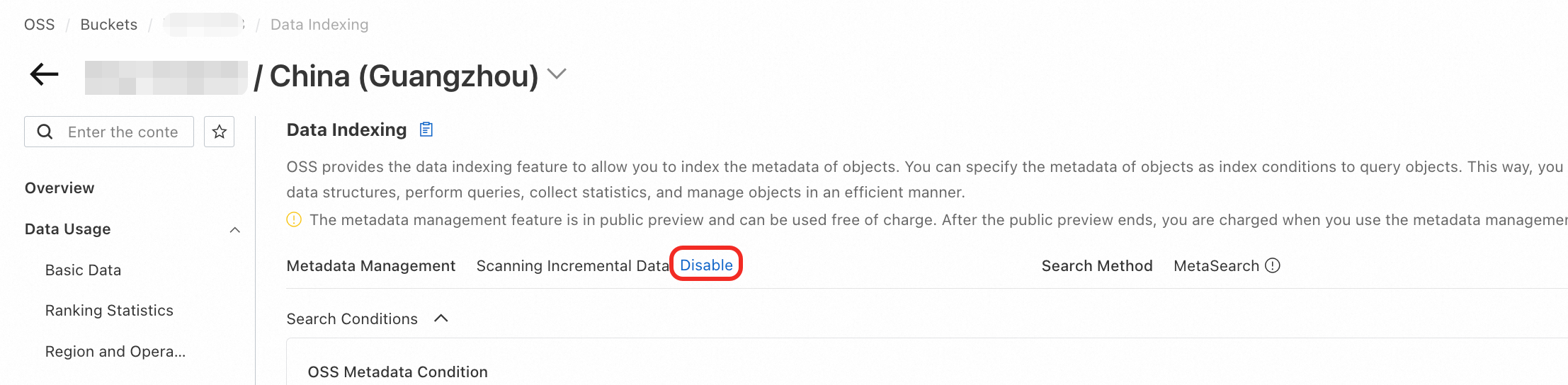
OSS コンソール にログインします。[メタデータ管理] の横にある [無効化] をクリックし、表示される指示に従って操作します。
Alibaba Cloud SDK
Java
その他のコード例については、「MetaSearch (OSS SDK for Java V1)」をご参照ください。
import com.aliyun.oss.*;
import com.aliyun.oss.common.auth.*;
import com.aliyun.oss.common.comm.SignVersion;

public class CloseMetaQuery {
    public static void main(String[] args) throws Exception {
        // In this example, the endpoint of the China (Hangzhou) region is used.
        String endpoint = "https://oss-cn-hangzhou.aliyuncs.com";
        // Specify the name of the bucket. Example: examplebucket.
        String bucketName = "examplebucket";
        // Obtain access credentials from environment variables.
        // Before you run the sample code, make sure that the OSS_ACCESS_KEY_ID and OSS_ACCESS_KEY_SECRET environment variables are configured.
        EnvironmentVariableCredentialsProvider credentialsProvider = CredentialsProviderFactory.newEnvironmentVariableCredentialsProvider();
        // Specify the region in which the bucket is located. For example, if the bucket is located in the China (Hangzhou) region, set the region to cn-hangzhou.
        String region = "cn-hangzhou";

        // Create an OSSClient instance.
        // Call the shutdown method to release associated resources when the OSSClient instance is no longer used.
        ClientBuilderConfiguration clientBuilderConfiguration = new ClientBuilderConfiguration();
        clientBuilderConfiguration.setSignatureVersion(SignVersion.V4);
        OSS ossClient = OSSClientBuilder.create()
                .endpoint(endpoint)
                .credentialsProvider(credentialsProvider)
                .clientConfiguration(clientBuilderConfiguration)
                .region(region)
                .build();

        try {
            // Disable the MetaSearch feature for the bucket.
            ossClient.closeMetaQuery(bucketName);
        } catch (OSSException oe) {
            System.out.println("Error Message:" + oe.getErrorMessage());
            System.out.println("Error Code:" + oe.getErrorCode());
            System.out.println("Request ID:" + oe.getRequestId());
            System.out.println("Host ID:" + oe.getHostId());
        } catch (ClientException ce) {
            System.out.println("Error Message: " + ce.getMessage());
        } finally {
            // Shut down the OSSClient instance.
            if(ossClient != null){
                ossClient.shutdown();
            }
        }
    }
}
Python
その他のコード例については、「MetaSearch」をご参照ください。
import argparse
import alibabacloud_oss_v2 as oss

# コマンドライン引数を処理するための ArgumentParser オブジェクトを作成します。
parser = argparse.ArgumentParser(description="close meta query sample")
parser.add_argument('--region', help='The region in which the bucket is located.', required=True)
parser.add_argument('--bucket', help='The name of the bucket.', required=True)
parser.add_argument('--endpoint', help='The domain names that other services can use to access OSS')

def main():
    # コマンドライン引数を解析します。
    args = parser.parse_args()

    # 環境変数からアクセス認証情報を取得します。
    credentials_provider = oss.credentials.EnvironmentVariableCredentialsProvider()

    # SDK のデフォルト構成を使用します。
    cfg = oss.config.load_default()
    # 認証情報プロバイダーを、環境変数から取得した認証情報プロバイダーに設定します。
    cfg.credentials_provider = credentials_provider
    # 構成内のリージョンを、コマンドラインで指定されたものに設定します。
    cfg.region = args.region
    # カスタムエンドポイントが指定されている場合、cfg オブジェクトの endpoint 属性を指定されたエンドポイントで更新します。
    if args.endpoint is not None:
        cfg.endpoint = args.endpoint

    # OSS クライアントを作成します。
    client = oss.Client(cfg)

    # close_meta_query メソッドを呼び出して、指定されたバケットのメタデータクエリ機能を無効化します。
    result = client.close_meta_query(oss.CloseMetaQueryRequest(
            bucket=args.bucket,
    ))

    # HTTP ステータスコードとリクエスト ID を表示します。
    print(f'status code: {result.status_code}, request id: {result.request_id}')

# スクリプトが直接実行されたときに main 関数を呼び出します。
if __name__ == "__main__":
    main()
Go
その他のコード例については、「MetaSearch (OSS SDK for Go V2)」をご参照ください。
package main
import (
"context"
"flag"
"log"
"github.com/aliyun/alibabacloud-oss-go-sdk-v2/oss"
"github.com/aliyun/alibabacloud-oss-go-sdk-v2/oss/credentials"
)
var (
region string // Specify a variable to store the region information obtained from the command lines.
bucketName string // Specify a variable to store the bucket name obtained from the command lines.
)
// The init function is executed before the main function to initialize the program.
func init() {
// Use a command line parameter to specify the region.
flag.StringVar(®ion, "region", "", "The region in which the bucket is located.")
// Use a command line parameter to specify the bucket name.
flag.StringVar(&bucketName, "bucket", "", "The name of the bucket.")
}
func main() {
flag.Parse() // Parse command line parameters.
// Check if the bucket name is specified. If not, the program outputs default parameters and terminates.
if len(bucketName) == 0 {
flag.PrintDefaults()
log.Fatalf("invalid parameters, bucket name required") // Log the error message and terminate the program.
}
// Check if the region is specified. If not, the program outputs default parameters and terminates.
if len(region) == 0 {
flag.PrintDefaults()
log.Fatalf("invalid parameters, region required") // Log the error message and terminate the program.
}
// Create and configure a client and use environment variables to pass the credential provider and the region.
cfg := oss.LoadDefaultConfig().
WithCredentialsProvider(credentials.NewEnvironmentVariableCredentialsProvider()).
WithRegion(region)
client := oss.NewClient(cfg) // Create a new OSSClient instance.
// Create a CloseMetaQuery request to disable the metadata management feature for the bucket.
request := &oss.CloseMetaQueryRequest{
Bucket: oss.Ptr(bucketName), // Specify the name of the bucket.
}
result, err := client.CloseMetaQuery(context.TODO(), request) // Execute the request.
if err != nil {
log.Fatalf("failed to close meta query %v", err) // If an error occurs, record the error message and exit the program.
}
log.Printf("close meta query result:%#v\n", result)
}PHP
その他のコード例については、「MetaSearch (OSS SDK for PHP V2)」をご参照ください。
<?php

// Import the autoloader file to ensure that dependency libraries can be correctly loaded.
require_once __DIR__ . '/../vendor/autoload.php';

use AlibabaCloud\Oss\V2 as Oss;

// Define the description of command line arguments.
$optsdesc = [
    "region" => ['help' => 'The region in which the bucket is located.', 'required' => True], // The region in which the bucket is located. This parameter is required.
    "endpoint" => ['help' => 'The domain names that other services can use to access OSS.', 'required' => False], // The endpoint that other services can use to access OSS. This parameter is optional.
    "bucket" => ['help' => 'The name of the bucket', 'required' => True], // The name of the bucket. This parameter is required.
];

// Convert the argument description to the long option format required by getopt.
// A colon (:) after each argument indicates that the argument requires a value.
$longopts = \array_map(function ($key) {
    return "$key:";
}, array_keys($optsdesc));

// Parse the command line arguments.
$options = getopt("", $longopts);

// Check whether the required arguments are specified.
foreach ($optsdesc as $key => $value) {
    if ($value['required'] === True && empty($options[$key])) {
        $help = $value['help']; // Obtain the help information of the argument.
        echo "Error: the following arguments are required: --$key, $help" . PHP_EOL;
        exit(1); // If a required argument is not specified, exit the program.
    }
}

// Extract values from the parsed arguments.
$region = $options["region"]; // The region in which the bucket is located.
$bucket = $options["bucket"]; // The name of the bucket.

// Load the credential information from environment variables.
// Use EnvironmentVariableCredentialsProvider to read the Access Key ID and Access Key Secret from environment variables.
$credentialsProvider = new Oss\Credentials\EnvironmentVariableCredentialsProvider();

// Use the default configurations of the SDK.
$cfg = Oss\Config::loadDefault();
$cfg->setCredentialsProvider($credentialsProvider); // Set the credential provider.
$cfg->setRegion($region); // Set the region in which the bucket is located.
if (isset($options["endpoint"])) {
    $cfg->setEndpoint($options["endpoint"]); // If an endpoint is provided, set the endpoint.
}

// Create an OSS client instance.
$client = new Oss\Client($cfg);

// Create a CloseMetaQueryRequest object to disable the retrieval feature for the bucket.
$request = new \AlibabaCloud\Oss\V2\Models\CloseMetaQueryRequest(
    bucket: $bucket
);

// Execute the operation to disable the retrieval feature.
$result = $client->closeMetaQuery($request);

// Print the result of disabling the retrieval feature.
printf(
    'status code:' . $result->statusCode . PHP_EOL . // The HTTP status code. For example, 200 indicates that the request is successful.
    'request id:' . $result->requestId . PHP_EOL     // The request ID, which is used to debug or track requests.
);
ossutil
以下の例は、examplebucket バケットに対して MetaSearch 機能を無効化する方法を示しています。
ossutil api close-meta-query --bucket examplebucketこのコマンドの詳細については、「close-meta-query」をご参照ください。
クエリ条件と出力設定
クエリ条件
以下のクエリ条件を個別または組み合わせて使用できます。
出力設定
結果を並べ替えたり、簡単な統計分析を実行したりできます。
オブジェクトの並べ替え順序:最終更新時刻、オブジェクト名、オブジェクトサイズのいずれかで、昇順、降順、またはデフォルトの順序で並べ替えられます。
データ集約:クエリ結果に対して、ユニークアイテムのカウント、グループ化とカウント、最大値または最小値の検索、平均値の計算、合計値の算出などの計算を実行できます。
関連 API
上記の操作は、基盤となる API 上に構築されています。さらにカスタマイズが必要な場合は、直接 REST API リクエストを送信できますが、署名の計算コードを手動で記述する必要があります。
メタデータ管理機能を有効にする方法については、「OpenMetaQuery」をご参照ください。
指定された条件を満たすファイルをクエリする方法については、「DoMetaQuery」をご参照ください。
メタデータ管理機能を無効にする方法については、「CloseMetaQuery」をご参照ください。
課金
MetaSearch の料金は、以下の 2 つの要素で構成されています。
MetaSearch 機能料金
これらはオブジェクトメタデータの管理料金であり、OSS データインデックスの標準料金に基づいて課金されます。詳細については、「データインデックス料金」をご参照ください。
API リクエスト料金
API リクエスト料金は、増分ファイルのインデックス更新中に発生します。API 呼び出し回数に基づいて課金されます。これらの料金が発生する API リクエストは次のとおりです。
アクション
API
回数
バケット内のオブジェクトのインデックス作成
HeadObject および GetObject
オブジェクトごとに 1 回呼び出されます
タグ付きオブジェクトのインデックス作成
GetObjectTag
タグ付きオブジェクトごとに 1 回呼び出されます
カスタムメタデータ付きオブジェクトのインデックス作成
GetObjectMeta
カスタムメタデータ付きオブジェクトごとに 1 回呼び出されます
シンボリックリンクのインデックス作成
GetSymlink
シンボリックリンクごとに 1 回呼び出されます
バケット内のオブジェクトのスキャン
ListObjects
スキャンされるオブジェクト 1,000 個ごとに 1 回呼び出されます
OSS API リクエスト料金の詳細については、「リクエスト料金」をご参照ください。
これらの課金を停止するには、MetaSearch を無効化してください。
よくある質問
大規模バケットでのデータインデックス構築が遅い
インデックス作成レートは、1 秒あたり約 600 個の増分オブジェクトです。バケット内のオブジェクト数に基づいて、必要な総時間を推定できます。
プレフィックス別のオブジェクトサイズの合計をクエリする
-
OSS コンソール にログインします。
-
左側のナビゲーションウィンドウで、バケット をクリックします。表示されたページで、対象のバケット名をクリックします。
左側のナビゲーションウィンドウで、 を選択します。
[オブジェクト名] をプレフィックス一致に設定し、プレフィックスとして
random_files/を入力します。他のパラメーターはデフォルト設定のままにします。
[検索結果の設定] を構成します。
[オブジェクトの並べ替え順序] で、[デフォルト] を選択します。
[データ集約] で、[オブジェクトサイズ] の [合計] を選択します。

[今すぐクエリ] をクリックします。結果には、
random_files/プレフィックスを持つすべてのオブジェクトの合計サイズが表示されます。
関連ドキュメント
MetaSearch は、最終更新時刻、ストレージクラス、アクセス制御リスト、ファイルサイズなど、複数のフィルター条件をサポートしています。OSS バケット内の特定の時間範囲内のオブジェクトをフィルターする方法については、「OSS 内で指定された時間範囲内のファイルをフィルターする方法」をご参照ください。