すべてのプロダクト
Search
ドキュメントセンター

Object Storage Service:チュートリアル:IPC のセマンティック検索

最終更新日:May 07, 2026

OSS のデータインデックス機能を使用して、インターネットプロトコルカメラ (IPC) デバイスから取得した動画向けのインテリジェントなセマンティック検索システムを構築します。このシステムにより、収集した動画に対してセマンティック検索を実行でき、スマートセキュリティなどのシナリオに最適です。

説明

IPC シナリオ - コンテンツ認識価格電卓 を使用して、本ソリューションで使用する AI コンテンツ認識機能の想定コストを試算できます。(Alibaba Cloud アカウントにログインしていない場合は、ログイン後に再度リンクをクリックしてください。)

ソリューション概要

インテリジェントなセマンティック検索システムの構築には、次の 2 つのステップが含まれます。

  1. バケットの作成と動画のアップロード:IPC デバイスからの生動画ファイルを保存するためのバケットを作成します。その後、処理対象の動画をアップロードします。これらの動画は、検索のソースデータとなります。

  2. AISearch 機能の有効化:バケットに対して AISearch 機能を有効化します。これにより、自然言語による記述を用いたインテリジェント検索が可能になります。

ソリューションのメリット

  • セマンティック検索:自然言語による記述や複数の条件を用いた高精度な検索が可能です。複雑なシナリオにおいても、特定のビデオフレームを迅速に特定できます。

  • マルチモーダル検索:動画、画像、テキストなどさまざまなデータの型に対して、統一された管理および検索機能を提供します。これにより、技術的な複雑さや運用・保守 (O&M) コストを削減できます。

  • 水平方向へのスケーリング:OSS は無制限の容量とスケーラビリティを提供します。そのため、大規模なデータ増加にも容易に対応できます。

1. バケットの作成と動画のアップロード

  1. OSS コンソール にログインします。

  2. バケット ページで、バケットの作成 をクリックします。

  3. バケットの作成 ページで、バケット名を入力します。ビジネスに関連する名前(例:ipc-videos-oss-metaquery-demo)を使用してください。その他のパラメーターはデフォルト設定のままにしてかまいません。

  4. [OK] をクリックします。成功ページで、バケットに移動 をクリックします。

  5. オブジェクト ページで、アップロード > ファイルの選択 をクリックします。アップロードする動画ファイル(例:videoA.mp4videoB.mp4、および videoC.mp4)を選択します。その他のパラメーターはデフォルト設定のままにし、アップロード をクリックします。

  6. (オプション) アップロード済みの動画ファイルにタグを追加します。対象ファイルの **[操作]** 列で、more > [タグ] を選択します。表示されるダイアログボックスで、キーと値のペアを追加します。たとえば、インデックス作成時のフィルター条件として使用するために、キーを need-seek、値を true に設定できます。また、クエリ時のフィルター条件として使用するために、キーを camera、値を camera-a に設定することもできます。OK をクリックします。タグを使用することで、インデックス作成時および検索時により正確なフィルタリングが可能になります。

2. AISearch 機能の有効化

バケットに対して AISearch 機能を有効化し、自然言語による記述や複数の条件を用いた動画の高精度検索を可能にします。

  1. 左側のナビゲーションウィンドウで、オブジェクト管理 > データのインデックス作成 を選択します。

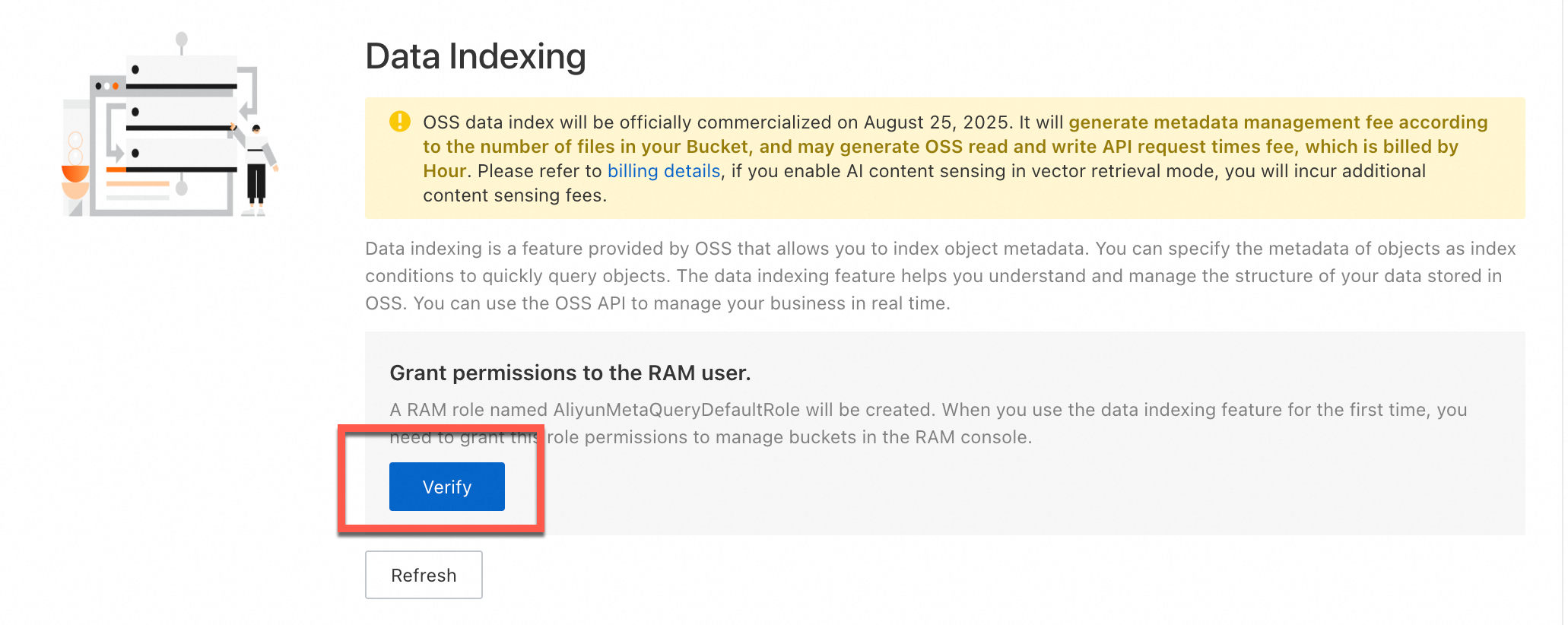
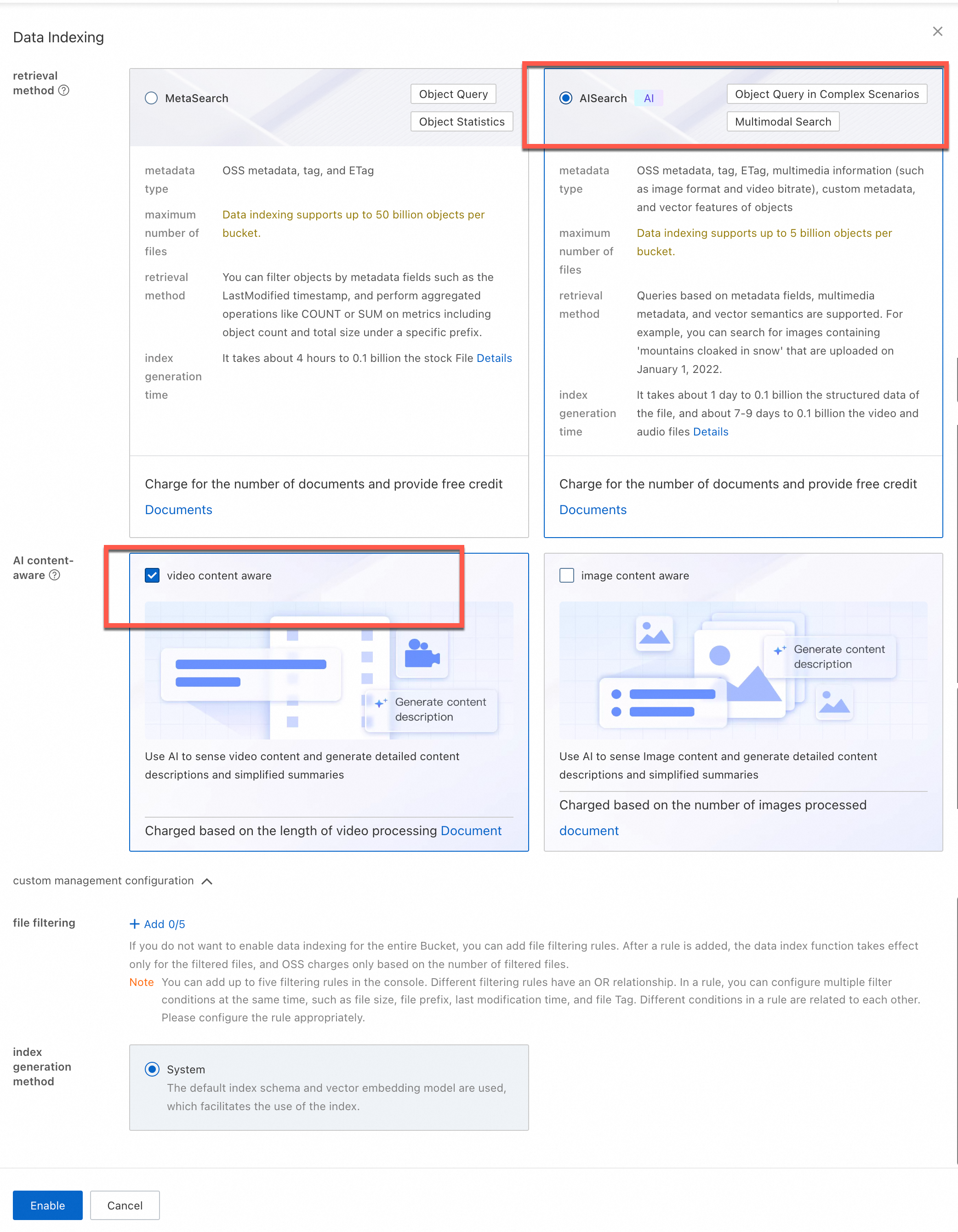
  2. データのインデックス作成 ページで、データインデックス機能を初めて使用する場合は、画面上の指示に従って、OSS がバケット内のデータを管理できるように AliyunMetaQueryDefaultRole ロールの権限を付与します。権限を付与した後、[データインデックスの有効化] をクリックし、ベクトル検索 を選択します。

  3. (オプション)AI コンテンツ認識:必要に応じて、[画像コンテンツ認識] または [動画コンテンツ認識] を選択します。

  4. (オプション)ファイルフィルタールール:特定のルールに一致するファイルに対してのみ AI 分析を実行するように設定します。最大 5 つのファイルフィルタールールを設定できます。プレフィックス、ファイルサイズ、タグ、LastModifiedTime によるフィルタリングがサポートされています。たとえば、キーが need-seek、値が true のタグフィルタールールを追加します。設定後、このタグを持つファイルのみがインデックス作成対象となります。

    説明

    ファイルフィルタリングを有効化した場合、データインデックス (AISearch) およびコンテンツ認識機能の課金は、フィルタリング後のファイル数に基づいて行われます。

  5. [有効化] をクリックします。

説明

メタデータインデックスの構築には時間がかかります。所要時間はバケット内のオブジェクト数によって異なります。時間がかかる場合は、ページをリフレッシュして有効化ステータスを確認できます。

image

image

結果の検証

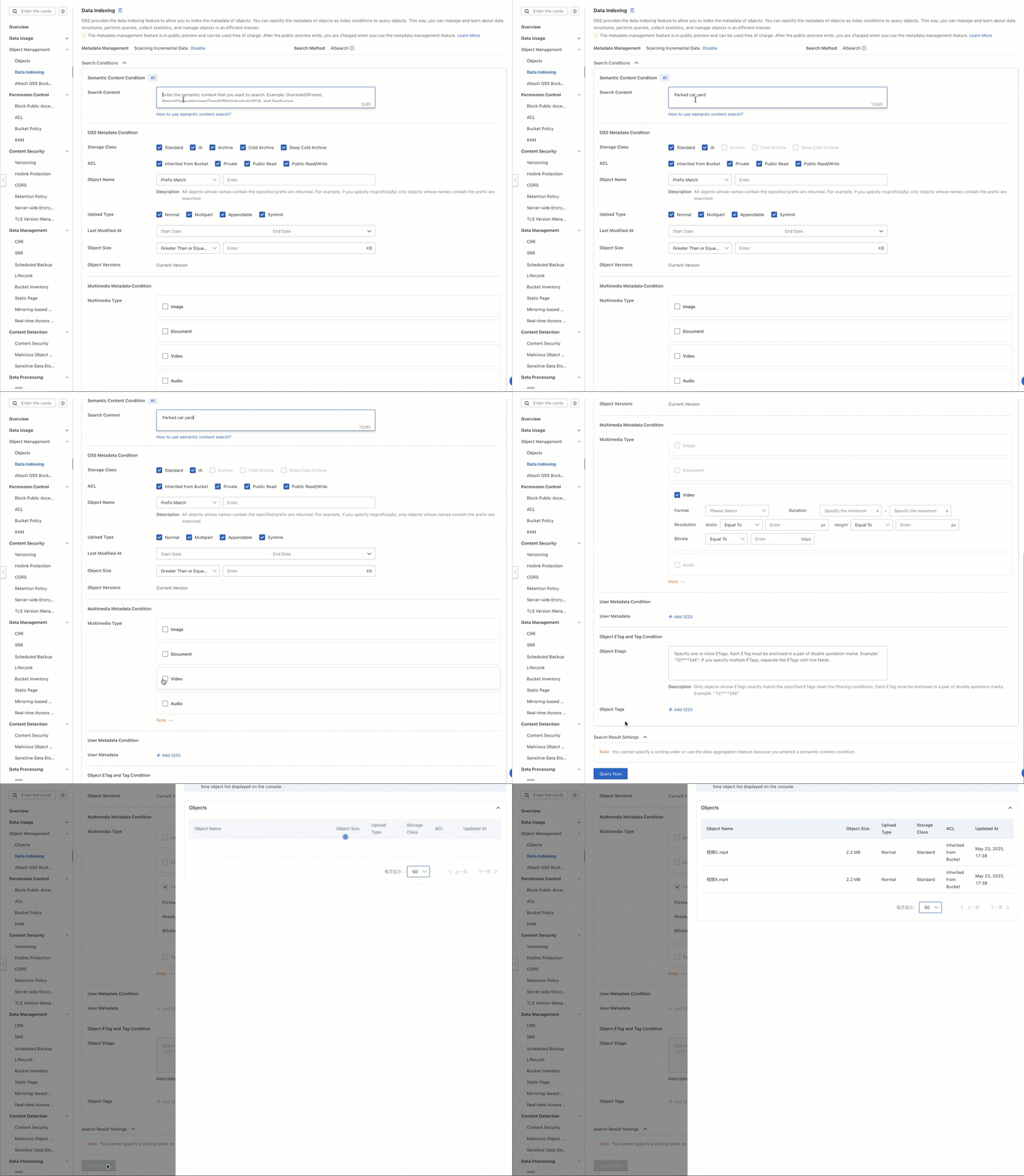
駐車中の車がある中庭 などの記述的なフレーズを入力すると、その記述に一致する関連動画がシステムから返されます。

  1. バケット ページで、ご利用のバケット名をクリックします。

  2. オブジェクト ページで、動画がアップロードされていることを確認します。

  3. 左側のナビゲーションウィンドウで、オブジェクト管理 > データのインデックス作成 を選択します。

  4. データのインデックス作成 ページで、検索ボックスに 駐車中の車がある中庭 を入力します。メディア種類 セクションで、video チェックボックスをオンにします。

  5. (オプション) [オブジェクトタグ付け] セクションで、キーを camera、値を camera-a に設定します。これにより、camera=camera-a のタグを持つ動画のみが返され、他のすべての動画はフィルタリングされます。

  6. 今すぐ検索 をクリックします。

  7. クエリ結果からファイルパスをコピーします。オブジェクト ページに戻り、ファイルパスを検索ボックスに貼り付けて検索します。これで、記述に一致する動画を確認できます。

2025-05-23_16-41-02 (1)

本番環境に適用

この機能を本番環境に統合する際は、以下の点を考慮してください。

本番データのインジェスト

一般的なビジネスシナリオでは、IPC などの監視デバイスが継続的に大量の動画データを生成します。安定性と適時性を確保し、システム全体の可用性およびリアルタイム処理能力を向上させるため、OSS SDK を統合して、録画された動画セグメントを指定されたバケットにリアルタイムでアップロードすることを推奨します。

次の例は、OSS Python SDK の Upload Manager を使用して動画ファイルをアップロードする方法を示しています。

コード例

import argparse
import alibabacloud_oss_v2 as oss
from alibabacloud_oss_v2.models import ListObjectsRequest, PutObjectTaggingRequest, Tagging, TagSet, Tag, PutObjectRequest
import os

def upload_video(client, bucket, video_config):
    """Upload a video."""
    try:
        # Check if the file exists.
        if not os.path.exists(video_config['path']):
            print(f'File does not exist: {video_config["path"]}')
            return False

        # Create an uploader object.
        uploader = client.uploader()

        # Execute the upload request - pass the filepath parameter correctly.
        result = uploader.upload_file(
            filepath=video_config['path'],  # Add the filepath parameter.
            request=PutObjectRequest(
                bucket=bucket,
                key=video_config['key']
            )
        )

        print(f'Successfully uploaded {video_config["key"]}:')
        print(f'status code: {result.status_code},'
              f' request id: {result.request_id}')
        return True
    except Exception as e:
        print(f'Failed to upload {video_config["key"]}: {str(e)}')
        return False

def main():
    # OSS configuration.
    args = argparse.Namespace(
        region='cn-beijing',
        bucket='ipc-videos-oss-metaquery-demo',
        endpoint='https://oss-cn-beijing.aliyuncs.com'
    )

    # Configure the OSS client.
    credentials_provider = oss.credentials.EnvironmentVariableCredentialsProvider()
    cfg = oss.config.load_default()
    cfg.credentials_provider = credentials_provider
    cfg.region = args.region
    cfg.endpoint = args.endpoint
    client = oss.Client(cfg)

    # Video file configurations, including different tags.
    videos = [
        {
            'path': '<Your-Path>/videoa.mp4',
            'key': 'videoa.mp4'
        },
        {
            'path': '<Your-Path>/videob.mp4',
            'key': 'videob.mp4'
        },
        {
            'path': '<Your-Path>/videoc.mp4',
            'key': 'videoc.mp4'
        }
    ]

    # Upload all videos.
    for video in videos:
        print(f"\nStart uploading video: {video['key']}")
        upload_video(
            client=client,
            bucket=args.bucket,
            video_config=video
        )

if __name__ == "__main__":
    main()

検索機能の統合

本番環境では、コンソールでの手動操作を避け、バックエンドサービスに検索機能を統合することを推奨します。OSS SDK を使用して自動化された呼び出しを実行できます。

次のコード例は、OSS MetaQuery 仕様に準拠した XML リクエストを構築して検索結果を取得する方法を示しています。

コード例

# -*- coding: utf-8 -*-
import argparse
import alibabacloud_oss_v2 as oss
# Parse the XML response.
import xml.etree.ElementTree as ET
import json 
from datetime import datetime 

def get_search_conditions():
    """Get the user's multi-conditional input."""
    print("Enter a semantic description (example: a yard with a parked car)")
    query = input("> Semantic keywords: ").strip()
    while not query:
        print("Semantic keywords cannot be empty!")
        query = input("> Semantic keywords: ").strip()
    return query  

def build_metaquery_xml(query):
    """Build a MetaQuery XML that complies with the OSS specification."""
    xml_parts = [f'<Query>{query}</Query>']
    # Add the MediaTypes tag. Here, it is hard-coded as video.
    xml_parts.append('<MediaTypes><MediaType>video</MediaType></MediaTypes>')

    meta_query_xml = f'''<MetaQuery>
    {"".join(xml_parts)}
</MetaQuery>'''
    return meta_query_xml  # Encode into a UTF-8 byte stream.


def format_result(key, pre_url):
    """Format a single search result."""
    return f""" File path: {key}
 File URL: {pre_url}
-----------------------"""

def semantic_search():
    # Directly assign command-line arguments.
    args = argparse.Namespace(
        region = 'cn-beijing',  # Replace with your region.
        bucket = 'ipc-videos-oss-metaquery-demo',  # Replace with your bucket name.
        endpoint = 'https://oss-cn-beijing.aliyuncs.com',  # Replace with your endpoint. You can leave it empty or delete it if not needed.
    )

    # Initialize the OSS client.
    credentials = oss.credentials.EnvironmentVariableCredentialsProvider()
    cfg = oss.config.load_default()
    cfg.credentials_provider = credentials
    cfg.region = args.region
    if args.endpoint:
        cfg.endpoint = args.endpoint
    client = oss.Client(cfg)

    # Get user input.
    query = get_search_conditions()  # Get only the query.
    # Build the request.
    try:
        # Construct the request body (XML data).
        data_str = build_metaquery_xml(query)

        # Define the operation input.
        req = oss.OperationInput(
            op_name='DoMetaQuery',  # Custom action name.
            method='POST',            # HTTP method.
            parameters={              # Query parameters.
                'metaQuery': '',
                'mode': 'semantic',
                'comp': 'query',
            },
            headers=None,             # Custom request header (optional).
            body=data_str.encode("utf-8"),  # Request body (encoded as a UTF-8 byte stream).
            bucket=args.bucket,       # Destination bucket name.
        )

        # Call the generic interface to execute the operation.
        resp = client.invoke_operation(req)

    except oss.exceptions.ServiceError as e:
        print(f" Server-side error: {e.message}")
        return
    
    root = ET.fromstring(resp.http_response.content.decode('utf-8'))
     # Find all File elements.
    files = root.findall('.//File')
    
    print(f"\n Found {len(files)} matching results:")


    for i, file in enumerate(files, 1):
        print(f"\nFile {i}:")

        # Extract and print various properties.
        uri_element = file.find('URI')
        uri = uri_element.text if uri_element is not None else 'N/A'
        print(f"  URI: {uri}")

        key_element = file.find('Filename')
        key = key_element.text if key_element is not None else 'N/A'
        print(f"  File name: {key}")

        size_element = file.find('Size')
        size = size_element.text if size_element is not None else 'N/A'
        print(f"  Size: {size}")

        modified_time_element = file.find('FileModifiedTime')
        modified_time = modified_time_element.text if modified_time_element is not None else 'N/A'
        print(f"  Last modified: {modified_time}")

        content_type_element = file.find('ContentType')
        content_type = content_type_element.text if content_type_element is not None else 'N/A'
        print(f"  ContentType: {content_type}")

        media_type_element = file.find('MediaType')
        media_type = media_type_element.text if media_type_element is not None else 'N/A'
        print(f"  MediaType: {media_type}")

        # You can add extraction and printing for more properties as needed, such as ImageHeight, ImageWidth, OSSStorageClass, etc.
        # image_height_element = file.find('ImageHeight')
        # image_height = image_height_element.text if image_height_element is not None else 'N/A'
        # print(f"  ImageHeight: {image_height}")

        # Generate a signed URL (if needed).
        if key != 'N/A': # Generate a URL only if the file name exists.
             try:
                pre_url = client.presign(
                    oss.GetObjectRequest(
                        bucket=args.bucket,  # Specify the bucket name.
                        key=key,        # Specify the object key.
                    )
                )
                print(f"  File URL (signed URL): {pre_url.url}")
             except Exception as e:
                 print(f"  Failed to generate signed URL: {e}")


        print("-" * 20) # Separator.
        
if __name__ == "__main__":
    semantic_search()

プログラムを実行後、駐車中の車がある中庭 などの記述的なフレーズを入力してクエリを実行できます。これにより、データインデックスから記述に一致する検索結果が返され、URL を使用して動画の詳細を確認できます。

Found 1 matching result:

File 1:
  URI: oss://ipc-videos-oss-metaquery-demo/videoA.mp4
  File name: videoA.mp4
  Size: 2311252
  Last modified: 2025-05-23T17:38:10+08:00
  ContentType: video/mp4
  MediaType: video
  File URL (signed URL): https://ipc-videos-oss-metaquery-demo.oss-cn-beijing.aliyuncs.com/%E8%A7%86%E9%A2%91A.mp4?x-oss-signature-version=OSS4-HMAC-SHA256&x-oss-date=20250523T094511Z&x-oss-expires=900&x-oss-credential=LTAI********************%2F20250523%2Fcn-beijing%2Foss%2Faliyun_v4_request&x-oss-signature=0bf38092c42a179ff0e8334c8bea3fd92f5a78599038e816e2ed3e02755542af
--------------------

タグフィルタリングの設定

大量の動画データを扱う場合、パスのみによるファイル管理では、検索や分類の効率が低下することがあります。OSS のオブジェクトタグ付け機能を使用することを推奨します。ビジネス要件(カメラ ID や地理的リージョンなど)に基づいて、ファイルにキーと値のタグを追加することで、データを迅速にフィルタリングおよび分類できます。

ここでは、システム内で次の 3 つの動画ファイルを分析すると仮定します。videoA.mp4videoB.mp4、および videoC.mp4

videoA.mp4

videoB.mp4

videoC.mp4

example

example (1)

example

中庭の動画で、camera-a で撮影されたものとしてマークされています

販売店の動画で、camera-b で撮影されたものとしてマークされています

中庭の動画で、video A と内容が類似しており、camera-c で撮影されたものとしてマークされています

タグはファイルのアップロード時に設定するか、アップロード後に動的に管理することで、さまざまなビジネスシナリオの要件に対応できます。

アップロード時のタグ設定

動画ファイルのアップロード時にタグを設定することで、アップロード操作とタグ管理を同時に行い、データ管理の効率を向上させることができます。

次の例は、OSS Python SDK の Upload Manager を使用して動画ファイルをアップロードし、同時にタグを設定する方法を示しています。

コード例

import argparse
import alibabacloud_oss_v2 as oss
from alibabacloud_oss_v2.models import PutObjectRequest
import os

def upload_video_with_tags(client, bucket, video_config):
    """Upload a video with tags."""
    try:
        # Check if the file exists.
        if not os.path.exists(video_config['path']):
            print(f'File does not exist: {video_config["path"]}')
            return False

        # Create an uploader object.
        uploader = client.uploader()

        # Use the tagging string directly (encoding is not required if both key and value are simple strings).
        tagging_str = f"camera={video_config['camera_tag']}"

        # Execute the upload request - include tags directly.
        result = uploader.upload_file(
            filepath=video_config['path'],
            request=PutObjectRequest(
                bucket=bucket,
                key=video_config['key'],
                tagging=tagging_str
            )
        )

        print(f'Successfully uploaded {video_config["key"]}:')
        print(f'status code: {result.status_code},'
              f' request id: {result.request_id}')
        print(f'Tags added: {tagging_str}')
        return True
    except Exception as e:
        print(f'Failed to upload {video_config["key"]}: {str(e)}')
        return False


def main():
    # OSS configuration.
    args = argparse.Namespace(
        region='cn-beijing',
        bucket='ipc-videos-oss-metaquery-demo',
        endpoint='https://oss-cn-beijing.aliyuncs.com'
    )

    # Configure the OSS client.
    credentials_provider = oss.credentials.EnvironmentVariableCredentialsProvider()
    cfg = oss.config.load_default()
    cfg.credentials_provider = credentials_provider
    cfg.region = args.region
    cfg.endpoint = args.endpoint
    client = oss.Client(cfg)

    # Video file configurations, including different tags.
    videos = [
        {
            'path': '<Your-Path>/videoa.mp4',
            'key': 'videoa.mp4',
            'camera_tag': 'camera-a'
        },
        {
            'path': '<Your-Path>/videob.mp4',
            'key': 'videob.mp4',
            'camera_tag': 'camera-b'
        },
        {
            'path': '<Your-Path>/videoc.mp4',
            'key': 'videoc.mp4',
            'camera_tag': 'camera-c'
        }
    ]

    # Upload all videos and add tags.
    for video in videos:
        print(f"\nStart uploading video: {video['key']}")
        upload_video_with_tags(
            client=client,
            bucket=args.bucket,
            video_config=video
        )


if __name__ == "__main__":
    main()
アップロード後のタグ管理

ファイルがすでにアップロード済みの場合でも、いつでもタグを追加または変更できます。これにより、データタグの動的メンテナンスと精度が保証されます。

次の例は、Python SDK を使用して関連インターフェイスを呼び出し、タグを追加する方法を示しています。

コード例

import argparse
import alibabacloud_oss_v2 as oss
from alibabacloud_oss_v2.models import GetObjectTaggingRequest, PutObjectTaggingRequest, Tagging, TagSet, Tag


def apply_tags_to_frame(client, bucket, frame_key, tags):
    """Add tags to a video."""
    try:
        # Build the tagging object.
        tagging = Tagging(
            version=1,
            tag_set=TagSet(tags=tags)
        )
        
        # Create a request to update tags.
        put_tag_request = PutObjectTaggingRequest(
            bucket=bucket,
            key=frame_key,
            tagging=tagging
        )
        
        # Update object tags.
        result = client.put_object_tagging(put_tag_request)
        
        # Convert tags to a string for printing.
        tags_str = '&'.join([f"{tag.key}={tag.value}" for tag in tags])
        print(f"Successfully added tags to {frame_key}: {tags_str}")
        return True
    except Exception as e:
        print(f"Failed to add tags: {str(e)}")
        return False

def frame_tags():
    # OSS configuration.
    args = argparse.Namespace(
        region='cn-beijing',   
        frame_bucket='ipc-videos-oss-metaquery-demo',     
        endpoint='https://oss-cn-beijing.aliyuncs.com'
    )
    
    # Configure the OSS client.
    credentials_provider = oss.credentials.EnvironmentVariableCredentialsProvider()
    cfg = oss.config.load_default()
    cfg.credentials_provider = credentials_provider
    cfg.region = args.region
    cfg.endpoint = args.endpoint
    client = oss.Client(cfg)

    # Configure your video names.
    videos = [
        'videoa.mp4',    
        'videob.mp4',
        'videoc.mp4'
    ]

    # Process each video.
    for video_filename in videos:
        print(f"\nStart processing tags for video {video_filename}") # Print the originally extracted file name.

        # Remove the file name extension, for example, 'videoa.mp4' -> 'videoa'.
        # The sample code extracts the last character of the video file name as the camera identifier. This is for reference only. You can add tags based on your actual business requirements.
        video_name_base = video_filename.split('.')[0] if '.' in video_filename else video_filename
        tags = [
            Tag(key='camera', value=f'camera-{video_name_base[-1].lower()}' if video_name_base else 'camera-unknown'),
            # Tag(key='category', value='video_monitoring')       # Add actual business category information.
        ]

        # Add tags to the video.
        apply_tags_to_frame(client, args.frame_bucket, video_filename, tags)

        print(f"Finished processing tags for video {video_filename}\n") # Print the originally extracted file name.

if __name__ == "__main__":
    frame_tags()
タグフィルタリングと検索の組み合わせ

次の例は、OSS Python SDK を使用して、セマンティック理解とタグフィルタリングを組み合わせたクエリリクエストを開始する方法を示しています。

コード例

# -*- coding: utf-8 -*-
import argparse
import alibabacloud_oss_v2 as oss
# Parse the XML response.
import xml.etree.ElementTree as ET
import json
from datetime import datetime
# --- New import ---
from alibabacloud_oss_v2.models import GetObjectTaggingRequest
# --- End of new import ---

def get_inputs():
    """Get the user's semantic query (required) and filter conditions (optional)."""
    # 1. Get the required semantic query.
    print(" Enter a semantic description (example: a yard with a parked car)")
    query = input("> Semantic keywords: ").strip()
    while not query:
        print(" Semantic keywords cannot be empty!")
        query = input("> Semantic keywords: ").strip()

    conditions = [] # Initialize the list of filter conditions.
    target_tag = None # --- Used to store the target tag ---

    # 2. Get the optional tag filter.
    print("\n (Optional) Enter a tag filter condition (will be used for client-side filtering, example: camera=camera-a, press Enter to skip)") 
    tag_input = input("> Tag (format key=value): ").strip()
    if tag_input:
        if '=' in tag_input:
            # conditions.append({
            #     'field': 'Tags',
            #     'value': tag_input,
            #     'op': 'eq'
            # })
            target_tag = tag_input
            print(f" Info: The tag '{target_tag}' will be used for client-side filtering after results are retrieved.")
        else:
             print(" Incorrect tag format. Ignored. Please use the 'key=value' format.")

    # --- Return target_tag ---
    return query, conditions, target_tag

def build_metaquery_xml(query, conditions):
    """Build a MetaQuery XML that complies with the OSS specification (includes semantic query and optional filters)."""
    # Always include the semantic query part.
    xml_parts = [f'<Query>{query}</Query>']
    
    # Add media type restriction.
    xml_parts.append('<MediaTypes><MediaType>video</MediaType></MediaTypes>')
    
    # Add optional filter conditions - in semantic mode, only some fields are supported (such as Filename here).
    for cond in conditions:
        # In semantic mode, skip building SimpleQuery for the Tags field (although we no longer add Tags to conditions, this is kept just in case).
        if cond['field'] == 'Tags':
            continue

        json_query = json.dumps({
            "Field": cond['field'],
            "Value": cond['value'],
            "Operation": cond['op']
        }, ensure_ascii=False)
        xml_parts.append(f'<SimpleQuery>{json_query}</SimpleQuery>')

    # Combine into a complete MetaQuery XML.
    meta_query_xml = f'''<MetaQuery>
    {"".join(xml_parts)}
</MetaQuery>'''
    return meta_query_xml

def format_result(key, pre_url):
    """Format a single search result."""
    return f""" File URL: {pre_url}
 File path: {key}
-----------------------"""

def perform_search():
    # Directly assign command-line arguments.
    args = argparse.Namespace(
        region='cn-beijing',  # Replace with your region.
        bucket='ipc-videos-oss-metaquery-demo',  # Replace with your bucket name.
        endpoint='https://oss-cn-beijing.aliyuncs.com',  # Replace with your endpoint.
    )

    # Initialize the OSS client.
    credentials = oss.credentials.EnvironmentVariableCredentialsProvider()
    cfg = oss.config.load_default()
    cfg.credentials_provider = credentials
    cfg.region = args.region
    if args.endpoint:
        cfg.endpoint = args.endpoint
    client = oss.Client(cfg)

    # Get user input (semantic query + optional conditions + target tag).
    query, conditions, target_tag = get_inputs()

    # Build the request.
    try:
        # Construct the request body (XML data).
        # --- Pass only conditions (without Tags) ---
        data_str = build_metaquery_xml(query, conditions)

        # Define the operation input.
        req = oss.OperationInput(
            op_name='DoMetaQuery',
            method='POST',
            parameters={
                'metaQuery': '',
                'mode': 'semantic', # <-- Re-add semantic mode.
                'comp': 'query',
            },
            headers=None,
            body=data_str.encode("utf-8"),
            bucket=args.bucket,
        )

        # Call the generic interface to execute the operation.
        print("\n Sending DoMetaQuery request...")
        resp = client.invoke_operation(req)
        print(f"\n Request successful, HTTP status code: {resp.http_response.status_code}")
    except oss.exceptions.ServiceError as e:
        print(f" Server-side error (ServiceError): {e.message}")
        print(f"   - HTTP Status Code: {e.status_code}")
        print(f"   - Error Code: {e.error_code}")
        print(f"   - Request ID: {e.request_id}")
        return
    except oss.exceptions.ClientError as e: # Add catch for client errors.
        print(f" Client or network error (ClientError): {e.message}")
        return
    except Exception as e: # Catch other possible exceptions.
        print(f" Unknown error: {e}")
        import traceback
        traceback.print_exc() # Print the full traceback.
        return


    # Parse and process the results...
    final_results_count = 0 # --- New: Counter to tally the final qualifying results ---
    try:
        root = ET.fromstring(resp.http_response.content.decode('utf-8'))
        # Find all File elements.
        files = root.findall('.//File')

        print(f"\n Retrieved {len(files)} initial matches from OSS. Starting client-side tag filtering...")

        if not files:
            # Check for NextContinuationToken, paging may be required.
            next_token_elem = root.find('.//NextContinuationToken')
            if next_token_elem is not None and next_token_elem.text:
                print(" Note: There may be more results. The current implementation does not handle paging.")
            print("\n No initial matches found.")
            return # Return early if no files are found.


        for i, file in enumerate(files, 1):
            # Get the file name.
            key_element = file.find('Filename')
            if key_element is None:
                print(f" Warning: The {i}-th initial result is missing the Filename field. Skipped.")
                continue
            key = key_element.text

            # --- Client-side tag filtering ---
            if target_tag:
                try:
                    tagging_req = GetObjectTaggingRequest(bucket=args.bucket, key=key)
                    tagging_resp = client.get_object_tagging(tagging_req)
                    # Check if the returned tag set contains the target tag.
                    tag_found = False
                    target_k, target_v = target_tag.split('=', 1)

                    if tagging_resp.tag_set and tagging_resp.tag_set.tags: # Use .tags
                        for tag in tagging_resp.tag_set.tags: # Use .tags

                            if tag.key == target_k and tag.value == target_v:
                                tag_found = True
                                break
                    if not tag_found:
                        continue # Tag does not match, skip this file.
                except oss.exceptions.ServiceError as tag_err:
                     if tag_err.status_code == 404 and tag_err.error_code == 'NoSuchTagSet':
                         continue
                     else:
                        print(f" Warning: Error getting tags for file '{key}': {tag_err.error_code} - {tag_err.message}. Skipped.")
                        continue
                except Exception as tag_e:
                    print(f" Warning: Unknown error occurred while getting or processing tags for file '{key}': {tag_e}. Skipped.")
                    # --- Add traceback for debugging ---
                    import traceback
                    traceback.print_exc()
                    # --- End of addition ---
                    continue
            # --- End of client-side tag filtering ---

            # --- If it passes the tag filter (or if no tag filter is set), process and print the result ---
            final_results_count += 1 # Increment the final result counter.
            print(f"\n[{final_results_count}] File '{key}' matches all conditions:") # Print the final result number.

            # Generate a signed URL.
            try:
                pre_url = client.presign(
                    oss.GetObjectRequest(
                        bucket=args.bucket,
                        key=key,
                    )
                )
                print(format_result(key, pre_url.url))
            except Exception as presign_e:
                print(f" Warning: Error generating signed URL for file '{key}': {presign_e}")
                print(format_result(key, "[Could not generate URL]"))
        # --- Print final statistics after the loop ---
        print(f"\n Client-side filtering complete. Found {final_results_count} final matching results.")

    except ET.ParseError as xml_e:
        print(f" Error: Failed to parse OSS response XML - {xml_e}")
    except Exception as parse_e:
        print(f" Error: An unexpected error occurred while processing results - {parse_e}")


if __name__ == "__main__":
    perform_search()

プログラムを実行後、駐車中の車がある中庭を含む動画をフィルタリングできます。

  1. 記述フィールドに、次の検索キーワードを入力します:駐車中の車がある中庭

  2. 次のタグフィルター条件を設定します:camera = camera-a

この例では、video A と video C の両方に 駐車中の車がある中庭 という記述に一致するシーンが含まれています。ただし、camera-a でマークされた動画のみを返すようにタグフィルターを設定しているため、最終的な検索結果には video A のみが含まれます。

Sending DoMetaQuery request...

Request successful, HTTP status code: 200

Retrieved 2 initial matches from OSS. Starting client-side tag filtering...

[1] File 'videoA.mp4' matches all conditions:
 File URL: https://ipc-videos-oss-metaquery-demo.oss-cn-beijing.aliyuncs.com/%E8%A7%86%E9%A2%91A.mp4?x-oss-signature-version=OSS4-HMAC-SHA256&x-oss-date=20250526T054908Z&x-oss-expires=900&x-oss-credential=LTAI********************%2Fcn-beijing%2Foss%2Faliyun_v4_request&x-oss-signature=01bbf29790763d8e0f177d4cb0469cb00ae1c69d565219edb3866f75110b37ab
 File path: videoA.mp4
-----------------------

 Client-side filtering complete. Found 1 final matching result.