wan3.0 シリーズは、音声付き動画生成、マルチモーダル参照、動画編集を全面的に強化したオールインワンの動画生成モデルです。1 回で最大 30 秒、30 fps の動画を生成し、会話、BGM、効果音をネイティブに出力します。1 リクエストあたり最大 20 件のマルチモーダル参照素材(画像、動画、音声、文書、Web ページ)に対応し、最初のフレームまたは最初と最後のフレームの指定、動画の編集と延長も可能です。
プロンプトの書き方は wan3.0 動画生成 Prompt ガイドを参照してください。
適用範囲
- 対応モデルはリージョンごとに異なり、リソースはリージョン間で独立しています。利用可能なモデルは Model Studio コンソールで確認してください。
- 呼び出し前に API キーを取得して設定し、環境変数に設定してください。呼び出し時は
{WorkspaceId}を実際のワークスペース ID に置き換えます。 - モデル、エンドポイント URL、API キーは同じリージョンのものを使用してください。リージョンをまたぐ呼び出しは失敗します。
注記コード例はシンガポールリージョン用です。
モデルの機能
wan3.0-video / wan3.0-video-prime は、モデル名を切り替えずに以下のすべてのタスクに対応するオールインワンモデルです。type フィールド(input.media 内)とプロンプトの意図に基づいて自動的に処理を振り分けます。
注記各タスクで使用できる type は以下の表の値のみです。異なるタスクの type は混在できません。たとえば、最初と最後のフレームを指定するモードでは first_frame と last_frame のみ使用でき、reference_audio などは同時に指定できません。詳しくは素材の組み合わせを参照してください。
タスクの種類 | 指定方法 | 使用上の注意 | |
|---|---|---|---|
テキストから動画 |
| 解像度、アスペクト比、長さを自由に設定できます | |
画像から動画 | 最初のフレームから動画 |
|
|
最初と最後のフレームから動画 |
|
| |
マルチモーダル参照 | 画像参照 |
| 最大 10 枚、各 20 MB 以下 |
動画参照 |
| 最大 5 本、合計 15 秒以下、各ファイル 100 MB 以下 | |
音声参照 |
| 最大 5 本、合計 15 秒以下、各ファイル 15 MB 以下 | |
組み合わせ参照 |
| 画像/動画/音声の 3 種類を任意に組み合わせて参照できます
| |
ファイル/Web ページを参照して動画生成 |
| 文書/Web ページの内容を解析して動画を生成 文書と Web リンクはログイン不要で公開アクセス可能なもののみ対応 | |
動画編集 |
| 要素の追加/削除/変更、スタイル変換、照明編集、会話編集。 | |
動画の延長 |
| 前/後/両方向に延長。 | |
プロンプトのヒント
プロンプトの改善に役立つ Wan 3.0 プロンプト最適化 Skill を提供しています。
Skill のダウンロード:wan3-pe.zip(ダウンロード後に解凍)
使用方法:AI チャット欄に /wan3-pe とプロンプトを入力すると改善を開始します。例:
/wan3-pe Refine the prompt based on the Skill. Prompt: A cat running on the grass.
主な機能
テキストから動画
メディアを入力せず、プロンプトのみで動画を生成します。最大 30 秒のマルチショットの物語に対応し、同期した会話、BGM、効果音もネイティブに自動生成します。
- 単一ショットと複数ショットの絵コンテ形式に対応します(1 ショット 4~6 秒、タイムスタンプ付き)。
- 音声付き動画:会話、環境音、BGM をネイティブに生成し、後から音声を付ける必要はありません。
- スマート長さ:
durationを-1に設定すると、適切な長さが自動的に推奨されます。
パラメーター設定:resolution=480P/720P/1080P(デフォルト)、ratio=21:9/16:9/4:3/1:1/3:4/9:16、duration=2~30 秒または -1(スマート長さ)。
プロンプト例 2
物語のあらすじ
鮮やかな未来の荒野を舞台にした、乾いたユーモアと不条理に満ちた「給油」事件。ルート 66 を思わせる忘れられたガソリンスタンドで、退屈そうな店員が、本物の馬に乗ったクールなカウガールという奇妙な客を迎える。道を通りかかった変人だと思った矢先、彼女は給油機に直行し、ノズルを手に取り、新鮮な草で馬に「満タン給油」する。そのシュールな光景に、経験豊かな店員は完全な認知的不協和に陥る。
シーンと照明の美学
映像スタイル:写実的で、彩度と明度の高い映画的カラーグレーディング。日差しの明るさを感じさせ、不条理な物語がごく普通の、むしろ心地よい環境で展開する。
色彩:明るい「ティール&オレンジ」を厳密に守る。
ティール:雲のない空は澄んだ明るい青(ティール寄り)。スタンドの建物は少し色あせたレトロな黄・オレンジ・青。給油機は色あせたレトロな赤。
オレンジ:ひび割れた乾いたオレンジ色の大地。遠くの山は暖かなテラコッタ色。カウガールのスカーフまたは上着はオレンジ。
人物と舞台:
カウガール:クールで無口。つば広のカウボーイハット、丈夫なワークブーツとジーンズ。長旅のほこりが服に付いている。
馬:本物の馬。落ち着いていて普通の毛色。すべてに慣れているかのように振る舞う。
店員:油で汚れた青いつなぎ、巨大な黒いサングラス。つまようじをくわえて椅子にだらしなく寄りかかる。この映像のリアクションショットの中心人物。
スタンド:典型的なルート 66 スタイル。隣に小さな売店があり、入口に色あせたコーラの自販機。レトロなアメリカらしさに満ちている。
- カメラワークの説明
カメラのスタイルは「冷静な観察 & 不条理なクローズアップ」:
固定のミディアムショットとゆっくりした横移動を多用し、感情を誘導せず、冷静で客観的な視点から出来事を記録する。
不条理な行動の決定的な瞬間に、ノズルから草が出る瞬間や店員の驚いた表情へ突然の極端なクローズアップを挿入し、急激な拡大で笑いを生む。
- ショットごとの説明
0~8 秒:序章 — 退屈な午後
固定のワイドな導入ショット。青空、風、ほこり。少し色あせた黄・オレンジ・青のレトロなスタンドが道路脇にぽつんと立つ。入口ではサングラスの店員が椅子でうたた寝している。風の音しか聞こえないほど静か。
ロングショット。地平線に馬に乗ったカウガールがゆっくり現れ、静寂を破る。
ミディアムショット。ひづめの音で起きた店員がサングラスを直し、いら立った様子で起き上がって奇妙な組み合わせを見る。口のつまようじが動き、顔には「また道を聞く客か」と書いてある。
8~16 秒:展開 — 大まじめなでたらめ
カウガールは無言で素早く馬を降り、馬を引いて古い給油機へ直行する。馬は慣れた様子で給油機に頭を伸ばす。
店員の主観ショット(軽い魚眼)。サングラス越しの視界を再現し、女性と馬の組み合わせがいっそう奇妙に見える。彼女が本当に給油ノズルを手に取る。
クローズアップ。店員は眉をひそめ、自分をからかっていると思う。サングラスを外し、怒鳴ろうとする。
スローモーションのクローズアップ。サングラスを外した瞬間、彼女がノズルを馬の口に向け、引き金を引くのを見る。
16~24 秒:クライマックス — 認識が崩壊する瞬間
[究極の対比]:
クローズアップ。給油ノズルからガソリンではなく、露をまとった新鮮な緑の草が勢いよく噴き出す!
極端なクローズアップ。呆然とする店員の顔に素早く切り替える。目は皿のように見開かれ、口は少し開き、つまようじは静止する。この 1 秒で世界観が砕けたかのように表情が固まる。
ミディアムショット。馬は幸せそうに草を食べ、満足げに目を細め、力強くしっぽを振る。舞い上がったほこりが、横で固まっている店員の顔に直撃する。
24~30 秒:結末 — 風の中のほこりと呆然
草が「満タン」になる。彼女はノズルを戻し、ポケットから小銭を出して売店入口へ歩き、カウンターの缶にチャリンと落とす。
まだ石のように固まった店員を振り返り、帽子のつばの下で口元がわずかに上がる。
[究極の静止画]:彼女は馬に乗り、遠くへ去る。
カメラはゆっくり店員へ寄る。顔にほこりをかぶり、外したサングラスを握ったまま呆然とした姿勢を保ち、ようやくつまようじがカチッと口から落ちる。
存在の危機に陥った顔で静止。つまようじが風に転がる音だけが響く、不条理な沈黙で映画が終わる。
プロンプト例 3
30 秒の 3D アニメーション短編。ダークファンタジー、ワンショット、薄暗い石造りの室内。冷ややかで際立って美しい男性。紫の瞳、銀のメッシュが乱れた墨色がかった青い髪、暗い結晶の角、青白い肌。額とこめかみは濃紫の星の魔法のルーンで覆われている。黒い絹のシャツに極夜の青の錦織りの立ち襟トレンチコート、左耳には暗い銀とアメジストのイヤーカフ。
シーン:夜の冷たい白い月光を硬いキーライトとし、高コントラストのローキー照明、正面斜めからの光。背景にぼやけた 2 人の姿と暖かな黄色い炎が揺れ、青い幻想的なちりが空気中を漂う。
カメラ:わずかなハイアングルのミディアムクローズアップ。浅い被写界深度で左側の人物に焦点を固定し、独白中にゆっくり目線の高さまで上げる。
動作:男性は斜めに立ち、うつむいて軽蔑の笑みを浮かべ、手のひらを一瞥してカメラへ向き直る。顔を上げ、冷たく魅力的な声で「Ripe enough for the void.」と言う。左手の指を 5 本広げると、暗い影の星雲の渦が手のひらに集まり、「Your soul, a mere spark for me to extinguish.」と言う。突然拳を握り、星雲が爆発して濃紫の霧と青い星のかけらに散る。最後に暗紫のグラデーションの爪をわずかに伸ばしながら残酷に笑う。
虚空の共鳴とエネルギー爆発の効果音を添え、全編で若い英語話者の悪役の声を使用。
Python SDK
重要以下のコードを実行する前に、DashScope Python SDK を 1.26.2.1 以降に更新してください。手順は SDK のインストールを参照してください。
import os
from http import HTTPStatus
from dashscope import VideoSynthesis
import dashscope

dashscope.base_http_api_url = 'https://{WorkspaceId}.ap-southeast-1.maas.aliyuncs.com/api/v1'
api_key = os.getenv("DASHSCOPE_API_KEY", "YOUR_API_KEY")

print('please wait...')
rsp = VideoSynthesis.call(
    api_key=api_key,
    model='wan3.0-video',
    prompt='A 20-second ultra-widescreen plush universe adventure clip, featuring ultra-fine plush textures throughout, cinematic space scale, a contrast between cute appearances and intense action, exaggerated FPV camera movements, and realistic soft-body physics. A spaceship made of plush fabric, buttons, zippers, and stuffing cotton carries three small plush animals — a rabbit, a fox, and a crow — fleeing at high speed through a universe composed of giant yarn planets, fluffy nebulae, and puppet giant beasts. A massive interstellar whale beast covered in deep blue long fur with eyes like two glass buttons chases the ship from within the nebula. The dynamics include the zipper ship launching via catapult, high-speed orbiting around a yarn planet, the giant whale bursting out from behind, navigating through a button asteroid belt, being swallowed by the whale beast, escaping through a golden zipper on its back, the whale slowly deflating as if losing its stuffing cotton, and finally flying through a pink-purple fluffy nebula toward a colorful button sun.',
    resolution="480P",
    ratio="adaptive",
    duration=20,
    prompt_extend=True)
print(rsp)
if rsp.status_code == HTTPStatus.OK:
    print("video_url:", rsp.output.video_url)
else:
    print('Failed, status_code: %s, code: %s, message: %s' % (rsp.status_code, rsp.code, rsp.message))
Java SDK
重要以下のコードを実行する前に、DashScope Java SDK を 2.22.31 以降に更新してください。手順は SDK のインストールを参照してください。
// Copyright (c) Alibaba, Inc. and its affiliates.

import com.alibaba.dashscope.aigc.videosynthesis.VideoSynthesis;
import com.alibaba.dashscope.aigc.videosynthesis.VideoSynthesisParam;
import com.alibaba.dashscope.aigc.videosynthesis.VideoSynthesisResult;
import com.alibaba.dashscope.exception.ApiException;
import com.alibaba.dashscope.exception.InputRequiredException;
import com.alibaba.dashscope.exception.NoApiKeyException;
import com.alibaba.dashscope.utils.Constants;
import com.alibaba.dashscope.utils.JsonUtils;

public class Text2Video {

    static {
        Constants.baseHttpApiUrl = "https://{WorkspaceId}.ap-southeast-1.maas.aliyuncs.com/api/v1";
    }

    static String apiKey = System.getenv("DASHSCOPE_API_KEY");

    public static void syncCall() {
        VideoSynthesis videoSynthesis = new VideoSynthesis();
        VideoSynthesisParam param =
                VideoSynthesisParam.builder()
                        .apiKey(apiKey)
                        .model("wan3.0-video")
                        .prompt("20秒超宽银幕毛绒宇宙冒险片段,整体采用超精细毛绒材质、电影级太空尺度、可爱外形与强烈动作反差、夸张FPV运镜和真实软体物理。一艘由毛绒布、纽扣、拉链与填充棉制成的宇宙飞船,载着兔子、狐狸和乌鸦三只小型毛绒动物,在由巨大毛线行星、绒毛星云和布偶巨兽组成的宇宙中高速逃亡。")
                        .resolution("480P")
                        .ratio("adaptive")
                        .duration(20)
                        .promptExtend(true)
                        .build();
        VideoSynthesisResult result = null;
        try {
            System.out.println("---sync call, please wait a moment----");
            result = videoSynthesis.call(param);
        } catch (ApiException | NoApiKeyException e) {
            throw new RuntimeException(e.getMessage());
        } catch (InputRequiredException e) {
            throw new RuntimeException(e);
        }
        System.out.println(JsonUtils.toJson(result));
    }

    public static void main(String[] args) {
        syncCall();
    }
}
curl
手順 1:タスクを作成してタスク ID を取得curl --location 'https://{WorkspaceId}.ap-southeast-1.maas.aliyuncs.com/api/v1/services/aigc/video-generation/video-synthesis' \
-H 'X-DashScope-Async: enable' \
-H "Authorization: Bearer $DASHSCOPE_API_KEY" \
-H 'Content-Type: application/json' \
-d '{
"model": "wan3.0-video",
"input": {
"prompt": "A 20-second ultra-widescreen plush universe adventure clip, featuring ultra-fine plush textures throughout, cinematic space scale, a contrast between cute appearances and intense action, exaggerated FPV camera movements, and realistic soft-body physics. A spaceship made of plush fabric, buttons, zippers, and stuffing cotton carries three small plush animals — a rabbit, a fox, and a crow — fleeing at high speed through a universe composed of giant yarn planets, fluffy nebulae, and puppet giant beasts. A massive interstellar whale beast covered in deep blue long fur with eyes like two glass buttons chases the ship from within the nebula. The dynamics include the zipper ship launching via catapult, high-speed orbiting around a yarn planet, the giant whale bursting out from behind, navigating through a button asteroid belt, being swallowed by the whale beast, escaping through a golden zipper on its back, the whale slowly deflating as if losing its stuffing cotton, and finally flying through a pink-purple fluffy nebula toward a colorful button sun."
},
"parameters": {
"resolution": "480P",
"ratio": "adaptive",
"duration": 20,
"prompt_extend": true
}
}'
curl -X GET 'https://{WorkspaceId}.ap-southeast-1.maas.aliyuncs.com/api/v1/tasks/{task_id}' \
    -H "Authorization: Bearer $DASHSCOPE_API_KEY"
画像から動画(最初のフレーム/最初と最後のフレーム)
first_frame/last_frame で動画の最初または最後の画像を厳密に指定し、参照画像をピクセルレベルで再現します。開始と終了のフレームを正確に制御したい場合に適しています。
- 最初のフレームから動画:画像を最初のフレームとして渡すと、続く動きが生成されます。
- 最初と最後のフレームから動画:両方を指定すると、その間の動きが自動生成されます。
- 音声付き動画を出力できます。会話と効果音はプロンプトで指定できます。
パラメーター設定:ratio は adaptive を推奨(入力画像のアスペクト比に自動適合)、duration=2~30 秒または -1。
| 機能 | 入力プロンプト | 入力する最初または最後のフレーム | 出力動画 |
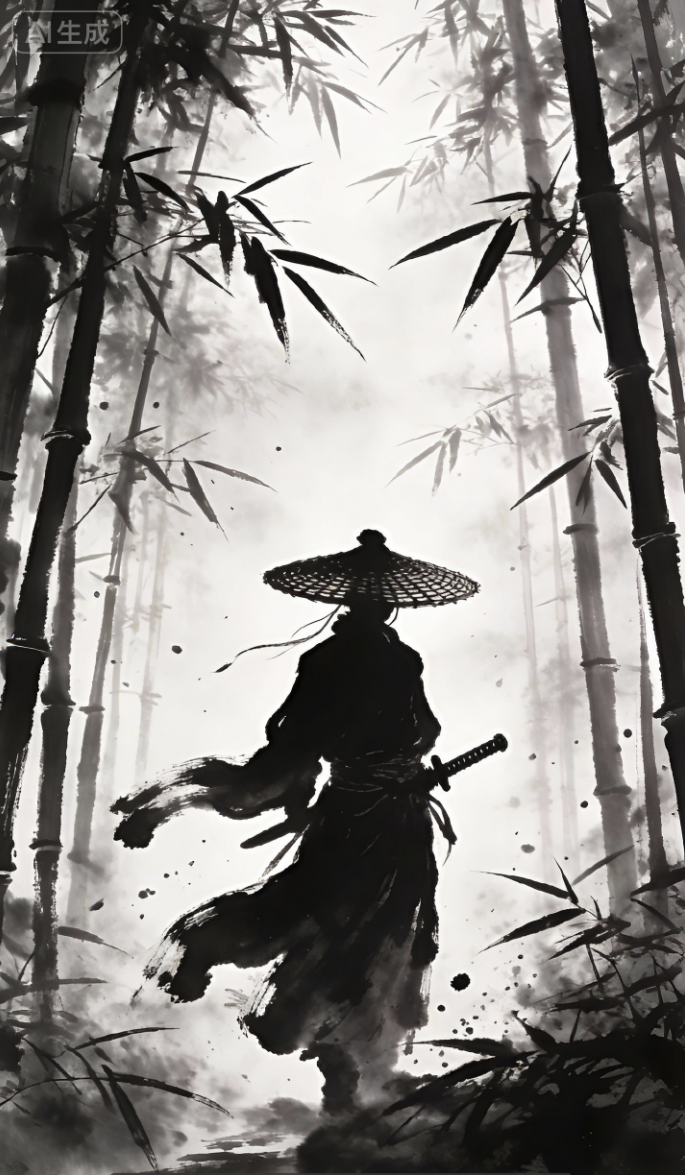
最初のフレームから動画 | (0:00~0:03)カメラ:ミディアムショット。場面:Image 1 の水墨画の竹林。笠をかぶり暗い衣をまとった剣士の影が、濃い霧と揺れる竹の影に囲まれて中央に立つ。動作:左手をそっと剣の柄に置き、竹の葉が風に落ちる。雰囲気:静かで圧迫感があり、水墨画の粒状の質感がはっきり見える。
|  | |
最初と最後のフレームから動画 | [ワンカット、ゆっくりした美しいカメラワーク、切り替えなし、15 秒の長回し、岩絵の鉱物顔料の質感と 3D レンダリングの融合、青緑 × 金箔の対比]
| 最初のフレーム  最後のフレーム  |
プロンプト:最初のフレームから動画
(0:00~0:03)カメラ:ミディアムショット。場面:Image 1 の水墨画の竹林。笠をかぶり暗い衣をまとった剣士の影が、濃い霧と揺れる竹の影に囲まれて中央に立つ。動作:左手をそっと剣の柄に置き、竹の葉が風に落ちる。雰囲気:静かで圧迫感があり、水墨画の粒状の質感がはっきり見える。
(0:03~0:08)導入。カメラ:クローズアップ。物語:剣士が殺気を感じる。笠の下へ急速に寄る。細部:笠の下に鋭く毅然とした目が現れ、視線は刃のよう。水墨の「汗」が額を伝う。動作:右手がゆっくり剣の柄を握り、指の関節が白くなる。竹の葉がさらに速く落ちる。
(0:08~0:13)カメラ:高速旋回。剣士の周囲を急速に回る。竹林の奥から、水墨の影で描かれた 2 人の刺客が双鈎と短刀を持って飛び出す。刺客の動きも流れる墨の筆致で構成する。カメラがその姿を素早く横切り、速度を強調。
(0:13~0:18)カメラ:手持ち感、高速撮影。戦闘:剣士が鋭く抜刀し、刃の光は純白の水墨の亀裂となる。刺客が双鈎で襲う。第一撃:剣士が回転して斬り、双鈎との衝突で書のような白黒の火花と墨滴が飛ぶ。第二撃:フェイントから竹を踏み台に跳び、上から斬り下ろす。刺客は転がって避け、竹は砕けて墨の跡が散る。第三撃:剣先がもう一人の喉を狙い、刺客が短刀で防ぐ。刃が擦れる場所の細かな墨の亀裂を捉える。
(0:18~0:20)カメラ:スローモーションから静止。* 場面: 剣が刺客の首元で止まり、刺客も固まる。* 細部: 戦闘で笠が少し傾く。竹林は静まり、さらに竹の葉が舞う。* 雰囲気: ゆっくりミディアムショットへ引き、納刀する剣士と倒れる刺客で静止。* テキスト(任意): 下部に水墨風の文字で「江湖、一筆で決着」。スタイル: 全編で Image 1 の強い白黒の水墨画スタイルを維持。動作には書の筆致を持たせ、速く、墨滴・火花・墨の亀裂を豊かに描く。
プロンプト:最初と最後のフレームから動画
[ワンカット、ゆっくりした美しいカメラワーク、切り替えなし、15 秒の長回し、岩絵の鉱物顔料の質感と 3D レンダリングの融合、青緑 × 金箔の対比]
全体設定:中国風の岩絵、鉱物顔料の粒、金箔の質感。青緑と金の強い対比。薄霧の夜明けの西湖。湖面はマットな青緑の墨、金の朝日が雲を貫き光柱を作る。三潭印月の 3 つの石塔と雷峰塔が霧の中にかすかに見え、前景に蓮の葉と花。主人公は西湖の水の女神「西子」。岩絵の質感、卵形の顔、柳葉の眉、鳳凰の目、眉間の朱色の花飾り、柔らかく光る温かな玉のような肌、頭の後ろには淡い金の光輪。髪は高く結い金の蓮の簪。スカートとショールは流れる湖水ででき、青緑のグラデーションときらめく水の反射を持つ。
音声と効果音:穏やかな古筝と竹笛、小さな波紋と朝の鳥の声。8 秒から、幻想的で優しい女性の声がゆっくり「西湖を美女の西子にたとえるなら——」と詠み、振り返る場面で「薄化粧も厚化粧も、いつも美しい」と続ける。ゆったりしたテンポ、軽い残響と長い余韻。
[0~3 秒:水滴] 夜明けの蓮の葉の端を極端なマクロで捉える。水滴がふくらみ、金の朝日を映してゆっくり落ちる。カメラは下へ傾きながら追い、水滴が湖に落ちると金と青の波紋が幾重にも広がる。
[3~7 秒:水が姿を作る] 波紋の中心から湖水がゆっくり立ち上がり、女神「西子」になる。水は青緑のスカートと半透明のショールへ変わり、細い水流が周囲を巡る。彼女は湖の中心から浮上し、そっと閉じた目をゆっくり開く。金の蓮の簪が淡く輝く。カメラは伏し目と水で織られたスカートの周りをゆっくり回る。
[7~11 秒:一歩ごとに蓮] 素足で湖面を歩き、足ごとに金の波紋と蓮の花が次々に生まれる。カメラがミディアムワイドへ引く。霧が晴れ、遠くに暖かく光る三潭印月の石塔、朝日の雷峰塔、岸で水をなでる柳。8 秒から「西湖を美女の西子にたとえるなら——」という女性の声。ショールが後ろに長い金と青の水の光を引く。
[11~15 秒:振り返り — いつも美しい] 立ち止まってカメラを振り返る。ゆっくりミディアムクローズアップへ寄る。朝日が顔に注ぎ、湖水のショールがそっと漂う。髪から落ちた光る水滴が細かな光の粒になる。「薄化粧も厚化粧も、いつも美しい」と声が続く。背後に雷峰塔とかすむ三潭印月、彼女は優しく微笑む。最後の 1 秒は振り返った目線で完全に静止し、映画ポスターのような構図になる。
Python SDK
重要以下のコードを実行する前に、DashScope Python SDK を 1.26.2.1 以降に更新してください。手順は SDK のインストールを参照してください。
import os
from http import HTTPStatus
from dashscope import VideoSynthesis
import dashscope

dashscope.base_http_api_url = 'https://{WorkspaceId}.ap-southeast-1.maas.aliyuncs.com/api/v1'
api_key = os.getenv("DASHSCOPE_API_KEY", "YOUR_API_KEY")

print('please wait...')
rsp = VideoSynthesis.call(
    api_key=api_key,
    model='wan3.0-video',
    prompt='A cat running on the grass',
    media=[{"type": "first_frame", "url": "https://cdn.translate.alibaba.com/r/wanx-demo-1.png"}],
    resolution="720P",
    ratio="adaptive",
    duration=5,
    prompt_extend=True)
print(rsp)
if rsp.status_code == HTTPStatus.OK:
    print("video_url:", rsp.output.video_url)
else:
    print('Failed, status_code: %s, code: %s, message: %s' % (rsp.status_code, rsp.code, rsp.message))
Java SDK
重要以下のコードを実行する前に、DashScope Java SDK を 2.22.31 以降に更新してください。手順は SDK のインストールを参照してください。
// Copyright (c) Alibaba, Inc. and its affiliates.

import com.alibaba.dashscope.aigc.videosynthesis.VideoSynthesis;
import com.alibaba.dashscope.aigc.videosynthesis.VideoSynthesisParam;
import com.alibaba.dashscope.aigc.videosynthesis.VideoSynthesisResult;
import com.alibaba.dashscope.exception.ApiException;
import com.alibaba.dashscope.exception.InputRequiredException;
import com.alibaba.dashscope.exception.NoApiKeyException;
import com.alibaba.dashscope.utils.Constants;
import com.alibaba.dashscope.utils.JsonUtils;

import java.util.ArrayList;
import java.util.List;

public class FirstFrame2Video {

    static {
        Constants.baseHttpApiUrl = "https://{WorkspaceId}.ap-southeast-1.maas.aliyuncs.com/api/v1";
    }

    static String apiKey = System.getenv("DASHSCOPE_API_KEY");

    public static void syncCall() {
        VideoSynthesis videoSynthesis = new VideoSynthesis();
        List<VideoSynthesisParam.Media> media = new ArrayList<>();
        media.add(VideoSynthesisParam.Media.builder()
                    .url("https://cdn.translate.alibaba.com/r/wanx-demo-1.png")
                    .type("first_frame")
                    .build());

        VideoSynthesisParam param =
                VideoSynthesisParam.builder()
                        .apiKey(apiKey)
                        .model("wan3.0-video")
                        .prompt("一只猫在草地上奔跑")
                        .media(media)
                        .resolution("720P")
                        .ratio("adaptive")
                        .duration(5)
                        .promptExtend(true)
                        .build();
        VideoSynthesisResult result = null;
        try {
            System.out.println("---sync call, please wait a moment----");
            result = videoSynthesis.call(param);
        } catch (ApiException | NoApiKeyException e) {
            throw new RuntimeException(e.getMessage());
        } catch (InputRequiredException e) {
            throw new RuntimeException(e);
        }
        System.out.println(JsonUtils.toJson(result));
    }

    public static void main(String[] args) {
        syncCall();
    }
}
curl
手順 1:タスクを作成してタスク ID を取得curl --location 'https://{WorkspaceId}.ap-southeast-1.maas.aliyuncs.com/api/v1/services/aigc/video-generation/video-synthesis' \
-H 'X-DashScope-Async: enable' \
-H "Authorization: Bearer $DASHSCOPE_API_KEY" \
-H 'Content-Type: application/json' \
-d '{
"model": "wan3.0-video",
"input": {
"prompt": "A cat running on the grass",
"media": [
{
"type": "first_frame",
"url": "https://cdn.translate.alibaba.com/r/wanx-demo-1.png"
}
]
},
"parameters": {
"resolution": "720P",
"ratio": "adaptive",
"duration": 5,
"prompt_extend": true
}
}'
curl -X GET 'https://{WorkspaceId}.ap-southeast-1.maas.aliyuncs.com/api/v1/tasks/{task_id}' \
    -H "Authorization: Bearer $DASHSCOPE_API_KEY"
マルチモーダル参照による動画生成
最大 20 件の参照素材(画像、動画、音声、文書、Web ページ)を渡すと、参照意図を自動で理解して動画を生成します。プロンプトでは「Image 1」または「Img 1」、「Video 1」、「Audio 1」などを使用し、input.media 配列内の順序に対応する素材を参照します。
注記素材の番号付け:画像、動画、音声は種類ごとに別々にカウントします。最初の reference_image は input.media 内の「Img 1」または「Image 1」、2 番目は「Img 2」または「Image 2」に対応します。最初の reference_video は「Video 1」、2 番目は「Video 2」、最初の reference_audio は「Audio 1」、2 番目は「Audio 2」です。3 種類は競合せず、「Image 1」「Video 1」「Audio 1」を同時に使用できます。
- 人物/オブジェクト参照:画像を渡して、外観の一貫した動画を生成します。
- カメラワーク/動作参照:参照動画を渡して、そのカメラの動きやアクションの振り付けを再現します。
- スタイル参照:参照画像の美的スタイルを生成動画に適用します。
- 音声参照:音楽や声を渡して、リズムや声調と同期するダンスまたはリップシンクアニメーションを生成します。
- 文書/Web ページから動画:文書や公開 Web リンクの内容を自動解析して動画を生成します。
パラメーター設定:ratio は adaptive を推奨(参照素材に適合)、duration=2~30 秒または -1。
1. 画像/動画/音声の参照
| 機能 | 入力プロンプト | 入力する参照素材 | 出力動画 |
参照画像 | Image 1 のリップグロスを使用し、モデルが色味を見せる 15 秒の縦動画を生成する。唇の発色を強調。 | 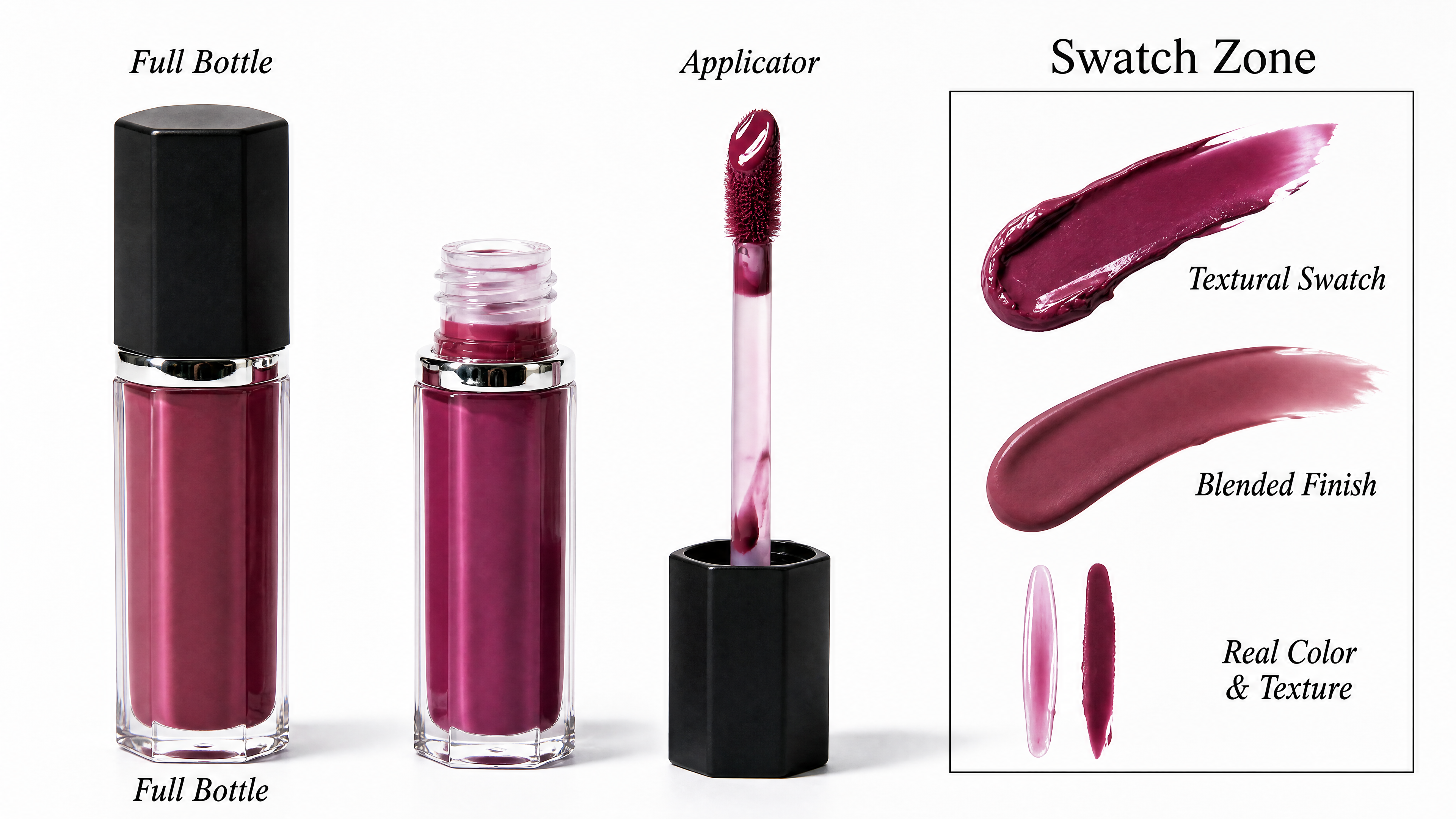 | |
参照画像+動画+音声 | Image 1 の男性を Video 1 の女性の役に違和感なく置き換える。窓辺に座り、電話を耳に当てている。 [声とセリフ] Audio 1 の声の特徴を抽出し、「本当? それはいいね! いつ帰ってくるの? とても会いたいよ」と話させる。 [リップシンクと表情] 音声で口を正確かつ自然に開閉させる。話す間は自然な瞬き、軽いうなずき、呼吸感を含める。微細な表情はセリフの思いやりと懐かしさに完全に合わせる。 [照明と場面] 顔には室内の暖かい光と窓外の冷たいネオンが自然に混ざって当たる。背景の窓を雨粒がゆっくり流れ続け、机のコーヒーから薄い湯気。人物の輪郭を場面になじませ、切り抜き跡は残さない。 [カメラと画質] 15 秒の長回し。極めてゆっくり前進するカメラ、非常に安定した画面、映画的照明、8K、フォトリアル。 | 参照画像  参照動画 参照音声 |
Python SDK
重要以下のコードを実行する前に、DashScope Python SDK を 1.26.2.1 以降に更新してください。手順は SDK のインストールを参照してください。
import os
from http import HTTPStatus
from dashscope import VideoSynthesis
import dashscope

dashscope.base_http_api_url = 'https://{WorkspaceId}.ap-southeast-1.maas.aliyuncs.com/api/v1'
api_key = os.getenv("DASHSCOPE_API_KEY", "YOUR_API_KEY")

print('please wait...')
rsp = VideoSynthesis.call(
    api_key=api_key,
    model='wan3.0-video',
    prompt='Video 1 holds Image 3, sitting on the chair in Image 4, playing a soothing country folk song, and says: "The sunshine is so nice today." Image 1 holds Image 2 in hand, walks past Video 1, places Image 2 on the table next to Video 1, and says: "That sounds great, can you sing it again?"',
    media=[
        {"type": "reference_image", "url": "https://help-static-aliyun-doc.aliyuncs.com/file-manage-files/zh-CN/20260408/sjuytr/wan-r2v-object-girl.jpg"},
        {"type": "reference_video", "url": "https://help-static-aliyun-doc.aliyuncs.com/file-manage-files/zh-CN/20260129/qigswt/wan-r2v-role2.mp4"},
        {"type": "reference_image", "url": "https://help-static-aliyun-doc.aliyuncs.com/file-manage-files/zh-CN/20260129/rtjeqf/wan-r2v-object3.png"},
        {"type": "reference_image", "url": "https://help-static-aliyun-doc.aliyuncs.com/file-manage-files/zh-CN/20260129/qpzxps/wan-r2v-object4.png"},
        {"type": "reference_image", "url": "https://help-static-aliyun-doc.aliyuncs.com/file-manage-files/zh-CN/20260129/wfjikw/wan-r2v-backgroud5.png"}
    ],
    resolution="720P",
    ratio="adaptive",
    duration=5,
    prompt_extend=True)
print(rsp)
if rsp.status_code == HTTPStatus.OK:
    print("video_url:", rsp.output.video_url)
else:
    print('Failed, status_code: %s, code: %s, message: %s' % (rsp.status_code, rsp.code, rsp.message))
Java SDK
重要以下のコードを実行する前に、DashScope Java SDK を 2.22.31 以降に更新してください。手順は SDK のインストールを参照してください。
// Copyright (c) Alibaba, Inc. and its affiliates.

import com.alibaba.dashscope.aigc.videosynthesis.VideoSynthesis;
import com.alibaba.dashscope.aigc.videosynthesis.VideoSynthesisParam;
import com.alibaba.dashscope.aigc.videosynthesis.VideoSynthesisResult;
import com.alibaba.dashscope.exception.ApiException;
import com.alibaba.dashscope.exception.InputRequiredException;
import com.alibaba.dashscope.exception.NoApiKeyException;
import com.alibaba.dashscope.utils.Constants;
import com.alibaba.dashscope.utils.JsonUtils;

import java.util.ArrayList;
import java.util.List;

public class Reference2Video {

    static {
        Constants.baseHttpApiUrl = "https://{WorkspaceId}.ap-southeast-1.maas.aliyuncs.com/api/v1";
    }

    static String apiKey = System.getenv("DASHSCOPE_API_KEY");

    public static void syncCall() {
        VideoSynthesis videoSynthesis = new VideoSynthesis();
        List<VideoSynthesisParam.Media> media = new ArrayList<>();
        media.add(VideoSynthesisParam.Media.builder()
                    .url("https://help-static-aliyun-doc.aliyuncs.com/file-manage-files/zh-CN/20260408/sjuytr/wan-r2v-object-girl.jpg")
                    .type("reference_image")
                    .build());
        media.add(VideoSynthesisParam.Media.builder()
                    .url("https://help-static-aliyun-doc.aliyuncs.com/file-manage-files/zh-CN/20260129/qigswt/wan-r2v-role2.mp4")
                    .type("reference_video")
                    .build());
        media.add(VideoSynthesisParam.Media.builder()
                    .url("https://help-static-aliyun-doc.aliyuncs.com/file-manage-files/zh-CN/20260129/rtjeqf/wan-r2v-object3.png")
                    .type("reference_image")
                    .build());
        media.add(VideoSynthesisParam.Media.builder()
                    .url("https://help-static-aliyun-doc.aliyuncs.com/file-manage-files/zh-CN/20260129/qpzxps/wan-r2v-object4.png")
                    .type("reference_image")
                    .build());
        media.add(VideoSynthesisParam.Media.builder()
                    .url("https://help-static-aliyun-doc.aliyuncs.com/file-manage-files/zh-CN/20260129/wfjikw/wan-r2v-backgroud5.png")
                    .type("reference_image")
                    .build());

        VideoSynthesisParam param =
                VideoSynthesisParam.builder()
                        .apiKey(apiKey)
                        .model("wan3.0-video")
                        .prompt("视频1抱着图3,在图4的椅子上弹奏一支舒缓的乡村民谣,并说道:\"今天的阳光真好。\"图1手中拿着图2,路过视频1,把手中的图2放到视频1旁边的桌子上,并说道:\"真好听,能不能再唱一遍\"。")
                        .media(media)
                        .resolution("720P")
                        .ratio("adaptive")
                        .duration(5)
                        .promptExtend(true)
                        .build();
        VideoSynthesisResult result = null;
        try {
            System.out.println("---sync call, please wait a moment----");
            result = videoSynthesis.call(param);
        } catch (ApiException | NoApiKeyException e) {
            throw new RuntimeException(e.getMessage());
        } catch (InputRequiredException e) {
            throw new RuntimeException(e);
        }
        System.out.println(JsonUtils.toJson(result));
    }

    public static void main(String[] args) {
        syncCall();
    }
}
curl
手順 1:タスクを作成してタスク ID を取得curl --location 'https://{WorkspaceId}.ap-southeast-1.maas.aliyuncs.com/api/v1/services/aigc/video-generation/video-synthesis' \
-H 'X-DashScope-Async: enable' \
-H "Authorization: Bearer $DASHSCOPE_API_KEY" \
-H 'Content-Type: application/json' \
-d '{
"model": "wan3.0-video",
"input": {
"prompt": "Video 1 holds Image 3, sitting on the chair in Image 4, playing a soothing country folk song, and says: \"The sunshine is so nice today.\" Image 1 holds Image 2 in hand, walks past Video 1, places Image 2 on the table next to Video 1, and says: \"That sounds great, can you sing it again?\"",
"media": [
{"type": "reference_image", "url": "https://help-static-aliyun-doc.aliyuncs.com/file-manage-files/zh-CN/20260408/sjuytr/wan-r2v-object-girl.jpg"},
{"type": "reference_video", "url": "https://help-static-aliyun-doc.aliyuncs.com/file-manage-files/zh-CN/20260129/qigswt/wan-r2v-role2.mp4"},
{"type": "reference_image", "url": "https://help-static-aliyun-doc.aliyuncs.com/file-manage-files/zh-CN/20260129/rtjeqf/wan-r2v-object3.png"},
{"type": "reference_image", "url": "https://help-static-aliyun-doc.aliyuncs.com/file-manage-files/zh-CN/20260129/qpzxps/wan-r2v-object4.png"},
{"type": "reference_image", "url": "https://help-static-aliyun-doc.aliyuncs.com/file-manage-files/zh-CN/20260129/wfjikw/wan-r2v-backgroud5.png"}
]
},
"parameters": {
"resolution": "720P",
"ratio": "adaptive",
"duration": 5,
"prompt_extend": true
}
}'
curl -X GET 'https://{WorkspaceId}.ap-southeast-1.maas.aliyuncs.com/api/v1/tasks/{task_id}' \
    -H "Authorization: Bearer $DASHSCOPE_API_KEY"
2. ファイルまたは Web ページの参照
| 機能 | 入力プロンプト | 入力素材 | 出力動画 |
参照ファイル - PPT から動画 | 高級スマートグラスの製品広告。全体をミニマルで未来的、ファッション性の高いスタイルとし、抑制した照明、黒・銀灰・アイスブルーを基調に、部分的な柔らかな白い光とスペックの UI グラフィックを添える。
| ||
参照ファイル - Excel から動画 | 全長 22 秒、4 セグメントを順につなぐ。全編を純白の背景、柔らかな色面、すっきりした折れ線グラフ、Apple Keynote 風のミニマルなビジネス美学、濃い灰色のサンセリフ体で統一。
|
プロンプト:参照ファイル - PPT から動画
高級スマートグラスの製品広告。全体をミニマルで未来的、ファッション性の高いスタイルとし、抑制した照明、黒・銀灰・アイスブルーを基調に、部分的な柔らかな白い光とスペックの UI グラフィックを添える。 純黒の背景から始まり、スマートグラスが闇からゆっくり現れる。洗練されたハイライトがテンプルの縁を滑り、冷たいエッジライトがフレームの輪郭を描く。レンズ、鼻パッド、ヒンジ、テンプル、素材の細部を極端な接写で通過し、金属と高性能複合材の繊細な質感、上品で抑制された表面処理、細く流れる線を見せる。製品が宙でゆっくり回り、ミニマルなモーショングラフィックスが主要スペックを同期表示。カメラが素早く収束し、全パーツが正確に戻って製品を組み立てる。若いモデルが着用するシーンへ移る。くっきりした顔立ちと自信ある態度、都会的で洗練された上質な服装。ミニマルな空間と都市の照明の中で、自然に顔を向け、手を上げ、歩き、笑う。正面、側面、斜め後ろから、薄いフィット感、ファッショナブルな輪郭、日常の使いやすさを強調。最後は単色背景で製品が浮いて静止し、ブランドロゴと主要コピーへゆっくり寄る。音楽は正確なビートを持つミニマルな電子アンビエント、明瞭で力強いリズム。上品で抑制され純粋な映像品質、強いブランド性と国際的なテクノロジー美学。
プロンプト:参照ファイル - Excel から動画
全長 22 秒、4 セグメントを順につなぐ。全編を純白の背景、柔らかな色面、すっきりした折れ線グラフ、Apple Keynote 風のミニマルなビジネス美学、濃い灰色のサンセリフ体で統一。 BGM(必須、全編で明瞭に聞こえる音量):軽快で明るいビジネス向け音楽、一定のリズムと簡潔な旋律。最初の 1 秒から途切れず流す。ナレーション中も消さず、声よりわずかに下げるだけ。効果音:色面が滑り込むと「シュッ」、数字が動くと軽いキーボードの「カチッ」、重要データが現れると澄んだ「チン」。ナレーション:英語の男性または女性、明るく自信に満ち、約 2.5 語/秒。四半期会議の発表のように専門的だが冷たくなく、リズムよく重要数値を軽く強調。
H1-2026跨境电商月度GMV.xlsx
セグメント 1:ワイドショット、中央構図、純白背景、柔らかな光、ミニマルなビジネススタイル。参照画像 1 の白背景と柔らかな色面を参考にする。白い画面が中央から開き、無数の金の粒が四方から集まり、衝突して光って「H1 2026 · Wan」の文字になる。文字表面には流れるデータ光、縁の周りには細かな粒が巡り、まぶしくも上品。少し止まってから文字が粒の流れに溶け、下に大きな濃灰の数字 2 組が滑り込む。左は B7 の $1,580(1 月 GMV)、右は G7 の $3,460(6 月 GMV)。中央の薄灰の矢印でつなぎ、下に小さく「Monthly GMV Growth」。下部にサンゴ色の角丸タグが現れ、H8 の +45.7%(上半期全体の成長率)を表示し、澄んだ「チン」が鳴る。明るく自信あるナレーション:「In the first half of 2026, monthly GMV grew from 15.8 to 34.6 million dollars.」BGM は最初の 1 秒からはっきり聞こえ、軽快なリズムで続く。色面が滑ると軽い「シュッ」。最後に色面が両側へ滑らかに動いて次のセグメントが見える。
セグメント 2:ワイドショット、左に Y 軸、下に X 軸。純白背景と薄灰の点線グリッド、柔らかな光、ミニマルなビジネススタイル。参照画像 2 の折れ線グラフを参考にする。X 軸は左から Jan、Feb、Mar、Apr、May、Jun を等間隔の薄灰サンセリフ体で表示し、Y 軸は数値目盛り。3 本の線を左から同時に描く。東南アジアはサンゴ色(4 行:B4=$580、C4=$640、D4=$750、E4=$880、F4=$1,050、G4=$1,280)、北米はティールブルー(5 行:B5=$420、C5=$480、D5=$560、E5=$680、F5=$860、G5=$1,260)、欧州は琥珀色(6 行:B6=$580、C6=$610、D6=$680、E6=$750、F6=$830、G6=$920)。同じ Jan の位置から始まり、リズムに合わせて右上の Jun へ伸びる。各線の下は透明度 30% のグラデーション。月ごとの点では少し跳ね、真上に正確なドル金額のみを表示。百分率やほかの文字はなく、上記セルと完全一致。右上から色面 3 つと英語の市場名の凡例が出る。6 点に達したら少し静止。落ち着いた声で「All three markets — Southeast Asia, North America, and Europe — showed consistent month-over-month growth, with no single dip.」BGM は常に聞こえ、データ表示に細かいキーの音。6 月末のラベルが画面いっぱいに拡大し、縮小・再配置して次へ移る。
セグメント 3:ワイドショット。左 60% が棒グラフ、右 40% がデータ列。白背景、柔らかな光、ミニマルなビジネススタイル、参照画像 1 の棒グラフ風。1~6 月に対応するティールブルーの角丸の棒 6 本を左から順に立ち上げ、すべて全体を見せる。高さは北米の 5 行の値 B5=$420、C5=$480、D5=$560、E5=$680、F5=$860、G5=$1,260 に厳密に合わせ、低い順にして明瞭な前月比成長を示す。各棒は軽いばねの「シュッ」とともに上がり、上に正確なドル金額。全部そろうと右側に北米の前月比を縦表示:Feb +14.3%(C5 対 B5)、Mar +16.7%(D5 対 C5)、Apr +21.4%(E5 対 D5)、May +26.5%(F5 対 E5)、Jun +46.5%(G5 対 F5)。緑の上矢印+百分率(例 ↑+14.3%)を上から階段状に並べ、大きめの文字で成長を強調。各数値が出ると細かい「カチッ」。最後に中央から大きなサンゴ色の +200%(G5=$1,260 対 B5=$420)を出し、澄んだベルの「チン」、薄い光輪で少し静止。重要数値を強調して「North America was our growth engine — up two hundred percent in just six months, accelerating every single month.」BGM は明瞭に聞こえ、リズムが盛り上がる。成長率の数字が中央で拡大し周囲が柔らかく消えて最終セグメントへ。
セグメント 4:ワイドショット、中央より少し上の構図。白背景、柔らかな光、ミニマルなビジネススタイル、参照画像 3 のリングチャート風。中央に 3 つの弧だけのシンプルなドーナツ図。サンゴ、ティールブルー、琥珀で上半期シェアを示す。東南アジア H4=5180、北米 H5=4260、欧州 H6=4370、合計 H7=13810 から計算。弧の間には白い隙間、図には百分率、数字、ばらばらのラベルを一切入れず、3 色の弧だけ。毎秒約 10° でゆっくり回る。中央の大きな濃灰の数字は 0 から H7 の $138.1M(1 億 3810 万ドル)へ急速にカウントし、細かなキーの音、確定時に澄んだ「チン」。下に薄灰の「Three Markets · All Growing · Zero Downturn.」が現れる。締めのナレーションは落ち着いて「138 million in total — all markets growing, zero downturns.」と言い、後に 1 秒の無音。BGM は全体で聞こえ徐々にフェードアウト。終了前に 1 秒の無音。
Python SDK
重要以下のコードを実行する前に、DashScope Python SDK を 1.26.2.1 以降に更新してください。手順は SDK のインストールを参照してください。
import os
from http import HTTPStatus
from dashscope import VideoSynthesis
import dashscope

dashscope.base_http_api_url = 'https://{WorkspaceId}.ap-southeast-1.maas.aliyuncs.com/api/v1'
api_key = os.getenv("DASHSCOPE_API_KEY", "YOUR_API_KEY")

print('please wait...')
rsp = VideoSynthesis.call(
    api_key=api_key,
    model='wan3.0-video',
    prompt='A high-end smart glasses product advertisement, with an overall minimalist, futuristic, fashion-forward style, restrained lighting, a palette of black, silver-gray, and ice-blue as main tones, with localized soft white light accents and parameter UI graphics. Opening on a pure black background, a pair of smart glasses slowly emerges from the darkness, with refined highlights gliding along the temple edges, the frame silhouette outlined under cold edge lighting. The camera passes in extreme close-up over the lenses, nose pads, hinges, temples, and material details, showcasing the delicate texture of metal and high-performance composite materials, with a refined and restrained surface treatment and slim, flowing lines. The product then slowly rotates in midair, with minimalist motion graphics displaying core parameter information in sync. The camera then quickly converges, all components precisely returning to assemble into the complete product. It transitions to a young model wearing the glasses — the model has defined features, confident demeanor, dressed in sleek, upscale urban fashion, naturally turning their head, raising their hand, walking, and smiling in a minimalist space and urban lighting environment. The camera shows the glasses from front, side, and rear-oblique angles, highlighting the slim fit, fashionable silhouette, and everyday versatility. The ending features the product floating and frozen against a solid-color background, with the camera slowly pushing in toward the brand logo and core slogan. The overall music is minimalist electronic ambiance with precise beats, clean and powerful rhythm. The visual quality is refined, restrained, and pure, with a strong brand signature and international tech aesthetic.',
    media=[
        {"type": "file", "url": "https://help-static-aliyun-doc.aliyuncs.com/file-manage-files/zh-CN/20260806/ebapmr/glass.pptx"}
    ],
    resolution="480P",
    ratio="adaptive",
    duration=10,
    prompt_extend=True)
print(rsp)
if rsp.status_code == HTTPStatus.OK:
    print("video_url:", rsp.output.video_url)
else:
    print('Failed, status_code: %s, code: %s, message: %s' % (rsp.status_code, rsp.code, rsp.message))
Java SDK
重要以下のコードを実行する前に、DashScope Java SDK を 2.22.31 以降に更新してください。手順は SDK のインストールを参照してください。
// Copyright (c) Alibaba, Inc. and its affiliates.

import com.alibaba.dashscope.aigc.videosynthesis.VideoSynthesis;
import com.alibaba.dashscope.aigc.videosynthesis.VideoSynthesisParam;
import com.alibaba.dashscope.aigc.videosynthesis.VideoSynthesisResult;
import com.alibaba.dashscope.exception.ApiException;
import com.alibaba.dashscope.exception.InputRequiredException;
import com.alibaba.dashscope.exception.NoApiKeyException;
import com.alibaba.dashscope.utils.Constants;
import com.alibaba.dashscope.utils.JsonUtils;

import java.util.ArrayList;
import java.util.List;

public class File2Video {

    static {
        Constants.baseHttpApiUrl = "https://{WorkspaceId}.ap-southeast-1.maas.aliyuncs.com/api/v1";
    }

    static String apiKey = System.getenv("DASHSCOPE_API_KEY");

    public static void syncCall() {
        VideoSynthesis videoSynthesis = new VideoSynthesis();
        List<VideoSynthesisParam.Media> media = new ArrayList<>();
        media.add(VideoSynthesisParam.Media.builder()
                    .url("https://help-static-aliyun-doc.aliyuncs.com/file-manage-files/zh-CN/20260806/ebapmr/glass.pptx")
                    .type("file")
                    .build());

        VideoSynthesisParam param =
                VideoSynthesisParam.builder()
                        .apiKey(apiKey)
                        .model("wan3.0-video")
                        .prompt("一支高端智能眼镜产品广告,整体风格极简、未来感、时尚高级,光影克制,画面以黑色、银灰色、冰蓝色为主色调。")
                        .media(media)
                        .resolution("480P")
                        .ratio("adaptive")
                        .duration(10)
                        .promptExtend(true)
                        .build();
        VideoSynthesisResult result = null;
        try {
            System.out.println("---sync call, please wait a moment----");
            result = videoSynthesis.call(param);
        } catch (ApiException | NoApiKeyException e) {
            throw new RuntimeException(e.getMessage());
        } catch (InputRequiredException e) {
            throw new RuntimeException(e);
        }
        System.out.println(JsonUtils.toJson(result));
    }

    public static void main(String[] args) {
        syncCall();
    }
}
curl
手順 1:タスクを作成してタスク ID を取得curl --location 'https://{WorkspaceId}.ap-southeast-1.maas.aliyuncs.com/api/v1/services/aigc/video-generation/video-synthesis' \
-H 'X-DashScope-Async: enable' \
-H "Authorization: Bearer $DASHSCOPE_API_KEY" \
-H 'Content-Type: application/json' \
-d '{
"model": "wan3.0-video",
"input": {
"prompt": "A high-end smart glasses product advertisement, with an overall minimalist, futuristic, fashion-forward style, restrained lighting, a palette of black, silver-gray, and ice-blue as main tones, with localized soft white light accents and parameter UI graphics. Opening on a pure black background, a pair of smart glasses slowly emerges from the darkness, with refined highlights gliding along the temple edges, the frame silhouette outlined under cold edge lighting. The camera passes in extreme close-up over the lenses, nose pads, hinges, temples, and material details, showcasing the delicate texture of metal and high-performance composite materials, with a refined and restrained surface treatment and slim, flowing lines. The product then slowly rotates in midair, with minimalist motion graphics displaying core parameter information in sync. The camera then quickly converges, all components precisely returning to assemble into the complete product. It transitions to a young model wearing the glasses — the model has defined features, confident demeanor, dressed in sleek, upscale urban fashion, naturally turning their head, raising their hand, walking, and smiling in a minimalist space and urban lighting environment. The camera shows the glasses from front, side, and rear-oblique angles, highlighting the slim fit, fashionable silhouette, and everyday versatility. The ending features the product floating and frozen against a solid-color background, with the camera slowly pushing in toward the brand logo and core slogan. The overall music is minimalist electronic ambiance with precise beats, clean and powerful rhythm. The visual quality is refined, restrained, and pure, with a strong brand signature and international tech aesthetic.",
"media": [
{
"type": "file",
"url": "https://help-static-aliyun-doc.aliyuncs.com/file-manage-files/zh-CN/20260806/ebapmr/glass.pptx"
}
]
},
"parameters": {
"resolution": "480P",
"ratio": "adaptive",
"duration": 10,
"prompt_extend": true
}
}'
curl -X GET 'https://{WorkspaceId}.ap-southeast-1.maas.aliyuncs.com/api/v1/tasks/{task_id}' \
    -H "Authorization: Bearer $DASHSCOPE_API_KEY"
動画編集
参照動画と自然言語の指示を渡して正確に編集します。変更を指定していない部分は維持されます。
- 要素の追加:指定した位置に新しいオブジェクトや人物を追加します。
- 要素の削除:オブジェクトや人物を削除し、背景を自動補完します。
- 要素の変更:人物の外観、衣服、年齢などを置き換えます。
- スタイル/照明の編集:全体のスタイル(粘土、水墨画など)の変換や照明の調整を行います。
- 会話の編集:動画内の人物のセリフを変更します。
- 参照編集:参照画像の要素を動画に追加します。
パラメーター設定:ratio は adaptive、duration は -1 を推奨します(元の動画のアスペクト比と長さを自動維持)。プロンプトには編集の意図(「動画を編集」「削除」「置換」「変更」など)を含めてください。
| 機能 | 入力プロンプト | 入力する参照動画 | 出力動画 |
スタイル変換 | シーン全体を粘土風に変換する | ||
会話の編集 | 動画を編集し、男性のセリフを「取引は成立した。さあ……姿を消そう」に変更する。 | ||
参照編集 | 動画を編集:Video 1 の女性に Image 1 の帽子を頭の形になじむようにかぶせる。Video 1 の男性には Image 2 の帽子を自然にかぶせる。男性の赤褐色のシャツを Image 3 の青いウォッシュ加工のゆったりしたデニムシャツに替え、襟を開き、袖を前腕までまくる。動き、ほかの衣服、残りの場面は変えない。 | 参照動画 参照画像(3 枚)  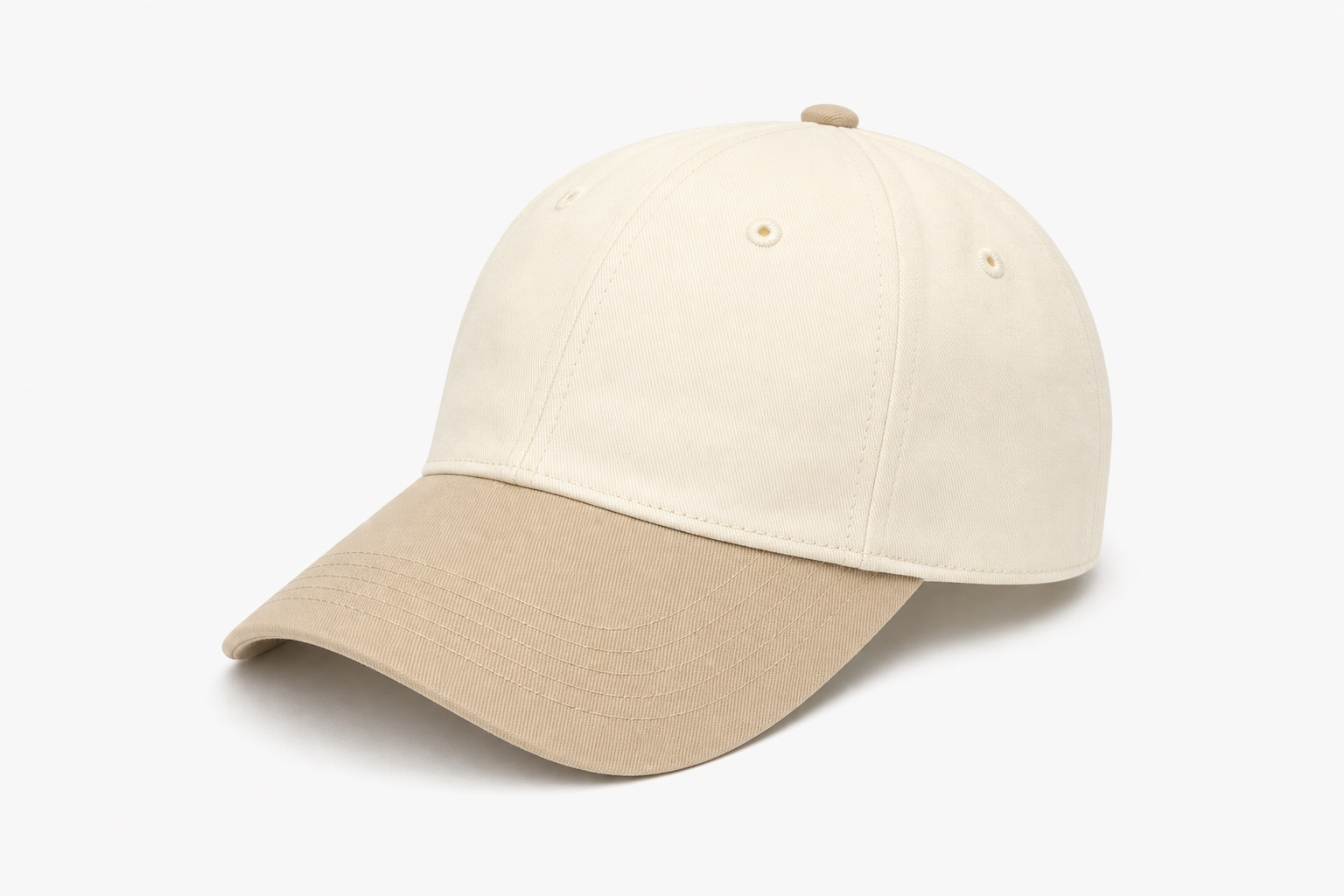 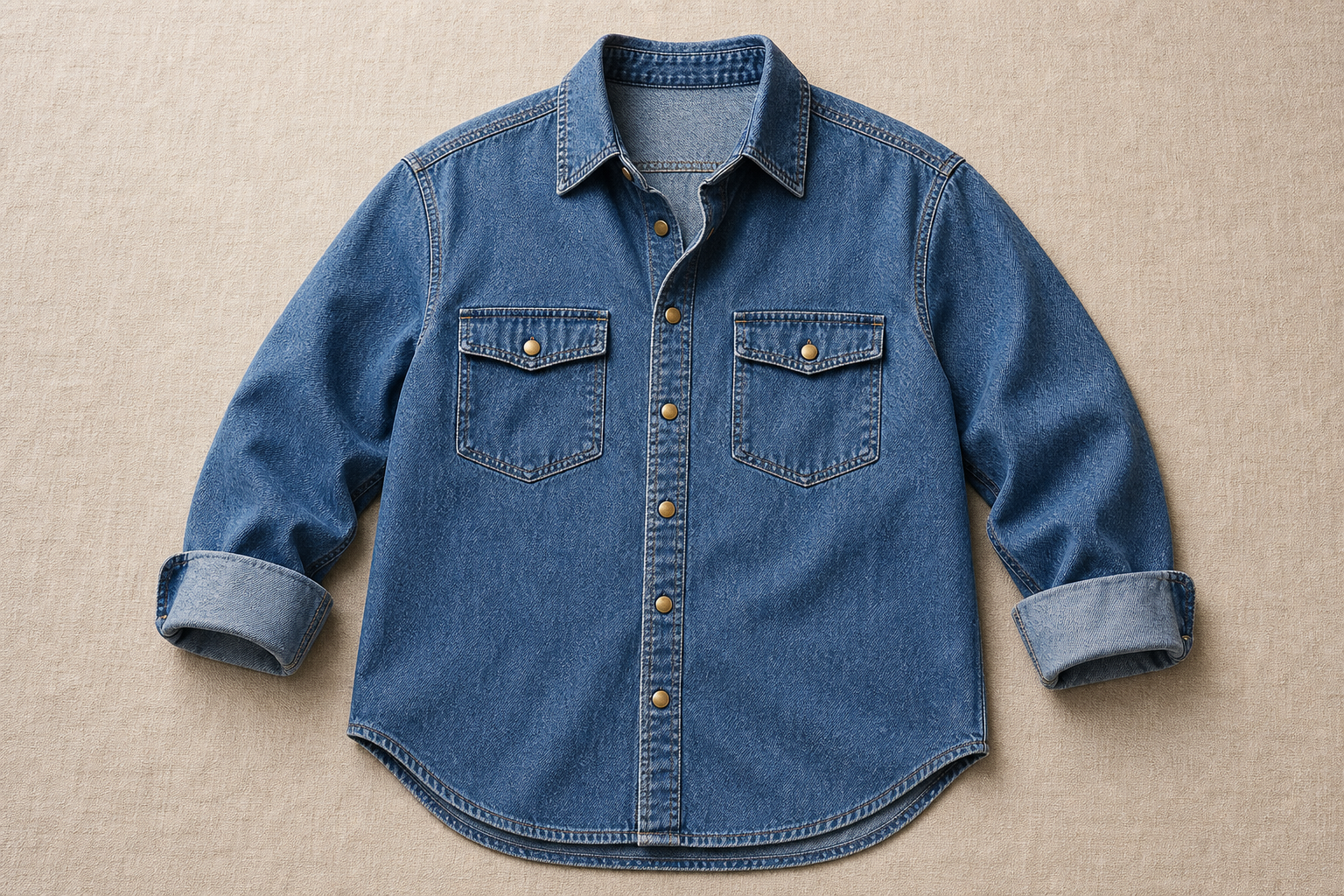 |
Python SDK
重要以下のコードを実行する前に、DashScope Python SDK を 1.26.2.1 以降に更新してください。手順は SDK のインストールを参照してください。
import os
from http import HTTPStatus
from dashscope import VideoSynthesis
import dashscope

dashscope.base_http_api_url = 'https://{WorkspaceId}.ap-southeast-1.maas.aliyuncs.com/api/v1'
api_key = os.getenv("DASHSCOPE_API_KEY", "YOUR_API_KEY")

print('please wait...')
rsp = VideoSynthesis.call(
    api_key=api_key,
    model='wan3.0-video',
    prompt='Convert the entire scene to clay style',
    media=[
        {"type": "reference_video", "url": "https://help-static-aliyun-doc.aliyuncs.com/file-manage-files/zh-CN/20260402/ldnfdf/wan2.7-videoedit-style-change.mp4"}
    ],
    resolution="720P",
    duration=-1,
    prompt_extend=True)
print(rsp)
if rsp.status_code == HTTPStatus.OK:
    print("video_url:", rsp.output.video_url)
else:
    print('Failed, status_code: %s, code: %s, message: %s' % (rsp.status_code, rsp.code, rsp.message))
Java SDK
重要以下のコードを実行する前に、DashScope Java SDK を 2.22.31 以降に更新してください。手順は SDK のインストールを参照してください。
// Copyright (c) Alibaba, Inc. and its affiliates.

import com.alibaba.dashscope.aigc.videosynthesis.VideoSynthesis;
import com.alibaba.dashscope.aigc.videosynthesis.VideoSynthesisParam;
import com.alibaba.dashscope.aigc.videosynthesis.VideoSynthesisResult;
import com.alibaba.dashscope.exception.ApiException;
import com.alibaba.dashscope.exception.InputRequiredException;
import com.alibaba.dashscope.exception.NoApiKeyException;
import com.alibaba.dashscope.utils.Constants;
import com.alibaba.dashscope.utils.JsonUtils;

import java.util.ArrayList;
import java.util.List;

public class VideoEdit {

    static {
        Constants.baseHttpApiUrl = "https://{WorkspaceId}.ap-southeast-1.maas.aliyuncs.com/api/v1";
    }

    static String apiKey = System.getenv("DASHSCOPE_API_KEY");

    public static void syncCall() {
        VideoSynthesis videoSynthesis = new VideoSynthesis();
        List<VideoSynthesisParam.Media> media = new ArrayList<>();
        media.add(VideoSynthesisParam.Media.builder()
                    .url("https://help-static-aliyun-doc.aliyuncs.com/file-manage-files/zh-CN/20260402/ldnfdf/wan2.7-videoedit-style-change.mp4")
                    .type("reference_video")
                    .build());

        VideoSynthesisParam param =
                VideoSynthesisParam.builder()
                        .apiKey(apiKey)
                        .model("wan3.0-video")
                        .prompt("将整个画面转换为黏土风格")
                        .media(media)
                        .resolution("720P")
                        .duration(-1)
                        .promptExtend(true)
                        .build();
        VideoSynthesisResult result = null;
        try {
            System.out.println("---sync call, please wait a moment----");
            result = videoSynthesis.call(param);
        } catch (ApiException | NoApiKeyException e) {
            throw new RuntimeException(e.getMessage());
        } catch (InputRequiredException e) {
            throw new RuntimeException(e);
        }
        System.out.println(JsonUtils.toJson(result));
    }

    public static void main(String[] args) {
        syncCall();
    }
}
curl
手順 1:タスクを作成してタスク ID を取得curl --location 'https://{WorkspaceId}.ap-southeast-1.maas.aliyuncs.com/api/v1/services/aigc/video-generation/video-synthesis' \
-H 'X-DashScope-Async: enable' \
-H "Authorization: Bearer $DASHSCOPE_API_KEY" \
-H 'Content-Type: application/json' \
-d '{
"model": "wan3.0-video",
"input": {
"prompt": "Convert the entire scene to clay style",
"media": [
{
"type": "reference_video",
"url": "https://help-static-aliyun-doc.aliyuncs.com/file-manage-files/zh-CN/20260402/ldnfdf/wan2.7-videoedit-style-change.mp4"
}
]
},
"parameters": {
"resolution": "720P",
"duration": -1,
"prompt_extend": true
}
}'
curl -X GET 'https://{WorkspaceId}.ap-southeast-1.maas.aliyuncs.com/api/v1/tasks/{task_id}' \
    -H "Authorization: Bearer $DASHSCOPE_API_KEY"
動画の延長
既存の動画を前、後、または両方向に延長できます。見た目のスタイルと人物の一貫性を維持し、延長部分の動きをプロンプトで指定します。
- 後方への延長:動画の最後のフレームを起点に、その後の内容を生成します。
- 前方への延長:動画の最初のフレームを終点に、その前の内容を生成します。
- 双方向への延長:元の動画を中央に置き、前後を同時に生成します。
パラメーター設定:ratio は adaptive を推奨します(元のアスペクト比を維持)。プロンプトには延長の意図(「延長」「続ける」「前/後に延長」など)を含めてください。
durationは-1を推奨します(入力に応じて適切な長さを自動推奨)。または、入力動画の長さ+延長したい長さを出力の目標値として設定します。たとえば 5 秒の動画を後に 2 秒延長する場合、durationは-1または7に設定できます。- 入力と出力の長さの合計は 30 秒以下である必要があります。
| 機能 | 入力プロンプト | 入力する参照動画 | 出力動画 |
後方への延長 | パン職人が刷毛で塗ったパンを持ち上げ、刷毛を脇に置く。カメラは背後のオーブンへ焼きに行く職人を追う。扉を閉めて横に立ち、中で焼けるパンを眺め、香りをかいで「いい香り」と言う。 | ||
前方への延長 | Video 1 を前に 15 秒延長する。人物 A は短い暗褐色の髪の男性で、黒の燕尾服、白シャツ、黒蝶ネクタイ、ベージュのベスト。人物 B は茶色の髪を結い上げた女性で、ベージュのパフスリーブのレトロなロングドレス、裾に黒レース、暗いしずく形のイヤリング。
| ||
双方向への延長 | 動画を中央部分として前に 2 秒延長:少女がゆっくりカメラへ歩き、止まってそっと顔を上げ、唇を少し開いて冷たい空気を深く吸う様子を滑らかに追う。動画を中央にして後ろに 3 秒延長:手をこすり終え、カメラを見つめ、温かく輝く笑みを浮かべる。手袋の手をゆっくり上げ、静かに落ちる雪を受ける。カメラはゆっくりミディアムロングへ引き、日差しのある雪の森の小道、ゴールデンアワーの逆光、レンズフレア、浅い被写界深度、温かく癒やされる雰囲気を見せる。 |
プロンプト:前方への延長
Video 1 を前に 15 秒延長する。人物 A は短い暗褐色の髪の男性で、黒の燕尾服、白シャツ、黒蝶ネクタイ、ベージュのベスト。人物 B は茶色の髪を結い上げた女性で、ベージュのパフスリーブのレトロなロングドレス、裾に黒レース、暗いしずく形のイヤリング。 舞踏室ではクリスタルのシャンデリアの光が大理石の床に反射する。客はグラスを持ち、小さな集まりで低い声で話す。優雅なワルツの弦楽前奏がゆっくり始まり、会話が静まる。B が部屋の片側からゆっくり歩き、裾が床を軽くなで、目で室内を見渡す。A は人混みから現れ、客の間を通ってまっすぐ B へ近づき、軽くお辞儀して右手を差し出す。視線は温かく丁寧。B は優しく笑って目を伏せ、A の手のひらに右手をそっと置く。笑みを交わし、A が B をダンスフロアの中央へ導く。周囲の客が自然に下がって場所を空け、視線が 2 人に集まる。A は左手で B の右手を持ち上げ、右手を彼女の腰に優しく置く。ワルツの姿勢を取り、弦の強拍で踏み出して回り始める。19 世紀の宮廷舞踏会の優雅さ、温かい金色のトーン。
Python SDK
重要以下のコードを実行する前に、DashScope Python SDK を 1.26.2.1 以降に更新してください。手順は SDK のインストールを参照してください。
import os
from http import HTTPStatus
from dashscope import VideoSynthesis
import dashscope

dashscope.base_http_api_url = 'https://{WorkspaceId}.ap-southeast-1.maas.aliyuncs.com/api/v1'
api_key = os.getenv("DASHSCOPE_API_KEY", "YOUR_API_KEY")

print('please wait...')
rsp = VideoSynthesis.call(
    api_key=api_key,
    model='wan3.0-video',
    prompt='Extend Video 1 backward, the baker brings up the brushed bread, puts the brush aside, the camera follows the baker to the oven behind for baking',
    media=[
        {"type": "reference_video", "url": "https://help-static-aliyun-doc.aliyuncs.com/file-manage-files/zh-CN/20260414/rptnhd/wan2.7-i2v-video-continuation-2.mp4"}
    ],
    resolution="720P",
    ratio="adaptive",
    duration=5,
    prompt_extend=True)
print(rsp)
if rsp.status_code == HTTPStatus.OK:
    print("video_url:", rsp.output.video_url)
else:
    print('Failed, status_code: %s, code: %s, message: %s' % (rsp.status_code, rsp.code, rsp.message))
Java SDK
重要以下のコードを実行する前に、DashScope Java SDK を 2.22.31 以降に更新してください。手順は SDK のインストールを参照してください。
// Copyright (c) Alibaba, Inc. and its affiliates.

import com.alibaba.dashscope.aigc.videosynthesis.VideoSynthesis;
import com.alibaba.dashscope.aigc.videosynthesis.VideoSynthesisParam;
import com.alibaba.dashscope.aigc.videosynthesis.VideoSynthesisResult;
import com.alibaba.dashscope.exception.ApiException;
import com.alibaba.dashscope.exception.InputRequiredException;
import com.alibaba.dashscope.exception.NoApiKeyException;
import com.alibaba.dashscope.utils.Constants;
import com.alibaba.dashscope.utils.JsonUtils;

import java.util.ArrayList;
import java.util.List;

public class VideoExtend {

    static {
        Constants.baseHttpApiUrl = "https://{WorkspaceId}.ap-southeast-1.maas.aliyuncs.com/api/v1";
    }

    static String apiKey = System.getenv("DASHSCOPE_API_KEY");

    public static void syncCall() {
        VideoSynthesis videoSynthesis = new VideoSynthesis();
        List<VideoSynthesisParam.Media> media = new ArrayList<>();
        media.add(VideoSynthesisParam.Media.builder()
                    .url("https://help-static-aliyun-doc.aliyuncs.com/file-manage-files/zh-CN/20260414/rptnhd/wan2.7-i2v-video-continuation-2.mp4")
                    .type("reference_video")
                    .build());

        VideoSynthesisParam param =
                VideoSynthesisParam.builder()
                        .apiKey(apiKey)
                        .model("wan3.0-video")
                        .prompt("将视频1向后延长,面包师端上刷好的面包,将刷子放到一旁,镜头跟随面包师,去斜后方的烤炉进行烤制")
                        .media(media)
                        .resolution("720P")
                        .ratio("adaptive")
                        .duration(5)
                        .promptExtend(true)
                        .build();
        VideoSynthesisResult result = null;
        try {
            System.out.println("---sync call, please wait a moment----");
            result = videoSynthesis.call(param);
        } catch (ApiException | NoApiKeyException e) {
            throw new RuntimeException(e.getMessage());
        } catch (InputRequiredException e) {
            throw new RuntimeException(e);
        }
        System.out.println(JsonUtils.toJson(result));
    }

    public static void main(String[] args) {
        syncCall();
    }
}
curl
手順 1:タスクを作成してタスク ID を取得curl --location 'https://{WorkspaceId}.ap-southeast-1.maas.aliyuncs.com/api/v1/services/aigc/video-generation/video-synthesis' \
-H 'X-DashScope-Async: enable' \
-H "Authorization: Bearer $DASHSCOPE_API_KEY" \
-H 'Content-Type: application/json' \
-d '{
"model": "wan3.0-video",
"input": {
"prompt": "Extend Video 1 backward, the baker brings up the brushed bread, puts the brush aside, the camera follows the baker to the oven behind for baking",
"media": [
{
"type": "reference_video",
"url": "https://help-static-aliyun-doc.aliyuncs.com/file-manage-files/zh-CN/20260414/rptnhd/wan2.7-i2v-video-continuation-2.mp4"
}
]
},
"parameters": {
"resolution": "720P",
"ratio": "adaptive",
"duration": 5,
"prompt_extend": true
}
}'
curl -X GET 'https://{WorkspaceId}.ap-southeast-1.maas.aliyuncs.com/api/v1/tasks/{task_id}' \
    -H "Authorization: Bearer $DASHSCOPE_API_KEY"
入力メディア
input.media 配列の各要素には type と url があります。使用できる種類と制約は以下のとおりです。
type | 説明 | 制約 |
| 最初のフレームの画像。動画の最初のフレームとして厳密に使用 | 最大 1 件 |
| 最後のフレームの画像。動画の最後のフレームとして厳密に使用 | 最大 1 件 |
| 参照画像 | 最大 10 件 |
| 参照動画 | 最大 5 件、合計 15 秒以下 |
| 参照音声 | 最大 5 件、合計 15 秒以下 |
| ファイル(docx、doc、xlsx、xls、pptx、ppt、pdf、txt、md) | 最大 1 件、link と同時使用不可 |
| Web リンク(公開 Web ページ) | 最大 1 件、file と同時使用不可 |
重要reference_xx/file/link と first_frame/last_frame は排他的であり、同じリクエストには使用できません。
出力動画
- 解像度:480P、720P、1080P(デフォルト)。
- アスペクト比:16:9、4:3、1:1、3:4、9:16、adaptive(デフォルト、入力素材に適合)。
- 長さ:2~30 秒、-1(スマート長さ、デフォルトは 5 秒)。動画入力がある場合、入力+出力の合計は 30 秒以下。
- 形式:MP4、30 fps。
- 音声付き動画:デフォルトで有効。
audio=false で無効にできます。 - 動画 URL の有効期間は 24 時間です。早めに保存してください。