Wan 2.7 画像から動画生成モデルは、 マルチモーダル入力 (テキスト、画像、音声、動画)を使用して、次の 3 つの主要なタスクを実行します。 最初のフレームからの動画生成、最初と最後のフレームからの動画生成、および動画継続(初期動画セグメントから継続。最終フレームの有無を問わず) 。
- 基本設定:2 秒から 15 秒の動画持続時間、解像度(720p または 1080p)の設定、インテリジェントなプロンプトリライト、ウォーターマーク機能をサポートしています。
- 音声機能:自動吹き替えまたはカスタム音声のアップロードをサポートし、音声と映像の同期を保証します。
- マルチショットナラティブ:複数のショットで構成される動画を生成でき、ショット間で被写体の一貫性を維持します。
クイックリンク: オンラインで試す (シンガポール | バージニア | 中国 (北京))|API リファレンス
クイックスタート
| 入力プロンプト | 入力最初の動画クリップ(2 秒) | 入力最終フレーム画像 | 出力動画(12 秒、10 秒の継続) |
男性が地面にある木箱を見下ろしています。彼はかがみ込み、慎重にふたを開けます。箱の中身をじっと見つめ、唇が震えて少し開いています。眉間にしわを寄せ、目を見開いて恐怖の表情を浮かべています。 |  |
呼び出しを行う前に、API キーを取得し、環境変数として設定してください。SDK を使用する場合は、DashScope SDK をインストールしてください。
Python SDK
重要以下のコードを実行する前に、DashScope Python SDK のバージョンが 2.0.1 以降であることを確認してください。
それより前のバージョンを使用すると、「url error, please check url!」などのエラーが発生する可能性があります。バージョンを更新するには、「SDK のインストール」をご参照ください。
# -*- coding: utf-8 -*-
import dashscope
import os
from dashscope.v2 import DashScopeError

# 以下の設定はシンガポール(ap-southeast-1)リージョン用です。region の値はリージョンによって異なります。各リージョンのエンドポイントについては、https://www.alibabacloud.com/help/ja/model-studio/image-to-video-general-api-reference をご参照ください。
client = dashscope.Client(
    # 環境変数を設定していない場合は、次の行を Model Studio API キーに直接置き換えてください: api_key="sk-xxx"
    # API キーはリージョンによって異なります。API キーの取得: https://www.alibabacloud.com/help/model-studio/get-api-key
    api_key=os.getenv("DASHSCOPE_API_KEY"),
    workspace="{WorkspaceId}",
    region="ap-southeast-1",
)

media = [
    {
        "type": "first_clip",
        "url": "https://help-static-aliyun-doc.aliyuncs.com/file-manage-files/zh-CN/20260414/cqcbkw/wan2.7-i2v-video-continuation.mp4"
    },
    {
        "type": "last_frame",
        "url": "https://help-static-aliyun-doc.aliyuncs.com/file-manage-files/zh-CN/20260414/mrwahg/wan2.7-i2v-video-continuation.webp"
    }
]

def sample_sync_call():
    print('----sync call, please wait a moment----')
    # generate はワンステップ呼び出し(タスクを送信して完了まで待機)で、完了した Job を返します
    # prompt_extend: SDK 1.x ではデフォルトでプロンプトの書き換えが有効化されていますが、2.0 ではサーバー側でデフォルトが決まるため、同じ動作を維持するためにここでは明示的に有効化しています。
    try:
        job = client.videos.generate(
            model="wan2.7-i2v-2026-04-25",
            media=media,
            resolution="720P",
            duration=12,
            watermark=True,
            prompt="A man looks down at a wooden box on the ground. He bends over and carefully opens the lid. He stares at the contents of the box, his lips trembling and slightly parted. His brow is furrowed and his eyes are wide with a look of horror.",
            prompt_extend=True,
        )
        print(job)
        print(job.video_url)
    except DashScopeError as e:
        print(f"HTTP status code: {e.status_code}")
        print(f"Error code: {e.code}")
        print(f"Error message: {e.message}")
        print("See the documentation: https://www.alibabacloud.com/help/ja/model-studio/developer-reference/error-code")

if __name__ == '__main__':
    sample_sync_call()
Java SDK
重要以下のコードを実行する前に、DashScope Java SDK のバージョンが 2.22.14 以降であることを確認してください。
それより前のバージョンを使用すると、「url error, please check url!」などのエラーが発生する可能性があります。バージョンを更新するには、「SDK のインストール」をご参照ください。
// Copyright (c) Alibaba, Inc. and its affiliates.

import com.alibaba.dashscope.aigc.videosynthesis.VideoSynthesis;
import com.alibaba.dashscope.aigc.videosynthesis.VideoSynthesisParam;
import com.alibaba.dashscope.aigc.videosynthesis.VideoSynthesisResult;
import com.alibaba.dashscope.exception.ApiException;
import com.alibaba.dashscope.exception.InputRequiredException;
import com.alibaba.dashscope.exception.NoApiKeyException;
import com.alibaba.dashscope.utils.Constants;
import com.alibaba.dashscope.utils.JsonUtils;

import java.util.ArrayList;
import java.util.List;

public class Image2Video {

    static {
        // シンガポールリージョンの URL です。WorkspaceId を実際のワークスペース ID に置き換えてください。URL はリージョンによって異なります。
        Constants.baseHttpApiUrl = "https://{WorkspaceId}.ap-southeast-1.maas.aliyuncs.com/api/v1";
    }

    // 環境変数を設定していない場合は、次の行を Model Studio API キーに置き換えてください:apiKey="sk-xxx"
    // API キーはリージョンによって異なります。API キーの取得方法については、https://www.alibabacloud.com/help/ja/model-studio/get-api-key をご参照ください。
    static String apiKey = System.getenv("DASHSCOPE_API_KEY");

    public static void syncCall() {
        VideoSynthesis videoSynthesis = new VideoSynthesis();
        final String prompt = "A man looks down at a wooden box on the ground. He bends over and carefully opens the lid. He stares at the contents of the box, his lips trembling and slightly parted. His brow is furrowed and his eyes are wide with a look of horror.";
        List<VideoSynthesisParam.Media> media = new ArrayList<VideoSynthesisParam.Media>(){{
            add(VideoSynthesisParam.Media.builder()
                    .url("https://help-static-aliyun-doc.aliyuncs.com/file-manage-files/zh-CN/20260414/cqcbkw/wan2.7-i2v-video-continuation.mp4")
                    .type("first_clip")
                    .build());
            add(VideoSynthesisParam.Media.builder()
                    .url("https://help-static-aliyun-doc.aliyuncs.com/file-manage-files/zh-CN/20260414/mrwahg/wan2.7-i2v-video-continuation.webp")
                    .type("last_frame")
                    .build());
        }};
        VideoSynthesisParam param =
                VideoSynthesisParam.builder()
                        .apiKey(apiKey)
                        .model("wan2.7-i2v-2026-04-25")
                        .prompt(prompt)
                        .media(media)
                        .watermark(true)
                        .duration(12)
                        .resolution("720P")
                        .build();
        VideoSynthesisResult result = null;
        try {
            System.out.println("---sync call, please wait a moment----");
            result = videoSynthesis.call(param);
        } catch (ApiException | NoApiKeyException e){
            throw new RuntimeException(e.getMessage());
        } catch (InputRequiredException e) {
            throw new RuntimeException(e);
        }
        System.out.println(JsonUtils.toJson(result));
    }

    public static void main(String[] args) {
        syncCall();
    }
}
Curl
ステップ 1:タスクを作成し、タスク ID を取得しますcurl --location 'https://{WorkspaceId}.ap-southeast-1.maas.aliyuncs.com/api/v1/services/aigc/video-generation/video-synthesis' \
-H 'X-DashScope-Async: enable' \
-H "Authorization: Bearer $DASHSCOPE_API_KEY" \
-H 'Content-Type: application/json' \
-d '{
"model": "wan2.7-i2v-2026-04-25",
"input": {
"prompt": "A man looks down at a wooden box on the ground. He bends over and carefully opens the lid. He stares at the contents of the box, his lips trembling and slightly parted. His brow is furrowed and his eyes are wide with a look of horror.",
"media": [
{
"type": "first_clip",
"url": "https://help-static-aliyun-doc.aliyuncs.com/file-manage-files/zh-CN/20260414/cqcbkw/wan2.7-i2v-video-continuation.mp4"
},
{
"type": "last_frame",
"url": "https://help-static-aliyun-doc.aliyuncs.com/file-manage-files/zh-CN/20260414/mrwahg/wan2.7-i2v-video-continuation.webp"
}
]
},
"parameters": {
"resolution": "720P",
"duration": 12,
"prompt_extend": true,
"watermark": true
}
}'
{task_id} を、前回の API 呼び出しで返された task_id の値に置き換えてください。task_id は 24 時間有効です。
curl -X GET https://{WorkspaceId}.ap-southeast-1.maas.aliyuncs.com/api/v1/tasks/{task_id} \
--header "Authorization: Bearer $DASHSCOPE_API_KEY"
video_urlは 24 時間有効です。動画は速やかにダウンロードしてください。
{
    "request_id": "c1209113-8437-424f-a386-xxxxxx",
    "output": {
        "task_id": "966cebcd-dedc-4962-af88-xxxxxx",
        "task_status": "SUCCEEDED",
        "video_url": "https://dashscope-result-sh.oss-accelerate.aliyuncs.com/xxx.mp4?Expires=xxx",
         ...
    },
    ...
}
注意事項
- サポートされているモデルはリージョンによって異なります。リソースはリージョン間で分離されています。各リージョンでサポートされているモデルについては、「Model Studio コンソール」をご参照ください。
- 呼び出しを行う際は、モデル、エンドポイント URL、API キーがすべて同じリージョンに属していることを確認してください。リージョンをまたいだ呼び出しは失敗します。
注記このトピックのサンプルコードはシンガポールリージョン用です。
コア機能
最初のフレームからの動画生成
サポートされているモデル:wan2.7 シリーズモデル。
パラメーター設定:type フィールドは media 配列内で次の 2 つの組み合わせをサポートします。メディアアセットの組み合わせの詳細については、「入力メディア」をご参照ください。
- 最初のフレーム:
typeをfirst_frameに設定します。モデルは自動的に動画に音声を追加します。 - 最初のフレーム + 音声:
typeをfirst_frameおよびdriving_audioに設定します。モデルは音声を使用して、リップシンクやアクションタイミングなどの機能を備えた動画生成を行います。
| プロンプト | 最初のフレーム画像 | 出力動画 |
都市ファンタジーアートのシーン。ダイナミックなグラフィティアートのキャラクター。コンクリートの壁からスプレーペイントでできた少年が命を得て現れます。彼はクラシックでエネルギッシュなラッパーのポーズを取りながら、英語のラップを高速で披露します。シーンは都市の鉄道橋の下で夜に行われます。光源は街灯 1 つで、高エネルギーかつ驚くべきディテールに満ちたシネマティックな雰囲気を演出しています。動画の音声はラップのみで、他の会話やノイズは含まれません。 | 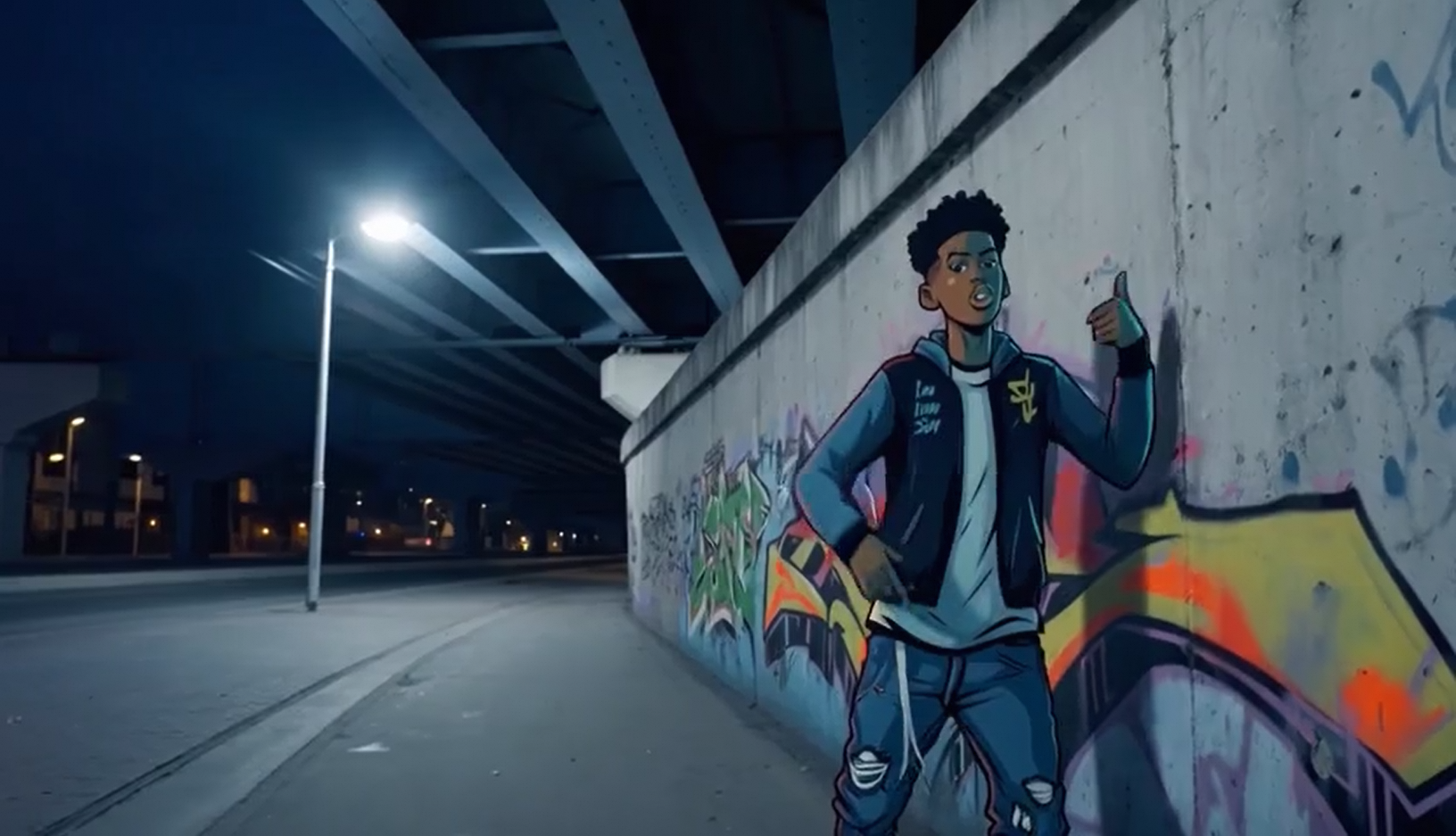 入力音声: |
Python SDK
DashScope Python SDK のバージョンが
2.0.1以降であることを確認してください。更新方法については、「SDK のインストール」をご参照ください。
# -*- coding: utf-8 -*-
import dashscope
import os
from dashscope.v2 import DashScopeError

# 以下の設定はシンガポール(ap-southeast-1)リージョン用です。region の値はリージョンによって異なります。各リージョンのエンドポイントについては、https://www.alibabacloud.com/help/ja/model-studio/image-to-video-general-api-reference をご参照ください。
client = dashscope.Client(
    # 環境変数を設定していない場合は、次の行を Model Studio API キーに直接置き換えてください: api_key="sk-xxx"
    # API キーはリージョンによって異なります。API キーの取得: https://www.alibabacloud.com/help/model-studio/get-api-key
    api_key=os.getenv("DASHSCOPE_API_KEY"),
    workspace="{WorkspaceId}",
    region="ap-southeast-1",
)

media = [
    {
        "type": "first_frame",
        "url": "https://help-static-aliyun-doc.aliyuncs.com/file-manage-files/zh-CN/20250925/wpimhv/rap.png"
    },
    {
        "type": "driving_audio",
        "url": "https://help-static-aliyun-doc.aliyuncs.com/file-manage-files/zh-CN/20250925/ozwpvi/rap.mp3"
    }
]

def sample_sync_call():
    print('----sync call, please wait a moment----')
    # generate はワンステップ呼び出し(タスクを送信して完了まで待機)で、完了した Job を返します
    # prompt_extend: SDK 1.x ではデフォルトでプロンプトの書き換えが有効化されていますが、2.0 ではサーバー側でデフォルトが決まるため、同じ動作を維持するためにここでは明示的に有効化しています。
    try:
        job = client.videos.generate(
            model="wan2.7-i2v-2026-04-25",
            media=media,
            resolution="720P",
            duration=10,
            watermark=True,
            prompt="An urban fantasy art scene. A dynamic graffiti art character. A boy made of spray paint comes to life from a concrete wall. He raps an English song at high speed while striking a classic, energetic rapper pose. The scene is set at night under an urban railway bridge. The light comes from a single street lamp, creating a cinematic atmosphere full of high energy and amazing detail. The audio of the video consists entirely of the rap, with no other dialogue or noise.",
            prompt_extend=True,
        )
        print(job)
        print(job.video_url)
    except DashScopeError as e:
        print(f"HTTP status code: {e.status_code}")
        print(f"Error code: {e.code}")
        print(f"Error message: {e.message}")
        print("See the documentation: https://www.alibabacloud.com/help/ja/model-studio/developer-reference/error-code")

if __name__ == '__main__':
    sample_sync_call()
Java SDK
DashScope Java SDK のバージョンが
2.22.14以降であることを確認してください。更新方法については、「SDK のインストール」をご参照ください。
// Copyright (c) Alibaba, Inc. and its affiliates.

import com.alibaba.dashscope.aigc.videosynthesis.VideoSynthesis;
import com.alibaba.dashscope.aigc.videosynthesis.VideoSynthesisParam;
import com.alibaba.dashscope.aigc.videosynthesis.VideoSynthesisResult;
import com.alibaba.dashscope.exception.ApiException;
import com.alibaba.dashscope.exception.InputRequiredException;
import com.alibaba.dashscope.exception.NoApiKeyException;
import com.alibaba.dashscope.utils.Constants;
import com.alibaba.dashscope.utils.JsonUtils;

import java.util.ArrayList;
import java.util.List;

public class Image2Video {

    static {
        // これはシンガポールリージョンのエンドポイントです。中国 (北京) リージョンの場合は https://dashscope.aliyuncs.com/api/v1 を使用してください。
        Constants.baseHttpApiUrl = "https://{WorkspaceId}.ap-southeast-1.maas.aliyuncs.com/api/v1";
    }

    // 環境変数を設定していない場合は、次の行を Model Studio API キーに置き換えてください:apiKey="sk-xxx"
    // API キーはリージョンによって異なります。API キーの取得方法については、https://www.alibabacloud.com/help/ja/model-studio/get-api-key をご参照ください。
    static String apiKey = System.getenv("DASHSCOPE_API_KEY");

    public static void syncCall() {
        VideoSynthesis videoSynthesis = new VideoSynthesis();
        final String prompt = "An urban fantasy art scene. A dynamic graffiti art character. A boy made of spray paint comes to life from a concrete wall. He raps an English song at high speed while striking a classic, energetic rapper pose. The scene is set at night under an urban railway bridge. The light comes from a single street lamp, creating a cinematic atmosphere full of high energy and amazing detail. The audio of the video consists entirely of the rap, with no other dialogue or noise.";
        List<VideoSynthesisParam.Media> media = new ArrayList<VideoSynthesisParam.Media>(){{
            add(VideoSynthesisParam.Media.builder()
                    .url("https://help-static-aliyun-doc.aliyuncs.com/file-manage-files/zh-CN/20250925/wpimhv/rap.png")
                    .type("first_frame")
                    .build());
            add(VideoSynthesisParam.Media.builder()
                    .url("https://help-static-aliyun-doc.aliyuncs.com/file-manage-files/zh-CN/20250925/ozwpvi/rap.mp3")
                    .type("driving_audio")
                    .build());
        }};
        VideoSynthesisParam param =
                VideoSynthesisParam.builder()
                        .apiKey(apiKey)
                        .model("wan2.7-i2v-2026-04-25")
                        .prompt(prompt)
                        .media(media)
                        .watermark(true)
                        .duration(10)
                        .resolution("720P")
                        .build();
        VideoSynthesisResult result = null;
        try {
            System.out.println("---sync call, please wait a moment----");
            result = videoSynthesis.call(param);
        } catch (ApiException | NoApiKeyException e){
            throw new RuntimeException(e.getMessage());
        } catch (InputRequiredException e) {
            throw new RuntimeException(e);
        }
        System.out.println(JsonUtils.toJson(result));
    }

    public static void main(String[] args) {
        syncCall();
    }
}
Curl
ステップ 1:タスクを作成し、タスク ID を取得しますcurl --location 'https://{WorkspaceId}.ap-southeast-1.maas.aliyuncs.com/api/v1/services/aigc/video-generation/video-synthesis' \
-H 'X-DashScope-Async: enable' \
-H "Authorization: Bearer $DASHSCOPE_API_KEY" \
-H 'Content-Type: application/json' \
-d '{
"model": "wan2.7-i2v-2026-04-25",
"input": {
"prompt": "An urban fantasy art scene. A dynamic graffiti art character. A boy made of spray paint comes to life from a concrete wall. He raps an English song at high speed while striking a classic, energetic rapper pose. The scene is set at night under an urban railway bridge. The light comes from a single street lamp, creating a cinematic atmosphere full of high energy and amazing detail. The audio of the video consists entirely of the rap, with no other dialogue or noise.",
"media": [
{
"type": "first_frame",
"url": "https://help-static-aliyun-doc.aliyuncs.com/file-manage-files/zh-CN/20250925/wpimhv/rap.png"
},
{
"type": "driving_audio",
"url": "https://help-static-aliyun-doc.aliyuncs.com/file-manage-files/zh-CN/20250925/ozwpvi/rap.mp3"
}
]
},
"parameters": {
"resolution": "720P",
"duration": 10,
"prompt_extend": true,
"watermark": true
}
}'
{task_id} を、前回の API 呼び出しで返された task_id の値に置き換えてください。task_id は 24 時間有効です。
curl -X GET https://{WorkspaceId}.ap-southeast-1.maas.aliyuncs.com/api/v1/tasks/{task_id} \
--header "Authorization: Bearer $DASHSCOPE_API_KEY"
video_urlは 24 時間有効です。動画は速やかにダウンロードしてください。
{
    "request_id": "c1209113-8437-424f-a386-xxxxxx",
    "output": {
        "task_id": "966cebcd-dedc-4962-af88-xxxxxx",
        "task_status": "SUCCEEDED",
        "video_url": "https://dashscope-result-sh.oss-accelerate.aliyuncs.com/xxx.mp4?Expires=xxx",
         ...
    },
    ...
}
最初と最後のフレームからの動画生成
サポートされているモデル:wan2.7 シリーズモデル。
パラメーター設定:type フィールドは media 配列内で次の 2 つの組み合わせをサポートします。メディアアセットの組み合わせの詳細については、「入力メディア」をご参照ください。
- 最初のフレーム + 最後のフレーム:
typeをfirst_frameおよびlast_frameに設定します。モデルは自動的に動画に音声を追加します。 - 最初のフレーム + 最後のフレーム + 音声:
typeをfirst_frame、last_frame、およびdriving_audioに設定します。モデルは音声を使用して動画生成を行います。
| プロンプト | 最初のフレーム画像 | 最後のフレーム画像 | 出力動画 |
朝日が昇る早朝、露がついた小さなカボチャがカボチャ畑にあります。突然、「バキッ」という音とともにカボチャが割れます。亀裂から金色の光が放たれ、カボチャが真っ二つに割れて白い霧がふわっと広がります。割れたカボチャの中心に小さなウサギが現れます。 |  |  |
Python SDK
DashScope Python SDK のバージョンが
2.0.1以降であることを確認してください。更新方法については、「SDK のインストール」をご参照ください。
# -*- coding: utf-8 -*-
import dashscope
import os
from dashscope.v2 import DashScopeError

# 以下の設定はシンガポール(ap-southeast-1)リージョン用です。region の値はリージョンによって異なります。各リージョンのエンドポイントについては、https://www.alibabacloud.com/help/ja/model-studio/image-to-video-general-api-reference をご参照ください。
client = dashscope.Client(
    # 環境変数を設定していない場合は、次の行を Model Studio API キーに直接置き換えてください: api_key="sk-xxx"
    # API キーはリージョンによって異なります。API キーの取得: https://www.alibabacloud.com/help/model-studio/get-api-key
    api_key=os.getenv("DASHSCOPE_API_KEY"),
    workspace="{WorkspaceId}",
    region="ap-southeast-1",
)

media = [
    {
        "type": "first_frame",
        "url": "https://help-static-aliyun-doc.aliyuncs.com/file-manage-files/zh-CN/20260414/welyei/wan2.7-i2v-first-frame.webp"
    },
    {
        "type": "last_frame",
        "url": "https://help-static-aliyun-doc.aliyuncs.com/file-manage-files/zh-CN/20260414/zongha/wan2.7-i2v-last-frame.webp"
    }
]

def sample_sync_call():
    print('----sync call, please wait a moment----')
    # generate はワンステップ呼び出し(タスクを送信して完了まで待機)で、完了した Job を返します
    # prompt_extend: SDK 1.x ではデフォルトでプロンプトの書き換えが有効化されていますが、2.0 ではサーバー側でデフォルトが決まるため、同じ動作を維持するためにここでは明示的に有効化しています。
    try:
        job = client.videos.generate(
            model="wan2.7-i2v-2026-04-25",
            media=media,
            resolution="720P",
            duration=15,
            watermark=True,
            prompt="In the early morning as the sun rises, a small pumpkin with dewdrops sits in a pumpkin patch. Suddenly, the pumpkin cracks open with a \"CRACK\". A golden light emanates from the fissure as the pumpkin splits apart, releasing a puff of white mist. A small rabbit appears in the center of the opened pumpkin.",
            prompt_extend=True,
        )
        print(job)
        print(job.video_url)
    except DashScopeError as e:
        print(f"HTTP status code: {e.status_code}")
        print(f"Error code: {e.code}")
        print(f"Error message: {e.message}")
        print("See the documentation: https://www.alibabacloud.com/help/ja/model-studio/developer-reference/error-code")

if __name__ == '__main__':
    sample_sync_call()
Java SDK
DashScope Java SDK のバージョンが
2.22.14以降であることを確認してください。更新方法については、「SDK のインストール」をご参照ください。
// Copyright (c) Alibaba, Inc. and its affiliates.

import com.alibaba.dashscope.aigc.videosynthesis.VideoSynthesis;
import com.alibaba.dashscope.aigc.videosynthesis.VideoSynthesisParam;
import com.alibaba.dashscope.aigc.videosynthesis.VideoSynthesisResult;
import com.alibaba.dashscope.exception.ApiException;
import com.alibaba.dashscope.exception.InputRequiredException;
import com.alibaba.dashscope.exception.NoApiKeyException;
import com.alibaba.dashscope.utils.Constants;
import com.alibaba.dashscope.utils.JsonUtils;

import java.util.ArrayList;
import java.util.List;

public class Image2Video {

    static {
        // これはシンガポールリージョンのエンドポイントです。中国 (北京) リージョンの場合は https://dashscope.aliyuncs.com/api/v1 を使用してください。
        Constants.baseHttpApiUrl = "https://{WorkspaceId}.ap-southeast-1.maas.aliyuncs.com/api/v1";
    }

    // 環境変数を設定していない場合は、次の行を Model Studio API キーに置き換えてください:apiKey="sk-xxx"
    // API キーはリージョンによって異なります。API キーの取得方法については、https://www.alibabacloud.com/help/ja/model-studio/get-api-key をご参照ください。
    static String apiKey = System.getenv("DASHSCOPE_API_KEY");

    public static void syncCall() {
        VideoSynthesis videoSynthesis = new VideoSynthesis();
        final String prompt = "In the early morning as the sun rises, a small pumpkin with dewdrops sits in a pumpkin patch. Suddenly, the pumpkin cracks open with a \"CRACK\". A golden light emanates from the fissure as the pumpkin splits apart, releasing a puff of white mist. A small rabbit appears in the center of the opened pumpkin.";
        List<VideoSynthesisParam.Media> media = new ArrayList<VideoSynthesisParam.Media>(){{
            add(VideoSynthesisParam.Media.builder()
                    .url("https://help-static-aliyun-doc.aliyuncs.com/file-manage-files/zh-CN/20260414/welyei/wan2.7-i2v-first-frame.webp")
                    .type("first_frame")
                    .build());
            add(VideoSynthesisParam.Media.builder()
                    .url("https://help-static-aliyun-doc.aliyuncs.com/file-manage-files/zh-CN/20260414/zongha/wan2.7-i2v-last-frame.webp")
                    .type("last_frame")
                    .build());
        }};
        VideoSynthesisParam param =
                VideoSynthesisParam.builder()
                        .apiKey(apiKey)
                        .model("wan2.7-i2v-2026-04-25")
                        .prompt(prompt)
                        .media(media)
                        .watermark(true)
                        .duration(15)
                        .resolution("720P")
                        .build();
        VideoSynthesisResult result = null;
        try {
            System.out.println("---sync call, please wait a moment----");
            result = videoSynthesis.call(param);
        } catch (ApiException | NoApiKeyException e){
            throw new RuntimeException(e.getMessage());
        } catch (InputRequiredException e) {
            throw new RuntimeException(e);
        }
        System.out.println(JsonUtils.toJson(result));
    }

    public static void main(String[] args) {
        syncCall();
    }
}
Curl
ステップ 1:タスクを作成し、タスク ID を取得しますcurl --location 'https://{WorkspaceId}.ap-southeast-1.maas.aliyuncs.com/api/v1/services/aigc/video-generation/video-synthesis' \
-H 'X-DashScope-Async: enable' \
-H "Authorization: Bearer $DASHSCOPE_API_KEY" \
-H 'Content-Type: application/json' \
-d '{
"model": "wan2.7-i2v-2026-04-25",
"input": {
"prompt": "In the early morning as the sun rises, a small pumpkin with dewdrops sits in a pumpkin patch. Suddenly, the pumpkin cracks open with a \"CRACK\". A golden light emanates from the fissure as the pumpkin splits apart, releasing a puff of white mist. A small rabbit appears in the center of the opened pumpkin.",
"media": [
{
"type": "first_frame",
"url": "https://help-static-aliyun-doc.aliyuncs.com/file-manage-files/zh-CN/20260414/welyei/wan2.7-i2v-first-frame.webp"
},
{
"type": "last_frame",
"url": "https://help-static-aliyun-doc.aliyuncs.com/file-manage-files/zh-CN/20260414/zongha/wan2.7-i2v-last-frame.webp"
}
]
},
"parameters": {
"resolution": "720P",
"duration": 15,
"prompt_extend": false,
"watermark": true
}
}'
{task_id} を、前回の API 呼び出しで返された task_id の値に置き換えてください。task_id は 24 時間有効です。
curl -X GET https://{WorkspaceId}.ap-southeast-1.maas.aliyuncs.com/api/v1/tasks/{task_id} \
--header "Authorization: Bearer $DASHSCOPE_API_KEY"
動画継続
サポートされているモデル:wan2.7 シリーズモデル。
この機能は、入力された動画クリップの内容を継続します。出力には元のクリップが含まれ、その持続時間は合計生成時間に加算されます。たとえば、2 秒の動画を入力し、合計出力持続時間を 12 秒に設定した場合、最終的な動画は 12 秒になります(元の 2 秒のクリップ+10 秒の継続)。
パラメーター設定:type フィールドは media 配列内で次の 2 つの組み合わせをサポートします。メディアアセットの組み合わせの詳細については、「入力メディア」をご参照ください。
- 最初の動画クリップ:
typeをfirst_clipに設定して動画を継続します。 - 最初の動画クリップ + 最後のフレーム継続:
typeをfirst_clipおよびlast_frameに設定します。これにより、最初の動画クリップを継続し、最終フレームが指定された最後のフレームと一致することを保証します。
最初のクリップ継続
| プロンプト | 最初の動画クリップ | 出力動画 |
パン職人が艶出ししたパンを持ってきて、ブラシを脇に置き、カメラが彼を後ろのオーブンまで追跡します。パン職人はオーブンのドアを閉め、横に立ってパンを見守り、香りを嗅いで「すごくいいね」と言います。 |
最初のクリップと最後のフレーム
| プロンプト | 最初の動画クリップ | 最後のフレーム画像 | 出力動画 |
男性が地面にある木箱を見下ろしています。彼はかがみ込み、慎重にふたを開け、中身をじっと見つめます。唇が震えて少し開き、眉間にしわを寄せ、目を見開いて恐怖の表情を浮かべています。 | |
Python SDK
DashScope Python SDK のバージョンが
2.0.1以降であることを確認してください。更新方法については、「SDK のインストール」をご参照ください。
# -*- coding: utf-8 -*-
import dashscope
import os
from dashscope.v2 import DashScopeError

# 以下の設定はシンガポール(ap-southeast-1)リージョン用です。region の値はリージョンによって異なります。各リージョンのエンドポイントについては、https://www.alibabacloud.com/help/ja/model-studio/image-to-video-general-api-reference をご参照ください。
client = dashscope.Client(
    # 環境変数を設定していない場合は、次の行を Model Studio API キーに直接置き換えてください: api_key="sk-xxx"
    # API キーはリージョンによって異なります。API キーの取得: https://www.alibabacloud.com/help/model-studio/get-api-key
    api_key=os.getenv("DASHSCOPE_API_KEY"),
    workspace="{WorkspaceId}",
    region="ap-southeast-1",
)

media = [
    {
        "type": "first_clip",
        "url": "https://help-static-aliyun-doc.aliyuncs.com/file-manage-files/zh-CN/20260414/rptnhd/wan2.7-i2v-video-continuation-2.mp4"
    }
]

def sample_sync_call():
    print('----sync call, please wait a moment----')
    # generate はワンステップ呼び出し(タスクを送信して完了まで待機)で、完了した Job を返します
    # prompt_extend: SDK 1.x ではデフォルトでプロンプトの書き換えが有効化されていますが、2.0 ではサーバー側でデフォルトが決まるため、同じ動作を維持するためにここでは明示的に有効化しています。
    try:
        job = client.videos.generate(
            model="wan2.7-i2v-2026-04-25",
            media=media,
            resolution="720P",
            duration=12,
            watermark=True,
            prompt="The baker brings over the glazed bread, sets the brush aside, and the camera follows him to the oven at the back to bake it. The baker closes the oven door, stands beside it watching the bread, smells the aroma, and says, \"so good\".",
            prompt_extend=True,
        )
        print(job)
        print(job.video_url)
    except DashScopeError as e:
        print(f"HTTP status code: {e.status_code}")
        print(f"Error code: {e.code}")
        print(f"Error message: {e.message}")
        print("See the documentation: https://www.alibabacloud.com/help/ja/model-studio/developer-reference/error-code")

if __name__ == '__main__':
    sample_sync_call()
Java SDK
DashScope Java SDK のバージョンが
2.22.14以降であることを確認してください。更新方法については、「SDK のインストール」をご参照ください。
// Copyright (c) Alibaba, Inc. and its affiliates.

import com.alibaba.dashscope.aigc.videosynthesis.VideoSynthesis;
import com.alibaba.dashscope.aigc.videosynthesis.VideoSynthesisParam;
import com.alibaba.dashscope.aigc.videosynthesis.VideoSynthesisResult;
import com.alibaba.dashscope.exception.ApiException;
import com.alibaba.dashscope.exception.InputRequiredException;
import com.alibaba.dashscope.exception.NoApiKeyException;
import com.alibaba.dashscope.utils.Constants;
import com.alibaba.dashscope.utils.JsonUtils;

import java.util.ArrayList;
import java.util.List;

public class Image2Video {

    static {
        Constants.baseHttpApiUrl = "https://{WorkspaceId}.ap-southeast-1.maas.aliyuncs.com/api/v1";
    }

    static String apiKey = System.getenv("DASHSCOPE_API_KEY");

    public static void syncCall() {
        VideoSynthesis videoSynthesis = new VideoSynthesis();
        final String prompt = "The baker brings over the glazed bread, sets the brush aside, and the camera follows him to the oven at the back to bake it. The baker closes the oven door, stands beside it watching the bread, smells the aroma, and says, \"so good\".";
        List<VideoSynthesisParam.Media> media = new ArrayList<VideoSynthesisParam.Media>(){{
            add(VideoSynthesisParam.Media.builder()
                    .url("https://help-static-aliyun-doc.aliyuncs.com/file-manage-files/zh-CN/20260414/rptnhd/wan2.7-i2v-video-continuation-2.mp4")
                    .type("first_clip")
                    .build());
        }};
        VideoSynthesisParam param =
                VideoSynthesisParam.builder()
                        .apiKey(apiKey)
                        .model("wan2.7-i2v-2026-04-25")
                        .prompt(prompt)
                        .media(media)
                        .watermark(true)
                        .duration(12)
                        .resolution("720P")
                        .build();
        VideoSynthesisResult result = null;
        try {
            System.out.println("---sync call, please wait a moment----");
            result = videoSynthesis.call(param);
        } catch (ApiException | NoApiKeyException e){
            throw new RuntimeException(e.getMessage());
        } catch (InputRequiredException e) {
            throw new RuntimeException(e);
        }
        System.out.println(JsonUtils.toJson(result));
    }

    public static void main(String[] args) {
        syncCall();
    }
}
Curl
ステップ 1:タスクを作成し、タスク ID を取得しますcurl --location 'https://{WorkspaceId}.ap-southeast-1.maas.aliyuncs.com/api/v1/services/aigc/video-generation/video-synthesis' \
-H 'X-DashScope-Async: enable' \
-H "Authorization: Bearer $DASHSCOPE_API_KEY" \
-H 'Content-Type: application/json' \
-d '{
"model": "wan2.7-i2v-2026-04-25",
"input": {
"prompt": "The baker brings over the glazed bread, sets the brush aside, and the camera follows him to the oven at the back to bake it. The baker closes the oven door, stands beside it watching the bread, smells the aroma, and says, \"so good\".",
"media": [
{
"type": "first_clip",
"url": "https://help-static-aliyun-doc.aliyuncs.com/file-manage-files/zh-CN/20260414/rptnhd/wan2.7-i2v-video-continuation-2.mp4"
}
]
},
"parameters": {
"resolution": "720P",
"duration": 12,
"prompt_extend": false,
"watermark": true
}
}'
{task_id} を、前回の API 呼び出しで返された task_id の値に置き換えてください。task_id は 24 時間有効です。
curl -X GET https://{WorkspaceId}.ap-southeast-1.maas.aliyuncs.com/api/v1/tasks/{task_id} \
--header "Authorization: Bearer $DASHSCOPE_API_KEY"
入力メディア
メディアアセットは media 配列で渡します。各要素には type と url を指定する必要があり、各 type は media 配列内に最大 1 回しか出現できません。
注記以下に示す特定のメディアの組み合わせのみがサポートされています。他の組み合わせではエラーが返されます。
// 組み合わせ 1:最初のフレーム(自動吹き替えあり)
{
  "media": [
    { "type": "first_frame", "url": "https://example.com/image.jpg" }
  ]
}

// 組み合わせ 2:最初のフレーム + driving 音声(カスタム音声あり)
{
  "media": [
    { "type": "first_frame", "url": "https://example.com/image.jpg" },
    { "type": "driving_audio", "url": "https://example.com/audio.mp3" }
  ]
}
// 組み合わせ 1:最初のフレーム + 最後のフレーム(自動吹き替えあり)
{
  "media": [
    { "type": "first_frame", "url": "https://example.com/image1.jpg" },
    { "type": "last_frame", "url": "https://example.com/image2.jpg" }
  ]
}

// 組み合わせ 2:最初のフレーム + 最後のフレーム + driving 音声(カスタム音声あり)
{
  "media": [
    { "type": "first_frame", "url": "https://example.com/image1.jpg" },
    { "type": "last_frame", "url": "https://example.com/image2.jpg" },
    { "type": "driving_audio", "url": "https://example.com/audio.mp3" }
  ]
}
// 組み合わせ 1:最初の動画クリップ
{
  "media": [
    { "type": "first_clip", "url": "https://example.com/video.mp4" }
  ]
}

// 組み合わせ 2:最初の動画クリップ + 最後のフレーム
{
  "media": [
    { "type": "first_clip", "url": "https://example.com/video.mp4" },
    { "type": "last_frame", "url": "https://example.com/last_image.jpg" }
  ]
}
入力画像
-
画像の枚数:最初のフレーム(
type=first_frame)および最後のフレーム(type=last_frame)それぞれにつき、最大 1 枚ずつ送信できます。 -
入力方法:
-
公開 URL:HTTP および HTTPS プロトコルをサポートします。例:https://xxxx/xxx.png。
-
Base64 エンコード文字列:
data:{MIME_type};base64,{base64_data}形式の文字列。ここで:-
{base64_data}:画像の Base64 エンコード文字列。
-
{MIME_type}:画像の MIME タイプ。ファイル形式と一致している必要があります。
形式
MIME タイプ
JPEG
image/jpeg
JPG
image/jpeg
PNG
image/png
BMP
image/bmp
WEBP
image/webp
-
-

入力音声
-
音声ファイルの数:最大 1 つの音声ファイル(
type=driving_audio)を提供できます。 -
入力方法:
- 公開 URL:HTTP および HTTPS プロトコルをサポートします。例:https://xxxx/xxx.mp3。
入力動画
-
動画の数:最大 1 つの最初の動画クリップ(
type=first_clip)を渡せます。 -
入力方法:
- 公開 URL:HTTP および HTTPS プロトコルをサポートします。例:https://xxxx/xxx.mp4。
出力動画
-
動画の数:1。
-
出力動画の仕様:サポートされている仕様はモデルによって異なります。詳細については、「利用可能状況」をご参照ください。
-
出力動画 URL の有効期限:24 時間。
-
出力動画のディメンション:モデルは、入力された最初のフレームまたは最初の動画クリップと
resolution設定に基づいてディメンションを決定します。モデルは入力メディアの元の縦横比を保持します。総ピクセル数を
resolutionパラメーターで設定されたターゲットに近づけるようにスケーリングし、幅と高さを 16 の倍数になるように調整します。
課金とレート制限
-
無料クォータおよび料金の詳細については、「モデルの料金」をご参照ください。
-
レート制限の詳細については、「Wan」をご参照ください。
-
課金の詳細:
- 入力は無料です。出力は、正常に生成された動画の秒単位の持続時間に基づいて課金されます。
- 失敗した呼び出しまたは処理エラーは、料金も新規ユーザー向けの無料クォータも消費しません。
- 画像から動画生成機能はサビングスプランもサポートしています。
API リファレンス
よくある質問
Q:wan2.7-i2v の新機能は何ですか?
A:wan2.7-i2v は、wan2.6-i2v およびそれ以前のモデルと比較して、次の新機能を導入しています。
- 3 つの主要なタスクをサポートします:最初のフレームからの動画生成、最初と最後のフレームからの動画生成、および動画継続。以前のモデルは最初のフレームからの動画生成のみをサポートしていました。
- 画像、音声、動画などのマルチモーダルメディアを統一された
media配列を使用して渡せます。以前のモデルは、img_urlパラメーターを使用して画像のみを渡すことができました。
Q:マルチショット動画を作成するにはどうすればよいですか?
A:prompt にショット構造を指定します。次の方法を使用できます。
- 直接指定:
promptに「マルチショット動画を生成する」を含めます。 - ストーリーボードまたはタイムスタンプ:各ショットを時間範囲付きで記述します。例:「最初のショット:ワイドショット、少年がラップして踊る」または「最初のショット [1-5 秒]:ワイドショット、少年がラップして踊る。2 番目のショット [6-10 秒]:カメラが歓声を上げるオーディエンスに切り替わる。」
- ショット構造を明示的に指定しない場合、モデルは
promptから推論します。
Q:動画の縦横比を設定できないのはなぜですか?
A:現在、API は縦横比を直接設定することをサポートしていません。代わりに、resolution パラメーターを使用して解像度を設定する必要があります。
resolution パラメーターは、固定された縦横比ではなく、動画の総ピクセル数を制御します。モデルは、入力された最初のフレームまたは最初の動画クリップの元の縦横比を概ね保持し、ビデオエンコーディングのために幅と高さを 16 の整数倍になるように微調整します。