リリース 26.01 では、training-nv-pytorch イメージに組み込まれているトレーニングおよび推論コンポーネントがアップグレードされます。ACS でトレーニングまたは推論ジョブを実行する前に、このリリースノートで、イメージタグ、コンポーネントのバージョン、および NVIDIA ドライバーの最小バージョンを確認してください。
新機能
コンポーネントのアップグレード
組み込みのトレーニングコンポーネント
megatron-coreが 0.15.0 にアップグレードされました。組み込みの推論コンポーネント
vLLMが 0.13.0 にアップグレードされました。組み込みコンポーネント
flashinfer-pythonが 0.5.3 にアップグレードされました。組み込みコンポーネント
health_checkが shuttle 1.5.3 と連携するようにアップグレードされました。
修正された問題
このリリースには、修正された問題はありません。
イメージの内容
次の表に、各 training-nv-pytorch 26.01 タグのシナリオ、フレームワーク、ドライバー要件、およびサポートされるアーキテクチャを示します。
項目 | 26.01-cu130-serverless | 26.01-cu128-serverless |
イメージ名 | training-nv-pytorch | training-nv-pytorch |
一般的なシナリオ | トレーニングと推論 | トレーニングと推論 |
フレームワーク | pytorch | pytorch |
要件 | NVIDIA ドライバーリリース >= 580 | NVIDIA ドライバーリリース >= 575 |
サポートされるアーキテクチャ | amd64 および aarch64 | amd64 |
コアコンポーネント
26.01-cu130-serverless
Ubuntu: 24.04
Python: 3.12.7+gc
CUDA: 13.0.2
perf: 5.4.30
gdb: 15.0.50.20240403-git
torch: 2.9.0+ali.10.nv25.10
triton: 3.5.0
transformer_engine: 2.10.0+769ed778
deepspeed: 0.18.1+ali
flash_attn: 2.8.3
transformers: 4.57.1+ali
grouped_gemm: 1.1.4
accelerate: 1.11.0+ali
diffusers: 0.34.0
mmengine: 0.10.3
mmcv: 2.1.0
mmdet: 3.3.0
opencv-python-headless: 4.11.0.86
ultralytics: 8.3.96
timm: 1.0.24
vllm: 0.13.0+cu130
flashinfer-python: 0.5.3
pytorch-dynamic-profiler: 0.24.11
peft: 0.16.0
ray: 2.53.0
megatron-core: 0.15.0
26.01-cu128-serverless
Ubuntu: 24.04
Python: 3.12.7+gc
CUDA: 12.8.0
perf: 5.4.30
gdb: 15.0.50.20240403-git
torch: 2.9.0+ali.10.nv25.3
triton: 3.5.0
transformer_engine: 2.10.0+769ed778
deepspeed: 0.18.1+ali
flash_attn: 2.8.3
flash_attn_3: 3.0.0b1
transformers:4.57.1+ali
grouped_gemm: 1.1.4
accelerate: 1.11.0+ali
diffusers: 0.34.0
mmengine: 0.10.3
mmcv: 2.1.0
mmdet: 3.3.0
opencv-python-headless: 4.11.0.86
ultralytics: 8.3.96
timm: 1.0.24
vllm: 0.13.0+cu128
flashinfer-python: 0.5.3
pytorch-dynamic-profiler: 0.24.11
peft: 0.16.0
ray: 2.53.0
megatron-core: 0.15.0
アセット
次のアドレスのいずれかから training-nv-pytorch 26.01 イメージをプルします。各 CUDA バージョンで必要な NVIDIA ドライバーの最小バージョンについては、「ドライバー要件」をご参照ください。
パブリックイメージ
CUDA 13.0.2 (ドライバー >= 580、amd64 および aarch64)
egslingjun-registry.cn-wulanchabu.cr.aliyuncs.com/egslingjun/training-nv-pytorch:26.01-cu130-serverless
CUDA 12.8.0 (ドライバー >= 575、amd64)
egslingjun-registry.cn-wulanchabu.cr.aliyuncs.com/egslingjun/training-nv-pytorch:26.01-cu128-serverless
VPC イメージ
仮想プライベートクラウド (VPC) 内で ACS AI コンテナイメージを迅速にプルするには、指定された AI コンテナイメージのアセット URI egslingjun-registry.cn-wulanchabu.cr.aliyuncs.com/egslingjun/{image:tag} を acs-registry-vpc.{region-id}.cr.aliyuncs.com/egslingjun/{image:tag} に置き換えてください。
{region-id}: ACS リージョンの ID です。たとえば、cn-beijingやcn-wulanchabuなどです。詳細については、「リージョン」をご参照ください。{image:tag}: AI コンテナイメージの名前とタグです。たとえば、inference-nv-pytorch:25.10-vllm0.11.0-pytorch2.8-cu128-20251028-serverlessやtraining-nv-pytorch:25.10-serverlessなどです。
このイメージは、ACS およびマルチテナント Lingjun に適用されます。シングルテナント Lingjun には適用されません。シングルテナント Lingjun のシナリオでは使用しないでください。
ドライバー要件
training-nv-pytorch 26.01 リリースは、異なるドライバーバージョンで CUDA 12.8.0 と CUDA 13.0.2 をサポートします:
CUDA 13.0.2 には、NVIDIA ドライバーバージョン 580 以降が必要です。
CUDA 12.8.0 には、NVIDIA ドライバーバージョン 575 以降が必要です。
サポートされているドライバーの完全なリストについては、「CUDA Application Compatibility」をご参照ください。詳細については、「CUDA Compatibility and Upgrades」をご参照ください。
組み込みの最適化機能
PyTorch コンパイル最適化
PyTorch 2.0 で導入された torch.compile() は、小規模なシングル GPU ワークロードでは多くの場合、大幅な向上をもたらします。しかし、LLM のトレーニングは GPU メモリの最適化と、FSDP や DeepSpeed などの分散フレームワークに依存するため、torch.compile() は限定的なメリットしか得られないか、パフォーマンスが低下する可能性があります。
DeepSpeed フレームワークでの通信粒度を制御します。これにより、コンパイラがより完全な計算グラフをキャプチャし、より広範なコンパイル最適化を適用できるようになります。
最適化された PyTorch ビルドを使用します:
PyTorch コンパイラのフロントエンドが改善され、計算グラフでグラフブレークが発生した場合でもコンパイルが成功するようになります。
パターンマッチングと動的シェイプのサポートが強化され、コンパイル後のパフォーマンスが向上します。
これらの最適化により、8B パラメーターの LLM トレーニングでは、通常、約 20% のエンドツーエンドのスループット向上が達成されます。
選択的勾配チェックポインティングによる GPU メモリ最適化
GPU メモリオーバーヘッドの予測モデルが、最適な活性化再計算レイヤー数を推奨します。このモデルは、さまざまなモデル、クラスター、トレーニングパラメーター設定などの大規模なパフォーマンスデータと、ベンチマーク中に収集された GPU メモリ使用率などのシステムメトリクスに基づいて構築されています。このアプローチは PyTorch に統合されており、最小限の労力で GPU メモリ最適化によるパフォーマンス向上を実現できます。この機能は DeepSpeed フレームワークでサポートされています。
エンドツーエンドのパフォーマンス評価
この評価では、クラウドネイティブな AI パフォーマンス分析ツールである CNP を使用して、主流のオープンソースモデルとフレームワーク構成において、このイメージと標準のベースイメージとの包括的な比較を行います。さらに、アブレーションスタディにより、各最適化コンポーネントがモデル全体のトレーニングパフォーマンスにどの程度貢献しているかを評価します。
ベースイメージとのイメージ比較と反復評価
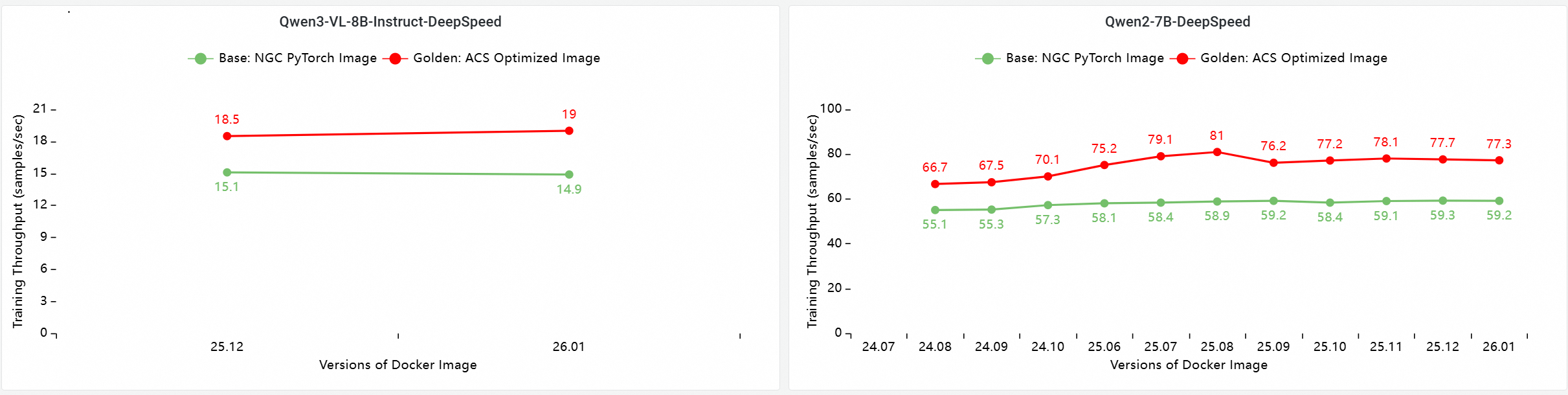
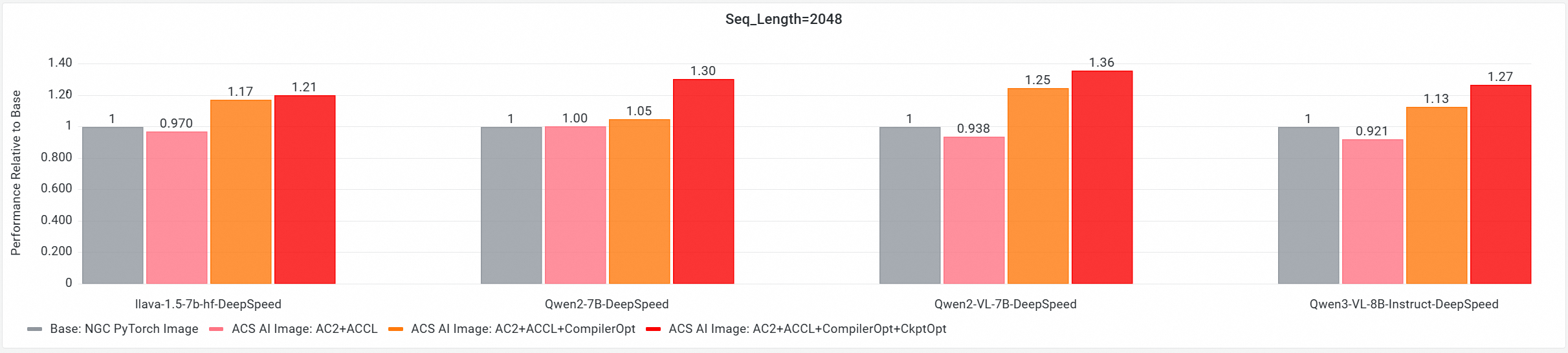
コア GPU コンポーネントのエンドツーエンドパフォーマンスへの貢献度分析
これらのテストはバージョン 26.01 で実行され、マルチノード GPU クラスターでのエンドツーエンドのトレーニングパフォーマンスを比較します。以下の構成が比較されます:
Base: NGC PyTorch イメージ。
ACS AI Image: Base + ACCL: ACS AI イメージは Alibaba Cloud Communication Library (ACCL) を使用します。
ACS AI Image: AC2 + ACCL: ACS AI ゴールデンイメージは AC2 BaseOS を使用し、最適化は有効にされていません。
ACS AI Image: AC2 + ACCL + CompilerOpt: ACS AI イメージは AC2 BaseOS を使用し、torch compile 最適化のみが有効にされています。
ACS AI Image: AC2 + ACCL + CompilerOpt + CkptOpt: ACS AI イメージは AC2 BaseOS を使用し、torch compile 最適化と選択的勾配チェックポインティング最適化の両方が有効にされています。
クイックスタート
training-nv-pytorch イメージをプルし、コンパイラと勾配チェックポインティングの最適化を有効にし、コンテナを開始してトレーニングジョブを実行した後、使用上の推奨事項を確認します。次の例では Docker のみを使用します。
ACS で training-nv-pytorch イメージを使用するには、コンソールでワークロードを作成するときに [Artifacts] ページでイメージを選択するか、YAML ファイルでイメージを参照してください。
1. イメージのプル
お使いのノードに一致する NVIDIA ドライバー要件とサポートされるアーキテクチャのタグを選択し、次のコマンドの [tag] をそのタグに置き換えてください。各タグの要件については、「イメージのコンテンツ」をご参照ください。
docker pull egslingjun-registry.cn-wulanchabu.cr.aliyuncs.com/egslingjun/training-nv-pytorch:[tag]2. コンパイラと勾配チェックポインティングの最適化を有効にする
コンパイル最適化の有効化
transformers の Trainer API を使用します:
training_args = TrainingArguments(
    bf16=True,
    gradient_checkpointing=True,
    torch_compile=True
)
選択的勾配チェックポインティング最適化の有効化
トレーニングスクリプトで gradient_checkpointing=True を設定することに加えて、次の環境変数を設定して、このイメージで提供される選択的最適化を有効にします:
export CHECKPOINT_OPTIMIZATION=true3. コンテナの開始
このイメージには、組み込みのモデルトレーニングツール ljperf が含まれています。次の手順では、このツールを使用してコンテナを開始し、トレーニングジョブを実行します。
LLM の場合
# コンテナを起動し、ログインします
docker run --rm -it --ipc=host --net=host  --privileged egslingjun-registry.cn-wulanchabu.cr.aliyuncs.com/egslingjun/training-nv-pytorch:[tag]
# トレーニングデモを実行します
ljperf benchmark --model deepspeed/llama3-8b
使用上の推奨事項
PyTorch や DeepSpeed など、イメージが変更するライブラリを再インストールしないでください。
DeepSpeed 設定で、
zero_optimization.stage3_prefetch_bucket_sizeを空白にするか、autoに設定してください。このイメージの組み込み環境変数
NCCL_SOCKET_IFNAMEを、シナリオに基づいて調整してください:単一の Pod がトレーニングまたは推論ジョブに 1、2、4、または 8 個の GPU のみを要求する場合は、
NCCL_SOCKET_IFNAME=eth0を設定してください (このイメージのデフォルト設定です)。単一の Pod がトレーニングまたは推論ジョブにマシン上の 16 個すべての GPU を要求し、高性能ネットワーク (HPN) を使用できる場合は、
NCCL_SOCKET_IFNAME=hpn0を設定してください。
既知の問題
このリリースには既知の問題はありません。