Qwen-Image adalah model generasi gambar serbaguna yang mendukung berbagai gaya artistik dan unggul dalam complex text rendering . Model ini menangani tata letak multi-baris, generasi teks tingkat paragraf, dan rendering detail halus.
Akses cepat: Panduan pengguna| Coba online(Singapura | Beijing)| Blog teknis (lebih banyak contoh) |
Contoh
Prompt | Gambar yang dihasilkan |
|---|---|
A healing-style hand-drawn poster featuring three puppies playing with a ball on lush green grass, adorned with decorative elements such as birds and stars. The main title “Come Play Ball!” appears prominently at the top in bold, blue cartoon font. Below it, the subtitle “Come [Show Off Your Skills]!” appears in green font. A speech bubble adds playful charm with the text: “Hehe, watch me amaze my little friends next!” At the bottom, supplementary text reads: “We get to play ball with our friends again!” The color palette centers on fresh greens and blues, accented with bright pink and yellow tones to highlight a cheerful, childlike atmosphere. |
|
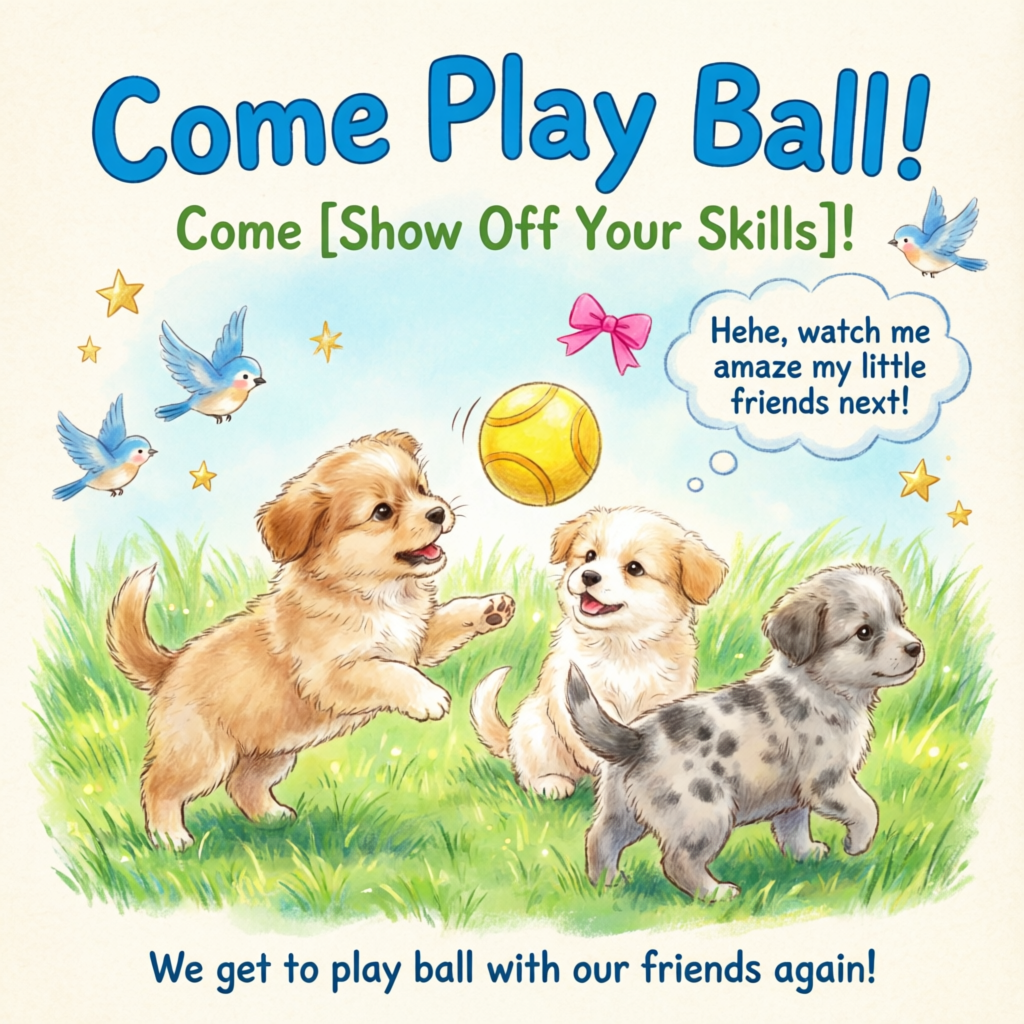
Ikhtisar model
| Model | Deskripsi | Spesifikasi gambar output |
|---|---|---|
qwen-image-2.0-pro
| Seri Pro Qwen untuk generasi dan pengeditan gambar. Menawarkan rendering teks lebih kuat, tekstur realistis, dan kepatuhan semantik.
| Resolusi: Atur lebar dan tinggi secara bebas. Total piksel harus antara 512×512 dan 2048×2048. Resolusi default adalah 2048×2048. Format: PNG Jumlah gambar: 1–6 |
qwen-image-2.0-pro-2026-06-22 | ||
qwen-image-2.0-pro-2026-04-22 | ||
qwen-image-2.0-pro-2026-03-03 | ||
qwen-image-2.0
| Seri akselerasi Qwen untuk generasi dan pengeditan gambar. Menyeimbangkan kualitas dan kecepatan respons.
| |
qwen-image-2.0-2026-03-03 | ||
qwen-image-max
| Seri Max Qwen untuk generasi gambar. Memberikan realisme dan naturalitas lebih tinggi, dengan lebih sedikit artefak generasi AI. | Resolusi: Lihat pengaturan parameter size untuk resolusi dan rasio aspek yang didukung. Format: PNG Jumlah gambar: Tetap 1 |
qwen-image-max-2025-12-30 | ||
qwen-image-plus
| Seri Plus Qwen untuk generasi gambar. Unggul dalam berbagai gaya artistik dan rendering teks. | |
qwen-image-plus-2026-01-09 | ||
qwen-image |
Hanya qwen-image-plus dan qwen-image yang mendukung panggilan asinkron.
CatatanSebelum memanggil API, periksa daftar model yang didukung untuk wilayah Anda.
Prasyarat
Sebelum melakukan panggilan, dapatkan Kunci API dan ekspor Kunci API sebagai variabel lingkungan. Untuk melakukan panggilan menggunakan SDK, instal SDK DashScope.
PentingWilayah China (Beijing) dan Singapura memiliki Kunci API dan titik akhir permintaan yang terpisah. Keduanya tidak dapat saling dipertukarkan. Panggilan lintas wilayah menyebabkan kegagalan autentikasi atau kesalahan layanan.
API Sinkron (disarankan)
HTTP
Panggilan sinkron mengembalikan hasil dalam satu permintaan.
Singapura:POST https://{WorkspaceId}.ap-southeast-1.maas.aliyuncs.com/api/v1/services/aigc/multimodal-generation/generation
Beijing:POST https://{WorkspaceId}.cn-beijing.maas.aliyuncs.com/api/v1/services/aigc/multimodal-generation/generation
Ganti {WorkspaceId} dengan ID ruang kerja aktual Anda.
Parameter permintaan | Text-to-image |
Header permintaan | |
Content-Type Tipe konten permintaan. Harus | |
Authorization Mengotentikasi permintaan dengan Kunci API Model Studio. Contoh: Bearer sk-xxxx. | |
Body permintaan | |
model Nama model. Contoh: | |
input Informasi input. | |
parameters Parameter pemrosesan gambar. Properti negative_prompt Prompt negatif yang menjelaskan apa yang tidak Anda inginkan dalam gambar. Mendukung bahasa Tionghoa dan Inggris. Panjang maksimum 500 karakter. Karakter berlebih dipotong secara otomatis. Contoh: resolusi rendah, kualitas buruk, anggota tubuh terdistorsi, jari-jari cacat, warna terlalu jenuh, tampilan seperti lilin, wajah tanpa detail, permukaan terlalu halus, kesan buatan AI, komposisi kacau, serta teks buram atau terdistorsi. size Resolusi gambar output, diformat sebagai Model seri qwen-image-2.0: Total piksel harus antara
Model seri qwen-image-max dan qwen-image-plus: Resolusi default adalah
n Jumlah gambar output. Default adalah 1. Untuk model seri qwen-image-2.0, Anda dapat memilih 1–6 gambar. Untuk model seri qwen-image-max dan qwen-image-plus, nilai ini tetap 1. Mengatur nilai lain mengembalikan kesalahan. prompt_extend Aktifkan penulisan ulang prompt cerdas. Model mengoptimalkan petunjuk positif. Tidak memengaruhi prompt negatif.
Lihat contoh penulisan ulang
Prompt asli (orig_prompt): A sitting ginger cat with a joyful expression, looking lively, adorable, and incredibly lifelike. Prompt aktual (actual_prompt): Potret satwa liar fotorealistis: seekor kucing jahe duduk dengan bulu lebat yang berkilau terkena sinar matahari dan ekspresi ceria penuh semangat; matanya berbinar menunjukkan rasa ingin tahu dan kehangatan. Kepalanya sedikit miring, telinga terangkat ke depan, dan mulutnya sedikit terbuka dalam pose puas yang hidup—memancarkan pesona menggemaskan serta detail luar biasa yang tampak nyata. Pencahayaan alami yang lembut menonjolkan tekstur setiap helai kumis dan bulu, dengan sorotan halus pada moncong dan bagian dalam telinga. Latar belakang: taman musim gugur dengan efek buram lembut pada golden hour—nuansa hangat daun ambar, cahaya matahari yang menembus sela-sela pepohonan, dan sedikit petunjuk anak tangga batu berlumut. Komposisi menempatkan kucing sebagai fokus utama, ditangkap dalam fokus tajam dengan kedalaman bidang yang dangkal. Gaya: fotografi ultra-realistis, detail setara National Geographic, resolusi 8K, Canon EOS R5, bukaan f/1.2, pencahayaan sinematik, gradasi warna akurat, dan post-processing minimal. Tanpa teks atau hamparan. watermark Menambahkan watermark “Qwen-Image” di pojok kanan bawah gambar. Default: seed Bibit angka acak. Rentang valid: Menggunakan Catatan: Generasi gambar bersifat probabilistik. Bahkan dengan |

Parameter respons | Tugas berhasilURL gambar hanya berlaku selama 24 jam lalu secara otomatis dihapus. Simpan gambar yang dihasilkan segera. Tugas gagalJika tugas gagal, respons mencakup detail kesalahan di bidang kode dan pesan. Lihat Kode kesalahan. |
output Informasi output tugas. | |
usage CatatanBidang ini hanya dikembalikan dalam panggilan asinkron. Panggilan SDK ImageSynthesis sinkron tidak mengembalikan bidang ini. Statistik output. Hanya menghitung hasil yang berhasil. | |
request_id Identifier permintaan unik untuk pelacakan dan troubleshooting. | |
code Kode kesalahan. Hanya dikembalikan untuk permintaan yang gagal. Lihat Kode kesalahan. | |
message Pesan kesalahan detail. Hanya dikembalikan untuk permintaan yang gagal. Lihat Kode kesalahan. |
Panggilan SDK DashScope
SDK DashScope mendukung Python dan Java.
Nama parameter dalam SDK sangat mirip dengan parameter HTTP, dan struktur parameter mengikuti konvensi khas bahasa pemrograman. Untuk parameter panggilan sinkron, lihat HTTP.
Python
CatatanInstal SDK Python DashScope versi terbaru untuk menghindari kesalahan waktu proses: Instal SDK.
Contoh permintaan
import json
import os
import dashscope
from dashscope import MultiModalConversation

# Wilayah Singapura. Ganti {WorkspaceId} dengan ID ruang kerja aktual Anda. URL berbeda berdasarkan wilayah.
dashscope.base_http_api_url = 'https://{WorkspaceId}.ap-southeast-1.maas.aliyuncs.com/api/v1'

messages = [
    {
        "role": "user",
        "content": [
            {"text": "Healing-style hand-drawn poster featuring three puppies playing with a ball on lush green grass, adorned with decorative elements such as birds and stars. The main title “Come Play Ball!” is prominently displayed at the top in bold, blue cartoon font. Below it, the subtitle “Come [Show Off Your Skills]!” appears in green font. A speech bubble adds playful charm with the text: “Hehe, watch me amaze my little friends next!” At the bottom, supplementary text reads: “We get to play ball with our friends again!” The color palette centers on fresh greens and blues, accented with bright pink and yellow tones to highlight a cheerful, childlike atmosphere."}
        ]
    }
]

# Kunci API berbeda antara wilayah Beijing dan Singapura. Dapatkan Kunci API Anda: https://www.alibabacloud.com/help/en/model-studio/get-api-key
# Jika Anda belum mengatur variabel lingkungan, ganti baris di bawah ini dengan: api_key="sk-xxx"
api_key = os.getenv("DASHSCOPE_API_KEY")

response = MultiModalConversation.call(
    api_key=api_key,
    model="qwen-image-2.0-pro",
    messages=messages,
    result_format='message',
    stream=False,
    watermark=False,
    prompt_extend=True,
    negative_prompt="Low resolution, low quality, distorted limbs, malformed fingers, oversaturated colors, wax-figure appearance, lack of facial detail, excessive smoothness, AI-looking artifacts, chaotic composition, blurry or warped text.",
    size='2048*2048'
)

if response.status_code == 200:
    print(json.dumps(response, ensure_ascii=False))
else:
    print(f"Kode status HTTP: {response.status_code}")
    print(f"Kode kesalahan: {response.code}")
    print(f"Pesan kesalahan: {response.message}")
    print("Lihat dokumentasi: https://www.alibabacloud.com/help/en/model-studio/error-code")
Contoh respons
URL gambar kedaluwarsa setelah 24 jam. Unduh gambar segera.
{
    "status_code": 200,
    "request_id": "d2d1a8c0-325f-9b9d-8b90-xxxxxx",
    "code": "",
    "message": "",
    "output": {
        "text": null,
        "finish_reason": null,
        "choices": [
            {
                "finish_reason": "stop",
                "message": {
                    "role": "assistant",
                    "content": [
                        {
                            "image": "https://dashscope-result-wlcb.oss-cn-wulanchabu.aliyuncs.com/xxx.png?Expires=xxx"
                        }
                    ]
                }
            }
        ]
    }
}
Java
CatatanAnda harus menginstal SDK Java DashScope versi terbaru. Jika tidak, kesalahan waktu proses mungkin terjadi: Instal SDK.
Contoh permintaan
import com.alibaba.dashscope.aigc.multimodalconversation.MultiModalConversation;
import com.alibaba.dashscope.aigc.multimodalconversation.MultiModalConversationParam;
import com.alibaba.dashscope.aigc.multimodalconversation.MultiModalConversationResult;
import com.alibaba.dashscope.common.MultiModalMessage;
import com.alibaba.dashscope.common.Role;
import com.alibaba.dashscope.exception.ApiException;
import com.alibaba.dashscope.exception.NoApiKeyException;
import com.alibaba.dashscope.exception.UploadFileException;
import com.alibaba.dashscope.utils.JsonUtils;
import com.alibaba.dashscope.utils.Constants;

import java.io.IOException;
import java.util.Arrays;
import java.util.Collections;
import java.util.HashMap;
import java.util.Map;

public class QwenImage {

    static {
        // Wilayah Singapura. Ganti {WorkspaceId} dengan ID ruang kerja aktual Anda. URL berbeda berdasarkan wilayah.
        Constants.baseHttpApiUrl = "https://{WorkspaceId}.ap-southeast-1.maas.aliyuncs.com/api/v1";
    }

    // Kunci API berbeda antara wilayah Beijing dan Singapura. Dapatkan Kunci API Anda: https://www.alibabacloud.com/help/en/model-studio/get-api-key
    // Jika Anda belum mengatur variabel lingkungan, ganti baris di bawah ini dengan: static String apiKey="sk-xxx"
    static String apiKey = System.getenv("DASHSCOPE_API_KEY");

    public static void call() throws ApiException, NoApiKeyException, UploadFileException, IOException {

        MultiModalConversation conv = new MultiModalConversation();

        MultiModalMessage userMessage = MultiModalMessage.builder().role(Role.USER.getValue())
                .content(Arrays.asList(
                        Collections.singletonMap("text", "Healing-style hand-drawn poster featuring three puppies playing with a ball on lush green grass, adorned with decorative elements such as birds and stars. The main title “Come Play Ball!” is prominently displayed at the top in bold, blue cartoon font. Below it, the subtitle “Come [Show Off Your Skills]!” appears in green font. A speech bubble adds playful charm with the text: “Hehe, watch me amaze my little friends next!” At the bottom, supplementary text reads: “We get to play ball with our friends again!” The color palette centers on fresh greens and blues, accented with bright pink and yellow tones to highlight a cheerful, childlike atmosphere.")
                )).build();

        Map<String, Object> parameters = new HashMap<>();
        parameters.put("watermark", false);
        parameters.put("prompt_extend", true);
        parameters.put("negative_prompt", "Low resolution, low quality, distorted limbs, malformed fingers, oversaturated colors, wax-figure appearance, lack of facial detail, excessive smoothness, AI-looking artifacts, chaotic composition, blurry or warped text.");
        parameters.put("size", "2048*2048");

        MultiModalConversationParam param = MultiModalConversationParam.builder()
                .apiKey(apiKey)
                .model("qwen-image-2.0-pro")
                .messages(Collections.singletonList(userMessage))
                .parameters(parameters)
                .build();

        MultiModalConversationResult result = conv.call(param);
        System.out.println(JsonUtils.toJson(result));
    }

    public static void main(String[] args) {
        try {
            call();
        } catch (ApiException | NoApiKeyException | UploadFileException | IOException e) {
            System.out.println(e.getMessage());
        }
        System.exit(0);
    }
}
Contoh respons
URL gambar kedaluwarsa setelah 24 jam. Unduh gambar segera.
{
    "requestId": "5b6f2d04-b019-40db-a5cc-xxxxxx",
    "output": {
        "choices": [
            {
                "finish_reason": "stop",
                "message": {
                    "role": "assistant",
                    "content": [
                        {
                            "image": "https://dashscope-result-wlcb.oss-cn-wulanchabu.aliyuncs.com/xxx.png?Expires=xxx"
                        }
                    ]
                }
            }
        ]
    }
}
Asynchronous API
PentingHanya qwen-image-plus dan qwen-image yang mendukung panggilan asinkron.
HTTP
Panggilan asinkron menggunakan alur kerja HTTP dua langkah:
- Buat tugas untuk mendapatkan task ID: Kirim permintaan untuk membuat tugas. Respons-nya mengembalikan task ID (task_id).
- Lakukan polling hasil menggunakan task ID: Lakukan polling status tugas dengan task_id hingga selesai dan mengembalikan URL gambar.
Langkah 1: Buat tugas untuk mendapatkan task ID
Singapura:POST https://{WorkspaceId}.ap-southeast-1.maas.aliyuncs.com/api/v1/services/aigc/text2image/image-synthesis
Beijing:POST https://{WorkspaceId}.cn-beijing.maas.aliyuncs.com/api/v1/services/aigc/text2image/image-synthesis
Catatan
- Setelah tugas dibuat, gunakan
task_idyang dikembalikan untuk menanyakan hasilnya.task_idberlaku selama 24 jam. Jangan membuat tugas duplikat. Sebagai gantinya, gunakan polling untuk mengambil hasilnya. - Untuk panduan pemula, lihat Panggil API dengan Postman atau cURL.
Parameter permintaan | Text-to-imageHanya |
Header permintaan | |
Content-Type Tipe konten dari permintaan. Harus berupa | |
Authorization Mengotentikasi permintaan dengan kunci API Model Studio. Contoh: Bearer sk-xxxx. | |
X-DashScope-Async Mengaktifkan pemrosesan asinkron. Permintaan HTTP hanya mendukung panggilan asinkron. Harus diatur ke PentingJika header permintaan ini tidak disertakan, kesalahan "current user api does not support synchronous calls" akan dikembalikan. | |
Body permintaan | |
model Nama model. Hanya Contoh: | |
input Informasi input. | |
parameters Parameter pemrosesan gambar. Properti size Resolusi gambar output, diformat sebagai Model seri qwen-image-2.0: Total piksel harus berada di antara
Model seri qwen-image-max dan qwen-image-plus: Resolusi default adalah
n Jumlah gambar yang dihasilkan. Nilai ini tetap 1. Mengatur nilai lain akan mengembalikan error. prompt_extend Aktifkan penulisan ulang prompt cerdas. Model mengoptimalkan prompt positif. Tidak memengaruhi prompt negatif.
Lihat contoh penulisan ulang
Prompt asli (orig_prompt): Seekor kucing jahe duduk dengan ekspresi gembira, terlihat hidup, menggemaskan, dan sangat mirip aslinya. Prompt aktual (actual_prompt): Potret satwa liar fotorealistik: Seekor kucing jahe duduk dengan bulu lebat yang terkena sinar matahari dan ekspresi gembira yang hidup, matanya berkilau penuh rasa ingin tahu dan kehangatan. Kepalanya sedikit miring, telinga tegak ke depan, mulut terbuka perlahan dalam pose puas—memancarkan pesona menggemaskan dan detail yang sangat mirip aslinya. Pencahayaan alami yang lembut menonjolkan tekstur setiap kumis dan helai bulu, dengan sorotan halus pada moncong dan telinga bagian dalam. Latar belakang: taman musim gugur yang kabur lembut pada golden hour—nuansa hangat daun amber, sinar matahari yang menembus pepohonan, dan jejak samar anak tangga batu berlumut. Komposisi menempatkan kucing sebagai fokus utama, diambil dengan fokus tajam dan depth of field dangkal. Gaya: fotografi ultra-realistis, detail tingkat National Geographic, resolusi 8K, Canon EOS R5, aperture f/1.2, pencahayaan sinematik, gradasi warna sesuai kenyataan, post-processing minimal. Tidak ada teks atau overlay. watermark Menambahkan watermark “Qwen-Image” di pojok kanan bawah gambar. Default: seed Seed angka acak. Rentang valid: Menggunakan Catatan: Pembuatan gambar bersifat probabilistik. Bahkan dengan |
Parameter respons | Respons suksesSimpan Respons errorPembuatan tugas gagal. Lihat Kode kesalahan. |
output Informasi output tugas. | |
request_id Identifier unik permintaan untuk pelacakan dan troubleshooting. | |
code Kode kesalahan. Hanya dikembalikan untuk permintaan yang gagal. Lihat Kode kesalahan. | |
message Pesan kesalahan detail. Hanya dikembalikan untuk permintaan yang gagal. Lihat Kode kesalahan. |
Langkah 2: Lakukan polling hasil menggunakan task ID
Singapura
GET https://{WorkspaceId}.ap-southeast-1.maas.aliyuncs.com/api/v1/tasks/{task_id}
Saat memanggil, ganti {WorkspaceId} dengan workspace ID Anda yang sebenarnya.
Tiongkok (Beijing)
GET https://{WorkspaceId}.cn-beijing.maas.aliyuncs.com/api/v1/tasks/{task_id}
Saat memanggil, ganti {WorkspaceId} dengan workspace ID Anda yang sebenarnya.
Catatan
- Rekomendasi polling: Pembuatan gambar memakan waktu. Gunakan mekanisme polling dengan interval yang masuk akal, misalnya 10 detik.
- Transisi status tugas: PENDING → RUNNING → SUCCEEDED atau FAILED.
- Tautan hasil: Setelah tugas berhasil, URL gambar yang berlaku selama 24 jam dikembalikan. Unduh dan simpan gambar ke penyimpanan permanen, seperti OSS.
Parameter permintaan | Lakukan polling hasil tugasGanti |
Header permintaan | |
Authorization Mengotentikasi permintaan dengan kunci API Model Studio. Contoh: Bearer sk-xxxx. | |
Parameter path URL | |
task_id ID tugas. |
Parameter respons | Tugas berhasilData tugas (status tugas dan URL gambar) hanya disimpan selama 24 jam, lalu secara otomatis dihapus. Segera simpan gambar yang dihasilkan. Tugas gagalSaat tugas gagal, |
output Informasi output tugas. | |
usage Statistik output. Hanya menghitung hasil yang sukses. | |
request_id Identifier unik permintaan untuk pelacakan dan troubleshooting. |
DashScope SDK
DashScope SDK mendukung Python dan Java.
Nama parameter SDK sangat mirip dengan padanannya di HTTP. Struktur parameter mengikuti konvensi khas bahasa pemrograman masing-masing. Untuk parameter panggilan asinkron, lihat HTTP.
Model gambar memerlukan waktu pemrosesan yang lebih lama, sehingga layanan dasarnya menggunakan eksekusi asinkron. SDK menyediakan dua mode:
- Panggilan sinkron (mode blocking): SDK menunggu hingga tugas selesai dan mengembalikan hasil akhir. Ini sesuai dengan perilaku standar panggilan sinkron.
- Panggilan asinkron (mode non-blocking): Panggilan langsung mengembalikan ID tugas. Lakukan polling status tugas dan hasil akhir menggunakan ID tersebut.
Python SDK
CatatanInstal DashScope Python SDK versi terbaru untuk menghindari error waktu proses: Install SDK.
Sinkron
Contoh permintaan
from http import HTTPStatus
from urllib.parse import urlparse, unquote
from pathlib import PurePosixPath
import requests
from dashscope import ImageSynthesis
import os
import dashscope

# Wilayah Singapura. Ganti {WorkspaceId} dengan ID ruang kerja Anda yang sebenarnya. URL berbeda-beda tergantung wilayah.
dashscope.base_http_api_url = 'https://{WorkspaceId}.ap-southeast-1.maas.aliyuncs.com/api/v1'

prompt = "Healing-style hand-drawn poster featuring three puppies playing with a ball on lush green grass, adorned with decorative elements such as birds and stars. The main title “Come Play Ball!” is prominently displayed at the top in bold, blue cartoon font. Below it, the subtitle “Come [Show Off Your Skills]!” appears in green font. A speech bubble adds playful charm with the text: “Hehe, watch me amaze my little friends next!” At the bottom, supplementary text reads: “We get to play ball with our friends again!” The color palette centers on fresh greens and blues, accented with bright pink and yellow tones to highlight a cheerful, childlike atmosphere."

# Kunci API berbeda antara wilayah Beijing dan Singapura. Dapatkan Kunci API Anda: https://www.alibabacloud.com/help/en/model-studio/get-api-key
# Jika Anda belum mengatur variabel lingkungan, ganti baris di bawah ini dengan: api_key="sk-xxx"
api_key = os.getenv("DASHSCOPE_API_KEY")

print('----Panggilan sinkron, harap tunggu sebentar----')
rsp = ImageSynthesis.call(api_key=api_key,
                          model="qwen-image-plus", # Hanya qwen-image-plus dan qwen-image yang mendukung panggilan asinkron
                          prompt=prompt,
                          negative_prompt=" ",
                          n=1,
                          size='1664*928',
                          prompt_extend=True,
                          watermark=False)
print(f'response: {rsp}')
if rsp.status_code == HTTPStatus.OK:
    # Simpan gambar di direktori saat ini
    for result in rsp.output.results:
        file_name = PurePosixPath(unquote(urlparse(result.url).path)).parts[-1]
        with open('./%s' % file_name, 'wb+') as f:
            f.write(requests.get(result.url).content)
else:
    print(f'Panggilan sinkron gagal, status_code: {rsp.status_code}, code: {rsp.code}, message: {rsp.message}')
Contoh respons
URL kedaluwarsa setelah 24 jam. Unduh gambar segera.
{
    "status_code": 200,
    "request_id": "a47b1a65-7041-4565-9068-xxxxxx",
    "code": null,
    "message": "",
    "output": {
        "task_id": "91093132-475e-43cf-b94e-xxxxxx",
        "task_status": "SUCCEEDED",
        "results": [
            {
                "url": "https://dashscope-result-sz.oss-cn-shenzhen.aliyuncs.com/xxx.png?Expires=xxxxxx",
                "orig_prompt": "Healing-style hand-drawn poster featuring three puppies playing with a ball on lush green grass, adorned with decorative elements such as birds and stars. The main title “Come Play Ball!” is prominently displayed at the top in bold, blue cartoon font. Below it, the subtitle “Come [Show Off Your Skills]!” appears in green font. A speech bubble adds playful charm with the text: “Hehe, watch me amaze my little friends next!” At the bottom, supplementary text reads: “We get to play ball with our friends again!” The color palette centers on fresh greens and blues, accented with bright pink and yellow tones to highlight a cheerful, childlike atmosphere.",
                "actual_prompt": "Childhood-inspired hand-drawn poster design: Three playful puppies joyfully interact with a colorful ball on a vibrant patch of lush green grass. Delicate decorative elements including fluttering birds and twinkling stars are scattered throughout. At the top center, the bold, blue cartoon-style title “Come Play Ball!” stands out prominently. Directly beneath, the subtitle “Come [Show Off Your Skills]!” is rendered in cheerful green lettering. A whimsical speech bubble near one of the puppies contains the playful text: “Hehe, watch me amaze my little friends next!” At the bottom edge, smaller supplementary text reads: “We get to play ball with our friends again!” The color palette is centered on fresh greens and sky blues, accented with pops of bright pink and sunny yellow, enhancing the cheerful, childlike atmosphere. Style evokes nostalgic, hand-inked illustrations with soft textures, gentle linework, and a whimsical, storybook-like composition."
            }
        ],
        "submit_time": "2025-09-09 13:39:20.659",
        "scheduled_time": "2025-09-09 13:39:20.717",
        "end_time": "2025-09-09 13:39:45.233"
    },
    "usage": {
        "image_count": 1
    }
}
Asinkron
Contoh permintaan
from http import HTTPStatus
from urllib.parse import urlparse, unquote
from pathlib import PurePosixPath
import requests
from dashscope import ImageSynthesis
import os
import dashscope
import time

# Wilayah Singapura. Ganti {WorkspaceId} dengan ID ruang kerja Anda yang sebenarnya. URL berbeda-beda tergantung wilayah.
dashscope.base_http_api_url = 'https://{WorkspaceId}.ap-southeast-1.maas.aliyuncs.com/api/v1'

prompt = "Healing-style hand-drawn poster featuring three puppies playing with a ball on lush green grass, adorned with decorative elements such as birds and stars. The main title “Come Play Ball!” is prominently displayed at the top in bold, blue cartoon font. Below it, the subtitle “Come [Show Off Your Skills]!” appears in green font. A speech bubble adds playful charm with the text: “Hehe, watch me amaze my little friends next!” At the bottom, supplementary text reads: “We get to play ball with our friends again!” The color palette centers on fresh greens and blues, accented with bright pink and yellow tones to highlight a cheerful, childlike atmosphere."

# Kunci API berbeda antara wilayah Beijing dan Singapura. Dapatkan Kunci API Anda: https://www.alibabacloud.com/help/en/model-studio/get-api-key
# Jika Anda belum mengatur variabel lingkungan, ganti baris di bawah ini dengan: api_key="sk-xxx"
api_key = os.getenv("DASHSCOPE_API_KEY")

def async_call():
    print('----Membuat Tugas----')
    task_info = create_async_task()
    print('----Melakukan Polling Status Tugas----')
    poll_task_status(task_info)

# Buat tugas asinkron
def create_async_task():
    rsp = ImageSynthesis.async_call(api_key=api_key,
                                    model="qwen-image-plus", # Hanya qwen-image-plus dan qwen-image yang mendukung panggilan asinkron
                                    prompt=prompt,
                                    negative_prompt=" ",
                                    n=1,
                                    size='1664*928',
                                    prompt_extend=True,
                                    watermark=False)
    print(rsp)
    if rsp.status_code == HTTPStatus.OK:
        print(rsp.output)
    else:
        print(f'Gagal membuat tugas, status_code: {rsp.status_code}, code: {rsp.code}, message: {rsp.message}')
    return rsp

# Lakukan polling status tugas asinkron, kueri setiap 5 detik, maksimal polling selama 1 menit
def poll_task_status(task):
    start_time = time.time()
    timeout = 60  # Batas waktu 1 menit

    while True:
        # Periksa apakah melebihi batas waktu
        if time.time() - start_time > timeout:
            print('Batas waktu polling tercapai (1 menit), tugas belum selesai')
            return

        # Dapatkan status tugas
        status_rsp = ImageSynthesis.fetch(task)
        print(f'Hasil kueri status tugas: {status_rsp}')

        if status_rsp.status_code != HTTPStatus.OK:
            print(f'Gagal mendapatkan status tugas, status_code: {status_rsp.status_code}, code: {status_rsp.code}, message: {status_rsp.message}')
            return
        task_status = status_rsp.output.task_status
        print(f'Status tugas saat ini: {task_status}')

        if task_status == 'SUCCEEDED':
            print('Tugas selesai, mengunduh gambar...')
            for result in status_rsp.output.results:
                file_name = PurePosixPath(unquote(urlparse(result.url).path)).parts[-1]
                with open(f'./{file_name}', 'wb+') as f:
                    f.write(requests.get(result.url).content)
                print(f'Gambar disimpan sebagai: {file_name}')
            break
        elif task_status == 'FAILED':
            print(f'Eksekusi tugas gagal, status: {task_status}, code: {status_rsp.code}, message: {status_rsp.message}')
            break
        elif task_status == 'PENDING' or task_status == 'RUNNING':
            print('Tugas sedang berjalan, lanjutkan kueri setelah 5 detik...')
            time.sleep(5)
        else:
            print(f'Status tugas tidak dikenal: {task_status}, lanjutkan kueri setelah 5 detik...')
            time.sleep(5)

# Batalkan tugas asinkron, hanya tugas dengan status PENDING yang dapat dibatalkan
def cancel_task(task):
    rsp = ImageSynthesis.cancel(task)
    print(rsp)
    if rsp.status_code == HTTPStatus.OK:
        print(rsp.output.task_status)
    else:
        print(f'Gagal membatalkan tugas, status_code: {rsp.status_code}, code: {rsp.code}, message: {rsp.message}')

if __name__ == '__main__':
    async_call()
Contoh respons
- Respons pembuatan tugas
{
	"status_code": 200,
	"request_id": "31b04171-011c-96bd-ac00-xxxxxx",
	"code": "",
	"message": "",
	"output": {
		"task_id": "4f90cf14-a34e-4eae-xxxxxxxx",
		"task_status": "PENDING",
		"results": []
	},
	"usage": null
}
-
Respons polling hasil tugas
URL kedaluwarsa setelah 24 jam. Unduh gambar segera.
{
    "status_code": 200,
    "request_id": "a47b1a65-7041-4565-9068-xxxxxx",
    "code": null,
    "message": "",
    "output": {
        "task_id": "91093132-475e-43cf-b94e-xxxxxx",
        "task_status": "SUCCEEDED",
        "results": [
            {
                "url": "https://dashscope-result-sz.oss-cn-shenzhen.aliyuncs.com/xxx.png?Expires=xxxxxx",
                "orig_prompt": "Healing-style hand-drawn poster featuring three puppies playing with a ball on lush green grass, adorned with decorative elements such as birds and stars. The main title “Come Play Ball!” is prominently displayed at the top in bold, blue cartoon font. Below it, the subtitle “Come [Show Off Your Skills]!” appears in green font. A speech bubble adds playful charm with the text: “Hehe, watch me amaze my little friends next!” At the bottom, supplementary text reads: “We get to play ball with our friends again!” The color palette centers on fresh greens and blues, accented with bright pink and yellow tones to highlight a cheerful, childlike atmosphere.",
                "actual_prompt": "Childhood-inspired hand-drawn poster design: Three playful puppies joyfully interact with a colorful ball on a vibrant patch of lush green grass. Delicate decorative elements including fluttering birds and twinkling stars are scattered throughout. At the top center, the bold, blue cartoon-style title “Come Play Ball!” stands out prominently. Directly beneath, the subtitle “Come [Show Off Your Skills]!” is rendered in cheerful green lettering. A whimsical speech bubble near one of the puppies contains the playful text: “Hehe, watch me amaze my little friends next!” At the bottom edge, smaller supplementary text reads: “We get to play ball with our friends again!” The color palette is centered on fresh greens and sky blues, accented with pops of bright pink and sunny yellow, enhancing the cheerful, childlike atmosphere. Style evokes nostalgic, hand-inked illustrations with soft textures, gentle linework, and a whimsical, storybook-like composition."
            }
        ],
        "submit_time": "2025-09-09 13:39:20.659",
        "scheduled_time": "2025-09-09 13:39:20.717",
        "end_time": "2025-09-09 13:39:45.233"
    },
    "usage": {
        "image_count": 1
    }
}
Java SDK
CatatanAnda harus menginstal DashScope Java SDK versi terbaru. Jika tidak, error waktu proses dapat terjadi: Install SDK.
Sinkron
Contoh permintaan
// Copyright (c) Alibaba, Inc. and its affiliates.

import com.alibaba.dashscope.aigc.imagesynthesis.ImageSynthesis;
import com.alibaba.dashscope.aigc.imagesynthesis.ImageSynthesisListResult;
import com.alibaba.dashscope.aigc.imagesynthesis.ImageSynthesisParam;
import com.alibaba.dashscope.aigc.imagesynthesis.ImageSynthesisResult;
import com.alibaba.dashscope.exception.ApiException;
import com.alibaba.dashscope.exception.NoApiKeyException;
import com.alibaba.dashscope.task.AsyncTaskListParam;
import com.alibaba.dashscope.utils.Constants;
import com.alibaba.dashscope.utils.JsonUtils;
import java.util.HashMap;
import java.util.Map;

public class Text2Image {
    static {
        // Wilayah Singapura. Ganti {WorkspaceId} dengan ID ruang kerja Anda yang sebenarnya. URL berbeda-beda tergantung wilayah.
        Constants.baseHttpApiUrl = "https://{WorkspaceId}.ap-southeast-1.maas.aliyuncs.com/api/v1";
    }

    // Kunci API berbeda antara wilayah Beijing dan Singapura. Dapatkan Kunci API Anda: https://www.alibabacloud.com/help/en/model-studio/get-api-key
    // Jika Anda belum mengatur variabel lingkungan, ganti baris di bawah ini dengan: static String apiKey = "sk-xxx"
    static String apiKey = System.getenv("DASHSCOPE_API_KEY");

    public static void basicCall() throws ApiException, NoApiKeyException {
        String prompt = "Healing-style hand-drawn poster featuring three puppies playing with a ball on lush green grass, adorned with decorative elements such as birds and stars. The main title “Come Play Ball!” is prominently displayed at the top in bold, blue cartoon font. Below it, the subtitle “Come [Show Off Your Skills]!” appears in green font. A speech bubble adds playful charm with the text: “Hehe, watch me amaze my little friends next!” At the bottom, supplementary text reads: “We get to play ball with our friends again!” The color palette centers on fresh greens and blues, accented with bright pink and yellow tones to highlight a cheerful, childlike atmosphere.";
        Map<String, Object> parameters = new HashMap<>();
        parameters.put("prompt_extend", true);
        parameters.put("watermark", false);
        parameters.put("negative_prompt", " ");
        ImageSynthesisParam param =
                ImageSynthesisParam.builder()
                        .apiKey(apiKey)
                        // Hanya qwen-image-plus dan qwen-image yang mendukung panggilan asinkron
                        .model("qwen-image-plus")
                        .prompt(prompt)
                        .n(1)
                        .size("1664*928")
                        .parameters(parameters)
                        .build();

        ImageSynthesis imageSynthesis = new ImageSynthesis();
        ImageSynthesisResult result = null;
        try {
            System.out.println("---Panggilan sinkron, harap tunggu sebentar----");
            result = imageSynthesis.call(param);
        } catch (ApiException | NoApiKeyException e){
            throw new RuntimeException(e.getMessage());
        }
        System.out.println(JsonUtils.toJson(result));
    }

    public static void main(String[] args){
        try{
            basicCall();
        }catch(ApiException|NoApiKeyException e){
            System.out.println(e.getMessage());
        }
    }
}
Contoh respons
URL kedaluwarsa setelah 24 jam. Unduh gambar segera.
{
    "request_id": "9f3044ba-528f-4606-8830-xxxxxx",
    "output": {
        "task_id": "fecf4c7f-3508-45f4-8454-xxxxxx",
        "task_status": "SUCCEEDED",
        "results": [
            {
                "orig_prompt": "Healing-style hand-drawn poster featuring three puppies playing with a ball on lush green grass, adorned with decorative elements such as birds and stars. The main title “Come Play Ball!” is prominently displayed at the top in bold, blue cartoon font. Below it, the subtitle “Come [Show Off Your Skills]!” appears in green font. A speech bubble adds playful charm with the text: “Hehe, watch me amaze my little friends next!” At the bottom, supplementary text reads: “We get to play ball with our friends again!” The color palette centers on fresh greens and blues, accented with bright pink and yellow tones to highlight a cheerful, childlike atmosphere.",
                "actual_prompt": "Childhood-inspired hand-drawn poster design: Three playful puppies joyfully interact with a colorful ball on a vibrant patch of lush green grass. Delicate decorative elements including fluttering birds and twinkling stars are scattered throughout. At the top center, the bold, blue cartoon-style title “Come Play Ball!” stands out prominently. Directly beneath, the subtitle “Come [Show Off Your Skills]!” is rendered in cheerful green lettering. A whimsical speech bubble near one of the puppies contains the playful text: “Hehe, watch me amaze my little friends next!” At the bottom edge, smaller supplementary text reads: “We get to play ball with our friends again!” The color palette is centered on fresh greens and sky blues, accented with pops of bright pink and sunny yellow, enhancing the cheerful, childlike atmosphere. Style evokes nostalgic, hand-inked illustrations with soft textures, gentle linework, and a whimsical, storybook-like composition.",
                "url": "https://dashscope-result-sz.oss-cn-shenzhen.aliyuncs.com/xxx.png?Expires=xxxx"
            }
        ]
    },
    "usage": {
        "image_count": 1
    }
}
Asinkron
Contoh permintaan
// Copyright (c) Alibaba, Inc. and its affiliates.

import com.alibaba.dashscope.aigc.imagesynthesis.ImageSynthesis;
import com.alibaba.dashscope.aigc.imagesynthesis.ImageSynthesisParam;
import com.alibaba.dashscope.aigc.imagesynthesis.ImageSynthesisResult;
import com.alibaba.dashscope.exception.ApiException;
import com.alibaba.dashscope.exception.NoApiKeyException;
import com.alibaba.dashscope.utils.Constants;
import com.alibaba.dashscope.utils.JsonUtils;
import java.util.HashMap;
import java.util.Map;

public class Text2Image {

    static {
        // Wilayah Singapura. Ganti {WorkspaceId} dengan ID ruang kerja Anda yang sebenarnya. URL berbeda-beda tergantung wilayah.
        Constants.baseHttpApiUrl = "https://{WorkspaceId}.ap-southeast-1.maas.aliyuncs.com/api/v1";
    }

    // Kunci API berbeda antara wilayah Beijing dan Singapura. Dapatkan Kunci API Anda: https://www.alibabacloud.com/help/en/model-studio/get-api-key
    // Jika Anda belum mengatur variabel lingkungan, ganti baris di bawah ini dengan: static String apiKey = "sk-xxx"
    static String apiKey = System.getenv("DASHSCOPE_API_KEY");

    public void asyncCall() {
        System.out.println("---Membuat tugas----");
        String taskId = this.createAsyncTask();
        System.out.println("--Menunggu hingga tugas selesai dan mengembalikan url gambar----");
        this.waitAsyncTask(taskId);
    }

    public String createAsyncTask() {
        String prompt = "Healing-style hand-drawn poster featuring three puppies playing with a ball on lush green grass, adorned with decorative elements such as birds and stars. The main title “Come Play Ball!” is prominently displayed at the top in bold, blue cartoon font. Below it, the subtitle “Come [Show Off Your Skills]!” appears in green font. A speech bubble adds playful charm with the text: “Hehe, watch me amaze my little friends next!” At the bottom, supplementary text reads: “We get to play ball with our friends again!” The color palette centers on fresh greens and blues, accented with bright pink and yellow tones to highlight a cheerful, childlike atmosphere.";
        Map<String, Object> parameters = new HashMap<>();
        parameters.put("prompt_extend", true);
        parameters.put("watermark", false);
        parameters.put("negative_prompt", " ");
        ImageSynthesisParam param =
                ImageSynthesisParam.builder()
                        .apiKey(apiKey)
                        // Hanya qwen-image-plus dan qwen-image yang mendukung panggilan asinkron
                        .model("qwen-image-plus")
                        .prompt(prompt)
                        .n(1)
                        .size("1664*928")
                        .parameters(parameters)
                        .build();

        try {
            ImageSynthesisResult result = new ImageSynthesis().asyncCall(param);
            System.out.println(JsonUtils.toJson(result));
            String taskId = result.getOutput().getTaskId();
            System.out.println("task_id=" + taskId);
            return taskId;
        } catch (Exception e) {
            throw new RuntimeException(e.getMessage());
        }
    }

    public void waitAsyncTask(String taskId) {
        ImageSynthesis imageSynthesis = new ImageSynthesis();
        long startTime = System.currentTimeMillis();
        int timeout = 60 * 1000; // Batas waktu 1 menit
        int interval = 5 * 1000;  // Interval polling 5 detik

        while (true) {
            if (System.currentTimeMillis() - startTime > timeout) {
                System.out.println("Waktu polling habis (1 menit), tugas belum selesai");
                return;
            }

            try {
                ImageSynthesisResult result = imageSynthesis.fetch(taskId, apiKey);
                System.out.println("Hasil kueri status tugas: " + JsonUtils.toJson(result));
                if (result.getOutput() == null) {
                    System.out.println("Gagal mendapatkan status tugas, output kosong");
                    return;
                }
                String taskStatus = result.getOutput().getTaskStatus();
                System.out.println("Status tugas saat ini: " + taskStatus);
                switch (taskStatus) {
                    case "SUCCEEDED":
                        System.out.println("Tugas selesai");
                        System.out.println(JsonUtils.toJson(result));
                        return;
                    case "FAILED":
                        System.out.println("Eksekusi tugas gagal, status: " + taskStatus);
                        return;
                    case "PENDING":
                    case "RUNNING":
                        System.out.println("Tugas sedang berjalan, kueri ulang dalam 5 detik...");
                        Thread.sleep(interval);
                        break;
                    default:
                        System.out.println("Status tugas tidak dikenal: " + taskStatus + ", kueri ulang dalam 5 detik...");
                        Thread.sleep(interval);
                        break;
                }
            } catch (ApiException | NoApiKeyException e) {
                System.err.println("Exception panggilan API: " + e.getMessage());
                return;
            } catch (InterruptedException e) {
                System.err.println("Exception interupsi thread: " + e.getMessage());
                Thread.currentThread().interrupt();
                return;
            }
        }
    }

    public static void main(String[] args){
        Text2Image text2Image = new Text2Image();
        text2Image.asyncCall();
    }
}
Contoh respons
- Respons pembuatan tugas
{
	"request_id": "5dbf9dc5-4f4c-9605-85ea-542f97709ba8",
	"output": {
		"task_id": "7277e20e-aa01-4709-xxxxxxxx",
		"task_status": "PENDING"
	}
}
-
Respons polling hasil tugas
URL kedaluwarsa setelah 24 jam. Unduh gambar segera.
{
    "request_id": "9f3044ba-528f-4606-8830-xxxxxx",
    "output": {
        "task_id": "fecf4c7f-3508-45f4-8454-xxxxxx",
        "task_status": "SUCCEEDED",
        "results": [
            {
                "orig_prompt": "Healing-style hand-drawn poster featuring three puppies playing with a ball on lush green grass, adorned with decorative elements such as birds and stars. The main title “Come Play Ball!” is prominently displayed at the top in bold, blue cartoon font. Below it, the subtitle “Come [Show Off Your Skills]!” appears in green font. A speech bubble adds playful charm with the text: “Hehe, watch me amaze my little friends next!” At the bottom, supplementary text reads: “We get to play ball with our friends again!” The color palette centers on fresh greens and blues, accented with bright pink and yellow tones to highlight a cheerful, childlike atmosphere.",
                "actual_prompt": "Childhood-inspired hand-drawn poster design: Three playful puppies joyfully interact with a colorful ball on a vibrant patch of lush green grass. Delicate decorative elements including fluttering birds and twinkling stars are scattered throughout. At the top center, the bold, blue cartoon-style title “Come Play Ball!” stands out prominently. Directly beneath, the subtitle “Come [Show Off Your Skills]!” is rendered in cheerful green lettering. A whimsical speech bubble near one of the puppies contains the playful text: “Hehe, watch me amaze my little friends next!” At the bottom edge, smaller supplementary text reads: “We get to play ball with our friends again!” The color palette is centered on fresh greens and sky blues, accented with pops of bright pink and sunny yellow, enhancing the cheerful, childlike atmosphere. Style evokes nostalgic, hand-inked illustrations with soft textures, gentle linework, and a whimsical, storybook-like composition.",
                "url": "https://dashscope-result-sz.oss-cn-shenzhen.aliyuncs.com/xxx.png?Expires=xxxx"
            }
        ]
    },
    "usage": {
        "image_count": 1
    }
}
Penggunaan dengan OpenAI Agents SDK
Model pembuatan gambar seperti Qwen-Image dipanggil melalui API native DashScope dan tidak mendukung mode kompatibel OpenAI (compatible-mode), sehingga tidak dapat digunakan secara langsung sebagai model penalaran suatu Agent dalam OpenAI Agents SDK.
Dalam kerangka kerja agent seperti OpenAI Agents SDK, Anda dapat membungkus pembuatan gambar sebagai tool (function tool) dan membiarkan model chat teks yang mendukung mode kompatibel OpenAI (misalnya qwen-plus) bertindak sebagai inti penalaran Agent untuk mengoordinasikannya. Contohnya:
Sebelum menjalankan, instal dependensi: pip install openai-agents dashscope.
import os
import asyncio
import dashscope
from openai import AsyncOpenAI
from dashscope import MultiModalConversation
from agents import Agent, Runner, function_tool, OpenAIChatCompletionsModel

# Baca Kunci API Model Studio dari variabel lingkungan
# (atau ganti dengan api_key="sk-xxx")
API_KEY = os.getenv("DASHSCOPE_API_KEY")

# Wilayah Singapura. Ganti {WorkspaceId} dengan ID ruang kerja Anda yang sebenarnya. URL berbeda-beda tergantung wilayah.
dashscope.base_http_api_url = "https://{WorkspaceId}.ap-southeast-1.maas.aliyuncs.com/api/v1"
# Model chat teks (inti penalaran Agent) diakses melalui mode kompatibel OpenAI
client = AsyncOpenAI(api_key=API_KEY, base_url="https://{WorkspaceId}.ap-southeast-1.maas.aliyuncs.com/compatible-mode/v1")

# Bungkus pembuatan gambar sebagai function tool agar dapat dipanggil oleh Agent
@function_tool
def generate_image(prompt: str) -> str:
    """Generate an image from a text description and return its URL. prompt: the text description of the image."""
    rsp = MultiModalConversation.call(
        api_key=API_KEY,
        model="qwen-image",
        messages=[{"role": "user", "content": [{"text": prompt}]}],
        result_format="message",
    )
    if rsp.status_code != 200:
        return f"Generation failed: {rsp.code} {rsp.message}"
    return rsp.output.choices[0].message.content[0]["image"]

agent = Agent(
    name="Image Assistant",
    instructions="You are an image generation assistant. When the user wants an image, call the generate_image tool and return the image URL to the user.",
    model=OpenAIChatCompletionsModel(model="qwen-plus", openai_client=client),
    tools=[generate_image],
)

async def main():
    result = await Runner.run(agent, "Draw a corgi running on the grass")
    print(result.final_output)

if __name__ == "__main__":
    asyncio.run(main())
Billing and rate limiting
- Untuk kuota gratis dan informasi harga, lihat Model pricing.
- Untuk batas laju (rate limits), lihat Qwen-Image.
- Detail Tagihan: Setiap successfully generated image akan dikenai biaya. Panggilan yang gagal atau error pemrosesan tidak dikenai biaya maupun mengurangi new user free quota Anda.
Kode error
Jika pemanggilan model gagal dan mengembalikan pesan error, lihat Kode error untuk resolusi.
FAQ
T: Haruskah saya mengaktifkan atau menonaktifkan parameter prompt_extend?
J: Aktifkan opsi ini (default) jika Anda menginginkan konten gambar yang lebih beragam dan agar model menambahkan detail. Nonaktifkan jika Anda memerlukan kontrol yang lebih ketat terhadap detail gambar, dan optimalkan prompt Anda menggunakan Text-to-Image Prompt Guide.
T: Apa perbedaan antara qwen-image, qwen-image-plus, qwen-image-max, qwen-image-2.0, dan qwen-image-edit?
J:
-
Model gabungan untuk pembuatan dan pengeditan gambar: Mendukung teks-ke-gambar dan Pengeditan gambar.
qwen-image-2.0-prodanqwen-image-2.0-pro-2026-03-03: Kemampuan sama. Seri Pro memberikan rendering teks yang lebih profesional, tekstur realistis yang lebih halus, adegan realistis yang lebih detail, serta kepatuhan semantik yang lebih kuat. Hanya mendukung panggilan sinkron.qwen-image-2.0danqwen-image-2.0-2026-03-03: Kemampuan sama. Versi akselerasi ini menyeimbangkan kinerja dan kualitas model. Hanya mendukung panggilan sinkron.
-
Model teks-ke-gambar: Menghasilkan gambar dari deskripsi teks.
qwen-image-maxdanqwen-image-max-2025-12-30: Kemampuan sama. Dibandingkan denganqwen-image-plus, model ini menghasilkan realisme dan naturalitas yang lebih baik, dengan hasil unggul pada tekstur karakter, detail, dan rendering teks.qwen-imagedanqwen-image-plus: Kemampuan sama, tetapiqwen-image-pluslebih hemat biaya.qwen-image-plus-2026-01-09: Versi Snapshot baru dari Qwen-Image. Ini merupakan versi yang telah disuling dan dipercepat dariqwen-image-maxyang mendukung pembuatan gambar berkualitas tinggi secara cepat.
-
Model pengeditan gambar:
qwen-image-edit: Melakukan transformasi gambar-ke-gambar, inpainting, dan operasi lainnya berdasarkan gambar input dan instruksi teks. Untuk informasi selengkapnya, lihat Qwen - image editing.
T: Bagaimana cara mendapatkan daftar putih nama domain untuk penyimpanan gambar?
J: Gambar yang dihasilkan oleh model disimpan di OSS. API mengembalikan URL publik temporary. Untuk mengonfigurasi daftar putih firewall untuk URL unduh ini, perhatikan hal berikut: Penyimpanan dasar dapat berubah secara dinamis. Topik ini tidak menyediakan daftar putih Nama domain OSS tetap untuk mencegah masalah akses akibat informasi yang kedaluwarsa. Jika Anda memiliki persyaratan kontrol keamanan, hubungi account manager Anda untuk mendapatkan daftar Nama domain OSS terbaru.