All Products
Search
Document Center

Elastic Container Instance:Terapkan aplikasi Bookinfo di Istio

Last Updated:Jun 21, 2026

Istio adalah service mesh open source yang menyediakan kemampuan manajemen traffic, observabilitas, keamanan, dan kebijakan. Integrasi Istio dengan Kubernetes membantu Anda mengelola dan mengontrol aplikasi kontainer secara lebih efektif serta meningkatkan kinerja, keamanan, dan keandalan aplikasi. Topik ini menjelaskan cara menggunakan Istio untuk menerapkan aplikasi Bookinfo dalam kluster Kubernetes yang dikelola sendiri yang terhubung ke Elastic Container Instance melalui VNode.

Informasi latar belakang

Istio adalah platform service mesh open source yang digunakan untuk mengelola traffic antar layanan mikro serta menangani komunikasi jaringan dan risiko keamanan. Dengan integrasi ke Kubernetes, Istio menyediakan manajemen traffic yang standar dan aman serta menyederhanakan penerapan dan operasi & pemeliharaan (O&M) aplikasi.

Bookinfo meniru entri katalog tunggal dari toko buku daring untuk menampilkan informasi tentang sebuah buku, termasuk deskripsi, detail seperti ISBN dan jumlah halaman, serta ulasan. Aplikasi ini bersifat heterogen dan terdiri dari empat layanan mikro yang ditulis dalam bahasa pemrograman berbeda untuk mendemonstrasikan berbagai fitur Istio. Arsitektur end-to-end Bookinfo:
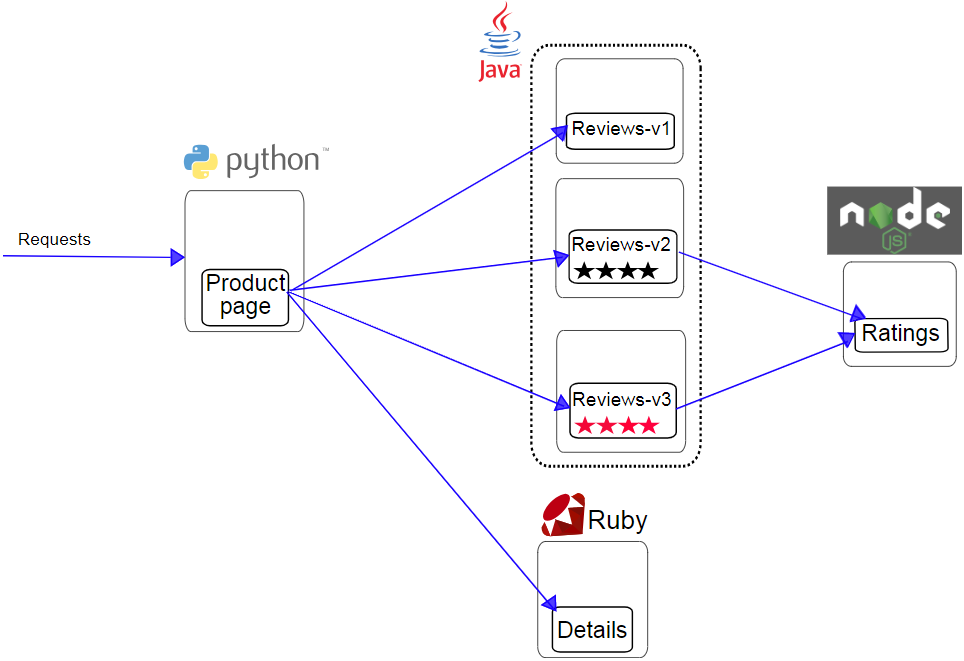
bookinfo

  • Productpage: layanan mikro Python yang memanggil layanan mikro Details dan Reviews untuk menghasilkan halaman. Layanan ini juga menyediakan fitur logon dan logoff.

  • Details: layanan mikro Ruby yang berisi informasi buku.

  • Reviews: layanan mikro Java yang berisi ulasan buku. Layanan ini memiliki tiga versi:

    • Versi 1 tidak memanggil layanan mikro Ratings.

    • Versi 2 memanggil layanan mikro Ratings dan menampilkan peringkat buku menggunakan satu hingga lima bintang hitam.

    • Versi 3 memanggil layanan mikro Ratings dan menampilkan peringkat buku menggunakan satu hingga lima bintang merah.

  • Ratings: layanan mikro Node.js yang menyediakan peringkat berdasarkan ulasan buku.

Untuk informasi selengkapnya, kunjungi Istio.

Prasyarat

Petunjuk dalam topik ini berlaku untuk kluster Kubernetes yang dikelola sendiri. Pastikan kluster Anda memenuhi kondisi berikut:

  • VNode telah diterapkan di kluster Kubernetes yang dikelola sendiri.

  • Jika kluster Kubernetes yang dikelola sendiri ditempatkan di pusat data, pusat data tersebut harus terhubung ke Alibaba Cloud.

  • Jika kluster Kubernetes yang dikelola sendiri ditempatkan pada instans Elastic Compute Service (ECS) dan menggunakan plug-in jaringan Flannel, pastikan Kubernetes cloud control manager (CCM) telah diterapkan di kluster tersebut. Hal ini memastikan Elastic Container Instance dapat berkomunikasi dengan Pod di node nyata. Untuk informasi selengkapnya, lihat Deploy the CCM.

Persiapan

  1. Instal Istio. Untuk informasi selengkapnya, lihat Getting Started.

  2. Buat namespace dan konfigurasikan label untuk namespace tersebut.

    kubectl create namespace istio-test
    kubectl label namespace istio-test istio-injection=enabled

Prosedur

Terapkan aplikasi Bookinfo

  1. Buat file bernama bookinfo.yaml dan salin templat berikut ke dalam file tersebut:

    Catatan

    Pada contoh kode YAML berikut, nodeSelector ditambahkan untuk menjadwalkan Pod ke VNode. Anda juga dapat mengonfigurasi eci-profile untuk menjadwalkan Pod ke VNode. Untuk informasi selengkapnya, lihat Schedule pods to a VNode dan Use eci-profile to schedule pods to a VNode.

    Buka file bookinfo.yaml

    # Copyright Istio Authors
    #
    #   Licensed under the Apache License, Version 2.0 (the "License");
    #   you may not use this file except in compliance with the License.
    #   You may obtain a copy of the License at
    #
    #       http://www.apache.org/licenses/LICENSE-2.0
    #
    #   Unless required by applicable law or agreed to in writing, software
    #   distributed under the License is distributed on an "AS IS" BASIS,
    #   WITHOUT WARRANTIES OR CONDITIONS OF ANY KIND, either express or implied.
    #   See the License for the specific language governing permissions and
    #   limitations under the License.
    ##################################################################################################
    # File ini mendefinisikan layanan, akun layanan, dan penyebaran untuk contoh Bookinfo.
    #
    # Untuk menerapkan keempat layanan Bookinfo, akun layanan terkait, dan penyebarannya:
    #
    #   kubectl apply -f samples/bookinfo/platform/kube/bookinfo.yaml
    #
    # Atau, Anda dapat menerapkan resource apa pun secara terpisah:
    #
    #   kubectl apply -f samples/bookinfo/platform/kube/bookinfo.yaml -l service=reviews # Layanan reviews
    #   kubectl apply -f samples/bookinfo/platform/kube/bookinfo.yaml -l account=reviews # ServiceAccount reviews
    #   kubectl apply -f samples/bookinfo/platform/kube/bookinfo.yaml -l app=reviews,version=v3 # Penyebaran reviews-v3
    ##################################################################################################
    ##################################################################################################
    # Layanan Details
    ##################################################################################################
    apiVersion: v1
    kind: Service
    metadata:
      name: details
      labels:
        app: details
        service: details
    spec:
      ports:
      - port: 9080
        name: http
      selector:
        app: details
    ---
    apiVersion: v1
    kind: ServiceAccount
    metadata:
      name: bookinfo-details
      labels:
        account: details
    ---
    apiVersion: apps/v1
    kind: Deployment
    metadata:
      name: details-v1
      labels:
        app: details
        version: v1
    spec:
      replicas: 1
      selector:
        matchLabels:
          app: details
          version: v1
      template:
        metadata:
          labels:
            app: details
            version: v1
        spec:
          nodeSelector:     # Konfigurasikan nodeSelector tertentu
            k8s.aliyun.com/vnode: "true"
          tolerations:      # Konfigurasikan toleransi tertentu
          - key: k8s.aliyun.com/vnode
            operator: "Equal"
            value: "true"
            effect: "NoSchedule"
          serviceAccountName: bookinfo-details
          containers:
          - name: details
            image: docker.io/istio/examples-bookinfo-details-v1:1.16.4
            imagePullPolicy: IfNotPresent
            ports:
            - containerPort: 9080
            securityContext:
              runAsUser: 1000
    ---
    ##################################################################################################
    # Layanan Ratings
    ##################################################################################################
    apiVersion: v1
    kind: Service
    metadata:
      name: ratings
      labels:
        app: ratings
        service: ratings
    spec:
      ports:
      - port: 9080
        name: http
      selector:
        app: ratings
    ---
    apiVersion: v1
    kind: ServiceAccount
    metadata:
      name: bookinfo-ratings
      labels:
        account: ratings
    ---
    apiVersion: apps/v1
    kind: Deployment
    metadata:
      name: ratings-v1
      labels:
        app: ratings
        version: v1
    spec:
      replicas: 1
      selector:
        matchLabels:
          app: ratings
          version: v1
      template:
        metadata:
          labels:
            app: ratings
            version: v1
        spec:
          nodeSelector:     # Konfigurasikan nodeSelector tertentu
            k8s.aliyun.com/vnode: "true"
          tolerations:      # Konfigurasikan toleransi tertentu
          - key: k8s.aliyun.com/vnode
            operator: "Equal"
            value: "true"
            effect: "NoSchedule"
          serviceAccountName: bookinfo-ratings
          containers:
          - name: ratings
            image: docker.io/istio/examples-bookinfo-ratings-v1:1.16.4
            imagePullPolicy: IfNotPresent
            ports:
            - containerPort: 9080
            securityContext:
              runAsUser: 1000
    ---
    ##################################################################################################
    # Layanan Reviews
    ##################################################################################################
    apiVersion: v1
    kind: Service
    metadata:
      name: reviews
      labels:
        app: reviews
        service: reviews
    spec:
      ports:
      - port: 9080
        name: http
      selector:
        app: reviews
    ---
    apiVersion: v1
    kind: ServiceAccount
    metadata:
      name: bookinfo-reviews
      labels:
        account: reviews
    ---
    apiVersion: apps/v1
    kind: Deployment
    metadata:
      name: reviews-v1
      labels:
        app: reviews
        version: v1
    spec:
      replicas: 1
      selector:
        matchLabels:
          app: reviews
          version: v1
      template:
        metadata:
          labels:
            app: reviews
            version: v1
        spec:
          nodeSelector:     # Konfigurasikan nodeSelector tertentu
            k8s.aliyun.com/vnode: "true"
          tolerations:      # Konfigurasikan toleransi tertentu
          - key: k8s.aliyun.com/vnode
            operator: "Equal"
            value: "true"
            effect: "NoSchedule"
          serviceAccountName: bookinfo-reviews
          containers:
          - name: reviews
            image: docker.io/istio/examples-bookinfo-reviews-v1:1.16.4
            imagePullPolicy: IfNotPresent
            env:
            - name: LOG_DIR
              value: "/tmp/logs"
            ports:
            - containerPort: 9080
            volumeMounts:
            - name: tmp
              mountPath: /tmp
            - name: wlp-output
              mountPath: /opt/ibm/wlp/output
            securityContext:
              runAsUser: 1000
          volumes:
          - name: wlp-output
            emptyDir: {}
          - name: tmp
            emptyDir: {}
    ---
    apiVersion: apps/v1
    kind: Deployment
    metadata:
      name: reviews-v2
      labels:
        app: reviews
        version: v2
    spec:
      replicas: 1
      selector:
        matchLabels:
          app: reviews
          version: v2
      template:
        metadata:
          labels:
            app: reviews
            version: v2
        spec:
          nodeSelector:     # Konfigurasikan nodeSelector tertentu
            k8s.aliyun.com/vnode: "true"
          tolerations:      # Konfigurasikan toleransi tertentu
          - key: k8s.aliyun.com/vnode
            operator: "Equal"
            value: "true"
            effect: "NoSchedule"
          serviceAccountName: bookinfo-reviews
          containers:
          - name: reviews
            image: docker.io/istio/examples-bookinfo-reviews-v2:1.16.4
            imagePullPolicy: IfNotPresent
            env:
            - name: LOG_DIR
              value: "/tmp/logs"
            ports:
            - containerPort: 9080
            volumeMounts:
            - name: tmp
              mountPath: /tmp
            - name: wlp-output
              mountPath: /opt/ibm/wlp/output
            securityContext:
              runAsUser: 1000
          volumes:
          - name: wlp-output
            emptyDir: {}
          - name: tmp
            emptyDir: {}
    ---
    apiVersion: apps/v1
    kind: Deployment
    metadata:
      name: reviews-v3
      labels:
        app: reviews
        version: v3
    spec:
      replicas: 1
      selector:
        matchLabels:
          app: reviews
          version: v3
      template:
        metadata:
          labels:
            app: reviews
            version: v3
        spec:
          nodeSelector:     # Konfigurasikan nodeSelector tertentu
            k8s.aliyun.com/vnode: "true"
          tolerations:      # Konfigurasikan toleransi tertentu
          - key: k8s.aliyun.com/vnode
            operator: "Equal"
            value: "true"
            effect: "NoSchedule"
          serviceAccountName: bookinfo-reviews
          containers:
          - name: reviews
            image: docker.io/istio/examples-bookinfo-reviews-v3:1.16.4
            imagePullPolicy: IfNotPresent
            env:
            - name: LOG_DIR
              value: "/tmp/logs"
            ports:
            - containerPort: 9080
            volumeMounts:
            - name: tmp
              mountPath: /tmp
            - name: wlp-output
              mountPath: /opt/ibm/wlp/output
            securityContext:
              runAsUser: 1000
          volumes:
          - name: wlp-output
            emptyDir: {}
          - name: tmp
            emptyDir: {}
    ---
    ##################################################################################################
    # Layanan Productpage
    ##################################################################################################
    apiVersion: v1
    kind: Service
    metadata:
      name: productpage
      labels:
        app: productpage
        service: productpage
    spec:
      ports:
      - port: 9080
        name: http
      selector:
        app: productpage
    ---
    apiVersion: v1
    kind: ServiceAccount
    metadata:
      name: bookinfo-productpage
      labels:
        account: productpage
    ---
    apiVersion: apps/v1
    kind: Deployment
    metadata:
      name: productpage-v1
      labels:
        app: productpage
        version: v1
    spec:
      replicas: 1
      selector:
        matchLabels:
          app: productpage
          version: v1
      template:
        metadata:
          labels:
            app: productpage
            version: v1
        spec:
          nodeSelector:     # Konfigurasikan nodeSelector tertentu
            k8s.aliyun.com/vnode: "true"
          tolerations:      # Konfigurasikan toleransi tertentu
          - key: k8s.aliyun.com/vnode
            operator: "Equal"
            value: "true"
            effect: "NoSchedule"
          serviceAccountName: bookinfo-productpage
          containers:
          - name: productpage
            image: docker.io/istio/examples-bookinfo-productpage-v1:1.16.4
            imagePullPolicy: IfNotPresent
            ports:
            - containerPort: 9080
            volumeMounts:
            - name: tmp
              mountPath: /tmp
            securityContext:
              runAsUser: 1000
          volumes:
          - name: tmp
            emptyDir: {}
    ---
  2. Terapkan aplikasi Bookinfo.

    kubectl -n istio-test apply -f bookinfo.yaml

    Output perintah berikut dikembalikan:

    xxx# kubectl -n istio-test apply -f bookinfo.yaml
    service/details created
    serviceaccount/bookinfo-details created
    deployment.apps/details-v1 created
    service/ratings created
    serviceaccount/bookinfo-ratings created
    deployment.apps/ratings-v1 created
    service/reviews created
    serviceaccount/bookinfo-reviews created
    deployment.apps/reviews-v1 created
    deployment.apps/reviews-v2 created
    deployment.apps/reviews-v3 created
    service/productpage created
    serviceaccount/bookinfo-productpage created
    deployment.apps/productpage-v1 created
  3. Lihat status Bookinfo.

    kubectl -n istio-test get pods -o wide

    Output perintah berikut dikembalikan:

    [xxx@xxx ~]# kubectl -n istio-test get pods -o wide
    NAME                                   READY   STATUS    RESTARTS   AGE     IP          NODE                          NOMINATED NODE   READINESS GATES
    details-v1-5f957dd5ff-kdvpc            2/2     Running   0          14m     192.168.xxx cn-qingdao.vnd-m5echu4xxx     <none>           <none>
    productpage-v1-85976f8df7-ht5dg        2/2     Running   0          72s     192.168.xxx cn-qingdao.vnd-m5echu4xxx     <none>           <none>
    ratings-v1-69fb6864cf-9l7fp            2/2     Running   0          23m     192.168.xxx cn-qingdao.vnd-m5echu4xxx     <none>           <none>
    reviews-v1-77f77b5-sssgw               2/2     Running   0          7m13s   192.168.xxx cn-qingdao.vnd-m5echu4xxx     <none>           <none>
    reviews-v2-5b9b5676c-bcjx9             2/2     Running   0          23m     192.168.xxx cn-qingdao.vnd-m5echu4xxx     <none>           <none>
    reviews-v3-6ff46dbb9c-kf2gl            2/2     Running   0          13m     192.168.xxx cn-qingdao.vnd-m5echu4xxx     <none>           <none>
  4. Periksa layanan mikro Bookinfo.

    kubectl -n istio-test get services

    Output perintah berikut dikembalikan:

    NAME          TYPE        CLUSTER-IP    EXTERNAL-IP   PORT(S)    AGE
    details       ClusterIP   10.96.1.xxx   <none>        9080/TCP   25m
    productpage   ClusterIP   10.96.2.xxx   <none>        9080/TCP   25m
    ratings       ClusterIP   10.96.1.xxx   <none>        9080/TCP   25m
    reviews       ClusterIP   10.96.1.xxx   <none>        9080/TCP   25m

Terapkan gateway Istio

  1. Buat file bernama bookinfo-gateway.yaml dan salin templat berikut ke dalam file tersebut:

    Buka file bookinfo-gateway.yaml

    apiVersion: networking.istio.io/v1alpha3
    kind: Gateway
    metadata:
      name: bookinfo-gateway
    spec:
      selector:
        istio: ingressgateway # gunakan controller default Istio
      servers:
      - port:
          number: 80
          name: http
          protocol: HTTP
        hosts:
        - "*"
    ---
    apiVersion: networking.istio.io/v1alpha3
    kind: VirtualService
    metadata:
      name: bookinfo
    spec:
      hosts:
      - "*"
      gateways:
      - bookinfo-gateway
      http:
      - match:
        - uri:
            exact: /productpage
        - uri:
            prefix: /static
        - uri:
            exact: /login
        - uri:
            exact: /logout
        - uri:
            prefix: /api/v1/products
        route:
        - destination:
            host: productpage
            port:
              number: 9080
  2. Terapkan gateway Istio.

    kubectl -n istio-test apply -f bookinfo-gateway.yaml

    Output yang diharapkan:

    [root@xxx ~]# kubectl -n istio-test apply -f bookinfo-gateway.yaml
    gateway.networking.istio.io/bookinfo-gateway created
    virtualservice.networking.istio.io/bookinfo created
  3. Lihat gateway Istio.

    kubectl -n istio-test get gateway

    Output perintah berikut dikembalikan:

    NAME                AGE
    bookinfo-gateway    88s

Verifikasi layanan mikro Bookinfo

  1. Dapatkan alamat host gateway Istio.

    Pilih Layanan Ingress Istio berdasarkan jenis kluster. Dalam topik ini, gunakan LoadBalancer sebagai Layanan Ingress Istio.

    kubectl -n istio-system get service istio-ingressgateway

    Output perintah berikut dikembalikan:

    [xxx@xxx ~]# kubectl -n istio-system get service istio-ingressgateway
    NAME                   TYPE           CLUSTER-IP   EXTERNAL-IP   PORT(S)                                                                      AGE
    istio-ingressgateway   LoadBalancer   10.96.xxx    <pending>     15021:31682/TCP,80:32247/TCP,443:31049/TCP,31400:30519/TCP,15443:31511/TCP   43m

    Parameter istio-ingressgateway pada pesan yang dikembalikan menunjukkan alamat host (dalam format IP:Port) dari Istio Ingress Gateway. Dalam contoh ini, alamat host-nya adalah 10.96.XX.XX:80.

  2. Buat Pod pengujian untuk memverifikasi layanan mikro Bookinfo.

    1. Buat file bernama test-pod.yaml dan salin templat berikut ke dalam file tersebut:

      Buka file test-pod.yaml

      apiVersion: v1
      kind: Pod
      metadata:
        name: centos
      spec:
        nodeSelector:    
          k8s.aliyun.com/vnode: "true"
        tolerations:      
        - key: k8s.aliyun.com/vnode
          operator: "Equal"
          value: "true"
          effect: "NoSchedule"
        containers:
        - name: eip
          image: registry-vpc.cn-shanghai.aliyuncs.com/eci_open/centos:7
          command:
          - bash
          - -c
          - sleep inf
    2. Terapkan Pod tersebut.

      kubectl apply -f test-pod.yaml
  3. Login ke Pod pengujian dan jalankan perintah berikut untuk memverifikasi layanan mikro Bookinfo.

    kubectl exec -it centos -- bash
    curl -s http://10.96.XX.XX:80/productpage | grep -o "<title>.*</title>"

    Ganti 10.96.xxx:80 dengan alamat internal gerbang masuk Anda. Jika perintah mengembalikan <title>Simple BookStore App</title>, berarti aplikasi Bookinfo dapat diakses melalui gerbang masuk Istio.