Appelle l'opération AttachNetworkInterface pour attacher une interface réseau élastique (ENI) à une instance ECS connectée à un VPC. Vous pouvez spécifier des paramètres tels que NetworkInterfaceId, InstanceId et NetworkCardIndex.
Description de l'opération
Lorsque vous appelez cette opération, prenez note des éléments suivants :
-
L'interface réseau élastique (ENI) doit être dans l'état disponible (
Available). Une ENI ne peut être attachée qu'à une seule instance qui réside dans la même zone et le même VPC que le contrôleur d'interface réseau (NIC). -
L'instance ECS doit être dans l'état Running ou Stopped. Certains types d'instances ECS requièrent que l'instance ECS soit dans l'état Stopped lorsque vous attachez une interface réseau élastique (ENI). Pour plus d'informations, consultez la section sur les types d'instances ECS qui nécessitent l'arrêt de l'instance ECS dans Attacher une ENI.
RemarqueSi l'instance a été démarrée pour la dernière fois avant le 1er avril 2018 (y compris, mais sans s'y limiter, le démarrage d'une instance nouvellement achetée, le redémarrage ou la mise sous tension), vous devez appeler RebootInstance pour redémarrer l'instance qui se trouve dans l'état Running. Sinon, le contrôleur d'interface réseau (NIC) ne peut pas être attaché.
-
Plusieurs interfaces réseau élastiques (ENI) peuvent être attachées à une seule instance en même temps. Pour plus d'informations, consultez Présentation des ENI.
-
Le vSwitch auquel appartient le contrôleur d'interface réseau (NIC) doit se trouver dans la même zone et le même VPC que l'instance.
-
Il s'agit d'une opération asynchrone. Après une invocation réussie, vous pouvez vérifier l'état de l'interface réseau élastique (ENI) ou écouter les événements d'opération du contrôleur d'interface réseau (NIC) pour obtenir le résultat. La machine à états de l'ENI est illustrée dans la figure suivante :
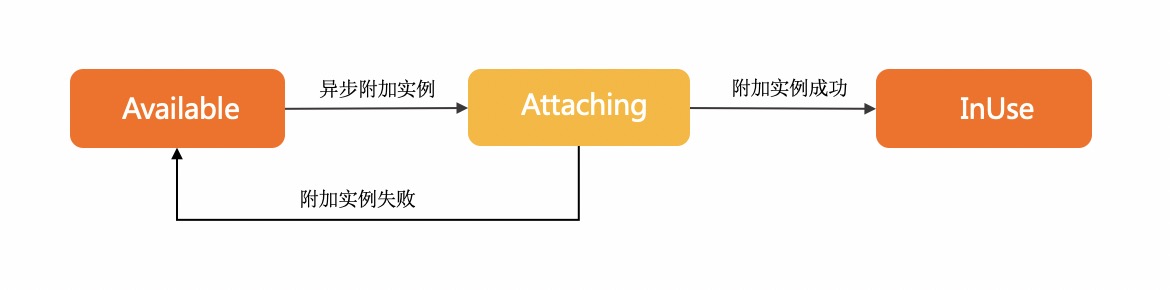
Attaching indique que la requête d'attachement de l'ENI a été envoyée avec succès et que l'ENI est en cours d'attachement à l'instance ECS.
InUse indique que l'ENI a été attachée à l'instance ECS.
Available indique que l'ENI n'a pas pu être attachée à l'instance ECS.
Pour plus de détails, consultez Attacher un contrôleur d'interface réseau (NIC).
Testez maintenant
Testez cette API dans OpenAPI Explorer, sans signature manuelle. Les appels réussis génèrent automatiquement du code SDK correspondant à vos paramètres. Téléchargez-le avec une sécurité intégrée des identifiants pour une utilisation locale. Testez cette API dans OpenAPI Explorer, sans signature manuelle. Les appels réussis génèrent automatiquement du code SDK correspondant à vos paramètres. Téléchargez-le avec une sécurité intégrée des identifiants pour une utilisation locale.
Test
Autorisation RAM
|
ecs:AttachNetworkInterface |
update |
*NetworkInterface
*Instance
|
Aucune | Aucune |
Paramètres de requête
|
Paramètre |
Type |
Requis |
Description |
Exemple |
| RegionId |
string |
Oui |
L'identifiant de la région de l'instance. Vous pouvez appeler DescribeRegions pour obtenir la liste la plus récente des régions. |
cn-hangzhou |
| NetworkInterfaceId |
string |
Oui |
L'identifiant du contrôleur d'interface réseau (NIC). |
eni-bp17pdijfczax1huji**** |
| InstanceId |
string |
Oui |
L'identifiant de l'instance. |
i-bp16qstyvxj9gpqw**** |
| TrunkNetworkInstanceId |
string |
Non |
L'identifiant de l'ENI trunk. Remarque
Ce paramètre n'est pas encore disponible. |
eni-f8zapqwj1v1j4ia3**** |
| WaitForNetworkConfigurationReady |
boolean |
Non |
Remarque
Ce paramètre est obsolète. |
null |
| NetworkCardIndex |
integer |
Non |
L'index de la carte réseau spécifiée pour l'ENI. Remarque
Les valeurs valides de NetworkCardIndex dépendent de la famille d'instances. Si le type d'instance ne prend pas en charge les cartes réseau, vous ne pouvez pas spécifier ce paramètre. Si le type d'instance prend en charge les cartes réseau, consultez Familles d'instances pour connaître les valeurs valides. |
0 |
Éléments de réponse
|
Élément |
Type |
Description |
Exemple |
|
object |
|||
| RequestId |
string |
L'identifiant de la requête. |
473469C7-AA6F-4DC5-B3DB-A3DC0DE3C83E |
Exemples
JSON format
{
  "RequestId": "473469C7-AA6F-4DC5-B3DB-A3DC0DE3C83E"
}
Codes d'erreur
|
Code de statut HTTP |
Code d'erreur |
Message d'erreur |
Description |
|---|---|---|---|
| 400 | MissingParameter | %s | A parameter is not specified. |
| 400 | UnsupportedParameter | %s | The parameter is not supported. |
| 400 | InvalidParameter | %s | The specified parameter is invalid. |
| 400 | InvalidInstanceID.Malformed | %s | The specified InstanceId parameter is invalid. |
| 400 | InvalidOperation.InvalidRegion | %s | The specified RegionId parameter is invalid. |
| 400 | InvalidOperation.InvalidEcsState | %s | The current status of the instance does not support this operation. |
| 400 | InvalidOperation.InvalidEniState | %s | The current status of the ENI does not allow modifying ENI attributes. |
| 400 | InvalidOperation.DetachPrimaryEniNotAllowed | %s | Detaching the primary ENI from an instance is not allowed. |
| 400 | Forbidden.RegionId | %s | The service is unavailable in the current region. |
| 400 | InvalidOperation.InvalidGeneration | %s | The specified ECS instance type does not support attaching an Elastic Network Interface (ENI). |
| 400 | InvalidParams.EniId | %s | The specified EniId parameter is invalid. |
| 400 | InvalidOperation.UserNotSupportNetworkCard | User not support network card. | |
| 400 | InvalidOperation.ConnectionTrackingConfigNotSupportMemberEni | Member eni not support ConnectionTrackingConfiguration. | Network connection configurations cannot be specified for member network interfaces. |
| 400 | InvalidParameter.NetworkCardIndexInvalid | The network card index is invalid or the current ECS/ENI type does not support the value. | Physical NIC properties do not meet the NIC or instance type restrictions |
| 400 | InvalidOperation.InstanceTypeNotSupportRss | The ECS instance type does not support Rss. | The ECS instance type does not support Rss. |
| 400 | OperationDenied.NoEniStock | The requested resource of ENI is insufficient in the specified ECS, please retry or upgrade to enterprise-level computing instance types. | The requested resource of ENI is insufficient in the specified ECS, please retry or upgrade to enterprise-level computing instance types. |
| 400 | InvalidOperation.InstanceTypeNotSupportSriov | The specified instance type does not support ENI Sriov. | The specified instance type does not support ENI Sriov. |
| 500 | InternalError | The request processing has failed due to some unknown error, exception or failure. | An internal error has occurred. Try again later. |
| 500 | InvalidSecurityGroupId.EniMustHaveSecurityGroup | The specified network card does not have an associated security group. | The specified NIC is not associated with a security group. |
| 403 | InvalidUserType.NotSupported | %s | Your account does not support this operation. |
| 403 | Abs.InvalidAccount.NotFound | %s | Your Alibaba Cloud account does not exist or your AccessKey pair has expired. |
| 403 | Forbidden.NotSupportRAM | %s | RAM users are not authorized to perform this operation. |
| 403 | Forbidden.SubUser | %s | You are not authorized to manage this resource. Contact the owner of the Alibaba Cloud account for authorization. |
| 403 | MaxEniCountExceeded | %s | The maximum number of ENIs that can be managed has been reached. |
| 403 | EniPerInstanceLimitExceeded | %s | The maximum number of ENIs that can be attached to the specified instance has been reached. |
| 403 | InvalidOperation.AvailabilityZoneMismatch | %s | The operation is invalid. |
| 403 | InvalidOperation.VpcMismatch | %s | The operation is invalid. Check whether the VPC in the operation corresponds to other parameters. |
| 403 | SecurityGroupInstanceLimitExceed | %s | The number of instances in the security group has reached the maximum limit. |
| 403 | InvalidSecurityGroupId.NotVpc | %s | The specified SecurityGroupId parameter is invalid and the network type of the security group is not VPC. |
| 403 | InvalidOperation.InvalidEniType | %s | The current type of the Elastic Network Interface (ENI) does not support this operation. |
| 403 | InvalidInstanceId.NotFound | %s | The specified instance does not exist. Check whether the InstanceId parameter is valid. |
| 403 | InvalidEni.NotSameVpc | %s | The specified resource and the specified ENI do not belong to the same VPC. For more information, see the return value of the %s placeholder in the error message. |
| 403 | InvalidOperation.Ipv4CountExceeded | %s | The operation is valid because the maximum number of IPv4 addresses has been reached. |
| 403 | InvalidOperation.EniServiceManaged | %s | The operation is invalid. |
| 403 | InvalidOperation.MultiGroupType | The specified instance can't join different types of security group. | The specified instance cannot join security groups of different types. |
| 403 | InvalidOperation.NotSupportEnterpriseGroup | The specified instance type doesn't support enterprise level security group. | |
| 403 | InvalidOperation.EniCountExceeded | The maximum number of eni in a enterprise level security group is exceeded. | The number of NICs in the enterprise security group exceeds the limit. |
| 403 | InvalidOperation.EipBindModel | %s | |
| 403 | InvalidOperation.Ipv6NotSupport | %s | The current instance type does not support IPv6. |
| 403 | InvalidOperation.HotPlugNotSupport | %s | The operation is not supported while the specified resource is running. For more information, see the return value of the %s placeholder in the error message. |
| 403 | InvalidInstance.NetworkType | %s | |
| 403 | InvalidOperation.InvalidTrunkEniStatus | %s | The current status of the specified trunk-mode ENI does not allow this operation. For more information, see the actual return result in the %s placeholder of the error message. |
| 403 | InvalidOperation.TrunkingIsNotAllowed | %s | The trunk network card is not operational. |
| 403 | InvalidOperation.InstanceTypeNotSupportEniTrunking | %s | The specified instance type does not support trunk mode for Elastic Network Interfaces (ENIs). |
| 403 | InvalidOperation.EniTypeNotSupportTrunking | %s | The type of the ENI does not support operations related to the trunk mode. For more information, see the return value of the %s placeholder in the error message. |
| 403 | InvalidOperation.EniTrunkDeviceFull | %s | |
| 403 | InvalidParameter.EniNotBelongTrunk | %s | The specified ENI is not in trunk mode. For more information, see the return value of the %s placeholder in the error message. |
| 403 | InvalidOperation.EniTypeNotSupportAttachToTrunk | %s | |
| 403 | InvalidParameter.EniNotBelongEcs | %s | |
| 403 | InvalidParameter.InvalidEniQueueNumber | %s | The number of network interface controller (NIC) queues is incorrect. For more information, refer to the actual return result of the %s placeholder in the error message. |
| 403 | InvalidOperation.MaxEniQueueNumberExceeded | %s | The number of Elastic Network Interface (ENI) queues exceeds the upper limit. For more information, see the actual return result of the %s placeholder in the error message. |
| 403 | InvalidOperation.ExceedInstanceTypeQueueNumber | %s | The maximum number of queues for all ENIs on an instance has been exceeded. For more information, see the return value of the %s placeholder in the error message. |
| 403 | InvalidOperation.HighPerformanceTrafficModeNotSupportTrunkEni | %s | |
| 403 | InvalidOperation.HighPerformanceTrafficModeNotSupportMemberEni | %s | |
| 403 | InvalidOperation.InstanceTypeNotSupportHighPerformanceTrafficMode | %s | The instance type of the specified instance does not support the NIC of the RDMA communication mode. |
| 403 | InvalidOperation.EniTrafficModeNotSupportIpv6 | %s | |
| 403 | InvalidOperation.MaxEniQueuePairNumberExceed | %s | |
| 403 | InvalidParameter.InvalidQueuePairNumber | %s | |
| 403 | InvalidOperation.EniQueuePairNumberOverflow | %s | |
| 403 | InvalidOperation.HighPerformanceEniPerInstanceLimitExceeded | %s | |
| 403 | InvalidOperation.Ipv6CountExceeded | %s. | The operation is invalid because the number of IPv6 has reached the upper limit. |
| 403 | InvalidOperation.PrimaryEniNotExist | Primary Eni Not Exist. | The primary NIC of the instance does not exist. |
| 404 | InvalidEcsId.NotFound | %s | The specified instance ID does not exist. |
| 404 | InvalidEniId.NotFound | %s | |
| 404 | InvalidVSwitchId.NotFound | %s | The specified vSwitch does not exist. |
| 404 | InvalidSecurityGroupId.NotFound | %s | The specified security group ID does not exist. |
Consultez Codes d'erreur pour la liste complète.
Notes de version
Consultez Notes de version pour la liste complète.