Cuando un bucket contiene millones o miles de millones de objetos, listarlos mediante la operación de API ListObjects resulta ineficiente y costoso. La función de inventario de buckets gestiona objetos a esta escala: analiza el bucket de forma asíncrona y periódica, y genera archivos de inventario con los metadatos que usted especifique, como el tamaño del objeto y la clase de almacenamiento.
Casos de uso
Object Storage Service (OSS) ofrece inventarios completos e incrementales. Es posible configurar uno o ambos tipos y entregar los archivos generados en un bucket específico. Elija el tipo de inventario según si necesita rastrear también los cambios en sus objetos:
Análisis y estadísticas de datos puntuales: si solo requiere analizar objetos históricos, configure una regla de inventario completo para generar una única lista de metadatos destinada al análisis de datos sin conexión.
Análisis y estadísticas de datos continuos: cuando necesite analizar objetos históricos y rastrear cambios posteriores, utilice inventarios completos e incrementales para construir una tabla de metadatos unificada. Por ejemplo, puede escribir todos los metadatos existentes e incrementales en su propia tabla y usar un clúster de Spark para recuperar, consultar y analizar dichos metadatos.
Funcionamiento
Una vez creada la regla de inventario, OSS ejecuta automáticamente la tarea de inventario de manera periódica. Esta tarea se ejecuta de forma asíncrona y no afecta el acceso normal al bucket.
-
Inventario completo: captura el estado de todos los objetos existentes en un bucket en un momento determinado. OSS genera estos inventarios de forma periódica (diaria, semanal o mensual), con una ejecución por ciclo. El flujo de trabajo es el siguiente:
Obtención de permisos: OSS asume un rol de RAM preautorizado para analizar el bucket de origen y escribir los informes de inventario en el bucket de destino.
Análisis de objetos: OSS examina los objetos del bucket de origen que coinciden con los criterios de filtro de la regla de inventario, como el prefijo del objeto, el estado de la versión, la fecha de creación o el tamaño.
Generación del informe de inventario: OSS agrupa los resultados del análisis en un informe de inventario y lo escribe en el bucket de destino. El informe se genera en formato CSV (comprimido con Gzip) o Parquet. El formato Parquet solo es compatible con la región UK (London).
-
Inventario incremental: registra los metadatos de los objetos creados, actualizados o eliminados durante un periodo determinado. Los inventarios incrementales capturan todos los eventos de cambio de los objetos, incluidas las creaciones, las actualizaciones de metadatos y las eliminaciones. Por lo general, se generan cada 10 minutos. El flujo de trabajo es el siguiente:
Obtención de permisos: OSS asume un rol de RAM preautorizado para analizar los registros del bucket de origen y escribir los informes de inventario en el bucket de destino.
Análisis de objetos: OSS examina los registros incrementales que coinciden con los criterios de filtro de la regla de inventario, como el prefijo del objeto.
Generación del informe de inventario: OSS utiliza particiones de backend para agrupar los resultados del análisis y escribe el informe de inventario en el bucket de destino en formato CSV.
Requisitos previos
Antes de configurar un inventario de buckets, asegúrese de cumplir con a continuación requisitos:
El bucket de origen debe tener un atributo regional. La función de inventario de buckets solo es compatible con buckets que cuentan con este atributo.
Para utilizar la función de inventario incremental, póngase en contacto con soporte técnico y solicite su activación.
Debe existir un rol de RAM disponible para que el servicio de inventario lea del bucket de origen y escriba en el de destino. Puede usar el rol predeterminado
AliyunOSSRoleque crea la consola o crear un rol dedicado con privilegios mínimos. Para obtener instrucciones, consulte Create and authorize a service role.Si la política del bucket de destino contiene declaraciones Deny que restringen el acceso a direcciones IP de red o VPC específicas, permita que el inventario escriba a través de la intranet clásica de OSS. Para obtener instrucciones, consulte Allow inventory writes to a network-restricted destination bucket.
Si desea cifrar los informes de inventario con KMS, use una clave de KMS administrada por OSS o cree una clave de KMS en la misma región que el bucket de destino.
Si necesita exportar los campos Last Accessed Time y Last Accessed Timestamp, habilite Access Tracking en el bucket de origen.
Creación y autorización de un rol de servicio
El servicio de inventario de OSS debe asumir un rol de RAM para obtener los permisos necesarios para leer del bucket de origen y escribir en el de destino. Para garantizar la seguridad de la cuenta, aplique el principio de privilegio mínimo y cree un rol de servicio dedicado para la función de inventario.
Cuando configura rápidamente un inventario en la consola, el sistema le sugiere crear de forma automática un rol llamado AliyunOSSRole. Puede usar este rol predeterminado sin necesidad de crear un rol de servicio. Sin embargo, dicho rol otorga permisos de gestión total sobre todos los buckets de su cuenta de Alibaba Cloud. En entornos de producción, no utilice AliyunOSSRole. Siga los pasos de esta sección para crear manualmente un rol con privilegios mínimos.
(Opcional) Otorgar a un usuario de RAM los permisos para configurar inventarios
Una cuenta de Alibaba Cloud tiene todos los permisos de forma predeterminada. Si utiliza una cuenta de este tipo, omita este paso. Este paso autoriza a un usuario de RAM, como un administrador de operaciones, a configurar reglas de inventario. No otorga permisos al servicio de inventario en sí. Como práctica recomendada de seguridad, el propietario de la cuenta de Alibaba Cloud o un administrador con permisos elevados debe crear previamente el rol de RAM necesario para el servicio de inventario. De este modo, un usuario de RAM común puede configurar el inventario utilizando ese rol, sin requerir permisos para crearlo.
Para otorgar a un usuario de RAM los permisos necesarios para crear y gestionar reglas de inventario, grant the user una política personalizada con los siguientes permisos. El permiso oss:ListBuckets de la siguiente política solo es obligatorio para las operaciones en la consola. No se requiere cuando se usan herramientas como SDK o ossutil.
{
    "Statement": [
        {
            "Effect": "Allow",
            "Action": [
                "oss:PutBucketInventory",
                "oss:GetBucketInventory",
                "oss:DeleteBucketInventory",
                "oss:ListBuckets",
                "ram:CreateRole",
                "ram:AttachPolicyToRole",
                "ram:GetRole",
                "ram:ListPoliciesForRole"
            ],
            "Resource": "*"
        }
    ],
    "Version": "1"
}Si el usuario de RAM actual ya tiene asignada la política de sistema AliyunOSSFullAccess, solo necesita otorgar los siguientes permisos para la gestión de roles:
{
    "Statement": [
        {
            "Effect": "Allow",
            "Action": [
                "ram:CreateRole",
                "ram:AttachPolicyToRole",
                "ram:GetRole",
                "ram:ListPoliciesForRole"
            ],
            "Resource": "*"
        }
    ],
    "Version": "1"
}
Creación del rol de servicio
Cree un rol de RAM. Vaya a la página Create RAM Role. En Select Trusted Entity, seleccione Alibaba Cloud Service. En Trusted Service, seleccione Object Storage Service.
-
Otorgue al rol de RAM los permisos para escribir en el bucket de destino. En la página Create Policy, haga clic en la pestaña Script. Pegue la siguiente política en el editor y reemplace
dest-bucketpor el nombre de su bucket de destino.{ "Version": "1", "Statement": [ { "Effect": "Allow", "Action": "oss:PutObject", "Resource": [ "acs:oss:::dest-bucket/*" ] } ] }Permiso
AliyunKMSCryptoUserAccesso permisos de KMS más específicos. Adjunte la política al rol de RAM. En la página Permissions, haga clic en Add Permissions. En Principal, seleccione el rol de RAM que creó. En Policy, seleccione la política que acaba de crear y, a continuación, haga clic en OK.
Registre el ARN del rol. En la página Roles, busque el rol de RAM que creó. Vaya a la página Basic Information y copie el ARN del rol para usarlo cuando cree la regla de inventario. El ARN tiene el formato
acs:ram::{source-account-id}:role/{role-name}.
Compruebe que el servicio de confianza del rol de RAM sea Object Storage Service y que el recurso de la política cubra la ruta del bucket de destino. De lo contrario, el servicio de inventario no podrá escribir los informes en el bucket de destino.
Permitir escrituras de inventario en un bucket de destino con restricciones de red
Esta sección aplica únicamente si la política del bucket de destino contiene declaraciones Deny que restringen el acceso a direcciones IP de red o VPC específicas. Si no existen tales declaraciones Deny, omita esta sección.
El bucket de destino debe permitir el acceso a través de la intranet clásica de OSS para que el servicio de inventario pueda escribir los archivos exportados.
Si por motivos de seguridad necesita restringir el bucket de destino para que solo admita el acceso desde direcciones IP de red o VPC específicas, agregue la siguiente condición al elemento Condition de cada declaración Deny en la política del bucket de destino. Esto permitirá que el servicio de inventario escriba en el bucket a través de la red clásica.
"StringNotEquals": {
    "oss:ClassicIntranet": [
        "true"
    ]
}
Inventario completo
Un inventario completo analiza y exporta periódicamente una lista completa de todos los objetos de un bucket o bajo un prefijo específico. Tenga en cuenta lo siguiente:
Instantánea del informe: un informe de inventario proporciona una instantánea de los objetos al iniciar la tarea de análisis. Es posible que los cambios en los objetos, como adiciones o eliminaciones durante el análisis, no se incluyan en el informe actual.
Programación del informe: el primer informe de inventario se ejecuta inmediatamente después de configurar la regla. Si programa exportaciones mensuales para un día específico del mes, la tarea de inventario comenzará ese día. Los informes posteriores se ejecutan por lotes durante las primeras horas de la mañana (UTC+8) de forma diaria, semanal o mensual, según su configuración. La latencia de exportación depende de la cantidad de objetos y de la cola de tareas.
Configurar una regla de inventario
Console
Inicie sesión en la consola de OSS.
Vaya al bucket de origen para el que desea generar un inventario. En el panel de navegación izquierdo, elija Data Management > Bucket Inventory.
En la página Bucket Inventory, haga clic en Create Inventory.
-
En el panel Create Inventory, configure a continuación los parámetros.
Parámetro Descripción Status Seleccione Start para habilitar la tarea de inventario. Rule Name El nombre de la tarea de inventario. Solo puede contener letras minúsculas, dígitos y guiones (-). No debe comenzar ni terminar con un guion (-). Inventory Report Destination El destino de los informes de inventario. El bucket de destino debe estar en la misma región y pertenecer a la misma cuenta que el bucket de origen. Para guardar el informe en la ruta exampledir1/del bucket examplebucket, introduzcaexampledir1/. Si la ruta especificada no existe en el bucket, OSS la crea automáticamente. Si deja este campo vacío, el informe se guarda en el directorio raíz. Si el servicio OSS-HDFS está habilitado para un bucket, no establezca el directorio del informe de inventario en.dlsdata/. Esto evita interferencias con el servicio y previene la contaminación de datos.Inventory file scan scope El alcance de los objetos que se van a analizar. Scan entire bucket: analiza todos los objetos del bucket. Object Prefix: analiza solo los objetos que coinciden con el prefijo especificado, como exampledir1/. Encryption Method El método de cifrado del informe de inventario. None: sin cifrado. AES256: cifra el informe mediante AES256. KMS: cifra el archivo de inventario mediante una clave de KMS. Puede usar una clave de KMS administrada por OSS o create a KMS key en la misma región que el bucket de destino desde la consola de KMS. El uso de la función de claves de KMS genera un pequeño cargo por las llamadas a la API de claves de KMS. Para obtener más información sobre los precios, consulte . Frequency La frecuencia con la que OSS genera los informes de inventario. Puede seleccionar Weekly, Daily, Monthly o One-time Export. Para buckets con más de 10 mil millones de objetos, seleccione Weekly y así reducir costos y sobrecarga de análisis. La programación Monthly no es compatible en todas las regiones. Para obtener más información, consulte Quotas and limitations. {mode, select, NOT_SPECIFY {Unspecified Date} SPECIFY {Specified Date} other{--}} Cuando establece el ciclo de exportación en Monthly, puede especificar el día del mes en el que iniciará la tarea de inventario. El valor debe ser un número entero del 1 al 31. Si selecciona {mode, select, NOT_SPECIFY {Unspecified Date} SPECIFY {Specified Date} other{--}}, OSS exporta el inventario en un intervalo fijo de 30 días de forma predeterminada. El primer análisis comienza el día en que configura la regla y el inventario se exporta cada 30 días a partir de entonces. Si especifica un día del 1 al 28, la tarea de inventario comienza ese día de cada mes. Si especifica un día del 29 al 31, la tarea comienza ese día si existe en el mes actual. Si el día no existe, la tarea comienza el último día del mes. Por ejemplo, si especifica el día 31 de cada mes, la tarea de inventario de abril comenzará el día 30. La fecha especificada indica cuándo inicia la tarea de inventario, no cuándo se entrega el informe. La generación del informe es una tarea asíncrona y su tiempo de finalización depende de la cantidad de objetos del bucket. La entrega ocurre después de la fecha especificada. Inventory format El formato de archivo del informe de inventario. Puede seleccionar CSV o Parquet. Actualmente, el formato Parquet solo es compatible en la región UK (London). Optional Fields La información de los objetos que se incluirá en el informe. System Metadata: object size, storage class, Last Modified Date, ETag, TransitionTime, multipart upload status, Encryption Status, Object ACL, Object Type, CRC64, Last Accessed Time y Last Accessed Timestamp. Last Accessed Time y Last Accessed Timestamp solo se pueden exportar cuando Access Tracking está habilitado para el bucket. Si Access Tracking está deshabilitado, los valores de estos dos campos pierden sentido y normalmente se muestran como nulos. Custom Metadata: Number of Tags. Advanced Filtering Si necesita filtrar los archivos exportados según condiciones como el tamaño del archivo o la clase de almacenamiento, active el interruptor Advanced Filtering. Las opciones de filtro solo son compatibles en las regiones China (Qingdao), China (Hohhot) y Germany (Frankfurt). A continuación se muestran las opciones de filtro compatibles. Time Range: la fecha de inicio y la fecha de fin de la última modificación de los objetos que se van a exportar. La hora tiene precisión de segundos. Object Size Range: el tamaño mínimo y máximo de los objetos que se van a exportar. Ambos tamaños deben ser mayores que 0 B. El tamaño máximo no puede superar los 48.8 TB. Storage Class: las clases de almacenamiento de los objetos que se van a exportar. Puede elegir exportar objetos de las clases de almacenamiento Standard, Infrequent Access, Archive, Cold Archive y Deep Cold Archive. Object Versions Si versioning está habilitado para el bucket, seleccione Current Version o All Versions. Seleccione I acknowledge and agree to grant the Alibaba Cloud OSS service permission to access resources in this bucket. y luego haga clic en OK. La nueva regla de inventario aparece en la página Bucket Inventory con el estado Start. La generación del archivo de inventario puede tardar algún tiempo si el bucket contiene muchos objetos. Para saber cómo comprobar si el archivo está listo, consulte How do I determine whether an inventory file has been generated?.
SDK
A continuación se muestra el código de ejemplo para configurar una regla de inventario mediante los SDK de OSS en distintos lenguajes.
import com.aliyun.oss.; import com.aliyun.oss.common.auth.; import com.aliyun.oss.common.comm.SignVersion; import com.aliyun.oss.model.*; import java.util.ArrayList; import java.util.List; public class Demo { public static void main(String[] args) throws Exception { // In this example, the endpoint of the China (Hangzhou) region is used. Specify your actual endpoint. String endpoint = "https://oss-cn-hangzhou.aliyuncs.com"; // Obtain access credentials from environment variables. Before you run the sample code, make sure that the OSS_ACCESS_KEY_ID and OSS_ACCESS_KEY_SECRET environment variables are configured. EnvironmentVariableCredentialsProvider credentialsProvider = CredentialsProviderFactory.newEnvironmentVariableCredentialsProvider(); // Specify the name of the bucket. Example: examplebucket. String bucketName = "examplebucket"; // Specify the name of the bucket in which you want to store the generated inventory lists. String destBucketName ="yourDestinationBucketName"; // Specify the account ID granted by the bucket owner. String accountId ="yourDestinationBucketAccountId"; // Specify the name of the RAM role that is granted the permissions to read all objects in the bucket for which you want to configure the inventory and the permissions to write data to the bucket in which you want to store the generated inventory lists. String roleArn ="yourDestinationBucketRoleArn"; // Specify the region in which the bucket is located. For example, if the bucket is located in the China (Hangzhou) region, set the region to cn-hangzhou. String region = "cn-hangzhou"; // Create an OSS Client instance. // Call the shutdown method to release associated resources when the OSS Client is no longer in use. ClientBuilderConfiguration clientBuilderConfiguration = new ClientBuilderConfiguration(); clientBuilderConfiguration.setSignatureVersion(SignVersion.V4); OSS ossClient = OSSClientBuilder.create() .endpoint(endpoint) .credentialsProvider(credentialsProvider) .clientConfiguration(clientBuilderConfiguration) .region(region) .build(); try { // Create an inventory. InventoryConfiguration inventoryConfiguration = new InventoryConfiguration(); // Specify the inventory name. String inventoryId = "testid"; inventoryConfiguration.setInventoryId(inventoryId); // Specify the object attributes that are included in inventory lists. List<String> fields = new ArrayList<String>(); fields.add(InventoryOptionalFields.Size); fields.add(InventoryOptionalFields.LastModifiedDate); fields.add(InventoryOptionalFields.IsMultipartUploaded); fields.add(InventoryOptionalFields.StorageClass); fields.add(InventoryOptionalFields.ETag); fields.add(InventoryOptionalFields.EncryptionStatus); inventoryConfiguration.setOptionalFields(fields); // Specify whether to generate inventory lists on a daily or weekly basis. The following code provides an example on how to generate the inventory lists on a weekly basis. Weekly indicates that the inventory lists are generated once a week and Daily indicates that the inventory lists are generated once a day. inventoryConfiguration.setSchedule(new InventorySchedule().withFrequency(InventoryFrequency.Weekly)); // Specify that the inventory lists include only the current version of objects. If you set the InventoryIncludedObjectVersions parameter to All, all versions of objects are included in the inventory lists. This configuration takes effect only when you enable versioning for the bucket. inventoryConfiguration.setIncludedObjectVersions(InventoryIncludedObjectVersions.Current); // Specify whether the inventory is enabled. Valid values: true and false. Set the value to true to enable the inventory. Set the value to false to disable the inventory. inventoryConfiguration.setEnabled(true); // Specify the rule used to filter the objects to include in the inventory lists. The following code provides an example on how to filter the objects by prefix. InventoryFilter inventoryFilter = new InventoryFilter().withPrefix("obj-prefix"); inventoryConfiguration.setInventoryFilter(inventoryFilter); // Specify the destination bucket in which you want to store the generated inventory lists. InventoryOSSBucketDestination ossInvDest = new InventoryOSSBucketDestination(); // Specify the prefix of the path in which you want to store the generated inventory lists. ossInvDest.setPrefix("destination-prefix"); // Specify the format of the inventory lists. ossInvDest.setFormat(InventoryFormat.CSV); // Specify the ID of the account to which the destination bucket belongs. ossInvDest.setAccountId(accountId); // Specify the role ARN of the destination bucket. ossInvDest.setRoleArn(roleArn); // Specify the name of the destination bucket. ossInvDest.setBucket(destBucketName); // The following code provides an example on how to encrypt the inventory lists by using customer master keys (CMKs) hosted in Key Management System (KMS). // InventoryEncryption inventoryEncryption = new InventoryEncryption(); // InventoryServerSideEncryptionKMS serverSideKmsEncryption = new InventoryServerSideEncryptionKMS().withKeyId("test-kms-id"); // inventoryEncryption.setServerSideKmsEncryption(serverSideKmsEncryption); // ossInvDest.setEncryption(inventoryEncryption); // The following code provides an example on how to encrypt the inventory lists on the OSS server. // InventoryEncryption inventoryEncryption = new InventoryEncryption(); // inventoryEncryption.setServerSideOssEncryption(new InventoryServerSideEncryptionOSS()); // ossInvDest.setEncryption(inventoryEncryption); // Specify the destination for the generated inventory lists. InventoryDestination destination = new InventoryDestination(); destination.setOssBucketDestination(ossInvDest); inventoryConfiguration.setDestination(destination); // Configure the inventory for the bucket. ossClient.setBucketInventoryConfiguration(bucketName, inventoryConfiguration); } catch (OSSException oe) { System.out.println("Caught an OSSException, which means your request made it to OSS, " + "but was rejected with an error response for some reason."); System.out.println("Error Message:" + oe.getErrorMessage()); System.out.println("Error Code:" + oe.getErrorCode()); System.out.println("Request ID:" + oe.getRequestId()); System.out.println("Host ID:" + oe.getHostId()); } catch (ClientException ce) { System.out.println("Caught an ClientException, which means the client encountered " + "a serious internal problem while trying to communicate with OSS, " + "such as not being able to access the network."); System.out.println("Error Message:" + ce.getMessage()); } finally { if (ossClient != null) { ossClient.shutdown(); } } } }
public class Demo {
public static void main(String[] args) throws Exception {
    // In this example, the endpoint of the China (Hangzhou) region is used. Specify your actual endpoint.
    String endpoint = </span>
const OSS = require('ali-oss');
const client = new OSS({
// The region where the bucket is located. Replace yourregion with the actual region. For example, if the bucket is in the China (Hangzhou) region, set this parameter to oss-cn-hangzhou.
region: 'yourregion',
// Obtain access credentials from environment variables. Before you run this sample code, make sure that you have configured the OSS_ACCESS_KEY_ID and OSS_ACCESS_KEY_SECRET environment variables.
accessKeyId: process.env.OSS_ACCESS_KEY_ID,
accessKeySecret: process.env.OSS_ACCESS_KEY_SECRET,
// The bucket name.
bucket: 'yourbucketname'
});
const inventory = {
// The ID of the inventory configuration.
id: 'default',
// Specifies whether to enable the inventory. Valid values: true and false.
isEnabled: true,
// (Optional) The inventory filter. Specify a prefix for the objects to be inventoried.
prefix: 'ttt',
OSSBucketDestination: {
// The format of the inventory report.
format: 'CSV',
// The account ID of the owner of the destination bucket.
accountId: '<Your AccountId>',
// The name of the role for the destination bucket.
rolename: 'AliyunOSSRole',
// The name of the destination bucket.
bucket: '<Your BucketName>',
// (Optional) A prefix for the path where the inventory report is stored.
prefix: '<Your Prefix>',
// If you want to use server-side encryption with OSS-managed keys to encrypt the inventory report, see the following code.
//encryption: {'SSE-OSS': ''},
// If you want to use server-side encryption with KMS keys (SSE-KMS) to encrypt the inventory report, see the following code.
//encryption: {
// 'SSE-KMS': {
// keyId: 'test-kms-id',
// },
//},
},
// The inventory generation schedule. Valid values: Daily and Weekly.
frequency: 'Daily',
// The object versions to include in the inventory. In this example, all versions of objects are included. If you set this parameter to Current, only the current version of objects is included.
includedObjectVersions: 'All',
optionalFields: {
// (Optional) The object attributes to include in the inventory report.
field: ["Size", "LastModifiedDate", "ETag", "StorageClass", "IsMultipartUploaded", "EncryptionStatus"]
},
}
async function putInventory(){
// The name of the bucket for which to add the inventory configuration.
const bucket = '<Your BucketName>';
try {
await client.putBucketInventory(bucket, inventory);
console.log('The inventory configuration was added.')
} catch(err) {
console.log('Failed to add the inventory configuration: ', err);
}
}
putInventory()import argparse import alibabacloud_oss_v2 as oss # Create a command line parameter parser and describe the purpose of the script. The example describes how to create an inventory for a bucket. parser = argparse.ArgumentParser(description="put bucket inventory sample") # Specify the command line parameters, including the required region, bucket name, endpoint, user ID, Alibaba Cloud Resource Name (ARN) of the RAM role, and inventory name. parser.add_argument('--region', help='The region in which the bucket is located.', required=True) parser.add_argument('--bucket', help='The name of the bucket.', required=True) parser.add_argument('--endpoint', help='The domain names that other services can use to access OSS') parser.add_argument('--user_id', help='User account ID.', required=True) parser.add_argument('--arn', help='The Alibaba Cloud Resource Name (ARN) of the role that has the permissions to read all objects from the source bucket and write objects to the destination bucket. Format: acs:ram::uid:role/rolename.', required=True) parser.add_argument('--inventory_id', help='The name of the inventory.', required=True) def main(): # Parse the command line parameters to obtain the values specified by the user. args = parser.parse_args() # Obtain access credentials from environment variables for authentication. credentials_provider = oss.credentials.EnvironmentVariableCredentialsProvider() # Use the default configurations of the SDK to create a configuration object and specify the credential provider. cfg = oss.config.load_default() cfg.credentials_provider = credentials_provider # Specify the region attribute of the configuration object based on the command line parameters specified by the user. cfg.region = args.region # If a custom endpoint is provided, modify the endpoint parameter in the configuration object. if args.endpoint is not None: cfg.endpoint = args.endpoint # Use the preceding configurations to initialize the OSSClient instance and allow the instance to interact with OSS. client = oss.Client(cfg) # Send a request to create an inventory for a bucket. result = client.put_bucket_inventory(oss.PutBucketInventoryRequest( bucket=args.bucket, # The name of the bucket. inventory_id=args.inventory_id, # The ID of the inventory. inventory_configuration=oss.InventoryConfiguration( included_object_versions='All', # Specify that inventory lists include all versions of objects. optional_fields=oss.OptionalFields( fields=[ # The optional fields, such as the size and last modified time of objects. oss.InventoryOptionalFieldType.SIZE, oss.InventoryOptionalFieldType.LAST_MODIFIED_DATE, ], ), id=args.inventory_id, # The ID of the inventory. is_enabled=True, # Specify whether to enable the inventory feature for the bucket. In this example, the inventory feature is enabled. destination=oss.InventoryDestination( oss_bucket_destination=oss.InventoryOSSBucketDestination( format=oss. InventoryFormatType.CSV, # Specify that the output format of the inventory lists is CSV. account_id=args.user_id, # The account ID of the user. role_arn=args.arn, # The ARN of the RAM role, which has the permissions to read the objects in the source bucket and write objects to the destination bucket. bucket=f'acs:oss:::{args.bucket}', # The name of the destination bucket. prefix='aaa', # Specify the prefix contained in the names of the objects that you want to include in inventory lists. ), ), schedule=oss.InventorySchedule( frequency=oss. InventoryFrequencyType.DAILY, # Specify whether to generate inventory lists on a daily or weekly basis. In this example, inventory lists are generated on a daily basis. ), filter=oss.InventoryFilter( lower_size_bound=1024, # Specify the minimum size of the object that you want to include in inventory lists. Unit: bytes. upper_size_bound=1048576, # Specify the maximum size of the object that you want to include in inventory lists. Unit: bytes. storage_class='ColdArchive', # # Specify the storage classes of objects that you want to include in inventory lists. prefix='aaa', # Specify the prefix that is used to filter inventories. last_modify_begin_time_stamp=1637883649, # Specify the beginning of the time range during which the object was last modified. last_modify_end_time_stamp=1638347592, # Specify the end of the time range during which the object was last modified. ), ), )) # Display the HTTP status code of the operation and request ID to check the request status. print(f'status code: {result.status_code},' f' request id: {result.request_id},' ) # Call the main function to start the processing logic when the script is directly run. if __name__ == "__main__": main() # Specify the entry points in the functions of the script. The control program flow starts here.
Create a command line parameter parser and describe the purpose of the script. The example describes how to create an inventory for a bucket.
parser = argparse.ArgumentParser(description= using Aliyun.OSS; using Aliyun.OSS.Common; // Specify the endpoint of the region in which the bucket is located. For example, if the bucket is located in the China (Hangzhou) region, set the endpoint to https://oss-cn-hangzhou.aliyuncs.com. var endpoint = "yourEndpoint"; // Obtain access credentials from environment variables. Before you run the sample code, make sure that the OSS_ACCESS_KEY_ID and OSS_ACCESS_KEY_SECRET environment variables are configured. var accessKeyId = Environment.GetEnvironmentVariable("OSS_ACCESS_KEY_ID"); var accessKeySecret = Environment.GetEnvironmentVariable("OSS_ACCESS_KEY_SECRET"); // Specify the name of the bucket. var bucketName = "examplebucket"; // Specify the account ID granted by the bucket owner. var accountId ="yourDestinationBucketAccountId"; // Specify the name of the RAM role that is granted the permissions to read all objects in the bucket for which you want to configure the inventory and the permissions to write data to the bucket in which you want to store the generated inventory lists. var roleArn ="yourDestinationBucketRoleArn"; // Specify the name of the bucket in which you want to store the generated inventory lists. var destBucketName ="yourDestinationBucketName"; // Specify the region in which the bucket is located. For example, if the bucket is located in the China (Hangzhou) region, set the region to cn-hangzhou. const string region = "cn-hangzhou"; // Create a ClientConfiguration instance and modify the default parameters based on your requirements. var conf = new ClientConfiguration(); // Use the signature algorithm V4. conf.SignatureVersion = SignatureVersion.V4; // Create an OSSClient instance. var client = new OssClient(endpoint, accessKeyId, accessKeySecret, conf); client.SetRegion(region); try { // Create an inventory for the bucket. var config = new InventoryConfiguration(); // Specify the name of the inventory. config.Id = "report1"; // Specify whether to enable the inventory for the bucket. Valid values: true and false. If this parameter is set to true, the inventory is enabled. config.IsEnabled = true; // Specify the rule that is used to filter the objects included in inventory lists. The following code provides an example on how to filter the objects by prefix. config.Filter = new InventoryFilter("filterPrefix"); // Configure the bucket in which you want to store the generated inventory lists. config.Destination = new InventoryDestination(); config.Destination.OSSBucketDestination = new InventoryOSSBucketDestination(); // Specify the format of the inventory lists. config.Destination.OSSBucketDestination.Format = InventoryFormat.CSV; // Specify the ID of the account to which the destination bucket belongs. config.Destination.OSSBucketDestination.AccountId = accountId; // Specify the Alibaba Cloud Resource Name (ARN) of the RAM role that is used to access the destination bucket. config.Destination.OSSBucketDestination.RoleArn = roleArn; // Specify the name of the bucket in which you want to store the generated inventory lists. config.Destination.OSSBucketDestination.Bucket = destBucketName; // Specify the prefix of the path in which you want to store the generated inventory lists. config.Destination.OSSBucketDestination.Prefix = "prefix1"; // Specify whether to generate the inventory lists on a daily or weekly basis. The following code provides an example on how to generate the inventory lists on a weekly basis. A value of Weekly indicates that the inventory lists are generated on a weekly basis. A value of Daily indicates that the inventory lists are generated on a daily basis. config.Schedule = new InventorySchedule(InventoryFrequency.Daily); // Specify that the inventory lists include only the current versions of objects. If you set the InventoryIncludedObjectVersions parameter to All, all versions of objects are included in the inventory lists. This configuration takes effect only when versioning is enabled for the bucket. config.IncludedObjectVersions = InventoryIncludedObjectVersions.All; // Specify the object attributes that are included in the inventory lists. config.OptionalFields.Add(InventoryOptionalField.Size); config.OptionalFields.Add(InventoryOptionalField.LastModifiedDate); config.OptionalFields.Add(InventoryOptionalField.StorageClass); config.OptionalFields.Add(InventoryOptionalField.IsMultipartUploaded); config.OptionalFields.Add(InventoryOptionalField.EncryptionStatus); config.OptionalFields.Add(InventoryOptionalField.ETag); var req = new SetBucketInventoryConfigurationRequest(bucketName, config); client.SetBucketInventoryConfiguration(req); Console.WriteLine("Set bucket:{0} InventoryConfiguration succeeded", bucketName); } catch (OssException ex) { Console.WriteLine("Failed with error code: {0}; Error info: {1}. \nRequestID:{2}\tHostID:{3}", ex.ErrorCode, ex.Message, ex.RequestId, ex.HostId); }
// Specify the endpoint of the region in which the bucket is located. For example, if the bucket is located in the China (Hangzhou) region, set the endpoint to https://oss-cn-hangzhou.aliyuncs.com. var endpoint = #include <alibabacloud/oss/OssClient.h> using namespace AlibabaCloud::OSS; int main(void) { / Initialize information about the account that is used to access OSS. / / Specify the endpoint of the region in which the bucket is located. For example, if the bucket is located in the China (Hangzhou) region, set the endpoint to https://oss-cn-hangzhou.aliyuncs.com. / std::string Endpoint = "yourEndpoint"; / Specify the region in which the bucket is located. For example, if the bucket is located in the China (Hangzhou) region, set the region to cn-hangzhou. / std::string Region = "yourRegion"; / Specify the name of the bucket. Example: examplebucket. / std::string BucketName = "examplebucket"; / Initialize resources, such as network resources. / InitializeSdk(); ClientConfiguration conf; conf.signatureVersion = SignatureVersionType::V4; / Obtain access credentials from environment variables. Before you run the sample code, make sure that the OSS_ACCESS_KEY_ID and OSS_ACCESS_KEY_SECRET environment variables are configured. / auto credentialsProvider = std::make_shared<EnvironmentVariableCredentialsProvider>(); OssClient client(Endpoint, credentialsProvider, conf); client.SetRegion(Region); InventoryConfiguration inventoryConf; / Specify the name of the inventory. The name must be globally unique in the current bucket. / inventoryConf.setId("inventoryId"); / Specify whether to enable inventory for the bucket. Valid values: true and false. / inventoryConf.setIsEnabled(true); / (Optional) Specify the prefix in the names of the objects. After you specify the prefix, information about the objects whose names contain the prefix is included in the inventory lists. / inventoryConf.setFilter(InventoryFilter("objectPrefix")); InventoryOSSBucketDestination dest; / Specify the format of the exported inventory lists. / dest.setFormat(InventoryFormat::CSV); / Specify the ID of the Alibaba Cloud account to which the bucket owner grants the permissions to perform the operation. / dest.setAccountId("10988548"); / Specify the name of the RAM role to which the bucket owner grants permissions to perform the operation. / dest.setRoleArn("acs:ram::10988548:role/inventory-test"); / Specify the bucket in which you want to store the generated inventory lists. / dest.setBucket("yourDstBucketName"); / Specify the prefix of the path in which you want to store the generated inventory lists. / dest.setPrefix("yourPrefix"); / (Optional) Specify the method that is used to encrypt inventory lists. Valid values: SSEOSS and SSEKMS. / //dest.setEncryption(InventoryEncryption(InventorySSEOSS())); //dest.setEncryption(InventoryEncryption(InventorySSEKMS("yourKmskeyId"))); inventoryConf.setDestination(dest); / Specify the time interval at which inventory lists are exported. Valid values: Daily and Weekly. / inventoryConf.setSchedule(InventoryFrequency::Daily); / Specify whether to include all versions of objects or only the current versions of objects in the inventory lists. Valid values: All and Current. / inventoryConf.setIncludedObjectVersions(InventoryIncludedObjectVersions::All); / (Optional) Specify the fields that are included in inventory lists based on your requirements. / InventoryOptionalFields field { InventoryOptionalField::Size, InventoryOptionalField::LastModifiedDate, InventoryOptionalField::ETag, InventoryOptionalField::StorageClass, InventoryOptionalField::IsMultipartUploaded, InventoryOptionalField::EncryptionStatus }; inventoryConf.setOptionalFields(field); / Configure the inventory. / auto outcome = client.SetBucketInventoryConfiguration( SetBucketInventoryConfigurationRequest(BucketName, inventoryConf)); if (!outcome.isSuccess()) { / Handle exceptions. / std::cout << "Set Bucket Inventory fail" << ",code:" << outcome.error().Code() << ",message:" << outcome.error().Message() << ",requestId:" << outcome.error().RequestId() << std::endl; return -1; } / Release resources, such as network resources. / ShutdownSdk(); return 0; }
int main(void) { / Initialize information about the account that is used to access OSS. /
/* Specify the endpoint of the region in which the bucket is located. For example, if the bucket is located in the China (Hangzhou) region, set the endpoint to https://oss-cn-hangzhou.aliyuncs.com. */
std::string Endpoint = </span>
package main import ( "context" "flag" "log" "github.com/aliyun/alibabacloud-oss-go-sdk-v2/oss" "github.com/aliyun/alibabacloud-oss-go-sdk-v2/oss/credentials" ) // Define global variables. var ( region string // The region in which the bucket is located. bucketName string // The name of the bucket. ) // Specify the init function used to initialize command line parameters. func init() { flag.StringVar(®ion, "region", "", "The region in which the bucket is located.") flag.StringVar(&bucketName, "bucket", "", "The name of the bucket.") } func main() { // Parse command line parameters. flag.Parse() var ( accountId = "account id of the bucket" // Specify the ID of the Alibaba Cloud account to which the bucket owner grants permissions to perform the operation. Example: 109885487000**. inventoryId = "inventory id" // The name of the inventory. The name must be globally unique in the bucket. ) // Check whether the name of the bucket is specified. if len(bucketName) == 0 { flag.PrintDefaults() log.Fatalf("invalid parameters, bucket name required") } // Check whether the region is specified. if len(region) == 0 { flag.PrintDefaults() log.Fatalf("invalid parameters, region required") } // Load the default configurations and specify the credential provider and region. cfg := oss.LoadDefaultConfig(). WithCredentialsProvider(credentials.NewEnvironmentVariableCredentialsProvider()). WithRegion(region) // Create an OSS client. client := oss.NewClient(cfg) // Create a request to configure an inventory for the bucket. putRequest := &oss.PutBucketInventoryRequest{ Bucket: oss.Ptr(bucketName), // The name of the bucket. InventoryId: oss.Ptr(inventoryId), // The name of the inventory specified by the user. InventoryConfiguration: &oss.InventoryConfiguration{ Id: oss.Ptr(inventoryId), // The name of the inventory specified by the user. IsEnabled: oss.Ptr(true), // Enable the inventory. Filter: &oss.InventoryFilter{ Prefix: oss.Ptr("filterPrefix"), // Specify the rule that is used to filter the objects included in inventories. LastModifyBeginTimeStamp: oss.Ptr(int64(1637883649)), // The timestamp that specifies the start time of the last modification. LastModifyEndTimeStamp: oss.Ptr(int64(1638347592)), // The timestamp that specifies the end time of the last modification. LowerSizeBound: oss.Ptr(int64(1024)), // The lower size limit of files (unit: bytes). UpperSizeBound: oss.Ptr(int64(1048576)), // The upper size limit of files (unit: bytes). StorageClass: oss.Ptr("Standard,IA"), // The storage class. }, Destination: &oss.InventoryDestination{ OSSBucketDestination: &oss.InventoryOSSBucketDestination{ Format: oss.InventoryFormatCSV, // The format of the exported inventory lists. AccountId: oss.Ptr(accountId), // Specify the ID of the account that is granted permissions by the bucket owner to perform the operation. Example: 109885487000. RoleArn: oss.Ptr("acs:ram::" + accountId + ":role/AliyunOSSRole"), // Specify the name of the RAM role that is granted permissions by the bucket owner to perform the operation. Example: acs:ram::109885487000**:role/ram-test. Bucket: oss.Ptr("acs:oss:::" + bucketName), // Specify the name of the bucket in which you want to store the generated inventory lists. Prefix: oss.Ptr("export/"), // Specify the prefix of the path in which you want to store the generated inventory lists. }, }, Schedule: &oss.InventorySchedule{ Frequency: oss.InventoryFrequencyDaily, // The frequency at which the inventory list is exported (daily). }, IncludedObjectVersions: oss.Ptr("All"), // Specify whether to include all versions of objects or only the current versions of objects in the inventory list. }, } // Execute the request. putResult, err := client.PutBucketInventory(context.TODO(), putRequest) if err != nil { log.Fatalf("failed to put bucket inventory %v", err) } // Display the result. log.Printf("put bucket inventory result:%#v\n", putResult) }
import (
Una vez ejecutado el código de ejemplo, compruebe que la regla de inventario aparece en la página Bucket Inventory de la consola o llame a la operación de API GetBucketInventory para consultar la regla.
ossutil
Cree un archivo llamado inventory-configuration.xml con a continuación el contenido:
<?xml version="1.0" encoding="UTF-8"?>
<InventoryConfiguration>
  <Id>report1</Id>
    <IsEnabled>true</IsEnabled>
  <Destination>
    <OSSBucketDestination>
      <Format>CSV</Format>
      <AccountId>100000000000000</AccountId>
      <RoleArn>acs:ram::100000000000000:role/AliyunOSSRole</RoleArn>
      <Bucket>acs:oss:::destbucket</Bucket>
      <Prefix>prefix1/</Prefix>
      <Encryption>
        <SSE-KMS>
          <KeyId>keyId</KeyId>
        </SSE-KMS>
      </Encryption>
    </OSSBucketDestination>
  </Destination>
  <Schedule>
    <Frequency>Daily</Frequency>
  </Schedule>
    <IncludedObjectVersions>All</IncludedObjectVersions>
  <OptionalFields>
    <Field>Size</Field>
    <Field>LastModifiedDate</Field>
    <Field>ETag</Field>
    <Field>StorageClass</Field>
    <Field>IsMultipartUploaded</Field>
    <Field>EncryptionStatus</Field>
  </OptionalFields>
</InventoryConfiguration>
Ejecute a continuación el comando:
ossutil api put-bucket-inventory --bucket examplebucket --inventory-id report1 --inventory-configuration file://inventory-configuration.xmlDespués de ejecutar el comando, compruebe que la regla de inventario aparece en la página Bucket Inventory de la consola.
Para obtener más información sobre el comando put-bucket-inventory, consulte put-bucket-inventory.
API
Llame a la operación PutBucketInventory para configurar o modificar una regla de inventario. Este método requiere construir manualmente la solicitud HTTP y calcular la firma, por lo que resulta adecuado para escenarios altamente personalizados. Una vez que la solicitud se complete correctamente, puede llamar a la operación GetBucketInventory para consultar la regla de inventario.
Archivos de inventario completo
Una vez que se configura una tarea de inventario, OSS genera los archivos correspondientes según el intervalo definido en la regla. La estructura de directorios de estos archivos es la siguiente:
<dest-bucket-name>/
└── <dest-prefix>/
    └── <source-bucket-name>/
        └── <inventory-id>/
            ├── YYYY-MM-DDTHH-MMZ/  (UTC time when the scan started)
            │   ├── manifest.json   (Metadata file for the inventory task)
            │   └── manifest.checksum (MD5 checksum of the manifest.json file)
            └── data/
└── <uuid>.csv.gz (Multiple GZIP-compressed inventory data files)|
Estructura de directorios |
Descripción |
|
dest-prefix |
Este directorio toma su nombre del prefijo que usted especifique para el informe de inventario. Si no define un prefijo, el directorio se omite. |
|
source-bucket-name |
El nombre de este directorio corresponde al bucket de origen del informe de inventario. |
|
inventory-id |
El nombre de este directorio coincide con el de la regla de inventario. |
|
YYYY-MM-DDTHH-MMZ |
El nombre del directorio es una marca de tiempo UTC que indica cuándo comenzó el escaneo del bucket; por ejemplo, 2025-05-17T16-00Z. Contiene los archivos manifest.json y manifest.checksum. |
|
data |
Este directorio almacena archivos CSV comprimidos con GZIP. En ellos se listan los objetos del bucket de origen y sus metadatos. Si el bucket contiene muchos objetos, el inventario se divide automáticamente en varios archivos CSV comprimidos para facilitar su descarga y procesamiento. Los nombres siguen una secuencia, como uuid.csv.gz, uuid-1.csv.gz y uuid-2.csv.gz. Consulte la lista de archivos CSV en manifest.json, descomprímalos y léalos para obtener los datos completos. Un registro de objeto siempre se encuentra dentro de un único archivo de inventario. |
Archivo de manifiesto
El archivo de manifiesto está compuesto por manifest.json y manifest.checksum.
El archivo manifest.json contiene los metadatos del inventario:
{
    "creationTimestamp": "1642994594",
    "destinationBucket": "dest-bucket-name",
    "fileFormat": "CSV",
    "fileSchema": "Bucket, Key, VersionId, IsLatest, IsDeleteMarker, Size, StorageClass, LastModifiedDate, ETag, IsMultipartUploaded, EncryptionStatus, ObjectAcl, TaggingCount, ObjectType, CRC64",
    "files": [{
            "MD5checksum": "F77449179760C3B13F1E76110F07****",
            "key": "dest-prefix/source-bucket-name/inventory-id/data/a1574226-b5e5-40ee-91df-356845777c04.csv.gz",
            "size": 2046}],
    "sourceBucket": "source-bucket-name",
    "version": "2019-09-01"
}
A continuación se describe cada campo:
|
Campo |
Descripción |
|
creationTimestamp |
Marca de tiempo que indica cuándo inició el escaneo del bucket de origen. |
|
destinationBucket |
Bucket de destino donde se almacena el archivo de inventario. |
|
fileFormat |
Formato del archivo de inventario. |
|
fileSchema |
Lista los campos del archivo de inventario, divididos en obligatorios y opcionales. El orden de los campos obligatorios es constante, mientras que el de los opcionales depende de cómo se configuraron. Por ejemplo, si usa la consola, el orden lo determina la secuencia en la que seleccione los Optional Fields. Para evitar discrepancias entre columnas y campos, analice las columnas de datos del archivo |
|
files |
Contiene el hash MD5, la clave y el tamaño del archivo de inventario. |
|
sourceBucket |
Bucket de origen sobre el cual se genera el inventario. |
|
version |
Versión del inventario. |
El archivo manifest.checksum contiene el hash MD5 del archivo manifest.json, el cual sirve para comprobar la integridad de manifest.json. Por ejemplo, F77449179760C3B13F1E76110F07****.
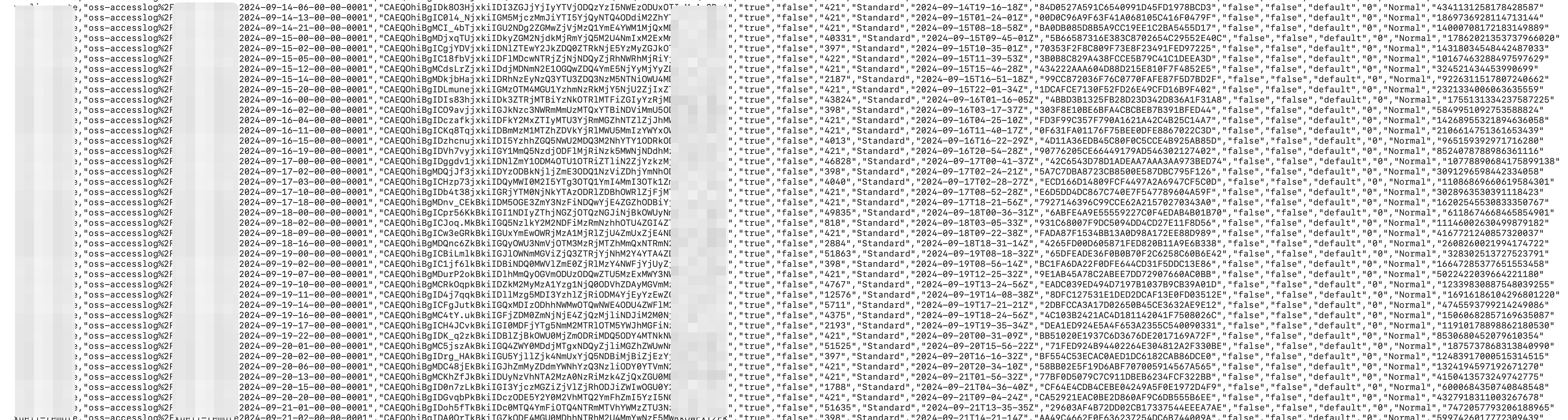
Informe de inventario completo
El informe se almacena en el directorio data/ y contiene la información de los objetos generada por esta función. Por ejemplo:
|
Campo |
Descripción |
|
Bucket |
Nombre del bucket de origen sobre el cual se ejecuta la tarea de inventario. |
|
Key |
Nombre del objeto dentro del bucket, codificado mediante URL. |
|
VersionId |
Identificador de versión del objeto. Este campo solo aparece cuando el inventario se configura para incluir todas las versiones. Si el control de versiones está deshabilitado en el bucket, el campo queda vacío; si está habilitado, muestra el identificador correspondiente. |
|
IsLatest |
Indica si el objeto corresponde a la versión más reciente. Solo aparece cuando el inventario incluye todas las versiones. Si el control de versiones está deshabilitado, el valor es true. Si está habilitado y el objeto es la última versión, el valor es true; si es una versión anterior, el valor es false. |
|
IsDeleteMarker |
Indica si la versión del objeto es un marcador de eliminación. Solo aparece cuando el inventario incluye todas las versiones. Si el control de versiones está deshabilitado, el valor predeterminado es false. Si está habilitado y el objeto es un marcador de eliminación, el valor es true; de lo contrario, es false. |
|
Size |
Tamaño del objeto en bytes. |
|
StorageClass |
Clase de almacenamiento del objeto. |
|
LastModifiedDate |
Fecha y hora de la última modificación del objeto, expresada en Tiempo Universal Coordinado (UTC). |
|
TransitionTime |
Momento en que una regla de ciclo de vida transfirió el objeto a la clase de almacenamiento Cold Archive o Deep Cold Archive. |
|
ETag |
Valor ETag del objeto. Se genera un ETag para cada objeto con el fin de identificar su contenido. Para un objeto creado mediante la operación de API PutObject, el ETag es el hash MD5 de su contenido. En los objetos creados por otros métodos, el ETag es un valor calculado único y no el hash MD5 del contenido. |
|
IsMultipartUploaded |
Indica si el objeto se creó mediante una carga multiparte. Si se usó este método, el valor es true; de lo contrario, es false. |
|
EncryptionStatus |
Indica si el objeto está cifrado. Si lo está, el valor es true; de lo contrario, es false. |
|
ObjectAcl |
ACL del objeto. Para obtener más información, consulte Object ACL. |
|
TaggingCount |
Cantidad de etiquetas asociadas al objeto. |
|
ObjectType |
Tipo del objeto. Para obtener más información, consulte Object type. |
|
Crc64 |
Valor CRC-64 del objeto. |
|
LastAccessDate |
Fecha y hora del último acceso al objeto, expresada en Tiempo Universal Coordinado (UTC). Este campo solo se exporta cuando access tracking está habilitado en el bucket. Si está deshabilitado, el valor suele ser |
|
LastAccessTimestamp |
Marca de tiempo del último acceso al objeto (marca de tiempo Unix). Este campo solo se exporta cuando access tracking está habilitado en el bucket. Si está deshabilitado, el valor suele ser |
Inventario incremental
Un inventario incremental captura y reporta todos los eventos de cambio en los objetos que ocurren en una ventana de 10 minutos. Estos eventos incluyen creaciones, actualizaciones de metadatos y eliminaciones.
Configuración de una regla de inventario
Console
Inicie sesión en la consola de OSS.
Vaya al bucket de origen del cual desea generar el inventario. En el panel de navegación izquierdo, seleccione Data Management > Bucket Inventory.
En la página Bucket Inventory, haga clic en Create Inventory.
-
En el panel Create Inventory, configure los parámetros de Basic Settings.
Parámetro
Descripción
Status
Estado de la tarea de inventario incremental. Seleccione Start.
Rule Name
Nombre de la tarea de inventario. Solo admite letras minúsculas, números y guiones (-). No puede comenzar ni terminar con un guion.
Inventory Report Destination
Ruta donde se almacenará el informe de inventario. El bucket de origen y el de destino deben pertenecer a la misma cuenta y encontrarse en la misma región. Para guardar el informe en la ruta
exampledir1del bucket examplebucket, introduzcaexampledir1/. Si la ruta no existe en el bucket, OSS la crea automáticamente. El prefijo de la ruta de destino no puede superar los 128 caracteres. Si deja este campo vacío, el informe se guarda en el directorio raíz. Para evitar interrupciones en el servicio OSS-HDFS o riesgos de corrupción de datos, no establezca el directorio del informe en.dlsdata/cuando configure una regla para un bucket con el servicio OSS-HDFS habilitado.Scan Scope
{status, select, BUCKET{Scan Entire Bucket} BUCKET_PATH{Match by Prefix} other{--}}: escanea todos los objetos del bucket. Object Prefix: escanea únicamente los objetos que coinciden con un prefijo específico, como exampledir1/.
-
En la sección Track and Generate Incremental Metadata Updates, active Get Incremental Metadata Updates y seleccione los Metadata Fields que desea exportar.
Parámetro
Descripción
Metadata Fields
Información de los objetos que desea exportar. Metadatos de eventos: {type, select, SEQUENCE_NUMBER{Serial Number} RECORD_TYPE{Event Type} RECORD_TIMESTAMP{Timestamp} REQUESTER{User ID} REQUEST_ID{Request ID} SOURCE_IP{Source IP} other{type}}, {type, select, SEQUENCE_NUMBER{Serial Number} RECORD_TYPE{Event Type} RECORD_TIMESTAMP{Timestamp} REQUESTER{User ID} REQUEST_ID{Request ID} SOURCE_IP{Source IP} other{type}}, {type, select, SEQUENCE_NUMBER{Serial Number} RECORD_TYPE{Event Type} RECORD_TIMESTAMP{Timestamp} REQUESTER{User ID} REQUEST_ID{Request ID} SOURCE_IP{Source IP} other{type}}, {type, select, SEQUENCE_NUMBER{Serial Number} RECORD_TYPE{Event Type} RECORD_TIMESTAMP{Timestamp} REQUESTER{User ID} REQUEST_ID{Request ID} SOURCE_IP{Source IP} other{type}}, Request ID y {type, select, SEQUENCE_NUMBER{Serial Number} RECORD_TYPE{Event Type} RECORD_TIMESTAMP{Timestamp} REQUESTER{User ID} REQUEST_ID{Request ID} SOURCE_IP{Source IP} other{type}}. Metadatos del sistema: {type, select, SIZE{Object Size} STORAGE_CLASS{Storage Class} LAST_MODIFIED_DATE{Last Modified Date} ETAG{ETag} IS_MULTIPART_UPLOADED{Multipart Upload Status} ENCRYPTION_STATUS{Encryption Status} OBJECT_ACL{Object ACL} OBJECT_TYPE{File Type} CRC64{CRC64} USER_META_COUNT{User-Defined Metadata Count} TAGGING_COUNT{Tag Count} KMS_KEY_ARN{SSE-KMS Master Key} IS_SSE_KMS_ENABLED{SSE-KMS Encryption Status} other{type}}, {type, select, SIZE{Object Size} STORAGE_CLASS{Storage Class} LAST_MODIFIED_DATE{Last Modified Date} ETAG{ETag} IS_MULTIPART_UPLOADED{Multipart Upload Status} ENCRYPTION_STATUS{Encryption Status} OBJECT_ACL{Object ACL} OBJECT_TYPE{File Type} CRC64{CRC64} USER_META_COUNT{User-Defined Metadata Count} TAGGING_COUNT{Tag Count} KMS_KEY_ARN{SSE-KMS Master Key} IS_SSE_KMS_ENABLED{SSE-KMS Encryption Status} other{type}}, {type, select, SIZE{Object Size} STORAGE_CLASS{Storage Class} LAST_MODIFIED_DATE{Last Modified Date} ETAG{ETag} IS_MULTIPART_UPLOADED{Multipart Upload Status} ENCRYPTION_STATUS{Encryption Status} OBJECT_ACL{Object ACL} OBJECT_TYPE{File Type} CRC64{CRC64} USER_META_COUNT{User-Defined Metadata Count} TAGGING_COUNT{Tag Count} KMS_KEY_ARN{SSE-KMS Master Key} IS_SSE_KMS_ENABLED{SSE-KMS Encryption Status} other{type}}, ETag, {type, select, SIZE{Object Size} STORAGE_CLASS{Storage Class} LAST_MODIFIED_DATE{Last Modified Date} ETAG{ETag} IS_MULTIPART_UPLOADED{Multipart Upload Status} ENCRYPTION_STATUS{Encryption Status} OBJECT_ACL{Object ACL} OBJECT_TYPE{File Type} CRC64{CRC64} USER_META_COUNT{User-Defined Metadata Count} TAGGING_COUNT{Tag Count} KMS_KEY_ARN{SSE-KMS Master Key} IS_SSE_KMS_ENABLED{SSE-KMS Encryption Status} other{type}}, tipo de objeto, ACL del objeto, CRC64 y {type, select, SIZE{Object Size} STORAGE_CLASS{Storage Class} LAST_MODIFIED_DATE{Last Modified Date} ETAG{ETag} IS_MULTIPART_UPLOADED{Multipart Upload Status} ENCRYPTION_STATUS{Encryption Status} OBJECT_ACL{Object ACL} OBJECT_TYPE{File Type} CRC64{CRC64} USER_META_COUNT{User-Defined Metadata Count} TAGGING_COUNT{Tag Count} KMS_KEY_ARN{SSE-KMS Master Key} IS_SSE_KMS_ENABLED{SSE-KMS Encryption Status} other{type}}.
Seleccione I acknowledge and agree to grant the Alibaba Cloud OSS service permission to access resources in this bucket. y haga clic en OK. La nueva regla de inventario aparecerá en la página Bucket Inventory con el estado Start.
Ossutil
Cree un archivo llamado incremental-inventory.xml. La diferencia principal respecto a la configuración de un inventario completo es la inclusión de la sección <IncrementalInventory>.
<?xml version="1.0" encoding="UTF-8"?>
<InventoryConfiguration>
    <Id>report-1</Id>
    <IsEnabled>true</IsEnabled>
    <Filter>
      <Prefix>test</Prefix>
    </Filter>
    <Destination>
      <OSSBucketDestination>
        <Format>CSV</Format>
        <AccountId>12xxxxxx29</AccountId>
        <RoleArn>acs:ram::12xxxxxx29:role/AliyunOSSRole</RoleArn>
        <Bucket>acs:oss:::test-inc-bi-bj</Bucket>
        <Prefix>Report-1</Prefix>
      </OSSBucketDestination>
    </Destination>
    <Schedule>
      <Frequency>Weekly</Frequency>
    </Schedule>
    <IncludedObjectVersions>All</IncludedObjectVersions>
    <OptionalFields>
      <Field>Size</Field>
      <Field>LastModifiedDate</Field>
      <Field>ETag</Field>
      <Field>StorageClass</Field>
    </OptionalFields>
    <IncrementalInventory>
      <IsEnabled>true</IsEnabled>
      <Schedule>
        <Frequency>600</Frequency>
      </Schedule>
      <OptionalFields>
        <Field>SequenceNumber</Field>
        <Field>RecordType</Field>
        <Field>RecordTimestamp</Field>
        <Field>Requester</Field>
        <Field>RequestId</Field>
        <Field>SourceIp</Field>
        <Field>Size</Field>
        <Field>StorageClass</Field>
        <Field>LastModifiedDate</Field>
        <Field>ETag</Field>
        <Field>IsMultipartUploaded</Field>
        <Field>ObjectType</Field>
        <Field>ObjectAcl</Field>
        <Field>CRC64</Field>
        <Field>EncryptionStatus</Field>
      </OptionalFields>
    </IncrementalInventory>
  </InventoryConfiguration>
Dentro de la sección <IncrementalInventory>, el elemento <Frequency> define el intervalo de exportación de los archivos de inventario incremental. En este ejemplo, el valor 600 corresponde al intervalo aproximado de 10 minutos con el que se generan dichos inventarios.
Ejecute el siguiente comando:
ossutil api put-bucket-inventory --bucket examplebucket --inventory-id report-1 --inventory-configuration file://incremental-inventory.xmlUna vez que finalice la ejecución, compruebe que la regla de inventario aparezca en la página Bucket Inventory de la consola.
Para obtener más información sobre el comando put-bucket-inventory, consulte put-bucket-inventory.
API
Para configurar o modificar una regla de inventario, llame a la operación de API PutBucketInventory. Este método es ideal para escenarios altamente personalizados, pero requiere que construya y firme manualmente la solicitud HTTP. Una vez que la solicitud tenga éxito, llame a la operación GetBucketInventory para consultar la regla de inventario.
Archivos de inventario incremental
Después de configurar una tarea de inventario, OSS genera los archivos correspondientes según el programa de exportación definido en la regla. La estructura de directorios de estos archivos es la siguiente:
<dest-bucket-name>/
└── <dest-prefix>/
    └── <source-bucket-name>/
       └── <inventory-id>/
          └── incremental_inventory/
             └── YYYY-MM-DDTHH-MMSSZ/
                 ├── manifest.json
                 └── data/
                     ├── uuid1_0.csv
└── ......|
Componente del directorio |
Descripción |
|
dest-prefix |
Este directorio toma su nombre del prefijo que usted especifique para el informe de inventario. Si no define un prefijo, el directorio se omite. |
|
source-bucket-name |
El nombre de este directorio corresponde al bucket de origen para el cual se configuró la regla de inventario. |
|
inventory-id |
El nombre de este directorio coincide con el de la regla de inventario. |
|
incremental_inventory |
Prefijo fijo para los informes de inventario incremental que permite distinguirlos de las exportaciones completas. |
|
YYYY-MM-DDTHH-MMSSZ |
El nombre de este directorio es una marca de tiempo UTC que indica cuándo comienza el escaneo del bucket; por ejemplo, 2020-05-17T16-0000Z. |
|
data |
Este directorio almacena los archivos de inventario en formato CSV. En ellos se listan los objetos y los metadatos que se modificaron en el bucket de origen durante la ventana de tiempo especificada. |
Archivo de manifiesto
{
    "startTimestamp": "1759320000",
    "endTimestamp": "1759320600",
    "destinationBucket": "destbucket",
    "fileFormat": "CSV",
    "fileSchema": "Bucket, Key, VersionId, IsDeleteMarker, SequenceNumber, RecordType, RecordTimestamp, Requester, RequestId, SourceIp, Size, StorageClass, LastModifiedDate, ETag, IsMultipartUploaded, ObjectType, ObjectAcl, CRC64, EncryptionStatus",
    "files": [{
            "MD5checksum": "60463A9A34019CF448A730EB2CB3****",
            "key": "dest-prefix/source-bucket-name/inventory-id/incremental_inventory/2025-09-28T07-4000Z/data/5b7c6cf0db490db906c60e87b917b148_5550506986a37a62abce56a83db6736d_0.csv",
            "size": 2046}],
    "sourceBucket": "srcbucket",
    "version": "2025-09-30"
}
A continuación se describen los campos.
|
Campo |
Descripción |
|
startTimestamp |
Marca de tiempo que indica la hora de inicio de la ventana del inventario incremental. |
|
endTimestamp |
Marca de tiempo que indica la hora de finalización de la ventana del inventario incremental. |
|
destinationBucket |
Bucket de destino donde se almacenan los archivos de inventario. |
|
fileFormat |
Formato de los archivos de inventario. |
|
fileSchema |
Define los campos del archivo de inventario, los cuales pueden ser obligatorios u opcionales. El orden de los campos obligatorios es constante, pero el de los opcionales depende de la secuencia en la que usted seleccione los Metadata Fields durante la configuración. Para analizar los datos correctamente, utilice siempre el orden definido en fileSchema. Si al configurar la regla selecciona current version para la versión del objeto, |
|
files |
Contiene el hash MD5, la clave y el tamaño de cada archivo de inventario. |
|
sourceBucket |
Bucket de origen sobre el cual se genera el inventario. |
|
version |
Versión del archivo de manifiesto. |
Campos del informe de inventario incremental
|
Tipo de metadato |
Campo |
Descripción |
|
Metadatos del sistema |
Bucket |
Nombre del bucket de origen. |
|
Metadatos de eventos |
SequenceNumber |
Número de secuencia único para cada registro. Para los registros que pertenecen al mismo objeto dentro de un bucket, ordenarlos por |
|
RecordType |
Tipo de evento. Valores válidos: CREATE, UPDATE_METADATA y DELETE. CREATE: abarca todos los métodos de carga bajo el prefijo seleccionado, como |
|
|
RecordTimestamp |
Marca de tiempo UTC del evento, con precisión de milisegundos. Ejemplo: "2024-08-25 18:08:01.024". |
|
|
Requester |
Identificador de la cuenta de Alibaba Cloud o Principal ID del solicitante. |
|
|
RequestId |
Identificador único de la solicitud. |
|
|
SourceIp |
Dirección IP de origen del solicitante. |
|
|
Metadatos del sistema |
Key |
Nombre del objeto dentro del bucket, codificado mediante URL. |
|
VersionId |
Identificador de versión del objeto. Este campo solo se incluye si la regla de inventario se configuró para exportar todas las versiones. Si el control de versiones está deshabilitado en el bucket de origen, el campo queda vacío. Si está habilitado, el campo muestra el VersionId del objeto. |
|
|
IsDeleteMarker |
Indica si la versión del objeto es un marcador de eliminación. Este campo solo se incluye si la regla de inventario se configuró para exportar todas las versiones. Si el control de versiones está deshabilitado en el bucket, el valor predeterminado es false. Si está habilitado, el valor es true cuando el objeto es un marcador de eliminación y false en caso contrario. |
|
|
Size |
Tamaño del objeto en bytes. |
|
|
StorageClass |
Clase de almacenamiento del objeto. |
|
|
LastModifiedDate |
Fecha y hora UTC de la última modificación del objeto. |
|
|
ETag |
Se genera un ETag cuando se crea un objeto para identificar su contenido. Para un objeto creado mediante la operación PutObject, el ETag es el hash MD5 de su contenido. En los objetos creados por otros medios, el ETag es un valor único generado con base en una regla de cálculo específica y no el hash MD5 del contenido. |
|
|
IsMultipartUploaded |
Indica si el objeto se creó mediante una carga multiparte. Si es así, el valor es true; de lo contrario, es false. |
|
|
EncryptionStatus |
Indica si el objeto está cifrado. Si lo está, el valor es true; de lo contrario, es false. |
|
|
ObjectAcl |
Lista de control de acceso (ACL) del objeto. Para obtener más información, consulte Object ACL. |
|
|
ObjectType |
Tipo del objeto. Para obtener más información, consulte Object Type. |
|
|
Crc64 |
Valor CRC-64 del objeto. |
Análisis de los informes de inventario
Las tareas de inventario se ejecutan de forma asíncrona. Cuando una tarea finaliza, OSS genera los archivos del informe en la ruta especificada del bucket de destino. Todos los archivos de un informe se almacenan en una carpeta cuyo nombre corresponde a la hora de inicio de la tarea. Para comprobar que una tarea terminó, verifique si el archivo manifest.json ya se generó en la ubicación de destino.
Los archivos principales de los informes de inventario, tanto completos como incrementales, son los siguientes:
El archivo
manifest.json.Los archivos de datos ubicados en el directorio
data/: archivos.csv.gzcomprimidos con GZIP para los inventarios completos y archivos.csvsin comprimir para los incrementales. Para analizar un informe de inventario, siga estos pasos:
-
Lea el archivo
manifest.jsonpara obtener el orden de las columnas y la información de los archivos de datos. El orden de las columnas en un informe de inventario es dinámico y depende de los campos que usted haya seleccionado al configurar la regla. Preste atención a los siguientes dos campos:fileSchema: cadena que define los nombres y el orden exacto de las columnas en el archivo CSV.files: arreglo que detalla todos los archivos de datos generados para este informe. Incluyekey(la ruta del archivo de datos),size(el tamaño del archivo) yMD5checksum(el hash MD5 del archivo).
Recupere y descomprima los archivos de datos. Obtenga el valor
keyde cada archivo desde el arreglofilesenmanifest.jsony utilícelo para descargar el archivo correspondiente. Si se trata de un archivo.csv.gz, descomprímalo para acceder a los datos en formato CSV.Analice los datos en orden. Utilice los nombres de columna del campo
fileSchemacomo encabezados del CSV, respetando su orden original. Lea el archivo línea por línea. Cada fila representa un registro completo de un objeto y cada columna corresponde a un campo especificado enfileSchema.
Ejemplo de contenido CSV
Si fileSchema es "Bucket,Key,Size,StorageClass,LastModifiedDate", el contenido CSV descomprimido tendrá el siguiente formato:
source-bucket,"dir%2Fbody.xml","102400","Standard","2025-04-14T07-06-00Z"
source-bucket,"dest.png","312049","Standard","2025-04-14T07-05-59Z"
El campo key está codificado mediante URL. Decodifíquelo según sea necesario.
Cuotas y limitaciones
A continuación se detallan las cuotas y limitaciones aplicables a los inventarios de buckets:
| Elemento | Límite |
| Reglas de inventario por bucket | Hasta 1,000 reglas mediante la API o el SDK, o 10 reglas a través de la consola |
| Formato del informe de inventario | CSV o Parquet. El formato Parquet solo es compatible con la región UK (London). |
| Programación mensual | No es compatible con las siguientes regiones: China (Zhangjiakou), China (Zhongwei), US (Virginia), US (Silicon Valley), Mexico y France (Paris). |
| Filtrado avanzado | Solo es compatible con las regiones China (Qingdao), China (Hohhot) y Germany (Frankfurt) |
| Filtro por tamaño de objeto | Los tamaños mínimo y máximo deben ser mayores a 0 B, y el tamaño máximo no puede superar los 48.8 TB |
| Prefijo de la ruta de destino para inventarios incrementales | Hasta 128 caracteres |
Facturación
La función de inventario de buckets no tiene costo, pero se aplican los siguientes cargos:
Cargos por solicitudes de API: se generan costos por solicitudes
PutyGetcuando usted configura y recupera reglas de inventario. Los cargos por solicitudes PUT se aplican cuando OSS escribe un informe de inventario en el bucket de destino. Los cargos por solicitudes GET se aplican cuando usted descarga y lee un informe de inventario.Cargos por almacenamiento: los informes de inventario generados (archivos
manifest,csv.gzycsv) consumen espacio en el bucket de destino y se facturan con las tarifas de almacenamiento Standard.Cargos por tráfico saliente: cuando usted descarga y lee informes de inventario a través de un endpoint de Internet, se generan cargos por tráfico saliente hacia Internet. Para evitar costos innecesarios, elimine las reglas de inventario que ya no necesite y utilice reglas de ciclo de vida para borrar automáticamente los archivos de informes caducados.
Uso en producción
Mejores prácticas
Privilegio mínimo: utilice siempre un rol de RAM dedicado con los permisos estrictamente necesarios. Nunca use
AliyunOSSRoleen un entorno de producción.Rendimiento: para buckets de origen con mucho tráfico, almacene los informes de inventario en un bucket de destino exclusivo. Esto evita la contención de escrituras que podría afectar el rendimiento de sus aplicaciones de producción.
Optimización de costos: el inventario de buckets admite exportaciones diarias, semanales y mensuales. Para buckets con más de 10 mil millones de objetos, utilice un inventario semanal. Además, configure una regla de ciclo de vida en el bucket de destino para eliminar automáticamente los informes de inventario que superen cierta antigüedad (por ejemplo, 30 días) y reducir así los costos de almacenamiento.
| Cantidad de objetos | Recomendación de exportación |
| Menos de 10 mil millones de objetos | Configure exportaciones diarias o semanales según sus necesidades |
| De 10 mil millones a 50 mil millones de objetos | Exportación semanal |
| 50 mil millones de objetos o más | Exporte en lotes agrupando por prefijos coincidentes. |
Partición por prefijos: para buckets extremadamente grandes, como aquellos con cientos de miles de millones de objetos, cree varias reglas de inventario basadas en prefijos de negocio. Este enfoque genera informes particionados que resultan más fáciles de gestionar y procesar.
Prevención de riesgos
Auditoría de datos: dado que los objetos pueden crearse, eliminarse o sobrescribirse mientras se exporta un archivo de inventario, es posible que la lista final no incluya todos los elementos. Los objetos cuya fecha de última modificación sea anterior a la indicada en el campo
creationTimestampdel archivo manifest.json sí se incluirán. Aquellos con una fecha posterior podrían quedar fuera. Antes de ejecutar cualquier operación sobre un objeto de la lista, utilice la operación de API HeadObject para comprobar sus propiedades.Monitoreo y alertas: supervise el uso de almacenamiento del bucket de destino para evitar sobrecostos provocados por la acumulación de archivos de inventario. También monitoree las llamadas a la API, como
PutBucketInventory, para dar seguimiento a los cambios de configuración.Gestión de cambios: cualquier modificación en las reglas de inventario, como ajustar un prefijo o cambiar la frecuencia, puede afectar los flujos de trabajo de análisis de datos posteriores. Estos cambios deben pasar por un proceso formal de revisión y gestionarse mediante control de versiones.