El modelo de imagen a video Wan 2.7 utiliza entradas multimodales (texto, imagen, audio y video) para realizar tres tareas principales: generación de video a partir del primer fotograma, generación de video a partir del primer y último fotograma, y continuación de video (continuación desde un segmento de video inicial, con o sin un fotograma final).
- Configuración básica: Admite duraciones de video de 2 a 15 segundos, resolución de video configurable (720p o 1080p), reescritura inteligente de indicaciones y marcas de agua.
- Capacidades de audio: Admite doblaje automático o carga de audio personalizado, garantizando la sincronización audiovisual.
- Narrativa de múltiples tomas: Le permite generar videos con múltiples tomas, manteniendo la consistencia del sujeto entre las tomas.
Enlaces rápidos: pruébelo en línea (Singapore | Virginia | China (Beijing))|Referencia de API
Inicio rápido
| Prompt de entrada | Primer clip de video de entrada (2 s) | Imagen del último fotograma de entrada | Video de salida (12 s, 10 s de continuación) |
Un hombre mira hacia abajo a una caja de madera en el suelo. Se inclina y abre la tapa con cuidado. Observa fijamente el contenido de la caja, con los labios temblorosos y ligeramente entreabiertos. Tiene el ceño fruncido y los ojos muy abiertos con una expresión de horror. |  |
Antes de realizar una llamada, obtenga una clave de API y configúrela como variable de entorno. Para usar un SDK, instale el DashScope SDK.
SDK de Python
ImportanteAsegúrese de que su DashScope Python SDK sea versión 1.25.16 o posterior antes de ejecutar el siguiente código.
Si utiliza una versión anterior, puede ocurrir un error como "url error, please check url!". Consulte Instalar el SDK para actualizar su versión.
# -*- coding: utf-8 -*-
from http import HTTPStatus
from dashscope import VideoSynthesis
import dashscope
import os

# This URL is for the Singapore region. URLs vary by region. For more information, see https://www.alibabacloud.com/help/model-studio/image-to-video-general-api-reference
dashscope.base_http_api_url = 'https://{WorkspaceId}.ap-southeast-1.maas.aliyuncs.com/api/v1'

# If you have not configured an environment variable, replace the following line with your Model Studio API key: api_key="sk-xxx"
# API keys vary by region. To get an API key, see https://www.alibabacloud.com/help/model-studio/get-api-key
api_key = os.getenv("DASHSCOPE_API_KEY")

media = [
    {
        "type": "first_clip",
        "url": "https://help-static-aliyun-doc.aliyuncs.com/file-manage-files/zh-CN/20260414/cqcbkw/wan2.7-i2v-video-continuation.mp4"
    },
    {
        "type": "last_frame",
        "url": "https://help-static-aliyun-doc.aliyuncs.com/file-manage-files/zh-CN/20260414/mrwahg/wan2.7-i2v-video-continuation.webp"
    }
]

def sample_sync_call():
    print('----sync call, please wait a moment----')
    rsp = VideoSynthesis.call(
        api_key=api_key,
        model="wan2.7-i2v-2026-04-25",
        media=media,
        resolution="720P",
        duration=12,
        watermark=True,
        prompt="A man looks down at a wooden box on the ground. He bends over and carefully opens the lid. He stares at the contents of the box, his lips trembling and slightly parted. His brow is furrowed and his eyes are wide with a look of horror.",
    )
    if rsp.status_code == HTTPStatus.OK:
        print(rsp.output.video_url)
    else:
        print('Failed, status_code: %s, code: %s, message: %s' %
              (rsp.status_code, rsp.code, rsp.message))

if __name__ == '__main__':
    sample_sync_call()
SDK de Java
ImportanteAsegúrese de que su DashScope Java SDK sea versión 2.22.14 o posterior antes de ejecutar el siguiente código.
Si utiliza una versión anterior, puede ocurrir un error como "url error, please check url!". Consulte Instalar el SDK para actualizar su versión.
// Copyright (c) Alibaba, Inc. and its affiliates.

import com.alibaba.dashscope.aigc.videosynthesis.VideoSynthesis;
import com.alibaba.dashscope.aigc.videosynthesis.VideoSynthesisParam;
import com.alibaba.dashscope.aigc.videosynthesis.VideoSynthesisResult;
import com.alibaba.dashscope.exception.ApiException;
import com.alibaba.dashscope.exception.InputRequiredException;
import com.alibaba.dashscope.exception.NoApiKeyException;
import com.alibaba.dashscope.utils.Constants;
import com.alibaba.dashscope.utils.JsonUtils;

import java.util.ArrayList;
import java.util.List;

public class Image2Video {

    static {
        // Singapore region URL. Replace {WorkspaceId} with your actual workspace ID. The URL varies by region.
        Constants.baseHttpApiUrl = "https://{WorkspaceId}.ap-southeast-1.maas.aliyuncs.com/api/v1";
    }

    // If you have not configured an environment variable, replace the following line with your Model Studio API key: apiKey="sk-xxx"
    // API keys vary by region. To get an API key, see https://www.alibabacloud.com/help/model-studio/get-api-key
    static String apiKey = System.getenv("DASHSCOPE_API_KEY");

    public static void syncCall() {
        VideoSynthesis videoSynthesis = new VideoSynthesis();
        final String prompt = "A man looks down at a wooden box on the ground. He bends over and carefully opens the lid. He stares at the contents of the box, his lips trembling and slightly parted. His brow is furrowed and his eyes are wide with a look of horror.";
        List<VideoSynthesisParam.Media> media = new ArrayList<VideoSynthesisParam.Media>(){{
            add(VideoSynthesisParam.Media.builder()
                    .url("https://help-static-aliyun-doc.aliyuncs.com/file-manage-files/zh-CN/20260414/cqcbkw/wan2.7-i2v-video-continuation.mp4")
                    .type("first_clip")
                    .build());
            add(VideoSynthesisParam.Media.builder()
                    .url("https://help-static-aliyun-doc.aliyuncs.com/file-manage-files/zh-CN/20260414/mrwahg/wan2.7-i2v-video-continuation.webp")
                    .type("last_frame")
                    .build());
        }};
        VideoSynthesisParam param =
                VideoSynthesisParam.builder()
                        .apiKey(apiKey)
                        .model("wan2.7-i2v-2026-04-25")
                        .prompt(prompt)
                        .media(media)
                        .watermark(true)
                        .duration(12)
                        .resolution("720P")
                        .build();
        VideoSynthesisResult result = null;
        try {
            System.out.println("---sync call, please wait a moment----");
            result = videoSynthesis.call(param);
        } catch (ApiException | NoApiKeyException e){
            throw new RuntimeException(e.getMessage());
        } catch (InputRequiredException e) {
            throw new RuntimeException(e);
        }
        System.out.println(JsonUtils.toJson(result));
    }

    public static void main(String[] args) {
        syncCall();
    }
}
Curl
Paso 1: Crear una tarea y obtener el ID de la tareacurl --location 'https://{WorkspaceId}.ap-southeast-1.maas.aliyuncs.com/api/v1/services/aigc/video-generation/video-synthesis' \
-H 'X-DashScope-Async: enable' \
-H "Authorization: Bearer $DASHSCOPE_API_KEY" \
-H 'Content-Type: application/json' \
-d '{
"model": "wan2.7-i2v-2026-04-25",
"input": {
"prompt": "A man looks down at a wooden box on the ground. He bends over and carefully opens the lid. He stares at the contents of the box, his lips trembling and slightly parted. His brow is furrowed and his eyes are wide with a look of horror.",
"media": [
{
"type": "first_clip",
"url": "https://help-static-aliyun-doc.aliyuncs.com/file-manage-files/zh-CN/20260414/cqcbkw/wan2.7-i2v-video-continuation.mp4"
},
{
"type": "last_frame",
"url": "https://help-static-aliyun-doc.aliyuncs.com/file-manage-files/zh-CN/20260414/mrwahg/wan2.7-i2v-video-continuation.webp"
}
]
},
"parameters": {
"resolution": "720P",
"duration": 12,
"prompt_extend": true,
"watermark": true
}
}'
Reemplace {task_id} con el valor task_id devuelto por la llamada a la API anterior. El task_id es válido para consultas durante 24 horas. Reemplace {WorkspaceId} con su ID de espacio de trabajo real.
curl -X GET https://{WorkspaceId}.ap-southeast-1.maas.aliyuncs.com/api/v1/tasks/{task_id} \
--header "Authorization: Bearer $DASHSCOPE_API_KEY"
La
video_urles válida durante 24 horas. Descargue el video a la brevedad.
{
    "request_id": "c1209113-8437-424f-a386-xxxxxx",
    "output": {
        "task_id": "966cebcd-dedc-4962-af88-xxxxxx",
        "task_status": "SUCCEEDED",
        "video_url": "https://dashscope-result-sh.oss-accelerate.aliyuncs.com/xxx.mp4?Expires=xxx",
         ...
    },
    ...
}
Notas de uso
- Los modelos compatibles varían según la región. Los recursos están aislados entre regiones. Para consultar los modelos compatibles en cada región, consulte la consola de Model Studio.
- Al realizar una llamada, asegúrese de que su modelo, URL de endpoint y clave de API pertenezcan todos a la misma región. Las llamadas entre regiones fallarán.
NotaEl código de muestra en este tema corresponde a la región de Singapur.
Capacidades principales
Generación de video desde el primer fotograma
Modelos compatibles: Modelos de la serie wan2.7.
Configuración de parámetros: El campo type en el arreglo media admite las siguientes dos combinaciones. Consulte Activos de entrada para obtener detalles sobre las combinaciones de activos de medios.
- Primer fotograma: Establezca
typeenfirst_frame. El modelo agrega audio al video automáticamente. - Primer fotograma + audio: Establezca
typeenfirst_frameydriving_audio. El modelo utiliza el audio para impulsar la generación de video para funciones como sincronización labial y temporización de acciones.
| Prompt | Imagen del primer fotograma | Video de salida |
Una escena de arte de fantasía urbana. Un personaje dinámico de arte grafiti. Un niño hecho de pintura en aerosol cobra vida desde una pared de concreto. Rapea una canción en inglés a gran velocidad mientras adopta una pose clásica y enérgica de rapero. La escena está ambientada de noche bajo un puente ferroviario urbano. La luz proviene de una sola farola, creando una atmósfera cinematográfica llena de alta energía y detalles asombrosos. El audio del video consiste enteramente en el rap, sin otros diálogos ni ruidos. | 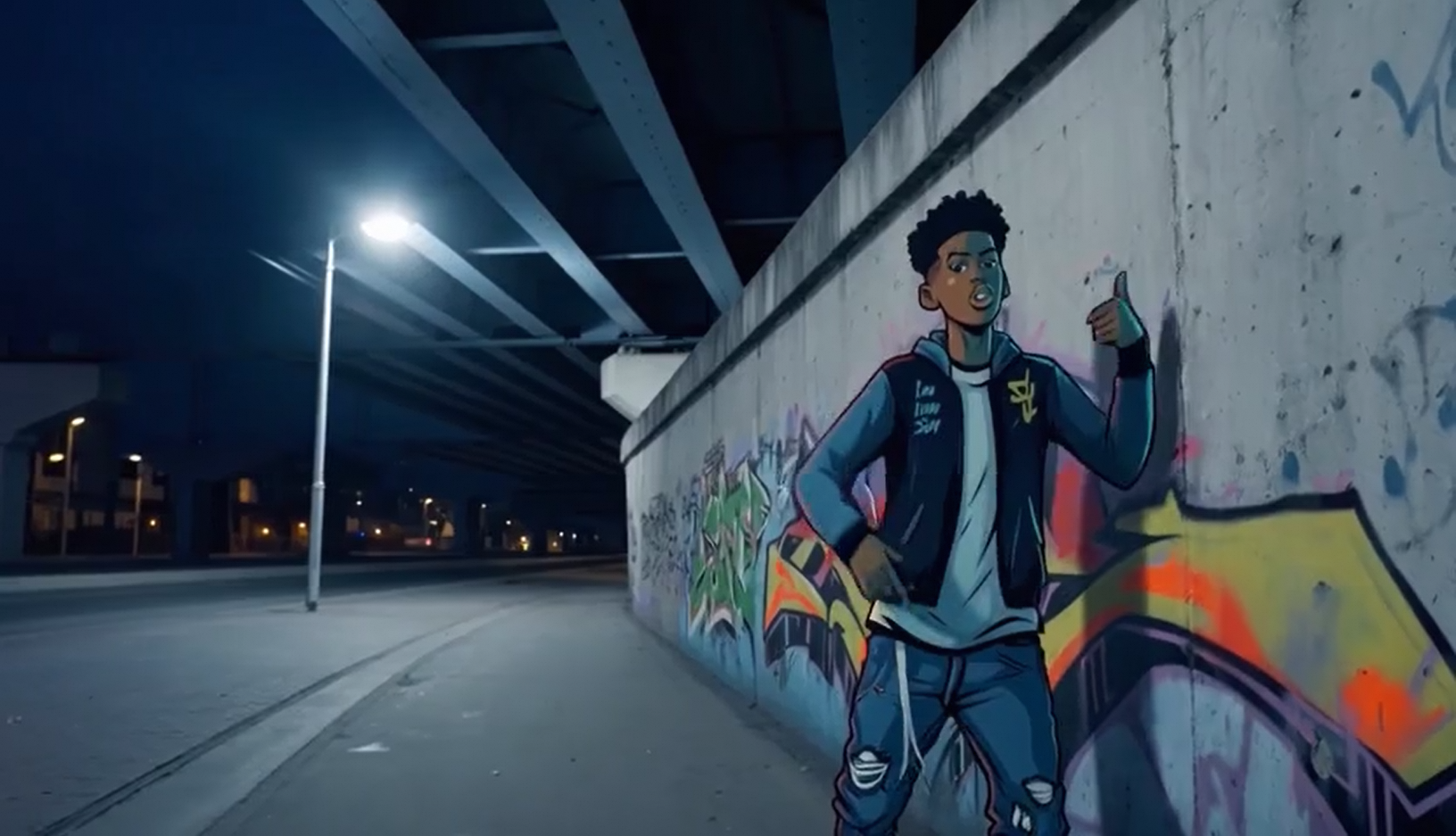 Audio de entrada: |
SDK de Python
Asegúrese de que su versión de DashScope Python SDK sea
1.25.16o posterior. Para actualizar, consulte Instalar el SDK.
# -*- coding: utf-8 -*-
from http import HTTPStatus
from dashscope import VideoSynthesis
import dashscope
import os

# This is the URL for the Singapore region. URLs vary by region. For a list of URLs, see https://www.alibabacloud.com/help/model-studio/image-to-video-general-api-reference.
dashscope.base_http_api_url = 'https://{WorkspaceId}.ap-southeast-1.maas.aliyuncs.com/api/v1'

# If you have not configured an environment variable, replace the following line with your Model Studio API key: api_key="sk-xxx"
# API keys vary by region. To obtain an API key, see https://www.alibabacloud.com/help/model-studio/get-api-key.
api_key = os.getenv("DASHSCOPE_API_KEY")

media = [
    {
        "type": "first_frame",
        "url": "https://help-static-aliyun-doc.aliyuncs.com/file-manage-files/zh-CN/20250925/wpimhv/rap.png"
    },
    {
        "type": "driving_audio",
        "url": "https://help-static-aliyun-doc.aliyuncs.com/file-manage-files/zh-CN/20250925/ozwpvi/rap.mp3"
    }
]

def sample_sync_call():
    print('----sync call, please wait a moment----')
    rsp = VideoSynthesis.call(
        api_key=api_key,
        model="wan2.7-i2v-2026-04-25",
        media=media,
        resolution="720P",
        duration=10,
        watermark=True,
        prompt="An urban fantasy art scene. A dynamic graffiti art character. A boy made of spray paint comes to life from a concrete wall. He raps an English song at high speed while striking a classic, energetic rapper pose. The scene is set at night under an urban railway bridge. The light comes from a single street lamp, creating a cinematic atmosphere full of high energy and amazing detail. The audio of the video consists entirely of the rap, with no other dialogue or noise.",
    )
    if rsp.status_code == HTTPStatus.OK:
        print(rsp.output.video_url)
    else:
        print('Failed, status_code: %s, code: %s, message: %s' %
              (rsp.status_code, rsp.code, rsp.message))

if __name__ == '__main__':
    sample_sync_call()
SDK de Java
Asegúrese de que su versión de DashScope Java SDK sea
2.22.14o posterior. Para actualizar, consulte Instalar el SDK.
// Copyright (c) Alibaba, Inc. and its affiliates.

import com.alibaba.dashscope.aigc.videosynthesis.VideoSynthesis;
import com.alibaba.dashscope.aigc.videosynthesis.VideoSynthesisParam;
import com.alibaba.dashscope.aigc.videosynthesis.VideoSynthesisResult;
import com.alibaba.dashscope.exception.ApiException;
import com.alibaba.dashscope.exception.InputRequiredException;
import com.alibaba.dashscope.exception.NoApiKeyException;
import com.alibaba.dashscope.utils.Constants;
import com.alibaba.dashscope.utils.JsonUtils;

import java.util.ArrayList;
import java.util.List;

public class Image2Video {

    static {
        // This is the endpoint for the Singapore region. For the China (Beijing) region, use https://{WorkspaceId}.cn-beijing.maas.aliyuncs.com/api/v1
        Constants.baseHttpApiUrl = "https://{WorkspaceId}.ap-southeast-1.maas.aliyuncs.com/api/v1";
    }

    // If you have not configured an environment variable, replace the following line with your Model Studio API key: apiKey="sk-xxx"
    // API keys vary by region. To obtain an API key, see https://www.alibabacloud.com/help/model-studio/get-api-key.
    static String apiKey = System.getenv("DASHSCOPE_API_KEY");

    public static void syncCall() {
        VideoSynthesis videoSynthesis = new VideoSynthesis();
        final String prompt = "An urban fantasy art scene. A dynamic graffiti art character. A boy made of spray paint comes to life from a concrete wall. He raps an English song at high speed while striking a classic, energetic rapper pose. The scene is set at night under an urban railway bridge. The light comes from a single street lamp, creating a cinematic atmosphere full of high energy and amazing detail. The audio of the video consists entirely of the rap, with no other dialogue or noise.";
        List<VideoSynthesisParam.Media> media = new ArrayList<VideoSynthesisParam.Media>(){{
            add(VideoSynthesisParam.Media.builder()
                    .url("https://help-static-aliyun-doc.aliyuncs.com/file-manage-files/zh-CN/20250925/wpimhv/rap.png")
                    .type("first_frame")
                    .build());
            add(VideoSynthesisParam.Media.builder()
                    .url("https://help-static-aliyun-doc.aliyuncs.com/file-manage-files/zh-CN/20250925/ozwpvi/rap.mp3")
                    .type("driving_audio")
                    .build());
        }};
        VideoSynthesisParam param =
                VideoSynthesisParam.builder()
                        .apiKey(apiKey)
                        .model("wan2.7-i2v-2026-04-25")
                        .prompt(prompt)
                        .media(media)
                        .watermark(true)
                        .duration(10)
                        .resolution("720P")
                        .build();
        VideoSynthesisResult result = null;
        try {
            System.out.println("---sync call, please wait a moment----");
            result = videoSynthesis.call(param);
        } catch (ApiException | NoApiKeyException e){
            throw new RuntimeException(e.getMessage());
        } catch (InputRequiredException e) {
            throw new RuntimeException(e);
        }
        System.out.println(JsonUtils.toJson(result));
    }

    public static void main(String[] args) {
        syncCall();
    }
}
Curl
Paso 1: Crear una tarea y obtener el ID de la tareacurl --location 'https://{WorkspaceId}.ap-southeast-1.maas.aliyuncs.com/api/v1/services/aigc/video-generation/video-synthesis' \
-H 'X-DashScope-Async: enable' \
-H "Authorization: Bearer $DASHSCOPE_API_KEY" \
-H 'Content-Type: application/json' \
-d '{
"model": "wan2.7-i2v-2026-04-25",
"input": {
"prompt": "An urban fantasy art scene. A dynamic graffiti art character. A boy made of spray paint comes to life from a concrete wall. He raps an English song at high speed while striking a classic, energetic rapper pose. The scene is set at night under an urban railway bridge. The light comes from a single street lamp, creating a cinematic atmosphere full of high energy and amazing detail. The audio of the video consists entirely of the rap, with no other dialogue or noise.",
"media": [
{
"type": "first_frame",
"url": "https://help-static-aliyun-doc.aliyuncs.com/file-manage-files/zh-CN/20250925/wpimhv/rap.png"
},
{
"type": "driving_audio",
"url": "https://help-static-aliyun-doc.aliyuncs.com/file-manage-files/zh-CN/20250925/ozwpvi/rap.mp3"
}
]
},
"parameters": {
"resolution": "720P",
"duration": 10,
"prompt_extend": true,
"watermark": true
}
}'
Reemplace {task_id} con el valor task_id devuelto por la llamada a la API anterior. El task_id es válido para consultas durante 24 horas. Reemplace {WorkspaceId} con su ID de espacio de trabajo real.
curl -X GET https://{WorkspaceId}.ap-southeast-1.maas.aliyuncs.com/api/v1/tasks/{task_id} \
--header "Authorization: Bearer $DASHSCOPE_API_KEY"
La
video_urles válida durante 24 horas. Descargue el video a la brevedad.
{
    "request_id": "c1209113-8437-424f-a386-xxxxxx",
    "output": {
        "task_id": "966cebcd-dedc-4962-af88-xxxxxx",
        "task_status": "SUCCEEDED",
        "video_url": "https://dashscope-result-sh.oss-accelerate.aliyuncs.com/xxx.mp4?Expires=xxx",
         ...
    },
    ...
}
Generación de video desde el primer y último fotograma
Modelos compatibles: Modelos de la serie wan2.7.
Configuración de parámetros: El campo type en el arreglo media admite las siguientes dos combinaciones. Consulte Activos de entrada para obtener detalles sobre las combinaciones de activos de medios.
- Primer fotograma + último fotograma: Establezca
typeenfirst_frameylast_frame. El modelo agrega audio al video automáticamente. - Primer fotograma + último fotograma + audio: Establezca
typeenfirst_frame,last_frameydriving_audio. El modelo utiliza el audio para impulsar la generación de video.
| Prompt | Imagen del primer fotograma | Imagen del último fotograma | Video de salida |
A primera hora de la mañana, mientras sale el sol, una pequeña calabaza con gotas de rocío descansa en un campo de calabazas. De repente, la calabaza se agrieta con un "CRACK". Una luz dorada emana de la fisura mientras la calabaza se parte, liberando una bocanada de niebla blanca. Un pequeño conejo aparece en el centro de la calabaza abierta. |  |  |
SDK de Python
Asegúrese de que su versión de DashScope Python SDK sea
1.25.16o posterior. Para actualizar, consulte Instalar el SDK.
# -*- coding: utf-8 -*-
from http import HTTPStatus
from dashscope import VideoSynthesis
import dashscope
import os

# This is the URL for the Singapore region. URLs vary by region. For a list of URLs, see https://www.alibabacloud.com/help/model-studio/image-to-video-general-api-reference.
dashscope.base_http_api_url = 'https://{WorkspaceId}.ap-southeast-1.maas.aliyuncs.com/api/v1'

# If you have not configured an environment variable, replace the following line with your Model Studio API key: api_key="sk-xxx"
# API keys vary by region. To obtain an API key, see https://www.alibabacloud.com/help/model-studio/get-api-key.
api_key = os.getenv("DASHSCOPE_API_KEY")

media = [
    {
        "type": "first_frame",
        "url": "https://help-static-aliyun-doc.aliyuncs.com/file-manage-files/zh-CN/20260414/welyei/wan2.7-i2v-first-frame.webp"
    },
    {
        "type": "last_frame",
        "url": "https://help-static-aliyun-doc.aliyuncs.com/file-manage-files/zh-CN/20260414/zongha/wan2.7-i2v-last-frame.webp"
    }
]

def sample_sync_call():
    print('----sync call, please wait a moment----')
    rsp = VideoSynthesis.call(
        api_key=api_key,
        model="wan2.7-i2v-2026-04-25",
        media=media,
        resolution="720P",
        duration=15,
        watermark=True,
        prompt="In the early morning as the sun rises, a small pumpkin with dewdrops sits in a pumpkin patch. Suddenly, the pumpkin cracks open with a \"CRACK\". A golden light emanates from the fissure as the pumpkin splits apart, releasing a puff of white mist. A small rabbit appears in the center of the opened pumpkin.",
    )
    if rsp.status_code == HTTPStatus.OK:
        print(rsp.output.video_url)
    else:
        print('Failed, status_code: %s, code: %s, message: %s' %
              (rsp.status_code, rsp.code, rsp.message))

if __name__ == '__main__':
    sample_sync_call()
SDK de Java
Asegúrese de que su versión de DashScope Java SDK sea
2.22.14o posterior. Para actualizar, consulte Instalar el SDK.
// Copyright (c) Alibaba, Inc. and its affiliates.

import com.alibaba.dashscope.aigc.videosynthesis.VideoSynthesis;
import com.alibaba.dashscope.aigc.videosynthesis.VideoSynthesisParam;
import com.alibaba.dashscope.aigc.videosynthesis.VideoSynthesisResult;
import com.alibaba.dashscope.exception.ApiException;
import com.alibaba.dashscope.exception.InputRequiredException;
import com.alibaba.dashscope.exception.NoApiKeyException;
import com.alibaba.dashscope.utils.Constants;
import com.alibaba.dashscope.utils.JsonUtils;

import java.util.ArrayList;
import java.util.List;

public class Image2Video {

    static {
        // This is the endpoint for the Singapore region. For the China (Beijing) region, use https://{WorkspaceId}.cn-beijing.maas.aliyuncs.com/api/v1
        Constants.baseHttpApiUrl = "https://{WorkspaceId}.ap-southeast-1.maas.aliyuncs.com/api/v1";
    }

    // If you have not configured an environment variable, replace the following line with your Model Studio API key: apiKey="sk-xxx"
    // API keys vary by region. To obtain an API key, see https://www.alibabacloud.com/help/model-studio/get-api-key.
    static String apiKey = System.getenv("DASHSCOPE_API_KEY");

    public static void syncCall() {
        VideoSynthesis videoSynthesis = new VideoSynthesis();
        final String prompt = "In the early morning as the sun rises, a small pumpkin with dewdrops sits in a pumpkin patch. Suddenly, the pumpkin cracks open with a \"CRACK\". A golden light emanates from the fissure as the pumpkin splits apart, releasing a puff of white mist. A small rabbit appears in the center of the opened pumpkin.";
        List<VideoSynthesisParam.Media> media = new ArrayList<VideoSynthesisParam.Media>(){{
            add(VideoSynthesisParam.Media.builder()
                    .url("https://help-static-aliyun-doc.aliyuncs.com/file-manage-files/zh-CN/20260414/welyei/wan2.7-i2v-first-frame.webp")
                    .type("first_frame")
                    .build());
            add(VideoSynthesisParam.Media.builder()
                    .url("https://help-static-aliyun-doc.aliyuncs.com/file-manage-files/zh-CN/20260414/zongha/wan2.7-i2v-last-frame.webp")
                    .type("last_frame")
                    .build());
        }};
        VideoSynthesisParam param =
                VideoSynthesisParam.builder()
                        .apiKey(apiKey)
                        .model("wan2.7-i2v-2026-04-25")
                        .prompt(prompt)
                        .media(media)
                        .watermark(true)
                        .duration(15)
                        .resolution("720P")
                        .build();
        VideoSynthesisResult result = null;
        try {
            System.out.println("---sync call, please wait a moment----");
            result = videoSynthesis.call(param);
        } catch (ApiException | NoApiKeyException e){
            throw new RuntimeException(e.getMessage());
        } catch (InputRequiredException e) {
            throw new RuntimeException(e);
        }
        System.out.println(JsonUtils.toJson(result));
    }

    public static void main(String[] args) {
        syncCall();
    }
}
Curl
Paso 1: Crear una tarea y obtener el ID de la tareacurl --location 'https://{WorkspaceId}.ap-southeast-1.maas.aliyuncs.com/api/v1/services/aigc/video-generation/video-synthesis' \
-H 'X-DashScope-Async: enable' \
-H "Authorization: Bearer $DASHSCOPE_API_KEY" \
-H 'Content-Type: application/json' \
-d '{
"model": "wan2.7-i2v-2026-04-25",
"input": {
"prompt": "In the early morning as the sun rises, a small pumpkin with dewdrops sits in a pumpkin patch. Suddenly, the pumpkin cracks open with a \"CRACK\". A golden light emanates from the fissure as the pumpkin splits apart, releasing a puff of white mist. A small rabbit appears in the center of the opened pumpkin.",
"media": [
{
"type": "first_frame",
"url": "https://help-static-aliyun-doc.aliyuncs.com/file-manage-files/zh-CN/20260414/welyei/wan2.7-i2v-first-frame.webp"
},
{
"type": "last_frame",
"url": "https://help-static-aliyun-doc.aliyuncs.com/file-manage-files/zh-CN/20260414/zongha/wan2.7-i2v-last-frame.webp"
}
]
},
"parameters": {
"resolution": "720P",
"duration": 15,
"prompt_extend": false,
"watermark": true
}
}'
Reemplace {task_id} con el valor task_id devuelto por la llamada a la API anterior. El task_id es válido para consultas durante 24 horas. Reemplace {WorkspaceId} con su ID de espacio de trabajo real.
curl -X GET https://{WorkspaceId}.ap-southeast-1.maas.aliyuncs.com/api/v1/tasks/{task_id} \
--header "Authorization: Bearer $DASHSCOPE_API_KEY"
Continuación de video
Modelos compatibles: Modelos de la serie wan2.7.
Esta función continúa el contenido de un clip de video de entrada. La salida incluye el clip original y su duración cuenta para el tiempo total de generación. Por ejemplo, si ingresa un video de 2 segundos y establece la duración total de salida en 12 segundos, el video final tendrá 12 segundos de duración (el clip original de 2 segundos más una continuación de 10 segundos).
Configuración de parámetros: El campo type en el arreglo media admite las siguientes dos combinaciones. Consulte Activos de entrada para obtener detalles sobre las combinaciones de activos de medios.
- Primer clip de video: Establezca
typeenfirst_clippara continuar el video. - Primer clip de video + continuación del último fotograma: Establezca
typeenfirst_clipylast_frame. Esto continúa el primer clip de video y asegura que su fotograma final coincida con el último fotograma proporcionado.
Continuación del primer clip
| Prompt | Primer clip de video | Video de salida |
El panadero trae el pan glaseado, deja la brocha a un lado, y la cámara lo sigue hasta el horno del fondo para hornearlo. El panadero cierra la puerta del horno, se para a su lado observando el pan, huele el aroma y dice: "qué rico". |
Primer clip y último fotograma
| Prompt | Primer clip de video | Imagen del último fotograma | Video de salida |
El hombre mira hacia abajo a la caja de madera en el suelo. Se agacha, abre cuidadosamente la tapa y observa fijamente el contenido. Sus labios tiemblan y se separan ligeramente, su ceño se frunce y sus ojos se abren con una expresión de horror. | |
SDK de Python
Asegúrese de que su versión de DashScope Python SDK sea
1.25.16o posterior. Para actualizar, consulte Instalar el SDK.
# -*- coding: utf-8 -*-
from http import HTTPStatus
from dashscope import VideoSynthesis
import dashscope
import os

# This is the URL for the Singapore region. URLs vary by region. For a list of URLs, see https://www.alibabacloud.com/help/model-studio/image-to-video-general-api-reference.
dashscope.base_http_api_url = 'https://{WorkspaceId}.ap-southeast-1.maas.aliyuncs.com/api/v1'

# If you have not configured an environment variable, replace the following line with your Model Studio API key: api_key="sk-xxx"
# API keys vary by region. To obtain an API key, see https://www.alibabacloud.com/help/model-studio/get-api-key.
api_key = os.getenv("DASHSCOPE_API_KEY")

media = [
    {
        "type": "first_clip",
        "url": "https://help-static-aliyun-doc.aliyuncs.com/file-manage-files/zh-CN/20260414/rptnhd/wan2.7-i2v-video-continuation-2.mp4"
    }
]

def sample_sync_call():
    print('----sync call, please wait a moment----')
    rsp = VideoSynthesis.call(
        api_key=api_key,
        model="wan2.7-i2v-2026-04-25",
        media=media,
        resolution="720P",
        duration=12,
        watermark=True,
        prompt="The baker brings over the glazed bread, sets the brush aside, and the camera follows him to the oven at the back to bake it. The baker closes the oven door, stands beside it watching the bread, smells the aroma, and says, \"so good\".",
    )
    if rsp.status_code == HTTPStatus.OK:
        print(rsp.output.video_url)
    else:
        print('Failed, status_code: %s, code: %s, message: %s' %
              (rsp.status_code, rsp.code, rsp.message))

if __name__ == '__main__':
    sample_sync_call()
SDK de Java
Asegúrese de que su versión de DashScope Java SDK sea
2.22.14o posterior. Para actualizar, consulte Instalar el SDK.
// Copyright (c) Alibaba, Inc. and its affiliates.

import com.alibaba.dashscope.aigc.videosynthesis.VideoSynthesis;
import com.alibaba.dashscope.aigc.videosynthesis.VideoSynthesisParam;
import com.alibaba.dashscope.aigc.videosynthesis.VideoSynthesisResult;
import com.alibaba.dashscope.exception.ApiException;
import com.alibaba.dashscope.exception.InputRequiredException;
import com.alibaba.dashscope.exception.NoApiKeyException;
import com.alibaba.dashscope.utils.Constants;
import com.alibaba.dashscope.utils.JsonUtils;

import java.util.ArrayList;
import java.util.List;

public class Image2Video {

    static {
        Constants.baseHttpApiUrl = "https://{WorkspaceId}.ap-southeast-1.maas.aliyuncs.com/api/v1";
    }

    static String apiKey = System.getenv("DASHSCOPE_API_KEY");

    public static void syncCall() {
        VideoSynthesis videoSynthesis = new VideoSynthesis();
        final String prompt = "The baker brings over the glazed bread, sets the brush aside, and the camera follows him to the oven at the back to bake it. The baker closes the oven door, stands beside it watching the bread, smells the aroma, and says, \"so good\".";
        List<VideoSynthesisParam.Media> media = new ArrayList<VideoSynthesisParam.Media>(){{
            add(VideoSynthesisParam.Media.builder()
                    .url("https://help-static-aliyun-doc.aliyuncs.com/file-manage-files/zh-CN/20260414/rptnhd/wan2.7-i2v-video-continuation-2.mp4")
                    .type("first_clip")
                    .build());
        }};
        VideoSynthesisParam param =
                VideoSynthesisParam.builder()
                        .apiKey(apiKey)
                        .model("wan2.7-i2v-2026-04-25")
                        .prompt(prompt)
                        .media(media)
                        .watermark(true)
                        .duration(12)
                        .resolution("720P")
                        .build();
        VideoSynthesisResult result = null;
        try {
            System.out.println("---sync call, please wait a moment----");
            result = videoSynthesis.call(param);
        } catch (ApiException | NoApiKeyException e){
            throw new RuntimeException(e.getMessage());
        } catch (InputRequiredException e) {
            throw new RuntimeException(e);
        }
        System.out.println(JsonUtils.toJson(result));
    }

    public static void main(String[] args) {
        syncCall();
    }
}
Curl
Paso 1: Crear una tarea y obtener el ID de la tareacurl --location 'https://{WorkspaceId}.ap-southeast-1.maas.aliyuncs.com/api/v1/services/aigc/video-generation/video-synthesis' \
-H 'X-DashScope-Async: enable' \
-H "Authorization: Bearer $DASHSCOPE_API_KEY" \
-H 'Content-Type: application/json' \
-d '{
"model": "wan2.7-i2v-2026-04-25",
"input": {
"prompt": "The baker brings over the glazed bread, sets the brush aside, and the camera follows him to the oven at the back to bake it. The baker closes the oven door, stands beside it watching the bread, smells the aroma, and says, \"so good\".",
"media": [
{
"type": "first_clip",
"url": "https://help-static-aliyun-doc.aliyuncs.com/file-manage-files/zh-CN/20260414/rptnhd/wan2.7-i2v-video-continuation-2.mp4"
}
]
},
"parameters": {
"resolution": "720P",
"duration": 12,
"prompt_extend": false,
"watermark": true
}
}'
Reemplace {task_id} con el valor task_id devuelto por la llamada a la API anterior. El task_id es válido para consultas durante 24 horas. Reemplace {WorkspaceId} con su ID de espacio de trabajo real.
curl -X GET https://{WorkspaceId}.ap-southeast-1.maas.aliyuncs.com/api/v1/tasks/{task_id} \
--header "Authorization: Bearer $DASHSCOPE_API_KEY"
Medios de entrada
Pase los activos de medios en el arreglo media, donde cada elemento debe especificar un type y una url, y cada type puede aparecer como máximo una vez en el arreglo media.
NotaSolo se admiten las combinaciones de medios específicas enumeradas a continuación. Cualquier otra combinación devuelve un error.
// Combination 1: First frame, with automatic dubbing
{
  "media": [
    { "type": "first_frame", "url": "https://example.com/image.jpg" }
  ]
}

// Combination 2: First frame + driving audio, with custom audio
{
  "media": [
    { "type": "first_frame", "url": "https://example.com/image.jpg" },
    { "type": "driving_audio", "url": "https://example.com/audio.mp3" }
  ]
}
// Combination 1: First frame + last frame, with automatic dubbing
{
  "media": [
    { "type": "first_frame", "url": "https://example.com/image1.jpg" },
    { "type": "last_frame", "url": "https://example.com/image2.jpg" }
  ]
}

// Combination 2: First frame + last frame + driving audio, with custom audio
{
  "media": [
    { "type": "first_frame", "url": "https://example.com/image1.jpg" },
    { "type": "last_frame", "url": "https://example.com/image2.jpg" },
    { "type": "driving_audio", "url": "https://example.com/audio.mp3" }
  ]
}
// Combination 1: First video clip
{
  "media": [
    { "type": "first_clip", "url": "https://example.com/video.mp4" }
  ]
}

// Combination 2: First video clip + last frame
{
  "media": [
    { "type": "first_clip", "url": "https://example.com/video.mp4" },
    { "type": "last_frame", "url": "https://example.com/last_image.jpg" }
  ]
}
Imágenes de entrada
-
Número de imágenes: Puede enviar un máximo de una imagen para el primer fotograma (
type=first_frame) y una para el último fotograma (type=last_frame). -
Métodos de entrada:
-
URL pública: Admite protocolos HTTP y HTTPS. Ejemplo: https://xxxx/xxx.png.
-
Cadena codificada en base64: Una cadena en el formato
data:{MIME_type};base64,{base64_data}, donde:-
{base64_data}: La cadena codificada en Base64 para la imagen.
-
{MIME_type}: El tipo MIME de la imagen, que debe coincidir con el formato del archivo.
Formato
Tipo MIME
JPEG
image/jpeg
JPG
image/jpeg
PNG
image/png
BMP
image/bmp
WEBP
image/webp
-
-

Audio de entrada
-
Número de archivos de audio: Puede proporcionar un máximo de un archivo de audio (
type=driving_audio). -
Métodos de entrada:
- URL pública: Admite protocolos HTTP y HTTPS. Ejemplo: https://xxxx/xxx.mp3.
Video de entrada
-
Número de videos: Puede pasar un máximo de 1 primer clip de video (
type=first_clip). -
Métodos de entrada:
- URL pública: Admite protocolos HTTP y HTTPS. Ejemplo: https://xxxx/xxx.mp4.
Video de salida
-
Número de videos: 1.
-
Especificaciones del video de salida: Las especificaciones admitidas varían según el modelo. Para más detalles, consulte Disponibilidad.
-
Caducidad de la URL del video de salida: 24 horas.
-
Dimensiones del video de salida: El modelo determina las dimensiones basándose en el primer fotograma o primer clip de video de entrada y en la configuración de
resolution.El modelo conserva la relación de aspecto original de los medios de entrada. Escala el recuento total de píxeles para aproximarse al objetivo establecido por el parámetro
resolution, y ajusta el ancho y el alto para que sean múltiplos de 16.
Facturación y límite de velocidad
-
Consulte Precios del modelo para obtener detalles sobre la cuota gratuita y los precios.
-
Consulte Wan para obtener detalles sobre el límite de velocidad.
-
Detalles de facturación:
- Las entradas son gratuitas. Las salidas se facturan según la duración en segundos de cada video generado exitosamente.
- Las llamadas fallidas o los errores de procesamiento no generan cargos ni consumen la cuota gratuita para nuevos usuarios.
- La función de imagen a video también admite Planes de Ahorro.
Referencia de API
Referencia de la API de Wan2.7-I2V
FAQ
P: ¿Qué hay de nuevo en wan2.7-i2v?
R: wan2.7-i2v introduce las siguientes nuevas capacidades en comparación con wan2.6-i2v y modelos anteriores:
- Admite tres tareas principales: generación de video desde el primer fotograma, generación de video desde el primer y último fotograma, y continuación de video. Los modelos anteriores solo admitían la generación de video desde el primer fotograma.
- Puede pasar medios multimodales, como imágenes, audio y videos, utilizando el arreglo unificado
media. Los modelos anteriores solo admitían pasar imágenes con el parámetroimg_url.
P: ¿Cómo crear un video de múltiples tomas?
R: Especifique la estructura de tomas en el prompt. Puede utilizar los siguientes métodos:
- Especificación directa: Incluya "generar un video de múltiples tomas" en el
prompt. - Guion gráfico o marcas de tiempo: Describa cada toma con un rango de tiempo. Por ejemplo, "Primera toma: plano general, un niño rapea y baila" o "Primera toma [1-5s]: plano general, un niño rapea y baila. Segunda toma [6-10s]: la cámara corta al público que vitorea".
- Si no especifica explícitamente la estructura de tomas, el modelo la infiere del
prompt.
P: ¿Por qué no puedo establecer la relación de aspecto del video?
R: Actualmente, la API no admite configurar la relación de aspecto directamente. En su lugar, debe establecer la resolución utilizando el parámetro resolution.
El parámetro resolution controla el recuento total de píxeles del video, no una relación de aspecto fija. El modelo conserva la relación de aspecto original aproximada del primer fotograma de entrada o del primer clip de video y ajusta el ancho y el alto para que sean múltiplos enteros de 16 para la codificación de video.