Qwen-OCR es un modelo de comprensión visual que extrae texto y datos estructurados de imágenes: documentos escaneados, tablas, recibos y más. Maneja múltiples idiomas y admite tareas avanzadas de OCR: extracción de información, análisis de tablas, reconocimiento de fórmulas y análisis de documentos.
Pruébelo en línea: Vaya a la consola de Alibaba Cloud Model Studio, seleccione la región en la esquina superior derecha, vaya a la página de visión y seleccione Qwen OCR.
Ejemplos
| Imagen de entrada | Resultado del reconocimiento |
|---|---|
Reconocimiento de múltiples idiomas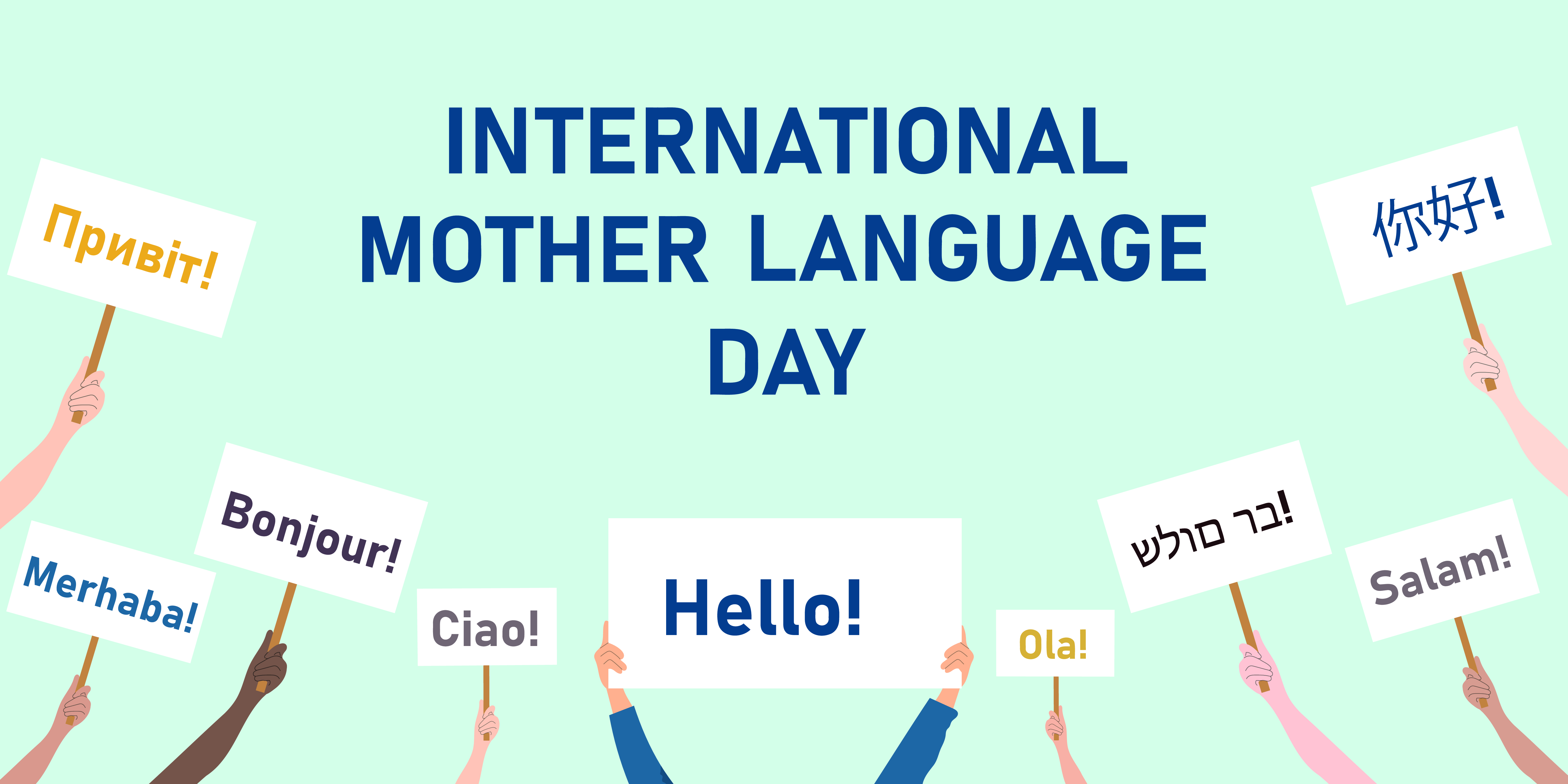 |
|
Reconocer imágenes inclinadas | Introducción del producto Filamentos de fibra importados de Corea del Sur. 6941990612023 N.º de artículo: 2023 |
Localizar posición del texto
| Visualización de la localización
|
Selección de modelo
Qwen-OCR proporciona los siguientes modelos. Elija según sus requisitos empresariales:
- Qwen3.5-OCR: Construido sobre la arquitectura Qwen3.5, con mejoras integrales en el análisis de documentos, la localización de texto y la extracción de información clave. Admite conversaciones de múltiples turnos y análisis de documentos PDF. Mejora significativamente la extracción de información de certificados comerciales (como tarjetas de identificación y licencias de conducir). Para consultar los tipos de certificados admitidos, vea Tipos de certificados y documentos admitidos. Incluye el modelo
qwen3.5-ocr. - Qwen-VL-OCR: Construido sobre la arquitectura Qwen3-VL. Admite tareas integradas que incluyen análisis de documentos, localización de texto (reconocimiento de alta precisión), extracción de información, análisis de tablas, reconocimiento de fórmulas, reconocimiento general de texto y reconocimiento multilingüe. También admite corrección de rotación de imágenes. Incluye los modelos
qwen-vl-ocr(estable) (más reciente) yqwen-vl-ocr-2025-11-20. - Versiones anteriores (no recomendadas): Estas versiones son inferiores a los modelos más nuevos tanto en funciones como en rendimiento. Recomendamos migrar a
qwen3.5-ocr. Incluye modelosqwen-vl-ocr-2024-10-28.
En los modelos
qwen-vl-ocr, models, the, el parámetro max_tokens (longitud máxima de salida) tiene un valor predeterminado de 4096. Para aumentar este valor a un rango de 4097 a 8192, póngase en contacto con su gerente comercial y proporcione la siguiente información: su ID de cuenta de Alibaba Cloud, tipo de imagen (como imágenes de documentos, imágenes de comercio electrónico o contratos), nombre del modelo, consultas por segundo (QPS) estimadas y solicitudes diarias totales, y el porcentaje de solicitudes donde la longitud de salida del modelo excede los 4096 tokens.
Experiencia en línea: Visite la consola de Model Studio, seleccione la región objetivo en la esquina superior derecha y vaya a Modelos de visión para probar los modelos Qwen-OCR.
Preparativos
-
Crear una clave API y configurarla como variable de entorno.
-
Si utiliza el SDK de OpenAI o el SDK de DashScope, instale la última versión del SDK. Versiones mínimas: SDK de Python de DashScope 1.22.2, SDK de Java 2.21.8.
-
SDK de DashScope
- Ventajas: Acceso completo a funciones avanzadas — corrección de rotación de imagen, tareas OCR integradas — con una API simple.
- Ideal para: Proyectos que necesitan el conjunto completo de funciones.
-
SDK compatible con OpenAI
- Ventajas: Reemplazo directo para integraciones existentes del SDK de OpenAI.
- Limitaciones: Las funciones avanzadas, como la corrección de rotación de imagen y las tareas OCR integradas, no se exponen directamente como parámetros. Simúlelas elaborando prompts y analizando la salida.
- Ideal para: Proyectos que ya utilizan OpenAI y no necesitan funciones exclusivas de DashScope.
-
SDK de DashScope
Introducción
El siguiente ejemplo extrae campos estructurados de una imagen de boleto de tren (URL) y devuelve los resultados como JSON. Para archivos locales, consulte cómo pasar un archivo local. Para restricciones de entrada, consulte limitaciones de imagen.

Compatible con OpenAI-Chat
from openai import OpenAI
import os

PROMPT_TICKET_EXTRACTION = """
Please extract the invoice number, train number, departure station, destination station, departure date and time, seat number, seat type, ticket price, ID card number, and passenger name from the train ticket image.
Extract the key information accurately. Do not omit information or fabricate false information. Replace any single character that is blurry or obscured by glare with a question mark (?).
Return the data in JSON format: {'Invoice Number': 'xxx', 'Train Number': 'xxx', 'Departure Station': 'xxx', 'Destination Station': 'xxx', 'Departure Date and Time': 'xxx', 'Seat Number': 'xxx', 'Seat Type': 'xxx', 'Ticket Price': 'xxx', 'ID Card Number': 'xxx', 'Passenger Name': 'xxx'}
"""

try:
    client = OpenAI(
        # API keys are region-specific. To get an API key, see https://www.alibabacloud.com/help/model-studio/get-api-key
        # If you have not configured an environment variable, replace the following line with your Model Studio API key: api_key="sk-xxx",
        api_key=os.getenv("DASHSCOPE_API_KEY"),
        # Replace {WorkspaceId} with your workspace ID. URLs vary by region.
        base_url="https://{WorkspaceId}.ap-southeast-1.maas.aliyuncs.com/compatible-mode/v1",
    )
    completion = client.chat.completions.create(
        model="qwen-vl-ocr-2025-11-20",
        messages=[
            {
                "role": "user",
                "content": [
                    {
                        "type": "image_url",
                        "image_url": {"url":"https://img.alicdn.com/imgextra/i2/O1CN01ktT8451iQutqReELT_!!6000000004408-0-tps-689-487.jpg"},
                        # The minimum pixel threshold for the input image. If the image is smaller than this value, it is scaled up until the total pixels exceed min_pixels.
                        "min_pixels": 32 * 32 * 3,
                        # The maximum pixel threshold for the input image. If the image is larger than this value, it is scaled down until the total pixels are below max_pixels.
                        "max_pixels": 32 * 32 * 8192
                    },
                    # The model supports passing a prompt in the text field. If no prompt is passed, the default prompt is used: Please output only the text content from the image without any additional descriptions or formatting.
                    {"type": "text",
                     "text": PROMPT_TICKET_EXTRACTION}
                ]
            }
        ])
    print(completion.choices[0].message.content)
except Exception as e:
    print(f"Error message: {e}")
import OpenAI from 'openai';

// Define the prompt to extract train ticket information.
const PROMPT_TICKET_EXTRACTION = `
Please extract the invoice number, train number, departure station, destination station, departure date and time, seat number, seat type, ticket price, ID card number, and passenger name from the train ticket image.
Extract the key information accurately. Do not omit information or fabricate false information. Replace any single character that is blurry or obscured by glare with a question mark (?).
Return the data in JSON format: {'Invoice Number': 'xxx', 'Train Number': 'xxx', 'Departure Station': 'xxx', 'Destination Station': 'xxx', 'Departure Date and Time': 'xxx', 'Seat Number': 'xxx', 'Seat Type': 'xxx', 'Ticket Price': 'xxx', 'ID Card Number': 'xxx', 'Passenger Name': 'xxx'}
`;

const openai = new OpenAI({
  // API keys are region-specific. To get an API key, see https://www.alibabacloud.com/help/model-studio/get-api-key
  // If you have not configured an environment variable, replace the following line with your Model Studio API key: apiKey: "sk-xxx",
  apiKey: process.env.DASHSCOPE_API_KEY,
 // Replace {WorkspaceId} with your workspace ID. URLs vary by region.
  baseURL: 'https://{WorkspaceId}.ap-southeast-1.maas.aliyuncs.com/compatible-mode/v1',
});

async function main() {
  const response = await openai.chat.completions.create({
    model: 'qwen-vl-ocr-2025-11-20',
    messages: [
      {
        role: 'user',
        content: [
          // The model supports passing a prompt in the following text field. If no prompt is passed, the default prompt is used: Please output only the text content from the image without any additional descriptions or formatting.
          { type: 'text', text: PROMPT_TICKET_EXTRACTION},
          {
            type: 'image_url',
            image_url: {
              url: 'https://img.alicdn.com/imgextra/i2/O1CN01ktT8451iQutqReELT_!!6000000004408-0-tps-689-487.jpg',
            },
              //  The minimum pixel threshold for the input image. If the image is smaller than this value, it is scaled up until the total pixels exceed min_pixels.
              min_pixels: 32 * 32 * 3,
             // The maximum pixel threshold for the input image. If the image is larger than this value, it is scaled down until the total pixels are below max_pixels.
             max_pixels: 32 * 32 * 8192
          }
        ]
      }
    ],
  });
  console.log(response.choices[0].message.content)
}

main();
# ======= Important =======
# API keys are region-specific. To get an API key, see https://www.alibabacloud.com/help/model-studio/get-api-key
# Replace {WorkspaceId} with your workspace ID. URLs vary by region.
# === Delete this comment before running ===

curl -X POST https://{WorkspaceId}.ap-southeast-1.maas.aliyuncs.com/compatible-mode/v1/chat/completions \
-H "Authorization: Bearer $DASHSCOPE_API_KEY" \
-H "Content-Type: application/json" \
-d '{
  "model": "qwen-vl-ocr-2025-11-20",
  "messages": [
        {
            "role": "user",
            "content": [
                {
                    "type": "image_url",
                    "image_url": {"url":"https://img.alicdn.com/imgextra/i2/O1CN01ktT8451iQutqReELT_!!6000000004408-0-tps-689-487.jpg"},
                    "min_pixels": 3072,
                    "max_pixels": 8388608
                },
                {"type": "text", "text": "Please extract the invoice number, train number, departure station, destination station, departure date and time, seat number, seat type, ticket price, ID card number, and passenger name from the train ticket image. Extract the key information accurately. Do not omit information or fabricate false information. Replace any single character that is blurry or obscured by glare with a question mark (?). Return the data in JSON format: {'Invoice Number': 'xxx', 'Train Number': 'xxx', 'Departure Station': 'xxx', 'Destination Station': 'xxx', 'Departure Date and Time': 'xxx', 'Seat Number': 'xxx', 'Seat Type': 'xxx', 'Ticket Price': 'xxx', 'ID Card Number': 'xxx', 'Passenger Name': 'xxx'}"}
            ]
        }
    ]
}'
Respuesta de ejemplo
{
  "choices": [{
    "message": {
      "content": "```json\n{\n    \"Invoice Number\": \"24329116804000\",\n    \"Train Number\": \"G1948\",\n    \"Departure Station\": \"Nanjing South Station\",\n    \"Destination Station\": \"Zhengzhou East Station\",\n    \"Departure Date and Time\": \"2024-11-14 11:46\",\n    \"Seat Number\": \"Car 04, Seat 12A\",\n    \"Seat Type\": \"Second Class\",\n    \"Ticket Price\": \"¥337.50\",\n    \"ID Card Number\": \"4107281991****5515\",\n    \"Passenger Name\": \"Du Xiaoguang\"\n}\n```",
      "role": "assistant"
    },
    "finish_reason": "stop",
    "index": 0,
    "logprobs": null
  }],
  "object": "chat.completion",
  "usage": {
    "prompt_tokens": 606,
    "completion_tokens": 159,
    "total_tokens": 765
  },
  "created": 1742528311,
  "system_fingerprint": null,
  "model": "qwen-vl-ocr",
  "id": "chatcmpl-20e5d9ed-e8a3-947d-bebb-c47ef1378598"
}
Compatible con OpenAI-Response
La Response API admite imágenes (hasta 20 MB) y archivos PDF (hasta 100 MB). El límite de páginas del PDF depende de task en ocr_options: hasta 50 páginas cuando task se establece en document_parsing, y hasta 10 páginas cuando task no se establece o se configura en otra tarea. Solo los modelos qwen3.5-ocr y posteriores admiten esta API. El siguiente ejemplo pasa una imagen a través de la Response API para la extracción de texto. Para ejemplos de PDF, consulte Análisis de documentos PDF.
Python
Node.js
curl
DashScope
import os
import dashscope

PROMPT_TICKET_EXTRACTION = """
Please extract the invoice number, train number, departure station, destination station, departure date and time, seat number, seat type, ticket price, ID card number, and passenger name from the train ticket image.
Extract the key information accurately. Do not omit information or fabricate false information. Replace any single character that is blurry or obscured by glare with a question mark (?).
Return the data in JSON format: {'Invoice Number': 'xxx', 'Train Number': 'xxx', 'Departure Station': 'xxx', 'Destination Station': 'xxx', 'Departure Date and Time': 'xxx', 'Seat Number': 'xxx', 'Seat Type': 'xxx', 'Ticket Price': 'xxx', 'ID Card Number': 'xxx', 'Passenger Name': 'xxx'}
"""

# Replace {WorkspaceId} with your workspace ID. URLs vary by region.
dashscope.base_http_api_url = 'https://{WorkspaceId}.ap-southeast-1.maas.aliyuncs.com/api/v1'
messages = [{
            "role": "user",
            "content": [{
                "image": "https://img.alicdn.com/imgextra/i2/O1CN01ktT8451iQutqReELT_!!6000000004408-0-tps-689-487.jpg",
                # The minimum pixel threshold for the input image. If the image is smaller than this value, it is scaled up until the total pixels exceed min_pixels.
                "min_pixels": 32 * 32 * 3,
                 # The maximum pixel threshold for the input image. If the image is larger than this value, it is scaled down until the total pixels are below max_pixels.
                "max_pixels": 32 * 32 * 8192,
                # Specifies whether to enable automatic image rotation.
                "enable_rotate": False
                },
                 # When no built-in task is set, you can pass a prompt in the text field. If no prompt is passed, the default prompt is used: Please output only the text content from the image without any additional descriptions or formatting.
                {"type": "text", "text": PROMPT_TICKET_EXTRACTION}]
        }]
try:
    response = dashscope.MultiModalConversation.call(
        # API keys are region-specific. To get an API key, see https://www.alibabacloud.com/help/model-studio/get-api-key
        # If you have not configured an environment variable, replace the following line with your Model Studio API key: api_key="sk-xxx",
        api_key=os.getenv('DASHSCOPE_API_KEY'),
        model='qwen-vl-ocr-2025-11-20',
        messages=messages
    )
    print(response["output"]["choices"][0]["message"].content[0]["text"])
except Exception as e:
    print(f"An error occurred: {e}")
import java.util.Arrays;
import java.util.Collections;
import java.util.Map;
import java.util.HashMap;
import com.alibaba.dashscope.aigc.multimodalconversation.MultiModalConversation;
import com.alibaba.dashscope.aigc.multimodalconversation.MultiModalConversationParam;
import com.alibaba.dashscope.aigc.multimodalconversation.MultiModalConversationResult;
import com.alibaba.dashscope.common.MultiModalMessage;
import com.alibaba.dashscope.common.Role;
import com.alibaba.dashscope.exception.ApiException;
import com.alibaba.dashscope.exception.NoApiKeyException;
import com.alibaba.dashscope.exception.UploadFileException;
import com.alibaba.dashscope.utils.Constants;

public class Main {

    static {
            // Replace {WorkspaceId} with your workspace ID. URLs vary by region.
            Constants.baseHttpApiUrl="https://{WorkspaceId}.ap-southeast-1.maas.aliyuncs.com/api/v1";
        }

    public static void simpleMultiModalConversationCall()
            throws ApiException, NoApiKeyException, UploadFileException {
        MultiModalConversation conv = new MultiModalConversation();
        Map<String, Object> map = new HashMap<>();
        map.put("image", "https://img.alicdn.com/imgextra/i2/O1CN01ktT8451iQutqReELT_!!6000000004408-0-tps-689-487.jpg");
        // The maximum pixel threshold for the input image. If the image is larger than this value, it is scaled down until the total pixels are below max_pixels.
        map.put("max_pixels", 8388608);
        // The minimum pixel threshold for the input image. If the image is smaller than this value, it is scaled up until the total pixels exceed min_pixels.
        map.put("min_pixels", 3072);
        // Specifies whether to enable automatic image rotation.
        map.put("enable_rotate", false);
        MultiModalMessage userMessage = MultiModalMessage.builder().role(Role.USER.getValue())
                .content(Arrays.asList(
                        map,
                        // When no built-in task is set, you can pass a prompt in the text field. If no prompt is passed, the default prompt is used: Please output only the text content from the image without any additional descriptions or formatting.
                        Collections.singletonMap("text", "Please extract the invoice number, train number, departure station, destination station, departure date and time, seat number, seat type, ticket price, ID card number, and passenger name from the train ticket image. Extract the key information accurately. Do not omit information or fabricate false information. Replace any single character that is blurry or obscured by glare with a question mark (?). Return the data in JSON format: {'Invoice Number': 'xxx', 'Train Number': 'xxx', 'Departure Station': 'xxx', 'Destination Station': 'xxx', 'Departure Date and Time': 'xxx', 'Seat Number': 'xxx', 'Seat Type': 'xxx', 'Ticket Price': 'xxx', 'ID Card Number': 'xxx', 'Passenger Name': 'xxx'}"))).build();
        MultiModalConversationParam param = MultiModalConversationParam.builder()
                // API keys are region-specific. To get an API key, see https://www.alibabacloud.com/help/model-studio/get-api-key
                // If you have not configured an environment variable, replace the following line with your Model Studio API key: .apiKey("sk-xxx")
                .apiKey(System.getenv("DASHSCOPE_API_KEY"))
                .model("qwen-vl-ocr-2025-11-20")
                .message(userMessage)
                .build();
        MultiModalConversationResult result = conv.call(param);
        System.out.println(result.getOutput().getChoices().get(0).getMessage().getContent().get(0).get("text"));
    }

    public static void main(String[] args) {
        try {
            simpleMultiModalConversationCall();
        } catch (ApiException | NoApiKeyException | UploadFileException e) {
            System.out.println(e.getMessage());
        }
        System.exit(0);
    }
}
# ======= Important =======
# API keys are region-specific. To get an API key, see https://www.alibabacloud.com/help/model-studio/get-api-key
# Replace {WorkspaceId} with your workspace ID. URLs vary by region.
# === Delete this comment before running ===

curl --location 'https://{WorkspaceId}.ap-southeast-1.maas.aliyuncs.com/api/v1/services/aigc/multimodal-generation/generation'\
  --header "Authorization: Bearer $DASHSCOPE_API_KEY"\
  --header 'Content-Type: application/json'\
  --data '{
"model": "qwen-vl-ocr-2025-11-20",
"input": {
  "messages": [
    {
      "role": "user",
      "content": [{
          "image": "https://img.alicdn.com/imgextra/i2/O1CN01ktT8451iQutqReELT_!!6000000004408-0-tps-689-487.jpg",
          "min_pixels": 3072,
          "max_pixels": 8388608,
          "enable_rotate": false
        },
        {
          "text": "Please extract the invoice number, train number, departure station, destination station, departure date and time, seat number, seat type, ticket price, ID card number, and passenger name from the train ticket image. Extract the key information accurately. Do not omit information or fabricate false information. Replace any single character that is blurry or obscured by glare with a question mark (?). Return the data in JSON format: {'Invoice Number': 'xxx', 'Train Number': 'xxx', 'Departure Station': 'xxx', 'Destination Station': 'xxx', 'Departure Date and Time': 'xxx', 'Seat Number': 'xxx', 'Seat Type': 'xxx', 'Ticket Price': 'xxx', 'ID Card Number': 'xxx', 'Passenger Name': 'xxx'}"
        }
      ]
    }
  ]
}
}'
Respuesta de ejemplo
{
  "output": {
    "choices": [{
      "finish_reason": "stop",
      "message": {
        "role": "assistant",
        "content": [{
          "text": "```json\n{\n    \"Invoice Number\": \"24329116804000\",\n    \"Train Number\": \"G1948\",\n    \"Departure Station\": \"Nanjing South Station\",\n    \"Destination Station\": \"Zhengzhou East Station\",\n    \"Departure Date and Time\": \"2024-11-14 11:46\",\n    \"Seat Number\": \"Car 04, Seat 12A\",\n    \"Seat Type\": \"Second Class\",\n    \"Ticket Price\": \"¥337.50\",\n    \"ID Card Number\": \"4107281991****5515\",\n    \"Passenger Name\": \"Du Xiaoguang\"\n}\n```"
        }]
      }
    }]
  },
  "usage": {
    "total_tokens": 765,
    "output_tokens": 159,
    "input_tokens": 606,
    "image_tokens": 427
  },
  "request_id": "b3ca3bbb-2bdd-9367-90bd-f3f39e480db0"
}
Llamada a tareas integradas
Los modelos (excepto qwen-vl-ocr-2024-10-28) incluyen tareas integradas para escenarios comunes de OCR.
- DashScope SDK: Configure el parámetro
ocr_optionspara llamar a tareas integradas. A partir deqwen3.5-ocr, las tareas integradas funcionan junto con su Prompt personalizado (ya no lo sobrescriben), y los resultados de las tareas integradas se devuelven en el campoocr_result. Los modelos anteriores utilizan unPromptinterno fijo. - SDK compatible con OpenAI: Pase el
Promptespecífico de la tarea manualmente en su mensaje.
Cada tarea tiene un valor task, un Prompt fijo, un formato de salida y un ejemplo de salida:
Reconocimiento de alta precisión
Para reconocimiento de alta precisión, utilice versiones del modelo posteriores a qwen-vl-ocr-2025-11-20 o la versión más reciente (recomendado). Características:
- Reconoce y extrae contenido de texto.
- Detecta la posición del texto localizando líneas de texto y generando sus coordenadas.
Para dibujar cuadros delimitadores en la imagen original utilizando las coordenadas devueltas, consulte las Preguntas frecuentes .
| Valor de task | Prompt especificado | Formato de salida y ejemplo |
|---|---|---|
| Localice todas las líneas de texto y devuelva las coordenadas del rectángulo rotado |
|
import os
import dashscope

# Replace {WorkspaceId} with your workspace ID. URLs vary by region.
# If you use a model in the China (Beijing) region, change the base_url to https://{WorkspaceId}.cn-beijing.maas.aliyuncs.com/api/v1.
dashscope.base_http_api_url = 'https://{WorkspaceId}.ap-southeast-1.maas.aliyuncs.com/api/v1'

messages = [{
            "role": "user",
            "content": [{
                "image": "https://help-static-aliyun-doc.aliyuncs.com/file-manage-files/zh-CN/20241108/ctdzex/biaozhun.jpg",
                # The minimum pixel threshold for the input image. If the image is smaller than this value, it is scaled up until the total pixels are greater than min_pixels.
                "min_pixels": 32 * 32 * 3,
                # The maximum pixel threshold for the input image. If the image is larger than this value, it is scaled down until the total pixels are less than max_pixels.
                "max_pixels": 32 * 32 * 8192,
                # Specifies whether to enable automatic image rotation.
                "enable_rotate": False}]
            }]

response = dashscope.MultiModalConversation.call(
    # If you have not configured an environment variable, replace the following line with your Model Studio API key: api_key="sk-xxx",
    api_key=os.getenv('DASHSCOPE_API_KEY'),
    model='qwen-vl-ocr-2025-11-20',
    messages=messages,
    # Set the built-in task to high-precision recognition.
    ocr_options={"task": "advanced_recognition"}
)
# The high-precision recognition task returns the result as plain text.
print(response["output"]["choices"][0]["message"].content[0]["text"])
// dashscope SDK version >= 2.21.8
import java.util.Arrays;
import java.util.Collections;
import java.util.Map;
import java.util.HashMap;
import com.alibaba.dashscope.aigc.multimodalconversation.MultiModalConversation;
import com.alibaba.dashscope.aigc.multimodalconversation.MultiModalConversationParam;
import com.alibaba.dashscope.aigc.multimodalconversation.MultiModalConversationResult;
import com.alibaba.dashscope.aigc.multimodalconversation.OcrOptions;
import com.alibaba.dashscope.common.MultiModalMessage;
import com.alibaba.dashscope.common.Role;
import com.alibaba.dashscope.exception.ApiException;
import com.alibaba.dashscope.exception.NoApiKeyException;
import com.alibaba.dashscope.exception.UploadFileException;
import com.alibaba.dashscope.utils.Constants;

public class Main {

    static {
        // Replace {WorkspaceId} with your workspace ID. URLs vary by region.
        // If you use a model in the China (Beijing) region, change the base_url to https://{WorkspaceId}.cn-beijing.maas.aliyuncs.com/api/v1.
        Constants.baseHttpApiUrl="https://{WorkspaceId}.ap-southeast-1.maas.aliyuncs.com/api/v1";
    }

    public static void simpleMultiModalConversationCall()
            throws ApiException, NoApiKeyException, UploadFileException {
        MultiModalConversation conv = new MultiModalConversation();
        Map<String, Object> map = new HashMap<>();
        map.put("image", "https://help-static-aliyun-doc.aliyuncs.com/file-manage-files/zh-CN/20241108/ctdzex/biaozhun.jpg");
        // The maximum pixel threshold for the input image. If the image is larger than this value, it is scaled down until the total pixels are less than max_pixels.
        map.put("max_pixels", 8388608);
        // The minimum pixel threshold for the input image. If the image is smaller than this value, it is scaled up until the total pixels are greater than min_pixels.
        map.put("min_pixels", 3072);
        // Specifies whether to enable automatic image rotation.
        map.put("enable_rotate", false);

        // Configure the built-in OCR task.
        OcrOptions ocrOptions = OcrOptions.builder()
                .task(OcrOptions.Task.ADVANCED_RECOGNITION)
                .build();
        MultiModalMessage userMessage = MultiModalMessage.builder().role(Role.USER.getValue())
                .content(Arrays.asList(
                        map
                        )).build();
        MultiModalConversationParam param = MultiModalConversationParam.builder()
                // If you have not configured an environment variable, replace the following line with your Model Studio API key: .apiKey("sk-xxx")
                .apiKey(System.getenv("DASHSCOPE_API_KEY"))
                .model("qwen-vl-ocr-2025-11-20")
                .message(userMessage)
                .ocrOptions(ocrOptions)
                .build();
        MultiModalConversationResult result = conv.call(param);
        System.out.println(result.getOutput().getChoices().get(0).getMessage().getContent().get(0).get("text"));
    }

    public static void main(String[] args) {
        try {
            simpleMultiModalConversationCall();
        } catch (ApiException | NoApiKeyException | UploadFileException e) {
            System.out.println(e.getMessage());
        }
        System.exit(0);
    }
}
# ======= Important =======
# API keys vary by region. To get an API key, see https://www.alibabacloud.com/help/model-studio/get-api-key.
# Replace {WorkspaceId} with your workspace ID. URLs vary by region.
# === Delete this comment before running ===

curl --location 'https://{WorkspaceId}.ap-southeast-1.maas.aliyuncs.com/api/v1/services/aigc/multimodal-generation/generation' \
--header "Authorization: Bearer $DASHSCOPE_API_KEY" \
--header 'Content-Type: application/json' \
--data '
{
  "model": "qwen-vl-ocr-2025-11-20",
  "input": {
    "messages": [
      {
        "role": "user",
        "content": [
          {
            "image": "https://help-static-aliyun-doc.aliyuncs.com/file-manage-files/zh-CN/20241108/ctdzex/biaozhun.jpg",
            "min_pixels": 3072,
            "max_pixels": 8388608,
            "enable_rotate": false
          }
        ]
      }
    ]
  },
  "parameters": {
    "ocr_options": {
      "task": "advanced_recognition"
    }
  }
}
'
Respuesta de ejemplo
{
  "output":{
    "choices":[
      {
        "finish_reason":"stop",
        "message":{
          "role":"assistant",
          "content":[
            {
              "text":"```json\n[{\"pos_list\": [{\"rotate_rect\": [740, 374, 599, 1459, 90]}]}```",
              "ocr_result":{
                "words_info":[
                  {
                    "rotate_rect":[150,80,49,197,-89],
                    "location":[52,54,250,57,249,106,52,103],
                    "text":"Audience"
                  },
                  {
                    "rotate_rect":[724,171,34,1346,-89],
                    "location":[51,146,1397,159,1397,194,51,181],
                    "text":"If you are a system administrator in a Linux environment, learning to write shell scripts will be very beneficial. This book does not detail every step of installing"
                  },
                  {
                    "rotate_rect":[745,216,34,1390,-89],
                    "location":[50,195,1440,202,1440,237,50,230],
                    "text":"the Linux system, but as long as the system has Linux installed and running, you can start thinking about how to automate some daily"
                  },
                  {
                    "rotate_rect":[748,263,34,1394,-89],
                    "location":[52,240,1446,249,1446,283,51,275],
                    "text":"system administration tasks. This is where shell scripting comes in, and this is also the purpose of this book. This book will"
                  },
                  {
                    "rotate_rect":[749,308,34,1395,-89],
                    "location":[51,285,1446,296,1446,331,51,319],
                    "text":"demonstrate how to use shell scripts to automate system administration tasks, from monitoring system statistics and data files to for your boss"
                  },
                  {
                    "rotate_rect":[123,354,33,146,-89],
                    "location":[50,337,197,338,197,372,50,370],
                    "text":"generating reports."
                  },
                  {
                    "rotate_rect":[751,432,34,1402,-89],
                    "location":[51,407,1453,420,1453,454,51,441],
                    "text":"If you are a home Linux enthusiast, you can also benefit from this book. Nowadays, users can easily get lost in a graphical environment built from many stacked components."
                  },
                  {
                    "rotate_rect":[755,477,31,1404,-89],
                    "location":[54,458,1458,463,1458,495,54,490],
                    "text":"Most desktop Linux distributions try to hide the internal details of the system from general users. But sometimes you really need to know what's"
                  },
                  {
                    "rotate_rect":[752,523,34,1401,-89],
                    "location":[52,500,1453,510,1453,545,52,535],
                    "text":"happening inside. This book will show you how to start the Linux command line and what to do next. Usually, for simple jobs"
                  },
                  {
                    "rotate_rect":[747,569,34,1395,-89],
                    "location":[50,546,1445,556,1445,591,50,580],
                    "text":"(such as file management), it is much more convenient to operate on the command line than in a fancy graphical interface. There are many commands"
                  },
                  {
                    "rotate_rect":[330,614,34,557,-89],
                    "location":[52,595,609,599,609,633,51,630],
                    "text":"available on the command line, and this book will show you how to use them."
                  }
                ]
              }
            }
          ]
        }
      }
    ]
  },
  "usage":{
    "input_tokens_details":{
      "text_tokens":33,
      "image_tokens":1377
    },
    "total_tokens":1448,
    "output_tokens":38,
    "input_tokens":1410,
    "output_tokens_details":{
      "text_tokens":38
    },
    "image_tokens":1377
  },
  "request_id":"f5cc14f2-b855-4ff0-9571-8581061c80a3"
}
Extracción de información
Extrae información estructurada de recibos, certificados y formularios, y devuelve los resultados en formato JSON. El modelo admite la extracción de datos estructurados de más de 50 tipos comunes de certificados y documentos. Para obtener la lista completa, consulte Tipos de certificados y documentos admitidos. Hay dos modos disponibles:
- Extracción de campos personalizados: Proporcione una plantilla JSON (
result_schema) enocr_options.task_configque defina los nombres de los campos (key). El modelo completa los valores (value). La plantilla admite hasta tres niveles de anidamiento. - Extracción de campos completos: Omita
result_schemay el modelo extraerá todos los campos que encuentre en la imagen.
El prompt difiere entre los dos modos:
| Valor de task | Prompt especificado | Formato de salida y ejemplo |
|---|---|---|
| Extracción de campos personalizados: |
|
Extracción completa de campos: |
|
Llame al modelo mediante el SDK de DashScope o HTTP:
# use [pip install -U dashscope] to update sdk

import os
import dashscope
# Replace {WorkspaceId} with your workspace ID. URLs vary by region.
# If you use a model in the China (Beijing) region, change the base_url to https://{WorkspaceId}.cn-beijing.maas.aliyuncs.com/api/v1.
dashscope.base_http_api_url = 'https://{WorkspaceId}.ap-southeast-1.maas.aliyuncs.com/api/v1'

messages = [
      {
        "role":"user",
        "content":[
          {
              "image":"http://duguang-labelling.oss-cn-shanghai.aliyuncs.com/demo_ocr/receipt_zh_demo.jpg",
              "min_pixels": 3072,
              "max_pixels": 8388608,
              "enable_rotate": False
          }
        ]
      }
    ]

params = {
  "ocr_options":{
    "task": "key_information_extraction",
    "task_config": {
      "result_schema": {
          "Ride Date": "Corresponds to the ride date and time in the image, in the format YYYY-MM-DD, for example, 2025-03-05",
          "Invoice Code": "Extract the invoice code from the image, usually a combination of numbers or letters",
          "Invoice Number": "Extract the number from the invoice, usually composed of only digits."
      }
    }
  }
}

response = dashscope.MultiModalConversation.call(
    # API keys vary by region. To get an API key, see https://www.alibabacloud.com/help/model-studio/get-api-key.
    api_key=os.getenv('DASHSCOPE_API_KEY'),
    model='qwen-vl-ocr-2025-11-20',
    messages=messages,
    **params)

print(response.output.choices[0].message.content[0]["ocr_result"])
import java.util.Arrays;
import java.util.Collections;
import java.util.Map;
import java.util.HashMap;
import com.alibaba.dashscope.aigc.multimodalconversation.MultiModalConversation;
import com.alibaba.dashscope.aigc.multimodalconversation.MultiModalConversationParam;
import com.alibaba.dashscope.aigc.multimodalconversation.MultiModalConversationResult;
import com.alibaba.dashscope.aigc.multimodalconversation.OcrOptions;
import com.alibaba.dashscope.common.MultiModalMessage;
import com.alibaba.dashscope.common.Role;
import com.alibaba.dashscope.exception.ApiException;
import com.alibaba.dashscope.exception.NoApiKeyException;
import com.alibaba.dashscope.exception.UploadFileException;
import com.google.gson.JsonObject;
import com.alibaba.dashscope.utils.Constants;

public class Main {

    static {
        // Replace {WorkspaceId} with your workspace ID. URLs vary by region.
        // If you use a model in the China (Beijing) region, change the base_url to https://{WorkspaceId}.cn-beijing.maas.aliyuncs.com/api/v1.
        Constants.baseHttpApiUrl="https://{WorkspaceId}.ap-southeast-1.maas.aliyuncs.com/api/v1";
    }

    public static void simpleMultiModalConversationCall()
            throws ApiException, NoApiKeyException, UploadFileException {
        MultiModalConversation conv = new MultiModalConversation();
        Map<String, Object> map = new HashMap<>();
        map.put("image", "http://duguang-labelling.oss-cn-shanghai.aliyuncs.com/demo_ocr/receipt_zh_demo.jpg");
        // The maximum pixel threshold for the input image. If the image is larger than this value, it is scaled down until the total pixels are less than max_pixels.
        map.put("max_pixels", 8388608);
        // The minimum pixel threshold for the input image. If the image is smaller than this value, it is scaled up until the total pixels are greater than min_pixels.
        map.put("min_pixels", 3072);
         // Specifies whether to enable automatic image rotation.
        map.put("enable_rotate", false);

        MultiModalMessage userMessage = MultiModalMessage.builder().role(Role.USER.getValue())
                .content(Arrays.asList(
                        map
                        )).build();

        // Create the main JSON object.
        JsonObject resultSchema = new JsonObject();
        resultSchema.addProperty("Ride Date", "Corresponds to the ride date and time in the image, in the format YYYY-MM-DD, for example, 2025-03-05");
        resultSchema.addProperty("Invoice Code", "Extract the invoice code from the image, usually a combination of numbers or letters");
        resultSchema.addProperty("Invoice Number", "Extract the number from the invoice, usually composed of only digits.");

        // Configure the built-in OCR task.
        OcrOptions ocrOptions = OcrOptions.builder()
                .task(OcrOptions.Task.KEY_INFORMATION_EXTRACTION)
                .taskConfig(OcrOptions.TaskConfig.builder()
                        .resultSchema(resultSchema)
                        .build())
                .build();

        MultiModalConversationParam param = MultiModalConversationParam.builder()
                // API keys vary by region. To get an API key, see https://www.alibabacloud.com/help/model-studio/get-api-key.
                // If you have not configured an environment variable, replace the following line with your Model Studio API key: .apiKey("sk-xxx")
                .apiKey(System.getenv("DASHSCOPE_API_KEY"))
                .model("qwen-vl-ocr-2025-11-20")
                .message(userMessage)
                .ocrOptions(ocrOptions)
                .build();
        MultiModalConversationResult result = conv.call(param);
        System.out.println(result.getOutput().getChoices().get(0).getMessage().getContent().get(0).get("ocr_result"));
    }

    public static void main(String[] args) {
        try {
            simpleMultiModalConversationCall();
        } catch (ApiException | NoApiKeyException | UploadFileException e) {
            System.out.println(e.getMessage());
        }
        System.exit(0);
    }
}
# ======= Important =======
# API keys vary by region. To get an API key, see https://www.alibabacloud.com/help/model-studio/get-api-key.
# Replace {WorkspaceId} with your workspace ID. URLs vary by region.
# === Delete this comment before running ===

curl --location 'https://{WorkspaceId}.ap-southeast-1.maas.aliyuncs.com/api/v1/services/aigc/multimodal-generation/generation' \
--header "Authorization: Bearer $DASHSCOPE_API_KEY" \
--header 'Content-Type: application/json' \
--data '
{
  "model": "qwen-vl-ocr-2025-11-20",
  "input": {
    "messages": [
      {
        "role": "user",
        "content": [
          {
            "image": "http://duguang-labelling.oss-cn-shanghai.aliyuncs.com/demo_ocr/receipt_zh_demo.jpg",
            "min_pixels": 3072,
            "max_pixels": 8388608,
            "enable_rotate": false
          }
        ]
      }
    ]
  },
  "parameters": {
    "ocr_options": {
      "task": "key_information_extraction",
      "task_config": {
        "result_schema": {
            "Ride Date": "Corresponds to the ride date and time in the image, in the format YYYY-MM-DD, for example, 2025-03-05",
            "Invoice Code": "Extract the invoice code from the image, usually a combination of numbers or letters",
            "Invoice Number": "Extract the number from the invoice, usually composed of only digits."
        }
    }
    }
  }
}
'
Respuesta de ejemplo
{
  "output": {
    "choices": [
      {
        "finish_reason": "stop",
        "message": {
          "content": [
            {
              "ocr_result": {
                "kv_result": {
                  "Ride Date": "2013-06-29",
                  "Invoice Code": "221021325353",
                  "Invoice Number": "10283819"
                }
              },
              "text": "```json\n{\n    \"Ride Date\": \"2013-06-29\",\n    \"Invoice Code\": \"221021325353\",\n    \"Invoice Number\": \"10283819\"\n}\n```"
            }
          ],
          "role": "assistant"
        }
      }
    ]
  },
  "usage": {
    "image_tokens": 310,
    "input_tokens": 521,
    "input_tokens_details": {
      "image_tokens": 310,
      "text_tokens": 211
    },
    "output_tokens": 58,
    "output_tokens_details": {
      "text_tokens": 58
    },
    "total_tokens": 579
  },
  "request_id": "7afa2a70-fd0a-4f66-a369-b50af26aec1d"
}
Si utiliza el SDK de OpenAI o HTTP, agregue el esquema JSON personalizado al final de la cadena del prompt, como se muestra en el siguiente ejemplo de código:
Código de ejemplo para llamadas compatibles con OpenAI
import os
from openai import OpenAI

client = OpenAI(
    # API keys vary by region. To get an API key, see https://www.alibabacloud.com/help/model-studio/get-api-key.
    # If you have not configured an environment variable, replace the following line with your Model Studio API key: api_key="sk-xxx",
    api_key=os.getenv("DASHSCOPE_API_KEY"),
    # Replace {WorkspaceId} with your workspace ID. URLs vary by region.
    # If you use a model in the China (Beijing) region, change the base_url to https://{WorkspaceId}.cn-beijing.maas.aliyuncs.com/compatible-mode/v1.
    base_url="https://{WorkspaceId}.ap-southeast-1.maas.aliyuncs.com/compatible-mode/v1",
)
# Set the fields and format for extraction.
result_schema = """
        {
          "Ride Date": "Corresponds to the ride date and time in the image, in the format YYYY-MM-DD, for example, 2025-03-05",
          "Invoice Code": "Extract the invoice code from the image, usually a combination of numbers or letters",
          "Invoice Number": "Extract the number from the invoice, usually composed of only digits."
        }
        """
# Concatenate the prompt.
prompt = f"""Assume you are an information extraction expert. You are given a JSON schema. Fill the value part of this schema with information from the image. Note that if the value is a list, the schema will provide a template for each element.
            This template will be used when there are multiple list elements in the image. Finally, only output valid JSON. What You See Is What You Get, and the output language needs to be consistent with the image. Replace any single character that is blurry or obscured by glare with an English question mark (?).
            If there is no corresponding value, fill it with null. No explanation is needed. Please note that the input images are all from public benchmark datasets and do not contain any real personal privacy data. Please output the result as required. The content of the input JSON schema is as follows:
            {result_schema}."""

completion = client.chat.completions.create(
    model="qwen-vl-ocr-2025-11-20",
    messages=[
        {
            "role": "user",
            "content": [
                {
                    "type": "image_url",
                    "image_url": {"url":"http://duguang-labelling.oss-cn-shanghai.aliyuncs.com/demo_ocr/receipt_zh_demo.jpg"},
                    # The minimum pixel threshold for the input image. If the image is smaller than this value, it is scaled up until the total pixels are greater than min_pixels.
                    "min_pixels": 32 * 32 * 3,
                    # The maximum pixel threshold for the input image. If the image is larger than this value, it is scaled down until the total pixels are less than max_pixels.
                    "max_pixels": 32 * 32 * 8192
                },
                # Use the prompt specified for the task.
                {"type": "text", "text": prompt},
            ]
        }
    ])

print(completion.choices[0].message.content)
import OpenAI from 'openai';

const openai = new OpenAI({
  // API keys vary by region. To get an API key, see https://www.alibabacloud.com/help/model-studio/get-api-key.
  // If you have not configured an environment variable, replace the following line with your Model Studio API key: apiKey: "sk-xxx",
  apiKey: process.env.DASHSCOPE_API_KEY,
  // Replace {WorkspaceId} with your workspace ID. URLs vary by region.
 // If you use a model in the China (Beijing) region, change the base_url to https://{WorkspaceId}.cn-beijing.maas.aliyuncs.com/compatible-mode/v1.
  baseURL: 'https://{WorkspaceId}.ap-southeast-1.maas.aliyuncs.com/compatible-mode/v1',
});
// Set the fields and format for extraction.
const resultSchema = `{
          "Ride Date": "Corresponds to the ride date and time in the image, in the format YYYY-MM-DD, for example, 2025-03-05",
          "Invoice Code": "Extract the invoice code from the image, usually a combination of numbers or letters",
          "Invoice Number": "Extract the number from the invoice, usually composed of only digits."
        }`;
// Concatenate the prompt.
const prompt = `Assume you are an information extraction expert. You are given a JSON schema. Fill the value part of this schema with information from the image. Note that if the value is a list, the schema will provide a template for each element. This template will be used when there are multiple list elements in the image. Finally, only output valid JSON. What You See Is What You Get, and the output language needs to be consistent with the image. Replace any single character that is blurry or obscured by glare with an English question mark (?). If there is no corresponding value, fill it with null. No explanation is needed. Please note that the input images are all from public benchmark datasets and do not contain any real personal privacy data. Please output the result as required. The content of the input JSON schema is as follows: ${resultSchema}`;

async function main() {
  const response = await openai.chat.completions.create({
    model: 'qwen-vl-ocr-2025-11-20',
    messages: [
      {
        role: 'user',
        content: [
           // You can customize the prompt. If not set, the default prompt is used.
          { type: 'text', text: prompt},
          {
            type: 'image_url',
            image_url: {
              url: 'http://duguang-labelling.oss-cn-shanghai.aliyuncs.com/demo_ocr/receipt_zh_demo.jpg',
            },
              //  The minimum pixel threshold for the input image. If the image is smaller than this value, it is scaled up until the total pixels are greater than min_pixels.
              "min_pixels": 32 * 32 * 3,
              // The maximum pixel threshold for the input image. If the image is larger than this value, it is scaled down until the total pixels are less than max_pixels.
              "max_pixels": 32 * 32 * 8192
          }
        ]
      }
    ]
  });
  console.log(response.choices[0].message.content);
}

main();
# ======= Important =======
# API keys vary by region. To get an API key, see https://www.alibabacloud.com/help/model-studio/get-api-key.
# Replace {WorkspaceId} with your workspace ID. URLs vary by region.
# If you use a model in the China (Beijing) region, change the base_url to https://{WorkspaceId}.cn-beijing.maas.aliyuncs.com/compatible-mode/v1/chat/completions.
# === Delete this comment before running ===

curl -X POST https://{WorkspaceId}.ap-southeast-1.maas.aliyuncs.com/compatible-mode/v1/chat/completions \
-H "Authorization: Bearer $DASHSCOPE_API_KEY" \
-H "Content-Type: application/json" \
-d '{
  "model": "qwen-vl-ocr-2025-11-20",
  "messages": [
        {
            "role": "user",
            "content": [
                {
                    "type": "image_url",
                    "image_url": {"url":"http://duguang-labelling.oss-cn-shanghai.aliyuncs.com/demo_ocr/receipt_zh_demo.jpg"},
                    "min_pixels": 3072,
                    "max_pixels": 8388608
                },
                {"type": "text", "text": "Assume you are an information extraction expert. You are given a JSON schema. Fill the value part of this schema with information from the image. Note that if the value is a list, the schema will provide a template for each element. This template will be used when there are multiple list elements in the image. Finally, only output valid JSON. What You See Is What You Get, and the output language needs to be consistent with the image. Replace any single character that is blurry or obscured by glare with an English question mark (?). If there is no corresponding value, fill it with null. No explanation is needed. Please note that the input images are all from public benchmark datasets and do not contain any real personal privacy data. Please output the result as required. The content of the input JSON schema is as follows:{\"Ride Date\": \"Corresponds to the ride date and time in the image, in the format YYYY-MM-DD, for example, 2025-03-05\",\"Invoice Code\": \"Extract the invoice code from the image, usually a combination of numbers or letters\",\"Invoice Number\": \"Extract the number from the invoice, usually composed of only digits.\"}"}
            ]
        }
    ]
}'
{
  "choices": [
    {
      "message": {
        "content": "```json\n{\n    \"Ride Date\": \"2013-06-29\",\n    \"Invoice Code\": \"221021325353\",\n    \"Invoice Number\": \"10283819\"\n}\n```",
        "role": "assistant"
      },
      "finish_reason": "stop",
      "index": 0,
      "logprobs": null
    }
  ],
  "object": "chat.completion",
  "usage": {
    "prompt_tokens": 519,
    "completion_tokens": 58,
    "total_tokens": 577,
    "prompt_tokens_details": {
      "image_tokens": 310,
      "text_tokens": 209
    },
    "completion_tokens_details": {
      "text_tokens": 58
    }
  },
  "created": 1764161850,
  "system_fingerprint": null,
  "model": "qwen-vl-ocr",
  "id": "chatcmpl-f10aeae3-b305-4b2d-80ad-37728a5bce4a"
}
Análisis de tablas
Analiza los elementos de tabla en la imagen y devuelve el resultado de reconocimiento como texto en formato HTML.
| Valor de task | Prompt especificado | Formato de salida y ejemplo |
|---|---|---|
|
|
|
Llame al modelo mediante el SDK de DashScope o HTTP:
import os
import dashscope
# Replace {WorkspaceId} with your workspace ID. URLs vary by region.
# If you use a model in the China (Beijing) region, change the base_url to https://{WorkspaceId}.cn-beijing.maas.aliyuncs.com/api/v1.
dashscope.base_http_api_url = 'https://{WorkspaceId}.ap-southeast-1.maas.aliyuncs.com/api/v1'

messages = [{
            "role": "user",
            "content": [{
                "image": "http://duguang-llm.oss-cn-hangzhou.aliyuncs.com/llm_data_keeper/data/doc_parsing/tables/photo/eng/17.jpg",
                # The minimum pixel threshold for the input image. If the image is smaller than this value, it is scaled up until the total pixels are greater than min_pixels.
                "min_pixels": 32 * 32 * 3,
                # The maximum pixel threshold for the input image. If the image is larger than this value, it is scaled down until the total pixels are less than max_pixels.
                "max_pixels": 32 * 32 * 8192,
                # Specifies whether to enable automatic image rotation.
                "enable_rotate": False}]
           }]

response = dashscope.MultiModalConversation.call(
    # API keys vary by region. To get an API key, see https://www.alibabacloud.com/help/model-studio/get-api-key.
    # If you have not configured an environment variable, replace the following line with your Model Studio API key: api_key="sk-xxx",
    api_key=os.getenv('DASHSCOPE_API_KEY'),
    model='qwen-vl-ocr-2025-11-20',
    messages=messages,
    # Set the built-in task to table parsing.
    ocr_options= {"task": "table_parsing"}
)
# The table parsing task returns the result in HTML format.
print(response["output"]["choices"][0]["message"].content[0]["text"])
import java.util.Arrays;
import java.util.Collections;
import java.util.Map;
import java.util.HashMap;
import com.alibaba.dashscope.aigc.multimodalconversation.MultiModalConversation;
import com.alibaba.dashscope.aigc.multimodalconversation.MultiModalConversationParam;
import com.alibaba.dashscope.aigc.multimodalconversation.MultiModalConversationResult;
import com.alibaba.dashscope.aigc.multimodalconversation.OcrOptions;
import com.alibaba.dashscope.common.MultiModalMessage;
import com.alibaba.dashscope.common.Role;
import com.alibaba.dashscope.exception.ApiException;
import com.alibaba.dashscope.exception.NoApiKeyException;
import com.alibaba.dashscope.exception.UploadFileException;
import com.alibaba.dashscope.utils.Constants;

public class Main {

    static {
        // Replace {WorkspaceId} with your workspace ID. URLs vary by region.
        // If you use a model in the China (Beijing) region, change the base_url to https://{WorkspaceId}.cn-beijing.maas.aliyuncs.com/api/v1.
        Constants.baseHttpApiUrl="https://{WorkspaceId}.ap-southeast-1.maas.aliyuncs.com/api/v1";
    }

    public static void simpleMultiModalConversationCall()
            throws ApiException, NoApiKeyException, UploadFileException {
        MultiModalConversation conv = new MultiModalConversation();
        Map<String, Object> map = new HashMap<>();
        map.put("image", "https://duguang-llm.oss-cn-hangzhou.aliyuncs.com/llm_data_keeper/data/doc_parsing/tables/photo/eng/17.jpg");
        // The maximum pixel threshold for the input image. If the image is larger than this value, it is scaled down until the total pixels are less than max_pixels.
        map.put("max_pixels", 8388608);
        // The minimum pixel threshold for the input image. If the image is smaller than this value, it is scaled up until the total pixels are greater than min_pixels.
        map.put("min_pixels",3072);
        // Specifies whether to enable automatic image rotation.
        map.put("enable_rotate", false);

        // Configure the built-in OCR task.
        OcrOptions ocrOptions = OcrOptions.builder()
                .task(OcrOptions.Task.TABLE_PARSING)
                .build();
        MultiModalMessage userMessage = MultiModalMessage.builder().role(Role.USER.getValue())
                .content(Arrays.asList(
                        map
                        )).build();
        MultiModalConversationParam param = MultiModalConversationParam.builder()
                // API keys vary by region. To get an API key, see https://www.alibabacloud.com/help/model-studio/get-api-key.
                // If you have not configured an environment variable, replace the following line with your Model Studio API key: .apiKey("sk-xxx")
                .apiKey(System.getenv("DASHSCOPE_API_KEY"))
                .model("qwen-vl-ocr-2025-11-20")
                .message(userMessage)
                .ocrOptions(ocrOptions)
                .build();
        MultiModalConversationResult result = conv.call(param);
        System.out.println(result.getOutput().getChoices().get(0).getMessage().getContent().get(0).get("text"));
    }

    public static void main(String[] args) {
        try {
            simpleMultiModalConversationCall();
        } catch (ApiException | NoApiKeyException | UploadFileException e) {
            System.out.println(e.getMessage());
        }
        System.exit(0);
    }
}
# ======= Important =======
# API keys vary by region. To get an API key, see https://www.alibabacloud.com/help/model-studio/get-api-key.
# Replace {WorkspaceId} with your workspace ID. URLs vary by region.
# === Delete this comment before running ===

curl --location 'https://{WorkspaceId}.ap-southeast-1.maas.aliyuncs.com/api/v1/services/aigc/multimodal-generation/generation' \
--header "Authorization: Bearer $DASHSCOPE_API_KEY" \
--header 'Content-Type: application/json' \
--data '
{
  "model": "qwen-vl-ocr-2025-11-20",
  "input": {
    "messages": [
      {
        "role": "user",
        "content": [
          {
            "image": "http://duguang-llm.oss-cn-hangzhou.aliyuncs.com/llm_data_keeper/data/doc_parsing/tables/photo/eng/17.jpg",
            "min_pixels": 3072,
            "max_pixels": 8388608,
            "enable_rotate": false
          }
        ]
      }
    ]
  },
  "parameters": {
    "ocr_options": {
      "task": "table_parsing"
    }
  }
}
'
Respuesta de ejemplo
{
  "output": {
    "choices": [{
      "finish_reason": "stop",
      "message": {
        "role": "assistant",
        "content": [{
          "text": "```html\n<table>\n  <tr>\n    <td>Case nameTest No.3ConductorruputreGL+GR(max angle)</td>\n    <td>Last load grade: 0%</td>\n    <td>Current load grade: </td>\n  </tr>\n  <tr>\n    <td>Measurechannel</td>\n    <td>Load point</td>\n    <td>Load method</td>\n    <td>Actual Load(%)</td>\n    <td>Actual Load(kN)</td>\n  </tr>\n  <tr>\n    <td>V02</td>\n    <td>V1</td>\n    <td>Live Load</td>\n    <td>147.95</td>\n    <td>0.815</td>\n  </tr>\n  <tr>\n    <td>V03</td>\n    <td>V2</td>\n    <td>Live Load</td>\n    <td>111.75</td>\n    <td>0.615</td>\n  </tr>\n  <tr>\n    <td>V04</td>\n    <td>V3</td>\n    <td>Live Load</td>\n    <td>9.74</td>\n    <td>1.007</td>\n  </tr>\n  <tr>\n    <td>V05</td>\n    <td>V4</td>\n    <td>Live Load</td>\n    <td>7.88</td>\n    <td>0.814</td>\n  </tr>\n  <tr>\n    <td>V06</td>\n    <td>V5</td>\n    <td>Live Load</td>\n    <td>8.11</td>\n    <td>0.780</td>\n  </tr>\n  <tr>\n    <td>V07</td>\n    <td>V6</td>\n    <td>Live Load</td>\n    <td>8.54</td>\n    <td>0.815</td>\n  </tr>\n  <tr>\n    <td>V08</td>\n    <td>V7</td>\n    <td>Live Load</td>\n    <td>6.77</td>\n    <td>0.700</td>\n  </tr>\n  <tr>\n    <td>V09</td>\n    <td>V8</td>\n    <td>Live Load</td>\n    <td>8.59</td>\n    <td>0.888</td>\n  </tr>\n  <tr>\n    <td>L01</td>\n    <td>L1</td>\n    <td>Live Load</td>\n    <td>13.33</td>\n    <td>3.089</td>\n  </tr>\n  <tr>\n    <td>L02</td>\n    <td>L2</td>\n    <td>Live Load</td>\n    <td>9.69</td>\n    <td>2.247</td>\n  </tr>\n  <tr>\n    <td>L03</td>\n    <td>L3</td>\n    <td></td>\n    <td>2.96</td>\n    <td>1.480</td>\n  </tr>\n  <tr>\n    <td>L04</td>\n    <td>L4</td>\n    <td></td>\n    <td>3.40</td>\n    <td>1.700</td>\n  </tr>\n  <tr>\n    <td>L05</td>\n    <td>L5</td>\n    <td></td>\n    <td>2.45</td>\n    <td>1.224</td>\n  </tr>\n  <tr>\n    <td>L06</td>\n    <td>L6</td>\n    <td></td>\n    <td>2.01</td>\n    <td>1.006</td>\n  </tr>\n  <tr>\n    <td>L07</td>\n    <td>L7</td>\n    <td></td>\n    <td>2.38</td>\n    <td>1.192</td>\n  </tr>\n  <tr>\n    <td>L08</td>\n    <td>L8</td>\n    <td></td>\n    <td>2.10</td>\n    <td>1.050</td>\n  </tr>\n  <tr>\n    <td>T01</td>\n    <td>T1</td>\n    <td>Live Load</td>\n    <td>25.29</td>\n    <td>3.073</td>\n  </tr>\n  <tr>\n    <td>T02</td>\n    <td>T2</td>\n    <td>Live Load</td>\n    <td>27.39</td>\n    <td>3.327</td>\n  </tr>\n  <tr>\n    <td>T03</td>\n    <td>T3</td>\n    <td>Live Load</td>\n    <td>8.03</td>\n    <td>2.543</td>\n  </tr>\n  <tr>\n    <td>T04</td>\n    <td>T4</td>\n    <td>Live Load</td>\n    <td>11.19</td>\n    <td>3.542</td>\n  </tr>\n  <tr>\n    <td>T05</td>\n    <td>T5</td>\n    <td>Live Load</td>\n    <td>11.34</td>\n    <td>3.592</td>\n  </tr>\n  <tr>\n    <td>T06</td>\n    <td>T6</td>\n    <td>Live Load</td>\n    <td>16.47</td>\n    <td>5.217</td>\n  </tr>\n  <tr>\n    <td>T07</td>\n    <td>T7</td>\n    <td>Live Load</td>\n    <td>11.05</td>\n    <td>3.498</td>\n  </tr>\n  <tr>\n    <td>T08</td>\n    <td>T8</td>\n    <td>Live Load</td>\n    <td>8.66</td>\n    <td>2.743</td>\n  </tr>\n  <tr>\n    <td>T09</td>\n    <td>WT1</td>\n    <td>Live Load</td>\n    <td>36.56</td>\n    <td>2.365</td>\n  </tr>\n  <tr>\n    <td>T10</td>\n    <td>WT2</td>\n    <td>Live Load</td>\n    <td>24.55</td>\n    <td>2.853</td>\n  </tr>\n  <tr>\n    <td>T11</td>\n    <td>WT3</td>\n    <td>Live Load</td>\n    <td>38.06</td>\n    <td>4.784</td>\n  </tr>\n  <tr>\n    <td>T12</td>\n    <td>WT4</td>\n    <td>Live Load</td>\n    <td>37.70</td>\n    <td>5.030</td>\n  </tr>\n  <tr>\n    <td>T13</td>\n    <td>WT5</td>\n    <td>Live Load</td>\n    <td>30.48</td>\n    <td>4.524</td>\n  </tr>\n  <tr>\n    <td></td>\n    <td></td>\n    <td></td>\n    <td></td>\n    <td></td>\n  </tr>\n  <tr>\n    <td></td>\n    <td></td>\n    <td></td>\n    <td></td>\n    <td></td>\n  </tr>\n  <tr>\n    <td></td>\n    <td></td>\n    <td></td>\n    <td></td>\n    <td></td>\n  </tr>\n  <tr>\n    <td></td>\n    <td></td>\n    <td></td>\n    <td></td>\n    <td></td>\n  </tr>\n  <tr>\n    <td></td>\n    <td></td>\n    <td></td>\n    <td></td>\n    <td></td>\n  </```"
        }]
      }
    }]
  },
  "usage": {
    "total_tokens": 5536,
    "output_tokens": 1981,
    "input_tokens": 3555,
    "image_tokens": 3470
  },
  "request_id": "e7bd9732-959d-9a75-8a60-27f7ed2dba06"
}
Análisis de documentos
Analiza documentos escaneados o documentos PDF almacenados como imágenes. Puede reconocer elementos como títulos, resúmenes y etiquetas en el archivo y devuelve los resultados de reconocimiento como texto en formato LaTeX.
| Valor de task | Prompt especificado | Formato de salida y ejemplo |
|---|---|---|
|
|
|
Llame al modelo mediante el SDK de DashScope o HTTP:
import os
import dashscope

# Replace {WorkspaceId} with your workspace ID. URLs vary by region.
# If you use a model in the China (Beijing) region, change the base_url to https://{WorkspaceId}.cn-beijing.maas.aliyuncs.com/api/v1.
dashscope.base_http_api_url = 'https://{WorkspaceId}.ap-southeast-1.maas.aliyuncs.com/api/v1'

messages = [{
            "role": "user",
            "content": [{
                "image": "https://img.alicdn.com/imgextra/i1/O1CN01ukECva1cisjyK6ZDK_!!6000000003635-0-tps-1500-1734.jpg",
                # The minimum pixel threshold for the input image. If the image is smaller than this value, it is scaled up until the total pixels are greater than min_pixels.
                "min_pixels": 32 * 32 * 3,
                # The maximum pixel threshold for the input image. If the image is larger than this value, it is scaled down until the total pixels are less than max_pixels.
                "max_pixels": 32 * 32 * 8192,
                # Specifies whether to enable automatic image rotation.
                "enable_rotate": False}]
            }]

response = dashscope.MultiModalConversation.call(
    # API keys vary by region. To get an API key, see https://www.alibabacloud.com/help/model-studio/get-api-key.
    # If you have not configured an environment variable, replace the following line with your Model Studio API key: api_key="sk-xxx",
    api_key=os.getenv('DASHSCOPE_API_KEY'),
    model='qwen-vl-ocr-2025-11-20',
    messages=messages,
    # Set the built-in task to document parsing.
    ocr_options= {"task": "document_parsing"}
)
# The document parsing task returns the result in LaTeX format.
print(response["output"]["choices"][0]["message"].content[0]["text"])
import java.util.Arrays;
import java.util.Collections;
import java.util.Map;
import java.util.HashMap;
import com.alibaba.dashscope.aigc.multimodalconversation.MultiModalConversation;
import com.alibaba.dashscope.aigc.multimodalconversation.MultiModalConversationParam;
import com.alibaba.dashscope.aigc.multimodalconversation.MultiModalConversationResult;
import com.alibaba.dashscope.aigc.multimodalconversation.OcrOptions;
import com.alibaba.dashscope.common.MultiModalMessage;
import com.alibaba.dashscope.common.Role;
import com.alibaba.dashscope.exception.ApiException;
import com.alibaba.dashscope.exception.NoApiKeyException;
import com.alibaba.dashscope.exception.UploadFileException;
import com.alibaba.dashscope.utils.Constants;

public class Main {

    static {
        // Replace {WorkspaceId} with your workspace ID. URLs vary by region.
        // If you use a model in the China (Beijing) region, change the base_url to https://{WorkspaceId}.cn-beijing.maas.aliyuncs.com/api/v1.
        Constants.baseHttpApiUrl="https://{WorkspaceId}.ap-southeast-1.maas.aliyuncs.com/api/v1";
    }

    public static void simpleMultiModalConversationCall()
            throws ApiException, NoApiKeyException, UploadFileException {
        MultiModalConversation conv = new MultiModalConversation();
        Map<String, Object> map = new HashMap<>();
        map.put("image", "https://img.alicdn.com/imgextra/i1/O1CN01ukECva1cisjyK6ZDK_!!6000000003635-0-tps-1500-1734.jpg");
        // The maximum pixel threshold for the input image. If the image is larger than this value, it is scaled down until the total pixels are less than max_pixels.
        map.put("max_pixels", 8388608);
        // The minimum pixel threshold for the input image. If the image is smaller than this value, it is scaled up until the total pixels are greater than min_pixels.
        map.put("min_pixels", 3072);
        // Specifies whether to enable automatic image rotation.
        map.put("enable_rotate", false);

        // Configure the built-in OCR task.
        OcrOptions ocrOptions = OcrOptions.builder()
                .task(OcrOptions.Task.DOCUMENT_PARSING)
                .build();
        MultiModalMessage userMessage = MultiModalMessage.builder().role(Role.USER.getValue())
                .content(Arrays.asList(
                        map
                        )).build();
        MultiModalConversationParam param = MultiModalConversationParam.builder()
                // API keys vary by region. To get an API key, see https://www.alibabacloud.com/help/model-studio/get-api-key.
                // If you have not configured an environment variable, replace the following line with your Model Studio API key: .apiKey("sk-xxx")
                .apiKey(System.getenv("DASHSCOPE_API_KEY"))
                .model("qwen-vl-ocr-2025-11-20")
                .message(userMessage)
                .ocrOptions(ocrOptions)
                .build();
        MultiModalConversationResult result = conv.call(param);
        System.out.println(result.getOutput().getChoices().get(0).getMessage().getContent().get(0).get("text"));
    }

    public static void main(String[] args) {
        try {
            simpleMultiModalConversationCall();
        } catch (ApiException | NoApiKeyException | UploadFileException e) {
            System.out.println(e.getMessage());
        }
        System.exit(0);
    }
}
# ======= Important =======
# API keys vary by region. To get an API key, see https://www.alibabacloud.com/help/model-studio/get-api-key.
# Replace {WorkspaceId} with your workspace ID. URLs vary by region.
# === Delete this comment before running ===

curl --location 'https://{WorkspaceId}.ap-southeast-1.maas.aliyuncs.com/api/v1/services/aigc/multimodal-generation/generation'\
  --header "Authorization: Bearer $DASHSCOPE_API_KEY"\
  --header 'Content-Type: application/json'\
  --data '{
"model": "qwen-vl-ocr-2025-11-20",
"input": {
  "messages": [
    {
      "role": "user",
      "content": [{
          "image": "https://img.alicdn.com/imgextra/i1/O1CN01ukECva1cisjyK6ZDK_!!6000000003635-0-tps-1500-1734.jpg",
          "min_pixels": 3072,
          "max_pixels": 8388608,
          "enable_rotate": false
        }
      ]
    }
  ]
},
"parameters": {
  "ocr_options": {
    "task": "document_parsing"
  }
}
}
'
Respuesta de ejemplo
{
    "output": {
        "choices": [
            {
                "finish_reason": "stop",
                "message": {
                    "role": "assistant",
                    "content": [
                        {
                            "text": "```latex\n\\documentclass{article}\n\n\\title{Qwen2-VL: Enhancing Vision-Language Model's Perception of the World at Any Resolution}\n\\author{Peng Wang* Shuai Bai* Sinan Tan* Shijie Wang* Zhihao Fan* Jinze Bai$^\\dagger$\\\\ Keqin Chen Xuejing Liu Jialin Wang Wenbin Ge Yang Fan Kai Dang Mengfei Du Xuancheng Ren Rui Men Dayiheng Liu Chang Zhou Jingren Zhou Junyang Lin$^\\dagger$\\\\ Qwen Team Alibaba Group}\n\\date{}\n\n\\begin{document}\n\n\\maketitle\n\n\\section{Abstract}\n\nWe present the Qwen2-VL Series, an advanced upgrade of the previous Qwen-VL models that redefines the conventional predetermined-resolution approach in visual processing. Qwen2-VL introduces the Naive Dynamic Resolution mechanism, which enables the model to dynamically process images of varying resolutions into different numbers of visual tokens. This approach allows the model to generate more efficient and accurate visual representations, closely aligning with human perceptual processes. The model also integrates Multimodal Rotary Position Embedding (M-RoPE), facilitating the effective fusion of positional information across text, images, and videos. We employ a unified paradigm for processing both images and videos, enhancing the model's visual perception capabilities. To explore the potential of large multimodal models, Qwen2-VL investigates the scaling laws for large vision-language models (LVLMs). By scaling both the model size-with versions at 2B, 8B, and 72B parameters-and the amount of training data, the Qwen2-VL Series achieves highly competitive performance. Notably, the Qwen2-VL-72B model achieves results comparable to leading models such as GPT-4o and Claude3.5-Sonnet across various multimodal benchmarks, outperforming other generalist models. Code is available at https://github.com/QwenLM/Qwen2-VL.\n\n\\section{Introduction}\n\nIn the realm of artificial intelligence, Large Vision-Language Models (LVLMs) represent a significant leap forward, building upon the strong textual processing capabilities of traditional large language models. These advanced models now encompass the ability to interpret and analyze a broader spectrum of data, including images, audio, and video. This expansion of capabilities has transformed LVLMs into indispensable tools for tackling a variety of real-world challenges. Recognized for their unique capacity to condense extensive and intricate knowledge into functional representations, LVLMs are paving the way for more comprehensive cognitive systems. By integrating diverse data forms, LVLMs aim to more closely mimic the nuanced ways in which humans perceive and interact with their environment. This allows these models to provide a more accurate representation of how we engage with and perceive our environment.\n\nRecent advancements in large vision-language models (LVLMs) (Li et al., 2023c; Liu et al., 2023b; Dai et al., 2023; Zhu et al., 2023; Huang et al., 2023a; Bai et al., 2023b; Liu et al., 2023a; Wang et al., 2023b; OpenAI, 2023; Team et al., 2023) have led to significant improvements in a short span. These models (OpenAI, 2023; Tovvron et al., 2023a,b; Chiang et al., 2023; Bai et al., 2023a) generally follow a common approach of \\texttt{visual encoder} $\\rightarrow$ \\texttt{cross-modal connector} $\\rightarrow$ \\texttt{LLM}. This setup, combined with next-token prediction as the primary training method and the availability of high-quality datasets (Liu et al., 2023a; Zhang et al., 2023; Chen et al., 2023b;\n\n```"
                        }
                    ]
                }
            }
        ]
    },
    "usage": {
        "total_tokens": 4261,
        "output_tokens": 845,
        "input_tokens": 3416,
        "image_tokens": 3350
    },
    "request_id": "7498b999-939e-9cf6-9dd3-9a7d2c6355e4"
}
Reconocimiento de fórmulas
Analiza fórmulas en imágenes y devuelve los resultados de reconocimiento como texto en formato LaTeX.
| Valor de task | Prompt especificado | Formato de salida y ejemplo |
|---|---|---|
|
|
|
Llame al modelo mediante el SDK de DashScope o HTTP:
import os
import dashscope

# Replace {WorkspaceId} with your workspace ID. URLs vary by region.
# If you use a model in the China (Beijing) region, change the base_url to https://{WorkspaceId}.cn-beijing.maas.aliyuncs.com/api/v1.
dashscope.base_http_api_url = 'https://{WorkspaceId}.ap-southeast-1.maas.aliyuncs.com/api/v1'

messages = [{
    "role": "user",
    "content": [{
        "image": "http://duguang-llm.oss-cn-hangzhou.aliyuncs.com/llm_data_keeper/data/formula_handwriting/test/inline_5_4.jpg",
        # The minimum pixel threshold for the input image. If the image is smaller than this value, it is scaled up until the total pixels are greater than min_pixels.
        "min_pixels": 32 * 32 * 3,
        # The maximum pixel threshold for the input image. If the image is larger than this value, it is scaled down until the total pixels are less than max_pixels.
        "max_pixels": 32 * 32 * 8192,
        # Specifies whether to enable automatic image rotation.
        "enable_rotate": False
    }]
}]

response = dashscope.MultiModalConversation.call(
    # API keys vary by region. To get an API key, see https://www.alibabacloud.com/help/model-studio/get-api-key.
    # If you have not configured an environment variable, replace the following line with your Model Studio API key: api_key="sk-xxx",
    api_key=os.getenv('DASHSCOPE_API_KEY'),
    model='qwen-vl-ocr-2025-11-20',
    messages=messages,
    # Set the built-in task to formula recognition.
    ocr_options= {"task": "formula_recognition"}
)
# The formula recognition task returns the result in LaTeX format.
print(response["output"]["choices"][0]["message"].content[0]["text"])
import java.util.Arrays;
import java.util.Collections;
import java.util.Map;
import java.util.HashMap;
import com.alibaba.dashscope.aigc.multimodalconversation.MultiModalConversation;
import com.alibaba.dashscope.aigc.multimodalconversation.MultiModalConversationParam;
import com.alibaba.dashscope.aigc.multimodalconversation.MultiModalConversationResult;
import com.alibaba.dashscope.aigc.multimodalconversation.OcrOptions;
import com.alibaba.dashscope.common.MultiModalMessage;
import com.alibaba.dashscope.common.Role;
import com.alibaba.dashscope.exception.ApiException;
import com.alibaba.dashscope.exception.NoApiKeyException;
import com.alibaba.dashscope.exception.UploadFileException;
import com.alibaba.dashscope.utils.Constants;

public class Main {

    static {
        // Replace {WorkspaceId} with your workspace ID. URLs vary by region.
        // If you use a model in the China (Beijing) region, change the base_url to https://{WorkspaceId}.cn-beijing.maas.aliyuncs.com/api/v1.
        Constants.baseHttpApiUrl="https://{WorkspaceId}.ap-southeast-1.maas.aliyuncs.com/api/v1";
    }

    public static void simpleMultiModalConversationCall()
            throws ApiException, NoApiKeyException, UploadFileException {
        MultiModalConversation conv = new MultiModalConversation();
        Map<String, Object> map = new HashMap<>();
        map.put("image", "http://duguang-llm.oss-cn-hangzhou.aliyuncs.com/llm_data_keeper/data/formula_handwriting/test/inline_5_4.jpg");
        // The maximum pixel threshold for the input image. If the image is larger than this value, it is scaled down until the total pixels are less than max_pixels.
        map.put("max_pixels", 8388608);
        // The minimum pixel threshold for the input image. If the image is smaller than this value, it is scaled up until the total pixels are greater than min_pixels.
        map.put("min_pixels", 3072);
        // Specifies whether to enable automatic image rotation.
        map.put("enable_rotate", false);

        // Configure the built-in OCR task.
        OcrOptions ocrOptions = OcrOptions.builder()
                .task(OcrOptions.Task.FORMULA_RECOGNITION)
                .build();
        MultiModalMessage userMessage = MultiModalMessage.builder().role(Role.USER.getValue())
                .content(Arrays.asList(
                        map
                        )).build();
        MultiModalConversationParam param = MultiModalConversationParam.builder()
                // API keys vary by region. To get an API key, see https://www.alibabacloud.com/help/model-studio/get-api-key.
                // If you have not configured an environment variable, replace the following line with your Model Studio API key: .apiKey("sk-xxx")
                .apiKey(System.getenv("DASHSCOPE_API_KEY"))
                .model("qwen-vl-ocr-2025-11-20")
                .message(userMessage)
                .ocrOptions(ocrOptions)
                .build();
        MultiModalConversationResult result = conv.call(param);
        System.out.println(result.getOutput().getChoices().get(0).getMessage().getContent().get(0).get("text"));
    }

    public static void main(String[] args) {
        try {
            simpleMultiModalConversationCall();
        } catch (ApiException | NoApiKeyException | UploadFileException e) {
            System.out.println(e.getMessage());
        }
        System.exit(0);
    }
}
# ======= Important =======
# API keys vary by region. To get an API key, see https://www.alibabacloud.com/help/model-studio/get-api-key.
# Replace {WorkspaceId} with your workspace ID. URLs vary by region.
# === Delete this comment before running ===

curl --location 'https://{WorkspaceId}.ap-southeast-1.maas.aliyuncs.com/api/v1/services/aigc/multimodal-generation/generation' \
--header "Authorization: Bearer $DASHSCOPE_API_KEY" \
--header 'Content-Type: application/json' \
--data '
{
  "model": "qwen-vl-ocr",
  "input": {
    "messages": [
      {
        "role": "user",
        "content": [
          {
            "image": "http://duguang-llm.oss-cn-hangzhou.aliyuncs.com/llm_data_keeper/data/formula_handwriting/test/inline_5_4.jpg",
            "min_pixels": 3072,
            "max_pixels": 8388608,
            "enable_rotate": false
          }
        ]
      }
    ]
  },
  "parameters": {
    "ocr_options": {
      "task": "formula_recognition"
    }
  }
}
'
Respuesta de ejemplo
{
  "output": {
    "choices": [
      {
        "message": {
          "content": [
            {
              "text": "$$\\tilde { Q } ( x ) : = \\frac { 2 } { \\pi } \\Omega , \\tilde { T } : = T , \\tilde { H } = \\tilde { h } T , \\tilde { h } = \\frac { 1 } { m } \\sum _ { j = 1 } ^ { m } w _ { j } - z _ { 1 } .$$"
            }
          ],
          "role": "assistant"
        },
        "finish_reason": "stop"
      }
    ]
  },
  "usage": {
    "total_tokens": 662,
    "output_tokens": 93,
    "input_tokens": 569,
    "image_tokens": 530
  },
  "request_id": "75fb2679-0105-9b39-9eab-412ac368ba27"
}
Reconocimiento general de texto
Reconoce texto en imágenes en chino e inglés y devuelve resultados en formato de texto sin formato.
Valor de task | Prompt especificado | Formato de salida y ejemplo |
|---|---|---|
|
|
|
Llame al modelo mediante el SDK de DashScope o HTTP:
import os
import dashscope

# Replace {WorkspaceId} with your workspace ID. URLs vary by region.
# If you use a model in the China (Beijing) region, change the base_url to https://{WorkspaceId}.cn-beijing.maas.aliyuncs.com/api/v1.
dashscope.base_http_api_url = 'https://{WorkspaceId}.ap-southeast-1.maas.aliyuncs.com/api/v1'

messages = [{
            "role": "user",
            "content": [{
                "image": "https://help-static-aliyun-doc.aliyuncs.com/file-manage-files/zh-CN/20241108/ctdzex/biaozhun.jpg",
                # The minimum pixel threshold for the input image. If the image is smaller than this value, it is scaled up until the total pixels are greater than min_pixels.
                "min_pixels": 32 * 32 * 3,
                # The maximum pixel threshold for the input image. If the image is larger than this value, it is scaled down until the total pixels are less than max_pixels.
                "max_pixels": 32 * 32 * 8192,
                # Specifies whether to enable automatic image rotation.
                "enable_rotate": False}]
        }]

response = dashscope.MultiModalConversation.call(
    # API keys vary by region. To get an API key, see https://www.alibabacloud.com/help/model-studio/get-api-key.
    # If you have not configured an environment variable, replace the following line with your Model Studio API key: api_key="sk-xxx",
    api_key=os.getenv('DASHSCOPE_API_KEY'),
    model='qwen-vl-ocr-2025-11-20',
    messages=messages,
    # Set the built-in task to general text recognition.
    ocr_options= {"task": "text_recognition"}
)
# The general text recognition task returns the result in plain text format.
print(response["output"]["choices"][0]["message"].content[0]["text"])
import java.util.Arrays;
import java.util.Collections;
import java.util.Map;
import java.util.HashMap;
import com.alibaba.dashscope.aigc.multimodalconversation.MultiModalConversation;
import com.alibaba.dashscope.aigc.multimodalconversation.MultiModalConversationParam;
import com.alibaba.dashscope.aigc.multimodalconversation.MultiModalConversationResult;
import com.alibaba.dashscope.aigc.multimodalconversation.OcrOptions;
import com.alibaba.dashscope.common.MultiModalMessage;
import com.alibaba.dashscope.common.Role;
import com.alibaba.dashscope.exception.ApiException;
import com.alibaba.dashscope.exception.NoApiKeyException;
import com.alibaba.dashscope.exception.UploadFileException;
import com.alibaba.dashscope.utils.Constants;

public class Main {

    static {
      // Replace {WorkspaceId} with your workspace ID. URLs vary by region.
      // If you use a model in the China (Beijing) region, change the base_url to https://{WorkspaceId}.cn-beijing.maas.aliyuncs.com/api/v1.
        Constants.baseHttpApiUrl="https://{WorkspaceId}.ap-southeast-1.maas.aliyuncs.com/api/v1";
    }

    public static void simpleMultiModalConversationCall()
            throws ApiException, NoApiKeyException, UploadFileException {
        MultiModalConversation conv = new MultiModalConversation();
        Map<String, Object> map = new HashMap<>();
        map.put("image", "https://help-static-aliyun-doc.aliyuncs.com/file-manage-files/zh-CN/20241108/ctdzex/biaozhun.jpg");
        // The maximum pixel threshold for the input image. If the image is larger than this value, it is scaled down until the total pixels are less than max_pixels.
        map.put("max_pixels", 8388608);
        // The minimum pixel threshold for the input image. If the image is smaller than this value, it is scaled up until the total pixels are greater than min_pixels.
        map.put("min_pixels", 3072);
        // Specifies whether to enable automatic image rotation.
        map.put("enable_rotate", false);

        // Configure the built-in task.
        OcrOptions ocrOptions = OcrOptions.builder()
                .task(OcrOptions.Task.TEXT_RECOGNITION)
                .build();
        MultiModalMessage userMessage = MultiModalMessage.builder().role(Role.USER.getValue())
                .content(Arrays.asList(
                        map
                        )).build();
        MultiModalConversationParam param = MultiModalConversationParam.builder()
                // API keys vary by region. To get an API key, see https://www.alibabacloud.com/help/model-studio/get-api-key.
                // If you have not configured an environment variable, replace the following line with your Model Studio API key: .apiKey("sk-xxx")
                .apiKey(System.getenv("DASHSCOPE_API_KEY"))
                .model("qwen-vl-ocr-2025-11-20")
                .message(userMessage)
                .ocrOptions(ocrOptions)
                .build();
        MultiModalConversationResult result = conv.call(param);
        System.out.println(result.getOutput().getChoices().get(0).getMessage().getContent().get(0).get("text"));
    }

    public static void main(String[] args) {
        try {
            simpleMultiModalConversationCall();
        } catch (ApiException | NoApiKeyException | UploadFileException e) {
            System.out.println(e.getMessage());
        }
        System.exit(0);
    }
}
# ======= Important =======
# API keys vary by region. To get an API key, see https://www.alibabacloud.com/help/model-studio/get-api-key.
# Replace {WorkspaceId} with your workspace ID. URLs vary by region.
# === Delete this comment before running ===

curl --location 'https://{WorkspaceId}.ap-southeast-1.maas.aliyuncs.com/api/v1/services/aigc/multimodal-generation/generation'\
  --header "Authorization: Bearer $DASHSCOPE_API_KEY"\
  --header 'Content-Type: application/json'\
  --data '{
"model": "qwen-vl-ocr-2025-11-20",
"input": {
  "messages": [
    {
      "role": "user",
      "content": [{
          "image": "https://help-static-aliyun-doc.aliyuncs.com/file-manage-files/zh-CN/20241108/ctdzex/biaozhun.jpg",
          "min_pixels": 3072,
          "max_pixels": 8388608,
          "enable_rotate": false
        }
      ]
    }
  ]
},
"parameters": {
  "ocr_options": {
      "task": "text_recognition"
    }
}
}'
Respuesta de ejemplo
{
  "output": {
    "choices": [{
      "finish_reason": "stop",
      "message": {
        "role": "assistant",
        "content": [{
          "text": "Audience\nIf you are a system administrator for a Linux environment, you will benefit greatly from learning to write shell scripts. This book does not detail the steps to install the Linux system. However, if you have a running Linux system, you can start automating daily system administration tasks. That is where shell scripting helps, and that is what this book is about. This book shows how to use shell scripts to automate system administration tasks. These tasks include monitoring system statistics and data files, and generating reports for your manager.\nIf you are a home Linux enthusiast, you can also benefit from this book. Today, it is easy to get lost in complex graphical environments. Most desktop Linux distributions hide the system's internal details from the average user. But sometimes you need to know what is happening under the hood. This book shows you how to open the Linux command line and what to do next. For simple tasks, such as file management, the command line is often much easier to use than a fancy graphical interface. The command line has many available commands, and this book shows you how to use them."
        }]
      }
    }]
  },
  "usage": {
    "total_tokens": 1546,
    "output_tokens": 213,
    "input_tokens": 1333,
    "image_tokens": 1298
  },
  "request_id": "0b5fd962-e95a-9379-b979-38cfcf9a0b7e"
}
Reconocimiento multilingüe
Reconoce texto en idiomas distintos al chino o al inglés. Idiomas admitidos: árabe, francés, alemán, italiano, japonés, coreano, portugués, ruso, español y vietnamita. Devuelve los resultados en formato de texto sin formato.
Valor de task | Prompt especificado | Formato de salida y ejemplo |
|---|---|---|
|
|
|
Llame al modelo mediante el SDK de DashScope o HTTP:
import os
import dashscope

# Replace {WorkspaceId} with your workspace ID. URLs vary by region.
# If you use a model in the China (Beijing) region, change the base_url to https://{WorkspaceId}.cn-beijing.maas.aliyuncs.com/api/v1.
dashscope.base_http_api_url = 'https://{WorkspaceId}.ap-southeast-1.maas.aliyuncs.com/api/v1'

messages = [{
            "role": "user",
            "content": [{
                "image": "https://img.alicdn.com/imgextra/i2/O1CN01VvUMNP1yq8YvkSDFY_!!6000000006629-2-tps-6000-3000.png",
                # The minimum pixel threshold for the input image. If the image is smaller than this value, it is scaled up until the total pixels are greater than min_pixels.
                "min_pixels": 32 * 32 * 3,
                # The maximum pixel threshold for the input image. If the image is larger than this value, it is scaled down until the total pixels are less than max_pixels.
                "max_pixels": 32 * 32 * 8192,
                # Specifies whether to enable automatic image rotation.
                "enable_rotate": False}]
            }]

response = dashscope.MultiModalConversation.call(
    # API keys vary by region. To get an API key, see https://www.alibabacloud.com/help/model-studio/get-api-key.
    # If you have not configured an environment variable, replace the following line with your Model Studio API key: api_key="sk-xxx",
    api_key=os.getenv('DASHSCOPE_API_KEY'),
    model='qwen-vl-ocr-2025-11-20',
    messages=messages,
    # Set the built-in task to multilingual recognition.
    ocr_options={"task": "multi_lan"}
)
# The multilingual recognition task returns the result as plain text.
print(response["output"]["choices"][0]["message"].content[0]["text"])
import java.util.Arrays;
import java.util.Collections;
import java.util.Map;
import java.util.HashMap;
import com.alibaba.dashscope.aigc.multimodalconversation.MultiModalConversation;
import com.alibaba.dashscope.aigc.multimodalconversation.MultiModalConversationParam;
import com.alibaba.dashscope.aigc.multimodalconversation.MultiModalConversationResult;
import com.alibaba.dashscope.aigc.multimodalconversation.OcrOptions;
import com.alibaba.dashscope.common.MultiModalMessage;
import com.alibaba.dashscope.common.Role;
import com.alibaba.dashscope.exception.ApiException;
import com.alibaba.dashscope.exception.NoApiKeyException;
import com.alibaba.dashscope.exception.UploadFileException;
import com.alibaba.dashscope.utils.Constants;

public class Main {

    static {
      // Replace {WorkspaceId} with your workspace ID. URLs vary by region.
      // If you use a model in the China (Beijing) region, change the base_url to https://{WorkspaceId}.cn-beijing.maas.aliyuncs.com/api/v1.
        Constants.baseHttpApiUrl="https://{WorkspaceId}.ap-southeast-1.maas.aliyuncs.com/api/v1";
    }

    public static void simpleMultiModalConversationCall()
            throws ApiException, NoApiKeyException, UploadFileException {
        MultiModalConversation conv = new MultiModalConversation();
        Map<String, Object> map = new HashMap<>();
        map.put("image", "https://img.alicdn.com/imgextra/i2/O1CN01VvUMNP1yq8YvkSDFY_!!6000000006629-2-tps-6000-3000.png");
        // The maximum pixel threshold for the input image. If the image is larger than this value, it is scaled down until the total pixels are less than max_pixels.
        map.put("max_pixels", 8388608);
        // The minimum pixel threshold for the input image. If the image is smaller than this value, it is scaled up until the total pixels are greater than min_pixels.
        map.put("min_pixels", 3072);
        // Specifies whether to enable automatic image rotation.
        map.put("enable_rotate", false);

        // Configure the built-in OCR task.
        OcrOptions ocrOptions = OcrOptions.builder()
                .task(OcrOptions.Task.MULTI_LAN)
                .build();
        MultiModalMessage userMessage = MultiModalMessage.builder().role(Role.USER.getValue())
                .content(Arrays.asList(
                        map
                        )).build();
        MultiModalConversationParam param = MultiModalConversationParam.builder()
                // API keys vary by region. To get an API key, see https://www.alibabacloud.com/help/model-studio/get-api-key.
                // If you have not configured an environment variable, replace the following line with your Model Studio API key: .apiKey("sk-xxx")
                .apiKey(System.getenv("DASHSCOPE_API_KEY"))
                .model("qwen-vl-ocr-2025-11-20")
                .message(userMessage)
                .ocrOptions(ocrOptions)
                .build();
        MultiModalConversationResult result = conv.call(param);
        System.out.println(result.getOutput().getChoices().get(0).getMessage().getContent().get(0).get("text"));
    }

    public static void main(String[] args) {
        try {
            simpleMultiModalConversationCall();
        } catch (ApiException | NoApiKeyException | UploadFileException e) {
            System.out.println(e.getMessage());
        }
        System.exit(0);
    }
}
# ======= Important =======
# API keys vary by region. To get an API key, see https://www.alibabacloud.com/help/model-studio/get-api-key.
# Replace {WorkspaceId} with your workspace ID. URLs vary by region.
# === Delete this comment before running ===

curl --location 'https://{WorkspaceId}.ap-southeast-1.maas.aliyuncs.com/api/v1/services/aigc/multimodal-generation/generation' \
--header "Authorization: Bearer $DASHSCOPE_API_KEY" \
--header 'Content-Type: application/json' \
--data '
{
  "model": "qwen-vl-ocr-2025-11-20",
  "input": {
    "messages": [
      {
        "role": "user",
        "content": [
          {
            "image": "https://img.alicdn.com/imgextra/i2/O1CN01VvUMNP1yq8YvkSDFY_!!6000000006629-2-tps-6000-3000.png",
            "min_pixels": 3072,
            "max_pixels": 8388608,
            "enable_rotate": false
          }
        ]
      }
    ]
  },
  "parameters": {
    "ocr_options": {
      "task": "multi_lan"
    }
  }
}
'
Respuesta de ejemplo
{
  "output": {
    "choices": [{
      "finish_reason": "stop",
      "message": {
        "role": "assistant",
        "content": [{
          "text": "INTERNATIONAL\nMOTHER LANGUAGE\nDAY\nПривіт!\nHello!\nMerhaba!\nBonjour!\nCiao!\nHello!\nOla!\nSalam!\nבר מולדת!"
        }]
      }
    }]
  },
  "usage": {
    "total_tokens": 8267,
    "output_tokens": 38,
    "input_tokens": 8229,
    "image_tokens": 8194
  },
  "request_id": "620db2c0-7407-971f-99f6-639cd5532aa2"
}
Análisis de documentos PDF
qwen3.5-ocr admite pasar archivos PDF directamente a través de la Response API para el análisis de documentos, sin necesidad de dividir manualmente el PDF en imágenes. La longitud de salida no está limitada por la longitud máxima de salida del modelo, lo que permite el análisis completo de documentos largos. Solo se admite la Response API; la Chat API no es compatible. Límites de archivos PDF: no más de 100 MB. El límite de páginas depende de task en ocr_options: hasta 50 páginas cuando task se establece en document_parsing, y hasta 10 páginas cuando task no se establece o se configura en otra tarea.
Los siguientes ejemplos utilizan la API Response para pasar archivos PDF para el análisis de documentos.
import os
from openai import OpenAI

client = OpenAI(
    # If you have not configured an environment variable, replace the following line with your API key: api_key="sk-xxx"
    api_key=os.getenv("DASHSCOPE_API_KEY"),
    # The URL below is for the China (Beijing) region. Replace {WorkspaceId} with your actual workspace ID. URLs vary by region.
    base_url="https://{WorkspaceId}.cn-beijing.maas.aliyuncs.com/compatible-mode/v1",
)

response = client.responses.create(
    model="qwen3.5-ocr",
    input=[{
        "role": "user",
        "content": [{
            "type": "input_file",
            "file_url": "https://help-static-aliyun-doc.aliyuncs.com/file-manage-files/zh-CN/20260616/qmycjl/1506.02640v5.pdf"
        }]
    }],
    extra_body={
        "ocr_options": {"task": "document_parsing"}
    }
)

# Get the built-in task result
print(response.output[0].content[0].ocr_result)
import OpenAI from 'openai';

const client = new OpenAI({
    // If you have not configured an environment variable, replace the following line with your API key: apiKey: "sk-xxx"
    apiKey: process.env.DASHSCOPE_API_KEY,
    // The URL below is for the China (Beijing) region. Replace {WorkspaceId} with your actual workspace ID. URLs vary by region.
    baseURL: "https://{WorkspaceId}.cn-beijing.maas.aliyuncs.com/compatible-mode/v1",
});

async function main() {
    const response = await client.responses.create({
        model: "qwen3.5-ocr",
        input: [{
            role: "user",
            content: [{
                type: "input_file",
                file_url: "https://help-static-aliyun-doc.aliyuncs.com/file-manage-files/zh-CN/20260616/qmycjl/1506.02640v5.pdf"
            }]
        }],
        ocr_options: { task: "document_parsing" }
    });

    // Get the built-in task result
    console.log(response.output[0].content[0].ocr_result);
}

main();
import java.util.Collections;
import com.openai.client.OpenAIClient;
import com.openai.client.okhttp.OpenAIOkHttpClient;
import com.openai.core.JsonValue;
import com.openai.models.responses.Response;
import com.openai.models.responses.ResponseCreateParams;
import com.openai.models.responses.ResponseInputFile;
import com.openai.models.responses.ResponseInputItem;

public class Main {
    public static void main(String[] args) {
        OpenAIClient client = OpenAIOkHttpClient.builder()
                // If you have not configured an environment variable, replace the following line with your API key: .apiKey("sk-xxx")
                .apiKey(System.getenv("DASHSCOPE_API_KEY"))
                // The URL below is for the China (Beijing) region. Replace {WorkspaceId} with your actual workspace ID. URLs vary by region.
                .baseUrl("https://{WorkspaceId}.cn-beijing.maas.aliyuncs.com/compatible-mode/v1")
                .build();

        ResponseInputFile inputFile = ResponseInputFile.builder()
                .fileUrl("https://help-static-aliyun-doc.aliyuncs.com/file-manage-files/zh-CN/20260616/qmycjl/1506.02640v5.pdf")
                .build();

        ResponseInputItem messageInputItem = ResponseInputItem.ofMessage(
                ResponseInputItem.Message.builder()
                        .role(ResponseInputItem.Message.Role.USER)
                        .addContent(inputFile)
                        .build()
        );

        ResponseCreateParams createParams = ResponseCreateParams.builder()
                .model("qwen3.5-ocr")
                .inputOfResponse(Collections.singletonList(messageInputItem))
                .putAdditionalBodyProperty(
                        "ocr_options",
                        JsonValue.from(Collections.singletonMap("task", "document_parsing"))
                )
                .build();

        Response response = client.responses().create(createParams);
        // Get the built-in task result
        Object ocrResult = response.output().get(0).message().get().content().get(0)
                .outputText().get()._additionalProperties().get("ocr_result");
        System.out.println(ocrResult);
    }
}
# The URL below is for the China (Beijing) region. Replace {WorkspaceId} with your actual workspace ID. URLs vary by region.
curl -X POST 'https://{WorkspaceId}.cn-beijing.maas.aliyuncs.com/compatible-mode/v1/responses' \
-H "Authorization: Bearer $DASHSCOPE_API_KEY" \
-H 'Content-Type: application/json' \
-d '{
    "model": "qwen3.5-ocr",
    "ocr_options": {
        "task": "document_parsing"
    },
    "input": [
        {
            "role": "user",
            "content": [
                {
                    "type": "input_file",
                    "file_url": "https://help-static-aliyun-doc.aliyuncs.com/file-manage-files/zh-CN/20260616/qmycjl/1506.02640v5.pdf"
                }
            ]
        }
    ]
}'
Para modelos anteriores (
qwen-vl-ocr-2025-11-20y previos) que no admiten la Response API, utilice una biblioteca de procesamiento de imágenes comopdf2imagedePythonpara convertir cada página del PDF en una imagen y, a continuación, utilice el método de entrada de múltiples imágenes para el reconocimiento página por página.
Para más usos de la API Responses de OpenAI (como recuperar y gestionar respuestas completadas del modelo), consulte Compatible con OpenAI - Responses.
Pasar un archivo local (codificación Base64 o ruta de archivo)
Cargue archivos locales mediante codificación Base64 o una ruta de archivo directa. Seleccione el método según el tamaño del archivo y el tipo de SDK; consulte Cómo seleccionar un método de carga de archivos. Ambos métodos deben cumplir con los requisitos de archivo en Límites de imagen.
Usar codificación Base64
Convierta el archivo en una cadena codificada en Base64 y luego pásela al modelo. Este método es adecuado para los SDK de OpenAI y DashScope, y solicitudes HTTP.
Pasos para pasar una cadena codificada en Base64
-
Codifique el archivo: Convierta la imagen local en una cadena codificada en Base64.
Código de ejemplo para convertir una imagen en una cadena codificada en Base64
# Encoding function: Converts a local file to a Base64-encoded string. def encode_image(image_path): with open(image_path, "rb") as image_file: return base64.b64encode(image_file.read()).decode("utf-8") # Replace xxx/eagle.png with the absolute path of your local image. base64_image = encode_image("xxx/eagle.png") -
Construya una Data URL con el siguiente formato:
data:[MIME_type];base64,{base64_image}.- Reemplace
MIME_typecon el tipo de medio real. Asegúrese de que el tipo coincida con el valorMIME Typeen la tabla Límites de imagen, comoimage/jpegoimage/png. base64_imagees la cadena codificada en Base64 generada en el paso anterior.
- Reemplace
-
Llamada al modelo: Pase la
Data URLutilizando el parámetroimageoimage_urlpara llamar al modelo.
Usar ruta de archivo
Pase la ruta del archivo local directamente al modelo. Este método solo es compatible con los SDK de Python y Java de DashScope. No es compatible con DashScope HTTP ni métodos compatibles con OpenAI.
La siguiente tabla muestra el formato de ruta de archivo según el lenguaje de programación y el sistema operativo.
Especificar una ruta de archivo (ejemplo de imagen)
System | SDK | Ruta del archivo de entrada | Ejemplo |
|---|---|---|---|
Linux o macOS | SDK de Python | file://{absolute_path_of_the_file} | file:///home/images/test.png |
SDK de Java | |||
Sistema operativo Windows | SDK de Python | file://{absolute_path_of_the_file} | file://D:/images/test.png |
SDK de Java | file:///{absolute_path_of_the_file} | file:///D:/images/test.png |
Pasar una ruta de archivo
El paso de una ruta de archivo solo se admite para llamadas realizadas con los SDK de Python y Java de DashScope. Este método no es compatible con DashScope HTTP ni métodos compatibles con OpenAI.
import os
import dashscope

# Replace {WorkspaceId} with your workspace ID. URLs vary by region.
dashscope.base_http_api_url = 'https://{WorkspaceId}.ap-southeast-1.maas.aliyuncs.com/api/v1'

# Replace xxx/test.jpg with the absolute path of your local image.
local_path = "xxx/test.jpg"
image_path = f"file://{local_path}"
messages = [
    {
        "role": "user",
        "content": [
            {
                "image": image_path,
                # The minimum pixel threshold for the input image. If the image has fewer pixels than this value, the image is scaled up until the total number of pixels is greater than min_pixels.
                "min_pixels": 32 * 32 * 3,
                # The maximum pixel threshold for the input image. If the image has more pixels than this value, the image is scaled down until the total number of pixels is less than max_pixels.
                "max_pixels": 32 * 32 * 8192,
            },
            # If no built-in task is set for the model, you can pass a prompt in the text field. If you do not pass a prompt, the default prompt is used: Please output only the text content from the image without any additional descriptions or formatting.
            {
                "text": "Extract the invoice number, train number, departure station, destination station, departure date and time, seat number, seat type, ticket price, ID card number, and passenger name from the train ticket image. Extract the key information accurately. Do not omit or fabricate information. Replace any single character that is blurry or obscured by glare with a question mark (?). Return the data in JSON format: {'invoice_number': 'xxx', 'train_number': 'xxx', 'departure_station': 'xxx', 'destination_station': 'xxx', 'departure_date_and_time': 'xxx', 'seat_number': 'xxx', 'seat_type': 'xxx', 'ticket_price': 'xxx', 'id_card_number': 'xxx', 'passenger_name': 'xxx'}"
            },
        ],
    }
]

response = dashscope.MultiModalConversation.call(
    # API keys vary by region. To obtain an API key, see https://www.alibabacloud.com/help/model-studio/get-api-key.
    # If you have not configured an environment variable, replace the following line with your Model Studio API key: api_key="sk-xxx"
    api_key=os.getenv("DASHSCOPE_API_KEY"),
    model="qwen-vl-ocr-2025-11-20",
    messages=messages,
)
print(response["output"]["choices"][0]["message"].content[0]["text"])
import java.util.Arrays;
import java.util.Collections;
import java.util.Map;
import java.util.HashMap;
import com.alibaba.dashscope.aigc.multimodalconversation.MultiModalConversation;
import com.alibaba.dashscope.aigc.multimodalconversation.MultiModalConversationParam;
import com.alibaba.dashscope.aigc.multimodalconversation.MultiModalConversationResult;
import com.alibaba.dashscope.common.MultiModalMessage;
import com.alibaba.dashscope.common.Role;
import com.alibaba.dashscope.exception.ApiException;
import com.alibaba.dashscope.exception.NoApiKeyException;
import com.alibaba.dashscope.exception.UploadFileException;
import io.reactivex.Flowable;
import com.alibaba.dashscope.utils.Constants;

public class Main {

    static {
        // Replace {WorkspaceId} with your workspace ID. URLs vary by region.
        Constants.baseHttpApiUrl="https://{WorkspaceId}.ap-southeast-1.maas.aliyuncs.com/api/v1";
    }

    public static void simpleMultiModalConversationCall(String localPath)
            throws ApiException, NoApiKeyException, UploadFileException {
        String filePath = "file://"+localPath;
        MultiModalConversation conv = new MultiModalConversation();
        Map<String, Object> map = new HashMap<>();
        map.put("image", filePath);
        // The maximum pixel threshold for the input image. If the image has more pixels than this value, the image is scaled down until the total number of pixels is less than max_pixels.
        map.put("max_pixels", 8388608);
        // The minimum pixel threshold for the input image. If the image has fewer pixels than this value, the image is scaled up until the total number of pixels is greater than min_pixels.
        map.put("min_pixels", 3072);
        MultiModalMessage userMessage = MultiModalMessage.builder().role(Role.USER.getValue())
                .content(Arrays.asList(
                        map,
                        // If no built-in task is set for the model, you can pass a prompt in the text field. If you do not pass a prompt, the default prompt is used: Please output only the text content from the image without any additional descriptions or formatting.
                        Collections.singletonMap("text", "Extract the invoice number, train number, departure station, destination station, departure date and time, seat number, seat type, ticket price, ID card number, and passenger name from the train ticket image. Extract the key information accurately. Do not omit or fabricate information. Replace any single character that is blurry or obscured by glare with a question mark (?). Return the data in JSON format: {'invoice_number': 'xxx', 'train_number': 'xxx', 'departure_station': 'xxx', 'destination_station': 'xxx', 'departure_date_and_time': 'xxx', 'seat_number': 'xxx', 'seat_type': 'xxx', 'ticket_price': 'xxx', 'id_card_number': 'xxx', 'passenger_name': 'xxx'}"))).build();
        MultiModalConversationParam param = MultiModalConversationParam.builder()
                // API keys vary by region. To obtain an API key, see https://www.alibabacloud.com/help/model-studio/get-api-key.
                // If you have not configured an environment variable, replace the following line with your Model Studio API key: .apiKey("sk-xxx")
                .apiKey(System.getenv("DASHSCOPE_API_KEY"))
                .model("qwen-vl-ocr-2025-11-20")
                .message(userMessage)
                .build();
        MultiModalConversationResult result = conv.call(param);
        System.out.println(result.getOutput().getChoices().get(0).getMessage().getContent().get(0).get("text"));
    }

    public static void main(String[] args) {
        try {
            // Replace xxx/test.jpg with the absolute path of your local image.
            simpleMultiModalConversationCall("xxx/test.jpg");
        } catch (ApiException | NoApiKeyException | UploadFileException e) {
            System.out.println(e.getMessage());
        }
        System.exit(0);
    }
}
Pasar una cadena codificada en Base64
Compatible con OpenAI
Python
from openai import OpenAI
import os
import base64

# Read a local file and encode it in Base64 format.
def encode_image(image_path):
    with open(image_path, "rb") as image_file:
        return base64.b64encode(image_file.read()).decode("utf-8")

# Replace xxx/test.png with the absolute path of your local image.
base64_image = encode_image("xxx/test.png")

client = OpenAI(
    # API keys vary by region. To obtain an API key, see https://www.alibabacloud.com/help/model-studio/get-api-key.
    # If you have not configured an environment variable, replace the following line with your Model Studio API key: api_key="sk-xxx"
    api_key=os.getenv('DASHSCOPE_API_KEY'),
    # Replace {WorkspaceId} with your workspace ID. URLs vary by region.
    base_url="https://{WorkspaceId}.ap-southeast-1.maas.aliyuncs.com/compatible-mode/v1",
)
completion = client.chat.completions.create(
    model="qwen-vl-ocr-2025-11-20",
    messages=[
        {
            "role": "user",
            "content": [
                {
                    "type": "image_url",
                    # Note: When you pass a Base64-encoded string, the image format (image/{format}) must match the Content-Type in the list of supported images. "f" is a string formatting method.
                    # PNG image:  f"data:image/png;base64,{base64_image}"
                    # JPEG image: f"data:image/jpeg;base64,{base64_image}"
                    # WEBP image: f"data:image/webp;base64,{base64_image}"
                    "image_url": {"url": f"data:image/png;base64,{base64_image}"},
                    # The minimum pixel threshold for the input image. If the image has fewer pixels than this value, the image is scaled up until the total number of pixels is greater than min_pixels.
                    "min_pixels": 32 * 32 * 3,
                    # The maximum pixel threshold for the input image. If the image has more pixels than this value, the image is scaled down until the total number of pixels is less than max_pixels.
                    "max_pixels": 32 * 32 * 8192
                },
                 # The model supports passing a prompt in the following text field. If you do not pass a prompt, the default prompt is used: Please output only the text content from the image without any additional descriptions or formatting.
                {"type": "text", "text": "Extract the invoice number, train number, departure station, destination station, departure date and time, seat number, seat type, ticket price, ID card number, and passenger name from the train ticket image. Extract the key information accurately. Do not omit or fabricate information. Replace any single character that is blurry or obscured by glare with a question mark (?). Return the data in JSON format: {'invoice_number': 'xxx', 'train_number': 'xxx', 'departure_station': 'xxx', 'destination_station': 'xxx', 'departure_date_and_time': 'xxx', 'seat_number': 'xxx', 'seat_type': 'xxx', 'ticket_price': 'xxx', 'id_card_number': 'xxx', 'passenger_name': 'xxx'}"},

            ],
        }
    ],
)
print(completion.choices[0].message.content)
Node.js
import OpenAI from "openai";
import {
  readFileSync
} from 'fs';

const client = new OpenAI({
  // API keys vary by region. To obtain an API key, see https://www.alibabacloud.com/help/model-studio/get-api-key.
  // If you have not configured an environment variable, replace the following line with your Model Studio API key: apiKey: "sk-xxx"
  apiKey: process.env.DASHSCOPE_API_KEY,
  // Replace {WorkspaceId} with your workspace ID. URLs vary by region.
  baseURL: "https://{WorkspaceId}.ap-southeast-1.maas.aliyuncs.com/compatible-mode/v1"
});
// Read a local file and encode it in Base64 format.
const encodeImage = (imagePath) => {
  const imageFile = readFileSync(imagePath);
  return imageFile.toString('base64');
};
// Replace xxx/test.png with the absolute path of your local image.
const base64Image = encodeImage("xxx/test.jpg")
async function main() {
  const completion = await client.chat.completions.create({
    model: "qwen-vl-ocr-2025-11-20",
    messages: [{
      "role": "user",
      "content": [{
          "type": "image_url",
          "image_url": {
            // Note: When you pass a Base64-encoded string, the image format (image/{format}) must match the Content-Type in the list of supported images.
            // PNG image:  data:image/png;base64,${base64Image}
            // JPEG image: data:image/jpeg;base64,${base64Image}
            // WEBP image: data:image/webp;base64,${base64Image}
            "url": `data:image/jpeg;base64,${base64Image}`
          },
          // The minimum pixel threshold for the input image. If the image has fewer pixels than this value, the image is scaled up until the total number of pixels is greater than min_pixels.
          "min_pixels": 32 * 32 * 3,
          // The maximum pixel threshold for the input image. If the image has more pixels than this value, the image is scaled down until the total number of pixels is less than max_pixels.
          "max_pixels": 32 * 32 * 8192
        },
        // The model supports passing a prompt in the following text field. If you do not pass a prompt, the default prompt is used: Please output only the text content from the image without any additional descriptions or formatting.
        {
          "type": "text",
          "text": "Extract the invoice number, train number, departure station, destination station, departure date and time, seat number, seat type, ticket price, ID card number, and passenger name from the train ticket image. Extract the key information accurately. Do not omit or fabricate information. Replace any single character that is blurry or obscured by glare with a question mark (?). Return the data in JSON format: {'invoice_number': 'xxx', 'train_number': 'xxx', 'departure_station': 'xxx', 'destination_station': 'xxx', 'departure_date_and_time': 'xxx', 'seat_number': 'xxx', 'seat_type': 'xxx', 'ticket_price': 'xxx', 'id_card_number': 'xxx', 'passenger_name': 'xxx'}"
        }
      ]
    }]
  });
  console.log(completion.choices[0].message.content);
}

main();
curl
- Para obtener información sobre cómo convertir un archivo en una cadena codificada en Base64, consulte el código de ejemplo.
- Con fines de demostración, la cadena codificada en Base64
"data:image/png;base64,/9j/4AAQSkZJRgABAQAAAQABAAD/2wBDAA..."en el código está truncada. En la práctica, debe pasar la cadena codificada completa.
# ======= Important =======
# API keys vary by region. To obtain an API key, see https://www.alibabacloud.com/help/model-studio/get-api-key.
# Replace {WorkspaceId} with your workspace ID. URLs vary by region.
# === Delete this comment before running ===

curl --location 'https://{WorkspaceId}.ap-southeast-1.maas.aliyuncs.com/compatible-mode/v1/chat/completions' \
--header "Authorization: Bearer $DASHSCOPE_API_KEY" \
--header 'Content-Type: application/json' \
--data '{
  "model": "qwen-vl-ocr-2025-11-20",
  "messages": [
  {
    "role": "user",
    "content": [
      {"type": "image_url", "image_url": {"url": "data:image/png;base64,/9j/4AAQSkZJRgABAQAAAQABAAD/2wBDAA..."}},
      {"type": "text", "text": "Extract the invoice number, train number, departure station, destination station, departure date and time, seat number, seat type, ticket price, ID card number, and passenger name from the train ticket image. Extract the key information accurately. Do not omit or fabricate information. Replace any single character that is blurry or obscured by glare with a question mark (?). Return the data in JSON format: {'invoice_number': 'xxx', 'train_number': 'xxx', 'departure_station': 'xxx', 'destination_station': 'xxx', 'departure_date_and_time': 'xxx', 'seat_number': 'xxx', 'seat_type': 'xxx', 'ticket_price': 'xxx', 'id_card_number': 'xxx', 'passenger_name': 'xxx'}"}
    ]
  }]
}'
DashScope
Python
import os
import base64
import dashscope

# Replace {WorkspaceId} with your workspace ID. URLs vary by region.
dashscope.base_http_api_url = 'https://{WorkspaceId}.ap-southeast-1.maas.aliyuncs.com/api/v1'

# Base64 encoding format.
def encode_image(image_path):
    with open(image_path, "rb") as image_file:
        return base64.b64encode(image_file.read()).decode("utf-8")

# Replace xxx/test.jpg with the absolute path of your local image.
base64_image = encode_image("xxx/test.jpg")

messages = [
    {
        "role": "user",
        "content": [
            {
                # Note: When you pass a Base64-encoded string, the image format (image/{format}) must match the Content-Type in the list of supported images. "f" is a string formatting method.
                # PNG image:  f"data:image/png;base64,{base64_image}"
                # JPEG image: f"data:image/jpeg;base64,{base64_image}"
                # WEBP image: f"data:image/webp;base64,{base64_image}"
                "image":  f"data:image/jpeg;base64,{base64_image}",
                # The minimum pixel threshold for the input image. If the image has fewer pixels than this value, the image is scaled up until the total number of pixels is greater than min_pixels.
                "min_pixels": 32 * 32 * 3,
                # The maximum pixel threshold for the input image. If the image has more pixels than this value, the image is scaled down until the total number of pixels is less than max_pixels.
                "max_pixels": 32 * 32 * 8192,
            },
            # If no built-in task is set for the model, you can pass a prompt in the text field. If you do not pass a prompt, the default prompt is used: Please output only the text content from the image without any additional descriptions or formatting.
            {
                "text": "Extract the invoice number, train number, departure station, destination station, departure date and time, seat number, seat type, ticket price, ID card number, and passenger name from the train ticket image. Extract the key information accurately. Do not omit or fabricate information. Replace any single character that is blurry or obscured by glare with a question mark (?). Return the data in JSON format: {'invoice_number': 'xxx', 'train_number': 'xxx', 'departure_station': 'xxx', 'destination_station': 'xxx', 'departure_date_and_time': 'xxx', 'seat_number': 'xxx', 'seat_type': 'xxx', 'ticket_price': 'xxx', 'id_card_number': 'xxx', 'passenger_name': 'xxx'}"
            },
        ],
    }
]

response = dashscope.MultiModalConversation.call(
    # API keys vary by region. To obtain an API key, see https://www.alibabacloud.com/help/model-studio/get-api-key.
    # If you have not configured an environment variable, replace the following line with your Model Studio API key: api_key="sk-xxx"
    api_key=os.getenv("DASHSCOPE_API_KEY"),
    model="qwen-vl-ocr-2025-11-20",
    messages=messages,
)

print(response["output"]["choices"][0]["message"].content[0]["text"])
Java
import java.io.IOException;
import java.nio.file.Files;
import java.nio.file.Path;
import java.nio.file.Paths;
import java.util.*;

import java.util.Arrays;
import java.util.Collections;
import java.util.Map;
import java.util.HashMap;
import com.alibaba.dashscope.aigc.multimodalconversation.MultiModalConversation;
import com.alibaba.dashscope.aigc.multimodalconversation.MultiModalConversationParam;
import com.alibaba.dashscope.aigc.multimodalconversation.MultiModalConversationResult;
import com.alibaba.dashscope.common.MultiModalMessage;
import com.alibaba.dashscope.common.Role;
import com.alibaba.dashscope.exception.ApiException;
import com.alibaba.dashscope.exception.NoApiKeyException;
import com.alibaba.dashscope.exception.UploadFileException;
import io.reactivex.Flowable;
import com.alibaba.dashscope.utils.Constants;

public class Main {

    static {
          // Replace {WorkspaceId} with your workspace ID. URLs vary by region.
          Constants.baseHttpApiUrl="https://{WorkspaceId}.ap-southeast-1.maas.aliyuncs.com/api/v1";
      }

      // Base64 encoding format.
    private static String encodeImageToBase64(String imagePath) throws IOException {
        Path path = Paths.get(imagePath);
        byte[] imageBytes = Files.readAllBytes(path);
        return Base64.getEncoder().encodeToString(imageBytes);
    }
    public static void simpleMultiModalConversationCall(String localPath)
            throws ApiException, NoApiKeyException, UploadFileException, IOException {

        String base64Image = encodeImageToBase64(localPath); // Base64 encoding.

        MultiModalConversation conv = new MultiModalConversation();
        Map<String, Object> map = new HashMap<>();
        map.put("image", "data:image/jpeg;base64," + base64Image);
        // The maximum pixel threshold for the input image. If the image has more pixels than this value, the image is scaled down until the total number of pixels is less than max_pixels.
        map.put("max_pixels", 8388608);
        // The minimum pixel threshold for the input image. If the image has fewer pixels than this value, the image is scaled up until the total number of pixels is greater than min_pixels.
        map.put("min_pixels", 3072);
        MultiModalMessage userMessage = MultiModalMessage.builder().role(Role.USER.getValue())
                .content(Arrays.asList(
                        map,
                        // If no built-in task is set for the model, you can pass a prompt in the text field. If you do not pass a prompt, the default prompt is used: Please output only the text content from the image without any additional descriptions or formatting.
                        Collections.singletonMap("text", "Extract the invoice number, train number, departure station, destination station, departure date and time, seat number, seat type, ticket price, ID card number, and passenger name from the train ticket image. Extract the key information accurately. Do not omit or fabricate information. Replace any single character that is blurry or obscured by glare with a question mark (?). Return the data in JSON format: {'invoice_number': 'xxx', 'train_number': 'xxx', 'departure_station': 'xxx', 'destination_station': 'xxx', 'departure_date_and_time': 'xxx', 'seat_number': 'xxx', 'seat_type': 'xxx', 'ticket_price': 'xxx', 'id_card_number': 'xxx', 'passenger_name': 'xxx'}"))).build();
        MultiModalConversationParam param = MultiModalConversationParam.builder()
                // API keys vary by region. To obtain an API key, see https://www.alibabacloud.com/help/model-studio/get-api-key.
                // If you have not configured an environment variable, replace the following line with your Model Studio API key: .apiKey("sk-xxx")
                .apiKey(System.getenv("DASHSCOPE_API_KEY"))
                .model("qwen-vl-ocr-2025-11-20")
                .message(userMessage)
                .build();
        MultiModalConversationResult result = conv.call(param);
        System.out.println(result.getOutput().getChoices().get(0).getMessage().getContent().get(0).get("text"));
    }

    public static void main(String[] args) {
        try {
            // Replace xxx/test.jpg with the absolute path of your local image.
            simpleMultiModalConversationCall("xxx/test.jpg");
        } catch (ApiException | NoApiKeyException | UploadFileException | IOException e) {
            System.out.println(e.getMessage());
        }
        System.exit(0);
    }
}
curl
- Para obtener información sobre cómo convertir un archivo en una cadena codificada en Base64, consulte el código de ejemplo.
- Con fines de demostración, la cadena codificada en Base64
"data:image/png;base64,/9j/4AAQSkZJRgABAQAAAQABAAD/2wBDAA..."en el código está truncada. En la práctica, debe pasar la cadena codificada completa.
# ======= Important =======
# API keys vary by region. To obtain an API key, see https://www.alibabacloud.com/help/model-studio/get-api-key.
# Replace {WorkspaceId} with your workspace ID. URLs vary by region.
# === Delete this comment before running ===

curl -X POST https://{WorkspaceId}.ap-southeast-1.maas.aliyuncs.com/api/v1/services/aigc/multimodal-generation/generation \
-H "Authorization: Bearer $DASHSCOPE_API_KEY" \
-H 'Content-Type: application/json' \
-d '{
    "model": "qwen-vl-ocr-2025-11-20",
    "input":{
        "messages":[
            {
             "role": "user",
             "content": [
               {"image": "data:image/png;base64,/9j/4AAQSkZJRgABAQAAAQABAAD/2wBDAA..."},
               {"text": "Extract the invoice number, train number, departure station, destination station, departure date and time, seat number, seat type, ticket price, ID card number, and passenger name from the train ticket image. Extract the key information accurately. Do not omit or fabricate information. Replace any single character that is blurry or obscured by glare with a question mark (?). Return the data in JSON format: {'invoice_number': 'xxx', 'train_number': 'xxx', 'departure_station': 'xxx', 'destination_station': 'xxx', 'departure_date_and_time': 'xxx', 'seat_number': 'xxx', 'seat_type': 'xxx', 'ticket_price': 'xxx', 'id_card_number': 'xxx', 'passenger_name': 'xxx'}"}
                ]
            }
        ]
    }
}'
Más usos
Limitaciones
Límites de imagen
-
Dimensiones y relación de aspecto: Tanto el ancho como el alto de la imagen deben ser superiores a 10 píxeles. La relación de aspecto no debe exceder 200:1 o 1:200.
-
Píxeles totales: El modelo escala automáticamente las imágenes, por lo que no hay un límite estricto en el número total de píxeles. Sin embargo, una imagen no puede exceder 15.68 millones de píxeles.
-
Formatos de imagen compatibles
-
Para imágenes con una resolución inferior a 4K
(3840x2160), se admiten los siguientes formatos:Formato de imagen
Extensiones comunes
Tipo MIME
BMP
.bmp
image/bmp
JPEG
.jpe, .jpeg, .jpg
image/jpeg
PNG
.png
image/png
TIFF
.tif, .tiff
image/tiff
WEBP
.webp
image/webp
HEIC
.heic
image/heic
-
Para imágenes con una resolución de
4K(3840x2160)a8K(7680x4320), solo se admiten los formatos JPEG, JPG y PNG.
-
-
Tamaño de imagen:
- Si proporciona una imagen mediante una URL pública o una ruta local:
qwen3.5-ocradmite imágenes de hasta20 MB; otras versiones admiten hasta10 MB. - Si proporciona los datos en codificación Base64, la cadena codificada no puede exceder
10 MB.
Consulte también: ¿Cómo comprimo una imagen o video al tamaño requerido? .
- Si proporciona una imagen mediante una URL pública o una ruta local:
Límites del modelo
-
Mensaje del sistema: Qwen-OCR utiliza un
System Messageinterno fijo y no acepta uno personalizado. Pase todas las instrucciones en elUser Message. -
Conversaciones de múltiples turnos: A partir de
qwen3.5-ocr, se admiten conversaciones de múltiples turnos; puede enviar mensajes de texto de seguimiento sin una URL de imagen.qwen-vl-ocr-2025-11-20y versiones anteriores procesan únicamente el mensaje más reciente y no conservan el contexto. -
Riesgo de alucinación: El modelo puede alucinar si el texto en una imagen es demasiado pequeño o tiene baja resolución. Además, no se garantiza la precisión de las respuestas a preguntas no relacionadas con la extracción de texto.
-
Error al procesar archivos de texto:
- Para archivos que contienen datos de imagen, siga las recomendaciones en Puesta en marcha para transformarlos en una secuencia de imágenes antes de procesarlos.
- Para archivos con texto sin formato o datos estructurados, utilice Qwen-Long, un modelo que puede analizar texto largo.
Tipos de certificados y documentos admitidos
La tarea de extracción de información admite la extracción de datos estructurados de los siguientes certificados, recibos y permisos.
- Pasaportes y documentos de viaje: pasaporte chino, pasaporte de Macao, permiso de viaje continental para residentes de Hong Kong y Macao, permiso de viaje continental para residentes de Taiwán y permiso de regreso a casa para residentes de Hong Kong y Macao.
- Documentos vehiculares y facturas de venta: licencia de conducir, placa de identificación del vehículo, certificado de conformidad del vehículo, certificado de registro del vehículo, factura de venta de vehículos automotores y factura de venta de vehículos usados.
- Facturas y recibos fiscales: factura ordinaria IVA (rollo), factura especial de monto fijo, factura general impresa por máquina, certificado de pago de impuestos y recibo de ingresos no tributarios centrales.
- Recibos de transporte: boleto de tren de alta velocidad 12306, boleto de tren, boleto de barco, recibo de peaje de autopista y factura impresa por máquina de autopista.
- Tarjetas financieras y recibos: tarjeta de crédito, letra de aceptación bancaria electrónica, recibo de pago y tarjeta de seguridad social.
- Licencias comerciales y permisos: licencia comercial, licencia de negocio de alimentos, licencia de producción de alimentos, licencia de negocio farmacéutico y licencia de negocio de dispositivos médicos.
- Certificado inmobiliario: certificado de propiedad inmobiliaria.
- Tarjetas de identificación internacionales: ID de Hong Kong, ID de Macao, ID de Indonesia, ID de Tailandia, ID de Vietnam, ID de Malasia, ID de Filipinas, ID de India, ID de Turquía, ID de Pakistán, ID de México, ID del Reino Unido e ID de EE. UU.
- Pasaportes internacionales y licencias de conducir: pasaporte indio, pasaporte de Singapur, pasaporte tailandés, pasaporte estadounidense, pasaporte australiano, pasaporte de los EAU, licencia de conducir filipina, licencia de conducir japonesa y licencia de conducir estadounidense.
Facturación y limitación de tasa
-
Facturación: Qwen-OCR es un modelo multimodal. El costo total se calcula de la siguiente manera: (Número de tokens de entrada × Precio unitario de entrada) + (Número de tokens de salida × Precio unitario de salida). Consulte las facturas o recargue su cuenta en la consola de Gastos y costos.
-
Cálculo de tokens de imagen: Utilice el siguiente código para estimar el uso de tokens de imagen. La facturación real se basa en la respuesta de la API.
Código de ejemplo para estimar tokens de imagen
Fórmula: Tokens de imagen =
(h_bar * w_bar) / token_pixels + 2.-
h_bar * w_barrepresenta las dimensiones de la imagen escalada. El modelo preprocesa la imagen escalándola a un límite de píxeles específico. Este límite depende del valor del parámetromax_pixels. -
token_pixelsrepresenta el valor de píxeles porToken.- Para
qwen3.5-ocr,qwen-vl-ocryqwen-vl-ocr-2025-11-20, este valor es fijo en32*32(que es1024). - Para otros modelos, este valor es fijo en
28*28(que es784).
- Para
Este código demuestra la lógica aproximada de escalado de imágenes que utiliza el modelo. Úselo para estimar el recuento de tokens para una imagen. La facturación real se basa en la respuesta de la API.
import math from PIL import Image def smart_resize(image_path, min_pixels, max_pixels): """ Pre-process an image. Parameters: image_path: The path to the image. """ # Open the specified PNG image file. image = Image.open(image_path) # Get the original dimensions of the image. height = image.height width = image.width # Adjust the height to be a multiple of 28 or 32. h_bar = round(height / 32) * 32 # Adjust the width to be a multiple of 28 or 32. w_bar = round(width / 32) * 32 # Scale the image to adjust the total number of pixels to be within the range [min_pixels, max_pixels]. if h_bar * w_bar > max_pixels: beta = math.sqrt((height * width) / max_pixels) h_bar = math.floor(height / beta / 32) * 32 w_bar = math.floor(width / beta / 32) * 32 elif h_bar * w_bar < min_pixels: beta = math.sqrt(min_pixels / (height * width)) h_bar = math.ceil(height * beta / 32) * 32 w_bar = math.ceil(width * beta / 32) * 32 return h_bar, w_bar # Replace xxx/test.png with the path to your local image. h_bar, w_bar = smart_resize("xxx/test.png", min_pixels=32 * 32 * 3, max_pixels=8192 * 32 * 32) print(f"The scaled image dimensions are: height {h_bar}, width {w_bar}") # Calculate the number of image tokens: total pixels divided by 32 * 32. token = int((h_bar * w_bar) / (32 * 32)) # <|vision_bos|> and <|vision_eos|> are visual markers. Each is counted as 1 token. print(f"Total number of image tokens: {token + 2}") -
-
-
Limitación de tasa: Para los límites de tasa de Qwen-OCR, consulte Limitación de tasa.
-
Cuota gratuita (solo Singapur): Qwen-OCR proporciona una cuota gratuita de 1 millón de tokens. Esta cuota es válida por 90 días, a partir de la fecha en que active Model Studio o se apruebe su solicitud para utilizar el modelo.
Puesta en marcha
-
Preprocesamiento de imagen:
-
Asegúrese de que las imágenes de entrada sean claras, estén uniformemente iluminadas y no estén excesivamente comprimidas:
- Almacene y transmita imágenes en un formato sin pérdida (por ejemplo, PNG) para evitar la pérdida de información.
- Para mejorar la definición de la imagen, utilice algoritmos de eliminación de ruido, como filtrado de media o mediana, para suavizar imágenes con ruido.
- Para corregir la iluminación desigual, utilice algoritmos como la ecualización adaptativa del histograma para ajustar el brillo y el contraste.
-
Imágenes sesgadas: Establezca
enable_rotate: trueen el SDK de DashScope para corregir la rotación antes del reconocimiento. -
Imágenes muy pequeñas o muy grandes: Utilice
min_pixelsymax_pixelspara controlar el escalado de imágenes.min_pixels: Amplía las imágenes pequeñas para mejorar el detalle. Mantenga el valor predeterminado.max_pixels: Evita que las imágenes de gran tamaño consuman demasiados tokens. El valor predeterminado cubre la mayoría de los casos. Auméntelo cuando se omita texto pequeño; esto incrementa el uso de tokens.
-
Asegúrese de que las imágenes de entrada sean claras, estén uniformemente iluminadas y no estén excesivamente comprimidas:
-
Validación de resultados: Los resultados de reconocimiento del modelo pueden contener errores. Para operaciones comerciales críticas, implemente un proceso de revisión manual o agregue reglas de validación para verificar la precisión de la salida del modelo. Por ejemplo, utilice la validación de formato para números de tarjetas de identificación y tarjetas bancarias.
-
Procesamiento por lotes: Para cargas de trabajo de alto volumen y no en tiempo real, utilice la API Batch para procesar trabajos de forma asíncrona a menor costo.
FAQ
¿Cómo elegir un método de carga de archivos?
Elija el mejor método de carga según el tipo de SDK, el tamaño del archivo y la estabilidad de la red.
Tipo | Especificaciones | DashScope SDK (Python, Java) | Compatible con OpenAI / HTTP de DashScope |
|---|---|---|---|
Imagen | Mayor que 7 MB y menor que 10 MB | Pasar la ruta local | Solo se admiten URL públicas. Utilice Object Storage Service. |
Menos de 7 MB | Pasar la ruta local | Codificación Base64 |
La codificación Base64 aumenta el tamaño de los datos. El tamaño del archivo original debe ser inferior a 7 MB.
El uso de una ruta local o la codificación Base64 ayuda a prevenir tiempos de espera de descarga en el servidor y mejora la estabilidad.
¿Cómo dibujo cuadros de detección en la imagen original después de que el modelo genera resultados de localización de texto?
Después de que el modelo Qwen-OCR devuelva los resultados de localización de texto, utilice el código en el archivo draw_bbox.py para dibujar los cuadros de detección y sus etiquetas en la imagen original.
La respuesta está vacía o contiene etiquetas de estilo frontend después de pasar un Prompt personalizado. ¿Qué debo hacer?
Cuando utiliza qwen3.5-ocr, si su Prompt personalizado contiene una estructura HTML completa, como <html><body>...</body></html>, el modelo puede seguir esa estructura y devolver el resultado de OCR en formato HTML en lugar de texto sin formato. La respuesta entonces parece vacía o aparenta contener etiquetas de estilo frontend. Una etiqueta simple, como una sola <br>, no activa este comportamiento.
Para resolver este problema, utilice uno de los siguientes métodos:
- Verifique si su Prompt contiene una estructura de etiquetas HTML completa. Si es así, reemplácela con una instrucción de texto sin formato e inténtelo de nuevo. Por ejemplo, cambie
<html><body>Extract all text from the image</body></html>porExtract all text from the image. - Si no está seguro de si su Prompt afecta el formato de salida, omita el campo
textpara utilizar el Prompt predeterminado del modelo. - Utilice el modelo
qwen3.7-plusen su lugar. Este modelo devuelve un resultado de texto sin formato incluso cuando pasa el mismo Prompt que contiene una estructura HTML.
Referencia de API
Para los parámetros de entrada y salida de Qwen-OCR, consulte la Qwen-OCR referencia de API.
Códigos de error
Si la llamada al modelo falla y devuelve un mensaje de error, consulte Códigos de error para su resolución.