Los modelos de comprensión visual pueden responder preguntas basándose en las imágenes o videos que usted proporcione. Admiten entradas de una o varias imágenes y son adecuados para diversas tareas, como la generación de descripciones de imágenes, la respuesta a preguntas visuales y la localización de objetos.
Pruébelo en línea: Vaya a la consola de Alibaba Cloud Model Studio. En la esquina superior derecha de la página, seleccione la región de destino. Luego, vaya a la página de Modelos de Visión para probar los modelos.
Introducción
Requisitos previos- Obtenga una clave API y configúrela como una variable de entorno.
- Para realizar llamadas utilizando un SDK, instale el SDK. El SDK de Python de DashScope debe ser versión 1.24.6 o posterior, y el SDK de Java de DashScope debe ser versión 2.21.10 o posterior.
Los siguientes ejemplos muestran cómo llamar a un modelo para describir el contenido de una imagen. Para obtener más información sobre archivos locales y límites de imágenes, consulte Pasar archivos locales y Límites de imágenes.
Compatible con OpenAI
Python
from openai import OpenAI
import os

client = OpenAI(
    # API keys vary by region. To obtain an API key, see https://www.alibabacloud.com/help/model-studio/get-api-key
    api_key=os.getenv("DASHSCOPE_API_KEY"),
    # The following URL is for the Singapore region. When you make a call, replace {WorkspaceId} with your actual workspace ID. URLs vary by region.
    base_url="https://{WorkspaceId}.ap-southeast-1.maas.aliyuncs.com/compatible-mode/v1"
)

completion = client.chat.completions.create(
    model="qwen3.8-max",  # This example uses qwen3.7-plus. You can replace it with another model as needed. For a list of models, see https://www.alibabacloud.com/help/model-studio/getting-started/models
    messages=[
        {
            "role": "user",
            "content": [
                {
                    "type": "image_url",
                    "image_url": {
                        "url": "https://help-static-aliyun-doc.aliyuncs.com/file-manage-files/zh-CN/20241022/emyrja/dog_and_girl.jpeg"
                    },
                },
                {"type": "text", "text": "What scene is depicted in the image?"},
            ],
        },
    ],
)
print(completion.choices[0].message.content)
Respuesta
This is a photo taken on a beach. In the photo, a person and a dog are sitting on the sand with the sea and sky in the background. The person and the dog seem to be interacting, with the dog's front paw on the person's hand. Sunlight shines from the right side of the frame, adding a warm atmosphere to the scene.
Node.js
import OpenAI from "openai";

const openai = new OpenAI({
  // API keys vary by region. To obtain an API key, see https://www.alibabacloud.com/help/model-studio/get-api-key
  // If the environment variable is not configured, replace the following line with your Model Studio API key: apiKey: "sk-xxx"
  apiKey: process.env.DASHSCOPE_API_KEY,
  // The following URL is for the Singapore region. When you make a call, replace {WorkspaceId} with your actual workspace ID. URLs vary by region.
  baseURL: "https://{WorkspaceId}.ap-southeast-1.maas.aliyuncs.com/compatible-mode/v1"
});

async function main() {
  const response = await openai.chat.completions.create({
    model: "qwen3.8-max",   // This example uses qwen3.7-plus. You can replace it with another model as needed. For a list of models, see https://www.alibabacloud.com/help/model-studio/getting-started/models
    messages: [
      {
        role: "user",
        content: [{
            type: "image_url",
            image_url: {
              "url": "https://help-static-aliyun-doc.aliyuncs.com/file-manage-files/zh-CN/20241022/emyrja/dog_and_girl.jpeg"
            }
          },
          {
            type: "text",
            text: "What scene is depicted in the image?"
          }
        ]
      }
    ]
  });
  console.log(response.choices[0].message.content);
}
main()
Respuesta
This is a photo taken on a beach. In the photo, a person and a dog are sitting on the sand with the sea and sky in the background. The person and the dog seem to be interacting, with the dog's front paw on the person's hand. Sunlight shines from the right side of the frame, adding a warm atmosphere to the scene.
Java
import com.openai.client.OpenAIClient;
import com.openai.client.okhttp.OpenAIOkHttpClient;
import com.openai.core.http.StreamResponse;
import com.openai.models.chat.completions.*;

import java.util.List;

public class Main {
    public static void main(String[] args) {
        // Create a client using the API key from the environment variable
        OpenAIClient client = OpenAIOkHttpClient.builder()
                // API keys vary by region. To obtain an API key, see https://www.alibabacloud.com/help/model-studio/get-api-key
                // If you have not set an environment variable, replace the following line with your Bailian API key: .apiKey("sk-xxx")
                .apiKey(System.getenv("DASHSCOPE_API_KEY"))
                // The following URL is for the Singapore region. When you make a call, replace {WorkspaceId} with your actual workspace ID. URLs vary by region.
                .baseUrl("https://{WorkspaceId}.ap-southeast-1.maas.aliyuncs.com/compatible-mode/v1")
                .build();

        // Build the multimodal message content: image + text
        ChatCompletionContentPart imagePart = ChatCompletionContentPart.ofImageUrl(
                ChatCompletionContentPartImage.builder()
                        .imageUrl(ChatCompletionContentPartImage.ImageUrl.builder()
                                .url("https://help-static-aliyun-doc.aliyuncs.com/file-manage-files/zh-CN/20241022/emyrja/dog_and_girl.jpeg")
                                .build())
                        .build());
        ChatCompletionContentPart textPart = ChatCompletionContentPart.ofText(
                ChatCompletionContentPartText.builder()
                        .text("What scene is depicted in the image?")
                        .build());

        // Create a chat request
        ChatCompletionCreateParams chatParams = ChatCompletionCreateParams.builder()
                // This example uses qwen3.8-max. You can replace it with another model as needed. For a list of models, see https://www.alibabacloud.com/help/model-studio/getting-started/models
                .model("qwen3.8-max")
                .addUserMessageOfArrayOfContentParts(List.of(imagePart, textPart))
                .build();

        StringBuilder fullResponse = new StringBuilder();

        // All code examples use streaming output to clearly show the model output process. For a non-streaming example, see https://www.alibabacloud.com/help/model-studio/text-generation
        try (StreamResponse<ChatCompletionChunk> streamResponse = client.chat().completions().createStreaming(chatParams)) {
            streamResponse.stream().forEach(chunk -> {
                System.out.println(chunk);
                String content = chunk.choices().get(0).delta().content().orElse("");
                if (!content.isEmpty()) {
                    fullResponse.append(content);
                }
            });
            System.out.println(fullResponse);
        } catch (Exception e) {
            System.err.println("Error message: " + e.getMessage());
            System.err.println("See: https://www.alibabacloud.com/help/model-studio/developer-reference/error-code");
        }
    }
}
Respuesta
This is a photo taken on a beach. In the photo, a person and a dog are sitting on the sand with the sea and sky in the background. The person and the dog seem to be interacting, with the dog's front paw on the person's hand. Sunlight shines from the right side of the frame, adding a warm atmosphere to the scene.
curl
# ======= Important notes =======
# The following URL is for the Singapore region. When you make a call, replace {WorkspaceId} with your actual workspace ID. URLs vary by region.
# API keys vary by region. To obtain an API key, see https://www.alibabacloud.com/help/model-studio/get-api-key
# === Delete this comment before execution ===

curl --location 'https://{WorkspaceId}.ap-southeast-1.maas.aliyuncs.com/compatible-mode/v1/chat/completions' \
--header "Authorization: Bearer $DASHSCOPE_API_KEY" \
--header 'Content-Type: application/json' \
--data '{
  "model": "qwen3.8-max",
  "messages": [
    {"role": "user",
     "content": [
        {"type": "image_url", "image_url": {"url": "https://help-static-aliyun-doc.aliyuncs.com/file-manage-files/zh-CN/20241022/emyrja/dog_and_girl.jpeg"}},
        {"type": "text", "text": "What scene is depicted in the image?"}
    ]
  }]
}'
Respuesta
{
  "choices": [
    {
      "message": {
        "content": "This is a photo taken on a beach. In the photo, a person and a dog are sitting on the sand with the sea and sky in the background. The person and the dog seem to be interacting, with the dog's front paw on the person's hand. Sunlight shines from the right side of the frame, adding a warm atmosphere to the scene.",
        "role": "assistant"
      },
      "finish_reason": "stop",
      "index": 0,
      "logprobs": null
    }
  ],
  "object": "chat.completion",
  "usage": {
    "prompt_tokens": 1270,
    "completion_tokens": 54,
    "total_tokens": 1324
  },
  "created": 1725948561,
  "system_fingerprint": null,
  "model": "qwen3.8-max",
  "id": "chatcmpl-0fd66f46-b09e-9164-a84f-3ebbbedbac15"
}
DashScope
Python
import os
import dashscope

# The following URL is for the Singapore region. When you make a call, replace {WorkspaceId} with your actual workspace ID. URLs vary by region.
dashscope.base_http_api_url = 'https://{WorkspaceId}.ap-southeast-1.maas.aliyuncs.com/api/v1'

messages = [
{
    "role": "user",
    "content": [
    {"image": "https://help-static-aliyun-doc.aliyuncs.com/file-manage-files/zh-CN/20241022/emyrja/dog_and_girl.jpeg"},
    {"text": "What scene is depicted in the image?"}]
}]

response = dashscope.MultiModalConversation.call(
    # API keys vary by region. To obtain an API key, see https://www.alibabacloud.com/help/model-studio/get-api-key
    # If the environment variable is not configured, replace the following line with your Model Studio API key: api_key="sk-xxx"
    api_key=os.getenv('DASHSCOPE_API_KEY'),
    model='qwen3.7-plus',   # This example uses qwen3.7-plus. You can replace it with another model as needed. For a list of models, see https://www.alibabacloud.com/help/model-studio/getting-started/models
    messages=messages
)

print(response.output.choices[0].message.content[0]["text"])
Respuesta
This is a photo taken on a beach. The photo shows a woman and a dog. The woman is sitting on the sand, smiling and interacting with the dog. The dog is wearing a collar and seems to be shaking hands with the woman. The background is the sea and the sky, and the sunlight shining on them creates a warm atmosphere.
Java
import java.util.Arrays;
import java.util.Collections;

import com.alibaba.dashscope.aigc.multimodalconversation.MultiModalConversation;
import com.alibaba.dashscope.aigc.multimodalconversation.MultiModalConversationParam;
import com.alibaba.dashscope.aigc.multimodalconversation.MultiModalConversationResult;
import com.alibaba.dashscope.common.MultiModalMessage;
import com.alibaba.dashscope.common.Role;
import com.alibaba.dashscope.exception.ApiException;
import com.alibaba.dashscope.exception.NoApiKeyException;
import com.alibaba.dashscope.exception.UploadFileException;
import com.alibaba.dashscope.utils.Constants;

public class Main {

    // The following URL is for the Singapore region. When you make a call, replace {WorkspaceId} with your actual workspace ID. URLs vary by region.
    static {
        Constants.baseHttpApiUrl="https://{WorkspaceId}.ap-southeast-1.maas.aliyuncs.com/api/v1";
    }

    public static void simpleMultiModalConversationCall()
            throws ApiException, NoApiKeyException, UploadFileException {
        MultiModalConversation conv = new MultiModalConversation();
        MultiModalMessage userMessage = MultiModalMessage.builder().role(Role.USER.getValue())
                .content(Arrays.asList(
                        Collections.singletonMap("image", "https://help-static-aliyun-doc.aliyuncs.com/file-manage-files/zh-CN/20241022/emyrja/dog_and_girl.jpeg"),
                        Collections.singletonMap("text", "What scene is depicted in the image?"))).build();
        MultiModalConversationParam param = MultiModalConversationParam.builder()
                // API keys vary by region. To obtain an API key, see https://www.alibabacloud.com/help/model-studio/get-api-key
                // If the environment variable is not configured, replace the following line with your Model Studio API key: .apiKey("sk-xxx")
                .apiKey(System.getenv("DASHSCOPE_API_KEY"))
                .model("qwen3.8-max")  //  This example uses qwen3.7-plus. You can replace it with another model as needed. For a list of models, see https://www.alibabacloud.com/help/model-studio/getting-started/models
                .messages(Arrays.asList(userMessage))
                .build();
        MultiModalConversationResult result = conv.call(param);
        System.out.println(result.getOutput().getChoices().get(0).getMessage().getContent().get(0).get("text"));
    }
    public static void main(String[] args) {
        try {
            simpleMultiModalConversationCall();
        } catch (ApiException | NoApiKeyException | UploadFileException e) {
            System.out.println(e.getMessage());
        }
        System.exit(0);
    }
}
Respuesta
This is a photo taken on a beach. The photo shows a person in a plaid shirt and a dog wearing a collar. The person and the dog are sitting face to face, seemingly interacting. The background is the sea and the sky, and the sunlight shining on them creates a warm atmosphere.
curl
# ======= Important notes =======
# The following URL is for the Singapore region. When you make a call, replace {WorkspaceId} with your actual workspace ID. URLs vary by region.
# API keys vary by region. To obtain an API key, see https://www.alibabacloud.com/help/model-studio/get-api-key
# === Delete this comment before execution ===

curl -X POST https://{WorkspaceId}.ap-southeast-1.maas.aliyuncs.com/api/v1/services/aigc/multimodal-generation/generation \
-H "Authorization: Bearer $DASHSCOPE_API_KEY" \
-H 'Content-Type: application/json' \
-d '{
    "model": "qwen3.8-max",
    "input":{
        "messages":[
            {
                "role": "user",
                "content": [
                    {"image": "https://help-static-aliyun-doc.aliyuncs.com/file-manage-files/zh-CN/20241022/emyrja/dog_and_girl.jpeg"},
                    {"text": "What scene is depicted in the image?"}
                ]
            }
        ]
    }
}'
Respuesta
{
  "output": {
    "choices": [
      {
        "finish_reason": "stop",
        "message": {
          "role": "assistant",
          "content": [
            {
              "text": "This is a photo taken on a beach. The photo shows a person in a plaid shirt and a dog wearing a collar. They are sitting on the sand with the sea and sky in the background. Sunlight shines from the right side of the frame, adding a warm atmosphere to the scene."
            }
          ]
        }
      }
    ]
  },
  "usage": {
    "output_tokens": 55,
    "input_tokens": 1271,
    "image_tokens": 1247
  },
  "request_id": "ccf845a3-dc33-9cda-b581-20fe7dc23f70"
}
CLI de dashscope
Llamada a través de la línea de comandos dashscope.
export DASHSCOPE_API_KEY="your-api-key"
# Replace {WorkspaceId} with your workspace ID, ap-southeast-1 with your region (e.g., us-east-1, eu-central-1)
export DASHSCOPE_HTTP_BASE_URL="https://{WorkspaceId}.ap-southeast-1.maas.aliyuncs.com/api/v1"
dashscope multimodal-conversation create -m qwen3-vl-plus -t "Hello"
ImportanteEl asistente interactivo SDK Expert puede realizar las mismas tareas de desarrollo y solución de problemas mediante lenguaje natural; consulte
DashScope SDK Expert.Para la tabla completa de regiones, consulte Resumen de URL base.
Rendimiento del modelo
Preguntas y respuestas sobre imágenes
Describa el contenido de una imagen o clasifíquela y etiquétela, como identificar personas, lugares, animales y plantas.
¿Qué objeto de esta imagen debería usar si el sol es demasiado brillante? | Si el sol es demasiado brillante, debe usar los lentes de sol rosas que aparecen en la imagen. Los lentes de sol pueden bloquear eficazmente la luz intensa, reducir el daño por rayos UV en sus ojos y ayudar a proteger su visión, mejorando así la comodidad visual bajo la luz solar intensa. |
|---|

Escritura creativa
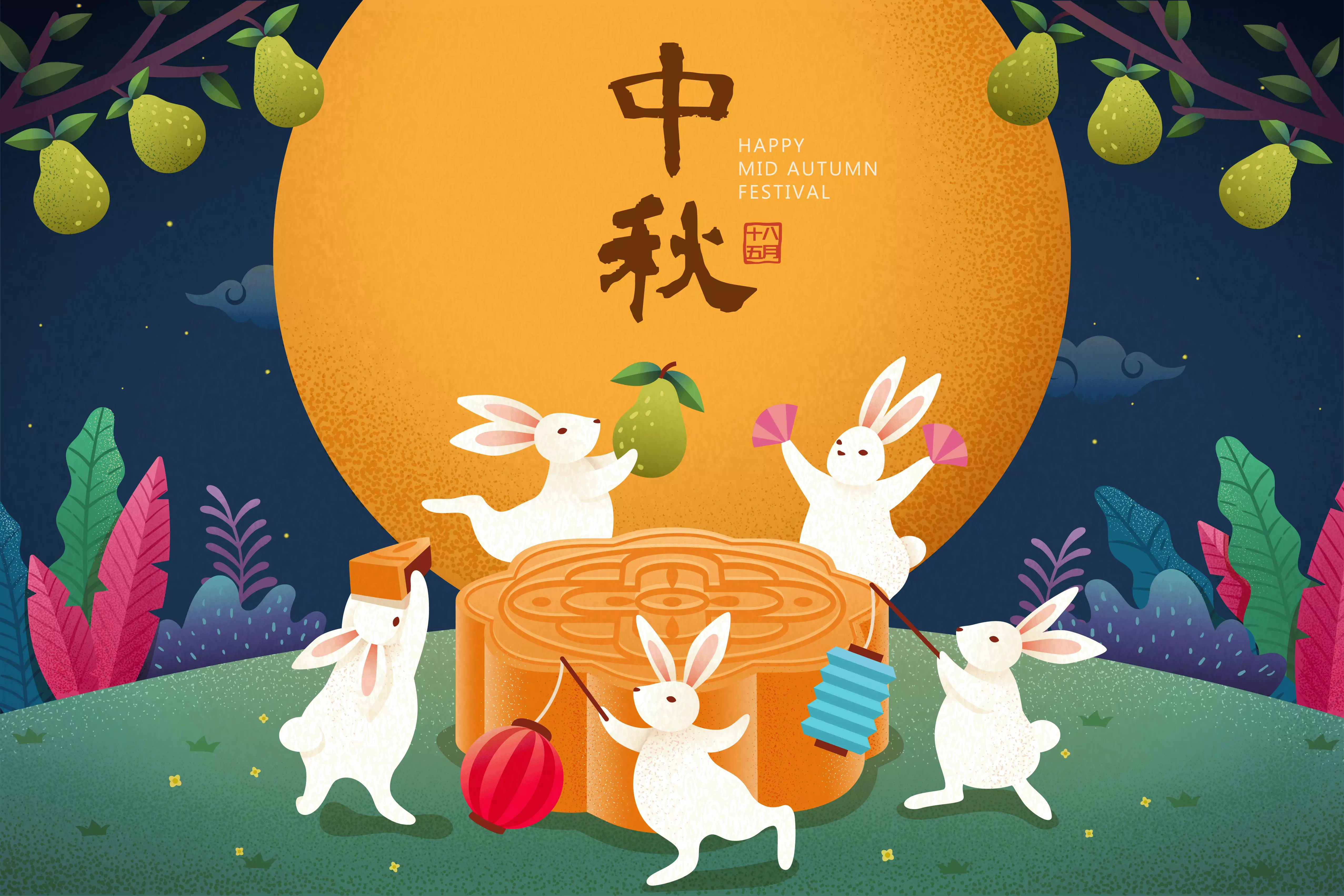
Genere descripciones de texto vívidas basadas en el contenido de imágenes o videos, adecuado para escenarios creativos como escritura de historias, redacción publicitaria y guiones de videos cortos.
Por favor, escriba una publicación interesante para redes sociales basada en el contenido de la imagen. | Claro. Esta imagen está llena de una rica atmósfera del Festival del Medio Otoño, combinando hábilmente elementos clásicos y modernos. Basándome en los elementos principales de la imagen, he preparado varias publicaciones para redes sociales en diferentes estilos para que usted elija. Estilo poético y hermoso Esta noche, la luna brilla para todos, pero ¿quién sabe dónde caerán los pensamientos otoñales? Chang'e vuela hacia la luna y el Conejo de Jade prepara medicinas. El romance de los antiguos se ilumina esta noche. ¡Que esta luna brillante ilumine su camino a casa y lleve mis pensamientos más profundos! ¡Feliz Festival del Medio Otoño! Estilo de buenos deseos La luna está llena y las personas se reúnen. La noche del Medio Otoño es la más gentil. Observe los fuegos artificiales florecer, admire la luna llena en el cielo, dé un bocado a un pastel lunar y want buena salud. Que todo aquello que usted y yo want se haga true. ¡Feliz Festival del Medio Otoño a todos, y que sus familias sean felices! |
Reconocimiento de texto y extracción de información
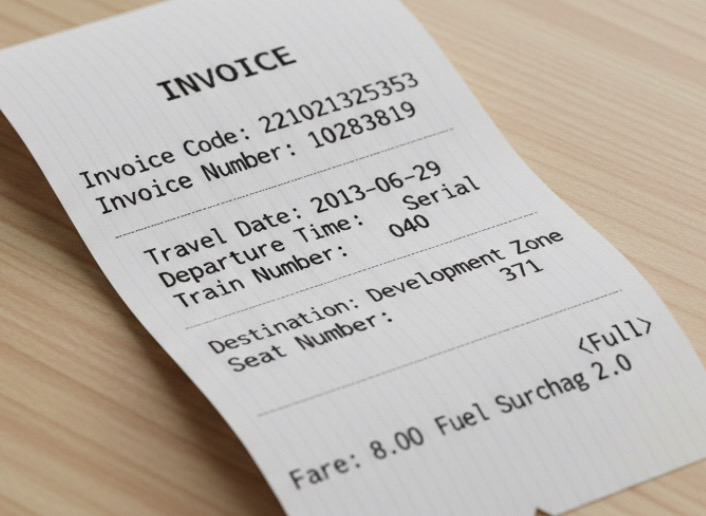
Reconozca texto y fórmulas en imágenes, o extraiga información de recibos, certificados y formularios. Admite salida de texto formateado.
Extraiga lo siguiente de la imagen: ['Invoice Code', 'Invoice Number', 'Destination', 'Fuel Surcharge', 'Fare', 'Date', 'Departure Time', 'Train Number', 'Seat Number']. Por favor, genere la salida en formato JSON. | { "Invoice Code": "221021325353", "Invoice Number": "10283819", "Destination": "Development Zone", "Fuel Surcharge": "2.0", "Fare": "8.00<Full>", "Date": "2013-06-29", "Departure Time": "Rolling", "Train Number": "040", "Seat Number": "371" } |
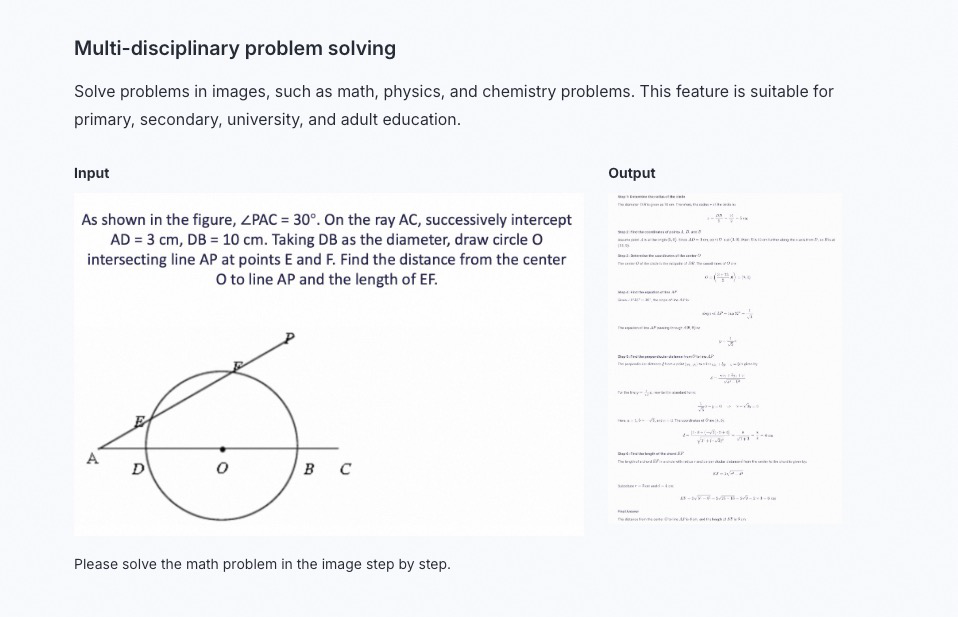
Resolución de problemas multidisciplinarios
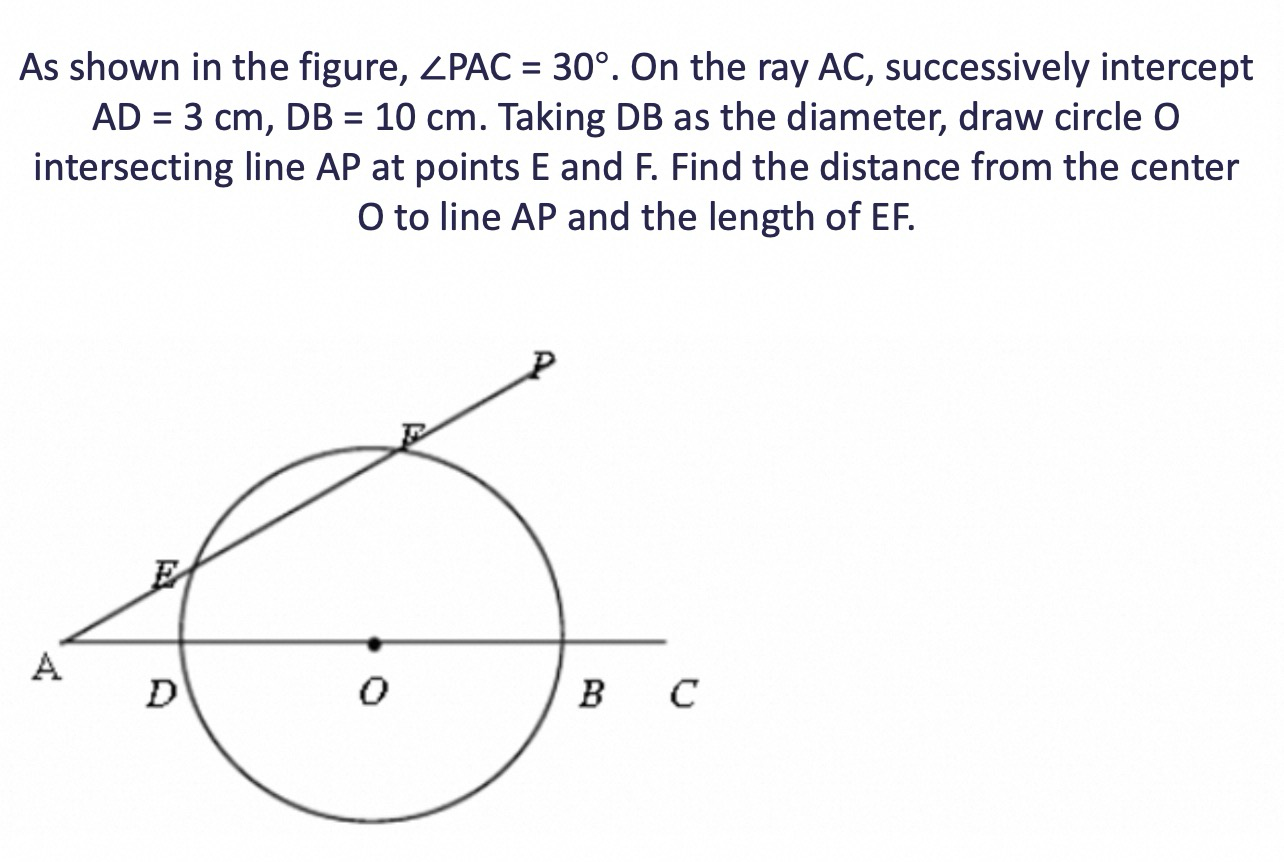
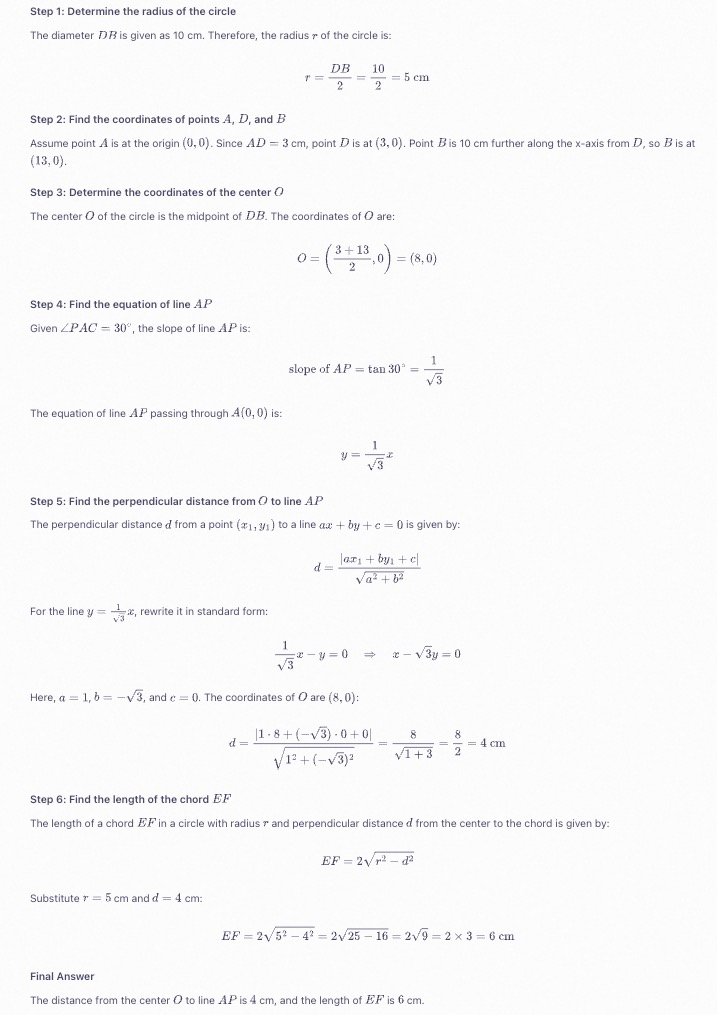
Resuelva problemas de matemáticas, física, química y otras materias en imágenes. Adecuado para educación K-12, universitaria y de adultos.
Resuelva el problema matemático del gráfico paso a paso. |
|
|---|
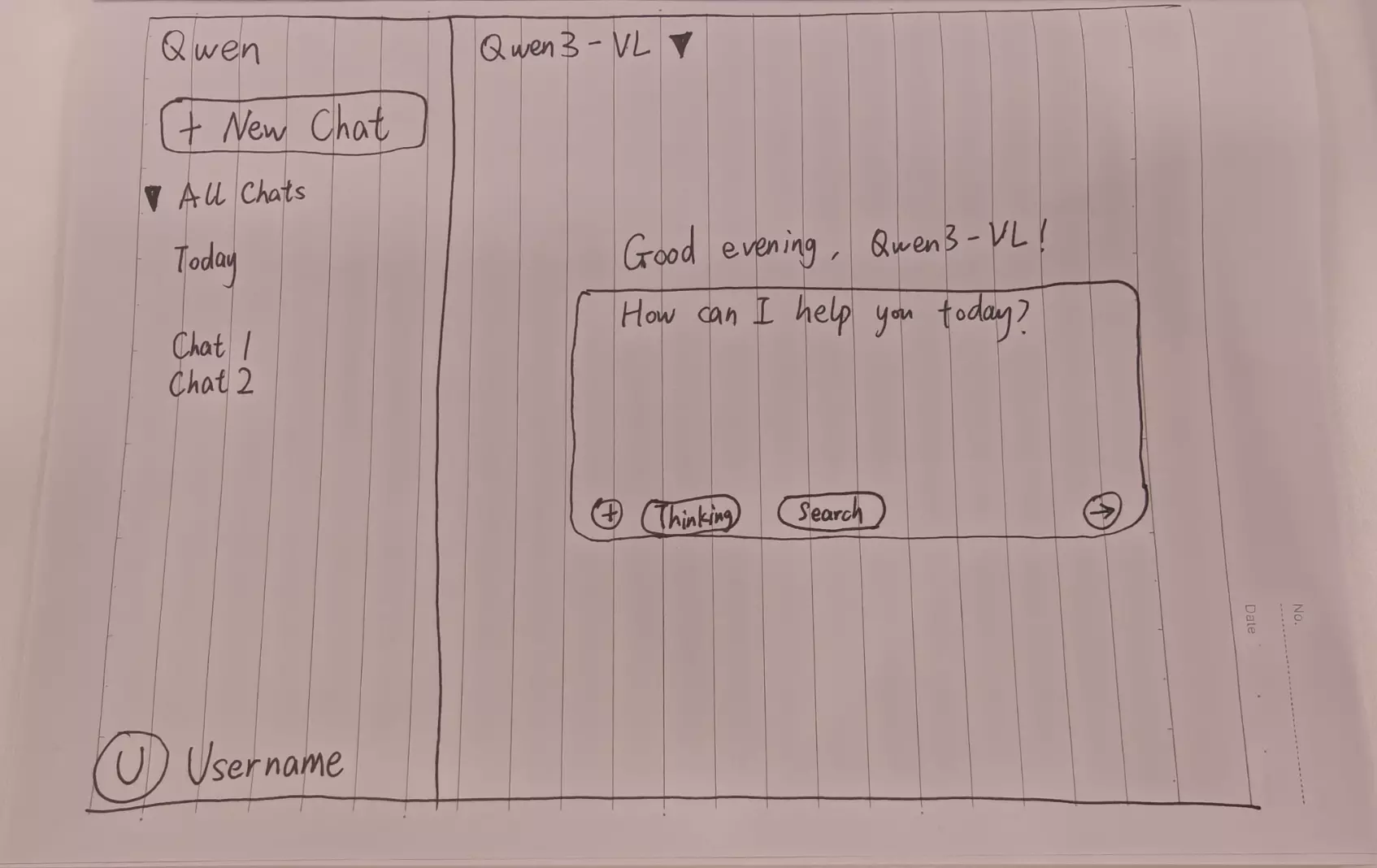
Programación visual
Genere código a partir de imágenes o videos. Puede utilizar esta función para generar código HTML, CSS y JS a partir de borradores de diseño, capturas de pantalla de sitios web y más.
Cree una página web usando HTML y CSS basada en mi boceto. El color principal debe ser negro. |
Vista previa de página web |
|---|

Localización de objetos
Admite localización 2D y 3D. Puede utilizar esta función para determinar la orientación del objeto, cambios de perspectiva y relaciones de oclusión. La localización 3D es una nueva capacidad añadida al modelo Qwen3-VL.
El rendimiento de localización de objetos del modelo Qwen2.5-VL es robusto dentro del rango de resolución de 480 × 480 a 2560 × 2560. Fuera de este rango, la precisión de detección puede disminuir, con deriva ocasional del cuadro de detección.
Para obtener información sobre cómo dibujar los resultados de localización en la imagen original, consulte FAQ.
Localización 2D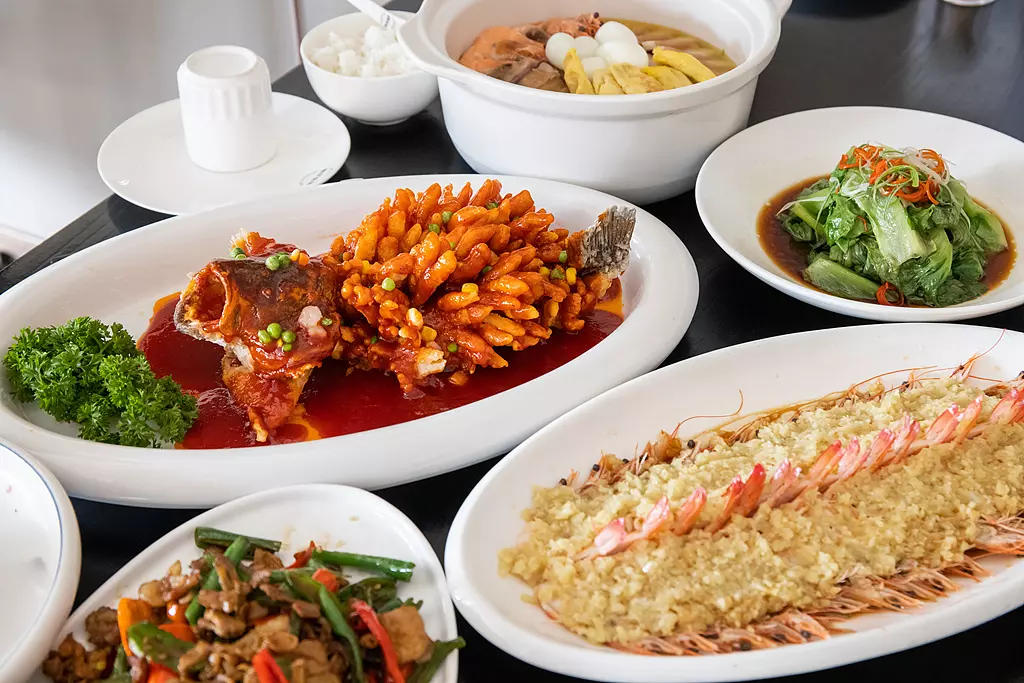
| Visualización de resultados de localización 2D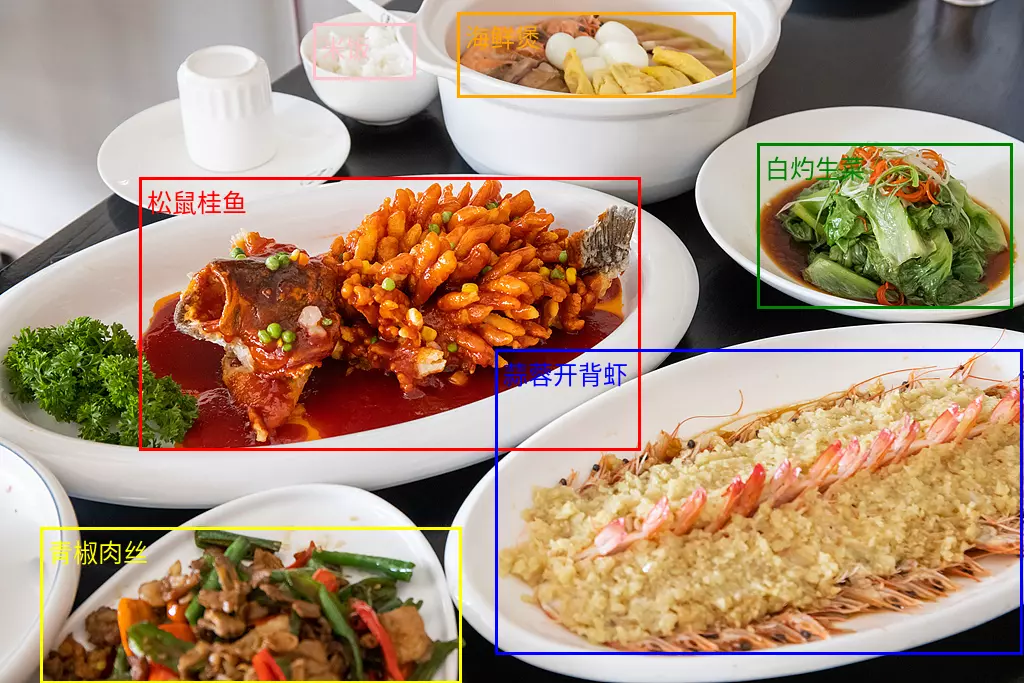 |
Localización 3D 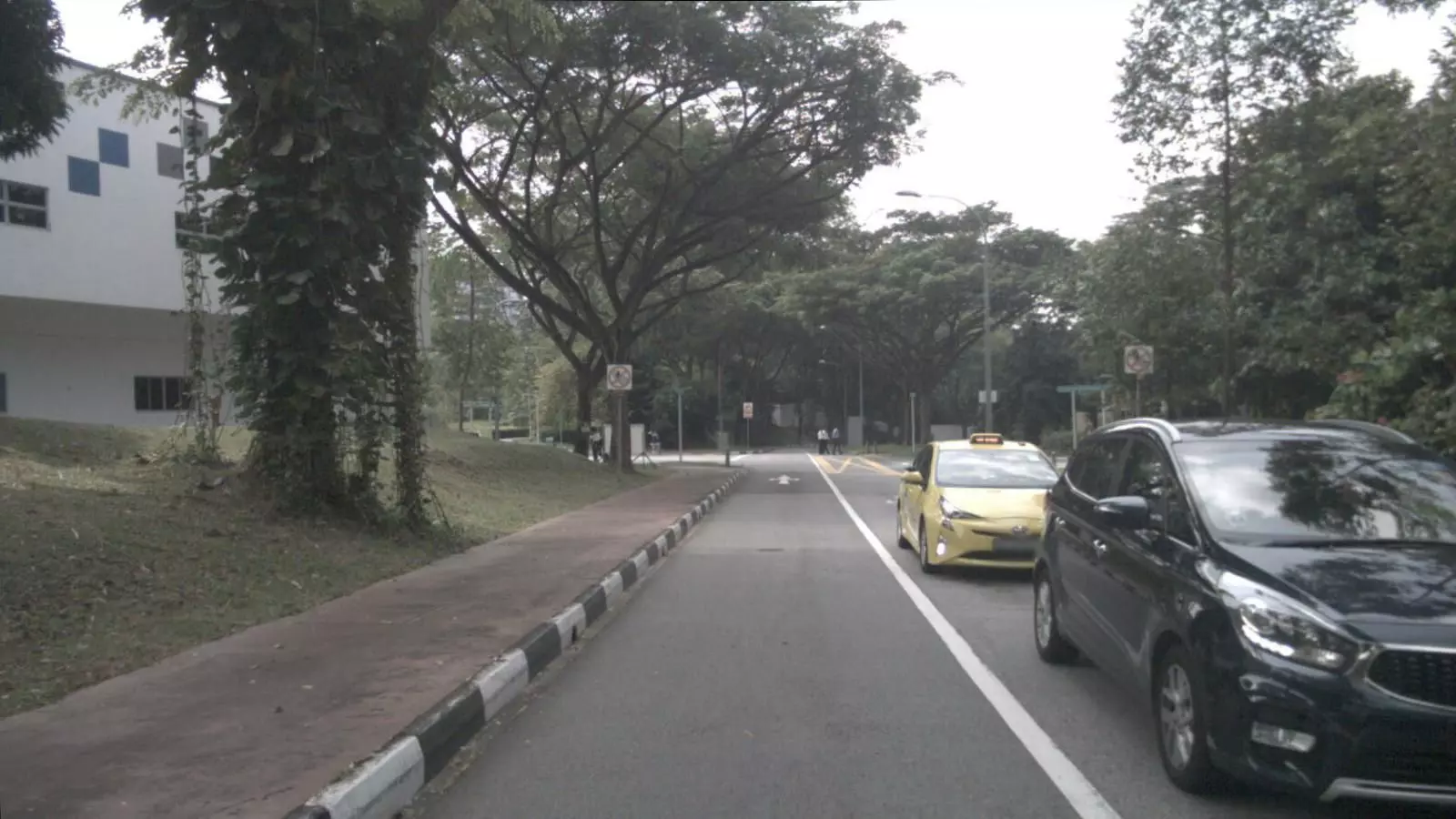 Detecte el automóvil en la imagen y prediga su posición 3D. Salida JSON: | Visualización de resultados de localización 3D 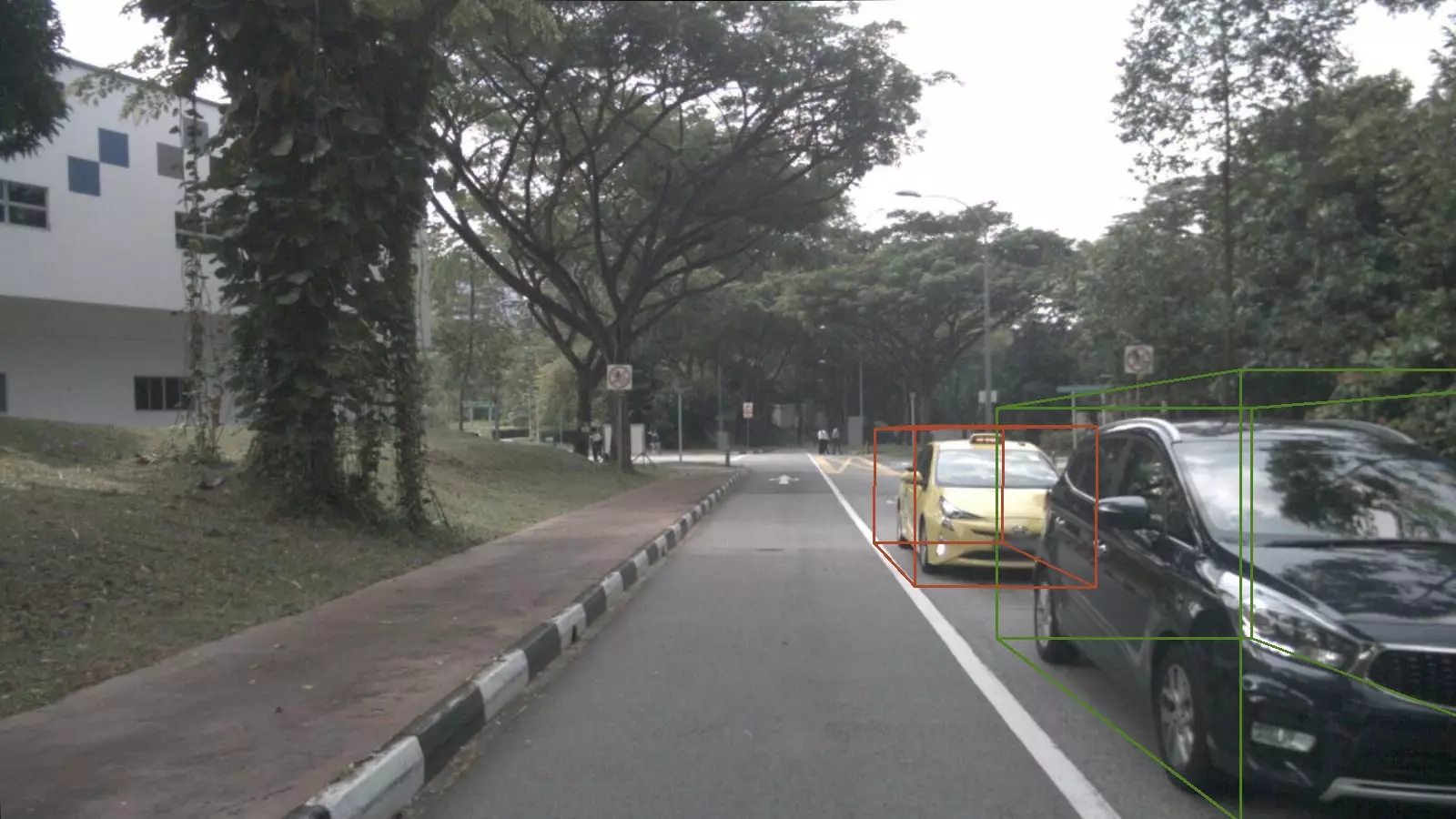 |
Análisis de documentos
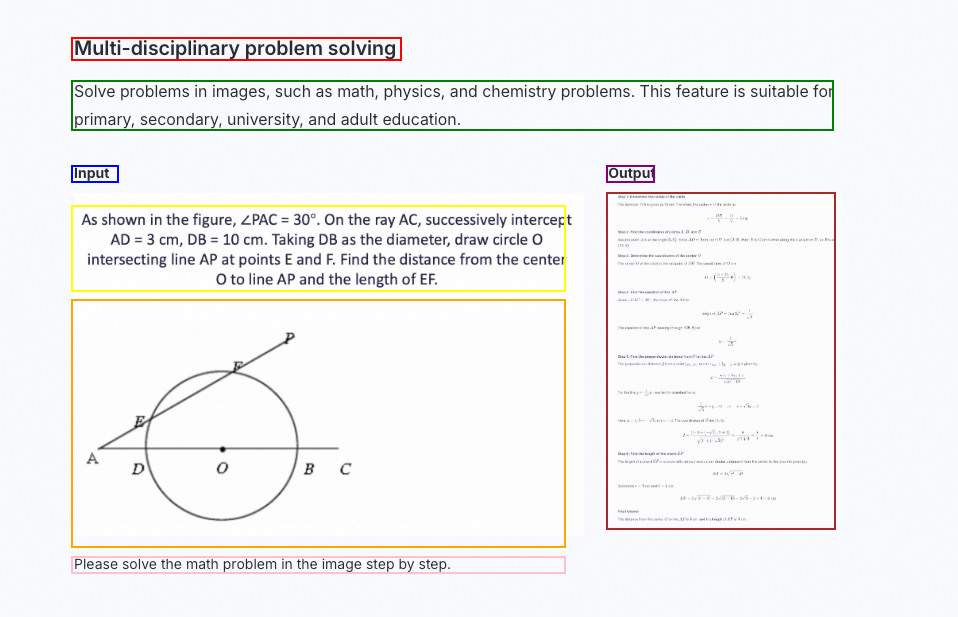
Analice documentos basados en imágenes (como copias escaneadas o PDFs de imágenes) para convertirlos al formato QwenVL HTML o QwenVL Markdown. Este formato no solo reconoce el texto con precisión, sino que también obtiene la información de posición de elementos como imágenes y tablas. El modelo Qwen3-VL añade la capacidad de analizar y convertir al formato Markdown.
Los prompts recomendados son los siguientes:
qwenvl html(para analizar en formato HTML) oqwenvl markdown(para analizar en formato Markdown).
Markdown de qwenvl. |
Visualización de resultados |
|---|
Comprensión de video
Analice el contenido del video, como localizar eventos específicos y obtener marcas de tiempo, o generar resúmenes de períodos clave.
Por favor, describa la serie de acciones de la persona en el video. Genere la hora de inicio (start_time), hora de fin (end_time) y evento (event) en formato JSON. Utilice HH:mm:ss para la marca de tiempo. | { "events": [ { "start_time": "00:00:00", "end_time": "00:00:05", "event": "La persona camina hacia la mesa sosteniendo una caja de cartón y la coloca sobre la mesa." }, { "start_time": "00:00:05", "end_time": "00:00:15", "event": "La persona toma un escáner y escanea la etiqueta de la caja de cartón." }, { "start_time": "00:00:15", "end_time": "00:00:21", "event": "La persona vuelve a colocar el escáner en su lugar y luego toma un bolígrafo para registrar información en un cuaderno."}] } |
Características principales
Habilitar o deshabilitar el modo de pensamiento
-
Las series de modelos
qwen3.8,qwen3.7,qwen3.6,qwen3.5yqwen3-vl-plusson modelos de pensamiento híbrido. Pueden pensar antes de responder o responder directamente. Utilice el parámetroenable_thinkingpara controlar si se habilita el modo de pensamiento:true: Habilita el modo de pensamiento. El valor predeterminado para los modelos de las seriesqwen3.8,qwen3.7,qwen3.6yqwen3.5estrue.false: Desactiva el modo de pensamiento. El valor predeterminado para los modelos de la serieqwen3-vl-plusesfalse.
-
Los modelos con el sufijo
thinkingson modelos exclusivos de pensamiento. Siempre piensan antes de responder y esta función no se puede desactivar.
Importante
- Configuración del modelo: En escenarios de conversación general que no implican llamadas a herramientas de Agent, no configure un
System Messagepara mantener un rendimiento óptimo. Puede pasar instrucciones, como configuraciones de rol del modelo y requisitos de formato de salida, a través delUser Message. - Priorizar la salida en streaming: Cuando el modo de pensamiento está habilitado, se admite tanto la salida en streaming como sin streaming. Para evitar tiempos de espera causados por respuestas excesivamente largas, priorice el uso de la salida en streaming.
- Limitar la longitud del pensamiento: Los modelos de pensamiento profundo a veces generan procesos de razonamiento extensos. Puede utilizar el parámetro
thinking_budgetpara limitar la longitud del proceso de pensamiento. Si la cantidad de tokens generados durante el proceso de pensamiento del modelo supera elthinking_budget, el contenido de inferencia se trunca y el modelo comienza inmediatamente a generar la respuesta final. El valor predeterminado dethinking_budgetes la longitud máxima de cadena de pensamiento del modelo. Para obtener más información, consulte la lista de modelos.
Compatible con OpenAI
El parámetro enable_thinking no es un parámetro estándar de OpenAI. Si utiliza el SDK de Python de OpenAI, páselo a través de extra_body.
import os
from openai import OpenAI

client = OpenAI(
    # API keys vary by region. To obtain an API key, see https://www.alibabacloud.com/help/model-studio/get-api-key
    api_key=os.getenv("DASHSCOPE_API_KEY"),
    # The following URL is for the Singapore region. When you make a call, replace {WorkspaceId} with your actual workspace ID. URLs vary by region.
    base_url="https://{WorkspaceId}.ap-southeast-1.maas.aliyuncs.com/compatible-mode/v1"
)

reasoning_content = ""  # Define the complete thinking process
answer_content = ""     # Define the complete response
is_answering = False   # Determine whether to end the thinking process and start responding
enable_thinking = True
# Create a chat completion request
completion = client.chat.completions.create(
    model="qwen3.8-max",
    messages=[
        {
            "role": "user",
            "content": [
                {
                    "type": "image_url",
                    "image_url": {
                        "url": "https://img.alicdn.com/imgextra/i1/O1CN01gDEY8M1W114Hi3XcN_!!6000000002727-0-tps-1024-406.jpg"
                    },
                },
                {"type": "text", "text": "How do I solve this problem?"},
            ],
        },
    ],
    stream=True,
    # The enable_thinking parameter enables the thinking process, and the thinking_budget parameter sets the maximum number of tokens for the inference process.
    # Use the enable_thinking parameter to switch the thinking mode.
    extra_body={
        'enable_thinking': enable_thinking,
        "thinking_budget": 81920},

    # Uncomment the following lines to return token usage in the last chunk.
    # stream_options={
    #     "include_usage": True
    # }
)

if enable_thinking:
    print("\n" + "=" * 20 + "Thinking process" + "=" * 20 + "\n")

for chunk in completion:
    # If chunk.choices is empty, print the usage.
    if not chunk.choices:
        print("\nUsage:")
        print(chunk.usage)
    else:
        delta = chunk.choices[0].delta
        # Print the thinking process.
        if hasattr(delta, 'reasoning_content') and delta.reasoning_content is not None:
            print(delta.reasoning_content, end='', flush=True)
            reasoning_content += delta.reasoning_content
        else:
            # Start responding.
            if delta.content != "" and is_answering is False:
                print("\n" + "=" * 20 + "Complete response" + "=" * 20 + "\n")
                is_answering = True
            # Print the response process.
            print(delta.content, end='', flush=True)
            answer_content += delta.content

# print("=" * 20 + "Complete thinking process" + "=" * 20 + "\n")
# print(reasoning_content)
# print("=" * 20 + "Complete response" + "=" * 20 + "\n")
# print(answer_content)
import OpenAI from "openai";

// Initialize the OpenAI client
const openai = new OpenAI({
  // API keys vary by region. To obtain an API key, see https://www.alibabacloud.com/help/model-studio/get-api-key
  // If the environment variable is not configured, replace the following line with your Model Studio API key: apiKey: "sk-xxx"
  apiKey: process.env.DASHSCOPE_API_KEY,
  // The following URL is for the Singapore region. When you make a call, replace {WorkspaceId} with your actual workspace ID. URLs vary by region.
  baseURL: "https://{WorkspaceId}.ap-southeast-1.maas.aliyuncs.com/compatible-mode/v1"
});

let reasoningContent = '';
let answerContent = '';
let isAnswering = false;
let enableThinking = true;

let messages = [
    {
        role: "user",
        content: [
        { type: "image_url", image_url: { "url": "https://img.alicdn.com/imgextra/i1/O1CN01gDEY8M1W114Hi3XcN_!!6000000002727-0-tps-1024-406.jpg" } },
        { type: "text", text: "Solve this problem" },
    ]
}]

async function main() {
    try {
        const stream = await openai.chat.completions.create({
            model: 'qwen3.7-plus',
            messages: messages,
            stream: true,
          // Note: In the Node.js SDK, non-standard parameters like enableThinking are passed as top-level properties and do not need to be placed in extra_body.
          enable_thinking: enableThinking,
          thinking_budget: 81920

        });

        if (enableThinking){console.log('\n' + '='.repeat(20) + 'Thinking process' + '='.repeat(20) + '\n');}

        for await (const chunk of stream) {
            if (!chunk.choices?.length) {
                console.log('\nUsage:');
                console.log(chunk.usage);
                continue;
            }

            const delta = chunk.choices[0].delta;

            // Process the thinking process.
            if (delta.reasoning_content) {
                process.stdout.write(delta.reasoning_content);
                reasoningContent += delta.reasoning_content;
            }
            // Process the formal response.
            else if (delta.content) {
                if (!isAnswering) {
                    console.log('\n' + '='.repeat(20) + 'Complete response' + '='.repeat(20) + '\n');
                    isAnswering = true;
                }
                process.stdout.write(delta.content);
                answerContent += delta.content;
            }
        }
    } catch (error) {
        console.error('Error:', error);
    }
}

main();
# ======= Important notes =======
# The following URL is for the Singapore region. When you make a call, replace {WorkspaceId} with your actual workspace ID. URLs vary by region.
# API keys vary by region. To obtain an API key, see https://www.alibabacloud.com/help/model-studio/get-api-key
# === Delete this comment before execution ===

curl --location 'https://{WorkspaceId}.ap-southeast-1.maas.aliyuncs.com/compatible-mode/v1/chat/completions' \
--header "Authorization: Bearer $DASHSCOPE_API_KEY" \
--header 'Content-Type: application/json' \
--data '{
    "model": "qwen3.8-max",
    "messages": [
    {
      "role": "user",
      "content": [
        {
          "type": "image_url",
          "image_url": {
            "url": "https://img.alicdn.com/imgextra/i1/O1CN01gDEY8M1W114Hi3XcN_!!6000000002727-0-tps-1024-406.jpg"
          }
        },
        {
          "type": "text",
          "text": "Please solve this problem"
        }
      ]
    }
  ],
    "stream":true,
    "stream_options":{"include_usage":true},
    "enable_thinking": true,
    "thinking_budget": 81920
}'
DashScope
import os
import dashscope
from dashscope import MultiModalConversation

# The following URL is for the Singapore region. When you make a call, replace {WorkspaceId} with your actual workspace ID. URLs vary by region.
dashscope.base_http_api_url = "https://{WorkspaceId}.ap-southeast-1.maas.aliyuncs.com/api/v1"

enable_thinking=True

messages = [
    {
        "role": "user",
        "content": [
            {"image": "https://img.alicdn.com/imgextra/i1/O1CN01gDEY8M1W114Hi3XcN_!!6000000002727-0-tps-1024-406.jpg"},
            {"text": "Solve this problem?"}
        ]
    }
]

response = MultiModalConversation.call(
    # If the environment variable is not configured, replace the following line with your Model Studio API key: api_key="sk-xxx",
    # API keys vary by region. To obtain an API key, see https://www.alibabacloud.com/help/model-studio/get-api-key
    api_key=os.getenv('DASHSCOPE_API_KEY'),
    model="qwen3.8-max",
    messages=messages,
    stream=True,
    # The enable_thinking parameter enables the thinking process.
    # Use the enable_thinking parameter to switch the thinking mode.
    enable_thinking=enable_thinking,
    # The thinking_budget parameter sets the maximum number of tokens for the inference process.
    thinking_budget=81920,

)

# Define the complete thinking process
reasoning_content = ""
# Define the complete response
answer_content = ""
# Determine whether to end the thinking process and start responding
is_answering = False

if enable_thinking:
    print("=" * 20 + "Thinking process" + "=" * 20)

for chunk in response:
    # If both the thinking process and the response are empty, ignore them.
    message = chunk.output.choices[0].message
    reasoning_content_chunk = message.get("reasoning_content", None)
    if (chunk.output.choices[0].message.content == [] and
        reasoning_content_chunk == ""):
        pass
    else:
        # If it is currently in the thinking process
        if reasoning_content_chunk is not None and chunk.output.choices[0].message.content == []:
            print(chunk.output.choices[0].message.reasoning_content, end="")
            reasoning_content += chunk.output.choices[0].message.reasoning_content
        # If it is currently responding
        elif chunk.output.choices[0].message.content != []:
            if not is_answering:
                print("\n" + "=" * 20 + "Complete response" + "=" * 20)
                is_answering = True
            print(chunk.output.choices[0].message.content[0]["text"], end="")
            answer_content += chunk.output.choices[0].message.content[0]["text"]

# Print the complete thinking process and response.
# print("=" * 20 + "Complete thinking process" + "=" * 20 + "\n")
# print(f"{reasoning_content}")
# print("=" * 20 + "Complete response" + "=" * 20 + "\n")
# print(f"{answer_content}")
// The DashScope SDK version must be 2.21.10 or later.
import java.util.*;

import org.slf4j.Logger;
import org.slf4j.LoggerFactory;

import com.alibaba.dashscope.common.Role;
import com.alibaba.dashscope.exception.ApiException;
import com.alibaba.dashscope.exception.NoApiKeyException;
import io.reactivex.Flowable;

import com.alibaba.dashscope.aigc.multimodalconversation.MultiModalConversation;
import com.alibaba.dashscope.aigc.multimodalconversation.MultiModalConversationParam;
import com.alibaba.dashscope.aigc.multimodalconversation.MultiModalConversationResult;
import com.alibaba.dashscope.common.MultiModalMessage;
import com.alibaba.dashscope.exception.UploadFileException;
import com.alibaba.dashscope.exception.InputRequiredException;
import java.lang.System;
import com.alibaba.dashscope.utils.Constants;

public class Main {
    // The following URL is for the Singapore region. When you make a call, replace {WorkspaceId} with your actual workspace ID. URLs vary by region.
    static {Constants.baseHttpApiUrl="https://{WorkspaceId}.ap-southeast-1.maas.aliyuncs.com/api/v1";}

    private static final Logger logger = LoggerFactory.getLogger(Main.class);
    private static StringBuilder reasoningContent = new StringBuilder();
    private static StringBuilder finalContent = new StringBuilder();
    private static boolean isFirstPrint = true;

    private static void handleGenerationResult(MultiModalConversationResult message) {
        String re = message.getOutput().getChoices().get(0).getMessage().getReasoningContent();
        String reasoning = Objects.isNull(re)?"":re; // Default value

        List<Map<String, Object>> content = message.getOutput().getChoices().get(0).getMessage().getContent();
        if (!reasoning.isEmpty()) {
            reasoningContent.append(reasoning);
            if (isFirstPrint) {
                System.out.println("====================Thinking process====================");
                isFirstPrint = false;
            }
            System.out.print(reasoning);
        }

        if (Objects.nonNull(content) && !content.isEmpty()) {
            Object text = content.get(0).get("text");
            finalContent.append(content.get(0).get("text"));
            if (!isFirstPrint) {
                System.out.println("\n====================Complete response====================");
                isFirstPrint = true;
            }
            System.out.print(text);
        }
    }
    public static MultiModalConversationParam buildMultiModalConversationParam(MultiModalMessage Msg)  {
        return MultiModalConversationParam.builder()
                // If the environment variable is not configured, replace the following line with your Model Studio API key: .apiKey("sk-xxx")
                // API keys vary by region. To obtain an API key, see https://www.alibabacloud.com/help/model-studio/get-api-key
                .apiKey(System.getenv("DASHSCOPE_API_KEY"))
                .model("qwen3.8-max")
                .messages(Arrays.asList(Msg))
                .enableThinking(true)
                .thinkingBudget(81920)
                .incrementalOutput(true)
                .build();
    }

    public static void streamCallWithMessage(MultiModalConversation conv, MultiModalMessage Msg)
            throws NoApiKeyException, ApiException, InputRequiredException, UploadFileException {
        MultiModalConversationParam param = buildMultiModalConversationParam(Msg);
        Flowable<MultiModalConversationResult> result = conv.streamCall(param);
        result.blockingForEach(message -> {
            handleGenerationResult(message);
        });
    }
    public static void main(String[] args) {
        try {
            MultiModalConversation conv = new MultiModalConversation();
            MultiModalMessage userMsg = MultiModalMessage.builder()
                    .role(Role.USER.getValue())
                    .content(Arrays.asList(Collections.singletonMap("image", "https://img.alicdn.com/imgextra/i1/O1CN01gDEY8M1W114Hi3XcN_!!6000000002727-0-tps-1024-406.jpg"),
                            Collections.singletonMap("text", "Please solve this problem")))
                    .build();
            streamCallWithMessage(conv, userMsg);
//             Print the final result.
//            if (reasoningContent.length() > 0) {
//                System.out.println("\n====================Complete response====================");
//                System.out.println(finalContent.toString());
//            }
        } catch (ApiException | NoApiKeyException | UploadFileException | InputRequiredException e) {
            logger.error("An exception occurred: {}", e.getMessage());
        }
        System.exit(0);
    }
}
# ======= Important notes =======
# API keys vary by region. To obtain an API key, see https://www.alibabacloud.com/help/model-studio/get-api-key
# The following URL is for the Singapore region. When you make a call, replace {WorkspaceId} with your actual workspace ID. URLs vary by region.
# === Delete this comment before execution ===

curl -X POST https://{WorkspaceId}.ap-southeast-1.maas.aliyuncs.com/api/v1/services/aigc/multimodal-generation/generation \
-H "Authorization: Bearer $DASHSCOPE_API_KEY" \
-H 'Content-Type: application/json' \
-H 'X-DashScope-SSE: enable' \
-d '{
    "model": "qwen3.8-max",
    "input":{
        "messages":[
            {
                "role": "user",
                "content": [
                    {"image": "https://img.alicdn.com/imgextra/i1/O1CN01gDEY8M1W114Hi3XcN_!!6000000002727-0-tps-1024-406.jpg"},
                    {"text": "Please solve this problem"}
                ]
            }
        ]
    },
    "parameters":{
        "enable_thinking": true,
        "incremental_output": true,
        "thinking_budget": 81920
    }
}'
Entradas de múltiples imágenes
Los modelos de comprensión visual admiten pasar múltiples imágenes en una sola solicitud, lo cual puede utilizarse para tareas como comparación de productos y procesamiento de documentos de varias páginas. Para hacerlo, simplemente incluya múltiples objetos de imagen en el arreglo content del user message.
ImportanteEl número de imágenes está limitado por el límite total de tokens del modelo para imágenes y texto. El recuento total de tokens para todas las imágenes y texto no debe exceder la entrada máxima del modelo.
Compatible con OpenAI
Python
import os
from openai import OpenAI

client = OpenAI(
    # API keys vary by region. To obtain an API key, see https://www.alibabacloud.com/help/model-studio/get-api-key
    api_key=os.getenv("DASHSCOPE_API_KEY"),
    # The following URL is for the Singapore region. When you make a call, replace {WorkspaceId} with your actual workspace ID. URLs vary by region.
    base_url="https://{WorkspaceId}.ap-southeast-1.maas.aliyuncs.com/compatible-mode/v1",
)

completion = client.chat.completions.create(
    model="qwen3.8-max",  #  This example uses qwen3.7-plus. You can replace it with another model as needed. For a list of models, see https://www.alibabacloud.com/help/model-studio/getting-started/models
    messages=[
        {"role": "user","content": [
            {"type": "image_url","image_url": {"url": "https://help-static-aliyun-doc.aliyuncs.com/file-manage-files/zh-CN/20241022/emyrja/dog_and_girl.jpeg"},},
            {"type": "image_url","image_url": {"url": "https://dashscope.oss-cn-beijing.aliyuncs.com/images/tiger.png"},},
            {"type": "text", "text": "What content do these images depict?"},
            ],
        }
    ],
)

print(completion.choices[0].message.content)
Respuesta
Image 1 shows a scene of a woman and a Labrador retriever interacting on a beach. The woman is wearing a plaid shirt and sitting on the sand, shaking hands with the dog. The background is the ocean waves and the sky, and the whole picture is full of warmth and joy.

Image 2 shows a scene of a tiger walking in a forest. The tiger's coat is orange with black stripes. It is stepping forward, surrounded by dense trees and vegetation, and the ground is covered with fallen leaves. The whole picture gives a feeling of wild nature.
Node.js
import OpenAI from "openai";

const openai = new OpenAI(
    {
        // API keys vary by region. To obtain an API key, see https://www.alibabacloud.com/help/model-studio/get-api-key
        // If the environment variable is not configured, replace the following line with your Model Studio API key: apiKey: "sk-xxx"
        apiKey: process.env.DASHSCOPE_API_KEY,
        // The following URL is for the Singapore region. When you make a call, replace {WorkspaceId} with your actual workspace ID. URLs vary by region.
        baseURL: "https://{WorkspaceId}.ap-southeast-1.maas.aliyuncs.com/compatible-mode/v1"
    }
);

async function main() {
    const response = await openai.chat.completions.create({
        model: "qwen3.8-max",  // This example uses qwen3.7-plus. You can replace it with another model as needed. For a list of models, see https://www.alibabacloud.com/help/model-studio/getting-started/models
        messages: [
          {role: "user",content: [
            {type: "image_url",image_url: {"url": "https://help-static-aliyun-doc.aliyuncs.com/file-manage-files/zh-CN/20241022/emyrja/dog_and_girl.jpeg"}},
            {type: "image_url",image_url: {"url": "https://dashscope.oss-cn-beijing.aliyuncs.com/images/tiger.png"}},
            {type: "text", text: "What content do these images depict?" },
        ]}]
    });
    console.log(response.choices[0].message.content);
}

main()
Respuesta
In the first image, a person and a dog are interacting on a beach. The person is wearing a plaid shirt, and the dog is wearing a collar. They seem to be shaking hands or giving a high-five.

In the second image, a tiger is walking in a forest. The tiger's coat is orange with black stripes, and the background is green trees and vegetation.
curl
# ======= Important notes =======
# API keys vary by region. To obtain an API key, see https://www.alibabacloud.com/help/model-studio/get-api-key
# The following URL is for the Singapore region. When you make a call, replace {WorkspaceId} with your actual workspace ID. URLs vary by region.
# === Delete this comment before execution ===

curl -X POST https://{WorkspaceId}.ap-southeast-1.maas.aliyuncs.com/compatible-mode/v1/chat/completions \
-H "Authorization: Bearer $DASHSCOPE_API_KEY" \
-H 'Content-Type: application/json' \
-d '{
  "model": "qwen3.8-max",
  "messages": [
    {
      "role": "user",
      "content": [
        {
          "type": "image_url",
          "image_url": {
            "url": "https://help-static-aliyun-doc.aliyuncs.com/file-manage-files/zh-CN/20241022/emyrja/dog_and_girl.jpeg"
          }
        },
        {
          "type": "image_url",
          "image_url": {
            "url": "https://dashscope.oss-cn-beijing.aliyuncs.com/images/tiger.png"
          }
        },
        {
          "type": "text",
          "text": "What content do these images depict?"
        }
      ]
    }
  ]
}'
Respuesta
{
  "choices": [
    {
      "message": {
        "content": "Image 1 shows a scene of a woman and a Labrador retriever interacting on a beach. The woman is wearing a plaid shirt and sitting on the sand, shaking hands with the dog. The background is a sea view and a sunset sky, making the whole scene look very warm and harmonious.\n\nImage 2 shows a scene of a tiger walking in a forest. The tiger's coat is orange with black stripes. It is stepping forward, surrounded by dense trees and vegetation, and the ground is covered with fallen leaves. The whole picture is full of natural wildness and vitality.",
        "role": "assistant"
      },
      "finish_reason": "stop",
      "index": 0,
      "logprobs": null
    }
  ],
  "object": "chat.completion",
  "usage": {
    "prompt_tokens": 2497,
    "completion_tokens": 109,
    "total_tokens": 2606
  },
  "created": 1725948561,
  "system_fingerprint": null,
  "model": "qwen3.8-max",
  "id": "chatcmpl-0fd66f46-b09e-9164-a84f-3ebbbedbac15"
}
DashScope
Python
import os
import dashscope

# The following URL is for the Singapore region. When you make a call, replace {WorkspaceId} with your actual workspace ID. URLs vary by region.
dashscope.base_http_api_url = 'https://{WorkspaceId}.ap-southeast-1.maas.aliyuncs.com/api/v1'

messages = [
    {
        "role": "user",
        "content": [
            {"image": "https://help-static-aliyun-doc.aliyuncs.com/file-manage-files/zh-CN/20241022/emyrja/dog_and_girl.jpeg"},
            {"image": "https://dashscope.oss-cn-beijing.aliyuncs.com/images/tiger.png"},
            {"text": "What content do these images depict?"}
        ]
    }
]

response = dashscope.MultiModalConversation.call(
    # API keys vary by region. To obtain an API key, see https://www.alibabacloud.com/help/model-studio/get-api-key
    # If the environment variable is not configured, replace the following line with your Model Studio API key: api_key="sk-xxx"
    api_key=os.getenv('DASHSCOPE_API_KEY'),
    model='qwen3.7-plus', #  This example uses qwen3.7-plus. You can replace it with another model as needed. For a list of models, see https://www.alibabacloud.com/help/model-studio/getting-started/models
    messages=messages
)

print(response.output.choices[0].message.content[0]["text"])
Respuesta
These images show some animals and natural scenes. In the first image, a person and a dog are interacting on a beach. The second image is of a tiger walking in a forest.
Java
import java.util.Arrays;
import java.util.Collections;
import com.alibaba.dashscope.aigc.multimodalconversation.MultiModalConversation;
import com.alibaba.dashscope.aigc.multimodalconversation.MultiModalConversationParam;
import com.alibaba.dashscope.aigc.multimodalconversation.MultiModalConversationResult;
import com.alibaba.dashscope.common.MultiModalMessage;
import com.alibaba.dashscope.common.Role;
import com.alibaba.dashscope.exception.ApiException;
import com.alibaba.dashscope.exception.NoApiKeyException;
import com.alibaba.dashscope.exception.UploadFileException;
import com.alibaba.dashscope.utils.Constants;

public class Main {
    static {
    // The following URL is for the Singapore region. When you make a call, replace {WorkspaceId} with your actual workspace ID. URLs vary by region.
        Constants.baseHttpApiUrl="https://{WorkspaceId}.ap-southeast-1.maas.aliyuncs.com/api/v1";
    }
    public static void simpleMultiModalConversationCall()
            throws ApiException, NoApiKeyException, UploadFileException {
        MultiModalConversation conv = new MultiModalConversation();
        MultiModalMessage userMessage = MultiModalMessage.builder().role(Role.USER.getValue())
                .content(Arrays.asList(
                        Collections.singletonMap("image", "https://help-static-aliyun-doc.aliyuncs.com/file-manage-files/zh-CN/20241022/emyrja/dog_and_girl.jpeg"),
                        Collections.singletonMap("image", "https://dashscope.oss-cn-beijing.aliyuncs.com/images/tiger.png"),
                        Collections.singletonMap("text", "What content do these images depict?"))).build();
        MultiModalConversationParam param = MultiModalConversationParam.builder()
                // API keys vary by region. To obtain an API key, see https://www.alibabacloud.com/help/model-studio/get-api-key
                .apiKey(System.getenv("DASHSCOPE_API_KEY"))
                .model("qwen3.8-max")  //  This example uses qwen3.7-plus. You can replace it with another model as needed. For a list of models, see https://www.alibabacloud.com/help/model-studio/getting-started/models
                .messages(Arrays.asList(userMessage))
                .build();
        MultiModalConversationResult result = conv.call(param);
        System.out.println(result.getOutput().getChoices().get(0).getMessage().getContent().get(0).get("text"));    }
    public static void main(String[] args) {
        try {
            simpleMultiModalConversationCall();
        } catch (ApiException | NoApiKeyException | UploadFileException e) {
            System.out.println(e.getMessage());
        }
        System.exit(0);
    }
}
Respuesta
These images show some animals and natural scenes.

1. First image: A woman and a dog are interacting on a beach. The woman is wearing a plaid shirt and sitting on the sand, and the dog is wearing a collar and extending its paw to shake hands with the woman.
2. Second image: A tiger is walking in a forest. The tiger's coat is orange with black stripes, and the background is trees and leaves.
curl
# ======= Important notes =======
# The following URL is for the Singapore region. When you make a call, replace {WorkspaceId} with your actual workspace ID. URLs vary by region.
# API keys vary by region. To obtain an API key, see https://www.alibabacloud.com/help/model-studio/get-api-key
# === Delete this comment before execution ===

curl --location 'https://{WorkspaceId}.ap-southeast-1.maas.aliyuncs.com/api/v1/services/aigc/multimodal-generation/generation' \
--header "Authorization: Bearer $DASHSCOPE_API_KEY" \
--header 'Content-Type: application/json' \
--data '{
    "model": "qwen3.8-max",
    "input":{
        "messages":[
            {
                "role": "user",
                "content": [
                    {"image": "https://help-static-aliyun-doc.aliyuncs.com/file-manage-files/zh-CN/20241022/emyrja/dog_and_girl.jpeg"},
                    {"image": "https://dashscope.oss-cn-beijing.aliyuncs.com/images/tiger.png"},
                    {"text": "What content do these images show?"}
                ]
            }
        ]
    }
}'
Respuesta
{
  "output": {
    "choices": [
      {
        "finish_reason": "stop",
        "message": {
          "role": "assistant",
          "content": [
            {
              "text": "These images show some animals and natural scenes. In the first image, a person and a dog are interacting on a beach. The second image is of a tiger walking in a forest."
            }
          ]
        }
      }
    ]
  },
  "usage": {
    "output_tokens": 81,
    "input_tokens": 1277,
    "image_tokens": 2497
  },
  "request_id": "ccf845a3-dc33-9cda-b581-20fe7dc23f70"
}
Comprensión de video
Los modelos de comprensión visual pueden entender el contenido de video proporcionado como una lista de imágenes (fotogramas de video) o como un archivo de video. Los siguientes ejemplos muestran cómo entender videos en línea o listas de imágenes especificadas mediante una URL. Para obtener más información sobre los límites de video o la cantidad de imágenes que se pueden pasar en una lista de imágenes, consulte Límites de video.
Para obtener un mejor rendimiento al comprender archivos de video, utilice las versiones más recientes o las versiones snapshot recientes de los modelos.
Archivos de video
Los modelos de comprensión visual analizan el contenido del video extrayendo una secuencia de fotogramas del video. Puede controlar la estrategia de extracción de fotogramas con los siguientes dos parámetros:
-
fps: Controla la frecuencia de extracción de fotogramas. Se extrae un fotograma cada 1/fps segundos. El rango de valores es [0.1, 10], y el valor predeterminado es 2.0.
- Para escenas con movimiento rápido, establezca un valor de fps más alto para capturar más detalles.
- Para escenas estáticas o videos largos, establezca un valor de fps más bajo para mejorar el rendimiento.
-
max_frames: El número máximo de fotogramas a extraer de un video. El sistema calcula el total de fotogramas basándose en los fps del video. Si el número total de fotogramas supera este límite, el sistema muestrea automáticamente los fotogramas de manera uniforme para cumplir con el límite. Este parámetro solo está disponible al utilizar el SDK de DashScope.
Compatible con OpenAI
Cuando envía un archivo de video directamente al modelo de comprensión visual utilizando el SDK de OpenAI o HTTP, establezca el parámetro
"type"en el mensaje del usuario en"video_url".
import os
from openai import OpenAI

client = OpenAI(
    # API keys vary by region. To get an API key, see https://www.alibabacloud.com/help/model-studio/get-api-key
    # If you have not configured the environment variable, replace the following line with your Model Studio API key: api_key="sk-xxx",
    api_key=os.getenv("DASHSCOPE_API_KEY"),
    # The following URL is for the Singapore region. When you make a call, replace {WorkspaceId} with your workspace ID. URLs vary by region.
    base_url="https://{WorkspaceId}.ap-southeast-1.maas.aliyuncs.com/compatible-mode/v1",
)
completion = client.chat.completions.create(
    model="qwen3.8-max",
    messages=[
        {
            "role": "user",
            "content": [
                # When you pass a video file directly, set the value of type to video_url.
                {
                    "type": "video_url",
                    "video_url": {
                        "url": "https://help-static-aliyun-doc.aliyuncs.com/file-manage-files/zh-CN/20241115/cqqkru/1.mp4"
                    },
                    "fps": 2
                },
                {
                    "type": "text",
                    "text": "What is the content of this video?"
                }
            ]
        }
    ]
)

print(completion.choices[0].message.content)
import OpenAI from "openai";

const openai = new OpenAI(
    {
        // API keys vary by region. To get an API key, see https://www.alibabacloud.com/help/model-studio/get-api-key
        // If you have not configured the environment variable, replace the following line with your Model Studio API key: apiKey: "sk-xxx"
        apiKey: process.env.DASHSCOPE_API_KEY,
        // The following URL is for the Singapore region. When you make a call, replace {WorkspaceId} with your workspace ID. URLs vary by region.
        baseURL: "https://{WorkspaceId}.ap-southeast-1.maas.aliyuncs.com/compatible-mode/v1"
    }
);

async function main() {
    const response = await openai.chat.completions.create({
        model: "qwen3.8-max",
        messages: [
            {
                role: "user",
                content: [
                    // When you pass a video file directly, set the value of type to video_url.
                    {
                        type: "video_url",
                        video_url: {
                            "url": "https://help-static-aliyun-doc.aliyuncs.com/file-manage-files/zh-CN/20241115/cqqkru/1.mp4"
                        },
                        "fps": 2
                    },
                    {
                        type: "text",
                        text: "What is the content of this video?"
                    }
                ]
            }
        ]
    });

    console.log(response.choices[0].message.content);
}

main();
# ======= Important =======
# API keys vary by region. To get an API key, see https://www.alibabacloud.com/help/model-studio/get-api-key
# The following URL is for the Singapore region. When you make a call, replace {WorkspaceId} with your workspace ID. URLs vary by region.
# === Delete this comment before execution. ===

curl -X POST https://{WorkspaceId}.ap-southeast-1.maas.aliyuncs.com/compatible-mode/v1/chat/completions \
  -H "Authorization: Bearer $DASHSCOPE_API_KEY" \
  -H 'Content-Type: application/json' \
  -d '{
    "model": "qwen3.8-max",
    "messages": [
      {
        "role": "user",
        "content": [
          {
            "type": "video_url",
            "video_url": {
              "url": "https://help-static-aliyun-doc.aliyuncs.com/file-manage-files/zh-CN/20241115/cqqkru/1.mp4"
            },
            "fps":2
          },
          {
            "type": "text",
            "text": "What is the content of this video?"
          }
        ]
      }
    ]
  }'
DashScope
import dashscope
import os

# The following URL is for the Singapore region. When you make a call, replace {WorkspaceId} with your workspace ID. URLs vary by region.
dashscope.base_http_api_url = 'https://{WorkspaceId}.ap-southeast-1.maas.aliyuncs.com/api/v1'
messages = [
    {"role": "user",
        "content": [
            # The fps parameter controls the video frame extraction frequency. It indicates that one frame is extracted every 1/fps seconds. For complete usage, see: https://www.alibabacloud.com/help/model-studio/use-qwen-by-calling-api?#2ed5ee7377fum
            {"video": "https://help-static-aliyun-doc.aliyuncs.com/file-manage-files/zh-CN/20241115/cqqkru/1.mp4","fps":2},
            {"text": "What is the content of this video?"}
        ]
    }
]

response = dashscope.MultiModalConversation.call(
    # API keys vary by region. To get an API key, see https://www.alibabacloud.com/help/model-studio/get-api-key
    # If you have not configured the environment variable, replace the following line with your Model Studio API key: api_key ="sk-xxx"
    api_key=os.getenv('DASHSCOPE_API_KEY'),
    model='qwen3.7-plus',
    messages=messages
)

print(response.output.choices[0].message.content[0]["text"])
import java.util.Arrays;
import java.util.Collections;
import java.util.HashMap;
import java.util.Map;

import com.alibaba.dashscope.aigc.multimodalconversation.MultiModalConversation;
import com.alibaba.dashscope.aigc.multimodalconversation.MultiModalConversationParam;
import com.alibaba.dashscope.aigc.multimodalconversation.MultiModalConversationResult;
import com.alibaba.dashscope.common.MultiModalMessage;
import com.alibaba.dashscope.common.Role;
import com.alibaba.dashscope.exception.ApiException;
import com.alibaba.dashscope.exception.NoApiKeyException;
import com.alibaba.dashscope.exception.UploadFileException;
import com.alibaba.dashscope.utils.Constants;

public class Main {
   static {
            // The following URL is for the Singapore region. When you make a call, replace {WorkspaceId} with your workspace ID. URLs vary by region.
            Constants.baseHttpApiUrl="https://{WorkspaceId}.ap-southeast-1.maas.aliyuncs.com/api/v1";
        }
    public static void simpleMultiModalConversationCall()
            throws ApiException, NoApiKeyException, UploadFileException {
        MultiModalConversation conv = new MultiModalConversation();
        // The fps parameter controls the video frame extraction frequency. It indicates that one frame is extracted every 1/fps seconds. For complete usage, see: https://www.alibabacloud.com/help/model-studio/use-qwen-by-calling-api?#2ed5ee7377fum
        Map<String, Object> params = new HashMap<>();
        params.put("video", "https://help-static-aliyun-doc.aliyuncs.com/file-manage-files/zh-CN/20241115/cqqkru/1.mp4");
        params.put("fps", 2);
        MultiModalMessage userMessage = MultiModalMessage.builder().role(Role.USER.getValue())
                .content(Arrays.asList(
                        params,
                        Collections.singletonMap("text", "What is the content of this video?"))).build();
        MultiModalConversationParam param = MultiModalConversationParam.builder()
                // If you use a model in the China (Beijing) region, you must use an API key for that region. To get an API key, see: https://www.alibabacloud.com/help/model-studio/get-api-key
                // If you have not configured the environment variable, replace the following line with your Model Studio API key: .apiKey("sk-xxx")
                .apiKey(System.getenv("DASHSCOPE_API_KEY"))
                .model("qwen3.8-max")
                .messages(Arrays.asList(userMessage))
                .build();
        MultiModalConversationResult result = conv.call(param);
        System.out.println(result.getOutput().getChoices().get(0).getMessage().getContent().get(0).get("text"));
    }
    public static void main(String[] args) {
        try {
            simpleMultiModalConversationCall();
        } catch (ApiException | NoApiKeyException | UploadFileException e) {
            System.out.println(e.getMessage());
        }
        System.exit(0);
    }
}
# ======= Important =======
# The following URL is for the Singapore region. When you make a call, replace {WorkspaceId} with your workspace ID. URLs vary by region.
# API keys vary by region. To get an API key, see https://www.alibabacloud.com/help/model-studio/get-api-key
# === Delete this comment before execution. ===

curl -X POST https://{WorkspaceId}.ap-southeast-1.maas.aliyuncs.com/api/v1/services/aigc/multimodal-generation/generation \
-H "Authorization: Bearer $DASHSCOPE_API_KEY" \
-H 'Content-Type: application/json' \
-d '{
    "model": "qwen3.8-max",
    "input":{
        "messages":[
            {"role": "user","content": [{"video": "https://help-static-aliyun-doc.aliyuncs.com/file-manage-files/zh-CN/20241115/cqqkru/1.mp4","fps":2},
            {"text": "What is the content of this video?"}]}]}
}'
Lista de imágenes
Cuando proporcione un video como una lista de fotogramas preextraídos, utilice el parámetro fps para especificar el intervalo de tiempo entre fotogramas. Esto ayuda al modelo a comprender mejor la secuencia, la duración y los cambios dinámicos de los eventos. El parámetro fps indica que los fotogramas se extrajeron del video original cada 1/fps segundos. Este parámetro es compatible con los modelos Qwen3.6, Qwen3-VL y Qwen2.5-VL.
Compatible con OpenAI
Cuando utiliza el SDK de OpenAI o HTTP para ingresar un video como una lista de imágenes al modelo de comprensión visual, establezca el parámetro
"type"en el mensaje del usuario en"video".
import os
from openai import OpenAI

client = OpenAI(
    # API keys vary by region. To obtain an API key, see https://www.alibabacloud.com/help/model-studio/get-api-key
    # If you have not configured the environment variable, replace the following line with your Model Studio API key: api_key="sk-xxx",
    api_key=os.getenv("DASHSCOPE_API_KEY"),
    # The following URL is for the Singapore region. When you call the API, replace {WorkspaceId} with your actual workspace ID. URLs vary by region.
    base_url="https://{WorkspaceId}.ap-southeast-1.maas.aliyuncs.com/compatible-mode/v1",
)

completion = client.chat.completions.create(
    model="qwen3.8-max", # This example uses qwen3.7-plus. You can replace it with another model name as needed. For a list of models, see https://www.alibabacloud.com/help/model-studio/models
    messages=[{"role": "user","content": [
        # When you input a list of images, the "type" parameter in the user message is "video"
         {"type": "video","video": [
         "https://help-static-aliyun-doc.aliyuncs.com/file-manage-files/zh-CN/20241108/xzsgiz/football1.jpg",
         "https://help-static-aliyun-doc.aliyuncs.com/file-manage-files/zh-CN/20241108/tdescd/football2.jpg",
         "https://help-static-aliyun-doc.aliyuncs.com/file-manage-files/zh-CN/20241108/zefdja/football3.jpg",
         "https://help-static-aliyun-doc.aliyuncs.com/file-manage-files/zh-CN/20241108/aedbqh/football4.jpg"],
         "fps":2},
         {"type": "text","text": "Describe the specific process in this video"},
    ]}]
)

print(completion.choices[0].message.content)
// Make sure you have specified "type": "module" in your package.json file.
import OpenAI from "openai";

const openai = new OpenAI({
    // API keys vary by region. To obtain an API key, see https://www.alibabacloud.com/help/model-studio/get-api-key
    // If you have not configured the environment variable, replace the following line with your Model Studio API key: apiKey: "sk-xxx",
    apiKey: process.env.DASHSCOPE_API_KEY,
    // The following URL is for the Singapore region. When you call the API, replace {WorkspaceId} with your actual workspace ID. URLs vary by region.
    baseURL: "https://{WorkspaceId}.ap-southeast-1.maas.aliyuncs.com/compatible-mode/v1"
});

async function main() {
    const response = await openai.chat.completions.create({
        model: "qwen3.8-max",  // This example uses qwen3.7-plus. You can replace it with another model name as needed. For a list of models, see https://www.alibabacloud.com/help/model-studio/models
        messages: [{
            role: "user",
            content: [
                {
                    // When you input a list of images, the "type" parameter in the user message is "video"
                    type: "video",
                    video: [
                        "https://help-static-aliyun-doc.aliyuncs.com/file-manage-files/zh-CN/20241108/xzsgiz/football1.jpg",
                        "https://help-static-aliyun-doc.aliyuncs.com/file-manage-files/zh-CN/20241108/tdescd/football2.jpg",
                        "https://help-static-aliyun-doc.aliyuncs.com/file-manage-files/zh-CN/20241108/zefdja/football3.jpg",
                        "https://help-static-aliyun-doc.aliyuncs.com/file-manage-files/zh-CN/20241108/aedbqh/football4.jpg"],
                        "fps": 2
                },
                {
                    type: "text",
                    text: "Describe the specific process in this video"
                }
            ]
        }]
    });
    console.log(response.choices[0].message.content);
}

main();
# ======= Important =======
# API keys vary by region. To obtain an API key, see https://www.alibabacloud.com/help/model-studio/get-api-key
# The following URL is for the Singapore region. When you call the API, replace {WorkspaceId} with your actual workspace ID. URLs vary by region.
# === Delete this comment before execution ===

curl -X POST https://{WorkspaceId}.ap-southeast-1.maas.aliyuncs.com/compatible-mode/v1/chat/completions \
-H "Authorization: Bearer $DASHSCOPE_API_KEY" \
-H 'Content-Type: application/json' \
-d '{
    "model": "qwen3.8-max",
    "messages": [{"role": "user","content": [{"type": "video","video": [
                  "https://help-static-aliyun-doc.aliyuncs.com/file-manage-files/zh-CN/20241108/xzsgiz/football1.jpg",
                  "https://help-static-aliyun-doc.aliyuncs.com/file-manage-files/zh-CN/20241108/tdescd/football2.jpg",
                  "https://help-static-aliyun-doc.aliyuncs.com/file-manage-files/zh-CN/20241108/zefdja/football3.jpg",
                  "https://help-static-aliyun-doc.aliyuncs.com/file-manage-files/zh-CN/20241108/aedbqh/football4.jpg"],
                  "fps":2},
                {"type": "text","text": "Describe the specific process in this video"}]}]
}'
DashScope
import os
import dashscope

# The following URL is for the Singapore region. When you call the API, replace {WorkspaceId} with your actual workspace ID. URLs vary by region.
dashscope.base_http_api_url = 'https://{WorkspaceId}.ap-southeast-1.maas.aliyuncs.com/api/v1'
messages = [{"role": "user",
             "content": [
                  # When you input a list of images, the fps parameter applies to the Qwen3.6, Qwen3-VL, and Qwen2.5-VL series models.
                 {"video":["https://help-static-aliyun-doc.aliyuncs.com/file-manage-files/zh-CN/20241108/xzsgiz/football1.jpg",
                           "https://help-static-aliyun-doc.aliyuncs.com/file-manage-files/zh-CN/20241108/tdescd/football2.jpg",
                           "https://help-static-aliyun-doc.aliyuncs.com/file-manage-files/zh-CN/20241108/zefdja/football3.jpg",
                           "https://help-static-aliyun-doc.aliyuncs.com/file-manage-files/zh-CN/20241108/aedbqh/football4.jpg"],
                   "fps":2},
                 {"text": "Describe the specific process in this video"}]}]
response = dashscope.MultiModalConversation.call(
    # API keys vary by region. To obtain an API key, see https://www.alibabacloud.com/help/model-studio/get-api-key
    # If you have not configured the environment variable, replace the following line with your Model Studio API key: api_key="sk-xxx",
    api_key=os.getenv("DASHSCOPE_API_KEY"),
    model='qwen3.7-plus',  # This example uses qwen3.7-plus. You can replace it with another model name as needed. For a list of models, see https://www.alibabacloud.com/help/model-studio/getting-started/models
    messages=messages
)
print(response.output.choices[0].message.content[0]["text"])
// The DashScope SDK version must be 2.21.10 or later.
import java.util.Arrays;
import java.util.Collections;
import java.util.HashMap;
import java.util.Map;

import com.alibaba.dashscope.aigc.multimodalconversation.MultiModalConversation;
import com.alibaba.dashscope.aigc.multimodalconversation.MultiModalConversationParam;
import com.alibaba.dashscope.aigc.multimodalconversation.MultiModalConversationResult;
import com.alibaba.dashscope.common.MultiModalMessage;
import com.alibaba.dashscope.common.Role;
import com.alibaba.dashscope.exception.ApiException;
import com.alibaba.dashscope.exception.NoApiKeyException;
import com.alibaba.dashscope.exception.UploadFileException;
import com.alibaba.dashscope.utils.Constants;

public class Main {
    static {
        // The following URL is for the Singapore region. When you call the API, replace {WorkspaceId} with your actual workspace ID. URLs vary by region.
        Constants.baseHttpApiUrl="https://{WorkspaceId}.ap-southeast-1.maas.aliyuncs.com/api/v1";
    }
    private static final String MODEL_NAME = "qwen3.8-max";  // This example uses qwen3.7-plus. You can replace it with another model name as needed. For a list of models, see https://www.alibabacloud.com/help/model-studio/getting-started/models
    public static void videoImageListSample() throws ApiException, NoApiKeyException, UploadFileException {
        MultiModalConversation conv = new MultiModalConversation();
        // When you input a list of images, the fps parameter applies to the Qwen3.6, Qwen3-VL, and Qwen2.5-VL series models.
        Map<String, Object> params = new HashMap<>();
        params.put("video", Arrays.asList("https://help-static-aliyun-doc.aliyuncs.com/file-manage-files/zh-CN/20241108/xzsgiz/football1.jpg",
                        "https://help-static-aliyun-doc.aliyuncs.com/file-manage-files/zh-CN/20241108/tdescd/football2.jpg",
                        "https://help-static-aliyun-doc.aliyuncs.com/file-manage-files/zh-CN/20241108/zefdja/football3.jpg",
                        "https://help-static-aliyun-doc.aliyuncs.com/file-manage-files/zh-CN/20241108/aedbqh/football4.jpg"));
        params.put("fps", 2);
        MultiModalMessage userMessage = MultiModalMessage.builder()
                .role(Role.USER.getValue())
                .content(Arrays.asList(
                        params,
                        Collections.singletonMap("text", "Describe the specific process in this video")))
                .build();
        MultiModalConversationParam param = MultiModalConversationParam.builder()
                // API keys vary by region. To obtain an API key, see https://www.alibabacloud.com/help/model-studio/get-api-key
                // If you have not configured the environment variable, replace the following line with your Model Studio API key: .apiKey("sk-xxx")
                .apiKey(System.getenv("DASHSCOPE_API_KEY"))
                .model(MODEL_NAME)
                .messages(Arrays.asList(userMessage)).build();
        MultiModalConversationResult result = conv.call(param);
        System.out.print(result.getOutput().getChoices().get(0).getMessage().getContent().get(0).get("text"));
    }
    public static void main(String[] args) {
        try {
            videoImageListSample();
        } catch (ApiException | NoApiKeyException | UploadFileException e) {
            System.out.println(e.getMessage());
        }
        System.exit(0);
    }
}
# ======= Important =======
# The following URL is for the Singapore region. When you call the API, replace {WorkspaceId} with your actual workspace ID. URLs vary by region.
# API keys vary by region. To obtain an API key, see https://www.alibabacloud.com/help/model-studio/get-api-key
# === Delete this comment before execution ===

curl -X POST https://{WorkspaceId}.ap-southeast-1.maas.aliyuncs.com/api/v1/services/aigc/multimodal-generation/generation \
-H "Authorization: Bearer $DASHSCOPE_API_KEY" \
-H 'Content-Type: application/json' \
-d '{
  "model": "qwen3.8-max",
  "input": {
    "messages": [
      {
        "role": "user",
        "content": [
          {
            "video": [
              "https://help-static-aliyun-doc.aliyuncs.com/file-manage-files/zh-CN/20241108/xzsgiz/football1.jpg",
              "https://help-static-aliyun-doc.aliyuncs.com/file-manage-files/zh-CN/20241108/tdescd/football2.jpg",
              "https://help-static-aliyun-doc.aliyuncs.com/file-manage-files/zh-CN/20241108/zefdja/football3.jpg",
              "https://help-static-aliyun-doc.aliyuncs.com/file-manage-files/zh-CN/20241108/aedbqh/football4.jpg"
            ],
            "fps":2

          },
          {
            "text": "Describe the specific process in this video"
          }
        ]
      }
    ]
  }
}'
Pasar un archivo local (codificación Base64 o ruta de archivo)
Los modelos de comprensión visual admiten dos métodos para cargar archivos locales: codificación Base64 y carga directa mediante ruta de archivo. Puede elegir un método de carga según el tamaño del archivo y el tipo de SDK. Para recomendaciones, consulte Cómo elegir un método de carga de archivos. Ambos métodos deben cumplir con los requisitos de archivo descritos en Limitaciones de imágenes.
Subir mediante codificación Base64
Convierta el archivo a una cadena codificada en Base64 y luego páselo al modelo. Este método es aplicable a los SDKs de OpenAI y DashScope, y a solicitudes HTTP.
Pasos para pasar una cadena codificada en Base64 (ejemplo de imagen)
-
Codificar el archivo: Convierta la imagen local a una codificación Base64.
Código de ejemplo para convertir una imagen a codificación Base64
# Encoding function: Converts a local file to a Base64-encoded string import base64 def encode_image(image_path): with open(image_path, "rb") as image_file: return base64.b64encode(image_file.read()).decode("utf-8") # Replace xxx/eagle.png with the absolute path of your local image base64_image = encode_image("xxx/eagle.png") -
Construya una Data URL con el siguiente formato:
data:[MIME_type];base64,{base64_image}.- Reemplace
MIME_typecon el tipo de medio real. Asegúrese de que coincida con el valorMIME Typeen la tabla Formatos de imagen admitidos, comoimage/jpegoimage/png. base64_imagees la cadena Base64 generada en el paso anterior.
- Reemplace
-
Llamar al modelo: Pase la
Data URLutilizando el parámetroimageoimage_url.
Subir mediante ruta de archivo
Pase directamente la ruta del archivo local al modelo. Este método solo es compatible con los SDKs de Python y Java de DashScope. No es compatible con solicitudes HTTP de DashScope ni con el modo compatible con OpenAI.
Consulte la siguiente tabla para especificar la ruta del archivo según su lenguaje de programación y sistema operativo.
Especificar una ruta de archivo (ejemplo de imagen)
System | SDK | Ruta de archivo a pasar | Ejemplo |
|---|---|---|---|
Sistema Linux o macOS | SDK de Python | file://{ruta absoluta del archivo} | file:///home/images/test.png |
SDK de Java | |||
Sistema Windows | SDK de Python | file://{ruta absoluta del archivo} | file://D:/images/test.png |
SDK de Java | file:///{ruta absoluta del archivo} | file:///D:/images/test.png |
Imagen
Pasar mediante ruta de archivo
import os
import dashscope

# The following URL is for the Singapore region. When you call the API, replace {WorkspaceId} with your actual workspace ID. The URL varies by region.
dashscope.base_http_api_url = 'https://{WorkspaceId}.ap-southeast-1.maas.aliyuncs.com/api/v1'

# Replace xxx/eagle.png with the absolute path of your local image
local_path = "xxx/eagle.png"
image_path = f"file://{local_path}"
messages = [
                {'role':'user',
                'content': [{'image': image_path},
                            {'text': 'What scene is depicted in the image?'}]}]
response = dashscope.MultiModalConversation.call(
    # API keys vary by region. To obtain an API key, see https://www.alibabacloud.com/help/model-studio/get-api-key
    # If you have not configured the environment variable, replace the following line with your Model Studio API key: api_key="sk-xxx"
    api_key=os.getenv('DASHSCOPE_API_KEY'),
    model='qwen3.7-plus',  # This example uses qwen3.7-plus. You can change the model name as needed. For a list of models, see https://www.alibabacloud.com/help/model-studio/getting-started/models
    messages=messages)
print(response.output.choices[0].message.content[0]["text"])
import java.util.Arrays;
import java.util.Collections;
import java.util.HashMap;
import com.alibaba.dashscope.aigc.multimodalconversation.MultiModalConversation;
import com.alibaba.dashscope.aigc.multimodalconversation.MultiModalConversationParam;
import com.alibaba.dashscope.aigc.multimodalconversation.MultiModalConversationResult;
import com.alibaba.dashscope.common.MultiModalMessage;
import com.alibaba.dashscope.common.Role;
import com.alibaba.dashscope.exception.ApiException;
import com.alibaba.dashscope.exception.NoApiKeyException;
import com.alibaba.dashscope.exception.UploadFileException;
import com.alibaba.dashscope.utils.Constants;

public class Main {

    static {
        // The following URL is for the Singapore region. When you call the API, replace {WorkspaceId} with your actual workspace ID. The URL varies by region.
        Constants.baseHttpApiUrl="https://{WorkspaceId}.ap-southeast-1.maas.aliyuncs.com/api/v1";
    }

    public static void callWithLocalFile(String localPath)
            throws ApiException, NoApiKeyException, UploadFileException {
        String filePath = "file://"+localPath;
        MultiModalConversation conv = new MultiModalConversation();
        MultiModalMessage userMessage = MultiModalMessage.builder().role(Role.USER.getValue())
                .content(Arrays.asList(new HashMap<String, Object>(){{put("image", filePath);}},
                        new HashMap<String, Object>(){{put("text", "What scene is depicted in the image?");}})).build();
        MultiModalConversationParam param = MultiModalConversationParam.builder()
                // API keys vary by region. To obtain an API key, see https://www.alibabacloud.com/help/model-studio/get-api-key
                // If you have not configured the environment variable, replace the following line with your Model Studio API key: .apiKey("sk-xxx")
                .apiKey(System.getenv("DASHSCOPE_API_KEY"))
                .model("qwen3.8-max")  // This example uses qwen3.7-plus. You can change the model name as needed. For a list of models, see https://www.alibabacloud.com/help/model-studio/getting-started/models
                .messages(Arrays.asList(userMessage))
                .build();
        MultiModalConversationResult result = conv.call(param);
        System.out.println(result.getOutput().getChoices().get(0).getMessage().getContent().get(0).get("text"));}

    public static void main(String[] args) {
        try {
            // Replace xxx/eagle.png with the absolute path of your local image
            callWithLocalFile("xxx/eagle.png");
        } catch (ApiException | NoApiKeyException | UploadFileException e) {
            System.out.println(e.getMessage());
        }
        System.exit(0);
    }
}
Entrada codificada en Base64
Compatible con OpenAI
Python
from openai import OpenAI
import os
import base64

# Encoding function: Converts a local file to a Base64-encoded string
def encode_image(image_path):
    with open(image_path, "rb") as image_file:
        return base64.b64encode(image_file.read()).decode("utf-8")

# Replace xxxx/eagle.png with the absolute path of your local image
base64_image = encode_image("xxx/eagle.png")
client = OpenAI(
    # API keys vary by region. To obtain an API key, see https://www.alibabacloud.com/help/model-studio/get-api-key
    # If you have not configured the environment variable, replace the following line with your Model Studio API key: api_key="sk-xxx"
    api_key=os.getenv('DASHSCOPE_API_KEY'),
    # The following URL is for the Singapore region. When you call the API, replace {WorkspaceId} with your actual workspace ID. The URL varies by region.
    base_url="https://{WorkspaceId}.ap-southeast-1.maas.aliyuncs.com/compatible-mode/v1",
)
completion = client.chat.completions.create(
    model="qwen3.8-max", # This example uses qwen3.7-plus. You can change the model name as needed. For a list of models, see https://www.alibabacloud.com/help/model-studio/getting-started/models
    messages=[
        {
            "role": "user",
            "content": [
                {
                    "type": "image_url",
                    # When passing Base64 image data, note that the image format (image/{format}) must match the Content Type in the list of supported images. "f" is a method for string formatting.
                    # PNG image:  f"data:image/png;base64,{base64_image}"
                    # JPEG image: f"data:image/jpeg;base64,{base64_image}"
                    # WEBP image: f"data:image/webp;base64,{base64_image}"
                    "image_url": {"url": f"data:image/png;base64,{base64_image}"},
                },
                {"type": "text", "text": "What scene is depicted in the image?"},
            ],
        }
    ],
)
print(completion.choices[0].message.content)
Node.js
import OpenAI from "openai";
import { readFileSync } from 'fs';

const openai = new OpenAI(
    {
        // API keys vary by region. To obtain an API key, see https://www.alibabacloud.com/help/model-studio/get-api-key
        // If you have not configured the environment variable, replace the following line with your Model Studio API key: apiKey: "sk-xxx"
        apiKey: process.env.DASHSCOPE_API_KEY,
        // The following URL is for the Singapore region. When you call the API, replace {WorkspaceId} with your actual workspace ID. The URL varies by region.
        baseURL: "https://{WorkspaceId}.ap-southeast-1.maas.aliyuncs.com/compatible-mode/v1"
    }
);

const encodeImage = (imagePath) => {
    const imageFile = readFileSync(imagePath);
    return imageFile.toString('base64');
  };
// Replace xxx/eagle.png with the absolute path of your local image
const base64Image = encodeImage("xxx/eagle.png")
async function main() {
    const completion = await openai.chat.completions.create({
        model: "qwen3.8-max",  // This example uses qwen3.7-plus. You can change the model name as needed. For a list of models, see https://www.alibabacloud.com/help/model-studio/getting-started/models
        messages: [
            {"role": "user",
            "content": [{"type": "image_url",
                            // Note: When passing Base64 data, the image format (image/{format}) must match the Content Type in the list of supported images.
                           // PNG image:  data:image/png;base64,${base64Image}
                          // JPEG image: data:image/jpeg;base64,${base64Image}
                         // WEBP image: data:image/webp;base64,${base64Image}
                        "image_url": {"url": `data:image/png;base64,${base64Image}`},},
                        {"type": "text", "text": "What scene is depicted in the image?"}]}]
    });
    console.log(completion.choices[0].message.content);
}

main();
curl
- Para obtener información sobre cómo convertir un archivo a una cadena codificada en Base64, consulte el código de ejemplo.
- Con fines de demostración, la cadena codificada en Base64
"data:image/jpeg;base64,/9j/4AAQSkZJRgABAQAAAQABAAD/2wBDAA..."en el código está truncada. En el uso real, asegúrese de pasar la cadena codificada completa.
# ======= Important =======
# API keys vary by region. To obtain an API key, see https://www.alibabacloud.com/help/model-studio/get-api-key
# The following URL is for the Singapore region. When you call the API, replace {WorkspaceId} with your actual workspace ID. The URL varies by region.
# === Delete this comment before execution ===

curl --location 'https://{WorkspaceId}.ap-southeast-1.maas.aliyuncs.com/compatible-mode/v1/chat/completions' \
--header "Authorization: Bearer $DASHSCOPE_API_KEY" \
--header 'Content-Type: application/json' \
--data '{
  "model": "qwen3.8-max",
  "messages": [
  {
    "role": "user",
    "content": [
      {"type": "image_url", "image_url": {"url": "data:image/jpeg;base64,/9j/4AAQSkZJRgABAQAAAQABAAD/2wBDAA"}},
      {"type": "text", "text": "What scene is depicted in the image?"}
    ]
  }]
}'
DashScope
Python
import base64
import os
import dashscope

# The following URL is for the Singapore region. When you call the API, replace {WorkspaceId} with your actual workspace ID. The URL varies by region.
dashscope.base_http_api_url = 'https://{WorkspaceId}.ap-southeast-1.maas.aliyuncs.com/api/v1'

# Encoding function: Converts a local file to a Base64-encoded string
def encode_image(image_path):
    with open(image_path, "rb") as image_file:
        return base64.b64encode(image_file.read()).decode("utf-8")

# Replace xxxx/eagle.png with the absolute path of your local image
base64_image = encode_image("xxxx/eagle.png")

messages = [
    {
        "role": "user",
        "content": [
            # Note: When passing Base64 data, the image format (image/{format}) must match the Content Type in the list of supported images. "f" is a method for string formatting.
            # PNG image:  f"data:image/png;base64,{base64_image}"
            # JPEG image: f"data:image/jpeg;base64,{base64_image}"
            # WEBP image: f"data:image/webp;base64,{base64_image}"
            {"image": f"data:image/png;base64,{base64_image}"},
            {"text": "What scene is depicted in the image?"},
        ],
    },
]

response = dashscope.MultiModalConversation.call(
    # API keys vary by region. To obtain an API key, see https://www.alibabacloud.com/help/model-studio/get-api-key
    # If you have not configured the environment variable, replace the following line with your Model Studio API key: api_key="sk-xxx"
    api_key=os.getenv("DASHSCOPE_API_KEY"),
    model="qwen3.8-max",  # This example uses qwen3.7-plus. You can change the model name as needed. For a list of models, see https://www.alibabacloud.com/help/model-studio/getting-started/models
    messages=messages,
)
print(response.output.choices[0].message.content[0]["text"])
Java
import java.io.IOException;
import java.util.Arrays;
import java.util.Collections;
import java.util.HashMap;
import java.util.Base64;
import java.nio.file.Files;
import java.nio.file.Path;
import java.nio.file.Paths;

import com.alibaba.dashscope.aigc.multimodalconversation.*;
import com.alibaba.dashscope.common.MultiModalMessage;
import com.alibaba.dashscope.common.Role;
import com.alibaba.dashscope.exception.ApiException;
import com.alibaba.dashscope.exception.NoApiKeyException;
import com.alibaba.dashscope.exception.UploadFileException;
import com.alibaba.dashscope.utils.Constants;

public class Main {

    static {
        // The following URL is for the Singapore region. When you call the API, replace {WorkspaceId} with your actual workspace ID. The URL varies by region.
        Constants.baseHttpApiUrl="https://{WorkspaceId}.ap-southeast-1.maas.aliyuncs.com/api/v1";
    }

    private static String encodeImageToBase64(String imagePath) throws IOException {
        Path path = Paths.get(imagePath);
        byte[] imageBytes = Files.readAllBytes(path);
        return Base64.getEncoder().encodeToString(imageBytes);
    }

    public static void callWithLocalFile(String localPath) throws ApiException, NoApiKeyException, UploadFileException, IOException {

        String base64Image = encodeImageToBase64(localPath); // Base64 encoding

        MultiModalConversation conv = new MultiModalConversation();
        MultiModalMessage userMessage = MultiModalMessage.builder().role(Role.USER.getValue())
                .content(Arrays.asList(
                        new HashMap<String, Object>() {{ put("image", "data:image/png;base64," + base64Image); }},
                        new HashMap<String, Object>() {{ put("text", "What scene is depicted in the image?"); }}
                )).build();

        MultiModalConversationParam param = MultiModalConversationParam.builder()
                // API keys vary by region. To obtain an API key, see https://www.alibabacloud.com/help/model-studio/get-api-key
                .apiKey(System.getenv("DASHSCOPE_API_KEY"))
                .model("qwen3.8-max")
                .messages(Arrays.asList(userMessage))
                .build();

        MultiModalConversationResult result = conv.call(param);
        System.out.println(result.getOutput().getChoices().get(0).getMessage().getContent().get(0).get("text"));
    }

    public static void main(String[] args) {
        try {
            // Replace xxx/eagle.png with the absolute path of your local image
            callWithLocalFile("xxx/eagle.png");
        } catch (ApiException | NoApiKeyException | UploadFileException | IOException e) {
            System.out.println(e.getMessage());
        }
        System.exit(0);
    }
}
curl
- Para obtener información sobre cómo convertir un archivo a una cadena codificada en Base64, consulte el código de ejemplo.
- Con fines de demostración, la cadena codificada en Base64
"data:image/jpeg;base64,/9j/4AAQSkZJRgABAQAAAQABAAD/2wBDAA..."en el código está truncada. En el uso real, asegúrese de pasar la cadena codificada completa.
# ======= Important =======
# The following URL is for the Singapore region. When you call the API, replace {WorkspaceId} with your actual workspace ID. The URL varies by region.
# API keys vary by region. To obtain an API key, see https://www.alibabacloud.com/help/model-studio/get-api-key
# === Delete this comment before execution ===

curl -X POST https://{WorkspaceId}.ap-southeast-1.maas.aliyuncs.com/api/v1/services/aigc/multimodal-generation/generation \
-H "Authorization: Bearer $DASHSCOPE_API_KEY" \
-H 'Content-Type: application/json' \
-d '{
    "model": "qwen3.8-max",
    "input":{
        "messages":[
            {
             "role": "user",
             "content": [
               {"image": "data:image/jpeg;base64,/9j/4AAQSkZJRgABAQAAAQABAAD/2wBDAA..."},
               {"text": "What scene is depicted in the image?"}
                ]
            }
        ]
    }
}'
Archivo de video
Esta sección utiliza un archivo test.mp4 guardado localmente como ejemplo.
Pasar mediante ruta de archivo
import os
import dashscope

# The following URL is for the Singapore region. When you call the API, replace {WorkspaceId} with your actual workspace ID. The URL varies by region.
dashscope.base_http_api_url = 'https://{WorkspaceId}.ap-southeast-1.maas.aliyuncs.com/api/v1'

# Replace xxxx/test.mp4 with the absolute path of your local video
local_path = "xxx/test.mp4"
video_path = f"file://{local_path}"
messages = [
                {'role':'user',
                # The fps parameter controls the number of frames extracted from the video. It indicates that one frame is extracted every 1/fps seconds.
                'content': [{'video': video_path,"fps":2},
                            {'text': 'What scene does this video depict?'}]}]
response = MultiModalConversation.call(
    # API keys vary by region. To obtain an API key, see https://www.alibabacloud.com/help/model-studio/get-api-key
    # If you have not configured the environment variable, replace the following line with your Model Studio API key: api_key="sk-xxx"
    api_key=os.getenv('DASHSCOPE_API_KEY'),
    model='qwen3.7-plus',
    messages=messages)
print(response.output.choices[0].message.content[0]["text"])
import java.util.Arrays;
import java.util.Collections;
import java.util.HashMap;
import com.alibaba.dashscope.aigc.multimodalconversation.MultiModalConversation;
import com.alibaba.dashscope.aigc.multimodalconversation.MultiModalConversationParam;
import com.alibaba.dashscope.aigc.multimodalconversation.MultiModalConversationResult;
import com.alibaba.dashscope.common.MultiModalMessage;
import com.alibaba.dashscope.common.Role;
import com.alibaba.dashscope.exception.ApiException;
import com.alibaba.dashscope.exception.NoApiKeyException;
import com.alibaba.dashscope.exception.UploadFileException;
import com.alibaba.dashscope.utils.Constants;

public class Main {

    static {
        // The following URL is for the Singapore region. When you call the API, replace {WorkspaceId} with your actual workspace ID. The URL varies by region.
        Constants.baseHttpApiUrl="https://{WorkspaceId}.ap-southeast-1.maas.aliyuncs.com/api/v1";
    }

    public static void callWithLocalFile(String localPath)
            throws ApiException, NoApiKeyException, UploadFileException {
        String filePath = "file://"+localPath;
        MultiModalConversation conv = new MultiModalConversation();
        MultiModalMessage userMessage = MultiModalMessage.builder().role(Role.USER.getValue())
                .content(Arrays.asList(new HashMap<String, Object>()
                                       {{
                                           put("video", filePath);// The fps parameter controls the number of frames extracted from the video. It indicates that one frame is extracted every 1/fps seconds.
                                           put("fps", 2);
                                       }},
                        new HashMap<String, Object>(){{put("text", "What scene does this video depict?");}})).build();
        MultiModalConversationParam param = MultiModalConversationParam.builder()
                // API keys vary by region. To obtain an API key, see https://www.alibabacloud.com/help/model-studio/get-api-key
                // If you have not configured the environment variable, replace the following line with your Model Studio API key: .apiKey("sk-xxx")
                .apiKey(System.getenv("DASHSCOPE_API_KEY"))
                .model("qwen3.8-max")
                .messages(Arrays.asList(userMessage))
                .build();
        MultiModalConversationResult result = conv.call(param);
        System.out.println(result.getOutput().getChoices().get(0).getMessage().getContent().get(0).get("text"));}

    public static void main(String[] args) {
        try {
            // Replace xxxx/test.mp4 with the absolute path of your local video
            callWithLocalFile("xxx/test.mp4");
        } catch (ApiException | NoApiKeyException | UploadFileException e) {
            System.out.println(e.getMessage());
        }
        System.exit(0);
    }
}
Entrada codificada en Base64
Compatible con OpenAI
Python
from openai import OpenAI
import os
import base64

# Encoding function: Converts a local file to a Base64-encoded string
def encode_video(video_path):
    with open(video_path, "rb") as video_file:
        return base64.b64encode(video_file.read()).decode("utf-8")

# Replace xxxx/test.mp4 with the absolute path of your local video
base64_video = encode_video("xxx/test.mp4")
client = OpenAI(
    # API keys vary by region. To obtain an API key, see https://www.alibabacloud.com/help/model-studio/get-api-key
    # If you have not configured the environment variable, replace the following line with your Model Studio API key: api_key="sk-xxx"
    api_key=os.getenv('DASHSCOPE_API_KEY'),
    # The following URL is for the Singapore region. When you call the API, replace {WorkspaceId} with your actual workspace ID. The URL varies by region.
    base_url="https://{WorkspaceId}.ap-southeast-1.maas.aliyuncs.com/compatible-mode/v1",
)
completion = client.chat.completions.create(
    model="qwen3.8-max",
    messages=[
        {
            "role": "user",
            "content": [
                {
                    # When passing a video file directly, set the value of type to video_url
                    "type": "video_url",
                    "video_url": {"url": f"data:video/mp4;base64,{base64_video}"},
                    "fps":2
                },
                {"type": "text", "text": "What scene does this video depict?"},
            ],
        }
    ],
)
print(completion.choices[0].message.content)
Node.js
import OpenAI from "openai";
import { readFileSync } from 'fs';

const openai = new OpenAI(
    {
        // API keys vary by region. To obtain an API key, see https://www.alibabacloud.com/help/model-studio/get-api-key
        // If you have not configured the environment variable, replace the following line with your Model Studio API key: apiKey: "sk-xxx"
        apiKey: process.env.DASHSCOPE_API_KEY,
        // The following URL is for the Singapore region. When you call the API, replace {WorkspaceId} with your actual workspace ID. The URL varies by region.
        baseURL: "https://{WorkspaceId}.ap-southeast-1.maas.aliyuncs.com/compatible-mode/v1"
    }
);

const encodeVideo = (videoPath) => {
    const videoFile = readFileSync(videoPath);
    return videoFile.toString('base64');
  };
// Replace xxxx/test.mp4 with the absolute path of your local video
const base64Video = encodeVideo("xxx/test.mp4")
async function main() {
    const completion = await openai.chat.completions.create({
        model: "qwen3.8-max",
        messages: [
            {"role": "user",
             "content": [{
                 // When passing a video file directly, set the value of type to video_url
                "type": "video_url",
                "video_url": {"url": `data:video/mp4;base64,${base64Video}`},
                "fps":2},
                 {"type": "text", "text": "What scene does this video depict?"}]}]
    });
    console.log(completion.choices[0].message.content);
}

main();
curl
- Para obtener información sobre cómo convertir un archivo a una cadena codificada en Base64, consulte el código de ejemplo.
- Con fines de demostración, la cadena codificada en Base64
"data:video/mp4;base64,/9j/4AAQSkZJRgABAQAAAQABAAD/2wBDAA..."en el código está truncada. En el uso real, asegúrese de pasar la cadena codificada completa.
# ======= Important =======
# API keys vary by region. To obtain an API key, see https://www.alibabacloud.com/help/model-studio/get-api-key
# The following URL is for the Singapore region. When you call the API, replace {WorkspaceId} with your actual workspace ID. The URL varies by region.
# === Delete this comment before execution ===

curl --location 'https://{WorkspaceId}.ap-southeast-1.maas.aliyuncs.com/compatible-mode/v1/chat/completions' \
--header "Authorization: Bearer $DASHSCOPE_API_KEY" \
--header 'Content-Type: application/json' \
--data '{
  "model": "qwen3.8-max",
  "messages": [
  {
    "role": "user",
    "content": [
      {"type": "video_url", "video_url": {"url": "data:video/mp4;base64,/9j/4AAQSkZJRgABAQAAAQABAAD/2wBDAA..."},"fps":2},
      {"type": "text", "text": "What scene is depicted in the image?"}
    ]
  }]
}'
DashScope
Python
import base64
import os
import dashscope

# The following URL is for the Singapore region. When you call the API, replace {WorkspaceId} with your actual workspace ID. The URL varies by region.
dashscope.base_http_api_url = 'https://{WorkspaceId}.ap-southeast-1.maas.aliyuncs.com/api/v1'

# Encoding function: Converts a local file to a Base64-encoded string
def encode_video(video_path):
    with open(video_path, "rb") as video_file:
        return base64.b64encode(video_file.read()).decode("utf-8")

# Replace xxxx/test.mp4 with the absolute path of your local video
base64_video = encode_video("xxxx/test.mp4")

messages = [{'role':'user',
                # The fps parameter controls the number of frames extracted from the video. It indicates that one frame is extracted every 1/fps seconds.
             'content': [{'video': f"data:video/mp4;base64,{base64_video}","fps":2},
                            {'text': 'What scene does this video depict?'}]}]
response = dashscope.MultiModalConversation.call(
    # API keys vary by region. To obtain an API key, see https://www.alibabacloud.com/help/model-studio/get-api-key
    # If you have not configured the environment variable, replace the following line with your Model Studio API key: api_key="sk-xxx"
    api_key=os.getenv('DASHSCOPE_API_KEY'),
    model='qwen3.7-plus',
    messages=messages)

print(response.output.choices[0].message.content[0]["text"])
Java
import java.io.IOException;
import java.util.*;
import java.nio.file.Files;
import java.nio.file.Path;
import java.nio.file.Paths;

import com.alibaba.dashscope.aigc.multimodalconversation.*;
import com.alibaba.dashscope.common.MultiModalMessage;
import com.alibaba.dashscope.common.Role;
import com.alibaba.dashscope.exception.ApiException;
import com.alibaba.dashscope.exception.NoApiKeyException;
import com.alibaba.dashscope.exception.UploadFileException;
import com.alibaba.dashscope.utils.Constants;

public class Main {

    static {
        // The following URL is for the Singapore region. When you call the API, replace {WorkspaceId} with your actual workspace ID. The URL varies by region.
        Constants.baseHttpApiUrl="https://{WorkspaceId}.ap-southeast-1.maas.aliyuncs.com/api/v1";
    }

    private static String encodeVideoToBase64(String videoPath) throws IOException {
        Path path = Paths.get(videoPath);
        byte[] videoBytes = Files.readAllBytes(path);
        return Base64.getEncoder().encodeToString(videoBytes);
    }

    public static void callWithLocalFile(String localPath)
            throws ApiException, NoApiKeyException, UploadFileException, IOException {

        String base64Video = encodeVideoToBase64(localPath); // Base64 encoding

        MultiModalConversation conv = new MultiModalConversation();
        MultiModalMessage userMessage = MultiModalMessage.builder().role(Role.USER.getValue())
                .content(Arrays.asList(new HashMap<String, Object>()
                                       {{
                                           put("video", "data:video/mp4;base64," + base64Video);// The fps parameter controls the number of frames extracted from the video. It indicates that one frame is extracted every 1/fps seconds.
                                           put("fps", 2);
                                       }},
                        new HashMap<String, Object>(){{put("text", "What scene does this video depict?");}})).build();

        MultiModalConversationParam param = MultiModalConversationParam.builder()
                // API keys vary by region. To obtain an API key, see https://www.alibabacloud.com/help/model-studio/get-api-key
                // If you have not configured the environment variable, replace the following line with your Model Studio API key: .apiKey("sk-xxx")
                .apiKey(System.getenv("DASHSCOPE_API_KEY"))
                .model("qwen3.8-max")
                .messages(Arrays.asList(userMessage))
                .build();

        MultiModalConversationResult result = conv.call(param);
        System.out.println(result.getOutput().getChoices().get(0).getMessage().getContent().get(0).get("text"));
    }

    public static void main(String[] args) {
        try {
            // Replace xxx/test.mp4 with the absolute path of your local video
            callWithLocalFile("xxx/test.mp4");
        } catch (ApiException | NoApiKeyException | UploadFileException | IOException e) {
            System.out.println(e.getMessage());
        }
        System.exit(0);
    }
}
curl
- Para obtener información sobre cómo convertir un archivo a una cadena codificada en Base64, consulte el código de ejemplo.
- Con fines de demostración, la cadena codificada en Base64
"f"data:video/mp4;base64,/9j/4AAQSkZJRgABAQAAAQABAAD/2wBDAA..."en el código está truncada. En el uso real, asegúrese de pasar la cadena codificada completa.
# ======= Important =======
# The following URL is for the Singapore region. When you call the API, replace {WorkspaceId} with your actual workspace ID. The URL varies by region.
# API keys vary by region. To obtain an API key, see https://www.alibabacloud.com/help/model-studio/get-api-key
# === Delete this comment before execution ===

curl -X POST https://{WorkspaceId}.ap-southeast-1.maas.aliyuncs.com/api/v1/services/aigc/multimodal-generation/generation \
-H "Authorization: Bearer $DASHSCOPE_API_KEY" \
-H 'Content-Type: application/json' \
-d '{
    "model": "qwen3.8-max",
    "input":{
        "messages":[
            {
             "role": "user",
             "content": [
               {"video": "data:video/mp4;base64,/9j/4AAQSkZJRgABAQAAAQABAAD/2wBDAA..."},
               {"text": "What scene does this video depict? "}
                ]
            }
        ]
    }
}'
Lista de imágenes
Esta sección utiliza como ejemplos los archivos guardados localmente football1.jpg, football2.jpg, football3.jpg y football4.jpg.




Paso de rutas de archivo
import os
import dashscope

# The following URL is for the Singapore region. When you call the API, replace {WorkspaceId} with your actual workspace ID. The URL varies by region.
dashscope.base_http_api_url = 'https://{WorkspaceId}.ap-southeast-1.maas.aliyuncs.com/api/v1'

local_path1 = "football1.jpg"
local_path2 = "football2.jpg"
local_path3 = "football3.jpg"
local_path4 = "football4.jpg"

image_path1 = f"file://{local_path1}"
image_path2 = f"file://{local_path2}"
image_path3 = f"file://{local_path3}"
image_path4 = f"file://{local_path4}"

messages = [{'role':'user',
              #  When you pass an image list, the fps parameter applies to the Qwen3.6, Qwen3-VL, and Qwen2.5-VL series models.
             'content': [{'video': [image_path1,image_path2,image_path3,image_path4],"fps":2},
                         {'text': 'What scene does this video depict?'}]}]
response = MultiModalConversation.call(
    # API keys vary by region. To obtain an API key, see https://www.alibabacloud.com/help/model-studio/get-api-key
    # If you have not configured the environment variable, replace the following line with your Model Studio API key: api_key="sk-xxx"
    api_key=os.getenv('DASHSCOPE_API_KEY'),
    model='qwen3.7-plus',  # This example uses qwen3.7-plus. You can change the model name as needed. For a list of models, see https://www.alibabacloud.com/help/model-studio/getting-started/models
    messages=messages)

print(response.output.choices[0].message.content[0]["text"])
// The DashScope SDK version must be 2.21.10 or later.
import java.util.Arrays;
import java.util.Map;
import java.util.Collections;
import java.util.HashMap;
import com.alibaba.dashscope.aigc.multimodalconversation.MultiModalConversation;
import com.alibaba.dashscope.aigc.multimodalconversation.MultiModalConversationParam;
import com.alibaba.dashscope.aigc.multimodalconversation.MultiModalConversationResult;
import com.alibaba.dashscope.common.MultiModalMessage;
import com.alibaba.dashscope.common.Role;
import com.alibaba.dashscope.exception.ApiException;
import com.alibaba.dashscope.exception.NoApiKeyException;
import com.alibaba.dashscope.exception.UploadFileException;
import com.alibaba.dashscope.utils.Constants;

public class Main {

    static {
        // The following URL is for the Singapore region. When you call the API, replace {WorkspaceId} with your actual workspace ID. The URL varies by region.
        Constants.baseHttpApiUrl="https://{WorkspaceId}.ap-southeast-1.maas.aliyuncs.com/api/v1";
    }

    private static final String MODEL_NAME = "qwen3.8-max";  // This example uses qwen3.7-plus. You can change the model name as needed. For a list of models, see https://www.alibabacloud.com/help/model-studio/getting-started/models
    public static void videoImageListSample(String localPath1, String localPath2, String localPath3, String localPath4)
            throws ApiException, NoApiKeyException, UploadFileException {
        MultiModalConversation conv = new MultiModalConversation();
        String filePath1 = "file://" + localPath1;
        String filePath2 = "file://" + localPath2;
        String filePath3 = "file://" + localPath3;
        String filePath4 = "file://" + localPath4;
        Map<String, Object> params = new HashMap<>();
        params.put("video", Arrays.asList(filePath1,filePath2,filePath3,filePath4));
        //  When you pass an image list, the fps parameter applies to the Qwen3.6, Qwen3-VL, and Qwen2.5-VL series models.
        params.put("fps", 2);
        MultiModalMessage userMessage = MultiModalMessage.builder()
                .role(Role.USER.getValue())
                .content(Arrays.asList(params,
                        Collections.singletonMap("text", "Describe the specific process in this video")))
                .build();
        MultiModalConversationParam param = MultiModalConversationParam.builder()
                // API keys vary by region. To obtain an API key, see https://www.alibabacloud.com/help/model-studio/get-api-key
                // If you have not configured the environment variable, replace the following line with your Model Studio API key: .apiKey("sk-xxx")
                .apiKey(System.getenv("DASHSCOPE_API_KEY"))
                .model(MODEL_NAME)
                .messages(Arrays.asList(userMessage)).build();
        MultiModalConversationResult result = conv.call(param);
        System.out.print(result.getOutput().getChoices().get(0).getMessage().getContent().get(0).get("text"));
    }
    public static void main(String[] args) {
        try {
            videoImageListSample(
                    "xxx/football1.jpg",
                    "xxx/football2.jpg",
                    "xxx/football3.jpg",
                    "xxx/football4.jpg");
        } catch (ApiException | NoApiKeyException | UploadFileException e) {
            System.out.println(e.getMessage());
        }
        System.exit(0);
    }
}
Pasar mediante codificación Base64
Compatible con OpenAI
Python
import os
from openai import OpenAI
import base64

# Encoding function: Converts a local file to a Base64-encoded string
def encode_image(image_path):
    with open(image_path, "rb") as image_file:
        return base64.b64encode(image_file.read()).decode("utf-8")

base64_image1 = encode_image("football1.jpg")
base64_image2 = encode_image("football2.jpg")
base64_image3 = encode_image("football3.jpg")
base64_image4 = encode_image("football4.jpg")
client = OpenAI(
    # API keys vary by region. To obtain an API key, see https://www.alibabacloud.com/help/model-studio/get-api-key
    # If you have not configured the environment variable, replace the following line with your Model Studio API key: api_key="sk-xxx",
    api_key=os.getenv("DASHSCOPE_API_KEY"),
    # The following URL is for the Singapore region. When you call the API, replace {WorkspaceId} with your actual workspace ID. The URL varies by region.
    base_url="https://{WorkspaceId}.ap-southeast-1.maas.aliyuncs.com/compatible-mode/v1",
)
completion = client.chat.completions.create(
    model="qwen3.8-max",  # This example uses qwen3.7-plus. You can change the model name as needed. For a list of models, see https://www.alibabacloud.com/help/model-studio/getting-started/models
    messages=[
    {"role": "user","content": [
        {"type": "video","video": [
            f"data:image/jpeg;base64,{base64_image1}",
            f"data:image/jpeg;base64,{base64_image2}",
            f"data:image/jpeg;base64,{base64_image3}",
            f"data:image/jpeg;base64,{base64_image4}",]},
        {"type": "text","text": "Describe the specific process in this video"},
    ]}]
)
print(completion.choices[0].message.content)
Node.js
import OpenAI from "openai";
import { readFileSync } from 'fs';

const openai = new OpenAI(
    {
        // API keys vary by region. To obtain an API key, see https://www.alibabacloud.com/help/model-studio/get-api-key
        // If you have not configured the environment variable, replace the following line with your Model Studio API key: apiKey: "sk-xxx"
        apiKey: process.env.DASHSCOPE_API_KEY,
        // The following URL is for the Singapore region. When you call the API, replace {WorkspaceId} with your actual workspace ID. The URL varies by region.
        baseURL: "https://{WorkspaceId}.ap-southeast-1.maas.aliyuncs.com/compatible-mode/v1"
    }
);

const encodeImage = (imagePath) => {
    const imageFile = readFileSync(imagePath);
    return imageFile.toString('base64');
  };

const base64Image1 = encodeImage("football1.jpg")
const base64Image2 = encodeImage("football2.jpg")
const base64Image3 = encodeImage("football3.jpg")
const base64Image4 = encodeImage("football4.jpg")
async function main() {
    const completion = await openai.chat.completions.create({
        model: "qwen3.8-max",  // This example uses qwen3.7-plus. You can change the model name as needed. For a list of models, see https://www.alibabacloud.com/help/model-studio/getting-started/models
        messages: [
            {"role": "user",
             "content": [{"type": "video",
                        "video": [
                            `data:image/jpeg;base64,${base64Image1}`,
                            `data:image/jpeg;base64,${base64Image2}`,
                            `data:image/jpeg;base64,${base64Image3}`,
                            `data:image/jpeg;base64,${base64Image4}`]},
                        {"type": "text", "text": "What scene does this video depict?"}]}]
    });
    console.log(completion.choices[0].message.content);
}

main();
curl
- Para obtener información sobre cómo convertir un archivo a una cadena codificada en Base64, consulte el código de ejemplo.
- Con fines de demostración, la cadena codificada en Base64
"data:image/jpeg;base64,/9j/4AAQSkZJRgABAQAAAQABAAD/2wBDAA..."en el código está truncada. En el uso real, asegúrese de pasar la cadena codificada completa.
# ======= Important =======
# The following URL is for the Singapore region. When you call the API, replace {WorkspaceId} with your actual workspace ID. The URL varies by region.
# API keys vary by region. To obtain an API key, see https://www.alibabacloud.com/help/model-studio/get-api-key
# === Delete this comment before execution ===

curl -X POST https://{WorkspaceId}.ap-southeast-1.maas.aliyuncs.com/compatible-mode/v1/chat/completions \
-H "Authorization: Bearer $DASHSCOPE_API_KEY" \
-H 'Content-Type: application/json' \
-d '{
    "model": "qwen3.8-max",
    "messages": [{"role": "user",
                "content": [{"type": "video",
                "video": [
                          "data:image/jpeg;base64,/9j/4AAQSkZJRgABAQAAAQABAAD/2wBDAA...",
                          "data:image/jpeg;base64,nEpp6jpnP57MoWSyOWwrkXMJhHRCWYeFYb...",
                          "data:image/jpeg;base64,JHWQnJPc40GwQ7zERAtRMK6iIhnWw4080s...",
                          "data:image/jpeg;base64,adB6QOU5HP7dAYBBOg/Fb7KIptlbyEOu58..."
                          ]},
                {"type": "text",
                "text": "Describe the specific process in this video"}]}]
}'
DashScope
Python
import base64
import os
import dashscope

# The following URL is for the Singapore region. When you call the API, replace {WorkspaceId} with your actual workspace ID. The URL varies by region.
dashscope.base_http_api_url = 'https://{WorkspaceId}.ap-southeast-1.maas.aliyuncs.com/api/v1'

#  Encoding function: Converts a local file to a Base64-encoded string
def encode_image(image_path):
    with open(image_path, "rb") as image_file:
        return base64.b64encode(image_file.read()).decode("utf-8")

base64_image1 = encode_image("football1.jpg")
base64_image2 = encode_image("football2.jpg")
base64_image3 = encode_image("football3.jpg")
base64_image4 = encode_image("football4.jpg")

messages = [{'role':'user',
            'content': [
                    {'video':
                         [f"data:image/jpeg;base64,{base64_image1}",
                          f"data:image/jpeg;base64,{base64_image2}",
                          f"data:image/jpeg;base64,{base64_image3}",
                          f"data:image/jpeg;base64,{base64_image4}"
                         ]
                    },
                    {'text': 'Please describe the specific process of this video?'}]}]
response = dashscope.MultiModalConversation.call(
    # API keys vary by region. To obtain an API key, see https://www.alibabacloud.com/help/model-studio/get-api-key
    api_key=os.getenv("DASHSCOPE_API_KEY"),
    model='qwen3.7-plus',  # This example uses qwen3.7-plus. You can change the model name as needed. For a list of models, see https://www.alibabacloud.com/help/model-studio/getting-started/models
    messages=messages)

print(response.output.choices[0].message.content[0]["text"])
Java
import java.io.IOException;
import java.util.*;
import java.nio.file.Files;
import java.nio.file.Path;
import java.nio.file.Paths;

import com.alibaba.dashscope.aigc.multimodalconversation.*;
import com.alibaba.dashscope.common.MultiModalMessage;
import com.alibaba.dashscope.common.Role;
import com.alibaba.dashscope.exception.ApiException;
import com.alibaba.dashscope.exception.NoApiKeyException;
import com.alibaba.dashscope.exception.UploadFileException;
import com.alibaba.dashscope.utils.Constants;

public class Main {

    static {
        // The following URL is for the Singapore region. When you call the API, replace {WorkspaceId} with your actual workspace ID. The URL varies by region.
        Constants.baseHttpApiUrl="https://{WorkspaceId}.ap-southeast-1.maas.aliyuncs.com/api/v1";
    }

    private static String encodeImageToBase64(String imagePath) throws IOException {
        Path path = Paths.get(imagePath);
        byte[] imageBytes = Files.readAllBytes(path);
        return Base64.getEncoder().encodeToString(imageBytes);
    }

    public static void videoImageListSample(String localPath1,String localPath2,String localPath3,String localPath4)
            throws ApiException, NoApiKeyException, UploadFileException, IOException {

        String base64Image1 = encodeImageToBase64(localPath1); // Base64 encoding
        String base64Image2 = encodeImageToBase64(localPath2);
        String base64Image3 = encodeImageToBase64(localPath3);
        String base64Image4 = encodeImageToBase64(localPath4);

        MultiModalConversation conv = new MultiModalConversation();
        Map<String, Object> params = new HashMap<>();
        params.put("video", Arrays.asList(
                        "data:image/jpeg;base64," + base64Image1,
                        "data:image/jpeg;base64," + base64Image2,
                        "data:image/jpeg;base64," + base64Image3,
                        "data:image/jpeg;base64," + base64Image4));
        //  When you pass an image list, the fps parameter applies to the Qwen3.6, Qwen3-VL, and Qwen2.5-VL series models.
        params.put("fps", 2);
        MultiModalMessage userMessage = MultiModalMessage.builder()
                .role(Role.USER.getValue())
                .content(Arrays.asList(params,
                        Collections.singletonMap("text", "Describe the specific process in this video")))
                .build();

        MultiModalConversationParam param = MultiModalConversationParam.builder()
                // API keys vary by region. To obtain an API key, see https://www.alibabacloud.com/help/model-studio/get-api-key
                .apiKey(System.getenv("DASHSCOPE_API_KEY"))
                .model("qwen3.8-max")
                .messages(Arrays.asList(userMessage))
                .build();

        MultiModalConversationResult result = conv.call(param);
        System.out.println(result.getOutput().getChoices().get(0).getMessage().getContent().get(0).get("text"));
    }

    public static void main(String[] args) {
        try {
            // Replace xxx/football1.png and other files with the absolute paths of your local images
            videoImageListSample(
                    "xxx/football1.jpg",
                    "xxx/football2.jpg",
                    "xxx/football3.jpg",
                    "xxx/football4.jpg"
            );
        } catch (ApiException | NoApiKeyException | UploadFileException | IOException e) {
            System.out.println(e.getMessage());
        }
        System.exit(0);
    }
}
curl
- Para obtener información sobre cómo convertir un archivo a una cadena codificada en Base64, consulte el código de ejemplo.
- Con fines de demostración, la cadena codificada en Base64
"data:image/jpeg;base64,/9j/4AAQSkZJRgABAQAAAQABAAD/2wBDAA..."en el código está truncada. En el uso real, asegúrese de pasar la cadena codificada completa.
# ======= Important =======
# The following URL is for the Singapore region. When you call the API, replace {WorkspaceId} with your actual workspace ID. The URL varies by region.
# API keys vary by region. To obtain an API key, see https://www.alibabacloud.com/help/model-studio/get-api-key
# === Delete this comment before execution ===

curl -X POST https://{WorkspaceId}.ap-southeast-1.maas.aliyuncs.com/api/v1/services/aigc/multimodal-generation/generation \
-H "Authorization: Bearer $DASHSCOPE_API_KEY" \
-H 'Content-Type: application/json' \
-d '{
  "model": "qwen3.8-max",
  "input": {
    "messages": [
      {
        "role": "user",
        "content": [
          {
            "video": [
                      "data:image/jpeg;base64,/9j/4AAQSkZJRgABAQAAAQABAAD/2wBDAA...",
                      "data:image/jpeg;base64,nEpp6jpnP57MoWSyOWwrkXMJhHRCWYeFYb...",
                      "data:image/jpeg;base64,JHWQnJPc40GwQ7zERAtRMK6iIhnWw4080s...",
                      "data:image/jpeg;base64,adB6QOU5HP7dAYBBOg/Fb7KIptlbyEOu58..."
            ],
            "fps":2
          },
          {
            "text": "Describe the specific process in this video"
          }
        ]
      }
    ]
  }
}'
Procesar imágenes de alta resolución
La API del modelo de comprensión visual tiene un límite en la cantidad de tokens visuales para una sola imagen codificada. Con las configuraciones predeterminadas, las imágenes de alta resolución se comprimen, lo que puede causar pérdida de detalles y afectar la precisión de la comprensión. Habilite vl_high_resolution_images o ajuste max_pixels para aumentar la cantidad de tokens visuales. Esto conserva más detalles de la imagen y mejora la comprensión.
Ver los píxeles por token visual, el límite de tokens y el límite de píxeles para cada modelo
Si el recuento de píxeles de la imagen de entrada supera el límite de píxeles del modelo, la imagen se reduce para ajustarse al límite.
Modelo | Píxeles por token | vl_high_resolution_images | max_pixels | Límite de tokens | Límite de píxeles |
Modelos de las series |
|
|
|
|
|
| Personalizable. El valor predeterminado es | Determinado por |
| ||
Modelos de las series de código abierto |
|
|
|
|
|
| Personalizable. El valor predeterminado es | Determinado por |
|
-
Cuando
vl_high_resolution_images=true, la API utiliza una política de resolución fija e ignora la configuración demax_pixels. Esto es adecuado para reconocer texto fino, objetos pequeños o detalles ricos en imágenes. -
Cuando
vl_high_resolution_images=false, el límite final de píxeles depende del valor del parámetromax_pixels.- Para escenarios sensibles a costos donde usted want reducir el consumo de tokens visuales: Utilice el valor predeterminado de
max_pixelso establézcalo en un valor menor. - Si usted want centrarse en ciertos detalles y puede aceptar una velocidad de procesamiento menor, aumente el valor de
max_pixelssegún sea necesario.
- Para escenarios sensibles a costos donde usted want reducir el consumo de tokens visuales: Utilice el valor predeterminado de
Compatible con OpenAI
vl_high_resolution_images no es un parámetro estándar de OpenAI. El método para pasarlo varía según los diferentes SDKs de lenguaje:
- Python SDK: Debe pasarse a través del diccionario
extra_body. - Node.js SDK: Se puede pasar directamente como un parámetro de nivel superior.
import os
import time
from openai import OpenAI

client = OpenAI(
    # API keys vary by region. To obtain an API key, see https://www.alibabacloud.com/help/model-studio/get-api-key
    api_key=os.getenv("DASHSCOPE_API_KEY"),
    # The following URL is for the Singapore region. When you call the API, replace {WorkspaceId} with your actual workspace ID. The URL varies by region.
    base_url="https://{WorkspaceId}.ap-southeast-1.maas.aliyuncs.com/compatible-mode/v1",
)

completion = client.chat.completions.create(
    model="qwen3.8-max",
    messages=[
        {"role": "user","content": [
            {"type": "image_url","image_url": {"url": "https://help-static-aliyun-doc.aliyuncs.com/file-manage-files/zh-CN/20250212/earbrt/vcg_VCG211286867973_RF.jpg"},
            # max_pixels represents the maximum pixel threshold for the input image. It is invalid when vl_high_resolution_images=True. When vl_high_resolution_images=False, it is customizable, and the maximum value varies by model.
            # "max_pixels": 16384 * 32 * 32
            },
           {"type": "text", "text": "What festival atmosphere does this image convey"},
            ],
        }
    ],
    extra_body={"vl_high_resolution_images":True}

)
print(f"Model output: {completion.choices[0].message.content}")
print(f"Total input tokens: {completion.usage.prompt_tokens}")
import OpenAI from "openai";

const openai = new OpenAI(
    {
        // API keys vary by region. To obtain an API key, see https://www.alibabacloud.com/help/model-studio/get-api-key
        // If you have not configured the environment variable, replace the following line with your Model Studio API key: apiKey: "sk-xxx"
        apiKey: process.env.DASHSCOPE_API_KEY,
        // The following URL is for the Singapore region. When you call the API, replace {WorkspaceId} with your actual workspace ID. The URL varies by region.
        baseURL: "https://{WorkspaceId}.ap-southeast-1.maas.aliyuncs.com/compatible-mode/v1"
    }
);

const response = await openai.chat.completions.create({
        model: "qwen3.8-max",
        messages: [
        {role: "user",content: [
            {type: "image_url",
            image_url: {"url": "https://help-static-aliyun-doc.aliyuncs.com/file-manage-files/zh-CN/20250212/earbrt/vcg_VCG211286867973_RF.jpg"},
            // max_pixels represents the maximum pixel threshold for the input image. It has no effect when vl_high_resolution_images=True. When vl_high_resolution_images=False, it is customizable, and the maximum value varies by model.
            // "max_pixels": 2560 * 32 * 32
            },
            {type: "text", text: "What festival atmosphere does this image convey?" },
        ]}],
        vl_high_resolution_images:true
    })

console.log("Model output:",response.choices[0].message.content);
console.log("Total input tokens",response.usage.prompt_tokens);
# ======= Important =======
# API keys vary by region. To obtain an API key, see https://www.alibabacloud.com/help/model-studio/get-api-key
# The following URL is for the Singapore region. When you call the API, replace {WorkspaceId} with your actual workspace ID. The URL varies by region.
# === Delete this comment before execution ===

curl -X POST https://{WorkspaceId}.ap-southeast-1.maas.aliyuncs.com/compatible-mode/v1/chat/completions \
-H "Authorization: Bearer $DASHSCOPE_API_KEY" \
-H 'Content-Type: application/json' \
-d '{
  "model": "qwen3.8-max",
  "messages": [
    {
      "role": "user",
      "content": [
        {
          "type": "image_url",
          "image_url": {
            "url": "https://help-static-aliyun-doc.aliyuncs.com/file-manage-files/zh-CN/20250212/earbrt/vcg_VCG211286867973_RF.jpg"
          }
        },
        {
          "type": "text",
          "text": "What festival atmosphere does this image convey?"
        }
      ]
    }
  ],
  "vl_high_resolution_images":true
}'
DashScope
import os
import time

import dashscope

# The following URL is for the Singapore region. When you call the API, replace {WorkspaceId} with your actual workspace ID. The URL varies by region.
dashscope.base_http_api_url = 'https://{WorkspaceId}.ap-southeast-1.maas.aliyuncs.com/api/v1'

messages = [
    {
        "role": "user",
        "content": [
            {"image": "https://help-static-aliyun-doc.aliyuncs.com/file-manage-files/zh-CN/20250212/earbrt/vcg_VCG211286867973_RF.jpg",
            # max_pixels represents the maximum pixel threshold for the input image. It is invalid when vl_high_resolution_images=True. When vl_high_resolution_images=False, it is customizable, and the maximum value varies by model.
            # "max_pixels": 16384 * 32 * 32
            },
            {"text": "What festival atmosphere does this image convey?"}
        ]
    }
]

response = dashscope.MultiModalConversation.call(
        # If you have not configured the environment variable, replace the following line with your Model Studio API key: api_key="sk-xxx"
        # API keys vary by region. To obtain an API key, see https://www.alibabacloud.com/help/model-studio/get-api-key
        api_key=os.getenv('DASHSCOPE_API_KEY'),
        model='qwen3.7-plus',
        messages=messages,
        vl_high_resolution_images=True
    )

print("Model output",response.output.choices[0].message.content[0]["text"])
print("Total input tokens:",response.usage.input_tokens)
import java.util.Arrays;
import java.util.Collections;
import java.util.Map;
import java.util.HashMap;
import com.alibaba.dashscope.aigc.multimodalconversation.MultiModalConversation;
import com.alibaba.dashscope.aigc.multimodalconversation.MultiModalConversationParam;
import com.alibaba.dashscope.aigc.multimodalconversation.MultiModalConversationResult;
import com.alibaba.dashscope.common.MultiModalMessage;
import com.alibaba.dashscope.common.Role;
import com.alibaba.dashscope.exception.ApiException;
import com.alibaba.dashscope.exception.NoApiKeyException;
import com.alibaba.dashscope.exception.UploadFileException;
import com.alibaba.dashscope.utils.Constants;

public class Main {

    static {
        // The following URL is for the Singapore region. When you call the API, replace {WorkspaceId} with your actual workspace ID. The URL varies by region.
        Constants.baseHttpApiUrl="https://{WorkspaceId}.ap-southeast-1.maas.aliyuncs.com/api/v1";
    }

    public static void simpleMultiModalConversationCall()
            throws ApiException, NoApiKeyException, UploadFileException {
        MultiModalConversation conv = new MultiModalConversation();
        Map<String, Object> map = new HashMap<>();
        map.put("image", "https://help-static-aliyun-doc.aliyuncs.com/file-manage-files/zh-CN/20250212/earbrt/vcg_VCG211286867973_RF.jpg");
        // max_pixels represents the maximum pixel threshold for the input image. It is invalid when vl_high_resolution_images=True. When vl_high_resolution_images=False, it is customizable, and the maximum value varies by model.
        // map.put("max_pixels", 2621440);
        MultiModalMessage userMessage = MultiModalMessage.builder().role(Role.USER.getValue())
                .content(Arrays.asList(
                        map,
                        Collections.singletonMap("text", "What festival atmosphere does this image convey?"))).build();
        MultiModalConversationParam param = MultiModalConversationParam.builder()
                // If you have not configured the environment variable, replace the following line with your Model Studio API key: .apiKey("sk-xxx")
                .apiKey(System.getenv("DASHSCOPE_API_KEY"))
                .model("qwen3.8-max")
                .message(userMessage)
                .vlHighResolutionImages(true)
                .build();
        MultiModalConversationResult result = conv.call(param);
        System.out.println(result.getOutput().getChoices().get(0).getMessage().getContent().get(0).get("text"));
        System.out.println(result.getUsage().getInputTokens());
    }

    public static void main(String[] args) {
        try {
            simpleMultiModalConversationCall();
        } catch (ApiException | NoApiKeyException | UploadFileException e) {
            System.out.println(e.getMessage());
        }
        System.exit(0);
    }
}
# ======= Important =======
# API keys vary by region. To obtain an API key, see https://www.alibabacloud.com/help/model-studio/get-api-key
# The following URL is for the Singapore region. When you call the API, replace {WorkspaceId} with your actual workspace ID. The URL varies by region.
# === Delete this comment before execution ===

curl -X POST https://{WorkspaceId}.ap-southeast-1.maas.aliyuncs.com/api/v1/services/aigc/multimodal-generation/generation \
-H "Authorization: Bearer $DASHSCOPE_API_KEY" \
-H 'Content-Type: application/json' \
-d '{
    "model": "qwen3.8-max",
    "input":{
        "messages":[
            {
             "role": "user",
             "content": [
               {"image": "https://help-static-aliyun-doc.aliyuncs.com/file-manage-files/zh-CN/20250212/earbrt/vcg_VCG211286867973_RF.jpg"},
               {"text": "What festival atmosphere does this image convey?"}
                ]
            }
        ]
    },
    "parameters": {
        "vl_high_resolution_images": true
    }
}'
Más usos
Límites
Límites de archivos de entrada
Límites de imagen
-
Resolución de imagen:
-
Tamaño mínimo: Tanto el ancho como el alto de la imagen deben ser mayores que
10píxeles. -
Relación de aspecto: La relación entre el lado largo y el lado corto tanto para las imágenes originales como para las escaladas no debe exceder
200:1.Para obtener información sobre la lógica de escalado de imágenes, consulte la función
smart_resizeen Calcular tokens de imagen -
Píxeles máximos:
- Mantenga la resolución de la imagen dentro de
8K (7680x4320). Las imágenes con una resolución mayor pueden causar tiempos de espera en las llamadas API debido a tamaños de archivo grandes y tiempos prolongados de transmisión de red. - Escalado automático: El modelo puede ajustar el tamaño de la imagen mediante
max_pixelsymin_pixels. Proporcionar imágenes de alta resolución no mejora la precisión de la detección; por el contrario, aumenta el riesgo de fallos en las llamadas. Escale las imágenes a un tamaño razonable en el cliente antes de cargarlas.
- Mantenga la resolución de la imagen dentro de
-
-
Formatos de imagen compatibles
-
Para resoluciones inferiores a 4K
(3840x2160), se admiten los siguientes formatos de imagen:Formato de imagen
Extensiones comunes
Tipo MIME
BMP
.bmp
image/bmp
JPEG
.jpe, .jpeg, .jpg
image/jpeg
PNG
.png
image/png
TIFF
.tif, .tiff
image/tiff
WEBP
.webp
image/webp
HEIC
.heic
image/heic
-
Para resoluciones entre
4K (3840x2160)y8K (7680x4320), solo se admiten los formatos JPEG, JPG y PNG.
-
-
Tamaño de imagen:
El cuerpo total de la solicitud para todas las interfaces no debe exceder
64 MB; al pasar múltiples imágenes, estas comparten esta cuota global del cuerpo de la solicitud. Los dominios de DashScope limitan el cuerpo de la solicitud a 16 MiB; utilice en su lugar el dominio del espacio de trabajo{WorkspaceId}.{region}.maas.aliyuncs.com.- Cuando se pasa como URL pública: Una sola imagen no puede exceder
20 MBpara los modelos de las series Qwen3.8, Qwen3.7, Qwen3.6, Qwen3.5 y Qwen3-VL. Para otros modelos, una sola imagen no puede exceder10 MB. - Cuando se pasa como una ruta local: Una sola imagen no puede exceder
10 MB. - Cuando se pasa como codificación Base64: Para las series de modelos Qwen3.8, Qwen3.7, Qwen3.6, Qwen3.5 y Qwen3-VL, el archivo de imagen original antes de la codificación no puede exceder
20 MB. Para otros modelos, no puede exceder10 MB. La cadena Data URI resultante no puede exceder20 MBen la API compatible con OpenAI y DashScope, o32 MBen la API compatible con Anthropic.
Estos límites dependen del modelo que utilice. No se pueden aumentar comprando un plan de nivel superior o actualizando la versión del modelo.
Para comprimir un archivo, consulte Cómo comprimir una imagen o video al tamaño requerido.
- Cuando se pasa como URL pública: Una sola imagen no puede exceder
-
Límite de cantidad de imágenes: El número máximo de imágenes admitido para la entrada de múltiples imágenes varía según el método de entrada:
-
Cuando se pasan como URLs públicas o rutas locales:
- Series Qwen3.8-Max, Qwen3.8-Flash, Qwen3.7-Plus: Hasta 2,048 imágenes
- Qwen3.7-Flash, Qwen3.6-Plus, Qwen3.6-Flash, Qwen3.5-Plus, Qwen3.5-Flash, Qwen3-VL, Qwen-VL, serie QVQ: Hasta 256 imágenes
- Para la serie Qwen-Omni, consulte Omni-modal.
-
Cuando se pasan como cadenas codificadas en Base64: Hasta 250 imágenes
-
El número total de tokens para todas las imágenes también está limitado por el límite máximo de tokens de entrada del modelo. El recuento total de tokens para todas las imágenes y texto no debe exceder la entrada máxima del modelo.
Límites de video
-
Cuando se pasa como una lista de imágenes, la cantidad de imágenes en la lista está limitada de la siguiente manera:
qwen3.8, seriesqwen3.7,qwen3.6yqwen3.5: Un mínimo de 4 imágenes y un máximo de 8,000 imágenes- Serie
qwen3-vl-plus: Un mínimo de 4 imágenes y un máximo de 2,000 imágenes - Otros modelos de código abierto
Qwen3-VL,Qwen2.5-VL(incluidas versiones comerciales y de código abierto) y seriesQVQ: Un mínimo de 4 imágenes y un máximo de 512 imágenes - Otros modelos: Un mínimo de 4 imágenes y un máximo de 80 imágenes
-
Cuando se pasa como un archivo de video:
-
Tamaño de video:
-
Cuando se pasa como una URL pública:
- Series
qwen3.8,qwen3.7,qwen3.6,qwen3.5yQwen3-VL: No pueden exceder 2 GB. - Modelos de las series de código abierto
Qwen2.5-VLyQVQ: No pueden exceder 1 GB. - Otros modelos: No pueden exceder 150 MB.
- Series
-
Cuando se pasa como una cadena codificada en Base64: La cadena codificada debe ser menor que 10 MB.
-
Cuando se pasa como una ruta de archivo local: El archivo de video no puede exceder 100 MB.
Para comprimir un archivo, consulte Cómo comprimir una imagen o video al tamaño requerido.
-
-
Duración del video:
- Series
qwen3.8,qwen3.7,qwen3.6yqwen3.5: De 2 segundos a 2 horas. - Serie
qwen3-vl-plus: De 2 segundos a 1 hora. - Otras series de código abierto
Qwen3-VL: De 2 segundos a 20 minutos. - Modelos de las series de código abierto
Qwen2.5-VLyQVQ: De 2 segundos a 10 minutos. - Otros modelos: De 2 segundos a 40 segundos.
- Series
-
Formato de video: MP4, AVI, MKV, MOV, FLV, WMV y más.
-
Dimensiones del video: No hay límites específicos. El modelo puede ajustar automáticamente las dimensiones del video utilizando
max_pixelsymin_pixels. Archivos de video más grandes no resultan en una mejor comprensión. -
Límite de cantidad de videos: Se pueden pasar hasta 64 videos.
-
Comprensión de audio: El modelo no admite la comprensión de la pista de audio de los archivos de video.
-
Tamaño de video:
Métodos de entrada de archivos
-
URL pública: Proporcione una dirección de archivo accesible públicamente que admita el protocolo HTTP o HTTPS. Para una estabilidad y un rendimiento óptimos, suba el archivo a OSS para obtener una URL pública. Model Studio no puede acceder a los endpoints internos de OSS, cuyas direcciones contienen
-internal, comohttps://<bucket>.oss-cn-hangzhou-internal.aliyuncs.com/image.jpg. Si pasa una dirección interna, la descarga del archivo fallará y se devolveráInvalidParametercon el mensajeFailed to download multimodal content. Utilice en su lugar un endpoint público de OSS, comohttps://<bucket>.oss-cn-hangzhou.aliyuncs.com/image.jpg, o una URL de OSS prefirmada.ImportantePara garantizar que el modelo pueda descargar el archivo correctamente, el encabezado de respuesta de la URL pública debe incluir Content-Length (tamaño del archivo) y Content-Type (tipo de medio, como image/jpeg). Si falta alguno de estos campos o es incorrecto, la descarga del archivo fallará.
-
Codificación Base64: Convierta el archivo a una cadena codificada en Base64 y luego pásela.
-
Ruta de archivo local (solo DashScope SDK): Pase la ruta de un archivo local.
Para recomendaciones sobre cómo elegir un método de entrada de archivos, consulte ¿Cómo elijo un método de carga de archivos?
Uso en un entorno de producción
-
Preprocesamiento de imágenes y videos: Los modelos de comprensión visual tienen límites de tamaño para los archivos de entrada. Para comprimir archivos, consulte Métodos de compresión de imágenes o videos.
-
Procesamiento de archivos de texto: Los modelos de comprensión visual solo admiten archivos de imagen y video. No admiten el procesamiento de archivos TXT, Word (.doc/.docx), PDF u otros archivos basados en texto. Utilice una de las siguientes soluciones alternativas:
- Convierta el archivo de texto a un formato de imagen. Utilice una biblioteca de procesamiento de imágenes, como pdf2image para Python, para convertir el archivo página por página en múltiples imágenes de alta calidad. Luego, pase las imágenes al modelo utilizando el método de entrada de múltiples imágenes.
- Utilice Qwen-Long, que admite cargar documentos y realizar conversaciones pasando información a través de
file-id.
-
Tolerancia a fallos y estabilidad
- Manejo de tiempos de espera: En llamadas sin streaming, ocurre un error de tiempo de espera si el modelo no termina de generar la salida dentro de 300 segundos. Cuando ocurre un tiempo de espera, el contenido generado se devuelve en el cuerpo de la respuesta. Un encabezado de respuesta que contiene
x-dashscope-partialresponse: trueindica que la respuesta agotó el tiempo de espera. Utilice la función de modo parcial, que es compatible con algunos modelos. Agregue el contenido generado al arreglomessagesy envíe la solicitud nuevamente. Esto permite que el Modelo de Lenguaje Grande (LLM) continúe generando contenido. Para obtener más información, consulte Continuar la generación a partir de una salida incompleta. - Configuración de tiempo de espera del lado del cliente: El tiempo de espera mencionado anteriormente es un tiempo de espera del lado del servidor que ocurre cuando el modelo no termina de generar la salida dentro de 300 segundos. Es diferente del tiempo de espera predeterminado del lado del cliente del SDK. Cuando procesa imágenes grandes, como una imagen de 4000 x 4000 píxeles, una solicitud puede tardar más que el tiempo de espera predeterminado del lado del cliente del SDK e interrumpirse con un
APITimeoutError, incluso si no se ha alcanzado el límite de 300 segundos del lado del servidor. Para evitar esto, utilicewith_optionsen el SDK de Python de OpenAI para extender el tiempo de espera del lado del cliente:
- Manejo de tiempos de espera: En llamadas sin streaming, ocurre un error de tiempo de espera si el modelo no termina de generar la salida dentro de 300 segundos. Cuando ocurre un tiempo de espera, el contenido generado se devuelve en el cuerpo de la respuesta. Un encabezado de respuesta que contiene
client = client.with_options(timeout=1800.0)
response = client.chat.completions.create(
    model="qwen3-vl-plus",
    messages=[...]
)
- Salida en streaming: Configure
stream=Truepara que el modelo devuelva el contenido de forma incremental en lugar de esperar una única respuesta completa. Esto evita los tiempos de espera del lado del cliente causados por llamadas sin streaming de larga duración cuando procesa imágenes grandes:
stream = client.chat.completions.create(
    model="qwen3-vl-plus",
    messages=[...],
    stream=True
)
for chunk in stream:
    print(chunk.choices[0].delta.content)
- Mecanismo de reintento: Diseñe una lógica de reintento de llamadas API razonable, como retroceso exponencial, para manejar fluctuaciones de red o indisponibilidad temporal del servicio.
Facturación y limitación de tasa
-
Facturación:El costo total se calcula en función del número total de tokens de entrada y salida. Los precios de entrada y salida están disponibles en la consola de Model Studio.
-
Composición de tokens: Los tokens de entrada consisten en tokens de texto y tokens convertidos desde imágenes o videos. Los tokens de salida son el texto generado por el modelo. En el modo de pensamiento, el proceso de razonamiento del modelo también se cuenta como tokens de salida. Si el proceso de pensamiento no se genera en el modo de pensamiento, la facturación sigue los precios del modo sin pensamiento.
-
Calcular tokens para imágenes y videos:Utilice el siguiente código para calcular el consumo de tokens para imágenes o videos. El resultado estimado es solo para referencia. El uso real se basa en la respuesta de la API.
Calcular tokens para imágenes y videos
Imágenes
Fórmula:
Image Tokens = h_bar * w_bar / token_pixels + 2-
h_bar, w_bar: La altura y el ancho de la imagen escalada. Antes de procesar una imagen, el modelo realiza un preprocesamiento para reducirla a un límite de píxeles específico. Este límite depende de los valores de los parámetrosmax_pixelsyvl_high_resolution_images. Para obtener más información, consulte Procesar imágenes de alta resolución. -
token_pixels: El valor de píxel correspondiente a cadatokenvisual. Esto varía según el modelo:qwen3.8-series,qwen3.7-series,qwen3.6-series,qwen3.5-series,Qwen3-VL:Cadatokencorresponde a32x32píxeles.QVQy otros modelosQwen2.5-VL:Cada token corresponde a28x28píxeles.
El siguiente código demuestra la lógica aproximada de escalado de imágenes utilizada por el modelo. Úselo para estimar los tokens de una imagen. Para la facturación real, consulte la respuesta de la API.
import math
from PIL import Image  # pip install Pillow

def smart_resize(image_path, max_pixels, vl_high_resolution_images):
    """Calculates the scaled dimensions of an image based on model parameters to estimate image tokens."""
    image = Image.open(image_path)
    height, width = image.height, image.width

    # The scaling factor is 32 for models such as Qwen3.6, Qwen3.5, and Qwen3-VL. For other models, it is 28.
    factor = 32
    h_bar = round(height / factor) * factor
    w_bar = round(width / factor) * factor

    # Token lower limit: 4 tokens
    min_pixels = 4 * factor * factor

    # If vl_high_resolution_images=True, the token upper limit is fixed at 16384, and max_pixels is ignored.
    if vl_high_resolution_images:
        max_pixels = 16384 * factor * factor

    # Constrains the total number of pixels to the range [min_pixels, max_pixels].
    if h_bar * w_bar > max_pixels:
        beta = math.sqrt((height * width) / max_pixels)
        h_bar = math.floor(height / beta / factor) * factor
        w_bar = math.floor(width / beta / factor) * factor
    elif h_bar * w_bar < min_pixels:
        beta = math.sqrt(min_pixels / (height * width))
        h_bar = math.ceil(height * beta / factor) * factor
        w_bar = math.ceil(width * beta / factor) * factor

    return h_bar, w_bar

if __name__ == "__main__":
    # Note: The values of max_pixels and vl_high_resolution_images must match the parameters passed when calling the model.
    h_bar, w_bar = smart_resize("xxx/test.jpg", max_pixels=2560 * 32 * 32, vl_high_resolution_images=False)
    print(f"Scaled image dimensions: Height {h_bar}, Width {w_bar}")

    # Each image includes one <vision_bos> and one <vision_eos> token.
    token = int(h_bar * w_bar / (32 * 32)) + 2
    print(f"Number of image tokens: {token}")
Videos
-
Archivos de video:
Al procesar un archivo de video, el modelo primero extrae fotogramas y luego calcula el número total de tokens para todos los fotogramas del video. Dado que este cálculo es complejo, puede utilizar el siguiente código para estimar el consumo total de tokens de un video proporcionando su ruta:
# Before use, install: pip install opencv-python import math import os import logging import cv2 logger = logging.getLogger(__name__) FRAME_FACTOR = 2 # For models such as Qwen3.6, Qwen3.5, and Qwen3-VL, the image scaling factor is 32. IMAGE_FACTOR = 32 # For other models, the image scaling factor is 28. # IMAGE_FACTOR = 28 # Maximum aspect ratio for video frames MAX_RATIO = 200 # Pixel lower limit for video frames VIDEO_MIN_PIXELS = 4 * 32 * 32 # Pixel upper limit for video frames. For the Qwen3-VL-Plus model, VIDEO_MAX_PIXELS is 640 * 32 * 32. For other models, it is 768 * 32 * 32. VIDEO_MAX_PIXELS = 640 * 32 * 32 # If the user does not pass the FPS parameter, the default value is used for fps. FPS = 2.0 # Minimum number of extracted frames FPS_MIN_FRAMES = 4 # Maximum number of extracted frames (set based on the selected model) FPS_MAX_FRAMES = 2000 # Maximum pixel value for video input. For the Qwen3-VL-Plus model, set VIDEO_TOTAL_PIXELS to 131072 * 32 * 32. For other models, set it to 65536 * 32 * 32. VIDEO_TOTAL_PIXELS = int(float(os.environ.get('VIDEO_TOTAL_PIXELS', 131072 * 32 * 32))) def round_by_factor(number: int, factor: int) -> int: """Returns the integer closest to 'number' that is divisible by 'factor'.""" return round(number / factor) * factor def ceil_by_factor(number: int, factor: int) -> int: """Returns the smallest integer that is greater than or equal to 'number' and divisible by 'factor'.""" return math.ceil(number / factor) * factor def floor_by_factor(number: int, factor: int) -> int: """Returns the largest integer that is less than or equal to 'number' and divisible by 'factor'.""" return math.floor(number / factor) * factor def extract_vision_info(conversations): vision_infos = [] if isinstance(conversations[0], dict): conversations = [conversations] for conversation in conversations: for message in conversation: if isinstance(message["content"], list): for ele in message["content"]: if ( "image" in ele or "image_url" in ele or "video" in ele or ele.get("type","") in ("image", "image_url", "video") ): vision_infos.append(ele) return vision_infos def smart_nframes(ele,total_frames,video_fps): """Calculates the number of extracted video frames. Args: ele (dict): A dictionary containing the video configuration. - fps: Controls the number of input frames extracted for the model. total_frames (int): The original total number of frames in the video. video_fps (int | float): The original frame rate of the video. Raises: An error is reported if nframes is not within the interval [FRAME_FACTOR, total_frames]. Returns: The number of video frames for model input. """ assert not ("fps" in ele and "nframes" in ele), "Only accept either `fps` or `nframes`" fps = ele.get("fps", FPS) min_frames = ceil_by_factor(ele.get("min_frames", FPS_MIN_FRAMES), FRAME_FACTOR) max_frames = floor_by_factor(ele.get("max_frames", min(FPS_MAX_FRAMES, total_frames)), FRAME_FACTOR) duration = total_frames / video_fps if video_fps != 0 else 0 if duration-int(duration)>(1/fps): total_frames = math.ceil(duration * video_fps) else: total_frames = math.ceil(int(duration)*video_fps) nframes = total_frames / video_fps * fps if nframes > total_frames: logger.warning(f"smart_nframes: nframes[{nframes}] > total_frames[{total_frames}]") nframes = int(min(min(max(nframes, min_frames), max_frames), total_frames)) if not (FRAME_FACTOR <= nframes and nframes <= total_frames): raise ValueError(f"nframes should in interval [{FRAME_FACTOR}, {total_frames}], but got {nframes}.") return nframes def get_video(video_path): # Get video information cap = cv2.VideoCapture(video_path) frame_width = int(cap.get(cv2.CAP_PROP_FRAME_WIDTH)) # Get video height frame_height = int(cap.get(cv2.CAP_PROP_FRAME_HEIGHT)) total_frames = int(cap.get(cv2.CAP_PROP_FRAME_COUNT)) video_fps = cap.get(cv2.CAP_PROP_FPS) return frame_height, frame_width, total_frames, video_fps def smart_resize(ele, path, factor=IMAGE_FACTOR): # Get the original width and height of the video height, width, total_frames, video_fps = get_video(path) # Token lower limit for video frames min_pixels = VIDEO_MIN_PIXELS total_pixels = VIDEO_TOTAL_PIXELS # Number of extracted video frames nframes = smart_nframes(ele, total_frames, video_fps) max_pixels = max(min(VIDEO_MAX_PIXELS, total_pixels / nframes * FRAME_FACTOR),int(min_pixels * 1.05)) # The aspect ratio of the video should not exceed 200:1 or 1:200. if max(height, width) / min(height, width) > MAX_RATIO: raise ValueError( f"absolute aspect ratio must be smaller than {MAX_RATIO}, got {max(height, width) / min(height, width)}" ) h_bar = max(factor, round_by_factor(height, factor)) w_bar = max(factor, round_by_factor(width, factor)) if h_bar * w_bar > max_pixels: beta = math.sqrt((height * width) / max_pixels) h_bar = floor_by_factor(height / beta, factor) w_bar = floor_by_factor(width / beta, factor) elif h_bar * w_bar < min_pixels: beta = math.sqrt(min_pixels / (height * width)) h_bar = ceil_by_factor(height * beta, factor) w_bar = ceil_by_factor(width * beta, factor) return h_bar, w_bar def token_calculate(video_path, fps): # Pass the video path and the fps frame extraction parameter. messages = [{"content": [{"video": video_path, "fps": fps}]}] vision_infos = extract_vision_info(messages)[0] resized_height, resized_width = smart_resize(vision_infos, video_path) height, width, total_frames, video_fps = get_video(video_path) num_frames = smart_nframes(vision_infos, total_frames, video_fps) print(f"Original video dimensions: {height}*{width}, Model input dimensions: {resized_height}*{resized_width}, Total video frames: {total_frames}, Total frames extracted when fps is {fps}: {num_frames}", end=", ") video_token = int(math.ceil(num_frames / 2) * resized_height / 32 * resized_width / 32) video_token += 2 # The system automatically adds <|vision_bos|> and <|vision_eos|> visual markers (1 token each). return video_token video_token = token_calculate("xxx/test.mp4", 1) print("Video tokens:", video_token)-
Lista de imágenes:
Cuando un video se pasa como una lista de imágenes, significa que la extracción de fotogramas ya se ha realizado. Utilice el siguiente código para calcular el consumo de tokens proporcionando la ruta y el número de imágenes:
# Before use, install: pip install Pillow import math import os import logging from typing import Tuple from PIL import Image logger = logging.getLogger(__name__) # ==================== Constant Definitions ==================== FRAME_FACTOR = 2 # For models such as Qwen3-VL, the scaling factor is 32. IMAGE_FACTOR = 32 # For other models, the scaling factor is 28. # IMAGE_FACTOR = 28 # Constants for token calculation TOKEN_DIVISOR = 32 # Divisor for token calculation VISION_SPECIAL_TOKENS = 2 # <|vision_bos|> and <|vision_eos|> markers # Maximum aspect ratio for video frames MAX_RATIO = 200 # Pixel lower limit for video frames VIDEO_MIN_PIXELS = 4 * 32 * 32 # Pixel upper limit for video frames. For the Qwen3-VL-Plus model, VIDEO_MAX_PIXELS is 640 * 32 * 32. For other models, it is 768 * 32 * 32. VIDEO_MAX_PIXELS = 640 * 32 * 32 # Maximum pixel value for video input. For the Qwen3-VL-Plus model, set VIDEO_TOTAL_PIXELS to 131072 * 32 * 32. For other models, set it to 65536 * 32 * 32. VIDEO_TOTAL_PIXELS = int(float(os.environ.get('VIDEO_TOTAL_PIXELS', 131072 * 32 * 32))) def round_by_factor(number: int, factor: int) -> int: """Returns the integer closest to 'number' that is divisible by 'factor'.""" return round(number / factor) * factor def ceil_by_factor(number: int, factor: int) -> int: """Returns the smallest integer that is greater than or equal to 'number' and divisible by 'factor'.""" return math.ceil(number / factor) * factor def floor_by_factor(number: int, factor: int) -> int: """Returns the largest integer that is less than or equal to 'number' and divisible by 'factor'.""" return math.floor(number / factor) * factor def get_image_size(image_path: str) -> Tuple[int, int]: if not os.path.exists(image_path): raise FileNotFoundError(f"Image file not found: {image_path}") try: image = Image.open(image_path) height = image.height width = image.width image.close() # Close the file promptly return height, width except Exception as e: raise ValueError(f"Cannot read image file {image_path}: {str(e)}") def smart_resize(height: int, width: int, nframes: int, factor: int = IMAGE_FACTOR) -> Tuple[int, int]: """ Calculates the scaled dimensions of an image Args: height: Original image height width: Original image width nframes: Number of video frames factor: Scaling factor, defaults to IMAGE_FACTOR Returns: (resized_height, resized_width) The scaled height and width Raises: ValueError: Aspect ratio exceeds the limit """ # Token lower limit for video frames min_pixels = VIDEO_MIN_PIXELS total_pixels = VIDEO_TOTAL_PIXELS # Number of extracted video frames max_pixels = max(min(VIDEO_MAX_PIXELS, total_pixels / nframes * FRAME_FACTOR), int(min_pixels * 1.05)) # The aspect ratio of the video should not exceed 200:1 or 1:200. aspect_ratio = max(height, width) / min(height, width) if aspect_ratio > MAX_RATIO: raise ValueError( f"Image aspect ratio must be less than {MAX_RATIO}:1, but is currently {aspect_ratio:.2f}:1" ) h_bar = max(factor, round_by_factor(height, factor)) w_bar = max(factor, round_by_factor(width, factor)) if h_bar * w_bar > max_pixels: beta = math.sqrt((height * width) / max_pixels) h_bar = floor_by_factor(height / beta, factor) w_bar = floor_by_factor(width / beta, factor) elif h_bar * w_bar < min_pixels: beta = math.sqrt(min_pixels / (height * width)) h_bar = ceil_by_factor(height * beta, factor) w_bar = ceil_by_factor(width * beta, factor) return h_bar, w_bar def calculate_video_tokens(image_path: str, nframes: int = 1, factor: int = IMAGE_FACTOR, verbose: bool = True) -> int: """ Args: image_path: Path to the video frame file nframes: Number of video frames, factor: Scaling factor, defaults to IMAGE_FACTOR verbose: Whether to print detailed information Returns: The number of tokens consumed Raises: FileNotFoundError: The file does not exist ValueError: The file format is invalid or the aspect ratio exceeds the limit """ # Get the original image dimensions (read only once) height, width = get_image_size(image_path) # Calculate the scaled dimensions resized_height, resized_width = smart_resize(height, width, nframes, factor) # Calculate the number of tokens # Formula: ceil(nframes/2) * (height/TOKEN_DIVISOR) * (width/TOKEN_DIVISOR) + VISION_SPECIAL_TOKENS video_token = int( math.ceil(nframes / 2) * (resized_height / TOKEN_DIVISOR) * (resized_width / TOKEN_DIVISOR) ) # Add visual marker tokens (<|vision_bos|> and <|vision_eos|>) video_token += VISION_SPECIAL_TOKENS if verbose: print(f"Original video frame dimensions: {height}x{width}, Model input dimensions: {resized_height}x{resized_width}, ", end="") return video_token if __name__ == "__main__": try: video_token = calculate_video_tokens("xxx/test.jpg", nframes=30) print(f"Video tokens: {video_token}\n") except Exception as e: print(f"Error: {str(e)}\n") -
-
-
Ver facturas:Vea facturas o recargue su cuenta en la página Gastos y Costos en la Consola de Administración de Alibaba Cloud.
-
Limitación de tasa:Para más información sobre las condiciones de limitación de tasa para modelos de comprensión visual, consulte Limitación de tasa.
-
Cuota gratuita (solo región de Singapur): Se proporciona una cuota gratuita de 1 millón de tokens para los modelos de comprensión visual. El periodo de validez de 90 días comienza a partir de la fecha en que usted habilita Model Studio o se aprueba su solicitud de modelo.
Referencia de API
Para más información sobre los parámetros de entrada y salida del modelo de comprensión visual, consulte generación de texto.
FAQ
¿Cómo elijo un método de subida de archivos?
Elija el método de carga más adecuado según el tipo de SDK, el tamaño del archivo y la estabilidad de la red.
Tipo de archivo | Especificaciones de archivo | DashScope SDK (Python, Java) | Compatible con OpenAI / HTTP de DashScope |
|---|---|---|---|
Imagen | Mayor que 7 MB y menor que 10 MB | Pasar la ruta local | Solo se admiten URLs de red pública. Utilice Alibaba Cloud Object Storage Service |
Menos de 7 MB | Pasar la ruta local | Codificación Base64 | |
Video | Mayor que 100 MB | Solo se admiten URLs de red pública. Utilice Alibaba Cloud Object Storage Service | Solo se admiten URLs de red pública. Utilice Alibaba Cloud Object Storage Service |
Mayor que 7 MB y menor que 100 MB | Pasar la ruta local | Solo se admiten URLs de red pública. Utilice Alibaba Cloud Object Storage Service | |
Menos de 7 MB | Pasar la ruta local | Codificación Base64 |
La codificación Base64 aumenta el tamaño de los datos. El tamaño del archivo original debe ser menor que 7 MB.
Utilice Base64 o una ruta local para evitar tiempos de espera de descarga en el servidor y mejorar la estabilidad.
¿Cómo comprimo una imagen o video al tamaño requerido?
Los modelos de comprensión visual tienen límites de tamaño para los archivos de entrada. Utilice los siguientes métodos para comprimir sus archivos.
Métodos de compresión de imágenes
- Herramientas en línea: Utilice herramientas en línea como CompressJPEG para comprimir imágenes.
- Software local: Utilice software como Photoshop para ajustar la calidad al exportar.
- Implementación de código:
# pip install pillow

from PIL import Image
def compress_image(input_path, output_path, quality=85):
    with Image.open(input_path) as img:
        img.save(output_path, "JPEG", optimize=True, quality=quality)

# Pass the local image
compress_image("/xxx/before-large.jpeg","/xxx/after-min.jpeg")

# Batch compress the images in a directory
import glob
import os

def batch_compress(input_dir, output_dir, quality=85):
    files = (
        glob.glob(os.path.join(input_dir, "*.jpg"))
        + glob.glob(os.path.join(input_dir, "*.jpeg"))
        + glob.glob(os.path.join(input_dir, "*.png"))
    )
    for i, f in enumerate(files, 1):
        try:
            compress_image(f, os.path.join(output_dir, os.path.basename(f)), quality)
            print(f"[{i}/{len(files)}] {os.path.basename(f)} done")
        except Exception as e:
            print(f"[{i}/{len(files)}] {os.path.basename(f)} error: {e}")

batch_compress("/xxx/input_dir", "/xxx/output_dir")
Métodos de compresión de videos
- Herramientas en línea: Utilice herramientas en línea como FreeConvert para comprimir videos.
- Software local: Utilice software como HandBrake.
- Implementación de código: Utilice la herramienta FFmpeg. Para más información, consulte el sitio web oficial de FFmpeg.
# Basic transform command
# -i, function: input file path, example: input.mp4
# -vcodec, function: video encoder, common values include libx264 (generally recommended) and libx265 (higher compression ratio)
# -crf, function: controls video quality, value range: [18-28]. The smaller the value, the higher the quality and the larger the file size.
# --preset, function: controls the balance between encoding speed and compression efficiency. Common values include slow, fast, and faster.
# -y, function: overwrite an existing file (no value needed)
# output.mp4, function: output file path

ffmpeg -i input.mp4 -vcodec libx264 -crf 28 -preset slow output.mp4
Después de que el modelo genera resultados de ubicación de objetos, ¿cómo dibujo cuadros de detección en la imagen original?
Después de que el modelo de comprensión visual devuelva los resultados de ubicación de objetos, puede utilizar el siguiente código para dibujar los cuadros de detección y su información de etiqueta en la imagen original.
- Qwen2.5-VL: Las coordenadas devueltas son valores absolutos en píxeles, relativos a la esquina superior izquierda de la imagen escalada. Para dibujar marcos de detección, consulte el código en qwen2_5_vl_2d.py.
- Las series Qwen3-VL, Qwen3.5, Qwen3.6 y Qwen3.7 (como qwen3.5-plus, qwen3.6-plus y qwen3.7-plus): Las coordenadas devueltas son relativas y están normalizadas en el rango
[0, 999]. Para dibujar marcos de detección, consulte el código en qwen3_vl_2d.py (posicionamiento 2D) o qwen3_vl_3d.zip (posicionamiento 3D).
Códigos de error
Si falla una llamada al modelo, se devuelve un mensaje de error. Para obtener información sobre cómo resolver el error, consulte Códigos de error.