El modelo de imagen a video Wan genera videos fluidos a partir de una imagen de primer fotograma, una imagen de último fotograma y un prompt de texto opcional.
- Especificaciones de video: Duración fija de 5 segundos y resolución personalizada (480P/720P/1080P).
- Capacidades adicionales: Reescritura de prompts y marcas de agua.
Enlaces rápidos: Referencia de la API | Guía de prompts
Introducción
| Prompt | Primer fotograma | Último fotograma | Video de salida |
Un adorable monstruo azul con una expresión ligeramente triste permanece bajo la lluvia. La cámara hace un zoom lento y se detiene en el momento en que mira hacia el cielo. |  |  |
Antes de llamar a la API: Obtenga una clave de API, configúrela como variable de entorno y instale el SDK de DashScope.
SDK de Python
ImportanteSe requiere DashScope Python SDK ≥ 1.25.8 antes de ejecutar el código a continuación. Las versiones anteriores pueden mostrar errores "url error, please check url!". Instale el SDK.
import os
from http import HTTPStatus
from dashscope import VideoSynthesis
import dashscope

# The following URL is for the Singapore region. When calling, replace {WorkspaceId} with your actual workspace ID. URLs vary by region. Get your URL: https://www.alibabacloud.com/help/model-studio/image-to-video-by-first-and-last-frame-api-reference
dashscope.base_http_api_url = 'https://{WorkspaceId}.ap-southeast-1.maas.aliyuncs.com/api/v1'
# API keys differ by region. Get your API key: https://www.alibabacloud.com/help/model-studio/get-api-key
api_key = os.getenv("DASHSCOPE_API_KEY", "YOUR_API_KEY")

print('please wait...')
rsp = VideoSynthesis.call(api_key=api_key,
                          model="wan2.2-kf2v-flash",
                          prompt="A cute blue monster with a slightly sad expression stands in the rain. The camera slowly zooms in and stops on the moment it looks up at the sky.",
                          first_frame_url="https://help-static-aliyun-doc.aliyuncs.com/file-manage-files/zh-CN/20260126/ixdxvt/wan-kf2v-blue-1.png",
                          last_frame_url="https://help-static-aliyun-doc.aliyuncs.com/file-manage-files/zh-CN/20260126/nhtdrc/wan-kf2v-blue-2.png",
                          duration=5,  # Fixed at 5 seconds. Do not change.
                          prompt_extend=True,
                          watermark=True)
print(rsp)
if rsp.status_code == HTTPStatus.OK:
    print("video_url:", rsp.output.video_url)
else:
    print('Failed, status_code: %s, code: %s, message: %s' % (rsp.status_code, rsp.code, rsp.message))
SDK de Java
ImportanteSe requiere DashScope Java SDK ≥ 2.22.6 antes de ejecutar el código a continuación. Las versiones anteriores pueden mostrar errores "url error, please check url!". Instale el SDK.
import com.alibaba.dashscope.aigc.videosynthesis.VideoSynthesis;
import com.alibaba.dashscope.aigc.videosynthesis.VideoSynthesisParam;
import com.alibaba.dashscope.aigc.videosynthesis.VideoSynthesisResult;
import com.alibaba.dashscope.exception.ApiException;
import com.alibaba.dashscope.exception.InputRequiredException;
import com.alibaba.dashscope.exception.NoApiKeyException;
import com.alibaba.dashscope.utils.JsonUtils;
import com.alibaba.dashscope.utils.Constants;

public class Image2Video {

    static {
        // The following URL is for the Singapore region. When calling, replace {WorkspaceId} with your actual workspace ID. URLs vary by region. Get your URL: https://www.alibabacloud.com/help/model-studio/image-to-video-by-first-and-last-frame-api-reference
        Constants.baseHttpApiUrl = "https://{WorkspaceId}.ap-southeast-1.maas.aliyuncs.com/api/v1";
    }

    // If you have not set an environment variable, replace the line below with: apiKey="sk-xxx"
    // API keys differ by region. Get your API key: https://www.alibabacloud.com/help/model-studio/get-api-key
    static String apiKey = System.getenv("DASHSCOPE_API_KEY");

    public static void image2video() throws ApiException, NoApiKeyException, InputRequiredException {
        VideoSynthesis vs = new VideoSynthesis();
        VideoSynthesisParam param =
                VideoSynthesisParam.builder()
                        .apiKey(apiKey)
                        .model("wan2.2-kf2v-flash")
                        .prompt("A cute blue monster with a slightly sad expression stands in the rain. The camera slowly zooms in and stops on the moment it looks up at the sky.")
                        .firstFrameUrl("https://help-static-aliyun-doc.aliyuncs.com/file-manage-files/zh-CN/20260126/ixdxvt/wan-kf2v-blue-1.png")
                        .lastFrameUrl("https://help-static-aliyun-doc.aliyuncs.com/file-manage-files/zh-CN/20260126/nhtdrc/wan-kf2v-blue-2.png")
                        .resolution("720P")
                        .promptExtend(true)
                        .watermark(true)
                        .build();
        System.out.println("please wait...");
        VideoSynthesisResult result = vs.call(param);
        System.out.println(JsonUtils.toJson(result));
    }

    public static void main(String[] args) {
        try {
            image2video();
        } catch (ApiException | NoApiKeyException | InputRequiredException e) {
            System.out.println(e.getMessage());
        }
        System.exit(0);
    }
}
curl
Paso 1: Crear una tarea para obtener el ID de tareacurl --location 'https://{WorkspaceId}.ap-southeast-1.maas.aliyuncs.com/api/v1/services/aigc/image2video/video-synthesis' \
-H 'X-DashScope-Async: enable' \
-H "Authorization: Bearer $DASHSCOPE_API_KEY" \
-H 'Content-Type: application/json' \
-d '{
"model": "wan2.2-kf2v-flash",
"input": {
"first_frame_url": "https://help-static-aliyun-doc.aliyuncs.com/file-manage-files/zh-CN/20260126/ixdxvt/wan-kf2v-blue-1.png",
"last_frame_url": "https://help-static-aliyun-doc.aliyuncs.com/file-manage-files/zh-CN/20260126/nhtdrc/wan-kf2v-blue-2.png",
"prompt": "A cute blue monster with a slightly sad expression stands in the rain. The camera slowly zooms in and stops on the moment it looks up at the sky."
},
"parameters": {
"resolution": "720P",
"prompt_extend": true,
"watermark": true
}
}'
Reemplace {task_id} con el valor task_id devuelto por la llamada a la API anterior. El task_id es válido para consultas durante 24 horas. Reemplace {WorkspaceId} con su ID de espacio de trabajo real.
curl -X GET https://{WorkspaceId}.ap-southeast-1.maas.aliyuncs.com/api/v1/tasks/{task_id} \
--header "Authorization: Bearer $DASHSCOPE_API_KEY"
video_urlcaduca después de 24 horas. Descargue el video de inmediato.
{
    "request_id": "c1209113-8437-424f-a386-xxxxxx",
    "output": {
        "task_id": "966cebcd-dedc-4962-af88-xxxxxx",
        "task_status": "SUCCEEDED",
        "video_url": "https://dashscope-result-sh.oss-accelerate.aliyuncs.com/xxx.mp4?Expires=xxx",
         ...
    },
    ...
}
Disponibilidad
- Los modelos compatibles varían según la región. Los recursos están aislados entre regiones. Para consultar los modelos compatibles en cada región, consulte la consola de Model Studio.
- Al realizar una llamada, asegúrese de que su modelo, URL de endpoint y clave de API pertenezcan todos a la misma región. Las llamadas entre regiones fallarán.
NotaLos códigos de ejemplo en este tema se aplican a la región de Singapur.
Capacidades principales
Generar video a partir del primer y último fotograma
Modelos compatibles: Todos los modelos.
Genera videos fluidos a partir de imágenes del primer y último fotograma.
Parámetros:first_frame_url: Obligatorio. Proporcione la imagen del primer fotograma.last_frame_url: Obligatorio. Proporcione la imagen del último fotograma.prompt: Opcional (recomendado). Controla cómo cambia el video con el tiempo.
| Prompt | Primer fotograma | Último fotograma | Video de salida |
Estilo realista. Un gatito negro curioso mira hacia el cielo. La cámara comienza a la altura de los ojos y se eleva gradualmente hasta capturar la mirada curiosa del gatito desde arriba. | 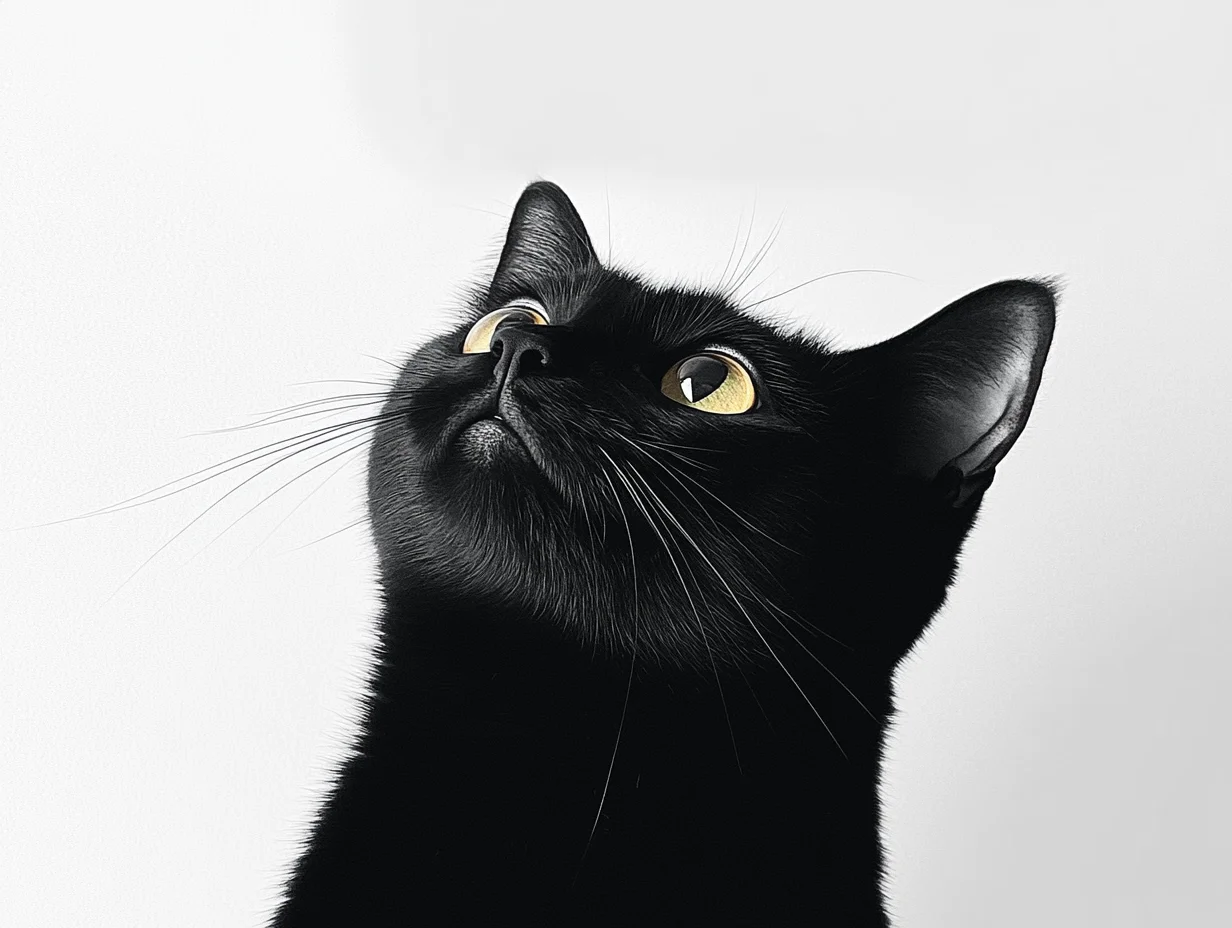 | 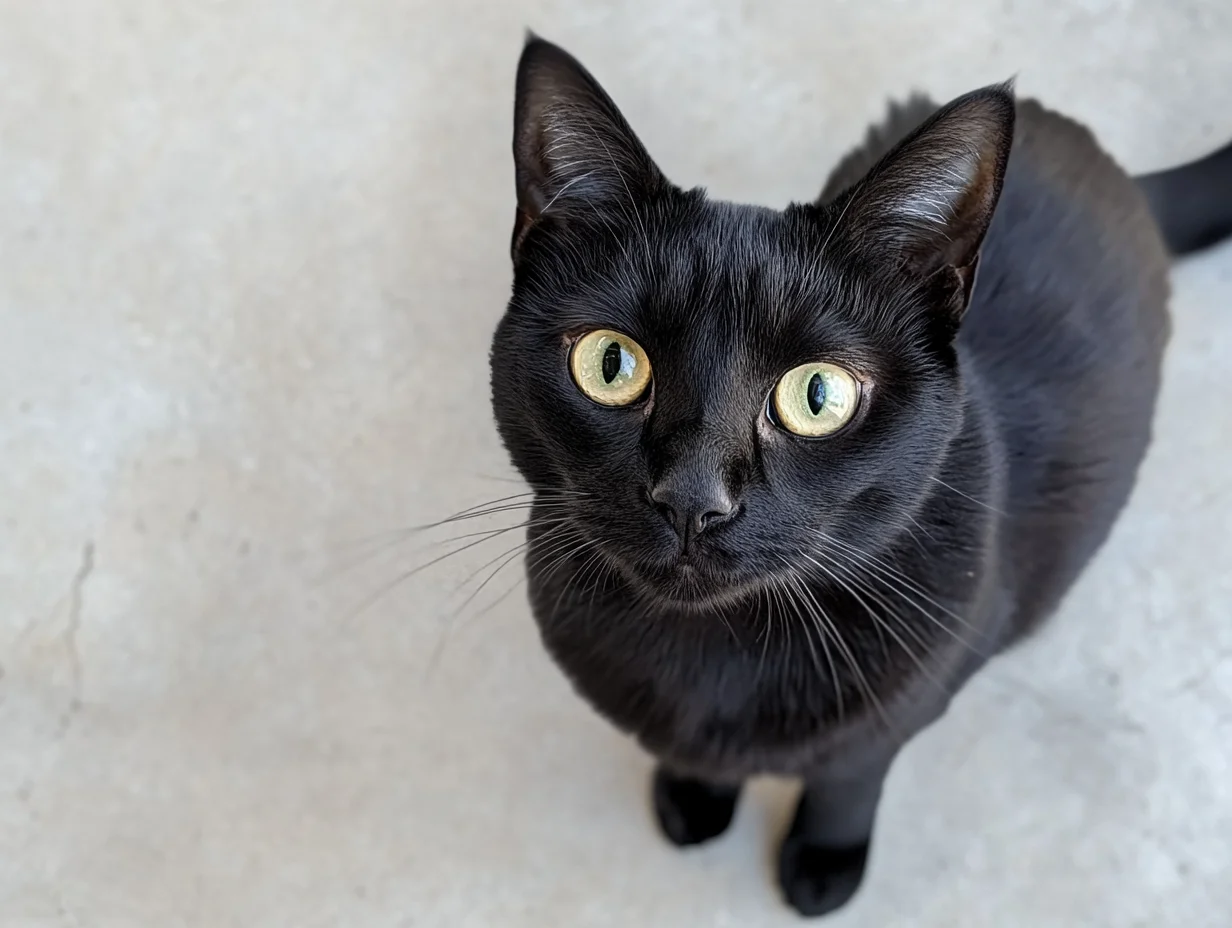 |
SDK de Python
Requiere DashScope Python SDK ≥
1.25.8. Actualice si es necesario.
import os
from http import HTTPStatus
from dashscope import VideoSynthesis
import dashscope

# The following URL is for the Singapore region. When calling, replace {WorkspaceId} with your actual workspace ID. URLs vary by region. Get your URL: https://www.alibabacloud.com/help/model-studio/image-to-video-by-first-and-last-frame-api-reference
dashscope.base_http_api_url = 'https://{WorkspaceId}.ap-southeast-1.maas.aliyuncs.com/api/v1'
# API keys differ by region. Get your API key: https://www.alibabacloud.com/help/model-studio/get-api-key
api_key = os.getenv("DASHSCOPE_API_KEY", "YOUR_API_KEY")

def sample_async_call_kf2v():
    # Asynchronous call returns a task_id
    rsp = VideoSynthesis.async_call(api_key=api_key,
                                    model="wan2.2-kf2v-flash",
                                    prompt="Realistic style. A curious black kitten looks up at the sky. The camera starts at eye level and gradually rises until it captures the kitten’s curious gaze from above.",
                                    first_frame_url="https://wanx.alicdn.com/material/20250318/first_frame.png",
                                    last_frame_url="https://wanx.alicdn.com/material/20250318/last_frame.png",
                                    duration=5,  # Fixed at 5 seconds. Do not change.
                                    prompt_extend=True,
                                    watermark=True)
    print(rsp)
    if rsp.status_code == HTTPStatus.OK:
        print("task_id: %s" % rsp.output.task_id)
    else:
        print('Failed, status_code: %s, code: %s, message: %s' % (rsp.status_code, rsp.code, rsp.message))

    # Wait for asynchronous task to complete
    rsp = VideoSynthesis.wait(task=rsp, api_key=api_key)
    print(rsp)
    if rsp.status_code == HTTPStatus.OK:
        print(rsp.output.video_url)
    else:
        print('Failed, status_code: %s, code: %s, message: %s' % (rsp.status_code, rsp.code, rsp.message))

if __name__ == '__main__':
    sample_async_call_kf2v()
SDK de Java
Requiere DashScope Java SDK ≥
2.22.6. Actualice si es necesario.
import com.alibaba.dashscope.aigc.videosynthesis.VideoSynthesis;
import com.alibaba.dashscope.aigc.videosynthesis.VideoSynthesisParam;
import com.alibaba.dashscope.aigc.videosynthesis.VideoSynthesisResult;
import com.alibaba.dashscope.exception.ApiException;
import com.alibaba.dashscope.exception.InputRequiredException;
import com.alibaba.dashscope.exception.NoApiKeyException;
import com.alibaba.dashscope.utils.JsonUtils;
import com.alibaba.dashscope.utils.Constants;

public class Image2Video {

    static {
        // The following URL is for the Singapore region. When calling, replace {WorkspaceId} with your actual workspace ID. URLs vary by region. Get your URL: https://www.alibabacloud.com/help/model-studio/image-to-video-by-first-and-last-frame-api-reference
        Constants.baseHttpApiUrl = "https://{WorkspaceId}.ap-southeast-1.maas.aliyuncs.com/api/v1";
    }

    // If you have not set an environment variable, replace the line below with: apiKey="sk-xxx"
    // API keys differ by region. Get your API key: https://www.alibabacloud.com/help/model-studio/get-api-key
    static String apiKey = System.getenv("DASHSCOPE_API_KEY");

    public static void image2video() throws ApiException, NoApiKeyException, InputRequiredException {
        VideoSynthesis vs = new VideoSynthesis();
        VideoSynthesisParam param =
                VideoSynthesisParam.builder()
                        .apiKey(apiKey)
                        .model("wan2.2-kf2v-flash")
                        .prompt("Realistic style. A curious black kitten looks up at the sky. The camera starts at eye level and gradually rises until it captures the kitten’s curious gaze from above.")
                        .firstFrameUrl("https://wanx.alicdn.com/material/20250318/first_frame.png")
                        .lastFrameUrl("https://wanx.alicdn.com/material/20250318/last_frame.png")
                        .resolution("720P")
                        .promptExtend(true)
                        .watermark(true)
                        .build();
        // Asynchronous call
        VideoSynthesisResult task = vs.asyncCall(param);
        System.out.println(JsonUtils.toJson(task));
        System.out.println("please wait...");

        // Get result
        VideoSynthesisResult result = vs.wait(task, apiKey);
        System.out.println(JsonUtils.toJson(result));
    }

    public static void main(String[] args) {
        try {
            image2video();
        } catch (ApiException | NoApiKeyException | InputRequiredException e) {
            System.out.println(e.getMessage());
        }
        System.exit(0);
    }
}
curl
Paso 1: Crear una tarea para obtener el ID de tareacurl --location 'https://{WorkspaceId}.ap-southeast-1.maas.aliyuncs.com/api/v1/services/aigc/image2video/video-synthesis' \
-H 'X-DashScope-Async: enable' \
-H "Authorization: Bearer $DASHSCOPE_API_KEY" \
-H 'Content-Type: application/json' \
-d '{
"model": "wan2.2-kf2v-flash",
"input": {
"first_frame_url": "https://wanx.alicdn.com/material/20250318/first_frame.png",
"last_frame_url": "https://wanx.alicdn.com/material/20250318/last_frame.png",
"prompt": "Realistic style. A curious black kitten looks up at the sky. The camera starts at eye level and gradually rises until it captures the kitten’s curious gaze from above."
},
"parameters": {
"resolution": "720P",
"prompt_extend": true,
"watermark": true
}
}'
Reemplace {task_id} con el valor task_id devuelto por la llamada a la API anterior. El task_id es válido para consultas durante 24 horas. Reemplace {WorkspaceId} con su ID de espacio de trabajo real.
curl -X GET https://{WorkspaceId}.ap-southeast-1.maas.aliyuncs.com/api/v1/tasks/{task_id} \
--header "Authorization: Bearer $DASHSCOPE_API_KEY"
Imagen de entrada
- Número de imágenes: Una imagen de primer fotograma y una imagen de último fotograma.
- Métodos de entrada: URL de imagen, ruta de archivo local.

Método 2: Ruta de archivo local (solo SDK)
Los requisitos de ruta varían según el lenguaje:
Python SDK: Admite rutas absolutas y relativas.
Sistema operativo | Ruta del archivo de entrada | Ejemplo (ruta absoluta) | Ejemplo (ruta relativa) |
|---|---|---|---|
Linux / macOS | file://{absolute or relative path} | file:///home/images/test.png | file://./images/test.png |
Windows | file://D:/images/test.png | file://./images/test.png |
Java SDK: Admite solo rutas absolutas.
Sistema operativo | Ruta del archivo de entrada | Ejemplo (ruta absoluta) |
|---|---|---|
Linux / macOS | file://{absolute path} | file:///home/images/test.png |
Windows | file:///D:/images/test.png | file:///D:/images/test.png |
Código de ejemplo: Múltiples métodos de entrada de imagen
import os
from http import HTTPStatus
# DashScope SDK >= 1.23.4
from dashscope import VideoSynthesis
import dashscope

dashscope.base_http_api_url = 'https://{WorkspaceId}.ap-southeast-1.maas.aliyuncs.com/api/v1'

# Get the DashScope API key (which is your Model Studio API key) from an environment variable.
api_key = os.getenv("DASHSCOPE_API_KEY")

# ========== Image input method (choose one) ==========
# [Method 1] Use a public image URL
first_frame_url = "https://wanx.alicdn.com/material/20250318/first_frame.png"
last_frame_url = "https://wanx.alicdn.com/material/20250318/last_frame.png"

# [Method 2] Use a local file path (file:// + file path)
# Use an absolute path:
# first_frame_url = "file://" + "/path/to/your/first_frame.png"  # Linux/macOS
# last_frame_url = "file://" + "C:/path/to/your/last_frame.png"  # Windows
# Or use a relative path:
# first_frame_url = "file://" + "./first_frame.png"              # Use your actual path.
# last_frame_url = "file://" + "./last_frame.png"                # Use your actual path.

def sample_sync_call_kf2v():
    print('please wait...')
    rsp = VideoSynthesis.call(api_key=api_key,
                              model="wan2.2-kf2v-flash",
                              prompt="Realistic style, a small black cat looks up at the sky curiously, the camera gradually rises from eye level, and finally captures its curious gaze from a top-down view.",
                              first_frame_url=first_frame_url,
                              last_frame_url=last_frame_url,
                              resolution="720P",
                              prompt_extend=True)
    print(rsp)
    if rsp.status_code == HTTPStatus.OK:
        print(rsp.output.video_url)
    else:
        print('Failed, status_code: %s, code: %s, message: %s' %
              (rsp.status_code, rsp.code, rsp.message))

if __name__ == '__main__':
    sample_sync_call_kf2v()
// Copyright (c) Alibaba, Inc. and its affiliates.

// DashScope SDK >= 2.20.1
import com.alibaba.dashscope.aigc.videosynthesis.VideoSynthesis;
import com.alibaba.dashscope.aigc.videosynthesis.VideoSynthesisParam;
import com.alibaba.dashscope.aigc.videosynthesis.VideoSynthesisResult;
import com.alibaba.dashscope.exception.ApiException;
import com.alibaba.dashscope.exception.InputRequiredException;
import com.alibaba.dashscope.exception.NoApiKeyException;
import com.alibaba.dashscope.utils.Constants;
import com.alibaba.dashscope.utils.JsonUtils;

import java.util.HashMap;
import java.util.Map;

public class Kf2vSyncIntl {

    static {
        Constants.baseHttpApiUrl = "https://{WorkspaceId}.ap-southeast-1.maas.aliyuncs.com/api/v1";
    }

    // Get the DashScope API key (which is your Model Studio API key) from an environment variable.
    static String apiKey = System.getenv("DASHSCOPE_API_KEY");

    /**
     * Image input method (choose one):
     *
     * [Method 1] Public URL
     */
    static String firstFrameUrl = "https://wanx.alicdn.com/material/20250318/first_frame.png";
    static String lastFrameUrl = "https://wanx.alicdn.com/material/20250318/last_frame.png";

     /**
     * [Method 2] Local file path (file://+absolute path or file:///+absolute path)
     */
    // static String firstFrameUrl = "file://" + "/your/path/to/first_frame.png";  // Linux/macOS
    // static String lastFrameUrl = "file:///" + "C:/path/to/your/img.png";        // Windows

    public static void syncCall() {

        Map<String, Object> parameters = new HashMap<>();
        parameters.put("prompt_extend", true);
        parameters.put("resolution", "720P");

        VideoSynthesis videoSynthesis = new VideoSynthesis();
        VideoSynthesisParam param =
                VideoSynthesisParam.builder()
                        .apiKey(apiKey)
                        .model("wan2.2-kf2v-flash")
                        .prompt("Realistic style, a small black cat looks up at the sky curiously, the camera gradually rises from eye level, and finally captures its curious gaze from a top-down view.")
                        .firstFrameUrl(firstFrameUrl)
                        .lastFrameUrl(lastFrameUrl)
                        .parameters(parameters)
                        .build();
        VideoSynthesisResult result = null;
        try {
            // Making a synchronous call. This may take a moment.
            result = videoSynthesis.call(param);
        } catch (ApiException | NoApiKeyException e){
            throw new RuntimeException(e.getMessage());
        } catch (InputRequiredException e) {
            throw new RuntimeException(e);
        }
        System.out.println(JsonUtils.toJson(result));
    }

    public static void main(String[] args) {
        syncCall();
    }
}
Video de salida
-
Número de videos: Uno.
-
Especificaciones: Las especificaciones varían según el modelo. Consulte Especificaciones de video.
-
Caducidad de URL: 24 horas.
-
Dimensiones: Determinadas por la imagen del primer fotograma y la configuración de
resolution.- El modelo conserva la relación de aspecto del primer fotograma y escala el recuento total de píxeles al objetivo. Las dimensiones de salida se ajustan automáticamente para ser divisibles por 16 (requisito de codificación).
- Ejemplo: entrada de 750×1000 (3:4) con resolution="720P" (objetivo ≈920K píxeles) puede generar 816×1104 (relación ≈0.739, ≈900K píxeles, ambos divisibles por 16).
Facturación y limitación de tasa
-
Para obtener detalles sobre la cuota gratuita y los precios, consulte Wanx-Image-to-Video-First-Last-Frame.
-
Para la limitación de tasa del modelo, consulte la serie Wanxiang.
-
Detalles de facturación:
- La entrada es gratuita. La facturación de salida se basa en los segundos de video exitosos generados.
- Las llamadas fallidas no generan cargos y no consumen cuota gratuita.
- Imagen a video también admite planes de ahorro.
Referencia de API
Imagen a video - primer y último fotograma - Referencia de API
FAQ
P: ¿Cómo genero un video con una relación de aspecto específica (como 3:4)?
R: La API no admite el control directo de la relación de aspecto, solo resolution.
El parámetro resolution controla el recuento de píxeles, no la relación de aspecto. El modelo conserva la relación de aspecto del primer fotograma (first_frame_url) con ajustes menores para la codificación (las dimensiones deben ser múltiplos de 16). Para video 3:4, cargue una imagen de primer fotograma 3:4.
Ejemplo: entrada de 750×1000 (3:4) con resolution="720P" (objetivo ≈920K píxeles) puede generar 816×1104 (relación ≈0.739, ≈900K píxeles, ambos divisibles por 16).
P: ¿Por qué obtengo un error "url error, please check url!" al ejecutar el código del SDK?
R: Asegúrese de que su versión del SDK cumpla con el requisito mínimo: DashScope Python SDK ≥ 1.25.8 o DashScope Java SDK ≥ 2.22.6. Las versiones anteriores pueden mostrar errores "url error, please check url!". Actualice el SDK.