Este capítulo describe cómo enviar y recibir mensajes mediante temas MQTT, y cómo implementar un dispositivo con el método de programación Device-Modelling en Ubuntu.
Instalación del entorno de desarrollo local
Instalación de Ubuntu 16.04
El entorno de compilación para esta guía de inicio rápido es Ubuntu16.04 en un host 64-bit. Este entorno no se ha verificado en otras versiones de Linux. Se recomienda instalar la versión coincidente con la de Alibaba para evitar problemas de compatibilidad.
Si utiliza un sistema operativo Windows, se recomienda instalar VMWare Virtualbox.
A continuación, instale la versión de escritorio de 64 bits de Ubuntu 16.04.x LTS. Enlace de descarga: http://releases.ubuntu.com/16.04
Instalación del software prerequisite
El entorno de desarrollo y compilación de este SDK utiliza el siguiente software: make-4.1, git-2.7.4, gcc-5.4.0, gcov-5.4.0, lcov-1.12, bash-4.3.48, tar-1.28, mingw-5.3.1
Utilice el siguiente comando para instalar el software necesario:
$ sudo apt-get install -y build-essential make git gccDesarrollo mediante Hacklab Web IDE
Si no planea instalar Ubuntu en su PC o computadora portátil, también puede desarrollar para los dispositivos directamente a través del entorno Hacklab Web IDE proporcionado por Alibaba Cloud IoT Platform. Hacklab Web IDE es un entorno de desarrollo Linux en la nube que ya tiene instalado todo el software necesario. Si cuenta con una cuenta de Alibaba Cloud, puede iniciar sesión en Hacklab Web IDE y comenzar el desarrollo desde un navegador.
Acceso al dispositivo mediante temas MQTT
Creación de productos y dispositivos
Utilice su cuenta de Alibaba Cloud para iniciar sesión en Alibaba Cloud IoT Platform y crear productos. Dado que implementará las funciones del producto directamente mediante temas MQTT, asegúrese de seleccionar “Basic version” al crear el producto.
Después de crear un producto, debe crear un dispositivo específico. Alibaba Cloud IoT Platform generará la información de identidad correspondiente al dispositivo.
Si no está familiarizado con la creación de productos en la nube, consulte la documentación sobre cómo crear productos y dispositivos en Alibaba Cloud IoT Platform.
Implementación de funciones del producto
Comprensión de la estructura del directorio raíz del SDK
Una vez descargado Link Kit SDK, la estructura del directorio de nivel superior es la siguiente:
$ ls
build-rules  Config.in  examples  LICENSE   make.settings  project.mk  sdk-c.mk  win_board_conf.mk CMakeLists.txt  Config.linkkit include   makefile  prebuilt  README.txt  src  win.makefile
Modificación de la identificación del dispositivo
Para obtener ProductKey y Product Secret de un producto, haga clic en los botones de copia indicados en la siguiente imagen:
Para obtener DeviceName y DeviceSecret de un dispositivo, haga clic en los botones de copia indicados en la siguiente imagen:
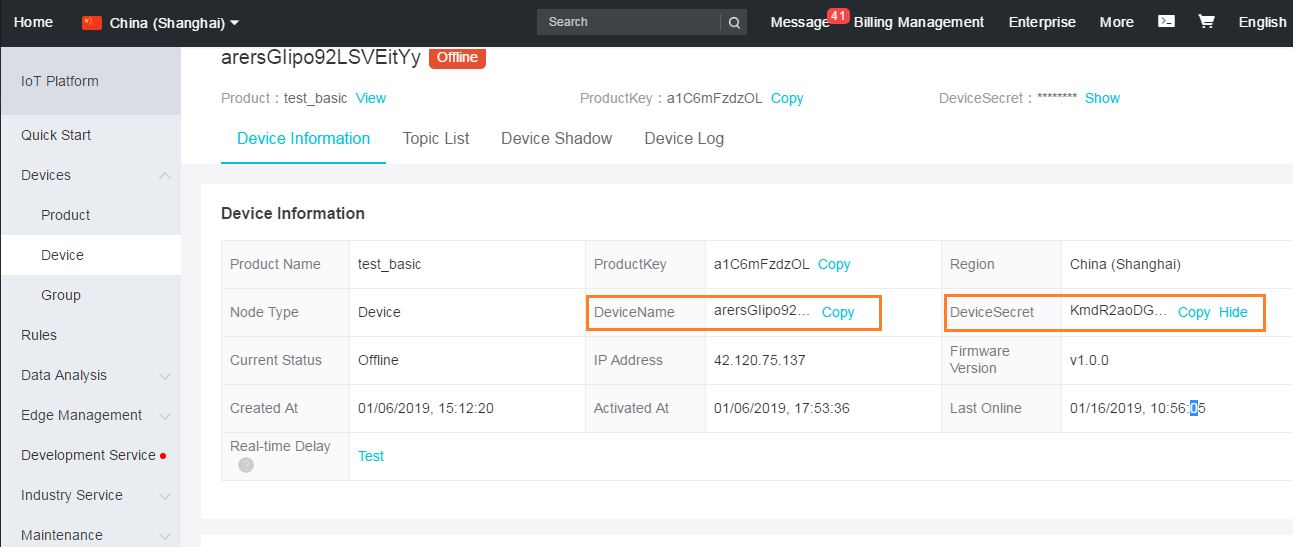
Abra el archivo ./examples/mqtt/mqtt-example.c y edite el siguiente fragmento de código para reemplazar los valores de PRODUCT_KEY/PRODUCT_SECRET/DEVICE_NAME/DEVICE_SECRET:
#include "iot_import.h"
#include "iot_export.h"
#include "app_entry.h"

#define PRODUCT_KEY             "a1MZxOdcBnO"
#define PRODUCT_SECRET          "h4I4dneEFp7EImTv"
#define DEVICE_NAME             "test_01"
#define DEVICE_SECRET           "t9GmMf2jb3LgWfXBaZD2r3aJrfVWBv56"
Inicialización del dispositivo y establecimiento de conexión
El siguiente fragmento de código describe brevemente el proceso de inicialización y establecimiento de conexión del dispositivo:
int mqtt_client(void)
{
    ...
    ...


/* Enter the device identity information before attempting to establish an MQTT connection to the server*/

    if (0 ! = IOT_SetupConnInfo(__product_key, __device_name, __device_secret, (void **)&pconn_info)) {
        EXAMPLE_TRACE("AUTH request failed!") ;
        rc = -1;
        goto do_exit;
    }

    /* Initialize MQTT parameter */
    ...
    ...
Intento de establecimiento de conexión MQTT con el servidor
    pclient = IOT_MQTT_Construct(&mqtt_params);
    if (NULL == pclient) {
        EXAMPLE_TRACE("MQTT construct failed");
        rc = -1;
        goto do_exit;
    }
Reporte de datos a la nube
En el archivo de ejemplo se definen los siguientes temas:
#define TOPIC_UPDATE            "/"PRODUCT_KEY"/"DEVICE_NAME"/update"
#define TOPIC_ERROR             "/"PRODUCT_KEY"/"DEVICE_NAME"/update/error"
#define TOPIC_GET               "/"PRODUCT_KEY"/"DEVICE_NAME"/get"
#define TOPIC_DATA              "/"PRODUCT_KEY"/"DEVICE_NAME"/data"

/* topic format definitions*/
#define TOPIC_UPDATE_FMT            "/%s/%s/update"
#define TOPIC_ERROR_FMT             "/%s/%s/update/error"
#define TOPIC_GET_FMT               "/%s/%s/get"
#define TOPIC_DATA_FMT              "/%s/%s/data"
Alibaba Cloud IoT Platform genera de forma predeterminada los siguientes 3 temas para un producto “Basic Edition”:
Los siguientes fragmentos de código muestran cómo enviar datos al tema ‘UPDATE’:
    /* Initialize topic information */
    memset(&topic_msg, 0x0, sizeof(iotx_mqtt_topic_info_t));
    strcpy(msg_pub, "update: hello! start!") ;

    topic_msg.qos = IOTX_MQTT_QOS1;
    topic_msg.retain = 0;
    topic_msg.dup = 0;
    topic_msg.payload = (void *)msg_pub;
    topic_msg.payload_len = strlen(msg_pub);

    rc = IOT_MQTT_Publish(pclient, TOPIC_UPDATE, &topic_msg);
    if (rc < 0) {
    IOT_MQTT_Destroy(&pclient);
    EXAMPLE_TRACE("error occur when publish");
    rc = -1;
    goto do_exit;
    }

    EXAMPLE_TRACE("\n publish message: \n topic: %s\n payload: \%s\n rc = %d", TOPIC_UPDATE, topic_msg.payload, rc);
Suscripción y procesamiento de datos desde la nube
El programa de ejemplo se suscribe al tema TOPIC_DATA y especifica el controlador que se ejecuta al recibir datos de dicho tema:
    rc = IOT_MQTT_Subscribe(pclient, TOPIC_DATA, IOTX_MQTT_QOS1, _demo_message_arrive, NULL);
    if (rc < 0) {
    IOT_MQTT_Destroy(&pclient);
    EXAMPLE_TRACE("IOT_MQTT_Subscribe() failed, rc = %d", rc);
    rc = -1;
    goto do_exit;
    }

    IOT_MQTT_Yield(pclient, 200);

    HAL_SleepMs(2000);

    ...
    ...
La función _demo_message_arrive() simplemente imprime los datos recibidos:
static void _demo_message_arrive(void *pcontext, void *pclient, iotx_mqtt_event_msg_pt msg)
{
    iotx_mqtt_topic_info_pt ptopic_info = (iotx_mqtt_topic_info_pt) msg->msg;

    /* print topic name and topic message */
    EXAMPLE_TRACE("----");
    EXAMPLE_TRACE("packetId: %d", ptopic_info->packet_id);
    EXAMPLE_TRACE("Topic: '%.*s' (Length: %d)",
                  ptopic_info->topic_len,
                  ptopic_info->ptopic,
                  ptopic_info->topic_len);
    EXAMPLE_TRACE("Payload: '%.*s' (Length: %d)",
                  ptopic_info->payload_len,
                  ptopic_info->payload,
                  ptopic_info->payload_len);
    EXAMPLE_TRACE("----");
}
El siguiente fragmento de código intenta enviar datos a este tema:
    do {
    cnt++;
    msg_len = snprintf(msg_pub, sizeof(msg_pub), "{\"attr_name\":\"temperature\", \"attr_value\":\"%d\"}", cnt);
    ...
    ...

    rc = IOT_MQTT_Publish(pclient, TOPIC_DATA, &topic_msg);
    if (rc < 0) {
    EXAMPLE_TRACE("error occur when publish");
    rc = -1;
    break;
    }
    EXAMPLE_TRACE("packet-id=%u, publish topic msg=%s", (uint32_t)rc, msg_pub);
Dado que el ejemplo se suscribe al tema TOPIC_DATA, recibirá los datos de vuelta después de enviarlos a la plataforma IoT.
Compilación del programa de ejemplo
Ejecute el siguiente comando en el directorio de nivel superior del SDK:
make distclean
make
Una vez completada correctamente la compilación, el programa de ejemplo se genera en el directorio output/release/bin de la ruta actual:
$ tree output/release
output/release/
+-- bin
...
...
|   +-- mqtt-example
...
...
Observación de datos
Ejecute el siguiente comando:
$ ./output/release/bin/mqtt-examplePuede encontrar el producto especificado en la consola de Alibaba Cloud IoT Platform y consultar los mensajes reportados desde el dispositivo en Log Service. Haga clic aquí para aprender a consultar en la nube los datos reportados desde el dispositivo.
También puede observar en la consola de Linux los datos provenientes de la nube que imprime el programa de ejemplo:
_demo_message_arrive|166 :: ----
_demo_message_arrive|167 :: packetId: 35641
_demo_message_arrive|171 :: Topic: '/a1ExpAkj9Hi/Example1/data' (Length: 26)
_demo_message_arrive|175 :: Payload: '{"attr_name":"temperature", "attr_value":"1"}' (Length: 45)
_demo_message_arrive|176 :: ----
Desarrollo de productos mediante Device Modelling
Creación de productos y dispositivos
Puede crear productos en Alibaba Cloud IoT Platform y utilizar los diversos servicios que ofrece. Los enlaces de ayuda para crear productos en Alibaba Cloud IoT Platform son los siguientes:
En este ejemplo, debe crear un producto que admita las siguientes funciones:
-
Propiedad LightSwitch
Identificador: LightSwitch
Tipo de datos: enum
Valores: 0 y 1
Tipo de lectura/escritura: lectura y escritura
-
Servicio Custom
Identificador: Custom
Método de llamada: Asynchronous
Parámetro de entrada: {Identificador: transparency, Tipo de datos: int32, Rango de valores: 0 ~ 100}
Parámetro de salida: {Identificador: Contrastratio, Tipo de datos: int32, Rango de valores: 0 ~ 100}
-
Evento
Identificador: Error
Tipo de evento: Information
Parámetro de salida: {Identificador: Errorcode, Tipo de datos: enum, Rango de valores: 0, 1}
Tras definir el producto, la plataforma IoT genera un archivo de descripción TSL en formato JSON para dicho producto.
Implementación de funciones del producto
Ingreso de la tríada del dispositivo en la rutina
Reemplace el certificado (ProductKey/ProductSecret/DeviceName/DeviceSecret) en ./examples/linkkit/linkkit_example_solo.c con los datos del dispositivo generado en la plataforma IoT.
    #define PRODUCT_KEY      "a1csED27mp7"
    #define PRODUCT_SECRET   "VuULINCrtTAzCSzp"
    #define DEVICE_NAME      "AdvExample1"
    #define DEVICE_SECRET    "3xGoxtWRscxPAoMxnJnjocZbNfmCTRi0"
Compilación y ejecución del programa
Ejecute el siguiente comando en el directorio de nivel superior del SDK:
$ make distclean
$ make
Una vez completada correctamente la compilación, el programa de ejemplo para el producto Pro-Edition se genera en el directorio output/release/bin de la ruta actual, con el nombre linkkit-example-solo.
Ejecute el siguiente comando en el directorio de nivel superior del SDK:
$ ./output/release/bin/linkkit-example-soloObservación de datos
El programa de ejemplo reporta periódicamente los valores de la propiedad LightSwitch a la nube; puede consultar dicha propiedad en la plataforma IoT.
Reporte de propiedades
Este programa de ejemplo invoca la función user_post_property para reportar propiedades. El ejemplo recorre cíclicamente el reporte de cargas útiles de diversas situaciones. Tenga en cuenta que esta función intenta enviar varias propiedades no válidas a la plataforma IoT con el fin de familiarizar a los desarrolladores con los códigos de error devueltos por la plataforma; puede eliminarlas al implementar su propia lógica:
    void user_post_property(void)
    {
    static int example_index = 0;
    int res = 0;
    user_example_ctx_t *user_example_ctx = user_example_get_ctx();
    char *property_payload = "NULL";

    if (example_index == 0) {
Reporte típico de atributos
/* Typical Example */
property_payload = "{\"LightSwitch\":1}";
example_index++;
}else if(...) {
...
...
}

res = IOT_Linkkit_Report(user_example_ctx->master_devid, ITM_MSG_POST_PROPERTY,
(unsigned char *)property_payload, strlen(property_payload));

EXAMPLE_TRACE("Post Property Message ID: %d", res);
}
Los registros impresos durante un reporte típico de atributos son los siguientes:
[inf] dm_msg_request(218): DM Send Message, URI: /sys/a1csED27mp7/AdvExample1/thing/event/property/post, Payload: {"id":"1","version":"1.0","params":{"LightSwitch":1},"method":"thing.event.property.post"}
[dbg] MQTTPublish(319): ALLOC: (160) / [224] @ 0x1da41a0
[inf] MQTTPublish(378): Upstream Topic: '/sys/a1csED27mp7/AdvExample1/thing/event/property/post'
[inf] MQTTPublish(379): Upstream Payload:
Se envía el siguiente mensaje a la nube:
> {
>     "id": "1",
>     "version": "1.0",
>     "params": {
>         "LightSwitch": 1
>     },
>     "method": "thing.event.property.post"
> }

[inf] dm_client_publish(106): Publish Result: 0
[dbg] alcs_observe_notify(105): payload:{"id":"1","version":"1.0","params":{"LightSwitch":1},"method":"thing.event.property.post"}
[dbg] CoAPResourceByPath_get(176): Found the resource: /sys/a1csED27mp7/AdvExample1/thing/event/property/post
[inf] dm_server_send(76): Send Observe Notify Result 0
[dbg] dm_msg_cache_insert(79): dmc list size: 0
user_post_property. 431: Post Property Message ID: 1
[dbg] iotx_mc_cycle(1774): PUBLISH
[inf] iotx_mc_handle_recv_PUBLISH(1549): Downstream Topic: '/sys/a1csED27mp7/AdvExample1/thing/event/property/post_reply'
[inf] iotx_mc_handle_recv_PUBLISH(1550): Downstream Payload:
Se recibe la siguiente respuesta desde la nube:
< {
<     "code": 200,
<     "data": {
<     },
<     "id": "1",
<     "message": "success",
<     "method": "thing.event.property.post",
<     "version": "1.0"
< }

[dbg] iotx_mc_handle_recv_PUBLISH(1555):         Packet Ident : 00000000
[dbg] iotx_mc_handle_recv_PUBLISH(1556):         Topic Length : 60
[dbg] iotx_mc_handle_recv_PUBLISH(1560):           Topic Name : /sys/a1csED27mp7/AdvExample1/thing/event/property/post_reply
[dbg] iotx_mc_handle_recv_PUBLISH(1563):     Payload Len/Room : 104 / 4935
[dbg] iotx_mc_handle_recv_PUBLISH(1564):       Receive Buflen : 5000
[dbg] iotx_mc_handle_recv_PUBLISH(1575): delivering msg ...
[dbg] iotx_mc_deliver_message(1291): topic be matched
[inf] dm_msg_proc_thing_event_post_reply(258): Event Id: property
[dbg] dm_msg_response_parse(167): Current Request Message ID: 1
[dbg] dm_msg_response_parse(168): Current Request Message Code: 200
[dbg] dm_msg_response_parse(169): Current Request Message Data: {}
[dbg] dm_msg_response_parse(174): Current Request Message Desc: success
[dbg] dm_ipc_msg_insert(87): dm msg list size: 0, max size: 50
[dbg] dm_msg_cache_remove(142): Remove Message ID: 1
[inf] _iotx_linkkit_event_callback(219): Receive Message Type: 30
[inf] _iotx_linkkit_event_callback(221): Receive Message: {"id":1,"code":200,"devid":0,"payload":{}}
[dbg] _iotx_linkkit_event_callback(476): Current Id: 1
[dbg] _iotx_linkkit_event_callback(477): Current Code: 200
[dbg] _iotx_linkkit_event_callback(478): Current Devid: 0
Registro de la función callback:
user_report_reply_event_handler. 300: Message Post Reply Received, Devid: 0, Message ID: 1, Code: 200, Reply: {}Procesamiento de una solicitud de configuración de propiedad
Cuando el código de ejemplo recibe una solicitud de configuración de propiedad, se llama a la siguiente función callback:
static int user_property_set_event_handler(const int devid, const char *request, const int request_len)
{
int res = 0;
user_example_ctx_t *user_example_ctx = user_example_get_ctx();
EXAMPLE_TRACE("Property Set Received, Devid: %d, Request: %s", devid, request);
Dentro de la función, simplemente se envía de vuelta el valor de la propiedad a la plataforma IoT, lo cual actualizará el registro de propiedades del dispositivo:
res = IOT_Linkkit_Report(user_example_ctx->master_devid, ITM_MSG_POST_PROPERTY,
(unsigned char *)request, request_len);
EXAMPLE_TRACE("Post Property Message ID: %d", res);

return 0;
}
Puede observar el valor establecido desde la plataforma IoT en los registros del dispositivo:
[dbg] iotx_mc_cycle(1774): PUBLISH
[inf] iotx_mc_handle_recv_PUBLISH(1549): Downstream Topic: '/sys/a1csED27mp7/AdvExample1/thing/service/property/set'
[inf] iotx_mc_handle_recv_PUBLISH(1550): Downstream Payload:
La solicitud de configuración de propiedad recibida desde la nube es la siguiente:
< {
<     "method": "thing.service.property.set",
<     "id": "161430786",
<     "params": {
<         "LightSwitch": 1
<     },
<     "version": "1.0.0"
< }

[dbg] iotx_mc_handle_recv_PUBLISH(1555):         Packet Ident : 00000000
[dbg] iotx_mc_handle_recv_PUBLISH(1556):         Topic Length : 55
[dbg] iotx_mc_handle_recv_PUBLISH(1560):           Topic Name : /sys/a1csED27mp7/AdvExample1/thing/service/property/set
[dbg] iotx_mc_handle_recv_PUBLISH(1563):     Payload Len/Room : 113 / 4940
[dbg] iotx_mc_handle_recv_PUBLISH(1564):       Receive Buflen : 5000
[dbg] iotx_mc_handle_recv_PUBLISH(1575): delivering msg ...
[dbg] iotx_mc_deliver_message(1291): topic be matched
[inf] dm_msg_proc_thing_service_property_set(93): thing/service/property/set
[dbg] dm_msg_request_parse(142): Current Request Message ID: 161430786
[dbg] dm_msg_request_parse(143): Current Request Message Version: 1.0.0
[dbg] dm_msg_request_parse(144): Current Request Message Method: thing.service.property.set
[dbg] dm_msg_request_parse(145): Current Request Message Params: {"LightSwitch":1}
[dbg] dm_ipc_msg_insert(87): dm msg list size: 0, max size: 50
[inf] dm_msg_response(274): Send URI: /sys/a1csED27mp7/AdvExample1/thing/service/property/set_reply, Payload: {"id":"161430786","code":200,"data":{}}
[dbg] MQTTPublish(319): ALLOC: (100) / [164] @ 0x154f1f0
[inf] MQTTPublish(378): Upstream Topic: '/sys/a1csED27mp7/AdvExample1/thing/service/property/set_reply'
[inf] MQTTPublish(379): Upstream Payload:
The following log is printed when the user_property_set_event_handler recibe la solicitud de configuración de atributo:
user_property_set_event_handler. 160: Property Set Received, Devid: 0, Request: {"LightSwitch":1}Nota: Cuando un producto real recibe una configuración de propiedad, los desarrolladores deben analizar sintácticamente la propiedad y procesarla en consecuencia, en lugar de simplemente devolver el valor a la plataforma IoT.
Reporte de un evento
La función user_post_event() del programa de ejemplo sirve para enviar eventos a la plataforma IoT. Nuevamente, genera varios eventos no válidos y los envía a la plataforma; debe eliminarlos y enviar eventos a la plataforma IoT únicamente cuando se desencadene un evento real:
    void user_post_event(void)
    {
    static int example_index = 0;
    int res = 0;
    user_example_ctx_t *user_example_ctx = user_example_get_ctx();
    char *event_id = "Error";
    char *event_payload = "NULL";

    if (example_index == 0) {
    ...

    //Report the event to the cloud

    res = IOT_Linkkit_TriggerEvent(user_example_ctx->master_devid, event_id, strlen(event_id),
    event_payload, strlen(event_payload));
    EXAMPLE_TRACE("Post Event Message ID: %d", res);
    }
El evento reportado a la nube es el siguiente:
> {
>     "id": "1",
>     "version": "1.0",
>     "params": {
>         "ErrorCode": 0
>     },
>     "method": "thing.event.Error.post"
> }

[inf] dm_client_publish(106): Publish Result: 0
[dbg] alcs_observe_notify(105): payload:{"id":"1","version":"1.0","params":{"ErrorCode":0},"method":"thing.event.Error.post"}
[inf] dm_server_send(76): Send Observe Notify Result 0
[dbg] dm_msg_cache_insert(79): dmc list size: 0
user_post_event. 470: Post Event Message ID: 1
[dbg] iotx_mc_cycle(1774): PUBLISH
[inf] iotx_mc_handle_recv_PUBLISH(1549): Downstream Topic: '/sys/a1csED27mp7/AdvExample1/thing/event/Error/post_reply'
[inf] iotx_mc_handle_recv_PUBLISH(1550): Downstream Payload:
La respuesta recibida desde la nube es la siguiente:
< {
<     "code": 200,
<     "data": {
<     },
<     "id": "1",
<     "message": "success",
<     "method": "thing.event.Error.post",
<     "version": "1.0"
< }

[dbg] iotx_mc_handle_recv_PUBLISH(1555):         Packet Ident : 00000000
[dbg] iotx_mc_handle_recv_PUBLISH(1556):         Topic Length : 57
[dbg] iotx_mc_handle_recv_PUBLISH(1560):           Topic Name : /sys/a1csED27mp7/AdvExample1/thing/event/Error/post_reply
[dbg] iotx_mc_handle_recv_PUBLISH(1563):     Payload Len/Room : 101 / 4938
[dbg] iotx_mc_handle_recv_PUBLISH(1564):       Receive Buflen : 5000
[dbg] iotx_mc_handle_recv_PUBLISH(1575): delivering msg ...
[dbg] iotx_mc_deliver_message(1291): topic be matched
[inf] dm_msg_proc_thing_event_post_reply(258): Event Id: Error
[dbg] dm_msg_response_parse(167): Current Request Message ID: 1
[dbg] dm_msg_response_parse(168): Current Request Message Code: 200
[dbg] dm_msg_response_parse(169): Current Request Message Data: {}
[dbg] dm_msg_response_parse(174): Current Request Message Desc: success
[dbg] dm_ipc_msg_insert(87): dm msg list size: 0, max size: 50
[dbg] dm_msg_cache_remove(142): Remove Message ID: 1
[inf] _iotx_linkkit_event_callback(219): Receive Message Type: 31
[inf] _iotx_linkkit_event_callback(221): Receive Message: {"id":1,"code":200,"devid":0,"eventid":"Error","payload":"success"}
[dbg] _iotx_linkkit_event_callback(513): Current Id: 1
[dbg] _iotx_linkkit_event_callback(514): Current Code: 200
[dbg] _iotx_linkkit_event_callback(515): Current Devid: 0
[dbg] _iotx_linkkit_event_callback(516): Current EventID: Error
[dbg] _iotx_linkkit_event_callback(517): Current Message: success
Se imprime el siguiente registro para la función callback del usuario user_trigger_event_reply_event_handler:
user_trigger_event_reply_event_handler. 310: Trigger Event Reply Received, Devid: 0, Message ID: 1, Code: 200, EventID: Error, Message: successLlamada a servicio
En el programa de ejemplo, cuando se recibe una solicitud de llamada a servicio, se invoca la siguiente función callback:
static int user_service_request_event_handler(const int devid, const char *serviceid, const int serviceid_len,
const char *request, const int request_len,
char **response, int *response_len)
{
int contrastratio = 0, to_cloud = 0;
cJSON *root = NULL, *item_transparency = NULL, *item_from_cloud = NULL;
EXAMPLE_TRACE("Service Request Received, Devid: %d, Service ID: %.*s, Payload: %s", devid, serviceid_len,
serviceid,
request);

/* Parse Root */
root = cJSON_Parse(request);
if (root == NULL || ! cJSON_IsObject(root)) {
EXAMPLE_TRACE("JSON Parse Error");
return -1;
}
Debe procesar el servicio recibido con el ID de servicio Custom, asignar al parámetro de salida el valor del parámetro de entrada del servicio más 1, y devolverlo a la nube.
if (strlen("Custom") == serviceid_len && memcmp("Custom", serviceid, serviceid_len) == 0) {
...
contrastratio = item_transparency->valueint + 1;

...
HAL_Snprintf(*response, *response_len, response_fmt, contrastratio);
*response_len = strlen(*response);
} else if (strlen("SyncService") == serviceid_len && memcmp("SyncService", serviceid, serviceid_len) == 0) {
...
...
}
cJSON_Delete(root);

return 0;
}
En este punto, puede observar el siguiente registro en el lado del dispositivo:
[dbg] iotx_mc_cycle(1774): PUBLISH
[inf] iotx_mc_handle_recv_PUBLISH(1549): Downstream Topic: '/sys/a1csED27mp7/AdvExample1/thing/service/Custom'
[inf] iotx_mc_handle_recv_PUBLISH(1550): Downstream Payload:
Se recibe la siguiente solicitud de llamada a servicio desde la nube, con el parámetro de entrada transparency:
< {
<     "method": "thing.service.Custom",
<     "id": "161445548",
<     "params": {
<         "transparency": 5
<     },
<     "version": "1.0.0"
< }

[dbg] iotx_mc_handle_recv_PUBLISH(1555):         Packet Ident : 00000000
[dbg] iotx_mc_handle_recv_PUBLISH(1556):         Topic Length : 49
[dbg] iotx_mc_handle_recv_PUBLISH(1560):           Topic Name : /sys/a1csED27mp7/AdvExample1/thing/service/Custom
[dbg] iotx_mc_handle_recv_PUBLISH(1563):     Payload Len/Room : 96 / 4946
[dbg] iotx_mc_handle_recv_PUBLISH(1564):       Receive Buflen : 5000
[dbg] iotx_mc_handle_recv_PUBLISH(1575): delivering msg ...
[dbg] iotx_mc_deliver_message(1291): topic be matched
[inf] dm_msg_proc_thing_service_request(224): Service Identifier: Custom
[dbg] dm_msg_request_parse(142): Current Request Message ID: 161445548
[dbg] dm_msg_request_parse(143): Current Request Message Version: 1.0.0
[dbg] dm_msg_request_parse(144): Current Request Message Method: thing.service.Custom
[dbg] dm_msg_request_parse(145): Current Request Message Params: {"transparency":5}
[dbg] dm_ipc_msg_insert(87): dm msg list size: 0, max size: 50
[inf] _iotx_linkkit_event_callback(219): Receive Message Type: 18
[inf] _iotx_linkkit_event_callback(221): Receive Message: {"id":"161445548","devid":0,"serviceid":"Custom","payload":{"transparency":5}}
[dbg] _iotx_linkkit_event_callback(300): Current Id: 161445548
[dbg] _iotx_linkkit_event_callback(301): Current Devid: 0
[dbg] _iotx_linkkit_event_callback(302): Current ServiceID: Custom
[dbg] _iotx_linkkit_event_callback(303): Current Payload: {"transparency":5}
Se llama a la función de llamada del usuario user_service_request_event_handler:
user_service_request_event_handler. 99: Service Request Received, Devid: 0, Service ID: Custom, Payload: {"transparency":5}

user_service_request_event_handler. 116: transparency: 5
[dbg] iotx_dm_send_service_response(280): Current Service Response Payload, Length: 19, Payload: {"Contrastratio":6}
[dbg] dm_mgr_upstream_thing_service_response(1275): Current Service Name: thing/service/Custom_reply
[inf] dm_msg_response(274): Send URI: /sys/a1csED27mp7/AdvExample1/thing/service/Custom_reply, Payload: {"id":"161445548","code":200,"data":{"Contrastratio":6}}
[dbg] MQTTPublish(319): ALLOC: (111) / [175] @ 0x85a1a0
[inf] MQTTPublish(378): Upstream Topic: '/sys/a1csED27mp7/AdvExample1/thing/service/Custom_reply'
[inf] MQTTPublish(379): Upstream Payload:
En la función callback, sume 1 al valor de transparency, asigne el resultado a Contrastratio y repórtelo a la nube:
> {
>     "id": "161445548",
>     "code": 200,
>     "data": {
>         "Contrastratio": 6
>     }
> }

[inf] dm_client_publish(106): Publish Result: 0
[dbg] alcs_observe_notify(105): payload:{"id":"161445548","code":200,"data":{"Contrastratio":6}}
[inf] dm_server_send(76): Send Observe Notify Result 0
Esto concluye la descripción de servicios, atributos y eventos en la versión avanzada de la rutina de elemento único.