Con la capacidad de cómputo de GPU de Container Compute Service (ACS), puede comenzar a trabajar sin administrar el hardware subyacente ni los nodos de GPU. Su modelo pay-as-you-go es ideal para tareas de inference de LLM y reduce costos. Dado que la gran cantidad de parámetros de DeepSeek-R1 supera la capacidad de una sola GPU, se recomienda un despliegue distribuido con varias instancias. Esta guía muestra cómo desplegar un servicio de inference distribuido de DeepSeek-R1 listo para producción mediante el cómputo de GPU de ACS.
Contexto
Modelo DeepSeek-R1
vLLM
ACS
LWS
Fluid
Descripción general de la solución
División del modelo
DeepSeek-R1 cuenta con 671 mil millones de parámetros, lo cual supera los 96 GB de memoria de una sola GPU. Esta guía divide el modelo entre dos instancias de contenedor de GPU con paralelismo de modelo (PP=2) y paralelismo de datos (TP=8).
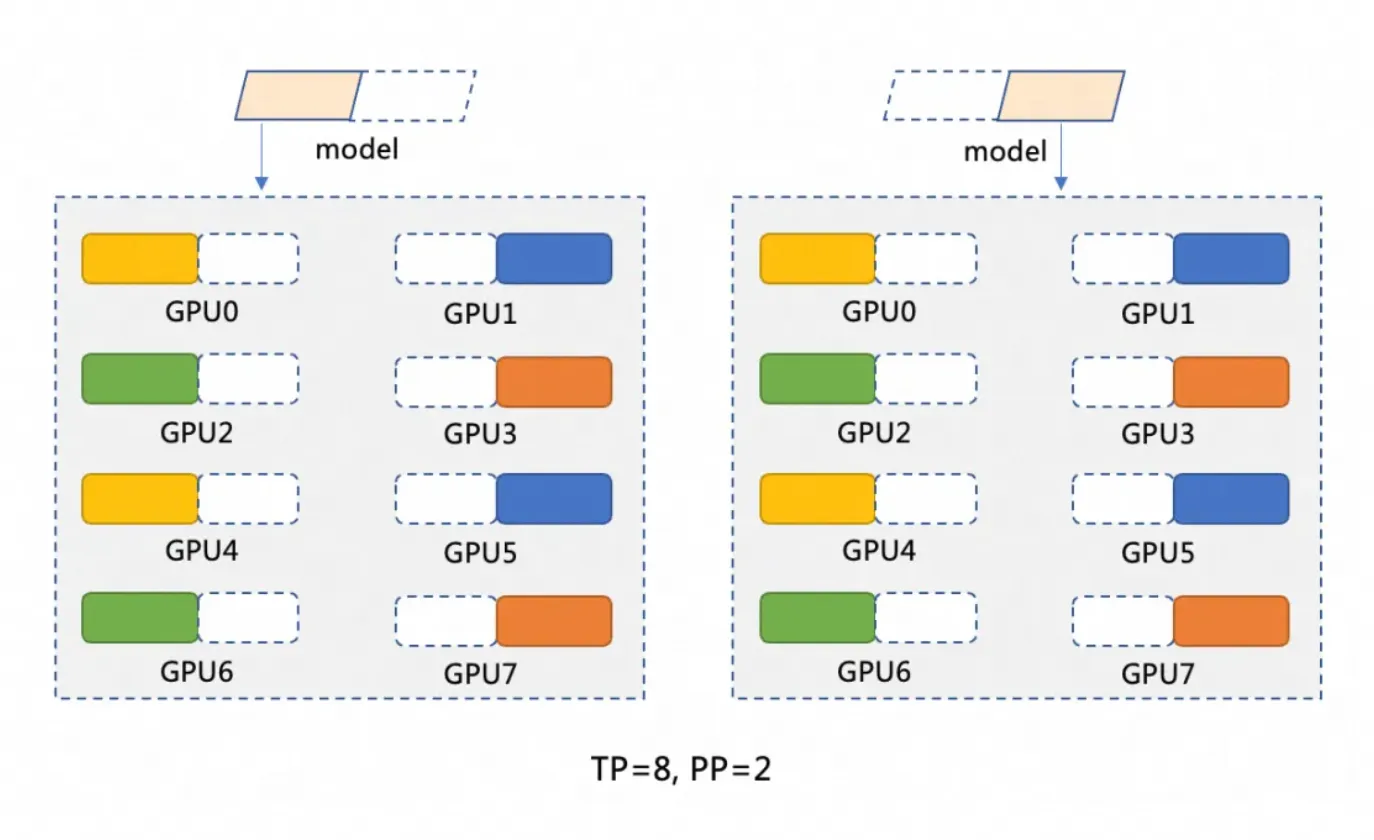
El paralelismo de modelo (PP=2) divide el modelo en dos etapas, cada una ejecutada en una instancia de contenedor de GPU. La primera etapa procesa la entrada y pasa los resultados intermedios a la segunda.
El paralelismo de datos (TP=8) distribuye el cálculo dentro de cada etapa entre 8 GPU. Así, los datos se procesan en paralelo y los resultados se combinan.
Arquitectura de despliegue distribuido
Esta solución despliega un servicio de inference distribuido para la versión completa de DeepSeek en ACS mediante vLLM y Ray. LWS administra el patrón de despliegue líder-trabajador, y Fluid proporciona una caché distribuida para acelerar la carga del modelo. vLLM se ejecuta en dos instancias de pod de GPU de ACS con 8 GPU cada una. Cada pod actúa como un Ray Group (un Ray head y un Ray worker) para dividir el modelo. Las distintas arquitecturas de despliegue afectan variables como tensor-parallel-size y LWS_GROUP_SIZE en el archivo YAML.

Requisitos previos
Asignó el rol predeterminado del sistema a la cuenta de servicio (obligatorio cuando usa Alibaba Cloud por primera vez). Esto permite que ACS llame a servicios dependientes como Elastic Compute Service (ECS), Object Storage Service (OSS), Apsara File Storage NAS, Cloud Parallel File Storage (CPFS) y Server Load Balancer (SLB), cree clústeres y guarde registros. ACS solo puede usar estas capacidades después de que se otorgue correctamente este rol. Para obtener más detalles, consulte Get started with Container Compute Service.
Especificaciones y costos de la instancia de GPU
Configuración recomendada por instancia: GPU: 8 tarjetas (96 GiB de memoria de GPU por tarjeta), CPU: 64 vCPU, Memoria: 512 GiB. Seleccione un tipo de instancia en Recommended instance types y GPU compute types and specifications. El cálculo de costos se aborda en Billing.
Las especificaciones de la instancia de GPU de ACS deben seguir ACS pod specification adjustment logic.
Los pods de ACS proporcionan 30 GiB de almacenamiento efímero gratuito de forma predeterminada. La imagen de inference
registry-cn-hangzhou.ack.aliyuncs.com/ack-demo/vllm:v0.7.2ocupa aproximadamente 9.5 GiB. Para ampliar el almacenamiento, siga Increase the ephemeral storage size.
Procedimiento
Paso 1: Preparar los archivos del modelo DeepSeek-R1
Los modelos de lenguaje grandes requieren mucho espacio en disco. Cree un volumen de NAS u OSS para almacenar de forma persistente los archivos del modelo. Esta guía utiliza OSS.
La transferencia de archivos del modelo puede ser lenta. Puede enviar un ticket para copiar rápidamente los archivos del modelo a su bucket de OSS.
-
Ejecute el siguiente comando para descargar el modelo DeepSeek-R1 desde ModelScope.
NotaAsegúrese de que git-lfs esté instalado. Si no lo está, ejecute
yum install git-lfsoapt-get install git-lfs. Encontrará métodos adicionales en Installing Git Large File Storage.git lfs install GIT_LFS_SKIP_SMUDGE=1 git clone https://www.modelscope.cn/deepseek-ai/DeepSeek-R1.git cd DeepSeek-R1/ git lfs pull -
Cree un directorio en OSS y cargue el modelo en él.
NotaPara instalar y configurar ossutil, siga Install ossutil.
ossutil mkdir oss://<your-bucket-name>/models/DeepSeek-R1 ossutil cp -r ./DeepSeek-R1 oss://<your-bucket-name>/models/DeepSeek-R1 -
Una vez almacenado el modelo en OSS, puede cargarlo de dos maneras.
-
Montar el modelo directamente mediante un PVC y un PV: Más indicado para modelos pequeños que no tienen requisitos estrictos de velocidad de inicio o de carga.
Console
A continuación se muestran los detalles de configuración básicos del PV de ejemplo:
Parámetro
Descripción
Tipo de volumen de almacenamiento
OSS
Name
llm-model
Access key
Configure el accesskey ID y el accesskey secret para acceder a OSS.
Bucket ID
Seleccione el bucket de OSS que creó en el paso anterior.
OSS path
Seleccione la ruta donde se encuentra el modelo, por ejemplo, /models/DeepSeek-R1.
A continuación se muestran los detalles de configuración básicos del PVC de ejemplo:
Parámetro
Descripción
Tipo de solicitud de almacenamiento
OSS
Name
llm-model
Modo de asignación
Seleccione Existing Volume.
Volumen existente
Haga clic en el enlace Select Existing Volume y seleccione el PV que creó.
kubectl
A continuación se muestra un archivo YAML de ejemplo:
apiVersion: v1 kind: Secret metadata: name: oss-secret stringData: akId: <your-oss-ak> # Your AccessKey ID for accessing OSS. akSecret: <your-oss-sk> # Your AccessKey Secret for accessing OSS. --- apiVersion: v1 kind: PersistentVolume metadata: name: llm-model labels: alicloud-pvname: llm-model spec: capacity: storage: 30Gi accessModes: - ReadOnlyMany persistentVolumeReclaimPolicy: Retain csi: driver: ossplugin.csi.alibabacloud.com volumeHandle: llm-model nodePublishSecretRef: name: oss-secret namespace: default volumeAttributes: bucket: <your-bucket-name> # The bucket name. url: <your-bucket-endpoint> # The endpoint, such as oss-cn-hangzhou-internal.aliyuncs.com. otherOpts: "-o umask=022 -o max_stat_cache_size=0 -o allow_other" path: <your-model-path> # In this example, the path is /models/DeepSeek-R1/. --- apiVersion: v1 kind: PersistentVolumeClaim metadata: name: llm-model spec: accessModes: - ReadOnlyMany resources: requests: storage: 30Gi selector: matchLabels: alicloud-pvname: llm-model -
Acelerar la carga del modelo con Fluid: Recomendado para modelos más grandes que requieren un inicio y una carga rápidos. Use Fluid to accelerate data access.
Instale el componente ack-fluid (versión 1.0.11-* o posterior) desde el ACS App Marketplace mediante Helm. Create an application by using Helm.
Habilite el modo privilegiado para el pod de ACS. Para habilitarlo, envíe un ticket.
-
Cree un Secret para acceder a OSS.
apiVersion: v1
kind: Secret
metadata:
  name: mysecret
stringData:
  fs.oss.accessKeyId: xxx
  fs.oss.accessKeySecret: xxx
Establezca
fs.oss.accessKeyIdyfs.oss.accessKeySecretcon las credenciales del bucket de OSS creado anteriormente. -
Cree un Dataset y un JindoRuntime.
apiVersion: data.fluid.io/v1alpha1
kind: Dataset
metadata:
  name: deepseek
spec:
  mounts:
    - mountPoint:  oss://<your-bucket-name>       # Replace with your actual bucket name.
      options:
        fs.oss.endpoint: <your-bucket-endpoint>    # Replace with your actual bucket endpoint.
      name: deepseek
      path: "/"
      encryptOptions:
        - name: fs.oss.accessKeyId
          valueFrom:
            secretKeyRef:
              name: mysecret
              key: fs.oss.accessKeyId
        - name: fs.oss.accessKeySecret
          valueFrom:
            secretKeyRef:
              name: mysecret
              key: fs.oss.accessKeySecret
---
apiVersion: data.fluid.io/v1alpha1
kind: JindoRuntime
metadata:
  name: deepseek
spec:
  replicas: 16    # Adjust as needed.
  master:
    podMetadata:
      labels:
        alibabacloud.com/compute-class: performance
        alibabacloud.com/compute-qos: default
  worker:
    podMetadata:
      labels:
        alibabacloud.com/compute-class: performance
        alibabacloud.com/compute-qos: default
      annotations:
        kubernetes.io/resource-type: serverless
    resources:
      requests:
        cpu: 16
        memory: 128Gi
      limits:
        cpu: 16
        memory: 128Gi
  tieredstore:
    levels:
      - mediumtype: MEM
        path: /dev/shm
        volumeType: emptyDir
        ## Adjust as needed.
        quota: 128Gi
        high: "0.99"
        low: "0.95"
Después de crearlos, ejecute el comando
kubectl get pod | grep jindopara comprobar si los pods están en estadoRunning. Resultado esperado:deepseek-jindofs-master-0 1/1 Running 0 3m29s deepseek-jindofs-worker-0 1/1 Running 0 2m52s deepseek-jindofs-worker-1 1/1 Running 0 2m52s ... -
Almacene el modelo en la caché mediante la creación de un recurso DataLoad.
apiVersion: data.fluid.io/v1alpha1 kind: DataLoad metadata: name: deepseek spec: dataset: name: deepseek namespace: default loadMetadata: true -
Ejecute el siguiente comando para comprobar el estado de la caché.
kubectl get dataloadResultado esperado:
NAME       DATASET    PHASE       AGE     DURATION
deepseek   deepseek   Executing   4m30s   Unfinished
El campo
PHASEmuestraExecutingmientras el almacenamiento en caché está en curso. Espere unos 20 minutos y vuelva a ejecutar el comando. El valorCompleteindica que el proceso finalizó correctamente. Siga el progreso conkubectl logs $(kubectl get pods --selector=job-name=deepseek-loader-job -o jsonpath='{.items[0].metadata.name}') | grep progress. -
Ejecute el siguiente comando para comprobar el recurso Dataset.
kubectl get datasetsResultado esperado:
NAME       UFS TOTAL SIZE   CACHED    CACHE CAPACITY   CACHED PERCENTAGE   PHASE   AGE
deepseek   1.25TiB          1.25TiB   2.00TiB          100.0%              Bound   21h
-
Paso 2: Desplegar el modelo con ACS GPU
Instale el componente lws desde el ACS App Marketplace mediante Helm. Create an application by using Helm.
-
Despliegue el modelo mediante un LeaderWorkerSet.
NotaEn el archivo YAML, reemplace
alibabacloud.com/gpu-model-series: <example-model>por un modelo de GPU específico compatible con ACS. Para consultar la lista de modelos de GPU compatibles actualmente, comuníquese con su PDSA o envíe un ticket.En comparación con TCP/IP, RDMA networking de alto rendimiento utiliza copia cero y omisión del kernel para evitar la duplicación de datos y los cambios frecuentes de contexto. Esto da como resultado menor latencia, mayor rendimiento y menor uso de CPU. ACS admite RDMA si configura la etiqueta
alibabacloud.com/hpn-type: "rdma"en el archivo YAML. Para consultar la lista de GPU models que admiten RDMA, comuníquese con su PDSA o envíe un ticket.Si utiliza Fluid para cargar el modelo, cambie el valor de
claimNameen ambas secciones de PVC por el nombre del conjunto de datos de Fluid.Las distintas distributed deployment architectures afectan los valores de variables como
tensor-parallel-sizeyLWS_GROUP_SIZEen el archivo YAML.
Standard deployment
apiVersion: leaderworkerset.x-k8s.io/v1
kind: LeaderWorkerSet
metadata:
  name: deepseek-r1-671b-fp8-distrubution
spec:
  replicas: 1
  leaderWorkerTemplate:
    size: 2 # Total number of leader and worker pods.
    restartPolicy: RecreateGroupOnPodRestart
    leaderTemplate:
      metadata:
        labels:
          role: leader
          alibabacloud.com/compute-class: gpu  # Specify the GPU type.
          alibabacloud.com/compute-qos: default # Specify the ACS QoS level.
          alibabacloud.com/gpu-model-series: <example-model> ## Specify the GPU model.
      spec:
        volumes:
          - name: llm-model
            persistentVolumeClaim:
              ## If using Fluid, enter the Fluid dataset name here, for example: deepseek
              claimName: llm-model
          - name: shm
            emptyDir:
              medium: Memory
              sizeLimit: 32Gi
        containers:
          - name: deepseek-r1-671b-leader
            image: registry-cn-hangzhou.ack.aliyuncs.com/ack-demo/vllm:v0.7.2
            env:
              - name: NCCL_SOCKET_IFNAME # Specify the network interface card (NIC).
                value: eth0
            command:
              - sh
              - -c
              - "/vllm-workspace/ray_init.sh leader --ray_cluster_size=$(LWS_GROUP_SIZE);vllm serve /models/DeepSeek-R1/ --port 8000 --trust-remote-code --served-model-name ds --max-model-len 2048 --gpu-memory-utilization 0.95 --tensor-parallel-size 8 --pipeline-parallel-size 2 --enforce-eager"
# Set tensor-parallel-size to the number of GPUs per pod.
            resources:
              limits:
                nvidia.com/gpu: "8"
                cpu: "64"
                memory: 512G
              requests:
                nvidia.com/gpu: "8"
                cpu: "64"
                memory: 512G
            ports:
              - containerPort: 8000
            volumeMounts:
              - mountPath: /models/DeepSeek-R1
                name: llm-model
              - mountPath: /dev/shm
                name: shm
    workerTemplate:
      metadata:
        labels:
          alibabacloud.com/compute-class: gpu  # Specify the GPU type.
          alibabacloud.com/compute-qos: default # Specify the ACS QoS level.
          alibabacloud.com/gpu-model-series: <example-model> ## Specify the GPU model.
      spec:
        volumes:
          - name: llm-model
            persistentVolumeClaim:
              ## If using Fluid, enter the Fluid dataset name here, for example: deepseek
              claimName: llm-model
          - name: shm
            emptyDir:
              medium: Memory
              sizeLimit: 32Gi
        containers:
          - name: deepseek-r1-671b-worker
            image: registry-cn-hangzhou.ack.aliyuncs.com/ack-demo/vllm:v0.7.2
            env:
              - name: NCCL_SOCKET_IFNAME # Specify the network interface card (NIC).
                value: eth0
            command:
              - sh
              - -c
              - "/vllm-workspace/ray_init.sh worker --ray_address=$(LWS_LEADER_ADDRESS)"
            resources:
              limits:
                nvidia.com/gpu: "8"
                cpu: "64"
                memory: 512G
              requests:
                nvidia.com/gpu: "8"
                cpu: "64"
                memory: 512G
            ports:
              - containerPort: 8000
            volumeMounts:
              - mountPath: /models/DeepSeek-R1
                name: llm-model
              - mountPath: /dev/shm
                name: shm
RDMA acceleration
Si utiliza una imagen base de código abierto (como vLLM), agregue las siguientes variables de entorno al archivo YAML:
Nombre
Valor
NCCL_SOCKET_IFNAME
eth0
NCCL_IB_TC
136
NCCL_IB_SL
5
NCCL_IB_GID_INDEX
3
NCCL_DEBUG
INFO
NCCL_IB_HCA
mlx5
NCCL_NET_PLUGIN
none
apiVersion: leaderworkerset.x-k8s.io/v1 kind: LeaderWorkerSet metadata: name: deepseek-r1-671b-fp8-distrubution spec: replicas: 1 leaderWorkerTemplate: size: 2 # Total number of leader and worker pods. restartPolicy: RecreateGroupOnPodRestart leaderTemplate: metadata: labels: role: leader alibabacloud.com/compute-class: gpu # Specify the GPU type. alibabacloud.com/compute-qos: default # Specify the ACS QoS level. alibabacloud.com/gpu-model-series: <example-model> ## Specify the GPU model. # Specify that the application runs in a high-performance RDMA network. Submit a ticket for information on supported GPU models. alibabacloud.com/hpn-type: "rdma" spec: volumes: - name: llm-model persistentVolumeClaim: ## If using Fluid, enter the Fluid dataset name here, for example: deepseek claimName: llm-model - name: shm emptyDir: medium: Memory sizeLimit: 32Gi containers: - name: deepseek-r1-671b-leader image: registry-cn-hangzhou.ack.aliyuncs.com/ack-demo/vllm:v0.7.2 env: - name: NCCL_SOCKET_IFNAME # Specify the network interface card (NIC). value: eth0 - name: NCCL_IB_TC value: "136" - name: NCCL_IB_SL value: "5" - name: NCCL_IB_GID_INDEX value: "3" - name: NCCL_DEBUG value: "INFO" - name: NCCL_IB_HCA value: "mlx5" - name: NCCL_NET_PLUGIN value: "none" command: - sh - -c - "/vllm-workspace/ray_init.sh leader --ray_cluster_size=$(LWS_GROUP_SIZE);vllm serve /models/DeepSeek-R1/ --port 8000 --trust-remote-code --served-model-name ds --max-model-len 2048 --gpu-memory-utilization 0.95 --tensor-parallel-size 8 --pipeline-parallel-size 2 --enforce-eager" # Set tensor-parallel-size to the number of GPUs per pod. resources: limits: nvidia.com/gpu: "8" cpu: "64" memory: 512G requests: nvidia.com/gpu: "8" cpu: "64" memory: 512G ports: - containerPort: 8000 volumeMounts: - mountPath: /models/DeepSeek-R1 name: llm-model - mountPath: /dev/shm name: shm workerTemplate: metadata: labels: alibabacloud.com/compute-class: gpu # Specify the GPU type. alibabacloud.com/compute-qos: default # Specify the ACS QoS level. alibabacloud.com/gpu-model-series: <example-model> ## Specify the GPU model. # Specify that the application runs in a high-performance RDMA network. Submit a ticket for information on supported GPU models. alibabacloud.com/hpn-type: "rdma" spec: volumes: - name: llm-model persistentVolumeClaim: ## If using Fluid, enter the Fluid dataset name here, for example: deepseek claimName: llm-model - name: shm emptyDir: medium: Memory sizeLimit: 32Gi containers: - name: deepseek-r1-671b-worker image: registry-cn-hangzhou.ack.aliyuncs.com/ack-demo/vllm:v0.7.2 env: - name: NCCL_SOCKET_IFNAME # Specify the network interface card (NIC). value: eth0 - name: NCCL_IB_TC value: "136" - name: NCCL_IB_SL value: "5" - name: NCCL_IB_GID_INDEX value: "3" - name: NCCL_DEBUG value: "INFO" - name: NCCL_IB_HCA value: "mlx5" - name: NCCL_NET_PLUGIN value: "none" command: - sh - -c - "/vllm-workspace/ray_init.sh worker --ray_address=$(LWS_LEADER_ADDRESS)" resources: limits: nvidia.com/gpu: "8" cpu: "64" memory: 512G requests: nvidia.com/gpu: "8" cpu: "64" memory: 512G ports: - containerPort: 8000 volumeMounts: - mountPath: /models/DeepSeek-R1 name: llm-model - mountPath: /dev/shm name: shm -
Exponga el servicio de inference con un recurso Service.
apiVersion: v1
kind: Service
metadata:
  name: ds-leader
spec:
  ports:
    - name: http
      port: 8000
      protocol: TCP
      targetPort: 8000
  selector:
    leaderworkerset.sigs.k8s.io/name: deepseek-r1-671b-fp8-distrubution
    role: leader
  type: ClusterIP
Paso 3: Compruebe el servicio de inference
-
Reenvíe un puerto local al servicio de inference.
NotaEl comando
kubectl port-forwardse usa únicamente para desarrollo y depuración. Para la red en producción, utilice Manage Ingresses.kubectl port-forward svc/ds-leader 8000:8000Resultado esperado:
Forwarding from 127.0.0.1:8000 -> 8000 Forwarding from [::1]:8000 -> 8000 -
Envíe una solicitud de inference al modelo.
curl http://localhost:8000/v1/chat/completions \
  -H "Content-Type: application/json" \
  -d '{
    "model": "ds",
    "messages": [
      {
        "role": "system",
        "content": "You are a friendly AI assistant."
      },
      {
        "role": "user",
        "content": "Introduce deep learning."
      }
    ],
    "max_tokens": 1024,
    "temperature": 0.7,
    "top_p": 0.9,
    "seed": 10
  }'
Resultado esperado:
{"id":"chatcmpl-4bc78b66e2a4439f8362bd434a60be57","object":"chat.completion","created":1739501401,"model":"ds","choices":[{"index":0,"message":{"role":"assistant","reasoning_content":null,"content":"<think>\nOkay, the user wants me to introduce deep learning. I need to think about how to answer this well. First, I should clarify the basic definition of deep learning—it's a branch of machine learning, right? Then I should compare it to traditional machine learning methods to highlight its advantages, like automatic feature extraction. I'll probably need to mention neural networks, especially the structure of deep neural networks with multiple hidden layers.\n\nNext, I should talk about the core components of deep learning, like activation functions, loss functions, and optimizers. The user might not be familiar with these terms, so I'll need to briefly explain the role of each part. I can use examples like ReLU as an activation function, Adam as an optimizer, and cross-entropy loss.\n\nThen, I should cover application areas. Computer vision and natural language processing are common examples. I should provide some concrete examples like image recognition and machine translation to make it easier for the user to understand. I could also mention industry applications, like in healthcare and finance, as the user might be interested in these practical use cases.\n\nI should also mention popular frameworks like TensorFlow and PyTorch, which make it easier to implement deep learning. And the importance of hardware acceleration, like GPUs, which explains why deep learning has developed so rapidly.\n\nAdditionally, I should probably discuss the challenges and limitations of deep learning, such as its dependency on data, high demand for computational resources, and poor interpretability. This will give the user a well-rounded view of its pros and cons. I might also mention future development directions, like efficient training algorithms and research into interpretability.\n\nThe user likely wants a basic understanding of deep learning. They might have some technical background, but not a deep one. They probably want to quickly grasp the key points and applications, so the answer needs to be well-structured and highlight the main points without getting too deep into technical details, but it can't be too brief either. I need to balance technical accuracy with readability.\n\nI should avoid using too much jargon, or explain it briefly when I do, for terms like \"neural network\" or \"convolutional neural network.\" The user could be a student or someone new to the field, so I should use plain language. I'll also use examples to help them connect the concepts to real-world applications, which makes them easier to remember.\n\nI also need to be clear about the relationship between deep learning and machine learning, explaining that deep learning is a subfield of machine learning, but it's deeper and handles more complex problems. I might also mention the backpropagation algorithm as one of the key training techniques.\n\nFinally, I'll provide a summary, emphasizing the impact and potential of deep learning and its future directions, to give the user a comprehensive overview. I'll check if I've missed any important points, like common model architectures such as CNNs and RNNs, which might be worth a brief mention to show the diversity.\n\nSometimes users are interested in the principles, but it's important to keep it concise here. The focus should be on an overview rather than in-depth technical details. I'll ensure the answer flows logically, starting from the definition, then moving to core components, applications, frameworks, challenges, and future directions. That structure seems reasonable.\n</think>\n\nDeep learning is a subfield of machine learning that aims to simulate the learning mechanism of the human brain by building multi-layered neural networks (known as \"deep\" networks). It automatically learns complex features and patterns from large amounts of data and is widely used in fields like image recognition, speech processing, and natural language processing.\n\n### Key concepts\n1. **Artificial Neural Networks (ANNs)**:\n * Composed of an input layer, multiple hidden layers, and an output layer, with each layer containing multiple neurons.\n * Processes information by simulating the activation and transmission of signals between neurons.\n\n2. **Automatic Feature Extraction**:\n * Traditional machine learning relies on manually engineered features. In contrast, deep learning uses multi-layer networks to automatically extract abstract features from data (such as edges and shapes from pixels in an image).\n\n3. **Core Components**:\n * **Activation Function** (e.g., ReLU, Sigmoid): Introduces non-linearity, enhancing the model's expressive power.\n * **Loss Function** (e.g., Cross-Entropy, Mean Squared Error): Measures the difference between the model's predictions and the actual values.\n * **Optimizer** (e.g., SGD, Adam): Optimizes the network's parameters through backpropagation to minimize the loss.\n\n---\n\n### Typical models\n- **Convolutional Neural Network (CNN)**:\n Designed for images, it uses convolutional kernels to extract spatial features. Classic models include ResNet and VGG.\n- **Recurrent Neural Network (RNN)**:\n Processes sequential data (text, speech) by introducing a memory mechanism. Improved versions include LSTM and GRU.\n- **Transformer**:\n Based on a self-attention mechanism, it has significantly advanced natural language processing performance (e.g., BERT, GPT series).\n\n---\n\n### Use cases\n- **Computer Vision**: Face recognition, medical image analysis (e.g., detecting lesions in lung CT scans).\n- **Natural Language Processing**: Intelligent chatbots, document summarization, translation (e.g., DeepL).\n- **Speech Technology**: Voice assistants (e.g., Siri), real-time captioning.\n- **Reinforcement Learning**: Game AI (AlphaGo), robotics control.\n\n---\n\n### Advantages and challenges\n- **Advantages**:\n - Automatically learns complex features, reducing the need for manual intervention.\n - Far outperforms traditional methods when given large amounts of data and high computing power.\n- **Challenges**:\n - Relies on massive amounts of labeled data (e.g., requires tens of thousands of labeled medical images).\n - High model training costs (e.g., training GPT-3 cost over ten million USD).\n - \"Black box\" nature leads to poor interpretability, limiting its application in high-risk fields like medicine.\n\n---\n\n### Tools and trends\n- **Mainstream Frameworks**: TensorFlow (industry-deployment friendly), PyTorch (preferred for research).\n- **Research Directions**:\n - Lightweight models (e.g., MobileNet for mobile devices).\n - Self-supervised learning (reducing dependency on labeled data).\n - Enhanced interpretability (e.g., visualizing the model's decision-making basis).\n\nDeep learning is pushing the boundaries of artificial intelligence, from generative AI (like Stable Diffusion for image generation) to autonomous driving, and continues to transform the tech ecosystem. Future advancements will likely focus on reducing computational costs and improving efficiency and interpretability.","tool_calls":[]},"logprobs":null,"finish_reason":"stop","stop_reason":null}],"usage":{"prompt_tokens":17,"total_tokens":1131,"completion_tokens":1114,"prompt_tokens_details":null},"prompt_logprobs":null}
Referencias
Alibaba Cloud Container Compute Service (ACS) está integrado en Container Service for Kubernetes. Puede usar la capacidad de cómputo de contenedores que proporciona ACS con un clúster administrado ACK Pro. Para obtener más información sobre el uso del cómputo de GPU de ACS en ACK, consulte Example: Use ACS GPU computing power.
-
Para obtener información sobre el despliegue de DeepSeek en ACK, consulte:
-
Para obtener más información sobre los modelos DeepSeek R1 y V3, consulte:
Las imágenes de contenedor de IA de ACS son imágenes especializadas para clústeres de ACS que usan instancias de GPU. Para consultar las imágenes disponibles actualmente, vea ACS AI container image release notes.