This topic describes how to configure a review file whitelist and provides the relevant writing rules.
Background information
In standardized scenarios, a merge request must have at least one reviewer. However, sometimes only a few non-sensitive files are committed, and the necessity for human intervention in the review process is minimal. In such cases, allowing direct merging for these types of files to improve work efficiency is beneficial. In a code project, most files require a review checkpoint, but minor changes to less important files do not need manual review every time. Nevertheless, to ensure the stability of the merged code, the merge process must pass automated Continuous Integration (CI) checks before proceeding. Therefore, direct pushes to the target branch are still not allowed, and the merge request process must be followed. These requirements can be addressed using a review file whitelist.
Writing rules of a review file whitelist
The file whitelist uses the following patterns to match file paths:
? matches exactly one character.
* matches zero or more characters.
** matches zero or more directories in a path.
Example:
# Matches files like codeup/test.java, codeup/tast.java, or codeup/txst.java.
codeup/t?st.java

# Matches all files ending with .java in the codeup directory.
codeup/*.java

# Matches all files named test.java under the codeup directory.
codeup/**/test.java

# Matches all files ending with .java under the org/springframework directory.
org/springframework/**/*.java

# Matches files like org/springframework/servlet/bla.java, org/springframework/testing/servlet/bla.java, or org/servlet/bla.java.
org/**/servlet/bla.java
Set the review file whitelist
Enter the repository as the administrator, choose from the left-side navigation pane, and then click Create Protected Branch Rule on the Branch Settings page. In the Create Protected Branch Rule panel, turn on the Code Review Approved Before Merge switch, set Review Mode to General, and then set the Review File Whitelist field. You can add files exempt from mandatory manual review to the whitelist.
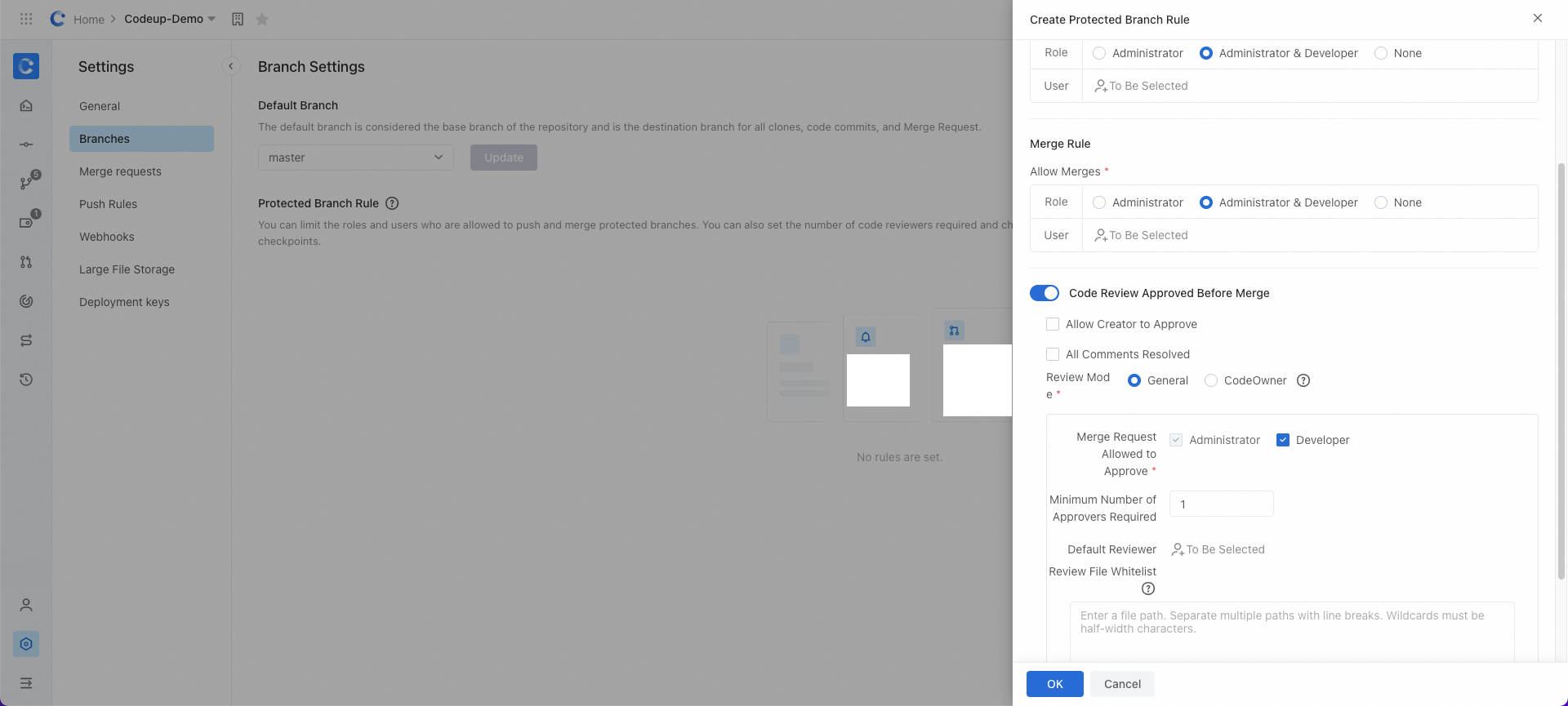
When the review file whitelist is configured and a review involves such files:
If the merge request contains only files within the whitelist, the merge request is not subject to the minimum number of required approvals. However, other conditions, such as resolving all comments and passing automated checks, still apply.
If the merge request partially contains files within the whitelist, all rules for the protected branch associated with the merge request remain in effect.