This topic describes the ASP SDK for Android.
1. Usage of the ASP SDK for Android
1.1. OS
Android version: Android 5.1 or later
1.2. Required file
aspengine-third-release.aar | The Android Archive (AAR) file defines the core APIs in the ASP SDK for Android. With this file, apps can control ASP key processes, such as starting or stopping streams, suspending or restoring streams, injecting input events, and receiving event messages. The file also defines enhanced UI components that have extensively integrated ASP capabilities. With these UI components, developers can build ASP-based apps in a quick manner. |
1.3. Sample - API operation usage
1.3.1. Integrate SDK by using a Maven repository
This integration method is coming soon.
1.3.2. Integrate SDK by integrating an AAR file
Copy aspengine-third-release.aar to the app/libs directory.
Add a library to the build.gradle file of an Android application module.
dependencies {
    implementation fileTree(include: ['*.jar', '*.aar'], dir: 'libs')
    // The INI file parsing library relied on aspengine-sdk.
    implementation 'org.ini4j:ini4j:0.5.4'
}
Declare application permissions in the AndroidManifest file.
<uses-permission android:name="android.permission.INTERNET" />Declare an activity in the AndroidManifest file.
// Forcibly display the UI orientation on a cloud computer in landscape mode.
<activity android:name=".ASPEngineDemoActivity"
          android:launchMode="singleTop"
          android:screenOrientation="sensorLandscape">
1.3.3.Sample
public class ASPEngineDemoActivity extends Activity
        implements ICursorListener, IResolutionUpdateListener, IOrientationUpdateListener {
    static final String TAG = "MainActivity";

    private SurfaceView mAspSurfaceView = null;

    private ASPEngine.Builder mEngineBuilder = null;
    private IASPEngine mEngine = null;

    @Override
    protected void onCreate(Bundle savedInstanceState) {
        super.onCreate(savedInstanceState);

        this.requestWindowFeature(Window.FEATURE_NO_TITLE);
        getWindow().setFlags(WindowManager.LayoutParams.FLAG_FULLSCREEN, WindowManager.LayoutParams.FLAG_FULLSCREEN);

        setContentView(R.layout.activity_main);

        mAspSurfaceView = findViewById(R.id.asp_surface_view);

        // Listen on messages of events occurred on touch screens and inject them into ASPEngine.
        mAspSurfaceView.setOnTouchListener(new View.OnTouchListener() {
            @Override
            public boolean onTouch(View view, MotionEvent motionEvent) {
                if (mEngine != null) {
                    return mEngine.sendTouchEvent(motionEvent);
                }
                return false;
            }
        });

        // Listen on messages of input events occurred on mouses and inject them into ASPEngine.
        mAspSurfaceView.setOnGenericMotionListener(new View.OnGenericMotionListener(){
            @Override
            public boolean onGenericMotion(View v, MotionEvent motionEvent) {
                Log.d(TAG,String.format("mouse, onGenericMotion: %d", motionEvent.getSource()));
                if (0 != (motionEvent.getSource() & InputDevice.SOURCE_MOUSE)) {
                    if (mEngine != null) {
                        return mEngine.sendMouseEvent(motionEvent);
                    }
                }
                return true;
            }
        });

        // Create a builder.
        mEngineBuilder = new IASPEngine.Builder();

        // Create an ASPEngine object.
        mEngine = mEngineBuilder.build();

        // Configure surface.
        mEngine.setSurface(mAspSurfaceView);

        IASPEngineListener listener = new IASPEngineListener() {
            @Override
            public void onConnectionSuccess() {
                // The server is connected.
                Log.i(TAG, "onConnectionSuccess");
            }

            @Override
            public void onConnectionFailure(int errorCode, String errorMsg) {
                // Failed to connect to the server.
                Log.i(TAG, "onConnectionFailure errorCode:" + errorCode + " errorMsg:" + errorMsg);
            }

            @Override
            public void onEngineError(int errorCode, String errorMsg) {
                // An internal error occurred in ASPEngine.
                Log.i(TAG, "onEngineError errorCode:" + errorCode + " errorMsg:" + errorMsg);
            }

            @Override
            public void onDisconnected(int reason) {
                // Disconnected.
                Log.i(TAG, "onDisconnected reason=" + reason);
            }

            @Override
            public void onReconnect() {
                // Reconnected.
                Log.i(TAG, "onReconnect");
            }
        };

        // Listen on connection and the internal status of ASPEngine.
        mEngine.registerASPEngineListener(listener);
        // Listen on the messages of cursor status changes of a cloud computer.
        mEngine.registerCursorListener(this);
        // Listen to the messages of resolution changes of a cloud computer.
        mEngine.registerResolutionUpdateListener(this);
        // Listen on the messages of screen orientation of a cloud computer.
        mEngine.registerOrientationUpdateListener(this);
    }

    /**
     * After you log on to the Alibaba Cloud OpenAPI Explorer platform, you can call the Elastic Desktop Service (EDS) API to obtain server session information and use
     * this method to start ASPEngine.
     *
     * As an application developer, you can log on to OpenAPI Explorer and call the EDS API. Refer to EDS documentation to call operations.
     *
     */
    protected void onGetServerSession(String session) {
        // Start ASPEngine.
        mEngine.start(session, null);
    }

    @Override
    protected void onDestroy() {
        super.onDestroy();
        if (mEngine != null) {
            mEngine.dispose();
            mEngine = null;
        }
    }

    @Override
    public boolean dispatchKeyEvent(KeyEvent event) {
        if (mEngine != null) {
            // Intercept and inject messages of input events occurred on keyboards.
            if (!mEngine.sendKeyboardEvent(event)) {
                return super.dispatchKeyEvent(event);
            }
            return true;
        }
        return super.dispatchKeyEvent(event);
    }

    /*
     * Cursor callback BEGIN
     * */
    @Override
    public void onCursorBitmapUpdate(int hotX, int hotY, int width, int height, byte[] rgba) {
        // If the cursor scheme changes on the cloud, synchronize the changes to the local device.
        Log.d(TAG,String.format("onCursorBitmapUpdate: hotX:%d, hotY:%d, width:%d, height:%d, len:%d :", hotX, hotY, width, height,rgba.length));
        //BitmapFactory.Options options = new BitmapFactory.Options();
        //options.inMutable = true;
        Bitmap rawBmp = Bitmap.createBitmap(width, height, Bitmap.Config.ARGB_8888);
        rawBmp.copyPixelsFromBuffer(ByteBuffer.wrap(rgba));
        if(rawBmp == null) {
            Log.i(TAG, "can't create cursor bitmap from rgba");
            return;
        }

        PointerIcon cursor = PointerIcon.create(rawBmp, hotX, hotY);
        mAspSurfaceView.setPointerIcon(cursor);
    }

    @Override
    public void onCursorHide()
    {
        // The cursor on a cloud computer is hidden.
        Log.i(TAG, "onCursorHide");
        PointerIcon cursor = PointerIcon.getSystemIcon(getApplicationContext(),PointerIcon.TYPE_NULL);
        mAspSurfaceView.setPointerIcon(cursor);
    }

    @Override
    public void onCursorReset() {
        // The cursor on a cloud computer is reset.
        Log.i(TAG, "onCursorReset");
        PointerIcon cursor = PointerIcon.getSystemIcon(getApplicationContext(),PointerIcon.TYPE_DEFAULT);
        mAspSurfaceView.setPointerIcon(cursor);
    }

    @Override
    public void onCursorMove(int x, int y) {
        // The cursor on a cloud computer is moved.
    }
    /* Cursor callback END */

    @Override
    public void onResolutionUpdate(int oldWidth, int oldHeight, int width, int height) {
        // The resolution of the cloud computer is changed. You can determine whether to scale the rendered content based on the aspect ratio.
        Log.i(TAG, "onResolutionUpdate stream ow " + oldWidth + " oh " + oldHeight
                + " w " + width + " h " + height);
        Log.i(TAG, "current view width " + mAspSurfaceView.getWidth()
                + " height " + mAspSurfaceView.getHeight());

        float factorX = 1f;
        float factorY = 1f;

        float aspectRatio  = 1.0f * width / height;
        float viewAspectRatio = 1.0f * mAspSurfaceView.getWidth() / mAspSurfaceView.getHeight();
        Log.i(TAG, "StreamView aspect ratio " + viewAspectRatio
                + " VS remote window aspect ratio " + aspectRatio);
        // TODO: suppose current device orientation is landscape
        if (viewAspectRatio > aspectRatio) {
            // Align stream content with view height for landscape
            int expectedWidth = (int) (mAspSurfaceView.getHeight() * aspectRatio);
            Log.i(TAG, "Expect width " + expectedWidth);
            factorX = 1.0f * expectedWidth / mAspSurfaceView.getWidth();
        } else {
            // Align stream content with view width for portrait
            int expectedHeight = (int) (mAspSurfaceView.getWidth() / aspectRatio);
            Log.i(TAG, "Expect height " + expectedHeight);
            factorY = 1.0f * expectedHeight / mAspSurfaceView.getHeight();
        }

        Log.i(TAG, "Calculate scale factor x " + factorX + " y " + factorY);

        mAspSurfaceView.setScaleX(factorX);
        mAspSurfaceView.setScaleY(factorY);
    }

    @Override
    public void onOrientationUpdate(int oldOrientation, int newOrientation) {
        // The screen rotation occurred on a cloud computer, which is synchronized to the client.
        Log.i(TAG, "onOrientationUpdate from " + oldOrientation + " to " + newOrientation);
        switch (newOrientation) {
            case IOrientationUpdateListener.ORIENTATION_0:
            case IOrientationUpdateListener.ORIENTATION_180:
                setRequestedOrientation(ActivityInfo.SCREEN_ORIENTATION_PORTRAIT);
                break;
            case IOrientationUpdateListener.ORIENTATION_90:
                setRequestedOrientation(ActivityInfo.SCREEN_ORIENTATION_LANDSCAPE);
                break;
            default:
                Log.i(TAG, "Unknown new orientation: " + newOrientation);
                break;
        }
    }
}
1.4. Sample - Use enhanced UI components
1.4.1. Integrate SDK by integrating an AAR file
Copy aspengine-thrid-release.aar to the app/libs directory.
Add a library to the build.gradle file of an Android application module.
dependencies {
    implementation fileTree(include: ['*.jar', '*.aar'], dir: 'libs')
    // The INI file parsing library relied on aspengine-sdk.
    implementation 'org.ini4j:ini4j:0.5.4'
}
Declare application permissions in the AndroidManifest file.
<uses-permission android:name="android.permission.INTERNET" />
<uses-permission android:name="android.permission.VIBRATE"/>
Declare an activity in the AndroidManifest file.
// Forcibly display the UI orientation on a cloud computer in landscape mode.
<activity android:name=".StreamViewDemoActivity"
          android:launchMode="singleTop"
          android:screenOrientation="sensorLandscape">
Configure the layout of an application.
<?xml version="1.0" encoding="utf-8"?>
<android.widget.RelativeLayout xmlns:android="http://schemas.android.com/apk/res/android"
    xmlns:app="http://schemas.android.com/apk/res-auto"
    xmlns:tools="http://schemas.android.com/tools"
    android:layout_width="match_parent"
    android:layout_height="match_parent"
    tools:context=".StreamViewDemoActivity">

    <com.aliyun.wuying.aspsdk.aspengine.ui.StreamView
        android:id="@+id/stream_view"
        android:layout_width="match_parent"
        android:layout_height="match_parent"
        android:focusableInTouchMode="true"
        android:focusable="true"
        android:focusedByDefault="true" />

</android.widget.RelativeLayout>
1.4.2 Sample
public class StreamViewDemoActivity extends Activity {
    private static final String TAG = "StreamViewDemoActivity";
    private StreamView mStreamView = null;

    private IASPEngineListener mListener = new IASPEngineListener() {
        @Override
        public void onConnectionSuccess() {
            Log.i(TAG, "onConnectionSuccess");
        }
        @Override
        public void onConnectionFailure(int errorCode, String errorMsg) {
            Log.i(TAG, "onConnectionFailure errorCode:" + errorCode + " errorMsg:" + errorMsg);
        }
        @Override
        public void onEngineError(int errorCode, String errorMsg) {
            Log.i(TAG, "onEngineError errorCode:" + errorCode + " errorMsg:" + errorMsg);
        }1
        @Override
        public void onDisconnected(int reason) {
            Log.i(TAG, "onDisconnected reason=" + reason);
        }
        @Override
        public void onReconnect() {
            Log.i(TAG, "onReconnect");
        }
    };

    @Override
    protected void onCreate(Bundle savedInstanceState) {
        super.onCreate(savedInstanceState);

        requestWindowFeature(Window.FEATURE_NO_TITLE);
        getWindow().setFlags(WindowManager.LayoutParams.FLAG_FULLSCREEN, WindowManager.LayoutParams.FLAG_FULLSCREEN);

        setContentView(R.layout.activity_stream_view_demo);

        mStreamView = findViewById(R.id.stream_view);

        mStreamView.setASPEngineListener(mListener);
    }

    /**
     * After you log on to the Alibaba Cloud OpenAPI Explorer platform, you can call the EDS API to obtain server session information and use
     * this method to start ASPEngine.
     *
     * As an application developer, you can log on to OpenAPI Explorer and call the EDS API. Refer to EDS documentation to call operations.
     *
     */
    protected void onGetServerSession(String session) {
        // Start ASPEngine and establish a connection to a cloud computer.
        Bundle config = new Bundle();
        config.putString(StreamView.CONFIG_CONNECTION_TICKET, session);
        mStreamView.start(mConfigs);
    }

    @Override
    protected void onDestroy() {
        super.onDestroy();
        mStreamView.dispose();
        mStreamView = null;
    }
}
2. API operations
2.1. IASPEngine.Builder
The builder to build an IASPEngine object.
2.1.1. Builder
The operation to build an IASPEngine builder.
public Builder()2.1.2. build
The operation to build an IASPEngine object.
public IASPEngine build()Return value:
Type | Description |
IASPEngine | The ASPEngine object. |
2.1.3. enableVDAagentCheck
The operation to forcibly check VDAgent availability when you establish connection. By default, VDAgent availability is forcibly checked.
If the parameter is set to true and VDAgent is unavailable when you establish a connection, an error occurs and the current connection ends.
We recommend that you do not set this parameter to false, unless you do so for internal debugging.
public IASPEngine.Builder enableVDAgentCheck(boolean enabled)Parameters:
Parameter | Type | Description |
enabled | boolean | Default value: true. The value true indicates that VDAgent availability is forcibly checked when you establish a connection. |
Return value:
Type | Description |
ASPEngine.Builder | The object. |
2.1.4. enableRTC
The operation to use real-time communication (RTC) to transmit stream data. By default, RTC is used.
public IASPEngine.Builder enableRTC(boolean enabled)2.2. IASPEngine
IASPEngine is the core operation of ASP SDK for Android, which can be used to perform the following operations:
Control streaming, such as starting or stopping streaming, suspending or restoring stream ingest, configuring the mouse in server mode.
Configure audio and video settings, such as video resolution and frames per second (FPS).
Inject input events to a cloud computer.
Provide a series of register methods to register listeners and listen on events on the cloud.
2.2.1. start
Starts streaming from the ServerSession obtained from PaaS. The streaming startup results are returned to apps in the IASPEngineListener callback.
public void start(String connectionTicket, String caFilePath)Parameters:
Parameter | Type | Description |
connectionTicket | string | The ServerSession string obtained from the Alibaba Cloud Workspace management and control platform when the specified application calls PaaS API. |
caFile | string | The absolute path of the certificate authority (CA) file, which is used to encrypt Transport Layer Security (TLS) communication. |
2.2.2 start
Starts streaming by using the specified server connection parameters. The streaming startup results are returned to apps in the IASPEngineListener callback.
This method is commonly used in routine debugging and suitable for scenarios in which the ASP server can be directly connected by bypassing a gateway (or when you obtain the address of a gateway and the token to access the gateway).
public void start(String host, String port, String udpPort, String caFilePath, String token, boolean enableTls)Parameters:
Parameter | Type | Description |
host | string | The IP address of an ASP serer or a gateway. |
port | string | The port number of an ASP server or a gateway. |
udpPort | string | The User Datagram Protocol (UDP) port number, which is used for Real-time Communication (RTC) data transmission. In most cases, the port number is the same as the value of port. |
caFile | string | The absolute path of the CA file, which is used to encrypt TLS communication. |
token | string | The token that is used to connect to a gateway. In most cases, the token is provided by the joint debugging personnel. |
enableTls | boolean | Specifies whether to use TLS to encrypt data. Valid values: true and false. |
2.2.3 stop
Immediately stops streaming in the cloud. When a connection stops, apps can obtain the disconnection message returned in the IASPEngineListener callback.
public void stop()2.2.4 pause
Suspends stream ingest in the cloud.
public void pause(IRemoteResult result)Parameter:
Parameter | Type | Description |
result | IRemoteResult | The result callback. The asynchronous callback result of this operation is not available. Apps can provide null as the argument. |
2.2.5 resume
Resumes stream ingest in the cloud.
public void resume(IRemoteResult result)Parameter:
Parameter | Type | Description |
result | IRemoteResult | The result callback. The asynchronous callback result of this operation is not available. Apps can provide null as the argument. |
2.2.6 enableStatistics
Enables or disables performance statistics returned by using the registered IStatisticsListener.
public void enableStatistics(boolean enable)Parameter:
Parameter | Type | Description |
enable | boolean | Valid values: true (default) and false. true indicates that ASPEngine periodically reports the statistics on performance and key running data by using the registered IStatisticsListener object. false indicates that performance statistics are not reported. |
2.2.7 toggleServerCursorMode
Enables or disables the cursor mode in the cloud. (This method is available soon.)
public void toggleServerCursorMode(boolean toggled)Parameter:
Parameter | Type | Description |
toggled | boolean | Valid values: true (default) and false. true indicates that the server cursor mode is enabled. ICursorListener is required to listen on events of cursor status changes, which must be configured for apps on the client. fasle indicates that the server cursor mode is disabled. |
2.2.8 setSurface
Configures a SurfaceView for ASPEngine.
After streaming is created on ASPEngine, you need to configure a SurfaceView to render streaming images.
void setSurface(SurfaceView surfaceView)Parameter:
Parameter | Type | Description |
surfaceView | android.view.SurfaceView | The SurfaceView object to display streaming images. |
2.2.9 setVideoProfile
Configures the resolution and frame rate for video streams.
The fps parameter is available soon.
public void setVideoProfile(int width, int height, int fps, IRemoteResult result)Parameters:
Parameter | Type | Description |
width | int | The width of the destination resolution. Unit: pixel. |
height | int | The height of the destination resolution. Unit: pixel. |
fps | int | The destination frame per second (FPS). |
result | IRemoteResult | The result callback. |
2.2.10 setImePreedit
Configures the preview text on the cloud after you obtain the preview of text input by using the local input method editor (IME).
This method is available soon.
public void setImePreedit(String preeditStr, IRemoteResult result)Parameters:
Parameter | Type | Description |
preeditStr | String | The preview of text input by using an IME. |
result | IRemoteResult | The result callback. |
2.2.11 setImeCommit
Commits text after the preview text input by using a local IME is committed to an input field.
This method is available soon.
public void setIMEPreedit(String commitStr, IRemoteResult result)Parameters:
Parameter | Type | Description |
commitStr | String | The preview of text input by using an IME. |
result | IRemoteResult | The result callback. |
2.2.12 setKeyboardLockModifiers
Configures the keyboard lock status.
This method is available soon.
public void setKeyboardLockModifiers(int modifiers, IRemoteResult result)Parameters:
Parameter | Type | Description |
modifiers | int | The keyboard lock status. |
result | IRemoteResult | The result callback. |
2.2.13 registerASPEngineListener
Registers IASPEngineListener to listen on the status of streaming connection and events of running errors.
public void registerASPEngineListener(IASPEngineListener listener)Parameters:
Parameter | Type | Description |
listener | IASPEngineListener | The listener to listen on the status of streaming connection and events of running errors. |
2.2.14 unregisterASPEngineListener
Cancels listening on the status of streaming connection and events of running errors.
public void unregisterASPEngineListener(IASPEngineListener listener)Parameter:
Parameter | Type | Description |
listener | IASPEngineListener | The listener for registration. |
2.2.15 registerIMEListener
Registers IIMEListener to listen on the events when an input field in the cloud gets focus and events of the position change of the IME UI element.
This method is available soon.
public void registerIMEListener(IIMEListener listener)Parameter:
Parameter | Type | Description |
listener | IIMEListener | The listener to listen on the events when an input field in the cloud gets focus and events of the position change of the IME UI element. |
2.2.16 unregisterIMEListener
Cancels listening on the events when an input field in the cloud gets focus and events of the position change of the IME UI element.
This method is available soon.
public void unregisterIMEListener(IIMEListener listener)Parameter:
Parameter | Type | Description |
listener | IIMEListener | The listener for registration. |
2.2.17 registerAudioVolumeListener
Registers IAudioVolumeListener to listen on the volume changes in the cloud.
This method is available soon.
public void registerAudioVolumeListener(IAudioVolumeListener listener)Parameter:
Parameter | Type | Description |
listener | IAudioVolumeListener | The listener to listen on the volume changes in the cloud. |
2.2.18 unregisterAudioVolumeListener
Cancels listening on the volume changes in the cloud.
This method is available soon.
public void unregisterAudioVolumeListener(IAudioVolumeListener)Parameter:
Parameter | Type | Description |
listener | IAudioVolumeListener | The listener for registration. |
2.2.19 registerResolutionUpdateListener
Registers IResolutionUpdateListener to listen on the resolution changes of video streams.
public void registerResolutionUpdateListener(IResolutionUpdateListener listener)Parameter:
Parameter | Type | Description |
listener | IResolutionUpdateListener | The listener to listen on the resolution changes of video streams. |
2.2.20 unregisterResolutionUpdateListener
Cancels listening on the resolution changes of video streams.
public void unregisterResolutionUpdateListener(IResolutionUpdateListener)Parameter:
Parameter | Type | Description |
listener | IResolutionUpdateListener | The listener for registration. |
2.2.21 registerCursorListener
Registers ICursorListener to listen on the cursor changes in the cloud.
public void registerCursorListener(ICursorListener listener)Parameter:
Parameter | Type | Description |
listener | ICursorListener | The listener to listen on the cursor changes in the cloud. |
2.2.22 unregisterCursorListener
Cancels listening on the cursor changes in the cloud.
public void unregisterCursorListener(ICursorListener listener)Parameter:
Parameter | Type | Description |
listener | ICursorListener | The listener for registration. |
2.2.23 registerOrientationUpdateListener
Registers IOrientationUpdateListener to listen on the events of screen orientation in the cloud.
public void registerOrientationUpdateListener(IOrientationUpdateListener listener)Parameter:
Parameter | Type | Description |
listener | IOrientationUpdateListener | The listener to listen on the events of screen orientation in the cloud. |
2.2.24 unregisterOrientationUpdateListener
Cancels listening on the events of screen orientation in the cloud.
public void unregisterOrientationUpdateListener(IOrientationUpdateListener listener)Parameter:
Parameter | Type | Description |
listener | IOrientationUpdateListener | The listener for registration. |
2.2.25 registerStatisticsListener
Registers IStatisticsListener to listen on the statistics on performance and events of key running data.
public void registerStatisticsListener(IStatisticsListener listener)Parameter:
Parameter | Type | Description |
listener | IStatisticsListener | The listener to listen on the statistics on performance and events of key running data. |
2.2.26 unregisterStatisticsListener
Cancels listening on the statistics on performance and events of key running data.
public void unregisterStatisticsListener(IStatisticsListener listener)Parameters:
Parameter | Type | Description |
listener | IStatisticsListener | The listener for registration. |
2.2.27 sendTouchEvent
Sends the message about a screen touch event to the cloud.
public boolean sendTouchEvent(MotionEvent event)Parameter:
Parameter | Type | Description |
event | android.view.MotionEvent | The message about a screen touch event. |
Return value:
Type | Description |
boolean | true indicates that the event is sent to the server, and false indicates that the event fails to be sent to the server. |
2.2.28 sendTouchEvent
Sends messages about screen touch events and asynchronously returns the result.
This method is available soon.
public void sendTouchEvent(MotionEvent event, IRemoteResult result)Parameters:
Parameter | Type | Description |
event | android.view.MotionEvent | The message about a screen touch event. |
result | IRemoteResult | The result callback. |
2.2.29 sendKeyboardEvent
Sends the message about a keystroke event to the cloud.
public boolean sendKeyboardEvent(KeyEvent event)Parameter:
Parameter | Type | Description |
event | android.view.KeyEvent | The message about a keystroke event. |
Return value:
Type | Description |
boolean | true indicates that the event is sent to the server, and false indicates that the event fails to be sent to the server. |
2.2.30 sendKeyboardEvent
Sends the message about a keystroke event to the cloud and asynchronously returns the result.
This method is available soon.
public void sendKeyboardEvent(KeyEvent event, IRemoteResult result)Parameters:
Parameter | Type | Description |
event | android.view.KeyEvent | The message about a keystroke event. |
result | IRemoteResult | The result callback. |
2.2.31 sendMouseEvent
Sends the message about a mouse event to the cloud.
public boolean sendMouseEvent(MotionEvent motionEvent)Parameters:
Parameter | Type | Description |
motionEvent | android.view.MotionEvent | The message about an Android motion event triggered by a mouse. |
Return value:
Type | Description |
boolean | true indicates that the event is sent to the server, and false indicates that the event fails to be sent to the server. |
2.2.32 sendMouseEvent
Sends the message about a mouse event to the cloud and asynchronously returns the result.
This method is available soon.
public void sendMouseEvent(MotionEvent motionEvent, IRemoteResult result)Parameters:
Parameter | Type | Description |
motionEvent | android.view.MotionEvent | The message about an Android motion event triggered by a mouse. |
result | IRemoteResult | The result callback. |
2.2.33 sendMouseEvent
Sends the message about a mouse event to the cloud.
public boolean sendMouseEvent(float x, float y, float axisValue, int action, int button, int state)Parameters:
Parameter | Type | Description |
x | float | The X-coordinate. |
y | float | The Y-coordinate. |
axisValue | float | The mouse wheel offset. |
action | int | The action of a mouse event. |
button | int | The value of the button pressed when a mouse event is triggered. |
state | int | The state of the button pressed when a mouse event is triggered. |
Return value:
Type | Description |
boolean | true indicates that the event is sent to the server, and false indicates that the event fails to be sent to the server. |
2.2.34 sendGamePadConnected
Sends the message about the connection to a gamepad device.
This method is available soon.
public boolean sendGamePadConnected(int id, int type)Parameters:
Parameter | Type | Description |
id | int | The gamepad ID. |
type | int | The combination of SOURCE_GAMEPAD, SOURCE_DPAD, and SOURCE_JOYSTICK. |
Return value:
Type | Description |
boolean | true indicates that the event is sent to the server, and false indicates that the event fails to be sent to the server. |
2.2.35 sendGamePadDisconnected
Sends the message about the disconnection from a gamepad device.
This method is available soon.
public boolean sendGamePadDisconnected(int id)Parameter:
Parameter | Type | Description |
id | int | The gamepad ID. |
Return value:
Type | Description |
boolean | true indicates that the event is sent to the server, and false indicates that the event fails to be sent to the server. |
2.2.36 sendGamePadEvent
Sends the message about a button pressing event on a gamepad device to the cloud.
This method is available soon.
public boolean sendGamePadEvent(int id,String event)Parameters:
Parameter | Type | Description |
id | int | The gamepad ID. |
event | String | The gamepad event in the JSON format. |
Return value:
Type | Description |
boolean | true indicates that the event is sent to the server, and false indicates that the event fails to be sent to the server. |
2.2.37 sendGamePadEvent
Sends the message about a button pressing event with a gamepad device to the cloud and asynchronously returns the result.
This method is available soon.
public void sendGamePadEvent(String event, IRemoteResult result)Parameters:
Parameter | Type | Description |
event | String | The gamepad event in the JSON format. |
result | IRemoteResult | The result callback. |
2.2.38 enableMouseMode
Enables or disables the mouse mode.
When the mouse mode is enabled, a virtual mouse appears on your screen.
public boolean enableMouseMode(boolean enabled)Parameter:
Parameter | Type | Description |
enabled | boolean | Valid values: true and false. true indicates that the mouse mode is enabled. false indicates that the mouse mode is disabled. |
Return value:
Type | Description |
boolean | true indicates that the mouse mode is enabled. false indicates that the mouse mode is disabled. |
2.2.39 enableDesktopMode
Configures whether to run ASPEngine in desktop mode. After you enable the desktop mode, ASPEngine converts all screen touch events to mouse events and sends the converted events to the server.
public void enableDesktopMode(boolean enabled)Parameter:
Parameter | Type | Description |
enabled | boolean | Valid values: true and false. true indicates that ASPEngine runs in desktop mode. false indicates that ASPEngine does not run in desktop mode. |
2.2.40 reconnect
Reconnects to a cloud computer when it is disconnected due to an exception.
In most cases, you can call this method to handle the disconnect reason=2200 error. Applications must call API operations to obtain the connection token to reconnect to the cloud computer.
public void reconnect(String connectionToken)Parameter:
Parameter | Type | Description |
connectionToken | String | The token obtained by calling API operations to connect to a cloud computer. |
2.2.41 dispose
Disconnects from a cloud computer and releases native resources. After you call this method, the related ASPEngine object becomes unavailable. Apps cannot use the same object to perform any streaming operations.
public void dispose()2.2.42 setMediaStreamPlayer
Configures whether to replace the default media engine built in the SDK with a custom media engine in an application. You can call this method only before you start or stop streaming.
boolean setMediaStreamPlayer(MediaStreamPlayer player);Parameter | Type | Description |
player | MediaStreamPlayer | The custom media engine of an application. |
Return value:
Type | Description |
boolean | Valid values: true and false. |
2.2.43 setAlignStreamResolutionWithSurfaceSize
Configures whether to automatically synchronize stream resolution to a SurfaceView for rendering on the client when streaming starts. By default, the resolution synchronization feature is enabled.
void setAlignStreamResolutionWithSurfaceSize(boolean aligned);Parameter | Type | Description |
aligned | boolean | Valid values: true and false. |
2.2.44 registerRequestSystemPermissionListener
Registers IRequestSystemPermissionListener to listen on the request sent by ASPEngine to apply for system permissions.
public void registerRequestSystemPermissionListener(IRequestSystemPermissionListener listener)Parameter:
Parameter | Type | Description |
listener | IRequestSystemPermissionListener | The listener to listen on the request sent by ASPEngine to apply for system permissions. |
2.2.45 unregisterRequestSystemPermissionListener
Cancels listening on the request sent by ASPEngine to apply for system permissions.
public void unregisterRequestSystemPermissionListener(IRequestSystemPermissionListener listener)Parameter:
Parameter | Type | Description |
listener | IRequestSystemPermissionListener | The listener for registration. |
2.2.46 mute
Configures whether to mute audio.
void mute(boolean muted);Parameter | Type | Description |
muted | boolean | Valid values: true and false. |
2.3 Listener
2.3.1 IRemoteResult
Obtains the remote call result when an application asynchronously configures or controls operations.
onSuccess
Notifies an application when a remote call is successful.
The feedback of successful execution for some processes in the cloud may be not returned. If the following response returned, the remote call is considered successful.
public void onSuccess()onFailure
Notifies an application when a remote call fails.
public void onFailure(int errorCode, String errorMsg)Parameters:
Parameter | Type | Description |
errorCode | int | An error code. |
errorMsg | String | An error message. |
onTimeout
Notifies an application when a remote call times out.
public void onTimeout()2.3.2 IASPEngineListener
Listens on the status of a streaming connection.
onConnectionSuccess
Notifies an application when a streaming connection is established.
public void onConnectionSuccess()onConnectionFailure
Notifies an application when a streaming fails to be established or an exception occurs.
public void onConnectionFailure(int errorCode, String errorMsg)Parameters:
Parameter | Type | Description |
errorCode | int | An error code. |
errorMsg | String | An error message. |
onEngineError
Notifies an application when an internal exception, such as a decoding error or status error, occurs in ASPEngine.
public void onEngineError(int errorCode, String errorMsg)Parameters:
Parameter | Type | Description |
errorCode | int | An error code. |
errorMsg | String | An error message. |
onDisconnected
Notifies an application when an application is disconnected from a cloud computer.
public void onDisconnected(int reason)Parameter:
Parameter | Type | Description |
reason | int | The reason why a cloud computer is disconnected. When error code 2200 is returned, it indicates that round-trip time (RTT) communication times out and the application is disconnected from the cloud computer due to an exception. In this case, the application can call the IASPEngine.reconnect operation to reconnect to the cloud computer. |
onReconnect
When an application reconnects to a cloud computer, this method is used to notify the application.
public void onReconnect()2.3.3 IIMEListener
Listens on the events when the focus state of an input field in the cloud changes and events when the position of the IME UI element changes.
onIMEFocusUpdate
Notifies an application when an input field in the cloud gets or loses focus.
public void onIMEFocusUpdate(boolean hasFocus)Parameter:
Parameter | Type | Description |
hasFocus | boolean | true indicates that an input field in the cloud gets focus, and false indicates that an input field in the cloud loses focus. |
onIMELocationUpdate
Notifies an application when the position of the IME UI element changes.
public void onIMELocationUpdate(int x, int y)Parameters:
Parameter | Type | Description |
x | int | The X-coordinate of the IME UI element on the screen of a cloud computer. |
y | int | The Y-coordinate of the IME UI element on the screen of a cloud computer. |
2.3.4 IAudioVolumeListener
Listens on the system volume changes in the cloud.
onAudioVolumeUpdate
Notifies an application when the system volume changes in the cloud.
public void onAudioVolumeUpdate(double volume)Parameter:
Parameter | Type | Description |
volume | double | The system volume in the cloud. |
2.3.5 IResolutionUpdateListener
Listens on resolution changes of video streams.
onResolutionUpdate
Notifies an application when the resolution of video streams changes.
public void onResolutionUpdate(int oldWidth, int oldHeight, int width, int height)Parameters:
Parameter | Type | Description |
oldWidth | int | The current resolution width. The value is 0 before rendering. |
oldHeight | int | The current resolution height. The value is -1 before rendering. |
width | int | The new resolution width. |
height | int | The new resolution height. |
2.3.6 ICursorListener
Listens on the cursor changes in the cloud, such as the changes of the cursor scheme and visibility.
onCursorBitmapUpdate
Notifies an application when the cursor scheme in the cloud changes.
public void onCursorBitmapUpdate(int hotX, int hotY, Bitmap bitmap)Parameters:
Parameter | Type | Description |
hotX | int | The X-coordinate of the cursor hotspot. |
hotY | int | The Y-coordinate of the cursor hotspot. |
bitmap | Bitmap | The cursor bitmap. |
onCursorReset
Notifies an application when the cursor in the cloud is reset.
public void onCursorReset()onCursorHide
Notifies an application when the cursor in the cloud is hidden.
public void onCursorHide()onCursorMove
Notifies an application when the cursor position in the cloud changes.
public void onCursorMove(int x, int y)Parameters:
Parameter | Type | Description |
x | int | The X-coordinate to which the cursor moves. |
y | int | The Y-coordinate to which the cursor moves. |
2.3.7 IOrientationUpdateListener
Listens on the events of screen orientation in the cloud.
onOrientationUpdate
Notifies an application when an event of screen orientation occurs in the cloud.
public void onOrientationUpdate(int oldOrientation, int newOrientation)Parameters:
Parameter | Type | Description |
oldOrientation | int | The current screen orientation in the cloud. |
newOrientation | int | The new screen orientation in the cloud. |
2.3.8 IStatisticsListener
Listens on the statistics on performance and events of key running data.
onStatisticsInfoUpdate
If an application calls the enableStatistics operation, ASPEngine regularly updates the statistics on performance and events of key running data and use this method to notify the application.
public void onStatisticsInfoUpdate(StatisticsInfo info)Parameter:
Parameter | Type | Description |
info | StatisticsInfo | The statistics on performance and events of key running data. |
StatisticsInfo
class StatisticsInfo {
   public int mReceiveFps = 0; // The number of frames per second (FPS) received on the client.
   public int mRenderFps = 0; // The number of FPS in rendering on the client.
   public double mDownstreamBandwithMBPerSecond = 0; // The downstream bandwidth. Unit: MB/s.
   public double mUpstreamBandwithMBPerSecond = 0; // The upstream bandwidth. Unit: MB/s.
   public long mP2pFullLinkageLatencyMS = -1; // The end-to-end latency. Unit: ms.
   // Currently, this value can be accurately represented only when a specific application is used in the guest OS.
   public long mNetworkLatencyMS = -1; // The RTT latency. Unit: ms.
   public double mLostRate = 0; // The packet loss rate.
   public long mServerRenderLatencyMS = -1; // The latency used for rendering on the server. Unit: ms.
   public long mServerEncoderLatencyMS = -1; // The latency used for coding on the server. Unit: ms.
   public long mServerTotalLatencyMS = -1; // The total latency on the server. Unit: ms.
}
2.3.9. IRequestSystemPermissionListener
Listens on the request sent by ASPEngine to apply for system permissions.
onRequestSystemPermission
Notifies an application when ASPEngine needs to apply for a system permission.
public void onRequestSystemPermission(SystemPermission permission)Parameter:
Parameter | Type | Description |
permission | SystemPermission | The permission that ASPEngine applies for. |
SystemPermission
enum SystemPermission {
    RECORD_AUDIO; // The recording permission.
}
2.3.10 IExtDeviceListener
Listens on the connection changes of storage devices or webcams.
 /**
 * The callback when a storage device connects to or disconnects from a cloud computer.
 * @param udisks The list of storage devices.
 */
void onUDisksUpdate(List<UDiskItem> udisks);

/**
 * The callback when a webcam connects to or disconnects from a cloud computer.
 * @param cameras The list of webcams.
 */
void onCamerasUpdate(List<CameraItem> cameras);
Device control:
After you obtain the device list, call the following operations to separately control a device:
Device of the UDiskItem class
/**
 * Obtains the current connection status of a device.
 * @return ConnectStatus.DISCONNECTED: The device is disconnected. ConnectStatus.CONNECTED: The device is connected.
 */
ConnectStatus getStatus();

/**
 * Obtains the name of the device.
 * @return The name of the device.
 */
String getName();

/**
 * Obtains the storage path in which the device is stored.
 * @return The storage path of the device.
 */
String getPath();

/**
 * Connects to the device.
 */
void connect();
/**
 * Disconnects from the device.
 */
void disConnect();
Device of the CameraItem class
/**
 * Obtains the current connection status of a device.
 * @return ConnectStatus.DISCONNECTED: The device is disconnected. ConnectStatus.CONNECTED: The device is connected.
 */
ConnectStatus getStatus();

/**
 * Obtains the name of the device.
 * @return The name of the device.
 */
String getName();

/**
 * Connects to the device.
 */
void connect();

/**
 * Disconnects from the device.
 */
void disConnect();

/**
 * Determines whether to preview an image.
 */
boolean isPreviewMirror();

/**
 *Configures a preview image.
 */
void setPreviewMirror(boolean mirror);
2.4 Static method
2.4.1 IASPEngine.setLogAdapter
Configures a global LoggerAdapter object. Applications implements the log redirection feature by inheriting and implementing the methods defined by LoggerAdapter.
public static void setLogAdapter(LoggerAdapter logAdapter)Parameter:
Parameter | Type | Description |
logAdapter | LoggerAdapter | The LoggerAdapter object provided by an application. |
LoggerAdapter
public interface LoggerAdapter {
    public void onLogMessage(String tag, String msg, LogLevel level);
}
2.5 StreamView
A StreamView is a RelativeLayout container whose child view contains at least one SurfaceView to render streaming images.
StreamView integrates ASPEngine and implements features such as ASP stream control, input injection, event prompt. With StreamView, the application can quickly integrate ASP capabilities.
2.5.1 Constant parameters
Parameter | Value type | Description |
CONFIG_HOST_ADDRESS | string | The address used by the ASP server or a gateway. |
CONFIG_PORT | string | The port number used by the ASP server or a gateway. |
CONFIG_USE_TLS | boolean | Specifies whether to use TLS to encrypt data. |
CONFIG_USE_VPC | boolean | Specifies whether the client is connected over a VPC. |
CONFIG_ENABLE_VDAGENT_CHECK | boolean | Specifies whether to check VDAgent availability when you establish connection. |
CONFIG_PREFER_RTC_TRANSPORT | boolean | Specifies whether to use RTC as the method to transmit data. |
CONFIG_TOKEN | string | The token to connect to a gateway. |
CONFIG_CA_FILE_PATH | string | The absolute path of the CA file, which is used to encrypt TLS communication. |
CONFIG_ENABLE_STATISTICS | boolean | Specifies whether to report performance statistics. If yes, additional performance data is provided in video streams. |
CONFIG_CONNECTION_TICKET | string | The ServerSession string obtained by calling Platform as a Service (PaaS) operations. |
2.5.2 start
Starts the streaming process based on the specified parameters.
public void start(Bundle configs)Parameter:
Parameter | Type | Description |
configs | android.os.Bundle | The configurations of ASP streaming. For applications, CONFIG_CONNECTION_TICKET or the information about connecting to the ASP server or a gateway is required. |
2.5.3 stop
Immediately stops streaming services in the cloud.
public void stop()2.5.4 dispose
Immediately stops the streaming service in the cloud and resets the internal state of StreamView. The activity needs to call this method when it receives the onDestroy message.
public void dispose()2.5.5 scaleStreamVideo
StreamView can resize streaming images based on the specified policy.
public void scaleStreamVideo(ScaleType scaleType)Parameter:
Parameter | Type | Description |
scaleType | StreamView | The policy to resize a streaming image. The following items describe common policies: ● FILL_STREAM_VIEW: Always stretches the streaming image to the same size as StreamView. When the aspect ratio of StreamView is not the same as that of the streaming image, this policy may cause image distortion. ● FIT_STREAM_CONTENT: Adjusts the rendering area of StreamView so that StreamView always renders streaming image content in the same aspect ratio. When this policy applies, the height and width of the streaming image cannot equal those of StreamView. |
2.5.6 enableDesktopMode
Configures whether to run StreamView in desktop mode. After the desktop mode applies, StreamView converts all screen touch events to mouse events and sends the events to the server.
public void enableDesktopMode(boolean enabled)Parameter:
Parameter | Type | Description |
enabled | boolean | Valid values: true and false. |
2.5.7 setASPEngineListener
Registers IASPEngineListener to listen on the status of streaming connection and events of running errors.
public void registerASPEngineListener(IASPEngineListener listener)Parameter:
Parameter | Type | Description |
listener | IASPEngineListener | The listener to listen on the status of streaming connection and events of running errors. |
2.5.8 setVideoProfile
Configures the resolution and frame rate for video streams.
The fps parameter is available soon.
public void setVideoProfile(int width, int height, int fps, IRemoteResult result)Parameters:
Parameter | Type | Description |
width | int | The width of the destination resolution. Unit: pixel. |
height | int | The height of the destination resolution. Unit: pixel. |
fps | int | The destination frame per second (FPS). |
result | IRemoteResult | The result callback. |
2.5.9 sendKeyEvent
Sends the message about a keystroke event to the cloud.
public boolean sendKeyEvent(KeyEvent event)Parameters:
Parameter | Type | Description |
event | android.view.KeyEvent | The message about a keystroke event. |
Return value:
Type | Description |
boolean | true indicates that the event is sent to the server, and false indicates that the event fails to be sent to the server. |
2.5.10 simulateMouseClick
Simulates sending mouse click events to the cloud.
Parameters:
Parameter | Type | Description |
leftButton | boolean | true indicates the simulation of a left-click event, and false indicates the simulation of a right-click event. |
2.5.11 getASPEngineDelegate
Obtains the delegate of IASPEngine instances in StreamView.
public ASPEngineDelegate getASPEngineDelegate()Return value:
Type | Description |
ASPEngineDelegate | The delegate of IASPEngine instances in StreamView. |
2.5.12 ASPEngineDelegate
ASPEngineDelegate is the delegate class of IASPEngine. StreamView can expose specific IASPEngine operations based on ASPEngineDelegate.
Applications can obtain an instance of this class based on StreamView.getASPEngineDelegate.
2.5.12.1 registerASPEngineListener
Registers IASPEngineListener to listen on the status of streaming connection and events of running errors.
public void registerASPEngineListener(IASPEngineListener listener)Parameters:
Parameter | Type | Description |
listener | IASPEngineListener | The listener to listen on the status of streaming connection and events of running errors. |
2.5.12.2 unregisterASPEngineListener
Cancels listening on the status of streaming connection and events of running errors.
public void unregisterASPEngineListener(IASPEngineListener listener)Parameters:
Parameter | Type | Description |
listener | IASPEngineListener | The listener for registration. |
2.5.12.3 registerStatisticsListener
Registers IStatisticsListener to listen on the statistics on performance and events of key running data.
public void registerStatisticsListener(IStatisticsListener listener)Parameters:
Parameter | Type | Description |
listener | IStatisticsListener | The listener to listen on the statistics on performance and events of key running data. |
2.5.12.4 unregisterStatisticsListener
Cancels listening on the statistics on performance and events of key running data.
public void unregisterStatisticsListener(IStatisticsListener listener)Parameters:
Parameter | Type | Description |
listener | IStatisticsListener | The listener for registration. |
2.5.12.5 enableMouseMode
Enables or disables the mouse mode.
public boolean enableMouseMode(boolean enabled)Parameters:
Parameter | Type | Description |
enabled | boolean | Valid values: true and false. true indicates that the mouse mode is enabled. false indicates that the mouse mode is disabled. |
Return value:
Type | Description |
boolean | true indicates that the mouse mode is enabled. false indicates that the mouse mode is disabled. |
2.5.12.6 setVideoProfile
Configures the resolution and frame rate for video streams.
public void setVideoProfile(int width, int height, int fps, IRemoteResult result)Parameters:
Parameter | Type | Description |
width | int | The width of the destination resolution. Unit: pixel. |
height | int | The height of the destination resolution. Unit: pixel. |
fps | int | The destination FPS. |
result | IRemoteResult | The result callback. |
2.5.12.7 sendKeyboardEvent
Sends the message about a keystroke event to the cloud.
public boolean sendKeyboardEvent(KeyEvent event)Parameters:
Parameter | Type | Description |
event | android.view.KeyEvent | The message about a keystroke event. |
Return value:
Type | Description |
boolean | true indicates that the event is sent to the server, and false indicates that the event fails to be sent to the server. |
2.5.12.8 sendKeyboardEvent
Sends the message about a keystroke event to the cloud and asynchronously returns the result.
This method is available soon.
public void sendKeyboardEvent(KeyEvent event, IRemoteResult result)Parameters:
Parameter | Type | Description |
event | android.view.KeyEvent | The message about a keystroke event. |
result | IRemoteResult | The result callback. |
2.5.12.9 sendMouseEvent
Sends the message about a mouse event to the cloud.
public boolean sendMouseEvent(MotionEvent motionEvent)Parameters:
Parameter | Type | Description |
motionEvent | android.view.MotionEvent | The message about an Android motion event triggered by a mouse. |
Return value:
Type | Description |
boolean | true indicates that the event is sent to the server, and false indicates that the event fails to be sent to the server. |
2.5.12.10 sendMouseEvent
Sends the message about a mouse event to the cloud and asynchronously returns the result.
This method is available soon.
public void sendMouseEvent(MotionEvent motionEvent, IRemoteResult result)Parameters:
Parameter | Type | Description |
motionEvent | android.view.MotionEvent | The message about an Android motion event triggered by a mouse. |
result | IRemoteResult | The result callback. |
2.5.12.11 enableDesktopMode
Configures whether to run ASPEngine in desktop mode. After you enable the desktop mode, ASPEngine converts all screen touch events to mouse events and sends the converted events to the server.
public void enableDesktopMode(boolean enabled)Parameters:
Parameter | Type | Description |
enabled | boolean | Valid values: true and false. |
2.5.12.12 reconnect
Reconnects to a cloud computer when it is disconnected due to an exception.
In most cases, you can call this method to handle the disconnect reason=2200 error. Applications must call API operations to obtain the connection token to reconnect to the cloud computer.
public void reconnect(String connectionToken)Parameters:
Parameter | Type | Description |
connectionToken | String | The token obtained by calling API operations to connect to a cloud computer. |
2.5.12.13 setMediaStreamPlayer
Configures whether to replace the default media engine built in the SDK with a custom media engine in an application. You can call this method only before you start or stop streaming.
boolean setMediaStreamPlayer(MediaStreamPlayer player);Parameter | Type | Description |
player | MediaStreamPlayer | The custom media engine of an application. |
Return value:
Type | Description |
boolean | Valid values: true and false. |
2.5.12.14 setAlignStreamResolutionWithSurfaceSize
Configures whether to automatically synchronize stream resolution to a SurfaceView for rendering on the client when streaming starts. By default, the resolution synchronization feature is enabled.
void setAlignStreamResolutionWithSurfaceSize(boolean aligned);Parameter | Type | Description |
aligned | boolean | Valid values: true and false. |
2.5.12.15 registerRequestSystemPermissionListener
Registers IRequestSystemPermissionListener to listen on the request sent by ASPEngine to apply for system permissions.
public void registerRequestSystemPermissionListener(IRequestSystemPermissionListener listener)Parameters:
Parameter | Type | Description |
listener | IRequestSystemPermissionListener | The listener to listen on the request sent by ASPEngine to apply for system permissions. |
2.5.12.16 unregisterRequestSystemPermissionListener
Cancels listening on the request sent by ASPEngine to apply for system permissions.
public void unregisterRequestSystemPermissionListener(IRequestSystemPermissionListener listener)Parameters:
Parameter | Type | Description |
listener | IRequestSystemPermissionListener | The listener for registration. |
2.5.12.17 mute
Configures whether to mute audio.
void mute(boolean muted);Parameter | Type | Description |
muted | boolean | Valid values: true and false. |
2.5.12.18 setToQualityFirst
Configures the quality-first mode, which can provide high image quality and a frame rate of up to 30 fps.
/**
 * Configures the quality-first mode, which can provide high image quality and a frame rate of up to 30 fps.
 */
void setToQualityFirst();
2.5.12.19 setToFpsFirst
Configures the smoothness-first mode, which can provide medium image quality and a frame rate of up to 60 fps.
/**
 * Configures the smoothness-first mode, which can provide medium image quality and a frame rate of up to 60 fps.
 */
void setToFpsFirst();
2.5.12.20 setToCustomPicture
Configures the custom mode, which can provide a custom frame rate and image quality.
 /**
  * Configures the custom mode, which can provide a custom frame rate and image quality.
  * @param Valid values of fps: 0 to 60. A higher frame rate indicates smoother response.
  * @param Valid values of quality: 0 to 4. 0: lossless, 1: high, 2: medium, 3: normal, and 4: auto.
  */
void setToCustomPicture(int fps, int quality);
Parameter | Type | Description |
fps | int | Valid values: 0 to 60. A higher frame rate indicates smoother response. |
quality | int | Valid values of quality: 0 to 4. 0: lossless, 1: high, 2: medium, 3: normal, and 4: auto. |
2.5.12.21 enableStatistics
Configures whether the enabling status of statistics-related feature is available.
void enableStatistics(boolean enabled);Parameter | Type | Description |
enabled | boolean | Valid values: true and false. |
3. Use a custom media engine to process media data
By implementing the com.aliyun.wuying.aspsdk.aspengine.MediaStreamPlayer class, applications can use custom media engines to process media streaming data, which mainly includes the following data:
Data of video streams: raw video streams that apply the H.264 or H.265 video compression standard
Data of adaptive video streams: bitmaps in video streams
Audio downstream data: audio downstream data flow coded by Opus or Pulse Code Modulation (PCM).
Cursor data: When the virtual mouse mode is enabled, applications can receive cursor images and bitmaps, which can be used to create virtual cursors.
Applications can call the IASPEngine.setMediaStreamPlayer operation to provide custom media engines to Alibaba Cloud Workspace SDK.
3.1 MediaStreamPlayer
MediaStreamPlayer is an abstract class that requires applications to implement the Initialize or Destroy method for global use and provides custom implementation to process different media data.

Take note of the following operations:
IVideoStreamHandler: defines the method to process video stream data.
IAdaptiveGraphicStreamHandler: defines the method to process adaptive image streams.
IAudioPlaybackStreamHandler: defines the method to process audio downstream data.
ICursorBitmap: defines the method to process cursor data.
Applications can choose to implement one or more preceding operations. Alibaba Cloud Workspace SDK can configure the type of cloud streaming based on the following rules:
If applications provide the implementation of IVideoStreamHandler and IAdaptiveGraphicStreamHandler, streaming is of the mixed type. Alibaba Cloud Workspace switches between image streams and video streams in different scenarios.
If applications provide only the implementation of IVideoStreamHandler, streaming is of the video stream type. The server provides only video streams.
If applications provide only the implementation of IAudioPlaybackStreamHandler, streaming is of the image stream type. The server provides only image streams.
Applications can provide custom implementations of different media data to Alibaba Cloud Workspace SDK by using a series of onCreateXXXHandler methods of MediaStreamPlayer.
    @Override
    protected IVideoStreamHandler onCreateVideoStreamHandler() {
        return new VideoStreamHandler();
    }

    @Override
    protected IAdaptiveGraphicStreamHandler onCreateAdaptiveGraphicStreamHandler() {
        return null;
    }

    @Override
    protected IAudioPlaybackStreamHandler onCreateAudioPlaybackStreamHandler() {
        return new AudioPlaybackStreamHandler();
    }

    @Override
    protected ICursorBitmapHandler onCreateCursorBitmapHandler() {
        return null;
    }
In the preceding code snippet, a custom media engine provides the implementations of IVideoStreamHandler and IAudioPlaybackStreamHandler, and the onCreateXXXHandler method is executed only once during a streaming process.
Process of calling main methods:
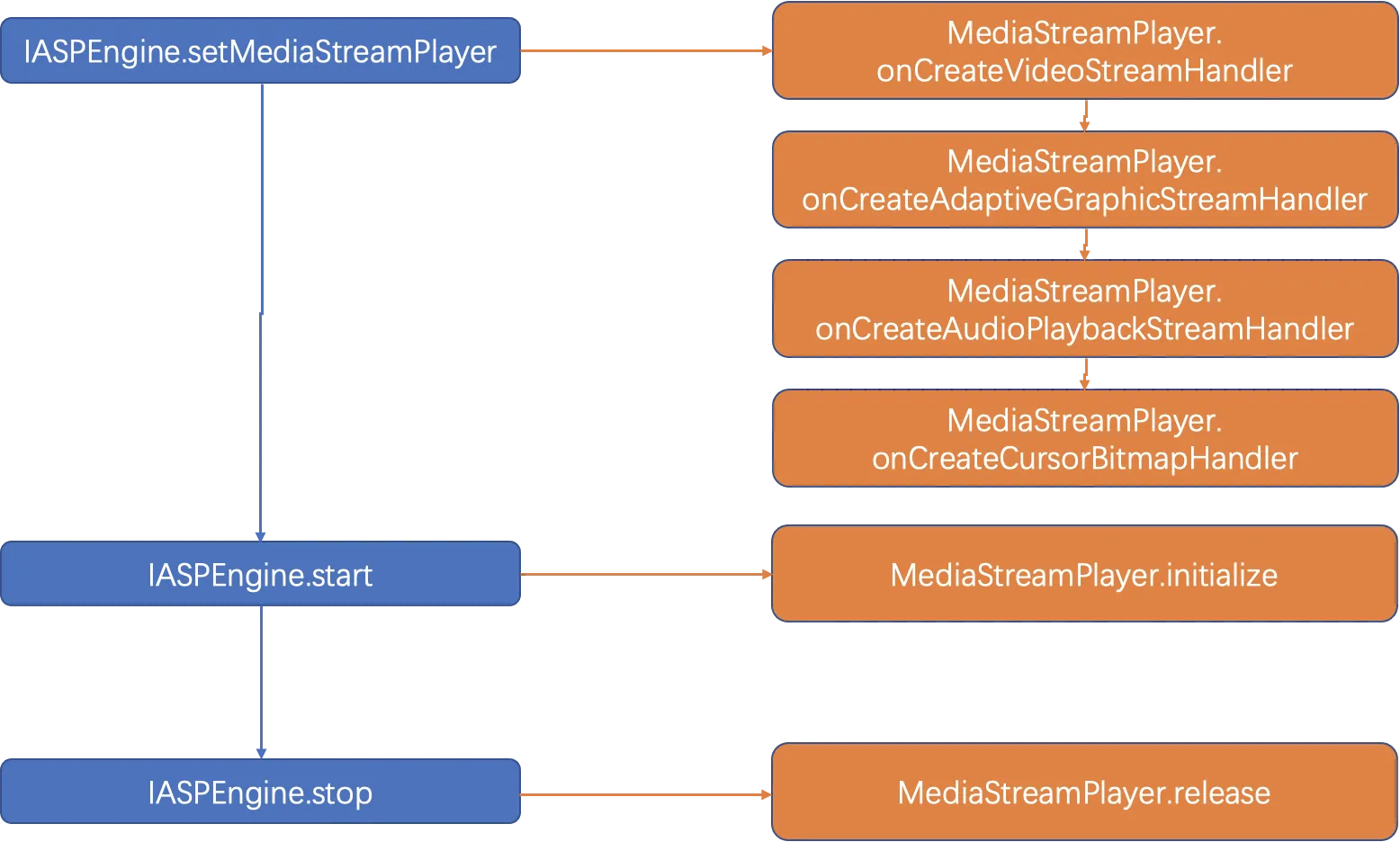
3.1.1 initialize
Initializes global custom media engines. This method is implemented by applications.
This method is executed once in each streaming process.
public ErrorCode initialize()Return value:
Type | Description |
ErrorCode | ErrorCode.OK indicates that a custom media engine is initialized. Otherwise, the media engine fails to be initialized. |
3.1.2 release
Releases global custom media engines. This method is implemented by applications.
This method is executed once in each streaming process.
public ErrorCode release()Return value:
Type | Description |
ErrorCode | ErrorCode.OK indicates that a custom media engine is released. Otherwise, the media engine fails to be released. |
3.1.3 enableStatistics
Configures whether to enable the performance statistic collection. This method is implemented by applications.
public void enableStatistics(boolean enabled)Parameter:
Parameter | Type | Description |
enabled | boolean | Valid values: true and false. |
3.1.4 onCreateVideoStreamHandler
Provides Alibaba Cloud Workspace SDK with a media engine implementation to process video stream data. This method is implemented by applications.
This method is executed once in each streaming process.
public IVideoStreamHandler onCreateVideoStreamHandler()Return value:
Type | Description |
IVideoStreamHandler | Implemented by the media engine provided by an application for video stream data processing. If the application does not provide any implementation of video stream processing, null is returned. In this case, video stream data is not processed. |
3.1.5 onCreateAdaptiveGraphicStreamHandler
Provides Alibaba Cloud Workspace SDK with a media engine implementation to process adaptive image stream data. This method is implemented by applications.
This method is executed once in each streaming process.
public IAdaptiveGraphicStreamHandler onCreatAdaptiveGraphicStreamHandler()Return value:
Type | Description |
IAdaptiveGraphicStreamHandler | Implemented by the media engine provided by an application for adaptive image stream data processing. If the application does not provide any implementation of adaptive image stream processing, null is returned. In this case, image stream data is not processed. |
3.1.6 onCreateAudioPlaybackStreamHandler
Provides Alibaba Cloud Workspace SDK with a media engine implementation to process audio downstream data. This method is implemented by applications.
This method is executed once in each streaming process.
public IAudioPlaybackStreamHandler onCreatAudioPlaybackStreamHandler()Return value:
Type | Description |
IAudioPlaybackStreamHandler | Implemented by the media engine provided by an application for audio downstream data processing. If the application does not provide any implementation of audio downstream data processing, null is returned. In this case, audio downstream data is not processed. |
3.1.7 onCreateCursorBitmapHandler
Provides Alibaba Cloud Workspace SDK with a media engine implementation to process cursor data. This method is implemented by applications.
This method is executed once in each streaming process.
Operation implementations based on this method are available only when the virtual mouse mode is enabled.
public ICursorBitmapHandler onCreatCursorBitmapHandler()Return value:
Type | Description |
ICursorBitmapHandler | Implemented by the media engine provided by an application for cursor data processing. If the application does not provide any implementation of cursor data processing, null is returned. In this case, cursor data is not processed. |
3.2 IVideoStreamHandler
Defines the main methods to process data streams.
When an application is switched between foreground and background, the surface used for rendering is destroyed or rebuilt. In this case, IVideoStreamHandler.setVideoSurface is frequently called. When the surface is destroyed, the surface object passed through setVideoSurface is null. Then, the application must handle load tolerance of decoders and renderers.
The application can obtain the event handling operations provided by Alibaba Cloud Workspace SDK by implementing methods defined in the IVideoStreamHandler.setEventHandler operation. With this operation, the application can notify Alibaba Cloud SDK about the video handling events of custom media engines. This operation is mainly used to collect performance statistics.
    @Override
    public void setEventHandler(EventHandler handler) {
        Log.i(TAG, "setEventHandler handler " + handler);
        VideoStreamEventHandler.getInstance().reset(handler);
    }

...

    public synchronized void onVideoFrameRendered() {
        VFrame frame = mVideoFrame.remove();
        if (mEnabled && mHandler != null) {
            Event event = new Event();
            event.type = EventType.RENDER_PERF_INFO;
            event.decodePerfInfo = new VDecodePerfInfo();
            event.renderPerfInfo = new VRenderPerfInfo();
            event.renderPerfInfo.frameId = frame.frameId;
            event.renderPerfInfo.sessionId = frame.sessionId;
            // Notify Alibaba Cloud Workspace SDK that a frame of video image is rendered. Then, the internal SDK system calculates end-to-end latency based on the frame ID.
            mHandler.callback(event);
        }
    }
3.2.1 setEventHandler
Sends video stream events. When Alibaba Cloud Workspace SDK loads custom media engines, the uses this method to provide EventHandler to applications. Then, the applications can use the handler to send video stream processing events. This method is implemented by applications.
public void setEventHandler(EventHandler handler)Parameter:
Parameter | Type | Description |
handler | EventHandler | The handler provided by Alibaba Cloud Workspace SDK. An application can use this handler to send video stream processing events to the SDK. |
3.2.2 addVideoTrack
Notifies an application when a video stream is created. This method is implemented by the applications.
Only one video stream exists in a streaming process.
ErrorCode addVideoTrack(int trackId, VProfile profile);Parameters:
Parameter | Type | Description |
trackId | int | The ID of a video stream. |
profile | VProfile | The information about a video stream. |
Return value:
Type | Description |
ErrorCode | ErrorCode.OK indicates that the method is executed. Otherwise, the method fails to be executed. |
3.2.3 setVideoSurface
Notifies an application when the status of the surface for video rendering changes. This method is implemented by applications.
ErrorCode setVideoSurface(int trackId, Surface surface);Parameters:
Parameter | Type | Description |
trackId | int | The ID of a video stream. |
surface | android.view.Surface | The surface used to render videos. When an application is switched to the background or a screen lock occurs, the surface can be null. |
Return value:
Type | Description |
ErrorCode | ErrorCode.OK indicates that the method is executed. Otherwise, the method fails to be executed. |
3.2.4 playVideo
Notifies an application when video streams are already. This method is implemented by applications.
ErrorCode playVideo(int trackId);Parameter:
Parameter | Type | Description |
trackId | int | The ID of a video stream. |
Return value:
Type | Description |
ErrorCode | ErrorCode.OK indicates that the method is executed. Otherwise, the method fails to be executed. |
3.2.5 removeVideoTrack
Notifies an application when video streams are destroyed. This method is implemented by applications.
ErrorCode removeVideoTrack(int trackId);Parameter:
Parameter | Type | Description |
trackId | int | The ID of a video stream. |
Return value:
Type | Description |
ErrorCode | ErrorCode.OK indicates that the method is executed. Otherwise, the method fails to be executed. |
3.2.6 pushVideoFrame
Notifies an application when new video frames are received. This method is implemented by applications.
ErrorCode setVideoSurface(int trackId, Surface surface);Parameters:
Parameter | Type | Description |
trackId | int | The ID of a video stream. |
frame | VFrame | The information about a newly received video frame. |
Return value:
Type | Description |
ErrorCode | ErrorCode.OK indicates that the method is executed. Otherwise, the method fails to be executed. |
3.2.7 getVideoTracks
Obtains the information about all video streams under processing from applications. This method is implemented by applications.
HashMap<Integer, VProfile> getVideoTracks();Return value:
Type | Description |
HashMap<Integer, VProfile> | The information about all video streams under processing obtained from an application. |
3.2.8 release
Notifies an application to clean residuals when all video streams are destroyed. This method is implemented by applications.
ErrorCode release();Return value:
Type | Description |
ErrorCode | ErrorCode.OK indicates that the method is executed. Otherwise, the method fails to be executed. |
3.3 IAudioPlaybackStreamHandler
Defines the main methods to process audio streams.
3.3.1 initAudio
Notifies an application when an audio channel is created in SDK. This method is implemented by applications.
ErrorCode initAudio();Return value:
Type | Description |
ErrorCode | ErrorCode.OK indicates that the method is executed. Otherwise, the method fails to be executed. |
3.3.2 deInitAudio
Notifies an application when an audio channel is destroyed in SDK. This method is implemented by applications.
ErrorCode deInitAudio();Return value:
Type | Description |
ErrorCode | ErrorCode.OK indicates that the method is executed. Otherwise, the method fails to be executed. |
3.3.3 startAudioPlayback
Notifies an application when a cloud computer is about to push audio streams. This method is implemented by applications.
ErrorCode startAudioPlayback();Return value:
Type | Description |
ErrorCode | ErrorCode.OK indicates that the method is executed. Otherwise, the method fails to be executed. |
3.3.4 stopAudioPlayback
Notifies an application when a cloud computer stops pushing audio streams. This method is implemented by applications.
ErrorCode stopAudioPlayback();Return value:
Type | Description |
ErrorCode | ErrorCode.OK indicates that the method is executed. Otherwise, the method fails to be executed. |
3.3.5 pushAudioPlaybackFrame
Notifies an application when a new downstream audio frame is received. This method is implemented by applications.
ErrorCode pushAudioPlaybackFrame(AFrame pbData);Parameter:
Parameter | Type | Description |
pbData | AFrame | The information about a newly received audio stream. |
Return value:
Type | Description |
ErrorCode | ErrorCode.OK indicates that the method is executed. Otherwise, the method fails to be executed. |
3.3.6 updateAudioPlaybackVol
Notifies an application when the volume of a cloud computer changes. This method is implemented by applications.
ErrorCode updateAudioPlaybackVol(int volume);Parameter:
Parameter | Type | Description |
volume | int | The system volume of a cloud computer. Valid values: 0 to USHRT_MAX. |
Return value:
Type | Description |
ErrorCode | ErrorCode.OK indicates that the method is executed. Otherwise, the method fails to be executed. |
3.3.7 updateAudioPlaybackMute
Notifies an application when a cloud computer is muted or unmuted. This method is implemented by applications.
ErrorCode updateAudioPlaybackMute(int mute);Parameter:
Parameter | Type | Description |
mute | int | Specifies whether to mute a cloud computer. Valid values: 1 and 0. 1 indicates the cloud computer is muted, and 0 indicates that the cloud computer is unmuted. |
Return value:
Type | Description |
ErrorCode | ErrorCode.OK indicates that the method is executed. Otherwise, the method fails to be executed. |
3.3.8 release
Notifies an application to clean residuals when an audio channel is destroyed. This method is implemented by applications.
ErrorCode release();Return value:
Type | Description |
ErrorCode | ErrorCode.OK indicates that the method is executed. Otherwise, the method fails to be executed. |
3.4 IAdaptiveGraphicStreamHandler
Defines the main methods to process image streams.
The image stream frame format uses bitmaps obtained by applications uses the ARGB_8888 format.
Only one image stream exists in a streaming process.
3.4.1 setAdaptiveGraphicSurface
Notifies an application when the status of the surface used for image rendering changes. This method is implemented by applications.
ErrorCode setAdaptiveGraphicSurface(Surface surface);Parameter:
Parameter | Type | Description |
surface | android.view.Surface | The surface used for image rendering. When an application is switched to the background or a screen lock occurs, the surface can be null. |
Return value:
Type | Description |
ErrorCode | ErrorCode.OK indicates that the method is executed. Otherwise, the method fails to be executed. |
3.4.2 invalidateAdaptiveGraphicSurface
Notifies an application when a new image frame is received. This method is implemented by applications.
ErrorCode invalidateAdaptiveGraphicSurface(Region region, byte[] buffer, BitmapFormat format);Parameters:
Parameter | Type | Description |
region | Region | The region in which an image frame is drawn. |
buffer | byte[] | The image frame data. |
format | BitmapFormat | The bitmap format of an image frame. Default value: ARGB8888. |
Return value:
Type | Description |
ErrorCode | ErrorCode.OK indicates that the method is executed. Otherwise, the method fails to be executed. |
3.4.3 release
Notifies an application to clean residuals when an image stream is destroyed. This method is implemented by applications.
ErrorCode release();Return value:
Type | Description |
ErrorCode | ErrorCode.OK indicates that the method is executed. Otherwise, the method fails to be executed. |
3.5 ICursorBitmapHandler
Defines the main methods to process cursor data. When the virtual mouse mode is enabled, applications provide the implementation of this operation to SDK, which can be used to draw cursor images.
3.5.1 setCursorBitmap
Notifies an application when the status of the cursor scheme on a cloud computer changes. This method is implemented by applications.
ErrorCode setCursorBitmap(CursorBitmap bitmap);Parameter:
Parameter | Type | Description |
bitmap | CursorBitmap | The cursor scheme data of a cloud computer. |
Return value:
Type | Description |
ErrorCode | ErrorCode.OK indicates that the method is executed. Otherwise, the method fails to be executed. |
3.5.2 unsetCursorBitmap
Notifies an application when the cursor on a cloud computer is hidden. This method is implemented by applications.
ErrorCode unsetCursorBitmap();Return value:
Type | Description |
ErrorCode | ErrorCode.OK indicates that the method is executed. Otherwise, the method fails to be executed. |
3.5.3 setCursorPosition
Notifies an application when the status of the cursor scheme on a cloud computer changes. This method is implemented by applications.
ErrorCode setCursorPosition(float x, float y);Parameters:
Parameter | Type | Description |
x | float | The X-coordinate of the cursor. |
y | float | The Y-coordinate of the cursor. |
Return value:
Type | Description |
ErrorCode | ErrorCode.OK indicates that the method is executed. Otherwise, the method fails to be executed. |
3.5.4 release
Notifies an application to clean residuals when a cloud computer is disconnected and the cursor is not displayed. This method is implemented by applications.
ErrorCode release();Return value:
Type | Description |
ErrorCode | ErrorCode.OK indicates that the method is executed. Otherwise, the method fails to be executed. |
4. Attachments
4.1 Demo
4.2 SDK
All documents, SDKs, and client programs of this platform are for restricted use by you or your organization. You shall not share these resources to any third parties or other organizations without the prior consent of Alibaba Cloud.