In a hybrid cloud WAF deployment, security detection logs are generated on-premises and need to flow into your centralized monitoring stack. This document describes how to configure WAF to deliver those logs to a syslog server or Kafka cluster, and how to manage delivery settings per protected object.
Prerequisites
Before you begin, make sure you have:
A subscription WAF instance running the Enterprise or Ultimate edition with hybrid cloud mode enabled, and Simple Log Service (SLS) for WAF activated
The domain name added as a protected object (required if the domain is integrated via hybrid cloud - SDK integration mode). See Configure protected objects and protected object groups
The hybrid cloud WAF image upgraded to the latest version
Create a delivery configuration
A delivery configuration defines the target platform and connection settings. You can create multiple configurations and apply the same configuration to different protected objects for centralized log management.
Log on to the WAF 3.0 console. In the top navigation bar, select the resource group and region. You can select Chinese Mainland or Outside Chinese Mainland.
In the left-side navigation pane, choose Detection and Response > Log Service. In the upper-right corner, click Log Configuration.
On the Default Field Settings tab, configure the default field settings for delivery. All fields in the logs are delivered. For the full list of log fields, see Log fields.
Click the Delivery Settings tab.
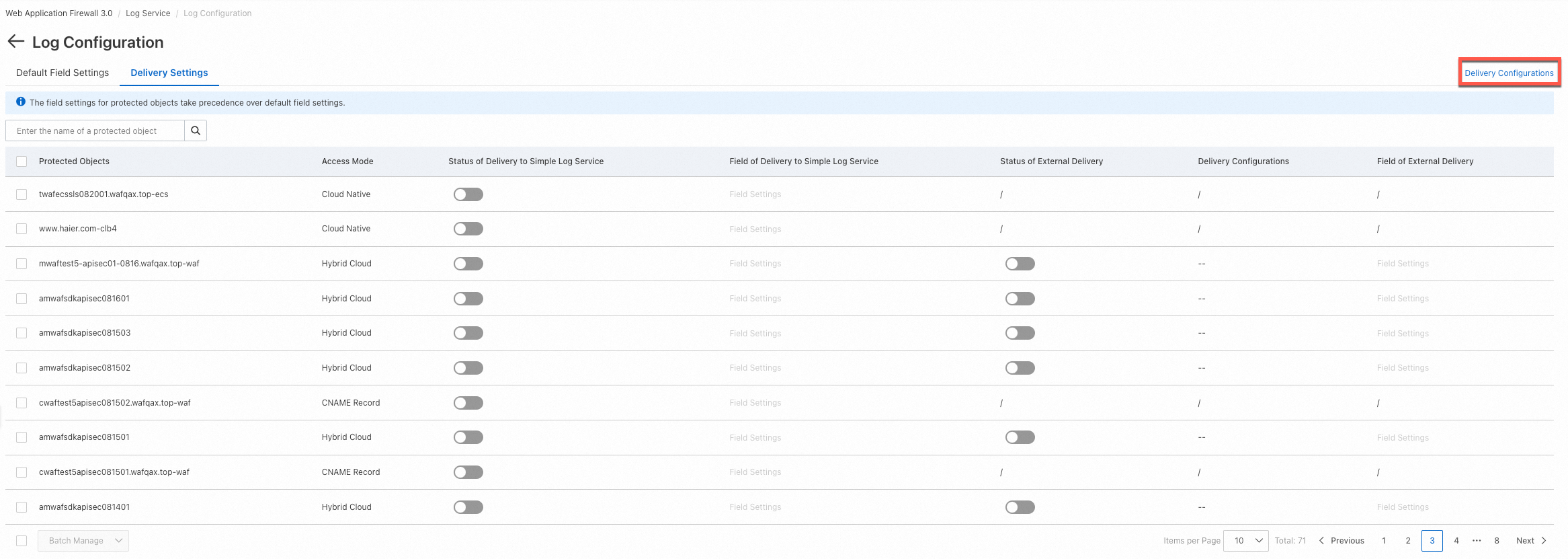
In the upper-right corner, click Delivery Configurations. The Delivery Configurations panel opens. To create your first configuration, click Configure External Delivery.
Select your target platform type, fill in the parameters for that platform, then click OK.
After a delivery configuration is applied to a hybrid cloud protected object and external delivery is enabled, you cannot delete the configuration directly. Disable external delivery for the protected object first, then delete the configuration.
Syslog parameters
| Parameter | Description |
|---|---|
| Configuration Item | The name of the delivery configuration. Must be 1–100 characters. Allowed characters: letters, digits, periods (.), underscores (_), and hyphens (-). The name cannot be changed after creation. |
| Server IP Address/Port | The IP address and port of the syslog server that receives the logs. |
| RFC | The Request for Comments (RFC) standard that defines the syslog protocol. |
| Protocol | The transport layer protocol. Valid values: TCP and UDP. |
Kafka parameters
| Parameter | Description |
|---|---|
| Configuration Item | The name of the delivery configuration. Must be 1–100 characters. Allowed characters: letters, digits, periods (.), underscores (_), and hyphens (-). The name cannot be changed after creation. |
| Topic ID/Name | The ID or name of the Kafka topic to receive the logs. |
| Domain Name | The domain name whose logs you want to deliver. Make sure the domain name is reachable. |
| Protocol | The security protocol for the connection. Options: PLAINTEXT (no encryption or authentication), SASL_PLAINTEXT (authentication only, no encryption), or SASL_SSL (encryption and authentication). |
| Compression Type | The compression format for delivered logs. Valid values: none, gzip, zstd, lz4, and snappy. |
| Custom CA | A custom Certificate Authority (CA) certificate for the connection. |
Enable or disable delivery for a protected object
After you create a delivery configuration, apply it to specific protected objects.
On the Delivery Settings page, find the protected object you want to manage.
Click the
 icon in the Status of External Delivery column to enable delivery for that object.
To verify delivery is working, log on to your syslog or Kafka platform and confirm that logs are arriving in real time.
To disable delivery, return to the Delivery Settings page and toggle off the switch in the Status of External Delivery column for the protected object.
After you enable external delivery, only new logs are delivered. Historical logs are not backfilled.
Batch operations: To enable or disable delivery for multiple protected objects at once, select them in the list, click Batch Manage below the list, then select Enable External Delivery or Disable External Delivery. In a single batch operation, the same delivery configuration is applied to all selected objects.
Change the delivery configuration: To switch a protected object to a different delivery configuration, disable external delivery for that object, then re-enable it and select the new configuration.
Configure log fields for delivery
Default fields (all protected objects): On the Default Field Settings tab, configure field settings that apply to all delivery tasks. See Configure log fields to be delivered.
Custom fields (per protected object): In the Field of External Delivery column, click Field Settings for a specific protected object to override the default field settings for that object. For field descriptions, see Log fields.