This topic describes common issues that you may encounter and their solutions when you configure protection settings in Web Application Firewall (WAF) 3.0.
Finding a specific protection rule ID
If you cannot find a specific rule ID in the WAF console, check the following items based on the rule type:
Find a built-in Core Web Protection rule
Log on to the Web Application Firewall 3.0 console. In the top navigation bar, select the resource group and region (Chinese Mainland or Outside Chinese Mainland) of your WAF instance.
In the left-side navigation pane, choose .
Find and expand the target protection template, and click Configure Engine in the Actions column.
On the Configure Engine page, search for the rule.
Find a custom rule
To find a custom rule for other modules under Core Web Protection, such as Custom Rule, HTTP Flood Protection, or Scanning Protection, follow these steps:
In the left-side navigation pane, choose .
Search for the rule on the page.
Find a whitelist rule
In the left-side navigation pane, choose .
Search for the rule on the page.
Find a Bot Management rule
Web Protection built-in rules
In the left-side navigation pane, choose .
In the Protection Rule ID drop-down list, enter a rule ID, such as
23009863, to search for the corresponding Bot Management rule.
App Protection built-in rules
In the left-side navigation pane, choose .
Search for the rule on the page.
Advanced Custom Rules
In the left-side navigation pane, choose .
Search for the rule on the page.
The protection rule was deleted
If you cannot find the rule in any of the preceding locations, the rule may have been deleted. You can use ActionTrail to check for events named DeleteDefenseRule or DeleteDefenseTemplate. For more information, see Query events in the ActionTrail console.
Meaning of acl_action:block in WAF logs
The acl_action:block field does not necessarily mean that the request was blocked. If acl_test is true, it indicates that observation mode is enabled. In this mode, WAF only records logs and does not trigger protection actions such as blocking. To determine whether a request was actually blocked, check the final_action field. A value of final_action:block indicates that the request was blocked.
Ineffective custom rule with the Body Parameter field
A possible cause is that the specified match content is too short. For traffic to be detected when you use the Body Parameter field, the match content must be longer than four characters. For example, you can set the parameter name to name, the logical operator to equals, and the match content to David. The value has a length of 5, which is greater than four characters.
Bypassing HTTP Flood Protection for a domain
If you need to bypass HTTP Flood Protection for requests to a specific domain, you can use one of the following methods.
Whitelist rule
(Optional) Add the domain you want to exclude from HTTP Flood Protection as a protection object. For more information, see Manually add a protection object. This step is required only for domains in an ALB instance.
Create a whitelist rule. Set Bypassed Modules to HTTP Flood Protection and Apply To to the domain that you want to bypass. For more information, see whitelist.
After you complete these steps, WAF bypasses HTTP Flood Protection for requests to the whitelisted domain.
HTTP Flood Protection rule
Domain not in an ALB instance
Create an HTTP Flood Protection rule. Set the rule template's Apply To field to the domain that you want to bypass. For more information, see Set up HTTP flood protection rules to defend against CC attacks.
Turn off the Status switch for the HTTP Flood Protection rule.
After you complete these steps, HTTP Flood Protection is bypassed for requests to the specified domain.
Domain in an ALB instance
Add all domains in the ALB instance as protection objects. For more information, see Manually add a protection object.
Create two HTTP Flood Protection rules. For more information, see Set up HTTP flood protection rules to defend against CC attacks.
The following list describes the rule requirements:
Rule A: Set Protection Mode to Standard Mode or Strict Mode based on your business requirements. Set Apply To to the domains in the ALB instance that you want to protect against CC attacks.
Rule B: Set Apply To to the ALB instance and the domains that you want to bypass.
Turn on the Status switch for Rule A and turn off the Status switch for Rule B.
After you complete these steps, requests to domains in Rule A are protected against CC attacks, while requests to domains in Rule B bypass this protection.
Ineffective rules for URLs with double slashes (//)
The WAF rule engine normalizes URLs by compressing consecutive forward slashes (/) into a single slash. Therefore, a custom rule configured to match a URL with double slashes (//) will not trigger.
If you need to configure ACL access control for a URL that contains a double slash (//), you can directly use the corresponding single-slash path as the match condition. For example, if you want to match the URL path //api/sms/request, you only need to enter /api/sms/request as the match content. WAF will then apply access control to requests that contain this path.
Investigating a WAF block with a request ID
When WAF blocks a request, a unique request ID is returned in the response. You can use this ID to search for details in Security Reports or logs to identify why the request was blocked.
Obtain the request ID: When a request is blocked, the block page displays the request ID by default. Copy the ID for subsequent queries.
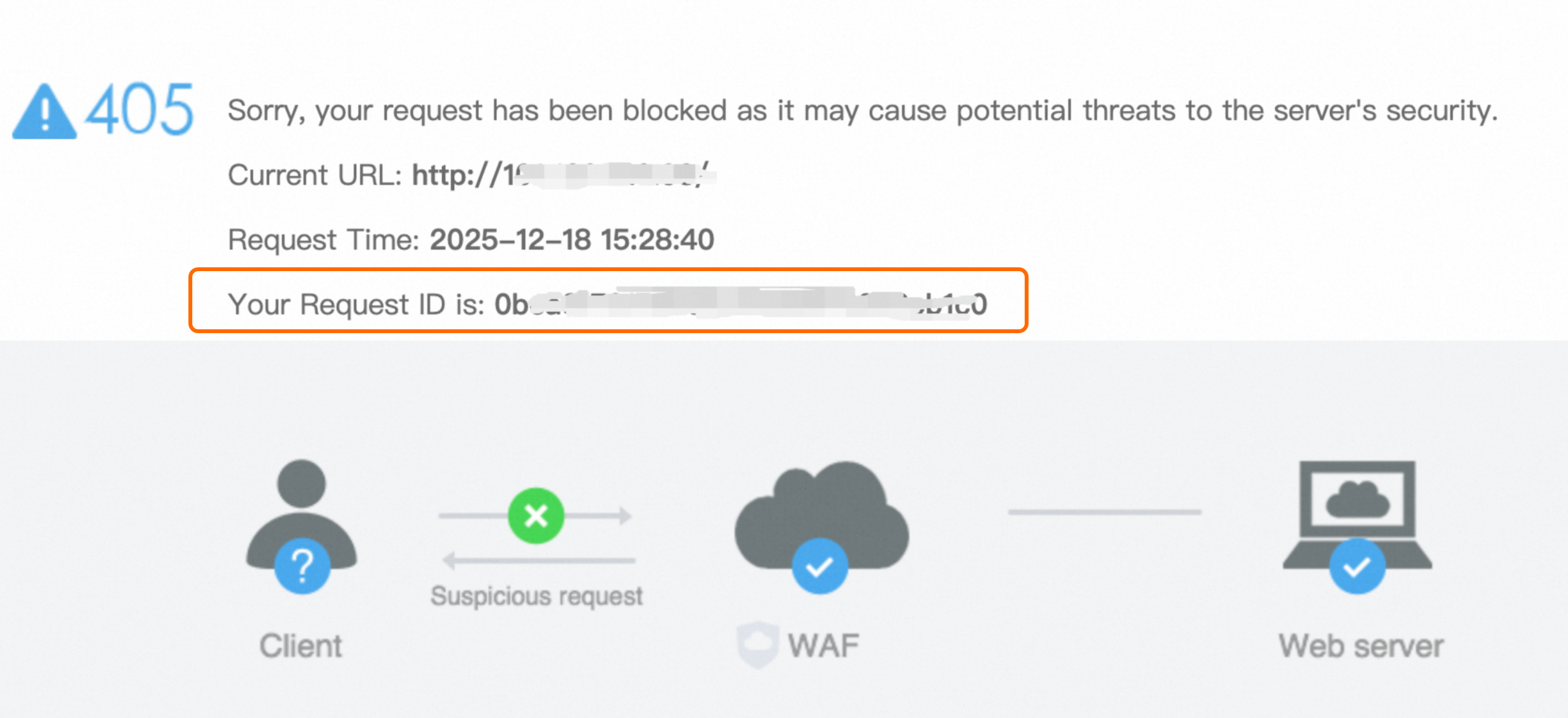
Search in the WAF console: Log on to the Web Application Firewall 3.0 console. In the left-side navigation pane, choose . Set a time range, paste the request ID into the "Enter Trace ID" search box, and then start the search.
NoteIf log delivery is enabled for the protection object, you can also perform the search on the page.
Analyze the block reason: On the Security Reports page, view the Protection Module and Rules Matched for the request. If you determine that the request is legitimate, find the request in the Logs and click Suppress False Positive in the Actions column. For more information, see whitelist.
Disabling API Security for pay-as-you-go WAF
If you no longer require the API Security feature for your pay-as-you-go WAF instance, follow these steps to disable it.
Log on to the Web Application Firewall 3.0 console. In the top navigation bar, select the resource group and region (Chinese Mainland or Outside Chinese Mainland) of your WAF instance.
In the left-side navigation pane, choose .
Go to the tab.
Turn off the Basic Detection switch for all protection objects and protection object groups. Once disabled, historical API Security data is cleared and becomes inaccessible.
WAF handling of CORS headers
WAF does not change the CORS headers of a request and does not provide configuration items to automatically inject CORS response headers or dynamically echo the Origin header. CORS policies must be configured and managed on your origin server or in your application.
Reason for "413 Request Entity Too Large" error
Cause: The size of the uploaded file exceeds the WAF limit for a single request, which is currently 2 GB.
Solution:
Reduce the file size to ensure that each request is smaller than 2 GB.
Upgrade WAF to the Ultimate edition, which supports a maximum file size of 10 GB. For more information, see Control the size of uploaded files.
Understanding WAF block alerts
Receiving a WAF block alert indicates that the protection mechanism is working. It does not necessarily mean that your service is affected. However, in some cases, you need to check for false positives or protection failures.
What the alert means
A WAF block alert means that the system has successfully identified and blocked a malicious request that matches a security rule. These requests are filtered before they reach your origin server. They do not consume origin server resources. This indicates the protection is working as intended.
Scenarios that require investigation
False positives: If legitimate user traffic, such as backend logins or API calls, is blocked, your protection rules may be too strict. In this case, service availability is affected. You must adjust the protection rules or add the request characteristics to a whitelist.
Large-scale CC attacks: When you are experiencing a high-frequency CC attack, some malicious requests may bypass WAF protection even though WAF is blocking traffic. In addition, excessive attack traffic may trigger blackhole filtering, which makes the WAF service unavailable. For more information about defense strategies, see Set up HTTP flood protection rules to defend against CC attacks.
Default policy for script file uploads
The default WAF protection policy is designed primarily to defend against high-frequency web attacks, such as SQL injection and cross-site scripting (XSS), and common web shells, such as JSP, PHP, and ASP.
Script file extensions such as .py, .sh, .cmd, and .bat are often used for legitimate background tasks or batch processing. To avoid mistakenly blocking normal business requests, the default policy does not include these extensions in its global blocking scope.
If you need to block these uploads, we recommend that you create a custom rule to precisely control uploads by matching the upload API path and file extension.
Blocking IPs outside China while allowing crawlers
You can achieve this with a combination of settings:
Enable the geo-blocking feature, and configure it to block all requests from regions Outside China.
Create a whitelist. Set the Match Condition to User-Agent containing a specific crawler identifier, such as
Googlebotorbingbot, and set Bypassed Modules to Geo-blocking.
Prefix matching vs. regex matching
Matching capabilities: Prefix matching is a simple mode that only matches fixed strings. Regex matching is an advanced mode that supports complex pattern matching.
Performance: Prefix matching is highly efficient. Regex matching consumes slightly more resources due to the complexity of the underlying engine, and the cost is slightly higher if you use a pay-as-you-go WAF instance.
Rule tuning recommendations: If a rule does not provide the expected protection, check whether the match method is appropriate. For example, for URI paths, you can try using Contains One of Multiple Values or Regex Match instead of a single prefix or suffix match to improve the match rate. When you use regex matching, make sure that your regular expressions are well-formed and avoid complex nesting.
Effective time of whitelist rules
A whitelist rule takes effect immediately after you add it. You do not need to wait for an existing block period to end.
If requests are still blocked after you configure the rule, check the following items:
The template and rule switches are turned on.
The Apply To setting is correct.
The match condition is configured correctly.
A Layer 7 proxy, such as CDN or Anti-DDoS, is deployed in front of WAF. If so, you must select the Is a Layer 7 proxy such as Anti-DDoS Proxy or CDN deployed in front of WAF option when you add the asset. Otherwise, WAF cannot obtain the real client IP address.
Managing objects blacklisted by rate-limiting rules
Manual unblocking: You cannot manually unblock objects in this scenario. To immediately restore access, use one of the following methods:
Create a whitelist rule (Recommended): Add a whitelist rule to allow the requests.
Modify the rule configuration: Modify the Match Condition, Action, Statistical Object, or Threshold of the rule. After you modify any of these settings, the historical blacklist for that rule is cleared, unblocking all previously blocked objects.
Permanent blocking: Not supported. The maximum block duration is 86,400 seconds (24 hours).
Blocking requests with an empty or missing Referer
You must add the following two match conditions to cover both scenarios:
The logical operator for the Header field
Refereris set to Does Not Exist.The logical operator for the Header field
Refereris set to Empty.
Risk warning
This configuration may block legitimate requests that do not carry a Referer header, such as internal server calls, API requests, and requests from client SDKs. We recommend that you create a whitelist rule to allow such legitimate traffic.
Inconsistent rule triggers across different ports
WAF protection templates take effect independently for each protection object. If a rule fails to trigger for a specific port, it is usually because the port is not correctly added to WAF or is not associated with the correct protection template.
Troubleshooting and solution
Check the port connection status: Verify that the affected port has been successfully added to WAF.
Check the policy binding: Make sure that the port's corresponding protection object is correctly associated with the intended protection template.
Priority of whitelist rules over other modules
Whitelist rules have the highest priority. When a request matches a whitelist rule, WAF bypasses the modules specified in Bypassed Modules.
Adding IPs to rules by using the API
Yes. For more information, see Create a core web protection rule.
How WAF fingerprint rules work
Fingerprint rules match requests based on hash values generated from the characteristics of client browsers or tools, not based on IP addresses. The details are as follows:
JA3 fingerprint: This fingerprint is generated by applying an MD5 hash to key TLS handshake parameters, such as the TLS version and cipher suites.
JA4 fingerprint: This fingerprint introduces more algorithms that involve browser versions and operating systems to reduce duplication.
HTTP/2 fingerprint: This fingerprint is generated by using the MD5 algorithm based on the original fingerprint of the HTTP/2 client.
As long as a request carries a matching fingerprint, the rule is triggered regardless of the geographical origin of the IP address.
WAF support for domain redirection
No. WAF does not provide a domain redirection feature. To implement this type of redirection, you must configure it on your origin server or at the DNS layer.
How can I query and modify WAF 3.0 whitelist rules using an API?
To create or modify whitelist rules, call the CreateDefenseRule operation and configure the whitelist parameter. For more information, see CreateDefenseRule.
What should I do if a domain name is still inaccessible after I disable a Bot Management block rule?
If a domain name is still inaccessible after you disable a Bot Management block rule, troubleshoot the issue as follows:
Check for cache issues: Access the domain name in your browser's incognito or private mode to rule out interference from the local cache.
Check the status code: Check the specific HTTP status code, such as 405 Method Not Allowed, to determine whether the request is blocked by another protection module or the origin server.
Verify the block reason: Retrieve the latest Request ID for the blocked request. See the Investigating a WAF block with a request ID section in this topic to find the rule that was triggered. This helps confirm whether another mitigation policy, such as a custom rule or a CC protection rule, blocked the request.
How long does it take for a WAF custom rule to take effect?
WAF custom rules take effect in real time.
How can I configure mitigation policies to avoid false positives when a single domain name serves both a web application and a miniapp?
If a single domain name serves both a web application and a miniapp, configure your mitigation policies as follows to avoid false positives:
Use separate domain names: Use different second-level domain names for the miniapp and the web application. Then, apply separate mitigation policies to each.
Exclude APIs: If you must use a shared domain name, exclude the miniapp's APIs or User-Agent from your custom rules. This prevents compatibility issues with features such as challenges and advanced custom rules.
If I create multiple WAF custom rule templates, how is their priority determined?
The priority of WAF custom rule templates is determined as follows:
Sorting: The execution order of custom rules is not determined by the rule ID.
Execution logic: If a request matches multiple rules in the same protection module and these rules have the same action, the rule that takes effect is chosen at random.
Optimization suggestions: Use fine-grained match conditions to reduce rule overlap. You can also use whitelist rules to manage your allow logic.
What should I do if WAF blocks an IP address from a CDN or cloud provider that I expect to be allowed?
If WAF blocks an IP address from a CDN or cloud provider that you expect to be allowed, troubleshoot the issue as follows:
Analysis: WAF determines the geographic location of an IP address based on an IP address library. This location may differ from the actual physical location of a CDN point of presence (POP). For example, an IP address for an AWS CloudFront POP might be identified as being outside the United States.
Verify ownership: Check the client's actual network environment. You can also confirm the POP's ownership by checking the cloud provider's official list of IP addresses.
Allow the IP address: If needed, add the IP address to a whitelist to prevent it from being blocked incorrectly.
Can the IP blacklist block IPs on a per-domain basis or automatically block associated domains?
The capabilities of the WAF 3.0 IP blacklist are described below:
Match dimension: The IP blacklist only supports blocking requests based on the client's IP address or IP address range. You cannot add a domain name directly to a blacklist.
Applicable scope: When WAF blocks a request, the block action applies only to the protected object for the currently associated domain name. WAF does not automatically add the source IP address to a global blacklist that would prevent it from accessing other websites or domain names.
Does WAF remove the HSTS response header from traffic generated by scanners?
WAF handles traffic from vulnerability scanners and HTTP Strict Transport Security (HSTS) response headers as follows:
Default behavior: By default, WAF does not remove HSTS response headers. It also does not apply special processing to scan traffic.
Block triggers: WAF executes a block or challenge action only if scan traffic contains characteristics of a suspected attack and triggers a mitigation rule.