If the cost of your Web Application Firewall (WAF) instance no longer suits your business, you can change its billing method by unsubscribing from your current instance and purchasing a new one.
Billing method conversion
WAF does not currently support direct billing method changes. To switch, unsubscribe from your current instance and then activate a new instance with the desired billing method.
-
Data loss risk: Unsubscribing from or terminating an instance releases the instance. All assets and protection rule configurations that have been added will be lost and must be reconfigured.
-
Business interruption risk: If your domain uses CNAME access, requests cannot be forwarded after the instance is released, making your website inaccessible. Before proceeding, ensure that all web traffic has been switched back to the origin server.
Subscription to pay-as-you-go
1. Unsubscribe from a subscription instance
Contact your account manager to request an unsubscription. The following conditions must be met:
-
The instance was purchased within the last 5 days.
-
The instance is unused, meaning no traffic has been processed.
2. Purchase a pay-as-you-go instance
Go to the Web Application Firewall 3.0 (Pay-as-you-go) buy page.
-
Set the Billing method to Pay-as-you-go and configure the instance based on your business requirements.
Click Purchase Now and complete the order.
When you purchase a pay-as-you-go instance, you can also purchase a SeCU resource plan to offset request processing and feature fees to reduce your costs. For more information about SeCU resource plans and how to purchase them, see SeCU resource plan.
Pay-as-you-go to subscription
1. Terminate a pay-as-you-go instance
Refunds are not applicable to the pay-as-you-go billing method. If you no longer need a pay-as-you-go WAF instance, terminate it at any time. After termination, you are no longer charged.
If you need to unsubscribe from a SeCU resource plan, contact your account manager to request an unsubscription. The following conditions must be met:
-
The SeCU resource plan was purchased within the last 5 days.
-
The SeCU resource plan is unused.
2. Purchase a subscription instance
Go to the Web Application Firewall 3.0 (Subscription) buy page.
-
Set the Billing method to Subscription and configure the instance edition you want to purchase. For more information about the features of different editions, see Editions and features.
Click Buy Now and complete the payment.
Seamless conversion to subscription (by invitation)
By default, changing from pay-as-you-go to subscription requires you to terminate the pay-as-you-go instance and purchase a subscription instance. For a seamless change that ensures service continuity, contact your account manager to request access to this feature.
After the feature is enabled, follow these steps to make the change:
If you have enabled Simple Log Service (SLS), your Logstore will change after the billing method is converted. You must re-enable logging for your protected objects and reselect the log fields. The original Logstore for the pay-as-you-go instance is retained, and its fees will continue to be billed by SLS.
-
Log on to the Web Application Firewall 3.0 console. From the top menu bar, select the resource group and region (Chinese Mainland or Outside Chinese Mainland) for the WAF instance.
-
In the left-side navigation pane, click Overview.
-
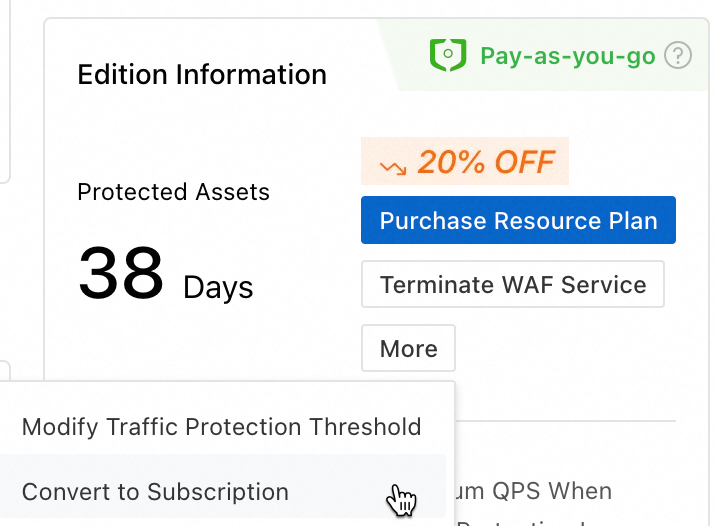
On the Overview page, in the edition information card, choose , then follow the on-screen instructions to complete the conversion.
Related documents
-
For more information about how subscription and pay-as-you-go instances are billed, see Subscription billing and Pay-as-you-go billing.