Pay-as-you-go is a postpaid billing method that lets you use resources on-demand without an upfront payment. The system generates a bill based on your usage in each billing cycle and deducts the fees from your account. This topic describes the billing rules for pay-as-you-go WAF.
Billing model
WAF 3.0 introduces the SeCU (Security Capacity Unit) as its unified pay-as-you-go metering unit. WAF converts the resources consumed by all billable items to SeCUs hourly and bills them as follows:
Unit price: The unit price of a SeCU is USD 0.01. One SeCU costs USD 0.01.
Measurement interval: SeCU usage is measured hourly, for example, from 10:00:00 to 10:59:59.
Rounding rule: WAF rounds SeCU usage up to the next integer. For example, if you use 0.1 SeCU in an hour, you are billed for 1 SeCU for that hour.
Hourly Cost = Total SeCUs × Unit Price.
You can upgrade the API Security and Bot Management modules for pay-as-you-go WAF to Agentic API Security and Agentic Bot, respectively. After the upgrade, these modules use Credit as an independent billing unit. The price is: 100 Credits = USD 0.2.
All other billable items continue to use SeCU as the metering unit.
For more information, see WAF API Security module upgrade and WAF Bot Management module upgrade.
Billable items
The following tables list the billable items for pay-as-you-go WAF. The items are categorized into instance and traffic fees, resource access features, and protection features.
WAF instance and traffic fees
Billable item | SeCU | Description |
WAF instance | 0.5 SeCU/hour | Billing for a pay-as-you-go WAF instance begins immediately upon activation, regardless of whether you add protected objects or configure protection rules. Note SeCU consumption for this billable item is calculated based on actual usage and is not rounded up. All other billable items that consume SeCUs are subject to the rounding-up rule. |
base request fee | 1 SeCU per 5,000 requests/hour | The total number of client requests received by WAF within an hour. This includes both legitimate and attack requests. Server responses are not counted. Note
|
QPS peak |
| Billed hourly based on the highest QPS peak recorded within that hour. Note If the excess portion is less than 5 QPS, it is billed as 5 QPS. |
Resource access feature fees
Billable item | SeCU | Description |
Number of domains for CNAME access | Tiered pricing (progressive):
| For CNAME access, billing is based on the number of domains added to WAF. No distinction is made between root domains and wildcard domains. |
CNAME access: dedicated IP | 15 SeCU/dedicated IP/hour | For CNAME access, billing is based on the number of domains with a dedicated IP enabled. |
CNAME access: non-standard port |
| For CNAME access, this feature is considered enabled if you configure any port other than 80, 8080, 443, or 8443. |
CNAME access: intelligent load balancing |
| For CNAME access, this feature is considered enabled if you configure intelligent load balancing for any domain. |
CNAME access: IPv6 |
| For CNAME access, this feature is considered enabled if you configure IPv6 for any domain. |
asset center |
| Billing starts after you enable the asset center feature. |
Web core protection fees
Billable item | SeCU | Description |
web core protection rules |
|
Note Starting September 10, 2026, WAF will adjust the billing logic for web core protection rules. For the pricing change announcement, see [Announcement] Web Application Firewall Web Core Protection, Bot Management, and Log Service Upgrade Notice. |
web core protection rules: intelligent allowlist engine |
| You are billed for each web core protection rule template with the intelligent allowlist engine enabled. |
IP blocklist | 2 SeCU/rule/hour | Billed based on the number of IP blocklist rules, regardless of whether they are enabled or disabled. |
custom rule |
| Billed based on the number of custom protection rules, regardless of whether they are enabled or disabled. Note A rule is classified as an advanced rule if it meets any of the following conditions. Otherwise, it is a basic rule:
|
custom rule: slider action | 1 SeCU per 10 invocations/hour | The number of invocations is rounded up to the nearest multiple of 10 for billing. |
scan protection | 10 SeCU/rule/hour | Billed based on the number of scan protection rules, regardless of whether they are enabled or disabled. Each scan protection template contains three rules. |
HTTP flood protection | 2 SeCU/rule/hour | Billed based on the number of HTTP flood protection rules, regardless of whether they are enabled or disabled. |
geo-blocking | 10 SeCU/rule/hour | Billed based on the number of geo-blocking rules, regardless of whether they are enabled or disabled. |
custom response | 10 SeCU/rule/hour | Billed based on the number of custom response rules, regardless of whether they are enabled or disabled. Each custom response template contains one rule. |
web tamper proofing | 5 SeCU/rule/hour | Billed based on the number of web tamper proofing rules, regardless of whether they are enabled or disabled. |
information leakage prevention | 5 SeCU/rule/hour | Billed based on the number of information leakage prevention rules, regardless of whether they are enabled or disabled. |
peak traffic throttling | 150 SeCU/rule/hour | Billed based on the number of peak traffic throttling rules, regardless of whether they are enabled or disabled. |
threat intelligence | 50 SeCU/template/hour | Billed based on the number of threat intelligence protection templates, regardless of whether they are enabled or disabled. |
Advanced protection fees
Billable item | SeCU | Description |
Bot management (legacy) |
| Billed based on the number of configured Bot-Web and Bot-App protection templates, regardless of whether they are enabled or disabled. |
Bot management (legacy): request processing fee | 1 SeCU per 7,500 requests/hour | The total number of requests processed for a protected object within an hour. Note If the request count is not a multiple of 7,500, the SeCU consumption is rounded up. For more information, see Billing examples. |
Bot management (legacy): advanced custom rules | 15 SeCU/rule/hour | Billed based on the number of advanced custom rules for Bot management, regardless of whether they are enabled or disabled. |
Bot management (legacy): account security | 50 SeCU/template/hour | Billed based on the number of created protection policy templates. |
Agentic Bot |
| Billed based on the number of configured Web and App protection templates, regardless of whether they are enabled or disabled. Agentic Bot uses a new billing unit called Credit (100 Credits = 0.2 USD). |
Agentic Bot: request processing fee | 1 Credit per 1,200 requests/hour | The total number of requests processed for a protected object within an hour. If the request count is not a multiple of 1,200, the Credit consumption is rounded up. |
Agentic Bot: advanced custom rules | 100 Credits/rule/hour | Billed based on the number of advanced custom rules for Agentic Bot, regardless of whether they are enabled or disabled. |
Agentic Bot: account security | 320 Credits/template/hour | Billed based on the number of created protection policy templates. |
Bot management/Agentic Bot: risk identification | 1 SeCU/hit/hour | Billed based on the number of identified risks. |
api security (legacy) | 20 SeCU/protected object/hour | Billed based on the number of protected objects with api security (legacy) enabled. |
api security (legacy): request processing fee | 1 SeCU per 7,500 requests/hour | The total number of requests processed for a protected object within an hour. Note If the request count is not a multiple of 7,500, the SeCU consumption is rounded up. For more information, see Billing examples. |
Agentic API Security | 125 Credits/protected object/hour | Billed based on the number of protected objects with Agentic API Security enabled. Agentic API Security uses a new billing unit called Credit (100 Credits = 0.2 USD). |
Agentic API Security: request processing fee | 1 Credit per 1,200 requests/hour | The total number of requests processed for a protected object within an hour. If the request count is not a multiple of 1,200, the Credit consumption is rounded up. |
extension plugin | 100 SeCU/plugin/hour | Billed based on the number of created plugins. |
extension plugin: request processing fee | 1 SeCU per 7,500 requests/hour | The total number of requests processed for a protected object within an hour. Note If the request count is not a multiple of 7,500, the SeCU consumption is rounded up. For more information, see Billing examples. |
critical event support | This feature uses a prepaid billing method and does not consume SeCUs. | critical event support is available for pay-as-you-go WAF instances. This feature requires a minimum purchase of 30 days. For more information, see critical event support. |
Log Service fees
Billable item | SeCU | Description |
Log Service | 40 SeCU/TB/hour | Starting August 14, 2026, the Log Service for WAF will be upgraded in batches. The billing rules after the upgrade are as follows:
For the upgrade announcement, see [Announcement] Web Application Firewall Web Core Protection, Bot Management, and Log Service Upgrade Notice. |
Billing examples
Example 1
You have added five domain names to WAF using CNAME access and configured two IP blacklist rules. During a full hour, your service receives 0 requests and the QPS peak is 0 QPS.
In this scenario, 34.5 SeCU is consumed within the hour, for a total cost of USD 0.345. The following table provides the billing details.
Billable item | Unit price | SeCU (per hour) | Total cost (1 SeCU = USD 0.01) |
Base request fee | 1 SeCU/5,000 requests/hour | 0 SeCU | 0.01 * 0 = USD 0 |
QPS peak | QPS peak ≤ 1,000 QPS: 0 SeCU/hour | 0 SeCU | 0.01 * 0 = USD 0 |
Number of domain names using CNAME access | Tiered pricing:
| 1 * 0 + 4 * 5 = 20 SeCU | 0.01 * 20 = USD 0.2 |
WAF instance | Billing starts after you activate a pay-as-you-go WAF instance. 0.5 SeCU/hour | 0.5 SeCU | 0.01 * 0.5 = USD 0.005 |
IP blacklist | 2 SeCU/rule/hour | 4 SeCU | 0.01 * 4 = USD 0.04 |
Web core protection rules Note After you add a resource to WAF, the system automatically creates a protected object and applies it to the default Web core protection rules template. | If protected objects exist: 10 SeCU/hour | 10 SeCU | 0.01 * 10 = USD 0.1 |
Example 2
You have added 12 domain names to WAF using CNAME access, and enabled dedicated IP and intelligent load balancing for two of them. You have also created one scan protection template. During a full hour, your service receives 50,001 requests and the QPS peak is 4,000 QPS.
In this scenario, 782.5 SeCU is consumed within the hour, for a total cost of USD 7.825. The following table provides the billing details.
Billable item | Unit price | SeCU (per hour) | Total cost (1 SeCU = USD 0.01) |
Base request fee | 1 SeCU/5,000 requests/hour | 11 SeCU | 0.01 * 11 = USD 0.11 |
QPS peak | QPS peak ≤ 1,000 QPS: 0 SeCU/hour > 1,000 QPS: 1 SeCU/5 QPS/hour for the excess portion | 600 SeCU | 0.01 * 600 = USD 6 |
WAF instance | Billing starts after you activate a pay-as-you-go WAF instance. 0.5 SeCU/hour | 0.5 SeCU | 0.01 * 0.5 = USD 0.005 |
Number of domain names using CNAME access | Tiered pricing:
| 1 * 0 + 9 * 5 + 2 * 3 = 51 SeCU | 0.01 * 51 = USD 0.51 |
CNAME access: dedicated IP | 15 SeCU/dedicated IP/hour | 30 SeCU | 0.01 * 30 = USD 0.3 |
CNAME access: intelligent load balancing | Enabled: 50 SeCU/hour | 50 SeCU | 0.01 * 50 = USD 0.5 |
Scan protection Note Each scan protection template includes three rules. | 10 SeCU/rule/hour | 30 SeCU | 0.01 * 30 = USD 0.3 |
Web core protection rules Note After you add a resource to WAF, the system automatically creates a protected object and applies it to the default Web core protection rules template. | If protected objects exist: 10 SeCU/hour | 10 SeCU | 0.01 * 10 = USD 0.1 |
Example 3
You enable WAF protection for a Layer-7 Classic Load Balancer (CLB) instance in cloud native mode (for example, in the US (Silicon Valley) region). In addition to Web core protection rules, you enable bot management and HTTP flood protection and configure their corresponding protection templates. You have two disabled HTTP flood protection rules and one enabled bot management template with the Fraud Detection feature active. During a full hour, the total number of requests is 4,200 and the QPS peak is 537. The bot management rules are matched 34 times, and the Fraud Detection rules are matched 3 times.
In this scenario, 69.5 SeCU is consumed within the hour, for a total cost of USD 0.695. The following table provides the billing details.
Billable item | Unit price | SeCU (per hour) | Total cost (1 SeCU = USD 0.01) |
Base request fee | 1 SeCU/5,000 requests/hour | 1 SeCU | 0.01 * 1 = USD 0.01 |
QPS peak | QPS peak ≤ 1,000 QPS: 0 SeCU/hour | 0 SeCU | 0.01 * 0 = USD 0 |
Bot management: request processing fee | Billed based on the number of requests that match protected objects within the hour. 1 SeCU/7,500 requests | 1 SeCU | 0.01 * 1 = USD 0.01 |
Bot management: Fraud Detection | Billed based on the number of matches. 1 SeCU/match/hour | 3 SeCU | 0.01 * 3 = USD 0.03 |
WAF instance | Billing starts after you activate a pay-as-you-go WAF instance. 0.5 SeCU/hour | 0.5 SeCU | 0.01 * 0.5 = USD 0.005 |
Web core protection rules Note After you add a resource to WAF, the system automatically creates a protected object and applies it to the default Web core protection rules template. | If protected objects exist: 10 SeCU/hour | 10 SeCU | 0.01 * 10 = USD 0.1 |
Bot management | Billed based on the number of configured Bot-Web protection templates, regardless of whether they are enabled or disabled. Bot-Web template: 50 SeCU/template/hour | 50 SeCU | 0.01 * 50 = USD 0.5 |
HTTP flood protection | Billed based on the number of HTTP flood protection rules, regardless of whether the rules are enabled or disabled. 2 SeCU/rule/hour | 4 SeCU | 0.01 * 4 = USD 0.04 |
Example 4
You enable WAF protection for an Application Load Balancer (ALB) instance in cloud native mode (for example, in the US (Silicon Valley) region) and create two custom response templates that are applied to different protected objects. During a full hour, your service receives 50,004 requests, and the QPS peak is 5,997 QPS.
In this scenario, the total consumption for the hour is 1041.5 SeCU, and the WAF-enhanced ALB instance fee is USD 0.035/hour, resulting in a total cost of USD 10.45. The following table provides the billing details.
Billable item | Unit price | SeCU (per hour) | Total cost (1 SeCU = USD 0.01) |
Base request fee | 1 SeCU/5,000 requests/hour | 11 SeCU | 0.01 * 11 = USD 0.11 |
QPS peak | QPS peak > 1,000 QPS: 1 SeCU/5 QPS/hour for the excess portion | 1000 SeCU | 0.01 * 1000 = USD 10 |
WAF instance | Billing starts after you activate a pay-as-you-go WAF instance. 0.5 SeCU/hour | 0.5 SeCU | 0.01 * 0.5 = USD 0.005 |
Custom response | 10 SeCU/rule/hour | 20 SeCU | 0.01 * 20 = USD 0.2 |
Web core protection rules Note After you add a resource to WAF, the system automatically creates a protected object and applies it to the default Web core protection rules template. | If protected objects exist: 10 SeCU/hour | 10 SeCU | 0.01 * 10 = USD 0.1 |
WAF-enhanced ALB instance fee | USD 0.035/hour. The actual price is subject to the purchase page. | / | 0.035 * 1 = USD 0.035 |
After activating pay-as-you-go WAF, refer to your Alibaba Cloud bill for your actual usage and charges.
Billing cycle
Pay-as-you-go fees are settled daily (UTC+8). A new billing cycle begins after the settlement is complete.
Pay-as-you-go billing typically occurs overnight. If you plan to modify your configuration, such as adding domain names or enabling new protection features, make the changes after 06:00 (UTC+8) each day. Otherwise, the resulting charges may be included on the previous day's bill.
If your available account balance, which includes your Alibaba Cloud account balance and vouchers, cannot cover a pending bill, you will receive an SMS or email notification.
Overdue payment
An overdue payment can affect your WAF services. Monitor your Expenses and Costs and resolve any overdue payment promptly. To learn how to check and handle an overdue payment, see Overdue payment.
If you have an overdue payment, your WAF service is at risk of suspension. The system will notify you to renew promptly to avoid service disruption.
View bills
For instructions on viewing the usage and detailed charges for your WAF 3.0 pay-as-you-go instance, see View bills.
FAQ
Optimize costs for pay-as-you-go WAF
To control costs and avoid unexpectedly high charges for a pay-as-you-go WAF instance, consider the following optimization measures:
Enable features as needed: Some features incur additional fees after being enabled. Enable features selectively based on your actual business needs. Avoid enabling multiple features indiscriminately or creating a large number of protection rules.
Agentic API security: Enable this feature only if your services use API interfaces.
Bot management: Use this feature to protect against automated scripts, crawlers, and other bot traffic. If your business does not require this type of protection, keep it disabled.
Core web protection: Modules such as scan protection and region blocking start to incur charges after you create protection rules. We recommend that you fully understand the functionality of each module before configuring them. If you no longer need a module, promptly delete the corresponding protection template.
CNAME record mode: Configuring non-standard ports, enabling IPv6, or using exclusive IP addresses incur additional fees. For example, if you add only a single domain name, you do not need to enable an exclusive IP address.
Use a prepaid model: If your monthly SeCU consumption is high and your business requirements prevent you from reducing the configuration, we recommend purchasing a prepaid SeCU resource plans or a subscription WAF instance for a better unit price.
Why am I still being charged even though I haven't configured WAF or added any assets?
In addition to request processing fees, a pay-as-you-go WAF instance also incurs feature fees, including the base fee for the WAF instance itself. Therefore, after you activate the WAF service, billing starts immediately regardless of whether traffic reaches it.
When you no longer plan to use WAF, after you remove the last added asset, the console displays the following page prompting you to terminate WAF to stop billing. If Web Core Protection, Bot Management, or API Security protection rules still exist, the WAF instance continues to incur feature fees. If you no longer need the pay-as-you-go instance, you can terminate the WAF instance on the Overview page.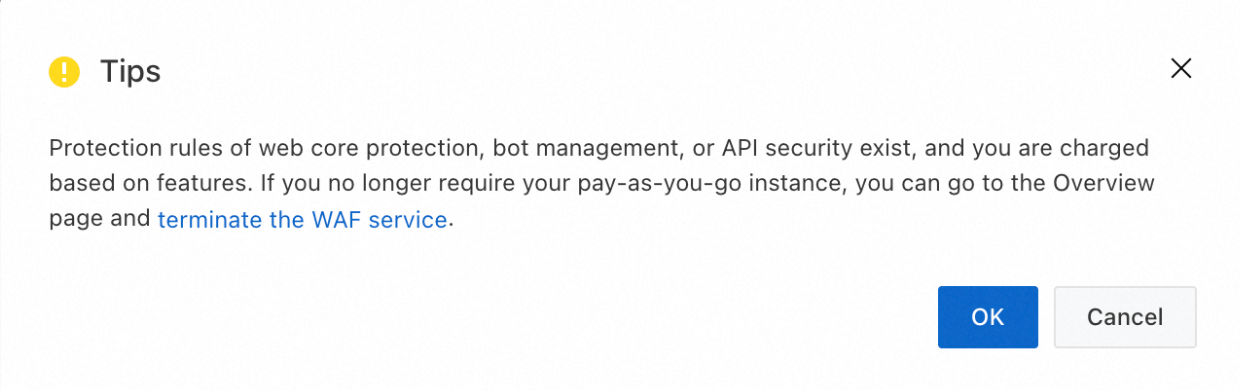
How do I terminate WAF to stop billing?
If you no longer plan to use WAF and want to stop billing, follow these steps to terminate the WAF instance.
Before you terminate the WAF instance, make sure that the DNS records of website domain names added to WAF have been resolved back to the origin server.
After the WAF instance is terminated, all website domain name configuration information is deleted. If requests are still sent to the WAF instance, they cannot be forwarded properly, causing website inaccessibility.
Go to the Overview page. In the top menu bar, select the resource group and region (Chinese Mainland, Outside Chinese Mainland) of the WAF instance.
If the following page appears, click Go to Console in the upper-right corner. If this page does not appear, skip this step.

On the right side of the page, click Terminate WAF Service. In the dialog box that appears, select the required checkboxes and click OK.

Why am I still being charged after terminating WAF?
If you are still being charged after terminating WAF, it may be due to the following reasons:
The termination process was not correctly completed: You may have only removed assets from WAF or disabled the WAF protection switch. Make sure that you strictly follow the steps in How do I terminate WAF to stop billing? to terminate the service.
Bills are generated with a delay: Bills for pay-as-you-go WAF are generated on the following day. For example, if you terminate WAF on October 2, a bill for October 2 is generated on October 3. Starting from October 3, no new bills are generated.
The region was not correctly switched: If you purchased a WAF instance for the Outside Chinese Mainland region, you need to switch to that region on the Overview page in the top menu bar before performing the termination. Log in to the Web Application Firewall 3.0 console and select Chinese Mainland or Outside Chinese Mainland in the region selector in the top navigation bar.

Maximum QPS for pay-as-you-go WAF
A pay-as-you-go WAF instance supports the following maximum QPS:
WAF instances in the Chinese mainland: 100,000 QPS
WAF instances outside the Chinese mainland: 50,000 QPS
If the actual QPS of your business exceeds the maximum guaranteed levels above, WAF will no longer guarantee the service level agreement (SLA). Protected objects associated with the affected instance may experience intermittent access issues at any time, including but not limited to packet loss, rate limiting, connection restrictions, protection failure, abnormal logs or reports, and access timeouts. If your estimated business QPS may exceed these levels, contact your business manager in advance for capacity expansion.