Forward Web Application Firewall (WAF) access logs to a Syslog server using Python Program. This lets you centralize WAF logs in your security operations center (SOC) to meet regulatory and audit requirements.
How it works
WAF writes access logs to Simple Log Service (SLS). Python Program runs on an Elastic Compute Service (ECS) instance, reads from SLS using a consumer group, and forwards each log entry to your Syslog server over UDP or TCP.
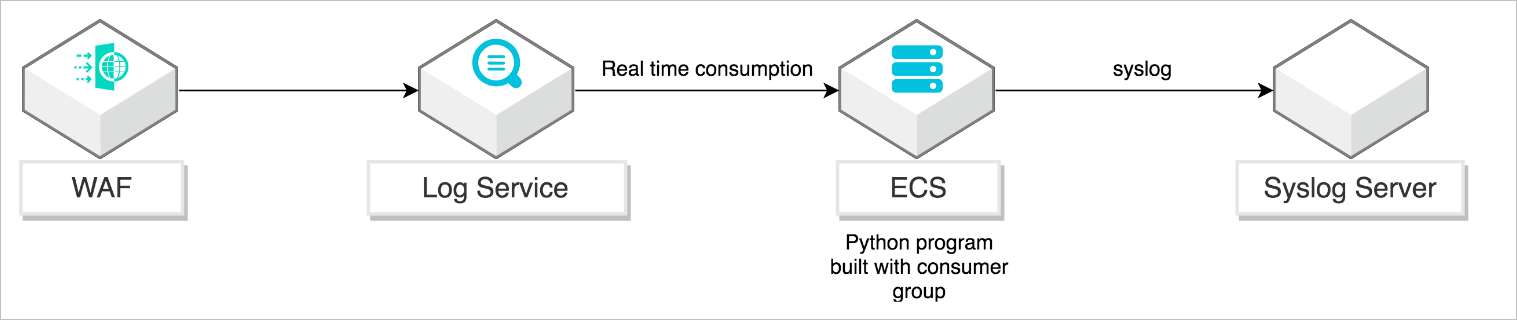
Python Program uses the SLS consumer library — an advanced consumption mode built on LogHub consumer groups. Consumer groups handle offset tracking and fault tolerance automatically, so Python Program focuses entirely on forwarding logic.
The Syslog channel transmits log data over UDP or TCP without encryption. For production environments with strict security requirements, route logs through a local Syslog proxy on the same host before forwarding to your remote Syslog server over a secured channel.
Prerequisites
Before you begin, ensure that you have:
-
Log Service for WAF enabled, with log collection turned on for your domain name. See Get started with the Log Service for WAF feature
-
A Linux ECS instance running Ubuntu with the following minimum specifications:
-
2.0 GHz processor, 8 cores
-
32 GB memory
-
At least 2 GB available disk space (10 GB or more recommended)
-
-
A Syslog server with UDP port 514 open to receive Syslog data
Set up Python Program
Step 1: Install dependencies
Connect to your ECS instance over SSH or through the ECS console. See Methods for connecting to an ECS instance.
Install Python 3, pip, and the SLS Python SDK:
apt-get update
apt-get install -y python3-pip python3-dev
cd /usr/local/bin
ln -s /usr/bin/python3 python
pip3 install --upgrade pip
pip install aliyun-log-python-sdk
For SDK documentation, see aliyun-log-python-sdk user guide.
Step 2: Download the sample script
wget https://raw.githubusercontent.com/aliyun/aliyun-log-python-sdk/master/tests/consumer_group_examples/sync_data_to_syslog.pyThe full source is available on GitHub.
Step 3: Configure Python Program
Open sync_data_to_syslog.py and set the following parameters.
Log Service parameters
endpoint = os.environ.get('SLS_ENDPOINT', 'http://ap-southeast-1.log.aliyuncs.com')
accessKeyId = os.environ.get('SLS_AK_ID', 'Your AccessKey ID')
accessKey = os.environ.get('SLS_AK_KEY', 'Your AccessKey secret')
project = os.environ.get('SLS_PROJECT', 'waf-project-548613414276****-ap-southeast-1')
logstore = os.environ.get('SLS_LOGSTORE', 'waf-logstore')
consumer_group = os.environ.get('SLS_CG', 'WAF-SLS')| Parameter | Description |
|---|---|
SLS_ENDPOINT |
The Log Service endpoint for your project's region. See Endpoints. |
SLS_AK_ID |
Your AccessKey ID. Retrieve it from the User Management console.  |
SLS_AK_KEY |
Your AccessKey secret. |
SLS_PROJECT |
The SLS project name for your WAF instance. Project names start with waf-project. Projects in the China (Hangzhou) region belong to WAF instances in the Chinese mainland; projects in Singapore belong to WAF instances outside the Chinese mainland. To find your project name, log in to the Log Service console. 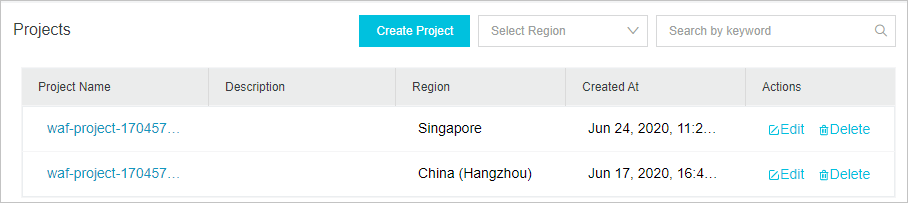 |
SLS_LOGSTORE |
The Logstore name within the project. Click your WAF project in the Log Service console to view the Logstore name. 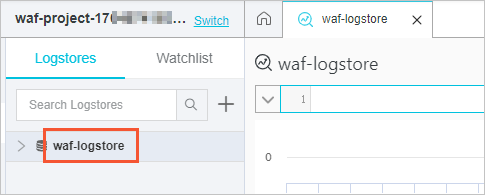 |
SLS_CG |
The consumer group name. The default value WAF-SLS works for most deployments. |
Syslog parameters
settings = {
    "host": "1.2.xx.xx",
    "port": 514,
    "protocol": "udp",
    "sep": ",",
    "cert_path": None,
    "timeout": 120,
    "facility": syslogclient.FAC_USER,
    "severity": syslogclient.SEV_INFO,
    "hostname": None,
    "tag": None
}| Parameter | Description |
|---|---|
host |
The IP address or hostname of your Syslog server. |
port |
The port for Syslog data. Supported values: 514 (UDP) and 1468 (TCP). |
protocol |
The transport protocol: udp or tcp. Match this to your Syslog server's configuration. |
sep |
The delimiter used to separate key-value pairs in each Syslog message. |
facility |
The Syslog facility code that classifies the log source. Syslog uses facility codes to route messages to different log files on the server. The default FAC_USER is appropriate for general application logs. For all available values, see the syslogclient documentation. |
severity |
The Syslog severity level for all forwarded messages. The default SEV_INFO is appropriate for WAF access logs. |
timeout |
The connection timeout in seconds. The default is 120. |
cert_path |
The path to the TLS certificate file. Set this when using TLS over TCP. Leave as None for unencrypted connections. |
Step 4: Start Python Program
python sync_data_to_syslog.pyWhen Python Program starts successfully, the output looks similar to:
*** start to consume data...
consumer worker "WAF-SLS-1" start
heart beat start
heart beat result: [] get: [0, 1]
Get data from shard 0, log count: 6
Complete send data to remote
Get data from shard 0, log count: 2
Complete send data to remote
heart beat result: [0, 1] get: [0, 1]
WAF access logs are now forwarded to your Syslog server.
What's next
-
Overview of Log Service for WAF — Learn what log fields WAF collects and how to query them.
-
Use consumer groups to consume logs — Understand how the consumer library manages distributed log consumption.