Use the open-source strongSwan software to establish an IPsec-VPN connection with an Alibaba Cloud VPN Gateway to enable private network communication between your on-premises and cloud environments.
Example scenario
In this scenario, you deploy strongSwan on a gateway device in your data center to establish a dual-tunnel IPsec-VPN connection with Alibaba Cloud. This connects your data center to your cloud resources.

IP address planning
Data center
Private CIDR block: 172.16.0.0/16
strongSwan device
NIC eth0: 172.16.20.80, mapped to public egress IP address 1: 120.XX.XX.202
(Optional) NIC eth1: 172.16.21.248, mapped to public egress IP address 2: 47.XX.XX.127
NoteFor non-NAT scenarios, see How to configure a strongSwan device whose NIC has a public IP address.
You can establish a dual-tunnel IPsec-VPN connection by using a device with either one public egress IP address (single egress) or two (dual egress). This topic provides examples for both scenarios.
Alibaba Cloud
VPC CIDR block: 192.168.0.0/16
vSwitch 1 CIDR block: 192.168.10.0/24
vSwitch 2 CIDR block: 192.168.20.0/24
vSwitch 3 CIDR block: 192.168.40.0/24
vSwitch 4 CIDR block: 192.168.50.0/24
vSwitch 5 CIDR block: 192.168.55.0/24
VPN gateway
IPsec address 1: 47.XX.XX.151
IPsec address 2: 47.XX.XX.87
NoteAfter you create a VPN gateway, the system automatically assigns two IPsec addresses to the VPN gateway instance.
BGP IP addresses
This topic describes how to configure the strongSwan device for an IPsec-VPN connection that uses static routing and BGP dynamic routing. If you do not need to use BGP dynamic routing, you can skip this section. The following table describes the BGP CIDR block planning for this example.
Resource | Tunnel | BGP tunnel CIDR block | BGP IP address | BGP ASN |
VPN gateway instance | Tunnel 1 | 169.254.10.0/30 Note For the same VPN gateway instance, the CIDR block of each tunnel must be unique. | 169.254.10.1 | 65535 |
Tunnel 2 | 169.254.20.0/30 | 169.254.20.1 | ||
strongSwan device | Tunnel 1 | 169.254.10.0/30 | 169.254.10.2 | 65530 |
Tunnel 2 | 169.254.20.0/30 | 169.254.20.2 |
VPN parameters
This example uses the same parameters for both tunnels. For each tunnel, ensure the configurations on your strongSwan device and on Alibaba Cloud match.
Pre-shared key: ChangeMe***
IKE configurations
IKE version: ikev2
Negotiation mode: main
Encryption algorithm: aes
Authentication algorithm: sha1
DH group: group2
SA lifetime (seconds): 86400
IPsec configurations:
Encryption algorithm: aes
Authentication algorithm: sha1
DH group: group2
SA lifetime (seconds): 86400
Alibaba Cloud preparations
Based on the number of public egress IP addresses and the routing method that you plan to use, complete the configurations on the Alibaba Cloud side:
Dual egress with BGP dynamic routing
See Establish a connection between a VPC and a data center (dual-tunnel mode and BGP dynamic routing) and complete the following steps: Create a VPN gateway, Create a customer gateway, Create an IPsec-VPN connection, and Enable BGP automatic route advertisement.
The strongSwan device has two public egress IP addresses. You must create two customer gateways.
When you create the IPsec-VPN connection, associate Tunnel 1 with public egress 1 and Tunnel 2 with public egress 2. In this scenario, the routing mode is set to Destination Routing Mode.
Dual-egress static routing
See Quick start for Standard VPN Gateways and complete the following steps: Create a VPN gateway, Create a customer gateway, Create an IPsec-VPN connection, and Configure routes for the VPN gateway.
The strongSwan device has two public egress IP addresses. You must create two customer gateways.
When you create the IPsec-VPN connection, associate Tunnel 1 with public egress 1 and Tunnel 2 with public egress 2. In this scenario, the routing mode is set to Destination Routing Mode.
Single Egress - BGP Dynamic Routing
See Establish a connection between a VPC and a data center (dual-tunnel mode and BGP dynamic routing) and complete the following steps: Create a VPN gateway, Create a customer gateway, Create an IPsec-VPN connection, and Enable BGP automatic route advertisement.
The strongSwan device has only one public egress IP address. You need to create only one customer gateway.
When you create the IPsec-VPN connection, associate both tunnels with the same customer gateway. In this scenario, the routing mode is set to Destination Routing Mode.
Single egress with static routing
See Quick start for Standard VPN Gateways and complete the following steps: Create a VPN gateway, Create a customer gateway, Create an IPsec-VPN connection, and Configure routes for the VPN gateway. Note the following points:
The strongSwan device has only one public egress IP address. You need to create only one customer gateway.
When you create the IPsec-VPN connection, you must use the Protected Data Flow mode and specify the following parameters. Associate both tunnels with the same customer gateway.
Local network: Enter the CIDR block of the VPC on the Alibaba Cloud side, which is 192.168.0.0/16.
Remote network: Enter the private CIDR block of the data center, which is 172.16.0.0/16.
In scenarios where an IPsec-VPN connection is associated with a transit router, we recommend that you use BGP dynamic routing instead of this method.
Configure the strongSwan device
The following steps use a strongSwan device that runs the CentOS Stream 9 64-bit operating system as an example. For other operating systems, see the official strongSwan documentation.
1. Configure firewall policies
On the strongSwan device, allow traffic that passes through the ESP protocol (IP protocol number 50), UDP port 500, and UDP port 4500.
iptables -I INPUT -p 50 -j ACCEPT
iptables -I INPUT -p udp --dport 500 -j ACCEPT
iptables -I INPUT -p udp --dport 4500 -j ACCEPT2. Enable traffic forwarding
echo 1 > /proc/sys/net/ipv4/ip_forwardThe preceding command is temporary and does not persist after a device restart. To make the change permanent, follow these steps.
3. Install strongSwan
dnf install epel-release -y
dnf install strongswan -y4. Configure dual tunnels
Dual egress with static and BGP routing
Dual egress is based on XFRM virtual network interfaces. To use XFRM virtual network interfaces, you must install strongSwan 5.8.0 or later, use Linux kernel 4.19 or later and iproute2 5.1.0 or later, and make sure that the kernel supports the xfrm module. If no result is returned after you run the lsmod | grep xfrm command, the xfrm module is not supported. For more information, see XFRM Interfaces on Linux.
Add routes to the two IPsec addresses on the Alibaba Cloud side. This way, traffic to IPsec address 1 is routed through eth0 and traffic to IPsec address 2 is routed through eth1.
ip route add 47.XX.XX.151 via 172.16.20.253 dev eth0  #172.16.20.253 is the private gateway address of eth0.
ip route add 47.XX.XX.87 via 172.16.21.253 dev eth1   #172.16.21.253 is the private gateway address of eth1.
Make sure that you can ping the following two IPsec addresses.
ping 47.XX.XX.151
ping 47.XX.XX.87
Create two virtual network interfaces to establish the IPsec-VPN tunnels.
ip link add ipsec0 type xfrm dev eth0 if_id 42 # Create an XFRM virtual network interface for Tunnel 1. The interface ID is 42 and the underlying interface is the public interface eth0. ip link add ipsec1 type xfrm dev eth1 if_id 43 # Create an XFRM virtual network interface for Tunnel 2. The interface ID is 43 and the underlying interface is the public interface eth1. ip link set ipsec0 up # Start the XFRM virtual network interface for Tunnel 1. ip link set ipsec1 up # Start the XFRM virtual network interface for Tunnel 2.ImportantThe configuration for creating virtual network interfaces is temporary. After the strongSwan device restarts, you must add the configuration again and run the
sudo systemctl restart strongswan;swanctl --load-allcommand. This command requires root permissions. You can add a startup script for the strongSwan device to automatically add the virtual network interfaces after the device is restarted.Modify the strongSwan configuration file.
Back up the original strongSwan configuration file.
mv /etc/strongswan/swanctl/swanctl.conf /etc/strongswan/swanctl/swanctl.conf.bakCreate a strongSwan configuration file.
vi /etc/strongswan/swanctl/swanctl.confBased on the IPsec parameters specified in the example scenario, add and save the following configuration.
ImportantIf you plan to use static routing, you must uncomment the
updown = /root/connect_1.shandupdown = /root/connect_2.shcommands in the configuration file.connections { vco1 { # Add the VPN configuration for IPsec-VPN Tunnel 1. version = 2 # Specify the IKE version. Make sure that the value is the same as the IKE version of Tunnel 1 on Alibaba Cloud. 2 indicates IKEv2. local_addrs = 172.16.20.80 # IP address of the first local NIC. remote_addrs = 47.XX.XX.151 # Specify the remote IP address of Tunnel 1, which is the public IP address of Tunnel 1 of the VPN gateway on Alibaba Cloud. This is IPsec address 1. dpd_delay = 10 rekey_time = 84600 # Specify the SA lifetime for Tunnel 1. Make sure that the value is the same as the SA lifetime in the IKE configurations of Tunnel 1 on Alibaba Cloud. over_time = 1800 proposals = aes-sha1-modp1024 # Specify the encryption algorithm, authentication algorithm, and DH group for Tunnel 1. Make sure that the values are the same as those of Tunnel 1 on Alibaba Cloud. group2 corresponds to modp1024. encap = yes local { auth = psk # Specify PSK as the authentication method for the local side. id = 120.XX.XX.202 # The first local public egress IP address. Make sure that the value is the same as the RemoteId of Tunnel 1 on Alibaba Cloud. } remote { auth = psk # Specify PSK as the authentication method for the peer side. id = 47.XX.XX.151 # IPsec address 1 on the Alibaba Cloud side. Make sure that the value is the same as the LocalId of Tunnel 1 on Alibaba Cloud. } children { vco_child1 { local_ts = 0.0.0.0/0 # For the Destination Routing Mode on Alibaba Cloud, the corresponding protected data flows are 0.0.0.0/0. remote_ts = 0.0.0.0/0 # For the Destination Routing Mode on Alibaba Cloud, the corresponding protected data flows are 0.0.0.0/0. mode = tunnel rekey_time = 85500 life_time = 86400 # Specify the SA lifetime for Tunnel 1. Make sure that the value is the same as the SA lifetime in the IPsec configurations of Tunnel 1 on Alibaba Cloud. dpd_action = restart start_action = start close_action = start esp_proposals = aes-sha1-modp1024 # Specify the encryption algorithm, authentication algorithm, and DH group for Tunnel 1. Make sure that the values are the same as those in the IPsec configurations of Tunnel 1 on Alibaba Cloud. group2 corresponds to modp1024. if_id_out = 42 # Specify the XFRM virtual network interface of Tunnel 1 as the egress and ingress interface for Tunnel 1. if_id_in = 42 #updown = /root/connect_1.sh # Execute the /root/connect_1.sh script to configure routes based on the UP/DOWN status of Tunnel 1. This parameter is required only if you use static routing. } } } vco2 { # Add the VPN configuration for IPsec-VPN Tunnel 2. version = 2 # Specify the IKE version. Make sure that the value is the same as the IKE version of Tunnel 2 on Alibaba Cloud. 2 indicates IKEv2. local_addrs = 172.16.21.248 # IP address of the second local NIC. remote_addrs = 47.XX.XX.87 # Specify the remote IP address of Tunnel 2, which is the public IP address of Tunnel 2 of the VPN gateway on Alibaba Cloud. This is IPsec address 2. dpd_delay = 10 rekey_time = 84600 # Specify the SA lifetime for Tunnel 2. Make sure that the value is the same as the SA lifetime in the IKE configurations of Tunnel 2 on Alibaba Cloud. over_time = 1800 # proposals = aes-sha1-modp1024 # Specify the encryption algorithm, authentication algorithm, and DH group for Tunnel 2. Make sure that the values are the same as those in the IKE configurations of Tunnel 2 on Alibaba Cloud. group2 corresponds to modp1024. encap = yes local { auth = psk # Specify PSK as the authentication method for the local side. id = 47.XX.XX.127 # The second local public egress IP address. Make sure that the value is the same as the RemoteId of Tunnel 2 on Alibaba Cloud. } remote { auth = psk # Specify PSK as the authentication method for the peer side. id = 47.XX.XX.87 # IPsec address 2 on the Alibaba Cloud side. Make sure that the value is the same as the LocalId of Tunnel 2 on Alibaba Cloud. } children { vco_child2 { local_ts = 0.0.0.0/0 # For the Destination Routing Mode on Alibaba Cloud, the corresponding protected data flows are 0.0.0.0/0. remote_ts = 0.0.0.0/0 # For the Destination Routing Mode on Alibaba Cloud, the corresponding protected data flows are 0.0.0.0/0. mode = tunnel rekey_time = 85500 life_time = 86400 # Specify the SA lifetime for Tunnel 2. Make sure that the value is the same as the SA lifetime in the IPsec configurations of Tunnel 2 on Alibaba Cloud. dpd_action = restart start_action = start close_action = start esp_proposals = aes-sha1-modp1024 # Specify the encryption algorithm, authentication algorithm, and DH group for Tunnel 2. Make sure that the values are the same as those in the IPsec configurations of Tunnel 2 on Alibaba Cloud. group2 corresponds to modp1024. if_id_out = 43 # Specify the XFRM virtual network interface of Tunnel 2 as the egress and ingress interface for Tunnel 2. if_id_in = 43 #updown = /root/connect_2.sh # Execute the /root/connect_2.sh script to configure routes based on the UP/DOWN status of Tunnel 2. This parameter is required only if you use static routing. } } } } secrets { ike-vco1 { id = 47.XX.XX.151 # The public IP address of Tunnel 1 of the VPN gateway on the Alibaba Cloud side. secret = ChangeMe*** # Specify the pre-shared key for Tunnel 1. Make sure that the value is the same as the pre-shared key of Tunnel 1 on the Alibaba Cloud side. } ike-vco2 { id = 47.XX.XX.87 # The public IP address of Tunnel 2 of the VPN gateway on the Alibaba Cloud side. secret = ChangeMe*** # Specify the pre-shared key for Tunnel 2. Make sure that the value is the same as the pre-shared key of Tunnel 2 on the Alibaba Cloud side. } }
Restart the strongSwan process, reload the strongSwan configurations, and then check the tunnel status.
sudo systemctl restart strongswan
swanctl --load-all
watch swanctl --list-sas
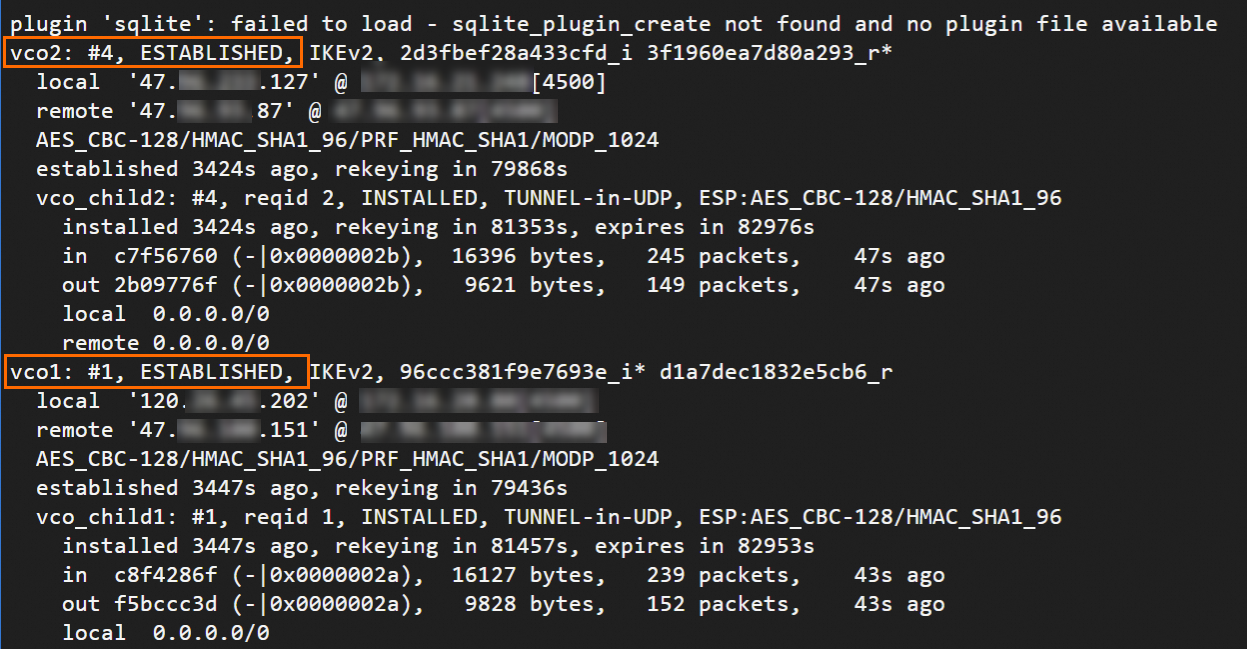
The output shows that the IPsec-VPN connection is established. However, network communication is not yet enabled because routes must be configured.
Configure routes.
View the relevant content based on the routing method that you want to use.
BGP dynamic routing
NoteAfter the strongSwan device is restarted, you must add the BGP configurations again.
Run the following commands to configure BGP IP addresses:
ip address add 169.254.10.2/30 dev ipsec0
ip address add 169.254.20.2/30 dev ipsec1
Install the FRRouting (FRR) software.
yum install -y frrRun the
vi /etc/frr/daemonscommand to edit the configuration file and enable BGP dynamic routing.Press the
ikey to enter insert mode. Change the value of the bgpd parameter toyesto enable BGP dynamic routing. Press theEsckey to exit insert mode, and then enter:wqto save the configuration.Run FRR.
systemctl enable frr
systemctl restart frr
Add BGP configurations.
Run the following command to go to the configuration interface:
vtyshRun the following command to enter configuration mode:
config terminalAdd BGP configurations.
When you run the commands, replace the following values with the actual values that you use.
Replace "169.254.10.1" and "169.254.20.1" with the BGP IP addresses of the tunnels on the Alibaba Cloud side.
Replace "65535" with the BGP ASN of the VPN gateway in your scenario.
Replace "172.16.20.0/24" and "172.16.21.0/24" with the CIDR blocks of your data center.
route-map allow-all permit 1
exit

router bgp 65530
 bgp router-id 169.254.10.2
 neighbor 169.254.10.1 remote-as 65535
 neighbor 169.254.10.1 timers 10 30
 neighbor 169.254.20.1 remote-as 65535
 neighbor 169.254.20.1 timers 10 30

 address-family ipv4 unicast
  network 172.16.20.0/24
  network 172.16.21.0/24
  neighbor 169.254.10.1 soft-reconfiguration inbound
  neighbor 169.254.10.1 route-map allow-all in
  neighbor 169.254.10.1 route-map allow-all out
  neighbor 169.254.20.1 soft-reconfiguration inbound
  neighbor 169.254.20.1 route-map allow-all in
  neighbor 169.254.20.1 route-map allow-all out
  maximum-paths 32
 exit-address-family
exit
Run the
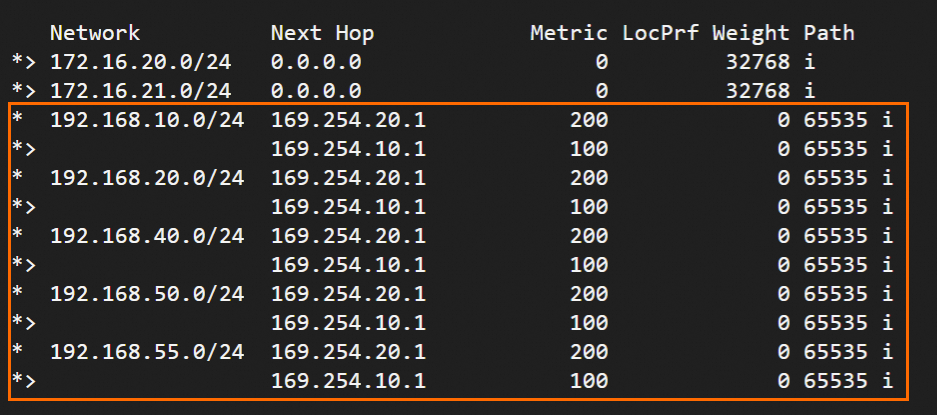
exitcommand to exit configuration mode, and then run theshow ip bgpcommand to view the BGP routes.You can see that the strongSwan device has learned the routes to the VPC and that the data center and the VPC can communicate with each other.
Static routing
Create two scripts for strongSwan to call to configure routes and control traffic forwarding.
Create and edit the /root/connect_1.sh script.
vi /root/connect_1.shAdd and save the following content.
#!/usr/bin/env bash
if [ x"$PLUTO_VERB" == "xup-client" ]; then
	echo "ip route add 192.168.0.0/16 dev ipsec0" >> /root/vpn_route.log;ip route add 192.168.0.0/16 dev ipsec0 metric 100
elif [ x"$PLUTO_VERB" == "xdown-client" ]; then
	echo "ip route del 192.168.0.0/16 dev ipsec0" >> /root/vpn_route.log;ip route del 192.168.0.0/16 dev ipsec0 metric 100
fi
Purpose: When Tunnel 1 is UP, this script adds a route for traffic destined for the Alibaba Cloud VPC (192.168.0.0/16) through the XFRM virtual network interface of Tunnel 1. The script sets the route metric to 100, giving it a higher priority than the route pointing to the XFRM virtual network interface of Tunnel 2. When Tunnel 1 is DOWN, the script deletes this route.
Create and edit the /root/connect_2.sh script.
vi /root/connect_2.shAdd and save the following content.
#!/usr/bin/env bash
if [ x"$PLUTO_VERB" == "xup-client" ]; then
	echo "ip route add 192.168.0.0/16 dev ipsec1" >> /root/vpn_route.log;ip route add 192.168.0.0/16 dev ipsec1 metric 101
elif [ x"$PLUTO_VERB" == "xdown-client" ]; then
	echo "ip route del 192.168.0.0/16 dev ipsec1" >> /root/vpn_route.log;ip route del 192.168.0.0/16 dev ipsec1 metric 101
fi
Purpose: When Tunnel 2 is UP, this script adds a route for traffic destined for the Alibaba Cloud VPC (192.168.0.0/16) through the XFRM virtual network interface of Tunnel 2. The script sets the route metric to 101, giving it a lower priority than the route pointing to the XFRM virtual network interface of Tunnel 1. When Tunnel 2 is DOWN, the script deletes this route.
Grant execute permissions to the two scripts.
sudo chmod +x /root/connect_1.sh
sudo chmod +x /root/connect_2.sh
Restart the strongSwan process.
sudo systemctl restart strongswanRun the following command to check whether the routes are configured:
route -n
Single egress with BGP dynamic routing
BGP dynamic routing is based on XFRM virtual network interfaces. To use XFRM virtual network interfaces, you must install strongSwan 5.8.0 or later, use Linux kernel 4.19 or later and iproute2 5.1.0 or later, and make sure that the kernel supports the xfrm module. If no result is returned after you run the lsmod | grep xfrm command, the xfrm module is not supported. For more information, see XFRM Interfaces on Linux.
Create two virtual network interfaces to establish the IPsec-VPN tunnels.
ip link add ipsec0 type xfrm dev eth0 if_id 42 # Create an XFRM virtual network interface for Tunnel 1. The interface ID is 42 and the underlying interface is the public interface eth0. ip link add ipsec1 type xfrm dev eth0 if_id 43 # Create an XFRM virtual network interface for Tunnel 2. The interface ID is 43 and the underlying interface is the public interface eth0. ip link set ipsec0 up # Start the XFRM virtual network interface for Tunnel 1. ip link set ipsec1 up # Start the XFRM virtual network interface for Tunnel 2.ImportantThe configuration for creating virtual network interfaces is temporary. After the strongSwan device restarts, you must add the configuration again and run the
sudo systemctl restart strongswan;swanctl --load-allcommand. This command requires root permissions. You can add a startup script for the strongSwan device to automatically add the virtual network interfaces after the device is restarted.Modify the strongSwan configuration file.
Back up the original strongSwan configuration file.
mv /etc/strongswan/swanctl/swanctl.conf /etc/strongswan/swanctl/swanctl.conf.bakCreate a strongSwan configuration file.
vi /etc/strongswan/swanctl/swanctl.confBased on the IPsec parameters specified in the example scenario, add and save the following configuration.
connections {
   vco1 {                            # Add the VPN configuration for IPsec-VPN Tunnel 1.
      version = 2                    # Specify the IKE version. Make sure that the value is the same as the IKE version of Tunnel 1 on Alibaba Cloud. 2 indicates IKEv2.
      local_addrs  = 172.16.20.80    # Private IP address of the eth0 interface.
      remote_addrs = 47.XX.XX.151    # Specify the remote IP address of Tunnel 1, which is the public IP address of Tunnel 1 of the VPN gateway on Alibaba Cloud. This is IPsec address 1.
      dpd_delay = 10
      rekey_time = 84600             # Specify the SA lifetime for Tunnel 1. Make sure that the value is the same as the SA lifetime in the IKE configurations of Tunnel 1 on Alibaba Cloud.
      over_time = 1800
      proposals = aes-sha1-modp1024  # Specify the encryption algorithm, authentication algorithm, and DH group for Tunnel 1. Make sure that the values are the same as those of Tunnel 1 on Alibaba Cloud. group2 corresponds to modp1024.
      encap = yes

      local {
         auth = psk                  # Specify PSK as the authentication method for the local side.
         id = 120.XX.XX.202          # Public egress IP address of eth0. Make sure that the value is the same as the RemoteId of Tunnel 1 on Alibaba Cloud.
      }
      remote {
         auth = psk                  # Specify PSK as the authentication method for the peer side.
         id = 47.XX.XX.151           # IPsec address 1 on the Alibaba Cloud side. Make sure that the value is the same as the LocalId of Tunnel 1 on Alibaba Cloud.
      }
      children {
         vco_child1 {
            local_ts  = 0.0.0.0/0    # For the Destination Routing Mode on Alibaba Cloud, the corresponding protected data flows are 0.0.0.0/0.
            remote_ts = 0.0.0.0/0    # For the Destination Routing Mode on Alibaba Cloud, the corresponding protected data flows are 0.0.0.0/0.
            mode = tunnel
            rekey_time = 85500
            life_time = 86400        # Specify the SA lifetime for Tunnel 1. Make sure that the value is the same as the SA lifetime in the IPsec configurations of Tunnel 1 on Alibaba Cloud.
            dpd_action = restart
            start_action = start
            close_action = start
            esp_proposals = aes-sha1-modp1024   # Specify the encryption algorithm, authentication algorithm, and DH group for Tunnel 1. Make sure that the values are the same as those in the IPsec configurations of Tunnel 1 on Alibaba Cloud. group2 corresponds to modp1024.

            if_id_out = 42           # Specify the XFRM virtual network interface of Tunnel 1 as the egress and ingress interface for Tunnel 1.
            if_id_in = 42
         }
      }
   }
  vco2 {                             # Add the VPN configuration for IPsec-VPN Tunnel 2.
      version = 2                    # Specify the IKE version. Make sure that the value is the same as the IKE version of Tunnel 2 on Alibaba Cloud. 2 indicates IKEv2.
      local_addrs  = 172.16.20.80    # Private IP address of the eth0 interface.
      remote_addrs = 47.XX.XX.87     # Specify the remote IP address of Tunnel 2, which is the public IP address of Tunnel 2 of the VPN gateway on Alibaba Cloud. This is IPsec address 2.
      dpd_delay = 10
      rekey_time = 84600             # Specify the SA lifetime for Tunnel 2. Make sure that the value is the same as the SA lifetime in the IKE configurations of Tunnel 2 on Alibaba Cloud.
      over_time = 1800               #
      proposals = aes-sha1-modp1024  # Specify the encryption algorithm, authentication algorithm, and DH group for Tunnel 2. Make sure that the values are the same as those in the IKE configurations of Tunnel 2 on Alibaba Cloud. group2 corresponds to modp1024.
      encap = yes

      local {
         auth = psk                  # Specify PSK as the authentication method for the local side.
         id = 120.XX.XX.202          # Public egress IP address of eth0. Make sure that the value is the same as the RemoteId of Tunnel 2 on Alibaba Cloud.
      }
      remote {
         auth = psk                  # Specify PSK as the authentication method for the peer side.
         id = 47.XX.XX.87            # IPsec address 2 on the Alibaba Cloud side. Make sure that the value is the same as the LocalId of Tunnel 2 on Alibaba Cloud.
      }
      children {
         vco_child2 {
            local_ts  = 0.0.0.0/0    # For the Destination Routing Mode on Alibaba Cloud, the corresponding protected data flows are 0.0.0.0/0.
            remote_ts = 0.0.0.0/0    # For the Destination Routing Mode on Alibaba Cloud, the corresponding protected data flows are 0.0.0.0/0.
            mode = tunnel
            rekey_time = 85500
            life_time = 86400        # Specify the SA lifetime for Tunnel 2. Make sure that the value is the same as the SA lifetime in the IPsec configurations of Tunnel 2 on Alibaba Cloud.
            dpd_action = restart
            start_action = start
            close_action = start
            esp_proposals = aes-sha1-modp1024     # Specify the encryption algorithm, authentication algorithm, and DH group for Tunnel 2. Make sure that the values are the same as those in the IPsec configurations of Tunnel 2 on Alibaba Cloud. group2 corresponds to modp1024.
            if_id_out = 43           # Specify the XFRM virtual network interface of Tunnel 2 as the egress and ingress interface for Tunnel 2.
            if_id_in = 43

         }
      }
   }
}

secrets {
   ike-vco1 {
      id = 47.XX.XX.151               # The public IP address of Tunnel 1 of the VPN gateway on the Alibaba Cloud side.
      secret = ChangeMe***            # Specify the pre-shared key for Tunnel 1. Make sure that the value is the same as the pre-shared key of Tunnel 1 on the Alibaba Cloud side.
   }
   ike-vco2 {
      id = 47.XX.XX.87               # The public IP address of Tunnel 2 of the VPN gateway on the Alibaba Cloud side.
      secret = ChangeMe***            # Specify the pre-shared key for Tunnel 2. Make sure that the value is the same as the pre-shared key of Tunnel 2 on the Alibaba Cloud side.
   }
}
Restart the strongSwan process, reload the strongSwan configurations, and then check the tunnel status.
sudo systemctl restart strongswan
swanctl --load-all
watch swanctl --list-sas
The output shows that the IPsec-VPN connection is established. However, network communication is not yet enabled because routes must be configured.

Configure BGP dynamic routing.
NoteAfter the strongSwan device is restarted, you must add the BGP configurations again.
Run the following commands to configure BGP IP addresses:
ip address add 169.254.10.2/30 dev ipsec0
ip address add 169.254.20.2/30 dev ipsec1
Install the FRRouting (FRR) software.
yum install -y frrRun the
vi /etc/frr/daemonscommand to edit the configuration file and enable BGP dynamic routing.Press the
ikey to enter insert mode. Change the value of the bgpd parameter toyesto enable BGP dynamic routing. Press theEsckey to exit insert mode, and then enter:wqto save the configuration.Run FRR.
systemctl enable frr
systemctl restart frr
Add BGP configurations.
Run the following command to go to the configuration interface:
vtyshRun the following command to enter configuration mode:
config terminalAdd BGP configurations.
When you run the commands, replace the following values with the actual values that you use.
Replace "169.254.10.1" and "169.254.20.1" with the BGP IP addresses of the tunnels on the Alibaba Cloud side.
Replace "65535" with the BGP ASN of the VPN gateway in your scenario.
Replace "172.16.20.0/24" and "172.16.21.0/24" with the CIDR blocks of your data center.
route-map allow-all permit 1
exit

router bgp 65530
 bgp router-id 169.254.10.2
 neighbor 169.254.10.1 remote-as 65535
 neighbor 169.254.10.1 timers 10 30
 neighbor 169.254.20.1 remote-as 65535
 neighbor 169.254.20.1 timers 10 30

 address-family ipv4 unicast
  network 172.16.20.0/24
  network 172.16.21.0/24
  neighbor 169.254.10.1 soft-reconfiguration inbound
  neighbor 169.254.10.1 route-map allow-all in
  neighbor 169.254.10.1 route-map allow-all out
  neighbor 169.254.20.1 soft-reconfiguration inbound
  neighbor 169.254.20.1 route-map allow-all in
  neighbor 169.254.20.1 route-map allow-all out
  maximum-paths 32
 exit-address-family
exit
Run the
exitcommand to exit configuration mode, and then run theshow ip bgpcommand to view the BGP routes.You can see that the strongSwan device has learned the routes to the VPC and that the data center and the VPC can communicate with each other.
Single egress with static routing
In a single-egress scenario that uses static routing, Alibaba Cloud may proactively switch traffic to the standby tunnel if it detects a risk on the active tunnel. This may cause a traffic interruption. You can monitor the value of the XfrmInTmplMismatch parameter in the /proc/net/xfrm_stat file to determine whether Alibaba Cloud has switched traffic to the standby tunnel. If the value of this parameter continuously changes, it indicates that the traffic has been switched. In this case, you can modify the value of the priority parameter for the standby tunnel in the /etc/strongswan/swanctl/swanctl.conf file to prioritize traffic from the data center to the cloud through the standby tunnel.
Back up the original strongSwan configuration file.
mv /etc/strongswan/swanctl/swanctl.conf /etc/strongswan/swanctl/swanctl.conf.bakCreate a strongSwan configuration file.
vi /etc/strongswan/swanctl/swanctl.confBased on the configuration specified in the Example scenario section, add and save the following configuration.
connections {
   vco1 {                              # Add the VPN configuration for IPsec-VPN Tunnel 1.
      version = 2                      # Specify the IKE version. Make sure that the value is the same as the IKE version of Tunnel 1 on Alibaba Cloud. 2 indicates IKEv2.
      local_addrs  = 172.16.20.80      # Private IP address of the eth0 interface.
      remote_addrs = 47.XX.XX.151      # Specify the remote IP address of Tunnel 1, which is the public IP address of Tunnel 1 of the VPN gateway on Alibaba Cloud. This is IPsec address 1.
      dpd_delay = 10
      rekey_time = 84600               # Specify the SA lifetime for Tunnel 1. Make sure that the value is the same as the SA lifetime in the IKE configurations of Tunnel 1 on Alibaba Cloud.
      over_time = 1800
      proposals = aes-sha1-modp1024    # Specify the encryption algorithm, authentication algorithm, and DH group for Tunnel 1. Make sure that the values are the same as those of Tunnel 1 on Alibaba Cloud. group2 corresponds to modp1024.
      encap = yes

      local {
         auth = psk                    # Specify PSK as the authentication method for the local side.
         id = 120.XX.XX.202            # The local public egress IP address. Make sure that the value is the same as the RemoteId of Tunnel 1 on Alibaba Cloud.
      }
      remote {
         auth = psk                    # Specify PSK as the authentication method for the peer side.
         id = 47.XX.XX.151             # IPsec address 1 on the Alibaba Cloud side. Make sure that the value is the same as the LocalId of Tunnel 1 on Alibaba Cloud.
      }
      children {
         vco_child1 {
            local_ts  = 172.16.0.0/16   # The protected data flows on the local side. Enter the private CIDR block of the data center, which is 172.16.0.0/16.
            remote_ts = 192.168.0.0/16  # The protected data flows on the Alibaba Cloud side. Enter the VPC CIDR block, which is 192.168.0.0/16.
            mode = tunnel
            rekey_time = 85500
            life_time = 86400          # Specify the SA lifetime for Tunnel 1. Make sure that the value is the same as the SA lifetime in the IPsec configurations of Tunnel 1 on Alibaba Cloud.
            dpd_action = restart
            start_action = start
            close_action = start
            esp_proposals = aes-sha1-modp1024   # Specify the encryption algorithm, authentication algorithm, and DH group for Tunnel 1. Make sure that the values are the same as those in the IPsec configurations of Tunnel 1 on Alibaba Cloud. group2 corresponds to modp1024.
            priority = 1                        # Specify the priority of Tunnel 1. This prioritizes traffic forwarding through the active tunnel.
         }
      }
   }
  vco2 {                             # Add the VPN configuration for IPsec-VPN Tunnel 2.
      version = 2                    # Specify the IKE version. Make sure that the value is the same as the IKE version of Tunnel 2 on Alibaba Cloud. 2 indicates IKEv2.
      local_addrs  = 172.16.20.80    # Private IP address of the eth0 interface.
      remote_addrs = 47.XX.XX.87     # Specify the remote IP address of Tunnel 2, which is the public IP address of Tunnel 2 of the VPN gateway on Alibaba Cloud. This is IPsec address 2.
      dpd_delay = 10
      rekey_time = 84600             # Specify the SA lifetime for Tunnel 2. Make sure that the value is the same as the SA lifetime in the IKE configurations of Tunnel 2 on Alibaba Cloud.
      over_time = 1800
      proposals = aes-sha1-modp1024  # Specify the encryption algorithm, authentication algorithm, and DH group for Tunnel 2. Make sure that the values are the same as those in the IKE configurations of Tunnel 2 on Alibaba Cloud. group2 corresponds to modp1024.
      encap = yes

      local {
         auth = psk                  # Specify PSK as the authentication method for the local side.
         id = 120.XX.XX.202          # The local public egress IP address. Make sure that the value is the same as the RemoteId of Tunnel 2 on Alibaba Cloud.
      }
      remote {
         auth = psk                  # Specify PSK as the authentication method for the peer side.
         id = 47.XX.XX.87            # IPsec address 2 on the Alibaba Cloud side. Make sure that the value is the same as the LocalId of Tunnel 2 on Alibaba Cloud.
      }
      children {
         vco_child2 {
            local_ts  = 172.16.0.0/16     # The protected data flows on the local side. Enter the private CIDR block of the data center, which is 172.16.0.0/16.
            remote_ts =  192.168.0.0/16   # The protected data flows on the Alibaba Cloud side. Enter the VPC CIDR block, which is 192.168.0.0/16.
            mode = tunnel
            rekey_time = 85500
            life_time = 86400        # Specify the SA lifetime for Tunnel 2. Make sure that the value is the same as the SA lifetime in the IPsec configurations of Tunnel 2 on Alibaba Cloud.
            dpd_action = restart
            start_action = start
            close_action = start
            esp_proposals = aes-sha1-modp1024     # Specify the encryption algorithm, authentication algorithm, and DH group for Tunnel 2. Make sure that the values are the same as those in the IPsec configurations of Tunnel 2 on Alibaba Cloud. group2 corresponds to modp1024.
            priority = 2                          # Specify the priority of Tunnel 2, which is lower than that of Tunnel 1.
         }
      }
   }
}

secrets {
   ike-vco1 {
      id = 47.XX.XX.151               # The public IP address of Tunnel 1 of the VPN gateway on the Alibaba Cloud side.
      secret = ChangeMe***            # Specify the pre-shared key for Tunnel 1. Make sure that the value is the same as the pre-shared key of Tunnel 1 on the Alibaba Cloud side.
   }
   ike-vco2 {
      id = 47.XX.XX.87                # The public IP address of Tunnel 2 of the VPN gateway on the Alibaba Cloud side.
      secret = ChangeMe***            # Specify the pre-shared key for Tunnel 2. Make sure that the value is the same as the pre-shared key of Tunnel 2 on the Alibaba Cloud side.
   }
}
Restart the strongSwan process, reload the strongSwan configurations, and then check the tunnel status.
sudo systemctl restart strongswan
swanctl --load-all
watch swanctl --list-sas
The output shows that the IPsec-VPN connection is established, and the data center and the VPC can communicate with each other.

5. Test connectivity and high availability
Test the connectivity between the data center and the VPC.
From a client in the data center,
pingan ECS instance in the Alibaba Cloud VPC. Receiving echo reply packets confirms that the connection is successful.ping <IP address of an ECS instance in the VPC>Test the high availability of the IPsec-VPN connection.
While the ping is in progress, interrupt the active tunnel of the IPsec-VPN connection.
You can interrupt the active tunnel by modifying its pre-shared key. The active tunnel is interrupted if the pre-shared keys at the two ends of the tunnel do not match.
After interrupting the active tunnel, check the connectivity again using the
pingcommand. You will notice a brief interruption in thepingtraffic before communication is restored, which confirms that traffic has automatically failed over to the standby tunnel.
FAQ
Configure strongSwan for transit router connections
If the IPsec-VPN connection is associated with a transit router, the configurations on the strongSwan device are the same as those described in this topic. We recommend that you use BGP dynamic routing. After the configuration is complete, you can view the VPC routes learned through BGP on the strongSwan device. The two tunnels of the IPsec-VPN connection automatically establish ECMP routing.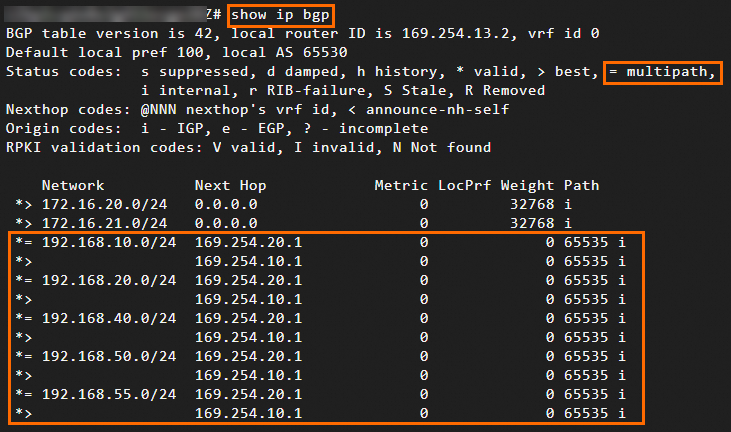
IKEv1 support
Yes.
When you configure the /etc/strongswan/swanctl/swanctl.conf file, specify version = 1.
Specify protected data flows
When you configure the /etc/strongswan/swanctl/swanctl.conf file, specify CIDR blocks in the following configuration. Make sure that the Protected Data Flow mode is also configured for the IPsec-VPN connection on the Alibaba Cloud side.
If you need to specify multiple CIDR blocks for the data center or the Alibaba Cloud VPC, both the strongSwan device and the IPsec-VPN connection must use IKEv2.
children {
         vco_child1 {
            local_ts  = 192.168.20.0/24,192.168.50.0/24    # CIDR blocks of the data center.
            remote_ts = 10.0.0.0/16    # CIDR block of the VPC on the Alibaba Cloud side.
         }
}
Configure strongSwan with a public IP address on the NIC
If your strongSwan device has a public IP address on its network interface (a non-NAT scenario), you only need to change the value of the local_addrs field for each tunnel to the public IP address in the /etc/strongswan/swanctl/swanctl.conf file. The other configurations remain unchanged.
connections {
   vco1 {
      local_addrs  = 1.1.XX.XX     # The public IP address that is assigned to the NIC of the strongSwan device.
   }
}
Single-tunnel configuration
If your VPN gateway supports only single-tunnel IPsec-VPN connections, we recommend that you upgrade the IPsec-VPN connection to dual-tunnel mode. Dual-tunnel IPsec-VPN connections support disaster recovery across availability zones to improve high availability.
Single-tunnel example
Example scenario
In the scenario shown in the following figure, you can deploy the strongSwan software on a gateway device in your data center and establish a single-tunnel IPsec-VPN connection with Alibaba Cloud to enable network communication between your data center and cloud resources.

IP address planning
Data center side
Private CIDR block: 10.0.0.0/16
strongSwan device: NIC eth0 with IP address 10.0.0.1, mapped to public egress IP address 1.1.XX.XX
NoteFor non-NAT scenarios, see How to configure a strongSwan device whose NIC has a public IP address.
Alibaba Cloud side
VPC CIDR block: 172.16.0.0/16
vSwitch 1 CIDR block: 172.16.1.0/24
vSwitch 2 CIDR block: 172.16.2.0/24
VPN gateway
IPsec address: 3.3.XX.XX
NoteAfter you create a VPN gateway, the system automatically assigns an IPsec address to the VPN gateway instance.
VPN parameters
Make sure that the configurations on the strongSwan device and on Alibaba Cloud are the same.
Pre-shared key: ChangeMe***
IKE configurations
IKE version: ikev2
Negotiation mode: main
Encryption algorithm: aes
Authentication algorithm: sha1
DH group: group2
SA lifetime (seconds): 86400
IPsec configurations:
Encryption algorithm: aes
Authentication algorithm: sha1
DH group: group2
SA lifetime (seconds): 86400
Alibaba Cloud preparations
Before you configure the strongSwan device, complete the following steps on the Alibaba Cloud side based on the configuration specified in the example scenario: Create a VPN gateway, Create a customer gateway, Create an IPsec-VPN connection, and Configure routes for the VPN gateway. For more information, see Establish a connection between a VPC and a data center (single-tunnel mode).
When you create the IPsec-VPN connection, set the routing mode of the tunnel to Protected Data Flow mode:
Local network: Enter the CIDR block of the VPC on the Alibaba Cloud side, which is 172.16.0.0/16.
Remote network: Enter the private CIDR block of the data center, which is 10.0.0.0/16.
Configure the strongSwan device
The following steps use a strongSwan device that runs the CentOS Stream 9 64-bit operating system as an example. For other operating systems, see the official strongSwan documentation.
1. Configure firewall policies
On the strongSwan device, allow traffic that passes through the ESP protocol (IP protocol number 50), UDP port 500, and UDP port 4500.
iptables -I INPUT -p 50 -j ACCEPT
iptables -I INPUT -p udp --dport 500 -j ACCEPT
iptables -I INPUT -p udp --dport 4500 -j ACCEPT2. Enable traffic forwarding
echo 1 > /proc/sys/net/ipv4/ip_forwardThe preceding command is temporary and does not persist after a device restart. To make the change permanent, follow these steps.
3. Install strongSwan
dnf install epel-release -y
dnf install strongswan -y4. Configure the tunnel
Configure the tunnel based on protected data flows.
Back up the original strongSwan configuration file.
mv /etc/strongswan/swanctl/swanctl.conf /etc/strongswan/swanctl/swanctl.conf.bakCreate a strongSwan configuration file.
vi /etc/strongswan/swanctl/swanctl.confBased on the configuration specified in the example scenario, add and save the following configuration.
connections {
   vco1 {                            # Add the VPN configuration for Tunnel 1.
      version = 2                    # Specify the IKE version. Make sure that the value is the same as the IKE version of Tunnel 1 on Alibaba Cloud. 2 indicates IKEv2.
      local_addrs  = 10.0.0.1        # IP address of the local NIC.
      remote_addrs = 3.3.XX.XX       # Specify the remote IP address of Tunnel 1, which is the public IP address of Tunnel 1 of the VPN gateway on Alibaba Cloud. This is IPsec address 1.
      dpd_delay = 10
      rekey_time = 84600             # Specify the SA lifetime for Tunnel 1. Make sure that the value is the same as the SA lifetime in the IKE configurations of Tunnel 1 on Alibaba Cloud.
      over_time = 1800
      proposals = aes-sha1-modp1024  # Specify the encryption algorithm, authentication algorithm, and DH group for Tunnel 1. Make sure that the values are the same as those of Tunnel 1 on Alibaba Cloud. group2 corresponds to modp1024.
      encap = yes

      local {
         auth = psk                  # Specify PSK as the authentication method for the local side.
         id = 1.1.XX.XX              # The public egress IP address. Make sure that the value is the same as the RemoteId of Tunnel 1 on Alibaba Cloud.
      }
      remote {
         auth = psk                  # Specify PSK as the authentication method for the peer side.
         id = 3.3.XX.XX              # The IPsec address on the Alibaba Cloud side. Make sure that the value is the same as the LocalId of Tunnel 1 on Alibaba Cloud.
      }
      children {
         vco_child1 {
            local_ts  = 10.0.0.0/16    # The protected data flows on the local side.
            remote_ts = 172.16.0.0/16    # The protected data flows on the Alibaba Cloud side.
            mode = tunnel
            rekey_time = 85500
            life_time = 86400        # Specify the SA lifetime for Tunnel 1. Make sure that the value is the same as the SA lifetime in the IPsec configurations of Tunnel 1 on Alibaba Cloud.
            dpd_action = restart
            start_action = start
            close_action = start
            esp_proposals = aes-sha1-modp1024   # Specify the encryption algorithm, authentication algorithm, and DH group for Tunnel 1. Make sure that the values are the same as those in the IPsec configurations of Tunnel 1 on Alibaba Cloud. group2 corresponds to modp1024.
         }
      }
   }

}

secrets {
   ike-vco1 {
      id = 3.3.XX.XX               # The public IP address of Tunnel 1 of the VPN gateway on the Alibaba Cloud side.
      secret = ChangeMe***            # Specify the pre-shared key for Tunnel 1. Make sure that the value is the same as the pre-shared key of Tunnel 1 on the Alibaba Cloud side.
   }
}
Restart the strongSwan process and reload the strongSwan configurations.
systemctl restart strongswan
swanctl --load-all
Check the tunnel status.
watch swanctl --list-sas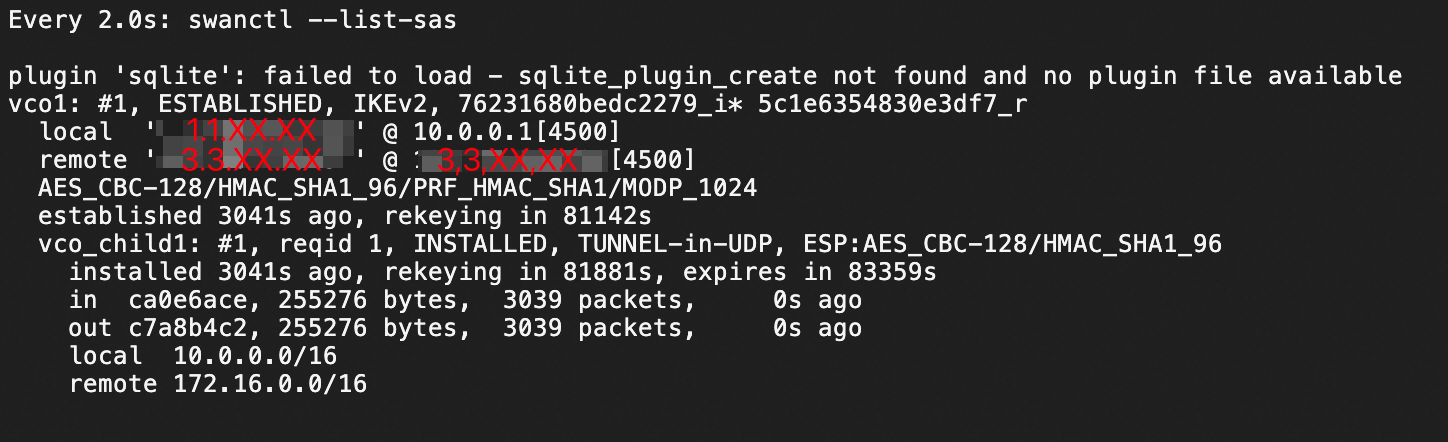
The output shows that the IPsec-VPN connection is established between the strongSwan device and the VPN gateway.
5. Test connectivity
Test the connectivity between the strongSwan device and the VPC.
From the strongSwan device, ping an ECS instance in the Alibaba Cloud VPC. Receiving echo reply packets confirms that the connection is successful.
ping <IP address of an ECS instance in the VPC>