Connect a data center FortiGate firewall to Alibaba Cloud VPN Gateway over IPsec-VPN in dual-tunnel mode. This guide covers both static routing and BGP dynamic routing on FortiOS 7.4.4. Estimated time: 30–45 minutes (including verification).
Scenario example

This article uses the scenario in the preceding figure as an example. A company has a Virtual Private Cloud (VPC) on Alibaba Cloud. The VPC CIDR block is 10.0.0.0/16, and Elastic Compute Service (ECS) instances are deployed in the VPC to host application services. The company also has a local data center, and the CIDR block in the local data center that needs to communicate with the VPC is 192.168.0.0/16. The company plans to establish an IPsec-VPN connection between the local data center and the VPC on the cloud to enable resource access.
In the scenario described in this article, the local data center uses a single public IP address of one FortiGate firewall to establish a dual-tunnel IPsec-VPN connection with Alibaba Cloud. If your scenario requires a single-tunnel IPsec-VPN connection, see Single-tunnel configuration example at the end of this article.
Network planning and VPN configuration example
Network planning
Resource | CIDR block | IP address |
Local data center | CIDR block to communicate with the VPC: 192.168.0.0/16 | Server IP address: 192.168.10.211 |
FortiGate firewall | CIDR block of the interface: 192.168.0.0/16 |
|
VPC | Primary CIDR block: 10.0.0.0/16 VSwitch 1: 10.0.10.0/24 VSwitch 2: 10.0.20.0/24 | ECS IP address: 10.0.10.247 |
VPN gateway instance (public network type) | Not applicable |
Note After you create a VPN gateway instance, the system automatically assigns IP addresses to the VPN gateway instance. |
BGP network planning
This article describes how to configure the FortiGate firewall when the IPsec-VPN connection uses static routing and BGP dynamic routing respectively. If you do not need to use BGP dynamic routing, you can ignore this section. The following is the BGP network planning used in this article.
Resource | Tunnel | BGP tunnel CIDR block | BGP IP address | BGP AS number (local autonomous system number) |
VPN gateway instance | Tunnel 1 | 169.254.10.0/30 Note Under a VPN gateway instance, the CIDR block of each tunnel must be unique. | 169.254.10.1 | 65535 |
Tunnel 2 | 169.254.20.0/30 | 169.254.20.1 | ||
FortiGate firewall | Tunnel 1 | 169.254.10.0/30 | 169.254.10.2 | 65500 |
Tunnel 2 | 169.254.20.0/30 | 169.254.20.2 |
VPN configuration example
In the scenario of this article, tunnel 1 (primary tunnel) and tunnel 2 (backup tunnel) use the same example values.
For each tunnel, the VPN configuration on the Alibaba Cloud side and the FortiGate firewall side must be the same.
Configuration item | Example value on the Alibaba Cloud side | Example value on the FortiGate firewall side | |
Pre-shared key | 123456**** | 123456**** | |
IKE configuration | IKE version | ikev2 | ikev2 |
Negotiation mode | main | main | |
Encryption algorithm | des | des Note In the scenario of this article, the software version used by the FortiGate firewall does not support the aes algorithm. Therefore, this article uses the des algorithm as an example. Using the aes algorithm is recommended. | |
Authentication algorithm | sha1 | sha1 | |
DH group | group2 | group2 | |
SA lifetime (seconds) | 86400 | 86400 | |
IPsec configuration | Encryption algorithm | des | des Note In the scenario of this article, the software version used by the FortiGate firewall does not support the aes algorithm. Therefore, this article uses the des algorithm as an example. Using the aes algorithm is recommended. |
Authentication algorithm | sha1 | sha1 | |
DH group | group2 | group2 | |
SA lifetime (seconds) | 86400 | 86400 | |
Prerequisites
This article only describes how to add VPN configurations on the FortiGate firewall. The configuration on the Alibaba Cloud VPN gateway side is not described. Therefore, before you start the configuration, make sure that you have completed the tasks of creating a VPN gateway instance, creating a customer gateway, creating an IPsec connection, and configuring VPN gateway routes. For the specific steps:
For static routing, see Standard VPN Gateway quick start.
For BGP dynamic routing, see Dual-tunnel mode with BGP.
In the scenario of this article, the local data center uses a single public IP address of the FortiGate firewall to establish a dual-tunnel IPsec-VPN connection with Alibaba Cloud. Therefore, you only need to create one customer gateway, and when you create an IPsec connection, both tunnels can be associated with the same customer gateway.
Start configuration
The following uses FortiOS V6.2.4 as an example to describe how to configure the FortiGate firewall. The following content is for example use only. For the specific configuration commands, refer to the vendor's configuration manual.
Static routing
Log in to the FortiGate firewall CLI configuration interface.
Add the phase 1 (IKE) configuration for the IPsec-VPN on the FortiGate firewall.
# Add the phase 1 configuration of the IPsec-VPN for tunnel 1
config vpn ipsec phase1-interface
 edit "to_aliyun_test1"
 set interface "port1"             # Specify the interface as the public network egress interface.
 set ike-version 2
 set peertype any
 set net-device disable
 set proposal des-sha1
 set localid-type address          # Specify the localid format as the IP address format, consistent with the remoteid format of tunnel 1 on the Alibaba Cloud side.
 set dhgrp 2
 set remote-gw 8.XX.XX.146         # Specify the remote address of tunnel 1 as IPsec address 1 of the VPN gateway instance.
 set psksecret 123456****          # Specify the pre-shared key of tunnel 1, which must be the same on the Alibaba Cloud side and the FortiGate firewall side.
 next
end

# Add the phase 1 configuration of the IPsec-VPN for tunnel 2
config vpn ipsec phase1-interface
 edit "to_aliyun_test2"
 set interface "port1"             # Specify the interface as the public network egress interface.
 set ike-version 2
 set peertype any
 set net-device disable
 set proposal des-sha1
 set localid-type address          # Specify the localid format as the IP address format, consistent with the remoteid format of tunnel 2 on the Alibaba Cloud side.
 set dhgrp 2
 set remote-gw 8.XX.XX.74          # Specify the remote address of tunnel 2 as IPsec address 2 of the VPN gateway instance.
 set psksecret 123456****          # Specify the pre-shared key of tunnel 2, which must be the same on the Alibaba Cloud side and the FortiGate firewall side.
 next
end
Add the phase 2 (IPsec) configuration for the IPsec-VPN on the FortiGate firewall.
# Add the phase 2 configuration of the IPsec-VPN for tunnel 1
config vpn ipsec phase2-interface
    edit "to_aliyun_test1"
        set phase1name "to_aliyun_test1"    # Associate the phase1-interface of tunnel 1.
        set proposal des-sha1
        set dhgrp 2
        set auto-negotiate enable
        set keylifeseconds 86400
    next
end

# Add the phase 2 configuration of the IPsec-VPN for tunnel 2
config vpn ipsec phase2-interface
    edit "to_aliyun_test2"
        set phase1name "to_aliyun_test2"     # Associate the phase1-interface of tunnel 2.
        set proposal des-sha1
        set dhgrp 2
        set auto-negotiate enable
        set keylifeseconds 86400
    next
end
Configure firewall policies.
config firewall policy
    edit 1
        set name "forti_to_aliyun1"       # Specify the CIDR block allowed to pass from the FortiGate firewall to Alibaba Cloud under tunnel 1.
        set srcintf "port4"
        set dstintf "to_aliyun_test1"
        set srcaddr "all"
        set dstaddr "all"
        set action accept
        set schedule "always"
        set service "ALL"
    next
    edit 2
        set name "aliyun_to_forti1"       # Specify the CIDR block allowed to pass from Alibaba Cloud to the FortiGate firewall under tunnel 1.
        set srcintf "to_aliyun_test1"
        set dstintf "port4"
        set srcaddr "all"
        set dstaddr "all"
        set action accept
        set schedule "always"
        set service "ALL"
    next
    edit 3
        set name "forti_to_aliyun2"        # Specify the CIDR block allowed to pass from the FortiGate firewall to Alibaba Cloud under tunnel 2.
        set srcintf "port4"
        set dstintf "to_aliyun_test2"
        set srcaddr "all"
        set dstaddr "all"
        set action accept
        set schedule "always"
        set service "ALL"
    next
    edit 4
        set name "aliyun_to_forti2"        # Specify the CIDR block allowed to pass from Alibaba Cloud to the FortiGate firewall under tunnel 2.
        set srcintf "to_aliyun_test2"
        set dstintf "port4"
        set srcaddr "all"
        set dstaddr "all"
        set action accept
        set schedule "always"
        set service "ALL"
    next
end
Configure static routes for accessing the VPC.
config router static
    edit 1
        set dst 10.0.0.0 255.255.0.0
        set priority 0
        set device "to_aliyun_test1"
    next
    edit 2
        set dst 10.0.0.0 255.255.0.0
        set distance 10                   # Higher distance = standby (Tunnel 2 takes over if Tunnel 1 fails)
        set device "to_aliyun_test2"
    next
end
BGP dynamic routing
Log in to the FortiGate firewall CLI configuration interface.
Add the phase 1 (IKE) configuration for the IPsec-VPN on the FortiGate firewall.
# Add the phase 1 configuration of the IPsec-VPN for tunnel 1
config vpn ipsec phase1-interface
 edit "to_aliyun_test1"
 set interface "port1"             # Specify the interface as the public network egress interface.
 set ike-version 2
 set peertype any
 set net-device disable
 set proposal des-sha1
 set localid-type address          # Specify the localid format as the IP address format, consistent with the remoteid format of tunnel 1 on the Alibaba Cloud side.
 set dhgrp 2
 set remote-gw 8.XX.XX.146         # Specify the remote address of tunnel 1 as IPsec address 1 of the VPN gateway instance.
 set psksecret 123456****          # Specify the pre-shared key of tunnel 1, which must be the same on the Alibaba Cloud side and the FortiGate firewall side.
 next
end

# Add the phase 1 configuration of the IPsec-VPN for tunnel 2
config vpn ipsec phase1-interface
 edit "to_aliyun_test2"
 set interface "port1"             # Specify the interface as the public network egress interface.
 set ike-version 2
 set peertype any
 set net-device disable
 set proposal des-sha1
 set localid-type address          # Specify the localid format as the IP address format, consistent with the remoteid format of tunnel 2 on the Alibaba Cloud side.
 set dhgrp 2
 set remote-gw 8.XX.XX.74          # Specify the remote address of tunnel 2 as IPsec address 2 of the VPN gateway instance.
 set psksecret 123456****          # Specify the pre-shared key of tunnel 2, which must be the same on the Alibaba Cloud side and the FortiGate firewall side.
 next
end
Add the phase 2 (IPsec) configuration for the IPsec-VPN on the FortiGate firewall.
# Add the phase 2 configuration of the IPsec-VPN for tunnel 1
config vpn ipsec phase2-interface
    edit "to_aliyun_test1"
        set phase1name "to_aliyun_test1"    # Associate the phase1-interface of tunnel 1.
        set proposal des-sha1
        set dhgrp 2
        set auto-negotiate enable
        set keylifeseconds 86400
    next
end

# Add the phase 2 configuration of the IPsec-VPN for tunnel 2
config vpn ipsec phase2-interface
    edit "to_aliyun_test2"
        set phase1name "to_aliyun_test2"     # Associate the phase1-interface of tunnel 2.
        set proposal des-sha1
        set dhgrp 2
        set auto-negotiate enable
        set keylifeseconds 86400
    next
end
Configure firewall policies.
config firewall policy
    edit 1
        set name "forti_to_aliyun1"       # Specify the CIDR block allowed to pass from the FortiGate firewall to Alibaba Cloud under tunnel 1.
        set srcintf "port4"
        set dstintf "to_aliyun_test1"
        set srcaddr "all"
        set dstaddr "all"
        set action accept
        set schedule "always"
        set service "ALL"
    next
    edit 2
        set name "aliyun_to_forti1"       # Specify the CIDR block allowed to pass from Alibaba Cloud to the FortiGate firewall under tunnel 1.
        set srcintf "to_aliyun_test1"
        set dstintf "port4"
        set srcaddr "all"
        set dstaddr "all"
        set action accept
        set schedule "always"
        set service "ALL"
    next
    edit 3
        set name "forti_to_aliyun2"        # Specify the CIDR block allowed to pass from the FortiGate firewall to Alibaba Cloud under tunnel 2.
        set srcintf "port4"
        set dstintf "to_aliyun_test2"
        set srcaddr "all"
        set dstaddr "all"
        set action accept
        set schedule "always"
        set service "ALL"
    next
    edit 4
        set name "aliyun_to_forti2"        # Specify the CIDR block allowed to pass from Alibaba Cloud to the FortiGate firewall under tunnel 2.
        set srcintf "to_aliyun_test2"
        set dstintf "port4"
        set srcaddr "all"
        set dstaddr "all"
        set action accept
        set schedule "always"
        set service "ALL"
    next
end
Assign BGP IP addresses to the tunnel interfaces.
config system interface
    edit "to_aliyun_test1"
        set ip 169.254.10.2 255.255.255.255          # Local BGP IP for Tunnel 1
        set remote-ip 169.254.10.1 255.255.255.255   # Remote BGP IP for Tunnel 1 (VPN Gateway)
    next
    edit "to_aliyun_test2"
        set ip 169.254.20.2 255.255.255.255          # Local BGP IP for Tunnel 2
        set remote-ip 169.254.20.1 255.255.255.255   # Remote BGP IP for Tunnel 2 (VPN Gateway)
    next
end
Configure BGP dynamic routing.
config router bgp
    set as 65500
    set router-id 122.XX.XX.248
    config neighbor
        edit "169.254.10.1"                       # BGP peer for Tunnel 1 (VPN Gateway)
            set remote-as 65535
        edit "169.254.20.1"
        edit "169.254.20.1"                       # BGP peer for Tunnel 2 (VPN Gateway)
        next
    end
    config network
        edit 1
        edit 100
        next
    end
    end
        set status enable
    end
end
Multi-CIDR-block traffic-selector scenario
For the scenario where the traffic selector involves multiple CIDR blocks, two methods are provided.
Method 1 (recommended): Use the Address group feature of FortiGate.
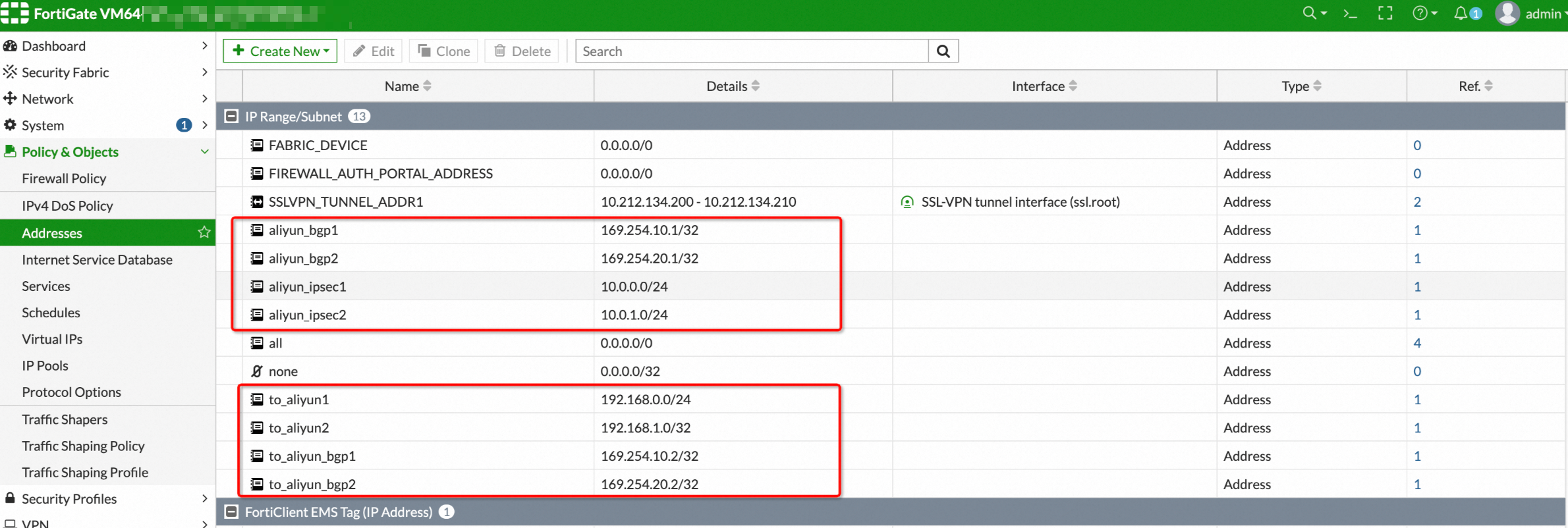
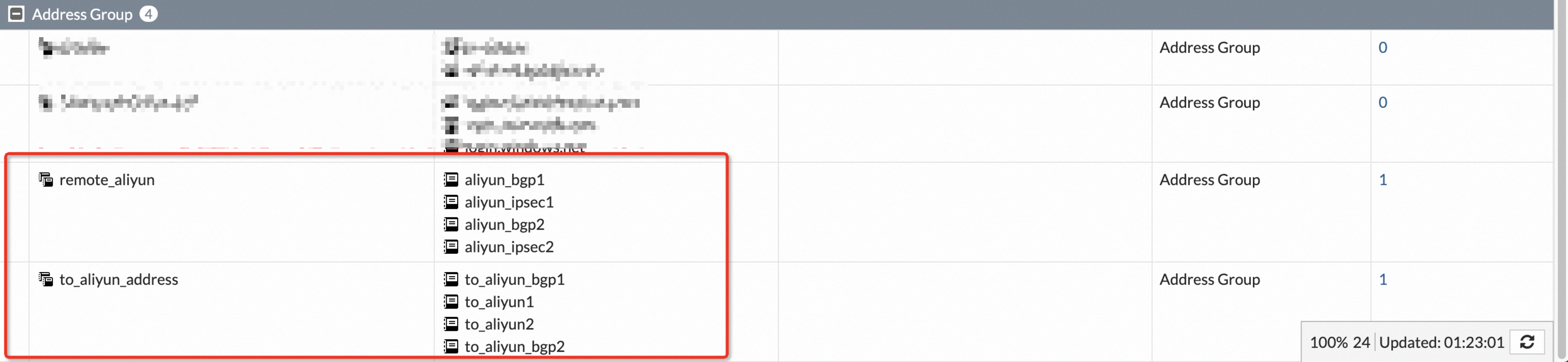
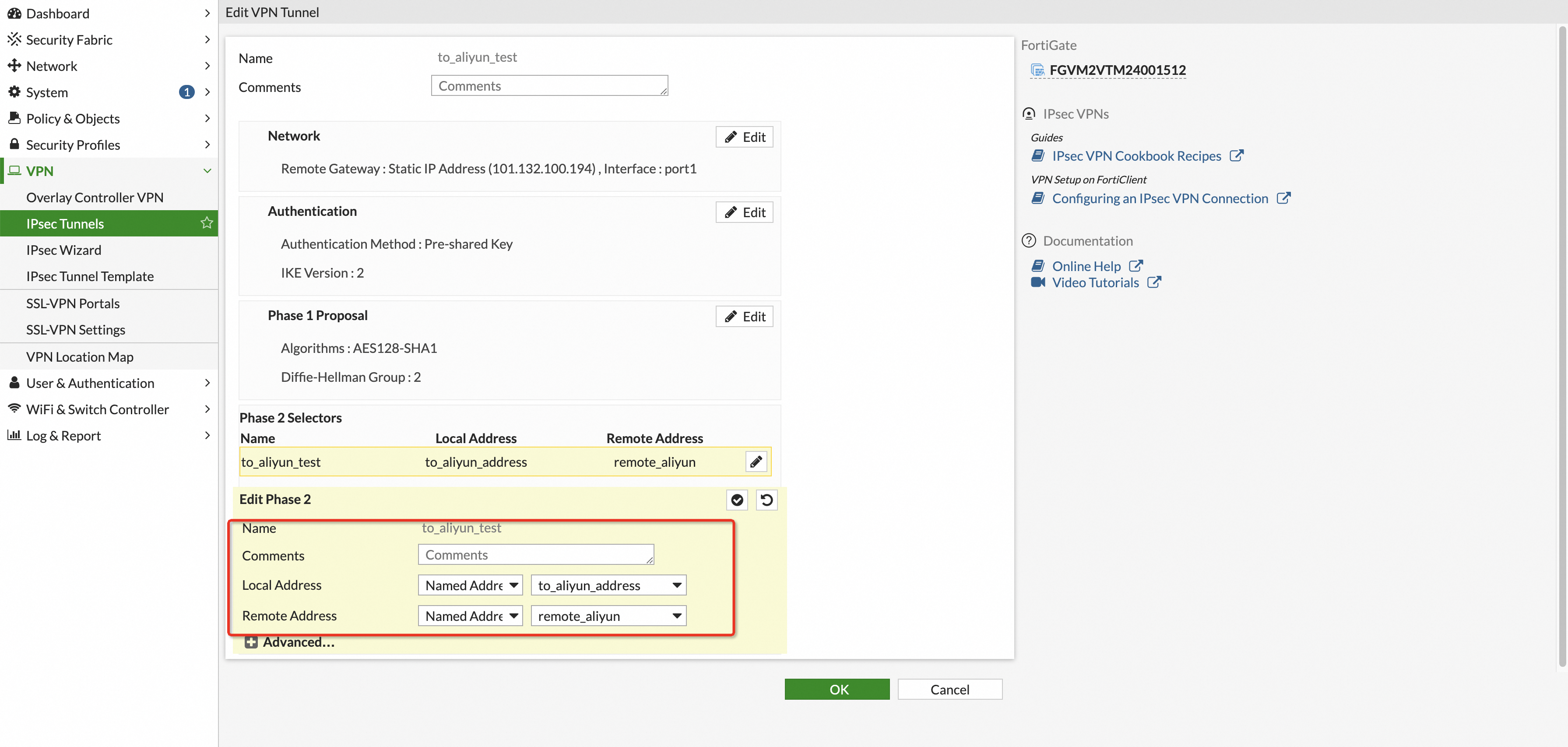
For example, the business CIDR blocks on the Alibaba Cloud side are divided into 10.0.0.0/24 and 10.0.1.0/24, and the business CIDR blocks on the FortiGate side are divided into 192.168.0.0/24 and 192.168.1.0/24.
Alibaba Cloud side: Set the routing mode of each tunnel of the IPsec connection to Protected Data Flows, and set
Local CIDR Block to 10.0.0.0/24, 10.0.1.0/24, 169.254.10.1/32, and 169.254.20.1/32.
Remote Network to 192.168.0.0/24, 192.168.1.0/24, 169.254.10.2/32, and 169.254.20.2/32.
When you enable BGP, you must add the four BGP addresses starting with 169 as shown above. Otherwise, BGP negotiation cannot succeed.
FortiGate side:
Configure address ranges:
Configure an address group:
Configure Phase2 Selectors:
After the configuration is complete, confirm that the two tunnels are successfully negotiated, the BGP status is normal, and perform mutual ping tests with the ECS on the Alibaba Cloud side.
Method 2: Aggregate multiple CIDR blocks into a single CIDR block. For details, see the first two solutions in Multi-CIDR block communication FAQ.
Single-tunnel configuration example
Scenario example

This article uses the scenario in the preceding figure as an example. A company has a VPC on Alibaba Cloud. The VPC CIDR block is 192.168.10.0/24, and ECS instances are deployed in the VPC to host application services. The company also has a local data center, and the CIDR block in the local data center that needs to communicate with the VPC is 192.168.66.0/24. The company plans to establish an IPsec-VPN connection between the local data center and the VPC on the cloud to enable resource access.
Network planning and VPN configuration example
Network planning
Resource | Example value | |
VPC | Private CIDR block to communicate with the local data center | 192.168.10.0/24 |
VPN gateway (public network type) | Public IP address of the VPN gateway | 101.XX.XX.127 |
Local data center | Private CIDR block to communicate with the VPC | 192.168.66.0/24 |
Public IP address of the FortiGate firewall | 122.XX.XX.248 | |
Physical interface of the FortiGate firewall connected to the public network | WAN: Configure the public IP address 122.XX.XX.248 for the WAN port | |
Physical interface of the FortiGate firewall connected to the local data center | LAN: Configure the private IP address 192.168.66.125/24 for the LAN port | |
VPN configuration example
Configuration item | Example value on the Alibaba Cloud side | Example value on the FortiGate firewall side | |
Pre-shared key | ff123TT**** | ff123TT**** | |
IKE configuration | IKE version | ikev1 | ikev1 |
Negotiation mode | main | main | |
Encryption algorithm | aes | aes | |
Authentication algorithm | sha1 | sha1 | |
DH group | group2 | group2 | |
SA lifetime (seconds) | 86400 | 86400 | |
IPsec configuration | Encryption algorithm | aes | aes |
Authentication algorithm | sha1 | sha1 | |
DH group | group2 | group2 | |
SA lifetime (seconds) | 86400 | 86400 | |
Prerequisites
This article only describes how to add VPN configurations on the FortiGate firewall. The configuration on the Alibaba Cloud VPN gateway side is not described. This article uses static routing. Before you start the configuration, make sure that you have completed the operations of creating a VPN gateway, creating a customer gateway, creating an IPsec connection, and configuring VPN gateway routes on the Alibaba Cloud side. For the specific operations, see Single-tunnel mode.
Start configuration
The following uses FortiOS 7.0 as an example to describe how to configure the FortiGate firewall. The following content is for example use only. For the specific configuration commands, refer to the vendor's configuration manual.
Log in to the FortiGate firewall CLI configuration interface.
Add the phase 1 (IKE) configuration for the IPsec-VPN on the FortiGate firewall.
config vpn ipsec phase1-interface
    edit "to_AliCloud"
        set interface "wan"
        set peertype any
        set net-device disable
        set proposal aes128-sha1
        set dpd on-idle
        set dhgrp 2
        set keylife 86400
        set keylife 86400
        set remote-gw 8.XX.XX.146           # Public IP address of the VPN Gateway
    next
end
Add the phase 2 (IPsec) configuration for the IPsec-VPN on the FortiGate firewall.
config vpn ipsec phase2-interface
    edit "to_AliCloud"
        set phase1name "to_AliCloud"            # Associate the phase1-interface of the tunnel.
        set proposal aes128-sha1
        set dhgrp 2
        set keylifeseconds 86400
        set auto-negotiate enable
    next
end
Configure firewall policies.
onfig firewall address                             # Define address ranges
    edit "Local_192.168.66.0/24"
        set subnet 192.168.66.0 255.255.255.0
    next
    edit "Remote_192.168.10.0/24"
        set subnet 192.168.10.0 255.255.255.0
    next
    edit "AliCloud_VPN_Gateway"
        set subnet 101.XX.XX.127 255.255.255.255
    next
end

config firewall policy
    edit 4
        set srcintf "lan"
        set dstintf "to_AliCloud"                  # Specify the CIDR block allowed to pass from the FortiGate firewall to Alibaba Cloud under the tunnel.
        set action accept
        set srcaddr "Local_192.168.66.0/24"
        set dstaddr "Remote_192.168.10.0/24"
        set schedule "always"
        set service "ALL"
    next
    edit 5
        set srcintf "to_AliCloud"                   # Specify the CIDR block allowed to pass from Alibaba Cloud to the FortiGate firewall under the tunnel.
        set dstintf "lan"
        set action accept
        set srcaddr "Remote_192.168.10.0/24"
        set dstaddr "Local_192.168.66.0/24"
        set schedule "always"
        set service "ALL"
    next
end
Add a static route to the VPC.
config router static
    edit 3
        set dst 192.168.10.0 255.255.255.0
        set device "to_AliCloud"
    next
    edit 4
        set dst 192.168.10.0 255.255.255.0
        set distance 254
        set blackhole enable
    next
end
Configure a local-in policy for the FortiGate.
ImportantConfigure a local-in policy for the FortiGate to drop IKE negotiation packets sent from the Alibaba Cloud side when no IKE session is established. Note that this step is very important. If you do not configure it, the IPsec-VPN connection may fail to be re-established after it is interrupted.
config firewall local-in-policy
    edit 1
        set intf "wan"
        set srcaddr "AliCloud_VPN_Gateway"
        set dstaddr "all"
        set service "IKE"
        set schedule "always"
        set action deny
    next
end