ApsaraVideo VOD lets you generate video snapshots from your media files. You can create snapshot templates with pre-configured settings and manage them through the console or by using APIs.
Introduction
A video snapshot is an image captured from a specific point in a video and saved as an image file. ApsaraVideo VOD provides snapshot templates so you can configure parameters once and reuse them by specifying the template ID when you submit a snapshot job.
-
Snapshot generation may fail for audio-only media files, corrupted source files, or files with abnormal container information.
-
The snapshot process is fully asynchronous. When you submit a snapshot request, the job may still be queued even after the API returns a response. You can retrieve the snapshot results from a video snapshot completion event notification.
-
The time required to generate a snapshot depends on the file size, duration, and frame type.
-
The output directory for generated snapshots cannot be customized.
Snapshot types
-
Cover snapshot (CoverSnapshot)
ApsaraVideo VOD automatically generates snapshots for every source video. These are called cover snapshots. By default, up to eight images are captured at evenly spaced keyframes, starting from the 5 ms mark of the video. You can view these cover snapshots on the video details page in the ApsaraVideo VOD console and select any of them as the video cover.
-
If a video has fewer than eight keyframes, fewer than eight snapshots will be generated.
-
If no video cover is set, the middle one of the generated cover snapshots is used as the default cover.
-
When you upload a video to ApsaraVideo VOD, the service generates cover snapshots and sprite snapshots.
-
Normal snapshot (NormalSnapshot)
You can use an API to capture a specific number of images from a video. This method lets you configure settings like the start time, total number of snapshots, snapshot interval, width, and height. If you submit multiple snapshot jobs for the same video, ApsaraVideo VOD retains only the data from the most recent job. For more information, see submit media snapshot job.
-
Sprite snapshot (SpriteSnapshot)
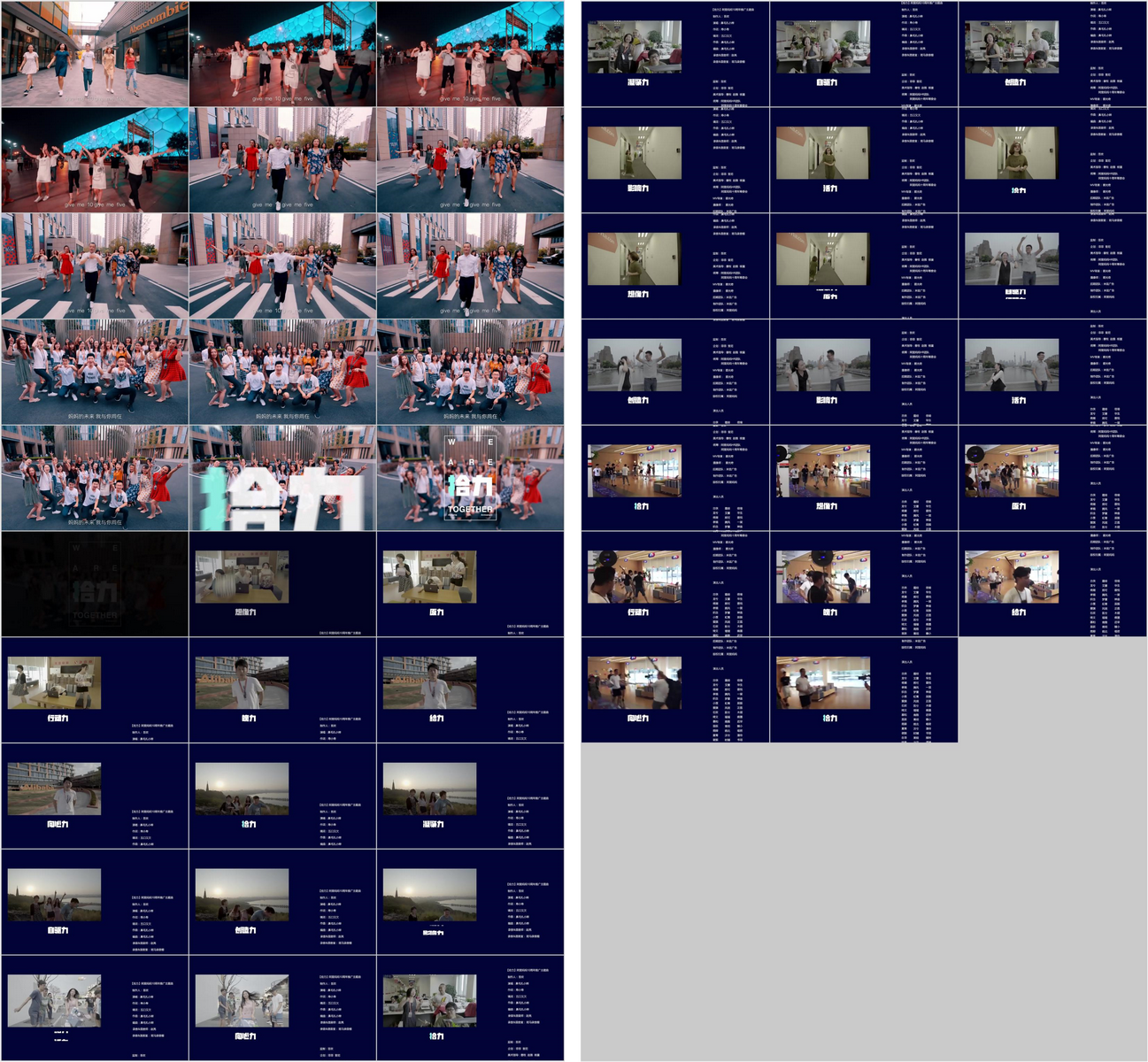
A sprite is created by first generating a series of normal snapshots and then stitching them together into a single, larger image based on a defined layout. This larger image is the sprite, and the individual images used to create it are called the original images of a sprite. Using a sprite reduces the number of image requests. This lets a client fetch information for multiple snapshots in a single request, which improves performance.
For example, if you arrange the normal snapshots in a 10x10 grid, a single sprite can theoretically contain 10 × 10 = 100 small images. If the actual number of normal snapshots is less than 100, the sprite will contain fewer images. If the number exceeds 100, a second sprite is generated, and so on. The following figure illustrates this process.
 Note
NoteIn the example diagram, there are 50 normal snapshots in total, arranged in a 10×3 grid. The first sprite contains 30 small images, and the second sprite contains the remaining 20.
-
Original image of a sprite (SpriteOriginSnapshot)
The original images of a sprite are the normal snapshots used to create the sprite. You can choose to either keep or delete these original images. If you keep them, you can retrieve their data using the query snapshot data API. For more information, see query snapshot data.
-
WebVTT snapshot
Generating WebVTT snapshots creates a VTT file that contains information about all the snapshots. The VTT file records basic information, such as the timestamp and URL of each snapshot. To display thumbnails, your application must first parse the VTT file to retrieve this information. This is commonly used to display preview thumbnails on a player's seek bar.
WebVTT snapshot storage options
-
Individual image storage
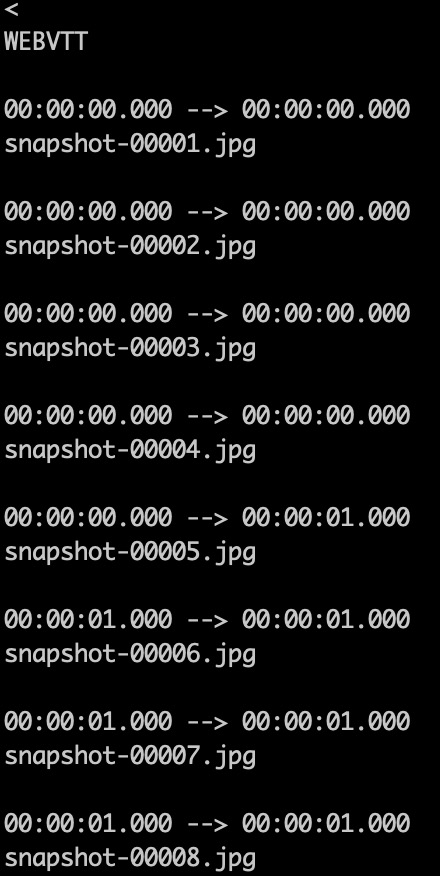
Each snapshot is stored as a separate image file. The VTT file records the relative position and timestamp for each individual snapshot, as shown in the following figure:
-
Combined image storage
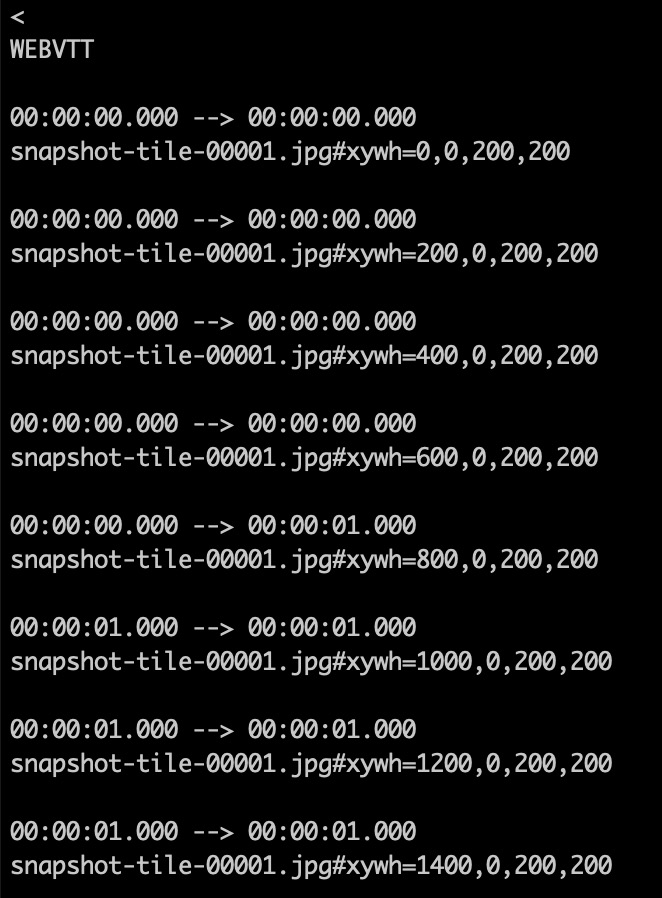
All snapshots are first stitched into a single large image (a sprite). To access a specific snapshot, you must parse its coordinates from the VTT file, as shown in the following figure:
Usage
-
Cover snapshot
After a video is uploaded, ApsaraVideo VOD automatically generates cover snapshots. This process is free of charge.
-
API-initiated snapshots
You can initiate a snapshot task for a specific video by calling the submit media snapshot job API. For more information, see submit media snapshot job. This method can be used to generate both normal snapshots and sprite snapshots.
-
How to retrieve snapshots
You can retrieve snapshot information in the following ways:
-
Receive a video snapshot completion callback notification.
-
Call the GetVideoInfo API to retrieve default snapshot information.
-
Call the query snapshot data API to query snapshot data.
-
-
How to delete snapshots
Currently, ApsaraVideo VOD does not support managing snapshots independently of their source videos. When you delete a video, all its associated snapshot information and image files are also permanently deleted. This action cannot be undone.
Manage snapshot templates
Snapshot jobs involve many parameters, and specifying them individually for every job is complex and error-prone. Snapshot templates let you configure these parameters once and reuse them by specifying a template ID when you submit a job.
You can manage snapshot templates through the console or by using APIs.
-
Manage through the console
You can add, modify, and delete snapshot templates in the ApsaraVideo VOD console.
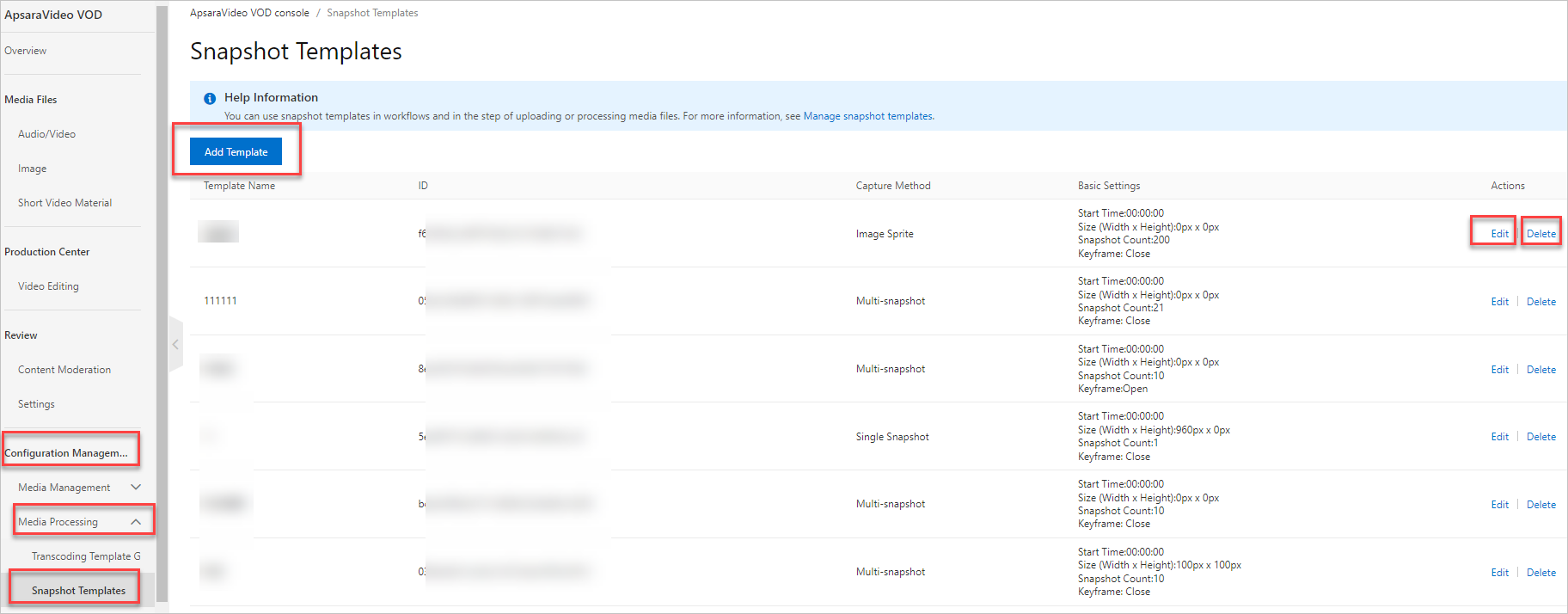
-
Manage by using APIs
You can also manage templates by calling the relevant APIs. For more information, see Snapshot templates.
Snapshot parameters
-
Normal snapshot settings
NoteThis section describes key parameters for normal snapshots. For a complete list of parameters, see SnapshotConfig.
API parameter
Console parameter
Description
FrameType
Frame type
The frame type to capture. Valid values are
intra(keyframe) andnormal(non-keyframe).Capturing keyframes is generally faster than capturing non-keyframes.
SpecifiedOffsetTime
Start time
The start time for capturing snapshots, in milliseconds (ms). This must be a positive integer.
For a single-frame screenshot,
SpecifiedOffsetTimeis the point in time at which the screenshot is taken.Count
Number of snapshots
The total number of snapshots to generate.
Interval
Snapshot interval
The time interval between snapshots.
-
Count> 1: Captures a total ofCountsnapshots at the specified interval. -
Count> 1 andInterval= 0: CapturesCountsnapshots evenly spaced throughout the video's duration. IfFrameTypeisintraand the number of keyframes is less thanCount, the actual number of generated snapshots will be less thanCount. -
Count= 1: Captures a single snapshot.
Width
Width
The width of the snapshot in pixels. The value must be between 8 and 4096, inclusive.
NoteNotes on
WidthandHeight:-
If you do not specify the width and height, the snapshots will have the same dimensions as the input video.
-
If you specify only the width or the height, the other dimension is scaled to preserve the original aspect ratio of the input video.
Height
Height
The height of the snapshot in pixels. The value must be between 8 and 4096, inclusive.
-
-
WebVTT snapshot settings
In addition to the normal snapshot parameters, you also need to configure
FormatandSubOut.API parameter
Console parameter
Description
Format
File format
Specifies that a VTT file indexing the snapshots will be generated.
NoteThis parameter is required only for WebVTT snapshots and its value must be
VTT.SubOut
This parameter is required only for WebVTT snapshots.
Example:
{ "IsSptFrag":"true" }IsSptFrag: Controls how snapshot images are generated for the VTT file. Set tofalseto store images individually. Set totrueto stitch images into a single large image (sprite). -
Sprite snapshot settings
NoteThis section describes key parameters for sprite snapshots. For a complete list of parameters, see SpriteSnapshotConfig.
API parameter
Console parameter
Description
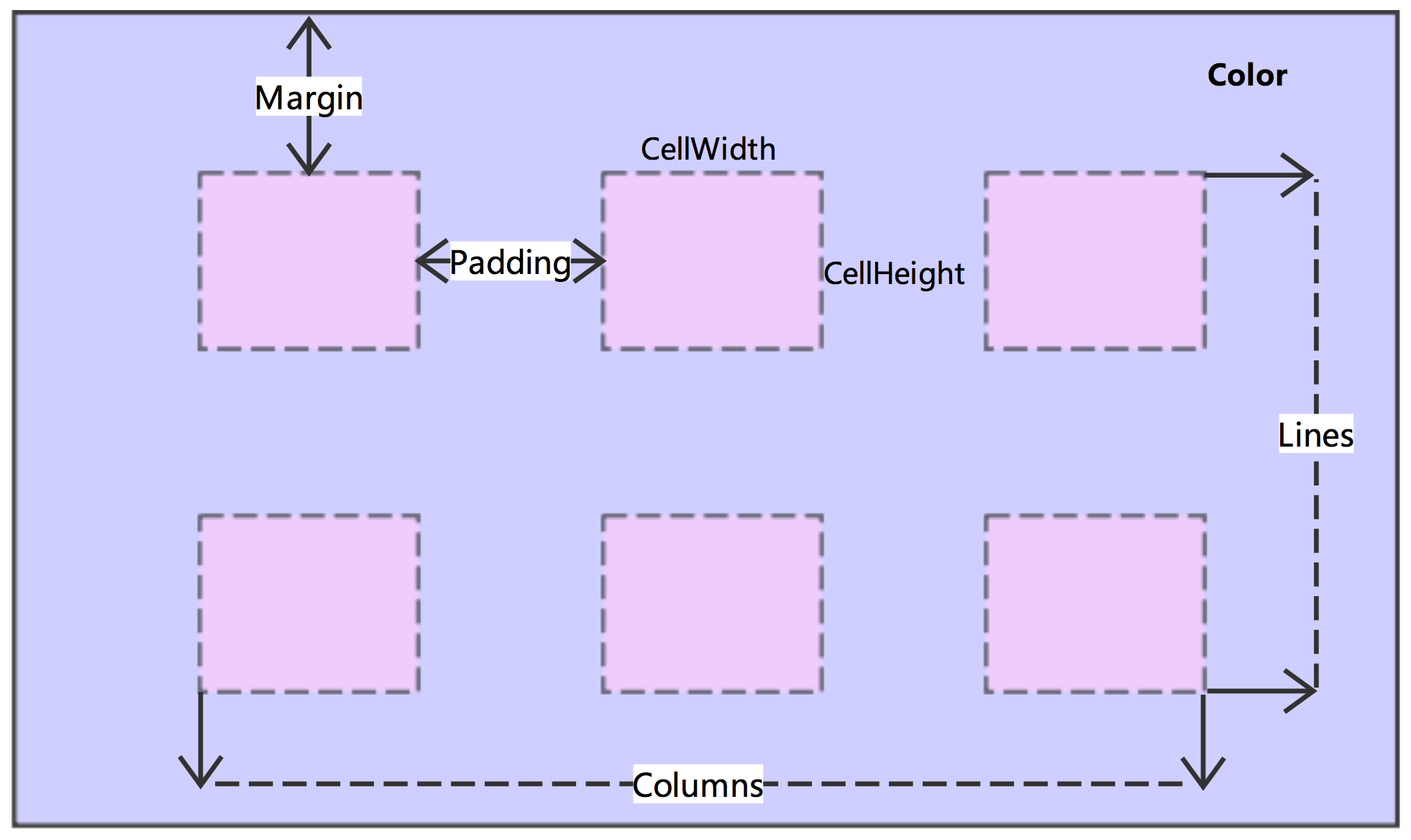
CellWidth
Small image width
The width and height of the small images within the sprite. If you do not set these parameters, the small images will have the same dimensions as the normal snapshots. If you specify only one dimension, the other is automatically scaled to maintain the aspect ratio.
CellHeight
Small image height
KeepCellPic
Delete original images
Specifies whether to keep the original images of a sprite (the normal snapshots used to create the sprite). Valid values are
delete(do not keep) andkeep.NoteWe recommend deleting the original images unless you need them.
Color
Background color
The background color of the sprite. For more information, see Color settings.
NoteRGB values are not supported.
The following figure illustrates these parameters.