Remote authentication is an access control feature that protects your resources. When a user request arrives at an Alibaba Cloud CDN point of presence (PoP), the PoP forwards it to your authentication server for validation and processes the request based on the result. Only authorized users can access your content.
How it works
ApsaraVideo VOD supports both URL signing and remote authentication to prevent your content from being illegally downloaded or hotlinked. These two features differ in their implementation:
-
URL signing: You define authentication rules for a domain name and distribute them to CDN POPs. The CDN POPs then handle the entire authentication process. For more information, see URL signing.
-
Remote authentication: You must provide and manage your own authentication server. When a CDN POP receives a request that requires authentication, it forwards the request to your server for validation.
The following diagram shows the remote authentication process: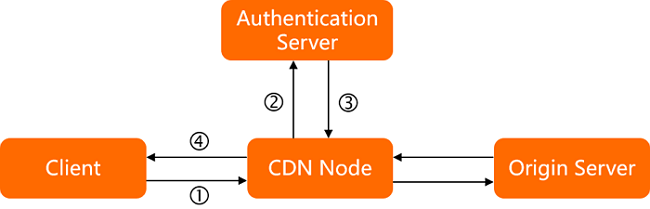
-
A user sends a request for a resource to a CDN POP. The request includes authentication parameters.
-
The CDN POP receives the user request and forwards it to your authentication server.
-
The authentication server validates the parameters in the request and returns the result to the CDN POP.
-
The CDN POP processes the user request based on the authentication result. If authentication succeeds, the PoP allows the request. If authentication fails, the PoP denies or restricts the request. Here are some examples:
-
Example 1: Authentication succeeds. The CDN POP serves the cached content to the user.
-
Example 2: Authentication fails. The CDN POP returns a 403 status code to the user.
-
Example 3: Authentication fails. The CDN POP throttles the user's access.
-
Example 4: Authentication times out. The CDN POP allows the user request, which is the default action.
-
Usage notes
After you enable remote authentication, every user request must be authenticated. If you expect high traffic volumes, ensure that your authentication server can handle the load.
Procedure
-
Log on to the ApsaraVideo VOD console.
-
In the left-side navigation pane, choose Configuration Management.
-
Choose CDN Configuration > Domain Names.
-
Find the domain name that you want to configure and click Configure in the Actions column.
-
Click Resource Access Control.
-
Click the Remote Authentication tab.
-
Turn on the Remote Authentication switch and configure the settings.
The following table describes the parameters.
Parameter
Description
Auth server address
The publicly accessible address of your authentication server. The address must meet the following format and value requirements.
-
Format requirements
The address must be in one of the following formats:
-
http://example.com/auth
-
https://example.com/auth
-
http://192.0.2.1/auth
-
https://192.0.2.1/auth
-
-
Value requirements
The value cannot be
127.0.0.1orlocalhost. These local addresses are invalid.
Request method
The request method that your authentication server supports. Valid values: GET, HEAD, and POST.
-
POST
-
Parameters are transmitted in the request body, and the address bar URL does not change.
-
No practical limit on the amount of data transmitted.
-
Requests are not cached or saved in browser history.
-
Security is relatively high.
-
-
GET
-
Parameters are transmitted in the request line, and their values are visible in the address bar.
-
Browser limitations cap the amount of transmittable data at 1,024 bytes.
-
Requests can be cached and are saved in browser history.
-
Security is relatively low.
-
-
HEAD
The HEAD method is identical to the GET method, except that the server does not return a message body in the response.
File types
-
All file types: Authenticates requests for all types of files.
-
Specified file types: Authenticates requests only for files of the specified types.
-
To specify multiple file types, separate them with a vertical bar (|), for example,
mp4|flv. -
File types are case-sensitive. For example,
jpgandJPGare considered different file types.
-
Retain parameters
Controls which parameters from the user request URL are used for authentication. You can select Retain all parameters, Retain specified parameters, or Delete all URL parameters.
-
If you select to retain specified parameters, separate multiple parameters with a vertical bar (|), for example,
user|token. -
Parameters are case-sensitive. For example,
keyandKEYare considered different parameters.
Add custom parameters
Adds custom parameters to the request URL that the CDN POP forwards to the authentication server.
You can select Custom to set custom parameters and values, or select Select Parameter to use preset variables from the console.
-
When you set custom parameters and values:
-
Separate multiple parameters with a vertical bar (|), for example,
token=$arg_token|vendor=ali_cdn. -
Parameters are case-sensitive. For example,
keyandKEYare considered different parameters.
-
-
When you use preset variables, you can extract their values and add them to the request forwarded by the CDN POP.
For example, if you select the
$http_hostvariable,host=$http_hostis added to the request URL, where$http_hostis the value of the Host header in the user request. For a list of variables and their descriptions, see Variable names.
Retain request headers
Controls which headers from the user request are used for authentication. You can select Retain all headers, Retain specified headers, or Delete all request headers.
-
If you select to retain specified headers, separate multiple headers with a vertical bar (|), for example,
user_agent|referer|cookies. -
Request headers are not case-sensitive. For example,
http_remote_addrandHTTP_Remote_Addrare considered the same header.
NoteBy default, the CDN POP deletes the
Hostheader. This is because the forwarded request'sHostheader contains the accelerated domain name, which your authentication server might not recognize, potentially causing 404 errors or authentication failures. To retain theHostheader, use Retain specified headers or Add Custom Parameters.Add custom headers
Adds custom headers to the request that the CDN POP forwards to the authentication server.
You can select Custom to set custom headers and values, or select Select Parameter to use preset variables from the console.
-
When you set custom parameters and values:
-
Separate multiple headers with a vertical bar (|), for example,
User-Agent=$http_user_agent|vendor=ali_cdn. -
Request headers are not case-sensitive. For example,
http_remote_addrandHTTP_Remote_Addrare considered the same header.
-
-
When you use preset variables, you can extract their values and add them to the request forwarded by the CDN POP.
For example, if you select the
$http_hostvariable,host=$http_hostis added to the request header, where$http_hostis the value of the Host header in the user request. For a list of variables and their descriptions, see Variable names.
Success status code
The HTTP status code from your authentication server that indicates success. We recommend that you use a 2xx status code.
For example, if you set this parameter to 200, a 200 response from your authentication server means success. If the server returns a status code that matches neither the success nor failure code, the request is treated as timed out.
Failure status code
The HTTP status code from your authentication server that indicates failure. We recommend that you use a 4xx status code.
For example, if you set this parameter to 403, a 403 response from your authentication server means failure. If the server returns a status code that matches neither the success nor failure code, the request is treated as timed out.
Custom response status code
The status code that the CDN POP returns to the user if the request fails authentication.
For example, if you set this to 403, the CDN POP returns a 403 status code to the user when their request fails authentication.
Timeout
The maximum time a CDN POP will wait for a response from the authentication server.
Unit: milliseconds. The maximum value is 3000.
Action on timeout
The action that the CDN POP takes if the authentication request to your server times out. Valid values:
-
allow: If a timeout occurs, the CDN POP allows the user request.
-
reject: If a timeout occurs, the CDN POP returns the specified Custom Response Status Code to the user.
-
-
Click OK to save the configuration.
After configuring remote authentication, you can return to the Remote Authentication tab to modify the settings or disable the feature.
Variable names
When you add custom parameters, you can use the following preset variables.
|
Parameter |
Description |
|
$http_host |
The value of the Host header in the request. |
|
$http_user_agent |
The value of the User-Agent header in the request. |
|
$http_referer |
The value of the Referer header in the request. |
|
$http_content_type |
The value of the Content-Type header in the request. |
|
$http_x_forward_for |
The value of the X-Forwarded-For header in the request. |
|
$remote_addr |
The client IP address of the request. |
|
$scheme |
The protocol of the request, such as |
|
$server_protocol |
The protocol version of the request, such as |
|
$uri |
The original URI of the request. |
|
$args |
The query string of the request. This does not include the question mark ( |
|
$request_method |
The request method. |
|
$request_uri |
The full request URI including the query string ( |