ApsaraVideo VOD provides media asset storage based on Alibaba Cloud Object Storage Service (OSS). Storage is a core component for media processing, distribution, and playback. Before you start, you must choose a storage solution that meets your business needs.
What is media storage
Media storage is the cloud storage feature provided by ApsaraVideo VOD. It supports various media file types, such as audio, video, images, and materials for short videos.
Media Storage offers two storage solutions:
VOD system bucket: A one-stop, managed storage solution provided by ApsaraVideo VOD. It is ready to use out of the box and is deeply integrated with ApsaraVideo VOD features. This solution is suitable for scenarios that require an all-in-one audio and video solution.
Your own OSS bucket: This solution lets you grant ApsaraVideo VOD access to your OSS buckets. It is ideal for users who already have large amounts of data in OSS or have specific storage management requirements.
Choosing a solution
Both ApsaraVideo VOD storage solutions are built on Alibaba Cloud Object Storage Service (OSS) but are suited for different scenarios. You can use a VOD system bucket, your own OSS bucket, or a combination of both. The following table compares the two solutions.
Comparison | Management method | Data security | Cost |
VOD system bucket | One-stop management by ApsaraVideo VOD. | ApsaraVideo VOD provides the service and manages both media asset information and stored files, ensuring high stability. | Low. CDN origin traffic fees and API request fees are waived. Billing is handled by ApsaraVideo VOD. |
Your own OSS bucket | Managed through both ApsaraVideo VOD and OSS. | Operations in the OSS console can easily cause inconsistencies in media asset information, leading to playback failures and other issues. | High. You pay OSS for storage, traffic, and API request fees. Billing is handled by OSS. |
Scenario 1: No existing data and want to optimize costs
If your project has no existing data and you want to optimize costs, we recommend that you use a VOD system bucket.
This solution has an optimal cost structure because it waives CDN origin traffic fees and storage API request fees.
Scenario 2: Large amount of existing data in OSS that is difficult to migrate
If you have many media files stored in your own OSS bucket and data migration is costly, we recommend that you use your own OSS bucket.
This solution lets you use your existing OSS media assets directly. It helps you avoid the time, cost, and potential risks associated with data migration. You only need to add your bucket to the ApsaraVideo VOD service.
ApsaraVideo VOD system bucket
A VOD system bucket is a bucket that is created and managed by the ApsaraVideo VOD service. It offers a simple configuration and a straightforward cost structure. This makes it ideal for projects that need to be launched quickly and require simplified O&M.
Enable a bucket
Procedure
Log on to the ApsaraVideo VOD console.
In the left-side navigation pane, choose Configuration Management > Media Management > Storage.
In the upper-left corner of the page, click the service region and switch to the desired region.

Click Enable VOD System Bucket.
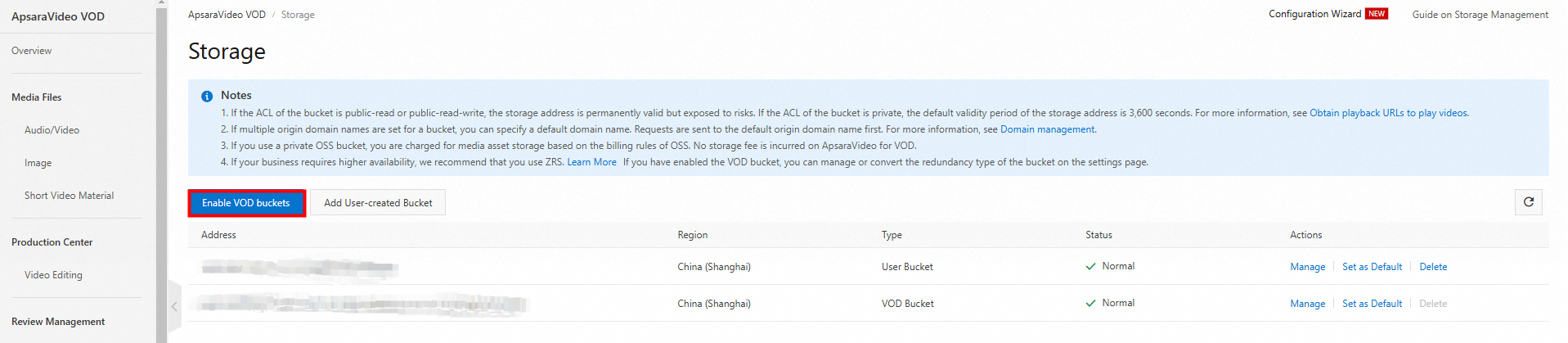
Select a storage redundancy type based on your data reliability requirements.
Locally redundant storage: This option has a lower cost and is suitable for scenarios with general data reliability requirements.
Zone-redundant storage: This option provides higher data reliability and is suitable for production environments or core business scenarios.
After the status of the storage address changes to Normal, the storage address is ready to use.
Manage the bucket
After a bucket is enabled, you can manage its permissions and associated domain names.
Log on to the Storage Management page in the ApsaraVideo VOD console.
In the Actions column of the target storage address, click Manage to open the management page.
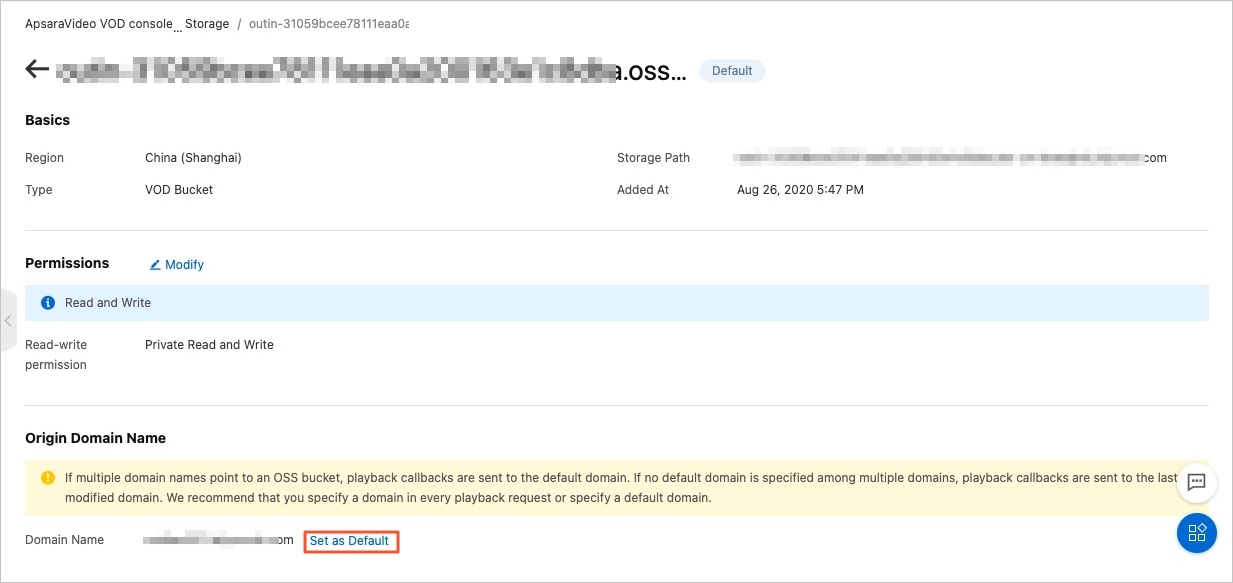
In the Basic Information section, you can view basic information about the storage address, such as its region and type.
In the Permissions section, click Modify Configuration to change the bucket's access control list (ACL).
Private (Default): High security. All access must be authenticated by the ApsaraVideo VOD service. The generated playback URL is valid for 3,600 seconds by default. You can adjust the validity period by calling the GetPlayInfo operation.
Public-read: High risk. The storage address is permanently valid. This poses risks of hotlinking and unauthorized downloads, which can lead to high traffic fees. Configure this setting with caution.
In the Domain names that use this storage address for origin fetch section, you can set the domain name for the default origin fetch storage address.
For more information about how to configure a domain name for an origin fetch storage address, see Domain name management.
Set the default storage address
When you use both a VOD system bucket and your own OSS bucket, you can set one as the default bucket. Media resources uploaded to that region are then automatically stored in the default bucket.
Log on to the Storage Management page of the ApsaraVideo VOD console.
In the Actions column for the target storage address, click Set As Default.
Convert the storage redundancy type
You can upgrade the storage type of a VOD system bucket from locally redundant storage to zone-redundant storage. Zone-redundant storage offers improved data reliability by storing data across multiple zones in the same region, but at a higher storage cost.
Scope
Storage redundancy type conversion is supported in the following regions: China (Shanghai), China (Beijing), China (Shenzhen), Hong Kong (China), Japan (Tokyo), Singapore, Indonesia (Jakarta), and Germany (Frankfurt).
Procedure
Log on to the Storage Management page in the ApsaraVideo VOD console. In the Actions column for the target storage address, click Manage to open the management page.
In the Basic Information section, to the right of Storage Redundancy Type, click Convert To Zone-Redundant Storage.

Because the conversion is a one-way operation, you cannot downgrade from zone-redundant storage to locally redundant storage.
Release system storage
If you no longer need the ApsaraVideo VOD service and its media assets in a specific region, you can request to release the system bucket. To ensure the security of your media assets, you must submit a request for approval before you can perform the release operation. To back up your media assets, see Migrate ApsaraVideo VOD resources.
Requesting release permission
Log on to Quota Center and choose .

On the Privilege Quotas page, select Video and CDN from the Product Category drop-down list. Click ApsaraVideo VOD to go to the quota request page.
In the row for Use The Feature Of Releasing VOD System Storage, click Request.
Enter the request information.
Parameter
Description
Example
Quota Value
After the quota request is approved, the Release/View System Storage button is displayed or hidden in the ApsaraVideo VOD console. The button is displayed when the quota is effective and hidden when it expires.
Effective
Time
If you set Quota Value to Effective, you must set an effective time and an expiration time. The expiration time must be later than the effective time.
Effective Time: If not specified, it defaults to the time the request is submitted.
Expiration Time: If not specified, it defaults to 99 years from the effective time.
Effective Time: 10:01:01, August 29, 2023
Expiration Time: -
Reason for Request
Provide a detailed and reasonable justification for your request.
The XXX service no longer uses ApsaraVideo VOD. I need to request to release all resources at once.
Notify of Result
Yes (Default): The result is sent by text message and email.
No: No notification is sent. You can view the status of your quota request by clicking Request History in the Privilege Quotas list in the Quota Center console.
Yes
Click Confirm Adjustment. Wait until the status of the quota request in the Request History changes to Approved.
Perform the release operation
Log on to the Storage Management page in the ApsaraVideo VOD console. In the Actions column for the target storage address, click Manage.
In the row for the VOD system bucket that you want to release, click
 , and then click Release/View System Storage.
Your own OSS bucket
If your media assets are already stored in an OSS bucket or if you want to use advanced OSS features, you can add your own OSS bucket to ApsaraVideo VOD.
Add a bucket
This operation adds an existing OSS bucket to ApsaraVideo VOD. It does not move or modify the files that already exist in the bucket.
Applicability
Ensure that the OSS bucket meets the following requirements:
The bucket must be in one of the following ApsaraVideo VOD regions: China (Shanghai), China (Beijing), China (Shenzhen), Japan (Tokyo), Singapore, Indonesia (Jakarta), Germany (Frankfurt), or US (Silicon Valley). Adding your own OSS bucket is not supported in the Hong Kong (China) region.
The storage class of your OSS bucket must be Standard. Other storage classes, such as Infrequent Access and Archive Storage, are not supported. For more information, see OSS storage classes.
If the bucket is attached to ApsaraVideo Media Processing (MPS), you must detach it first. For more information, see Detach a bucket. ApsaraVideo VOD transcoding is based on MPS, and a bucket cannot be attached to both ApsaraVideo VOD and MPS at the same time.
Procedure
Log on to the ApsaraVideo VOD console.
In the left-side navigation pane, choose Configuration Management > Media Management > Storage.
Click Add OSS Bucket and select your OSS bucket in the corresponding region.
Click OK.
NoteWhen you add your own OSS bucket, a default cross-domain configuration is assigned to the bucket. The default configurations are as follows:
Origin: *
Allowed Methods: GET, POST, PUT, DELETE, HEAD
Allowed Headers: *
Exposed Headers: ETag, x-oss-request-id
To modify the cross-domain configuration, go to the Object Storage Service (OSS) console. For more information, see Configure cross-origin resource sharing (CORS).
Manage existing media assets
For media assets that exist in the bucket before you add it, you must call the RegisterMedia operation to register their information with ApsaraVideo VOD. After the media assets are registered, you can perform operations such as transcoding, taking snapshots, and retrieving playback URLs.
Manage the bucket
After you add a bucket, you can manage its permissions and associated domain names.
Log on to the Storage Management page in the ApsaraVideo VOD console.
In the Actions column for the target storage address, click Manage to open the management page.
In the Basic Information section, you can view basic information about the storage address, such as its region and type.
In the Permissions section, click Modify Configuration to change the bucket ACL.
Private (Default): This option provides high security. All access must be authenticated by the ApsaraVideo VOD service. The generated playback URL is valid for 3,600 seconds by default. You can adjust the validity period by calling the GetPlayInfo operation.
Public-read: This option poses a high security risk. The storage address is permanently valid. This creates risks of hotlinking and unauthorized downloads, which can result in high traffic fees. You must configure this setting with caution.
In the Domain names that use this storage address for origin fetch section, you can set the domain name for the default origin fetch storage address.
For more information about how to configure a domain name for an origin fetch storage address, see Domain name management.
Set the default storage address
If you add multiple of your own OSS buckets, you can set one as the default storage address. Media assets that are uploaded to that region are automatically stored at this address.
Log on to the Storage Management page in the ApsaraVideo VOD console.
In the Actions column for the target storage address, click Set As Default.
Delete a bucket
This operation only detaches the bucket from ApsaraVideo VOD. It does not delete the bucket or its files from OSS.
Delete media assets
You can delete media assets in the ApsaraVideo VOD console or by calling an API operation. For more information, see Delete media files. To keep the media assets, see Migrate ApsaraVideo VOD resources.
Delete the origin configuration
Log on to the Domain Names page in the ApsaraVideo VOD console and click Configure for the target domain name. In the Basic Settings section, click Edit in the Origin Information area to change the origin server.

Perform a delete operation
Log on to the Storage Management page in the ApsaraVideo VOD console. In the Actions column for the target storage address, click Manage.
In the Actions column for the target storage address, click Delete.

Limits
Adding your own OSS bucket
Your own OSS bucket must be in the same region as the ApsaraVideo VOD service. You can add only OSS buckets of the Standard storage class.
If your OSS bucket is already attached to the ApsaraVideo Media Processing (MPS) service, you cannot add it to ApsaraVideo VOD. You must detach the bucket from MPS first. For more information, see Detach a bucket.
To prevent playback or processing failures that are caused by data inconsistencies between ApsaraVideo VOD and OSS, we recommend that you perform all operations to add, delete, or modify media assets using the ApsaraVideo VOD service.
Converting the storage redundancy type of a VOD system bucket
The storage redundancy type can be converted only in the following regions: China (Shanghai), China (Beijing), China (Shenzhen), Hong Kong (China), Japan (Tokyo), Singapore, Indonesia (Jakarta), or Germany (Frankfurt).
You can only convert from locally redundant storage to zone-redundant storage. The reverse conversion is not supported.
Billing
VOD system bucket: The fees are included in your ApsaraVideo VOD bill. No CDN origin traffic fees or storage API request fees are incurred.
Your own OSS bucket: Fees are charged separately by OSS and ApsaraVideo VOD. You must pay OSS for storage, outbound traffic over the internet, and API requests. If you use ApsaraVideo VOD features such as transcoding and snapshotting, the processing fees are charged by ApsaraVideo VOD.
Combined use: Storage fees for your own OSS bucket are billed by OSS. All other fees are charged by ApsaraVideo VOD. For more information, see Billing of basic services.
FAQ
After I add my own OSS bucket to ApsaraVideo VOD, can I use the existing files directly?
No, you cannot. For files that exist in the bucket before you add it, you must call the RegisterMedia operation to register their information with ApsaraVideo VOD. After the files are registered, you can perform operations such as transcoding, taking snapshots, and retrieving playback URLs. This step is not required for new files that are uploaded using the ApsaraVideo VOD upload API after the bucket is added.
How do I view my current storage usage?
VOD system bucket
Log on to the ApsaraVideo VOD console.
In the navigation pane on the left of the ApsaraVideo VOD console, choose Data Center > Usage to go to the Usage page.
On the Usage page, select Storage.
Select the storage region that you want to view.
Your own OSS bucket
Log on to the OSS console.
In the left navigation pane, click Buckets and then click the name of the target bucket.
In the navigation pane on the left, choose Usage.