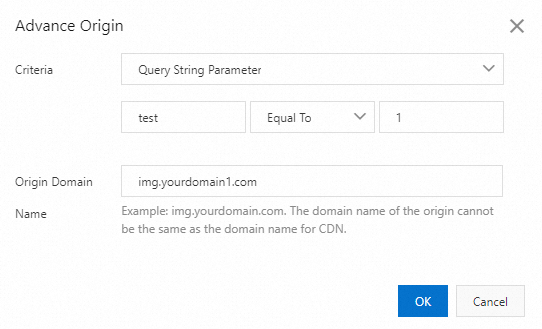
You can customize advanced origin settings to redirect requests to different origin servers based on the request header, query string parameter, path, and request cookie. This topic describes how to configure advanced origin settings. This topic describes how to configure advanced origin settings.
Usage notes
Configuration limit: You can add a maximum of 120 rules.
Matching order: The system attempts to match rules in the configuration list in descending order. If a rule is matched, the system stops the matching.
Differences between the conditional origin, basic origin, and advanced origin
The conditional origin and advanced origin features can use rules configured in the rules engine. This allows you to configure more flexible origin policies.
The address of a basic origin is the default address of the origin server used for origin fetch. If a user request does not match the rule of a conditional origin or advanced origin, the address of the basic origin is used.
If a user request matches the rule of a conditional origin or advanced origin, the origin server address specified for the features will be used.
Procedure
Log on to the ApsaraVideo VOD console.
In the left-side navigation pane, choose Configuration Management > CDN Configuration > Domain Names.
On the Domain Names page, find the domain name that you want to manage and click Configure in the Actions column.
On the configuration page of the domain name, click Back-to-Origin in the navigation pane on the left.
On the Configuration tab, in the Advanced Origin section, click Add.
Configure the conditions and the Origin Domain Name as required.
NoteYou can choose to redirect requests back to the origin server based on the request header, query string parameter, path, or request cookie. When a point of presence (POP) receives a request, it checks the specified field in the request and determines the origin server to which the request is redirected.
Click OK.
Configuration example
POP action: redirects requests that carry the parameter test=1 to the origin server img2.yourdomain.com.