This topic describes common issues with the short video SDK for iOS.
SDK integration
What do I do if the console displays a message which indicates that the Category method cannot be found when I import the short video SDK?
In the project target, select Build Setting > other linker flags and add -ObjC.
What are the differences between the Debug package and Release package?
The Debug package contains separate configurations for simulators and devices. This lets you compile code for simulators. The Debug package is recommended for local debugging. The Release package contains only configurations for devices. Use the Release package when you submit an application to App Store because Apple Inc. requires that dynamic libraries not contain the configurations used for simulators.
What do I do if the "Image not found" message appears after I import the short video SDK to the project?
The short video SDK contains dynamic libraries. To import dynamic libraries to a project, add the frameworks that contain these dynamic libraries to Embedded Binaries in Xcode. For more information, see Integrate the SDK.
Does the short video SDK support bitcode?
No, the short video SDK does not support bitcode. Set Enable Bitcode to NO. If a "failed to verify bitcode" error occurs during packaging, clear the rebuild for bitcode option.
Why is the "[NSDictionary oss_dictionaryWithXMLData:]: unrecognized selector sent to class" error returned?
This error occurs because the upload SDK is not imported. The short video SDK depends on the AliyunOSSiOS.framework from the upload SDK. For more information, see Integrate the SDK.
Video recording
Why am I unable to obtain the recorded video after recording is complete?
You can obtain the video only in the - (void)recorderDidFinishRecording; callback function, which is invoked after the recording is complete.
How do I record a video in landscape mode?
Set the cameraRotate parameter to specify the angle for recording. The orientation of the recorded video is determined by the angle of the first video segment.
Why do I fail to change the music when I record a video?
The short video SDK does not allow you to change the music when you record a video.
How do I record a video in full screen mode?
You can use one of the following methods to record a video in a screen with a 9:16 aspect ratio.
Method 1: Retain the black bars on the top and bottom of the screen of your device such as iPhone X. This method is provided in the demo of the short video SDK.
Solution 2: You can adjust the view layout to fill the vertical space, which crops content from the left and right sides.
Video cropping
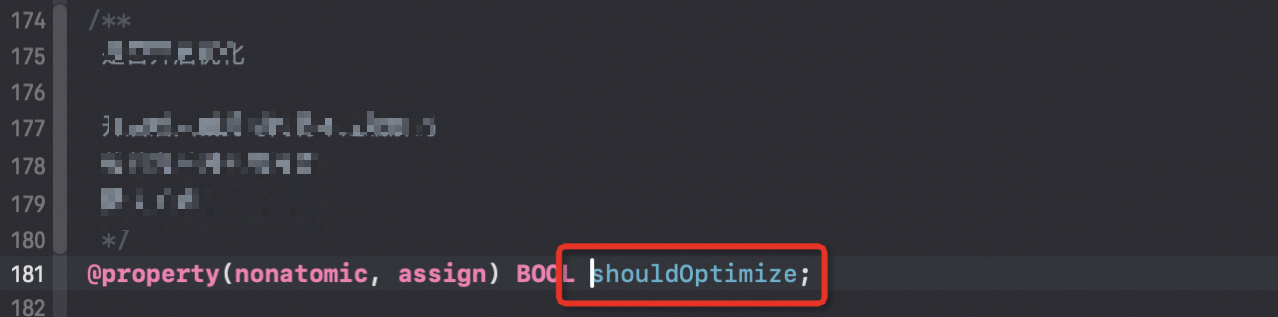
What do I do if an error message indicating that shouldOptimize is set to true is returned when I crop a video?
Disable the shouldOptimize option.
What do I do if an error message indicating that the output path is not specified is returned when I crop a video?
The output path is not set. Use the AliyunCrop outputPath parameter to set the path.
How do I obtain a cropped video without black bars?
Scale the video based on the original resolution. Make sure that the resolution of the output video is an even number.
How do I crop a piece of music?
Do not set the videoSize and outputSize parameters. The other parameters are the same as those for clipping a video.
Video editing
What do I do if the "[null length]" error is returned when I produce a video after I finish editing it?
Check whether the value of the source parameter of AEPGlobalWatermarkTrack is valid. The source parameter specifies the watermark path.
Why is the sound distorted when I call the volume control operation to set the volume?
The default volume value is 100, which is the original volume of a video. If you set the volume to a value that is greater than 100, the sound may be distorted. We recommend that you set the volume to a value within the range of 0 to 100.
What do I do if I fail to obtain resources such as filters and music videos (MVs)?
You can copy entire folders of the required resources to your project to maintain the file structure of the resources. Take note that the resource folders of your application are referenced to your project in Xcode as blue folders.
What do I do if the "Operation not permitted" message appears when I import a video?
To import videos from Photos, call the system API operation to obtain the access permissions on Photos. Make sure that the AVAsset class is not destroyed.
What do I do if I am unable to adjust the volume or add or delete sound effects for imported audio files?
Make sure that the imported files are audio files, such as files in the PCM and MP3 formats. Do not import video files.
Video upload
What do I do if an upload error is returned indicating that I am not authorized?
Symptom: An upload error which indicates that you are not authorized is returned.
Possible cause: The Security Token Service (STS) credentials that you depend on to upload the video have expired.
Solution: Obtain new STS credentials, and upload the video again. The following procedure shows how to obtain STS credentials:
Use your Alibaba Cloud account to create a RAM user and attach the AliyunSTSAssumeRoleAccess policy to the RAM user.
You can create a custom role and grant it the VODFULL permission.
Use the STS SDK to obtain STS credentials. For more information, see Obtain an STS token.
NoteThe AccessKey pair that you use to call the STS SDK must belong to the RAM user. For more information, see Accounts and authorization.
Attach the VODFULL policy to the role.
  String policy = "{\n" +
           "    \"Version\": \"1\", \n" +
           "    \"Statement\": [\n" +
           "        {\n" +
           "            \"Action\": [\n" +
           "                \"vod:*\"\n" +
           "            ], \n" +
           "            \"Resource\": [\n" +
           "                \"*\" \n" +
           "            ], \n" +
           "            \"Effect\": \"Allow\"\n" +
           "        }\n" +
           "    ]\n" +
           "}"
The network is disconnected when I upload a video. Why is no callback notification returned?
If the network is disconnected when you upload a video, the system automatically retries the upload. If you do not want the system to retry the upload, you can call the API operation that is used to cancel the upload.
I use the server SDK to download a video that is uploaded to ApsaraVideo VOD. Why is the downloaded video in the M3U8 format?
In the transcoding configuration, checking the HLS option generates a video in M3U8 format.
Upload to the App Store
How do I resolve App Store submission errors?
Symptom: The error message "Invalid CFBundleSupportedPlatforms value" is displayed.
Possible cause: You are using QuCore-ThirdParty 4.3.1 or QuCore-ThirdParty 3.15.0. In these two versions, the value of CFBundleSupportedPlatforms in info.plist is iPhoneSimulator.
Solutions:
Solution 1: Change the CFBundleSupportedPlatforms value in info.plist to iPhoneOS.
Solution 2: Use another version of QuCore-ThirdParty. The following table lists the QuCore-ThirdParty versions that can be used for the corresponding SDK versions.
QuCore-ThirdParty version
Short Video SDK Version
Version 4.3.2 or later (recommended)
v3.26.0 and later
4.3.1 (Not recommended)
v3.26.0 to v3.29.0
4.3.0
v3.24.0 to v3.25.1
3.15.0
earlier than v3.24.0