Short Video SDK includes a rich video material library with music videos (MVs), stickers, bubbles, and word art, and supports custom effects for different scenarios. This topic covers the specifications for creating and exporting word art.
Introduction
Word art is a caption-based effect. A word art resource package is a folder that contains a config.json configuration file and image assets. You can apply a word art effect by using the editing API of Short Video SDK and passing the path to the resource package folder.
- config.json: Required. The configuration file for the word art. For configuration details, see config.json parameters.
- icon.png: Optional. The thumbnail for the word art effect.
- lieheng.png: Optional. The texture for the word art text. If this image is specified in the configuration file, it is used to set the word art effect.
Configure a word art resource package
| Field | Type | Required | Description |
| version | String | Yes | The configuration version number. The default value is 1. |
| color | String | Yes | The font color. Format: #AARRGGBB or #RRGGBB. |
| texture | String | No | The texture for the word art text. Only JPG and PNG formats are supported. The file must be in the same folder as config.json. Each character uses the same texture, which overwrites the font color area. |
| outline1 | JSONObject | Yes | The first layer of the outline. For property details, see outline properties. |
| outline2 | JSONObject | No | The second layer of the outline. It has the same data structure as outline1. For property details, see outline properties. |
| Field | Type | Required | Description |
| type | String | Yes | The outline type. The default value is normal, which uses the system font. |
| data | JSONArray | Yes | A series of color and width definitions for the outline. For more information, see data child node properties. When type is set to normal, data supports a maximum of three color configurations. If more than three are specified, only the first three are used. |
| Field | Type | Required | Description |
| color | String | Yes | The outline color. Format: #AARRGGBB or #RRGGBB. |
| width | float | Yes | The outline width. Valid values: 0 to 64. The width value of each subsequent node of the same type must be greater than the current width value. Note For each outline, the width property of a data child node must be greater than the width property of the preceding data child node. See the following example. |
{
  "outline1": {
    "type": "normal",
    "data":[   // data1
      {
        "color": "#5350DD",
        "width": 2
      },
      {    // data2
        "color": "#B5FAA7",
        "width": 4
      }
    ]
  },
  "outline2": {
    "type": "normal",
    "data":[
      {    // data3
        "color": "#6E58F8",
        "width": 8
      },
      {    // data4
        "color": "#69F88C",
        "width": 10
      },
      {    // data5
        "color": "#FA55D8",
        "width": 12
      }
    ]
  }
}
Configuration example
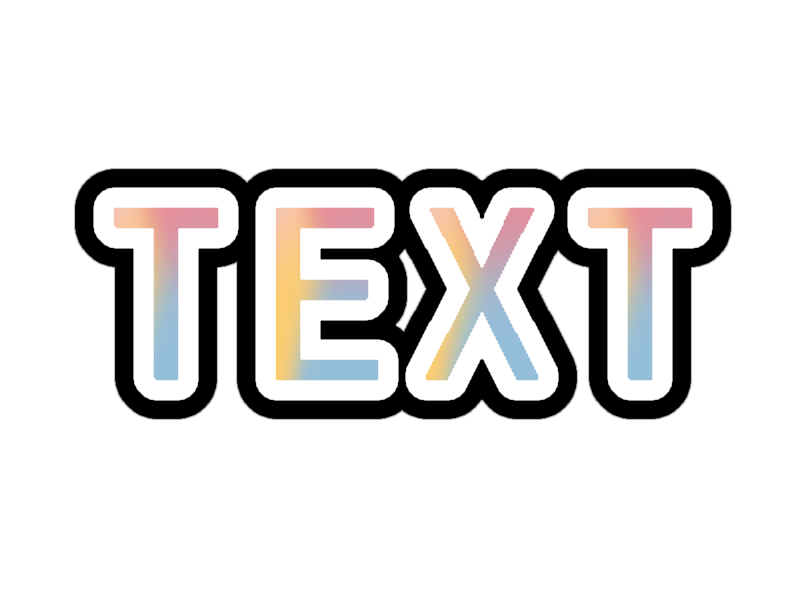
- The folder structure of the sample package is as follows:
├── config.json
├── icon.png
└── lieheng.png
- The config.json file is configured as follows:
{
  "version": 1,
  "color":"#000000",
  "texture": "lieheng.png",
  "outline1": {
    "type": "normal",
    "data":[
      {
        "color": "#ffffff",
        "width": 8
      }
    ]
  },
  "outline2": {
    "type": "normal",
    "data":[
      {
        "color": "#000000",
        "width": 15
      }
    ]
  }
}
Use effects in the short video SDK
- Android
Call the
AliyunPasterControllerCompoundCaption.setFontEffectTemplatemethod to apply the word art effect. For more information, see Set captions and dynamic stickers. - iOS
Call the
AliyunCaptionStickerController.setFontEffectTemplatemethod to apply the word art effect. For more information, see Set captions and stickers.