Smart tags
Smart tags analyze visuals, text, speech, and behaviors in videos using multimodal fusion to generate structured content tags with high accuracy. Use these tags for video analysis, automated review, search, personalized recommendations, and smart video production. The following Java SDK examples cover smart tag operations such as submitting jobs and managing templates.
Usage notes
All sample API calls in this topic use an AccessKey to initialize a client instance.
For detailed information about the request and response parameters of these API operations, visit the Alibaba Cloud OpenAPI Explorer. On the API operation page, open the API Documentations tab on the right side.
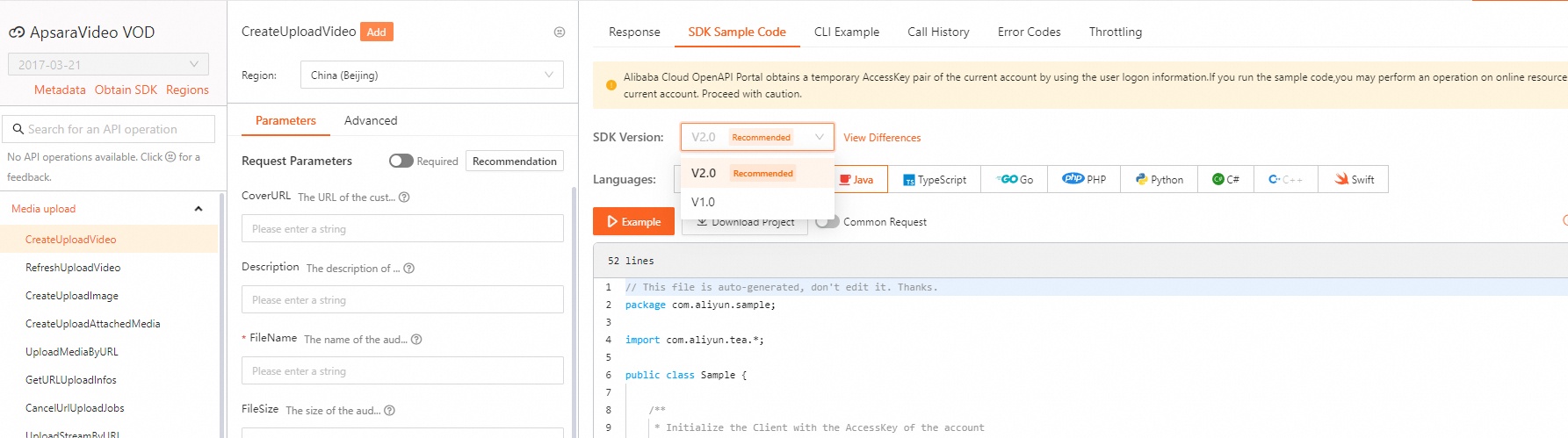
This topic provides examples for selected API operations. To obtain SDK code examples for other API operations, go to the Alibaba Cloud OpenAPI Explorer. On the Parameters tab, specify the required parameters and initiate the call. Then, on the SDK Sample Code tab, select the SDK version and your target language to view and download the sample code.
The examples in this topic use V1.0 of the SDK. To obtain examples for V2.0, make sure to select the correct SDK version in the Alibaba Cloud OpenAPI Explorer.
Initialize a client
Before you use the SDK, initialize a client as described in Initialization.
Submit a smart tag job
Call SubmitAIJob to submit a smart tag job.
Alibaba Cloud OpenAPI Portal: SubmitAIJob.
Query smart tag jobs
Call ListAIJob to query smart tag jobs.
Alibaba Cloud OpenAPI Portal: ListAIJob.
Add a smart tag template
Call AddAITemplate to add a smart tag template.
Alibaba Cloud OpenAPI Portal: AddAITemplate.
Sample code:
import com.alibaba.fastjson.JSONArray;
import com.alibaba.fastjson.JSONObject;
import com.aliyuncs.auth.AlibabaCloudCredentials;
import com.aliyuncs.auth.EnvironmentVariableCredentialsProvider;
import com.aliyuncs.vod.model.v20170321.AddAITemplateRequest;
import com.aliyuncs.vod.model.v20170321.AddAITemplateResponse;

/**
 * Obtain the AccessKey information.
 */
public static DefaultAcsClient initVodClient() throws ClientException {
    String regionId = "cn-shanghai";  // Specify the region in which ApsaraVideo VOD is activated.
    // The AccessKey pair of an Alibaba Cloud account has permissions on all API operations. We recommend that you use a RAM user to call API operations or perform routine O&M.
    // We recommend that you not include your AccessKey pair (AccessKey ID and AccessKey secret) in your project code. Otherwise, the AccessKey pair may be leaked and the security of all resources within your account may be compromised.
    // In this example, ApsaraVideo VOD reads the AccessKey pair from the environment variables to implement identity verification for API access. Before you run the sample code, configure the environment variables ALIBABA_CLOUD_ACCESS_KEY_ID and ALIBABA_CLOUD_ACCESS_KEY_SECRET.
    DefaultProfile profile = DefaultProfile.getProfile(regionId, System.getenv("ALIBABA_CLOUD_ACCESS_KEY_ID"), System.getenv("ALIBABA_CLOUD_ACCESS_KEY_SECRET"));
    DefaultAcsClient client = new DefaultAcsClient(profile);
    return client;
}

/**
 * Create an AI template.
 */
public static AddAITemplateResponse addAITemplate(DefaultAcsClient client) throws Exception {
        AddAITemplateRequest request = new AddAITemplateRequest();
        // The template type. An automated review template is used as an example.
        request.setTemplateType("AIMediaAudit");
        // The name of the template.
        request.setTemplateName("myaitemplate");
        // The detailed configurations of the template.
        JSONObject templateConfig = new JSONObject();
        JSONArray auditItem = new JSONArray();
        auditItem.add("terrorism");
        auditItem.add("porn");
        templateConfig.put("AuditItem", auditItem);

        JSONArray auditRange = new JSONArray();
        auditRange.add("video");
        auditRange.add("image-cover");
        auditRange.add("text-title");
        templateConfig.put("AuditRange", auditRange);

        JSONArray auditContent = new JSONArray();
        auditContent.add("screen");
        templateConfig.put("AuditContent", auditContent);

        templateConfig.put("AuditAutoBlock", "no");
        request.setTemplateConfig(templateConfig.toString());

        // The returned results.
        return client.getAcsResponse(request);
}


/**
 * Sample code
 * @param args
 * @throws ClientException
 */
public static void main(String[] args) throws Exception {
        // Initialize a client.
        DefaultAcsClient client = initVodClient();

        try {
            // Obtain the results.
            AddAITemplateResponse response = addAITemplate(client);

            // Display the ID of the request.
            System.out.println("ResquestId:" + response.getRequestId());
            // Display the ID of the template.
            System.out.println("TemplateId:" + response.getTemplateId());
        } catch (Exception e) {
            System.out.println("ErrorMessage:" + e.getLocalizedMessage());
        }
}
Modify a smart tag template
Call UpdateAITemplate to modify a smart tag template.
Alibaba Cloud OpenAPI Portal: UpdateAITemplate.
Sample code:
import com.alibaba.fastjson.JSONArray;
import com.alibaba.fastjson.JSONObject;
import com.aliyuncs.auth.AlibabaCloudCredentials;
import com.aliyuncs.auth.EnvironmentVariableCredentialsProvider;
import com.aliyuncs.vod.model.v20170321.UpdateAITemplateRequest;
import com.aliyuncs.vod.model.v20170321.UpdateAITemplateResponse;

/**
 * Obtain the AccessKey information.
 */
public static DefaultAcsClient initVodClient() throws ClientException {
    String regionId = "cn-shanghai";  // Specify the region in which ApsaraVideo VOD is activated.
    // The AccessKey pair of an Alibaba Cloud account has permissions on all API operations. We recommend that you use a RAM user to call API operations or perform routine O&M.
    // We recommend that you not include your AccessKey pair (AccessKey ID and AccessKey secret) in your project code. Otherwise, the AccessKey pair may be leaked and the security of all resources within your account may be compromised.
    // In this example, ApsaraVideo VOD reads the AccessKey pair from the environment variables to implement identity verification for API access. Before you run the sample code, configure the environment variables ALIBABA_CLOUD_ACCESS_KEY_ID and ALIBABA_CLOUD_ACCESS_KEY_SECRET.
    DefaultProfile profile = DefaultProfile.getProfile(regionId, System.getenv("ALIBABA_CLOUD_ACCESS_KEY_ID"), System.getenv("ALIBABA_CLOUD_ACCESS_KEY_SECRET"));
    DefaultAcsClient client = new DefaultAcsClient(profile);
    return client;
}

/**
 * Modify an AI template.
 */
public static UpdateAITemplateResponse updateAITemplate(DefaultAcsClient client) throws Exception {
        UpdateAITemplateRequest request = new UpdateAITemplateRequest();
        // The ID of the template.
        request.setTemplateId("1d763dd8987a122ab8596eb7d257****");
        // The name of the template.
        request.setTemplateName("myaitemplate1");
        // The detailed configurations of the template.
        JSONObject templateConfig = new JSONObject();
        JSONArray auditItem = new JSONArray();
        //auditItem.add("terrorism");
        auditItem.add("porn");
        templateConfig.put("AuditItem", auditItem);

        JSONArray auditRange = new JSONArray();
        auditRange.add("video");
        auditRange.add("image-cover");
        //auditRange.add("text-title");
        templateConfig.put("AuditRange", auditRange);

        JSONArray auditContent = new JSONArray();
        auditContent.add("screen");
        templateConfig.put("AuditContent", auditContent);

        templateConfig.put("AuditAutoBlock", "no");
        request.setTemplateConfig(templateConfig.toString());

        // The returned results.
        return client.getAcsResponse(request);
}

/**
 * Sample code
 * @param args
 * @throws ClientException
 */
public static void main(String[] args) throws Exception {
        // Initialize a client.
        DefaultAcsClient client = initVodClient();

        try {
            // Obtain the results.
            UpdateAITemplateResponse response = updateAITemplate(client);

            // Display the ID of the request.
            System.out.println("ResquestId:" + response.getRequestId());
            // Display the ID of the template.
            System.out.println("TemplateId:" + response.getTemplateId());
        } catch (Exception e) {
            System.out.println("ErrorMessage:" + e.getLocalizedMessage());
        }
}
Query smart tag templates
-
Call GetAITemplate to query a single smart tag template.
Alibaba Cloud OpenAPI Portal: GetAITemplate.
-
Call ListAITemplate to query a list of smart tag templates.
Alibaba Cloud OpenAPI Portal: ListAITemplate or ListAITemplate.
Set the default smart tag template
Call SetDefaultAITemplate to set the default smart tag template.
Alibaba Cloud OpenAPI Portal: SetDefaultAITemplate.
Query the default smart tag template
Call GetDefaultAITemplate to query the default smart tag template.
Alibaba Cloud OpenAPI Portal: or GetDefaultAITemplate.
Delete a smart tag template
Call DeleteAITemplate to delete a smart tag template.
Alibaba Cloud OpenAPI Portal: DeleteAITemplate.