Content moderation
ApsaraVideo VOD provides content moderation for videos, audio, images, and text, detecting risks such as terrorism, politically sensitive information, pornography, advertisements, abuse, and undesirable scenes. This topic provides Java SDK examples for submitting automated review jobs, querying review results, and submitting manual reviews.
Limits
The automated review feature is supported only in the Singapore region.
Usage notes
-
All examples in this topic use an AccessKey pair to initialize a client instance.
-
For request and response parameter details, visit Alibaba Cloud OpenAPI Explorer and open the API Documentations tab.
-
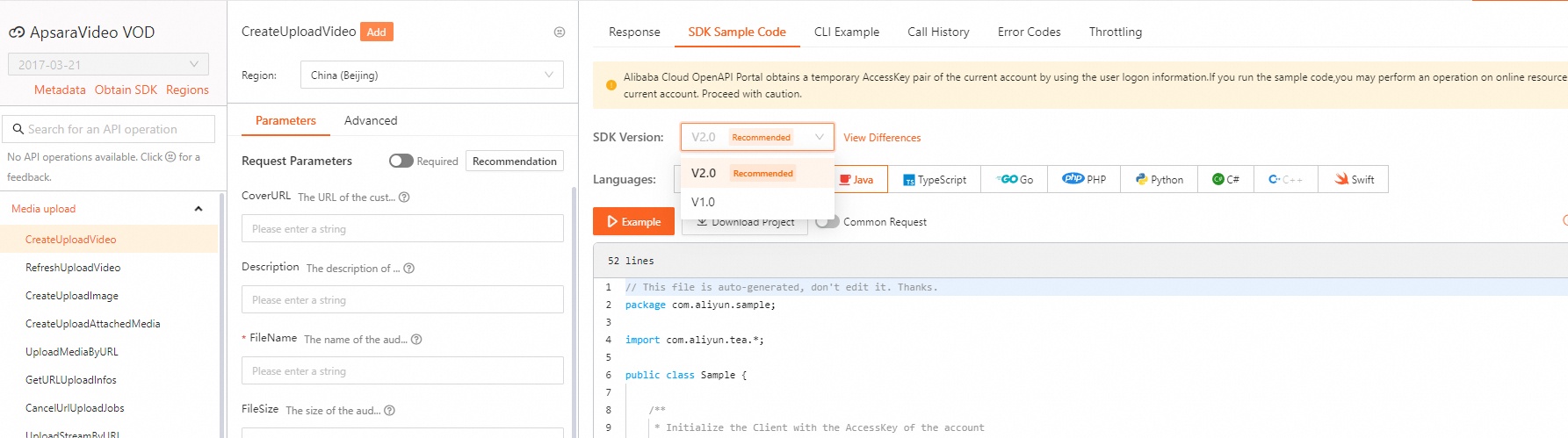
For SDK examples of other API operations, visit Alibaba Cloud OpenAPI Explorer. On the Parameters tab, specify the parameters and initiate the call. Then select the SDK version and language on the SDK Sample Code tab to view and download the code.
-
The examples in this topic use SDK V1.0. For V2.0 examples, select the correct SDK version in OpenAPI Explorer.
Initialize a client
Initialize a client before you use the SDK. For more information, see Initialization.
Submit an automated review job
Call the SubmitAIMediaAuditJob operation to submit an automated review job.
Call the SubmitAIMediaAuditJob operation in Alibaba Cloud OpenAPI portal.
Query an automated review job
Call the GetAIMediaAuditJob operation to query details about an automated review job.
Alibaba Cloud OpenAPI Portal: GetAIMediaAuditJob.
Query automated review results
Call the GetMediaAuditResult operation to query the results of automated review jobs.
Alibaba Cloud OpenAPI Portal: GetMediaAuditResult.
Query details of automated review results
Call the GetMediaAuditResultDetail operation to query details of automated review results.
For more information, see GetMediaAuditResultDetail in the Alibaba Cloud OpenAPI Portal.
Query the timeline of automated review results
Call the GetMediaAuditResultTimeline operation to query the timeline of automated review results.
Alibaba Cloud OpenAPI Portal: or GetMediaAuditResultTimeline.
Manual review
Call the CreateAuditRequest operation to create a manual review job.
Alibaba Cloud OpenAPI Portal: CreateAuditRequest
Sample code:
import com.aliyuncs.auth.AlibabaCloudCredentials;
import com.aliyuncs.auth.EnvironmentVariableCredentialsProvider;
import com.aliyuncs.vod.model.v20170321.CreateAuditRequest;
import com.aliyuncs.vod.model.v20170321.CreateAuditResponse;
import com.alibaba.fastjson.JSONObject;

/**
 * Obtain the AccessKey information.
 */
public static DefaultAcsClient initVodClient() throws ClientException {
    String regionId = "cn-shanghai";  // Specify the region in which ApsaraVideo VOD is activated.
    // The AccessKey pair of an Alibaba Cloud account has permissions on all API operations. We recommend that you use a RAM user to call API operations or perform routine O&M.
    // We recommend that you do not save your AccessKey pair (AccessKey ID and AccessKey secret) in your project code. Otherwise, the AccessKey pair may be leaked. As a result, the security of all resources in your account is compromised.
    // In this example, the system reads the AccessKey pair from environment variables to implement authentication for API access. Before you run the sample code, configure the environment variables ALIBABA_CLOUD_ACCESS_KEY_ID and ALIBABA_CLOUD_ACCESS_KEY_SECRET.
    DefaultProfile profile = DefaultProfile.getProfile(regionId, System.getenv("ALIBABA_CLOUD_ACCESS_KEY_ID"), System.getenv("ALIBABA_CLOUD_ACCESS_KEY_SECRET"));
    DefaultAcsClient client = new DefaultAcsClient(profile);
    return client;
}

/**
 * Specify the content for review.
 */
public static String buildAuditContent() throws Exception {
        List<JSONObject> auditContents = new ArrayList<>();

        JSONObject auditContent = new JSONObject();
        auditContent.put("VideoId", "3ebc10160bda481ca9b6858a0b58****"); // The video ID.
        auditContent.put("Status", "Blocked"); // The status of the review job.
        auditContent.put("Reason", "Pornography content"); // If the review status is Blocked, a reason must be provided. The reason can contain a maximum of 128 bytes.
        auditContents.add(auditContent);

        return auditContents.toString();
}

/**
 * Create a manual review job.
 */
public static CreateAuditResponse createAudit(DefaultAcsClient client) throws Exception {
        CreateAuditRequest request = new CreateAuditRequest();
        // The review content.
        request.setAuditContent(buildAuditContent());

        // The returned results.
        return client.getAcsResponse(request);
}

/**
 * Sample code
 * @param args
 */
public static void main(String[] args) throws Exception {
    DefaultAcsClient client = initVodClient();

    try {
        // Submit manual review results.
        CreateAuditResponse response = createAudit(client);
        // Display the ID of the request.
        System.out.println("ResquestId:" + response.getRequestId());
    } catch (Exception e) {
        System.out.println("ErrorMessage:" + e.getLocalizedMessage());
    }
}
Query historical manual review jobs
Call the GetAuditHistory operation to query historical manual review jobs.
Alibaba Cloud OpenAPI Portal: GetAuditHistory.
Configure IP addresses in review security groups
Call the SetAuditSecurityIp operation to configure IP addresses in a review security group.
Alibaba Cloud OpenAPI Portal: SetAuditSecurityIp.
Query IP addresses in review security groups
Call the ListAuditSecurityIp operation to query IP addresses in review security groups.
Alibaba Cloud OpenAPI Portal: ListAuditSecurityIp.