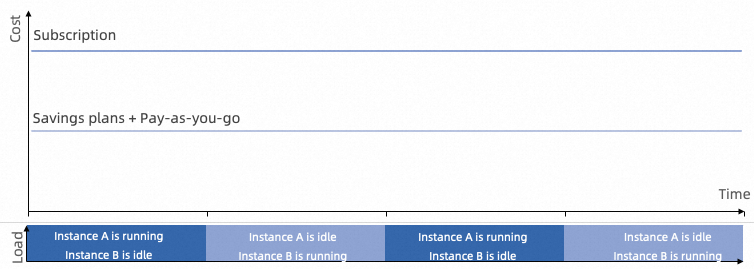
A savings plan is a discount benefit applicable to resonant, stable, and mixed workloads. This topic describes the benefits of savings plans and compares them with other billing methods.
Benefits of savings plans
-
Flexible cloud usage: Savings plans work with pay-as-you-go instances and can offset costs for multiple cloud resource types, adapting to changing business needs while simplifying budget planning.
-
Deep discounts: Compared to pay-as-you-go pricing, savings plans offer discounts of up to 76% off.
-
Flexible payment options: When you purchase a savings plan, you can flexibly control the upfront payment amount to reduce cash flow pressure.
Applicable workload types
Savings plans work with pay-as-you-go instances. Any usage beyond the committed amount is billed at the standard pay-as-you-go rate.
This billing model is ideal for workloads with stable overall resource consumption, such as system upgrades or cluster deployments. Although individual instances may be released and re-created, the total usage remains relatively stable. The following workload types are well-suited for savings plans:
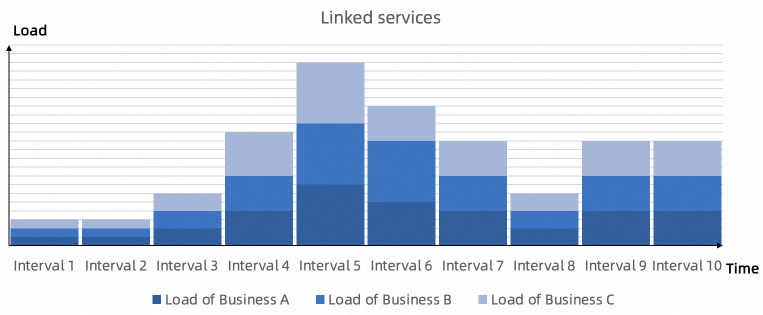
Resonant workloads
-
Resonant workloads: Services are interconnected, and when traffic increases, resource demand across all services grows simultaneously.
-
Typical scenarios: E-commerce sales promotions, trending events, and other internet traffic peaks.
-
Recommended billing: Savings Plans + Pay-as-you-go.
Mixed workloads
-
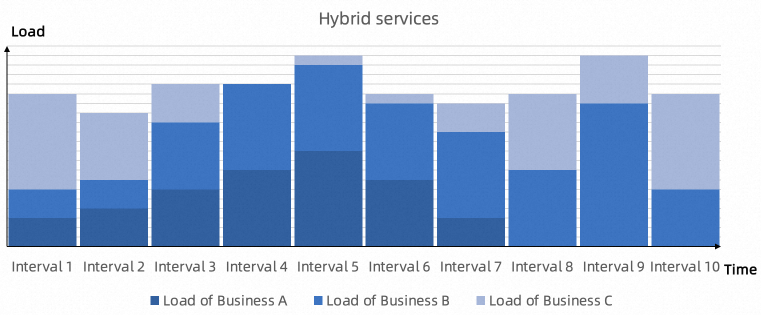
Mixed workloads: Multiple services run simultaneously, with different services having different resource demands at different times. Mixing online, offline, and job-based workloads improves overall resource utilization.
-
Typical scenarios: Large websites where different services peak at different times.
-
Recommended billing: Savings Plans.
Stable workloads
-
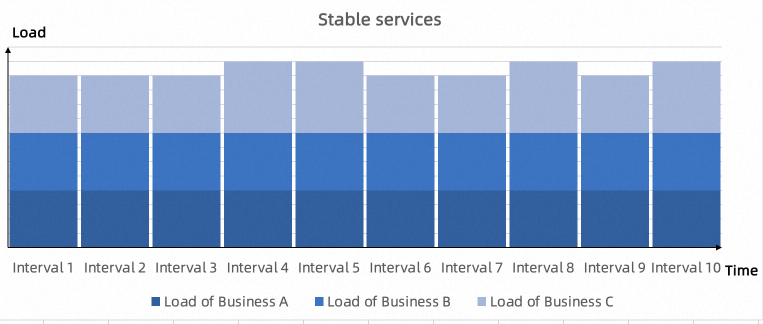
Stable workloads: Resource demand remains consistent throughout the day with minimal variation.
-
Typical scenarios: Internal OA systems.
-
Recommended billing: Savings Plans.
Comparison with other billing methods
|
Feature |
Subscription |
Reserved Instance |
Savings Plan |
|
Type |
Payment method bound to specific resources |
Discount benefit that randomly offsets the usage of eligible pay-as-you-go resources |
Discount benefit that randomly offsets the costs of eligible pay-as-you-go resources |
|
Discount restrictions |
Bound to specific instances |
Randomly matches eligible instances under the account |
Randomly matches eligible instances under the account |
|
Resource reservation |
Supported |
Supported |
Not supported |
|
Cross-product |
Not supported |
Supported |
Supported |
|
Cross-region |
Not supported |
Not supported |
Supported with General-purpose Savings Plan |
|
Cross-zone within the same region |
Not supported |
Supported |
Supported |
|
Cross-instance family |
Not supported |
Not supported |
Supported with General-purpose Savings Plan |
|
Cross-instance type within the same family |
Not supported |
Supported |
Supported |
|
Cross-operating system |
Not supported |
Not supported |
Supported |
|
Cross-account (financial hosting) |
Not supported |
Supported |
Supported |
|
Installment support |
Not supported |
Supported |
Supported (all upfront, partial upfront, or no upfront) |
Common scenarios
Variable resource usage
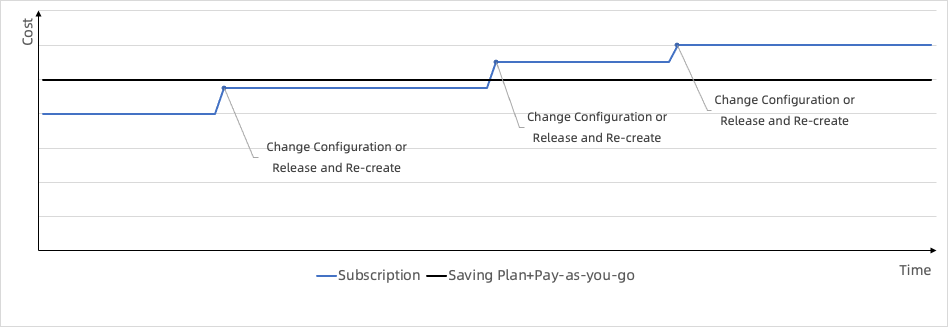
When you frequently upgrade, downgrade, or release and re-create instances, hidden costs accumulate under the subscription model. These costs from configuration changes and refunds add up over time and increase your overall spending. Savings plans combined with pay-as-you-go instances reduce these hidden costs because the discount follows your spending, not specific instances.
Varying resource demand at different times
For example, the business department uses certain resources during the day while the big data department uses different resources at night. With subscription or reserved instances, resources sit idle for nearly half the time. Savings plans combined with pay-as-you-go instances share discounts across instance families, significantly reducing total costs after switching.