Cost allocation breaks down total cloud resource costs into finer amounts by management perspective, analytical need, or resource granularity for effective cost management.
Background
As enterprises deepen cloud adoption, cost management grows critical. Common cost allocation challenges include:
Allocating costs by cost center: Users need to split costs across financial perspectives — subsidiaries, branches, departments, applications, or projects — using a single tool.
Allocating shared resource costs: Resources such as network security or big data platforms serve multiple teams, requiring clear splitting rules.
Automating cost allocation: With many applications and rapidly evolving procurement models, manual allocation is inefficient and error-prone.
Alibaba Cloud provides multi-dimensional cost allocation through multi-account structures, financial units, and tags.
Solution Architecture
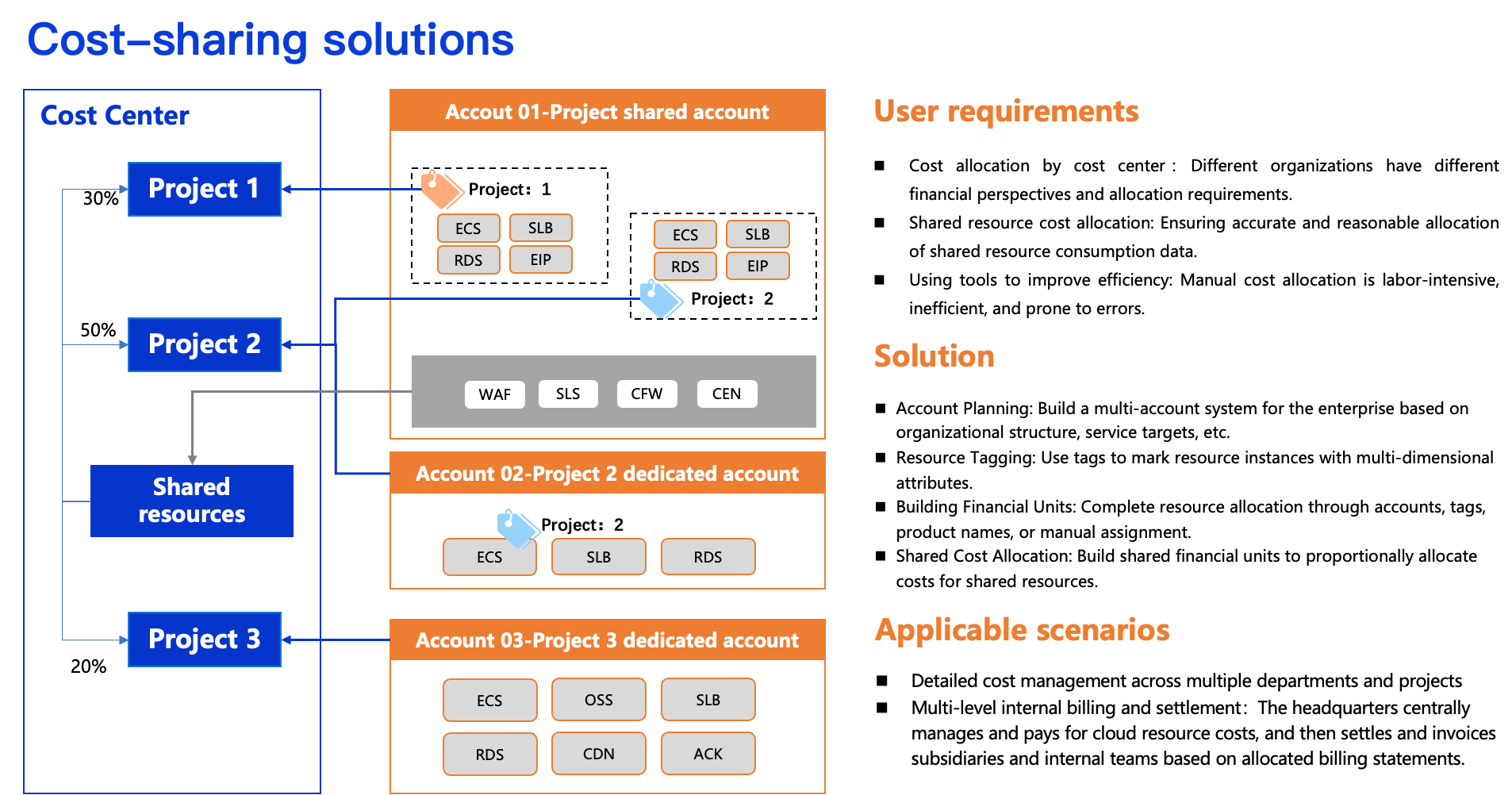
Scenarios
(1) Fine-grained cost management for multiple departments and projects
Calculate cloud resource usage per department or project to evaluate IT costs, adjust resource configurations, support budget planning, and reduce waste.
Applicable to enterprises that allocate cloud resources by department, project, or similar criteria.
(2) Multi-level internal billing and settlement for enterprises
The headquarters IT team centrally manages and pays for cloud resources, then performs internal settlement with subsidiaries and branch offices based on cost allocation bills.
Applicable to enterprises with complex structures, such as primary subsidiaries, group entities, or multi-level financial management.
Solution Workflow
Build a Multi-Account System in the Cloud
Create multiple Alibaba Cloud accounts through the Enterprise Account Center. The root account centrally manages them in a single-level or multi-level architecture.
Allocate costs to the responsible entity for each account. Each account can further allocate costs based on its business model.
Plan and adopt a multi-account model during initial cloud migration. Consider resource scaling, management complexity, security isolation, organizational mapping, and bill isolation. Early adoption reduces risks from later restructuring as the business grows.
For single-account users, complete cost allocation within one account using tools such as tags and financial units.
Plan Tags and Associate Resources
Create and attach tags to categorize and manage resources. A tag is a key-value pair (Key:Value) consisting of a tag key and tag value.
A tag key maps to multiple tag values. The key defines the classification dimension; the value provides specifics. For example, the key Department can have values like HR, R&D, Sales, O&M, and Administration.
Attach predefined tags on the purchase page, or tag existing resources through the Tags console, the product console, or the API.
Plan tags in advance across dimensions such as environment, department, and project:
Cost Allocation Dimension | Tag Key | Tag Value |
Business Application | Application | Application name, such as Retail, Mall, Outlet, etc. |
Account ID | Owner | Owner name (or account ID) |
Environment | Environment | POC, UAT, SIT, Production, etc. |
Business Unit | BusinessUnit | Business unit name, such as E-Commercial, etc. |
Project | Project | Project name |
Department | Department | such as Development, Testing, Sales, etc. |
You can also use resource groups to allocate costs by grouping related resources together.
Configure Financial Units
Financial units classify expenses across all cloud services. Design them based on your organization chart, using a multi-level directory tree for multi-level cost allocation. Consider these patterns:
Pattern 1: First-level units by environment (production/staging), with second-level nodes set by cost management granularity.
First-level Node | Second-level Node | Financial Unit Automatic Collection Conditions |
Staging environment | Department 1 | Environment=Staging environment & Department=Department 1 |
Department 2 | Environment=Staging environment & Department=Department 2 | |
Department 3 | Environment=Staging environment & Department=Department 3 | |
Production environment | Department 1-Mobile Game-Project 1 | Environment=Production environment and Department=Department 1 and Line-of-Business=Mobile Game and Project=Project 1 |
Department 1-Web Game-Project 2 | .. |
Pattern 2: Use simple collection for the staging environment and a multi-level directory tree for the production environment.
First-level Node | Second-level Node | Third-level Node | Fourth-level Node | Financial Unit Condition Settings |
Staging environment | Department 1 | Environment=Staging environment and Department=Department 1 | ||
Department 2 | Environment=Staging environment and Department=Department 2 | |||
Production environment | Department 1 | Web Game | Project 1 | Environment=Production environment and Department=Department 1 and Line-of-Business=Web Game and Project=Project 1 |
Project 2 | Environment=Production environment and Department=Department 1 and Line-of-Business=Web Game and Project=Project 2 | |||
Department 2 | Mobile Game | Project 3 | Environment=Production environment and Department=Department 2 and Line-of-Business=Mobile Game and Project=Project 3 | |
Project 4 | Environment=Production environment and Department=Department 2 and Line-of-Business=Mobile Game and Project=Project 4 |
For detailed operational guidance on financial units, see Financial Units.
Handle Shared Costs
Shared costs are expenses for resources used by multiple departments or teams. Define custom splitting rules to allocate these costs to designated financial units.
Create shared allocation rules through financial units. Supported methods include average splitting, proportional splitting, and custom splitting.
Query Cost Allocation Details
After configuring financial units, navigate to to view split expense data. Cost Allocation Details.
Cloud Product Cost Allocation Recommendations
To ensure cost data accuracy and automation, design your cost allocation strategy during the resource planning phase:
Understand the cost allocation granularity of cloud products — by instance or usage — and ensure alignment with your requirements. Cloud Services Supporting Tags lists products that support tag-based cost allocation.
Develop and implement a unified resource classification policy, such as tagging or using resource groups, to achieve automatic cost attribution.
For shared resources that cannot be tagged, select a reasonable business metric—such as CPU usage or API call count—as the basis for cost allocation.
Cost Allocation for Workload Resources
Workload resources include general-purpose instances — such as ECS, ApsaraDB RDS, and OSS — along with big data workloads. Supported cost allocation dimensions and practices:
Cloud Product | Cost Allocation Dimension | Cost Allocation Recommendation |
ECS | Instance | Set associated resource tags (ENIs, cloud disks, EIPs) to inherit ECS tags for automatic cost allocation. |
OSS | Bucket | Configure independent buckets per team for data isolation. |
RDS | Instance | For shared RDS instances, allocate proportionally by access count or tablespace volume. |
Alibaba Cloud Model Studio | Workspace | Tag workspaces and allocate costs per workspace. |
EIP | EIP instance | Tag consistently with the bound resource (such as ECS) for direct cost allocation. |
Snapshot | Instance | Associate snapshots with the corresponding ECS instance for cost allocation. |
Short Message Service | SMS template | If templates are insufficient, allocate by sending volume metrics (signature, template type, or message count). |
MaxCompute | Project | For shared projects, create independent jobs per application. Monitor resource usage per job and set custom allocation ratios. |
Kafka | Instance | Tag Kafka topics. Monitor inbound/outbound traffic and disk usage per topic, then allocate instance costs proportionally by team usage. |
RocketMQ | Topic | Each team sets up separate topics with tags or resource groups. Allocate costs by topic tag or resource group. |
Cost Allocation for Public Service Resources
Public service resources — network infrastructure, security, and O&M — are shared across teams. For example, WAF protects multiple ECS instances, and SLS integrates with all products. Allocate these costs as follows:
Product Category | Cloud Product | Cost Allocation Dimension | Cost Allocation Recommendation | |
Network Services | CBWP | Tag each public IP address for IP-based cost allocation. | ||
CDN | Tag each domain name for domain-based cost allocation. | |||
NAT Gateway | Allocate costs by summing the number of DNAT or SNAT entries used by the business. | |||
VPN | Set proportions based on the number of SSL or IPSec client connections. | |||
Security Services | Security Center | Allocate proportionally by ECS instance count per business, including ACK-allocated instances. | ||
DDoS | Allocate proportionally by public IP count per department. | |||
WAF | Allocate equally by protected domain or instance. Alternatively, monitor per-domain traffic and protection status, then split proportionally. | |||
SSL | Allocate costs by the specific certificate user. For a single certificate with multiple domain names, allocate proportionally by the associated business. | |||
Bastionhost | Allocate by ECS and RDS instance count per business. | |||
Cloud Firewall | Allocate proportionally by protected resource count per department. | |||
O&M Services | Cloud Monitor | Allocate proportionally by monitored resource count per business. | ||
Simple Log Service | Create separate projects per team when possible. For shared projects, allocate equally or by weighted billing items (storage, read/write traffic, read/write operations). | |||
For public infrastructure, allocate through equal splitting or proportional allocation.
For finer-grained allocation, retrieve usage data for key metrics via logs or third-party tools, then complete manual allocation through weighted calculations.
Cost Allocation for Promotional Benefit Resources
Resource plans and savings plans are promotional benefits used with pay-as-you-go products. Allocate used portions to the consumer and idle costs to the purchaser.
Allocate by purchaser: Tag savings plans and resource plans, assign to financial units. Fully attribute costs to the purchaser’s account. Suits centralized financial management or teams purchasing benefits for internal use.
Allocate by deduction object: Review daily deduction details in Expense Details to determine cost attribution.