Alibaba Cloud bills in USD by default. Eligible users can switch to a local currency, and some are billed in a local currency by default.
Settle in EUR, SGD, or HKD
Users in the European Economic Area, Singapore, or China (Hong Kong) can switch their settlement currency from USD to EUR, SGD, or HKD. Eligibility depends on the account registration region assigned during signup:
|
New currency |
Account registration region |
|
EUR |
Alibaba (Netherlands) B.V. |
|
SGD, HKD |
Alibaba Cloud (Singapore) Private Limited |
Before switching, verify that your linked payment methods support the new currency.
Only one settlement currency is allowed per billing cycle (calendar month). The new currency takes effect at 00:00 (UTC+8) on the first day of the following month.
After the change takes effect, new orders, bills, and invoices use the new currency. Historical orders, bills, and invoices remain in the original currency.
The following table lists exchange rates and supported payment methods for each currency.
|
EUR settlement |
SGD settlement |
HKD settlement |
|
|
Exchange rate source |
Fair market exchange rate |
||
|
Exchange rate update frequency |
Fixed monthly rate |
||
|
Online payment |
Visa, MasterCard |
Visa, Mastercard, American Express, JCB, Discover, Diners Club, Alipay CN |
Visa, Mastercard, Alipay CN |
|
Offline remittance account |
JPMorgan Chase Bank |
Citibank |
JPMorgan Chase Bank |
Cross-currency refunds, including downgrade and cancellation refunds, are not supported after a currency switch.
Change your currency in the Expenses and Costs console.
New console
-
Log in to the Expenses and Costs console and navigate to Account > Billing Account.
-
In the Account Settings section, click Edit next to Settlement Currency.
-
In the Change Settle Currency dialog box, select a currency and click OK. The change takes effect at 00:00 (UTC+8) on the first day of the next month.
-
In the Account Settings section, click View Exchange Rate next to Settlement Currency to view historical exchange rates.
Legacy console
-
Log in to the Expenses and Costs console and navigate to Payment Methods.
-
In the upper-right corner, click Settlement Currency Preference > Modify.
-
In the Modify Settlement Currency dialog box, select a currency and click OK. The change takes effect at 00:00 (UTC+8) on the first day of the next month.
-
Click Exchange Rates next to Settlement Currency Preference to view historical exchange rates.
For users with credit , charges incurred during the current month are consolidated into a bill on the first day of the next month. You can pay this bill by bank transfer, credit card, or digital wallet.
When the new currency takes effect, a virtual account (VA) in that currency is created automatically for top-ups and payments.
New console
-
Log in to the Expenses and Costs console and navigate to Account > Billing Account.
-
In the Asset Information section, click Top-up & Remittance next to Cash Balance.
-
On the remittance page, view the receiving bank account details and make an offline transfer. Pay by bank transfer.
Legacy console
-
In the Expenses and Costs console, navigate to Account Balance.
-
Below your account balance, click Deposit.
-
On the deposit page, view the receiving bank account details and make an offline transfer. Pay by bank transfer.
Your previous USD account and its balance are retained, not migrated.
For outstanding USD bills, continue remitting funds to your USD account to pay them.
If you have no remaining USD expenses or outstanding bills, request a refund of the USD balance to the original payment source.
Settle in MYR
Accounts registered in Malaysia are billed in Malaysian Ringgit (MYR) by default.
Currency conversion
Currencies are converted automatically using fair market exchange rates from a third-party service. All console amounts display in your local currency. The exchange rate depends on the transaction date:
-
Subscription orders: the exchange rate on the payment date applies.
-
Pay-as-you-go bills: the exchange rate on the settlement date applies.
If you pay by credit card or digital wallet, automatic settlement triggers when accrued pay-as-you-go charges reach a threshold (typically USD 1,000 equivalent), using that day's exchange rate. Remaining charges settle at month-end using the exchange rate on the final day.
If your account is under credit control, a bill for the previous month is issued on the first day of each month. This bill may show multiple exchange rates because it consolidates charges from different dates throughout the month.
Refunds for local-currency payments follow the standard Alibaba Cloud refund policies.
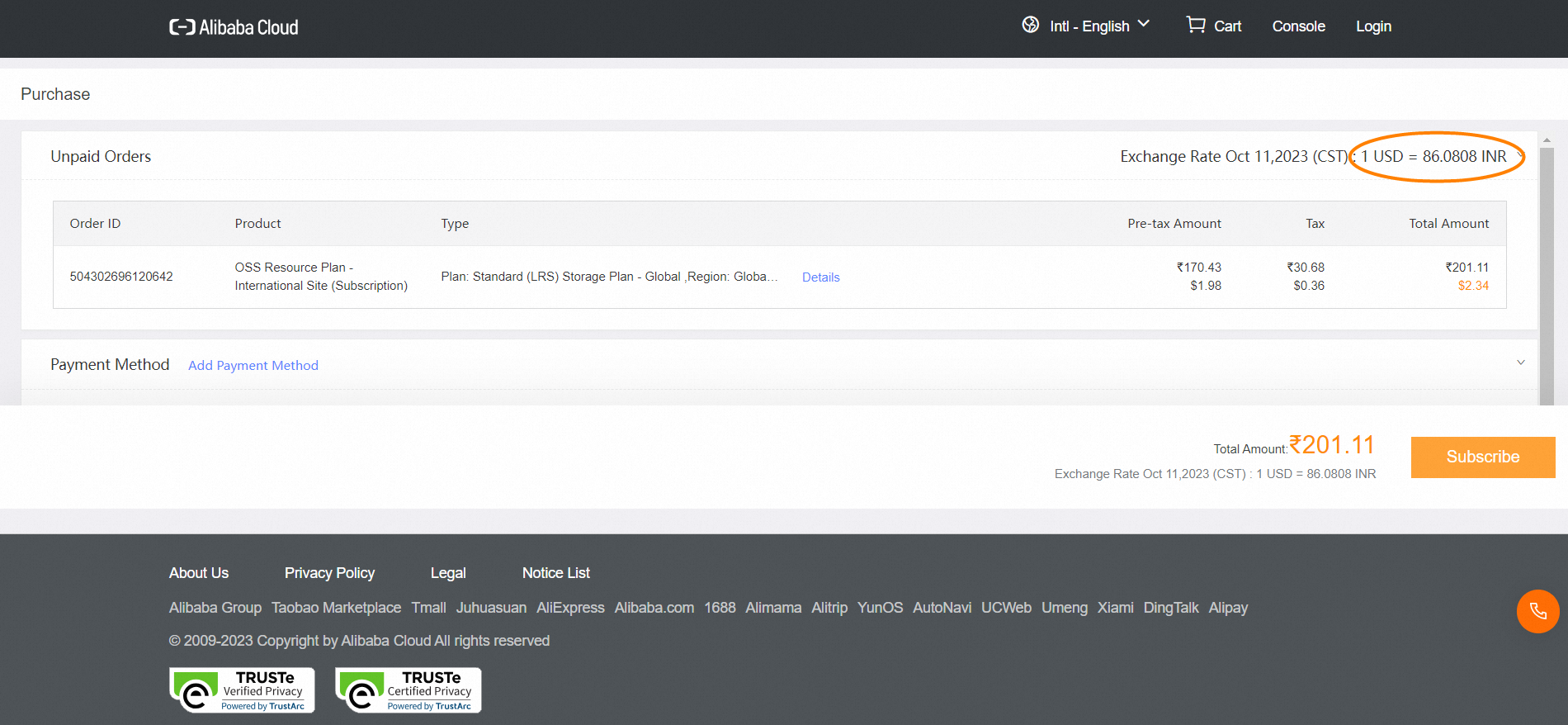
For eligible accounts, currency conversion is automatic. You can keep using your existing payment methods without creating additional accounts. The shopping cart and billing pages display amounts in your local currency with the daily exchange rate.
Payment page example