This topic describes how to perform stream processing on Tablestore data by using DataFrame when you access Tablestore with a Spark compute engine. This topic also explains how to run and debug the code in both local and cluster environments.
Prerequisites
A data table is created in Tablestore, data is written to the data table, and a tunnel is created for the data table. For more information, see Get started with the Wide Column model and Get started with Tunnel Service.
NoteFor the schema and sample data of the
order_source_stream_viewdata table, see Appendix: Sample data table.An AccessKey pair is created for your Alibaba Cloud account or a Resource Access Management (RAM) user that has permissions to access Tablestore. For more information, see Create an AccessKey pair.
A Java development environment is deployed.
In this topic, the Windows environment, JDK 1.8, IntelliJ IDEA 2024.1.2 (Community Edition), and Apache Maven are used as examples.
Procedure
Step 1: Download the project source code
Download the sample project by using Git.
git clone https://github.com/aliyun/tablestore-examples.gitIf you cannot download the project because of network issues, you can directly download tablestore-examples-master.zip.
Step 2: Update Maven dependencies
Go to the
tablestore-spark-demoroot directory.NoteWe recommend that you read the
README.mddocument in thetablestore-spark-demoroot directory to fully understand the project information.Run the following command to install
emr-tablestore-2.2.0-SNAPSHOT.jarto the local Maven repository.mvn install:install-file -Dfile="libs/emr-tablestore-2.2.0-SNAPSHOT.jar" -DartifactId=emr-tablestore -DgroupId="com.aliyun.emr" -Dversion="2.2.0-SNAPSHOT" -Dpackaging=jar -DgeneratePom=true
Step 3: (Optional) Modify the sample code
Step 4: Run and debug the code
You can run and debug the code locally or in a Spark cluster. This section uses StructuredTableStoreAggSQLSample as an example to describe the debugging process.
Local development environment
This section uses Windows operating system with IntelliJ IDEA as an example to describe how to debug the code.
Install the Scala plugin.
By default, IntelliJ IDEA does not support Scala. You need to manually install the Scala plugin.
Install winutils.exe (winutils 3.3.6 is used in this topic).
When you run Spark in a Windows environment, you also need to install
winutils.exeto resolve compatibility issues. You can downloadwinutils.exefrom the GitHub project homepage.Right-click the Scala program
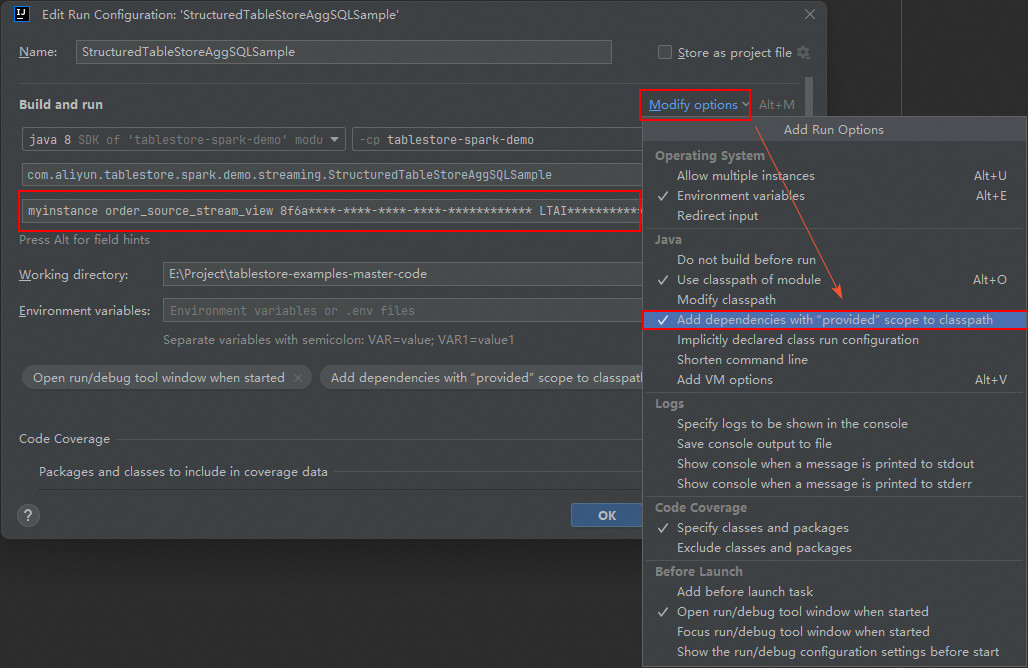
TableStoreBatchSample, select Modify Run Configuration, and open the Edit Run Configuration dialog box.NoteThe actual operations slightly vary based on the operating systems and IntelliJ IDEA versions.
In the Program arguments field, specify the instance name, data table name, tunnel ID, AccessKey ID, AccessKey secret, instance endpoint, and MaxOffsetsPerChannel in sequence.
myinstance order_source_stream_view 8f6a****-****-****-****-************ LTAI********************** DByT************************** https://myinstance.cn-hangzhou.ots.aliyuncs.com 10000Click Modify options, select Add dependencies with "provided" scope to classpath, and click OK.
Run the Scala program.
After you run the Scala program, the results will be printed to the Tablestore console.
+-------------------+-------------------+-----+-----------------+
|begin              |end                |count|totalPrice       |
+-------------------+-------------------+-----+-----------------+
|2025-04-16 11:13:30|2025-04-16 11:14:00|1    |2547.0           |
|2025-04-16 11:13:00|2025-04-16 11:13:30|3    |984.1999999999999|
|2025-04-16 11:12:30|2025-04-16 11:13:00|1    |29.6             |
+-------------------+-------------------+-----+-----------------+
Spark cluster environment
Before you perform debugging, make sure you have deployed a Spark cluster and the Spark version in the cluster environment is consistent with the Spark version of the sample project. Otherwise, version incompatibility might cause runtime errors.
This section uses the spark-submit method as an example. The master in the sample code is set to local[*] by default. When you run the code on a Spark cluster, you can remove this setting and use the spark-submit parameter to specify the master.
Run the
mvn -U clean packagecommand to package the project. The path of the JAR package istarget/tablestore-spark-demo-1.0-SNAPSHOT-jar-with-dependencies.jar.Upload the JAR package to the Driver node of the Spark cluster and submit the task by using
spark-submit.spark-submit --class com.aliyun.tablestore.spark.demo.streaming.StructuredTableStoreAggSQLSample --master yarn tablestore-spark-demo-1.0-SNAPSHOT-jar-with-dependencies.jar myinstance order_source_stream_view 8f6a****-****-****-****-************ LTAI********************** DByT************************** https://myinstance.cn-hangzhou.ots.aliyuncs.com 10000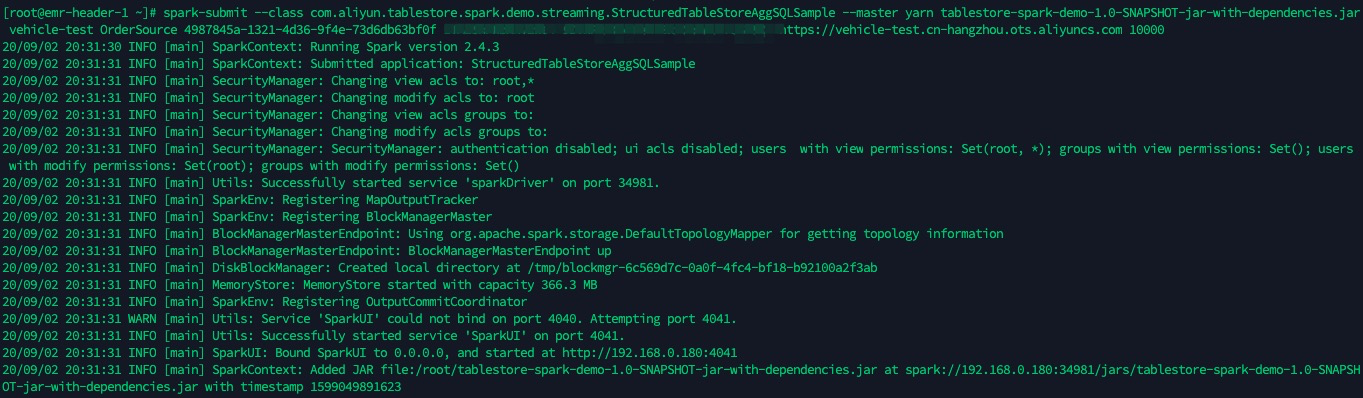
Appendix: Sample data table
The following tables show the schema and sample data of the order_source_stream_view table.
Sample table structure
Field name | Type | Description |
pk | long | The primary key column. |
UserId | string | The user ID. |
OrderId | string | The order ID. |
price | double | The order amount. |
timestamp | long | The timestamp. |
Sample data
pk (Primary key column) | UserId | OrderId | price | timestamp |
1 | user_A | 00002664-9d8b-441b-bad7-845202f3b142 | 29.6 | 1744773175362 |
2 | user_A | 9d8b7a6c-5e4f-4321-8765-0a9b8c7d6e5f | 785.3 | 1744773190240 |
3 | user_A | c3d4e5f6-7a8b-4901-8c9d-0a1b2c3d4e5f | 187 | 1744773195579 |
4 | user_B | f1e2d3c4-b5a6-4789-90ab-123cdef45678 | 11.9 | 1744773203345 |
5 | user_B | e2f3a4b5-c6d7-4890-9abc-def012345678 | 2547 | 1744773227789 |