After you create a mapping table for an analytical store, you can use SQL statements to query and analyze time series data. This topic describes examples on how to use SQL statements to query data in an analytical store.
Sample scenario
A manufacturer has 100,000 devices, each of which generates a group of CPU monitoring data every two minutes. To facilitate the management and analysis of device status, the manufacturer stores the collected device monitoring data in the cloud to reduce business costs and monitors device operation by analyzing device status.
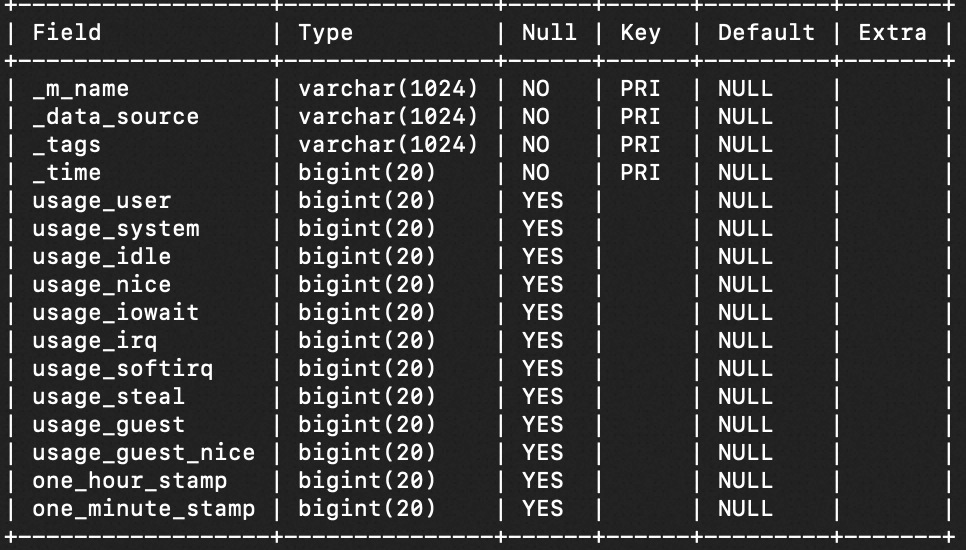
In this scenario, you can use the SQL query feature to quickly query and analyze time series data. Assume that the device monitoring data is stored in the Tablestore time series table named device, and the mapping table created for the time series table is named `device::cpu`. The following figure shows the schema of the mapping table created for the time series table.
Step 1: Create a mapping table for an analytical store
Create a mapping table in the multi-value model for a time series table by using the CREATE TABLE statement. For more information, see Mapping tables for a time series table in SQL.
Syntax
The _m_name, _data_source, _tags, and _time fields are fixed configurations. Retain the fixed configurations without modification.
CREATE TABLE table_name (
  `_m_name` VARCHAR(1024),
  `_data_source` VARCHAR(1024),
  `_tags` VARCHAR(1024),
  `_time` BIGINT(20),
  `column_name ` data_type,
  ......
  `user_column_namen ` data_type,
  PRIMARY KEY(`_m_name`,`_data_source`,`_tags`,`_time`))ENGINE=AnalyticalStore
Parameters
Parameter | Description |
table_name | The name of the mapping table, which is used to identify the mapping table. The format is |
column_name | The column name. The column name in SQL must be equivalent to the column name in the Tablestore table. For example, if the column name in the Tablestore table is Aa, the column name in SQL must be Aa, AA, aA, or aa. |
data_type | The data type of the column, such as BIGINT, DOUBLE, or BOOL. The data type of the column in SQL must match the data type of the column in the Tablestore table. For more information about data type mappings, see Data type mappings in SQL. |
ENGINE | The execution engine that is used when you use the mapping table to query data.
|
Example
Create a mapping table in the multi-value model named `device::cpu` for the device time series table.
CREATE TABLE `device::cpu`
(`_m_name` VARCHAR(1024),
 `_data_source` VARCHAR(1024),
 `_tags` VARCHAR(1024),
 `_time` BIGINT(20),
 `usage_user` BIGINT(20),
 `usage_system` BIGINT(20),
 `usage_idle` BIGINT(20),
 `usage_nice` BIGINT(20),
 `usage_iowait` BIGINT(20),
 `usage_irq` BIGINT(20),
 `usage_softirq` BIGINT(20),
 `usage_steal` BIGINT(20),
 `usage_guest` BIGINT(20),
 `usage_guest_nice` BIGINT(20),
 `one_hour_stamp` BIGINT(20),
 `one_minute_stamp` BIGINT(20),
 PRIMARY KEY(`_m_name`,`_data_source`,`_tags`,`_time`))  ENGINE=AnalyticStore;
Step 2: Query data by executing SQL statements
After you create a mapping table for an analytical store, you can execute the SELECT statement to query data in the analytical store. Synchronization latency exists when data is synchronized from the time series table to the analytical store. When you query the latest data, some data may not be synchronized to the analytical store yet.
Syntax
The execution priority of clauses in the SELECT statement is WHERE clause > GROUP BY clause > ORDER BY clause > LIMIT and OFFSET clauses.
SELECT
 select_expr [, select_expr] ...
 [FROM table_references]
 [WHERE where_condition]
 [GROUP BY groupby_condition]
 [ORDER BY order_condition]
 [LIMIT {[offset,] row_count | row_count OFFSET offset}]
Parameters
Parameter | Required | Description |
select_expr | Yes | The column name or column expression in the format of You can use column expressions to specify the columns that you want to query. When you use column expressions, you must comply with the following rules:
|
table_references | Yes | The name of the mapping table created for the time series table. |
where_condition | No | The WHERE clause, which can be used with different conditions to implement specific features. You can use the WHERE clause with relational operators in the format of When you use where_condition, you must comply with the following rules:
|
groupby_condition | No | The GROUP BY clause for grouped queries, which can be used with time series functions. When you use groupby_condition, take note of the following items:
|
order_condition | No | The ORDER BY clause for sorting in the format of
|
row_count | No | The maximum number of rows to return for this query. |
offset | No | The data offset for this query. The default offset is 0. |
Examples
Example 1: Query the maximum value of the usage_irq column and the maximum value of the usage_softirq column for all devices per day within the time range from
2023-01-05 05:14:00to2023-01-07 09:14:00.ImportantThe time zone of
unix_timestamp_micros("2023-01-05 05:14:00.000000")is the system time zone (for China, it isUTC+8Beijing time).SELECT time_bin(_time,"1day"), max(usage_irq),max(usage_softirq) FROM `device::cpu` WHERE _time > unix_timestamp_micros("2023-01-05 05:14:00.000000") AND _time < unix_timestamp_micros("2023-01-07 09:14:00.000000") GROUP BY 1 ORDER BY 1;Example 2: Query the average of all values in the usage_nice column for all time periods for devices with host_50625 and x64 CPU architecture.
SELECT avg(usage_nice)
FROM `device::cpu`
WHERE _data_source = "host_50625"
AND tag_value_at(_tags,"arch") = "x64";
Example 3: Query the number of data rows, average of all values in the usage_user column, and average of all values in the usage_system column for all devices within the time range from
2023-01-05 05:14:00to2023-01-07 09:14:00.SELECT count(*),avg(usage_idle),avg(usage_system) FROM `device::cpu` WHERE _time > unix_timestamp_micros("2023-01-05 05:14:00.000000") AND _time < unix_timestamp_micros("2023-01-07 09:14:00.000000");Example 4: Group CPU data by week, and then group each group by hour to calculate the standard deviation of the values in the usage_user column in each group.
SELECT week(from_unixtime_micros(_time)) as week,time_bin(_time,"1h"), stddev(usage_user)
FROM `device::cpu`
GROUP BY 1,2 ORDER BY 1,2;
Example 5: Query the value of the usage_user, usage_system, and usage_nice columns at the last point of every two hours for all devices with host_50625 within the time range from
2023-01-05 05:14:00to2023-01-07 09:14:00.SELECT time_bin(_time,"2h"), max_by(usage_user,_time), max_by(usage_system,_time),max_by(usage_nice,_time) FROM `device::cpu` WHERE _time > unix_timestamp_micros("2023-01-05 05:14:00.000000") AND _time < unix_timestamp_micros("2023-01-07 09:14:00.000000") AND _data_source = 'host_50625' GROUP BY 1 ORDER BY 1;Example 6: Output the time, month, day of the week, hour, minute, second, and microsecond when the value of the usage_user column is 100 within the time range from
2023-01-05 05:14:00to2023-01-07 09:14:00.SELECT from_unixtime_micros(_time) as time, monthname(from_unixtime_micros(_time)) as monthname, dayname(from_unixtime_micros(_time)) as dayname, hour(from_unixtime_micros(_time)) as hour, minute(from_unixtime_micros(_time)) as minute, second(from_unixtime_micros(_time)) as second, microsecond(from_unixtime_micros(_time)) as microsecond FROM `device::cpu` WHERE _time > unix_timestamp_micros("2023-01-05 05:14:00.000000") AND _time < unix_timestamp_micros("2023-01-07 09:14:00.000000") AND usage_user = 100 LIMIT 100;