Fully managed serverless architecture for automatic document parsing, vectorization, and index building. Supports hybrid search (vector + full-text), Subspace-based multi-tenant isolation, and stores all data in your own OSS and Tablestore instances.
System architecture
Knowledge Storage Service uses a fully managed serverless architecture. You interact through APIs while the platform manages all underlying resources. The data flow:
-
Call the
AddDocumentsAPI and specify an OSS file path, or upload a local file through the SDK. -
The system reads the file from OSS, then parses and chunks the document.
-
An embedding model generates vectors for each chunk and writes them to the Chunk table in Tablestore.
-
Vector indexes and full-text indexes are built automatically.
-
When you call the Retrieve API, the system runs a hybrid search and returns the matching chunks.
All data — raw documents, parsed results, and vectors — is stored in OSS and Tablestore instances under your Alibaba Cloud account. The service retains no customer data. Storage and compute are billed independently.
Applicability
Recommended scenarios:
-
RAG retrieval for LLM applications
-
Hybrid vector + full-text search
-
Multi-tenant data isolation
-
Document volumes from hundreds to hundreds of millions
-
Strict data security: all data stays in your own account
-
Pay-as-you-go with zero operations overhead
Scenarios that require evaluation:
-
Near-real-time indexing. Ingestion is asynchronous, so there is latency between upload and searchability.
-
Custom chunking. The system handles chunking automatically.
Not recommended:
-
Pure structured data queries. Use Tablestore wide column tables or relational databases instead.
-
Real-time streaming data indexing. Use Tablestore search indexes directly instead.
Data model
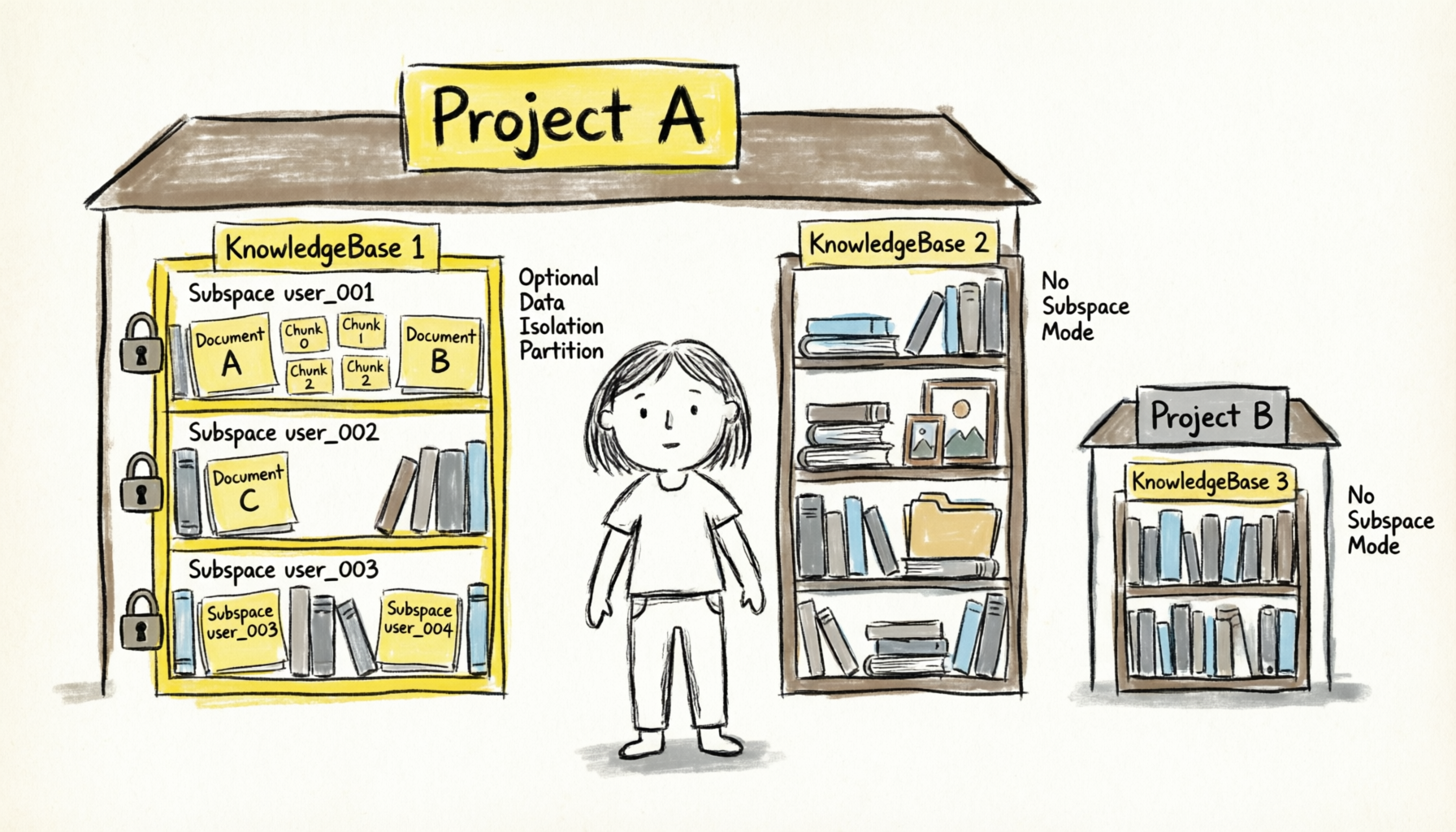
A knowledge base organizes data into four entity types:
|
Entity |
Description |
|
KnowledgeBase |
Maps to one Document table, one Chunk table, and one Index table. Supports up to hundreds of millions of documents. |
|
Document |
A record linked to an OSS file. Tracks document status and metadata. |
|
Chunk |
Stores vector data and raw text. The smallest retrieval unit. |
|
Index |
Stores vector data and retrieval-enhanced content for search. |
The system creates these data tables in Tablestore:
-
Document table:
{knowledge_base_name}_{knowledge_base_id} -
Chunk table:
{knowledge_base_name}_{knowledge_base_id}_chunk -
Index table:
{knowledge_base_name}_{knowledge_base_id}_index
Data sources
Knowledge Storage Service uses Alibaba Cloud Object Storage Service (OSS) as its data source. Regardless of how you upload documents, all raw data is stored in your own OSS bucket.
The knowledge base reads documents from OSS for parsing and chunking, and writes processing results back to OSS.
Import documents in three ways:
-
Upload local files: Specify a local file or directory. The SDK uploads files to OSS and adds them to the knowledge base. Directories are traversed recursively.
-
Add OSS files: Specify the OSS path to add existing files without re-uploading.
-
Batch import from an OSS directory: Specify an OSS directory path for the system to recursively scan all files. Use
inclusionFiltersandexclusionFiltersto filter files by name patterns.
Each import method and its detailed usage are described in Document management.
Embedding configuration
The embedding configuration determines how chunks are vectorized. Set it when creating a knowledge base.
|
Parameter |
Description |
|
|
Model provider. Set to |
|
|
Model name. Model Studio supports |
|
|
Vector dimension. |
|
|
Required only in |
|
|
Required only in |
If you omit embeddingConfiguration, the system defaults to Model Studio text-embedding-v4 with 1,024 dimensions, which suits most use cases.
The embedding configuration cannot be changed after creation. To switch models or dimensions, delete and recreate the knowledge base.
Model selection guidelines:
-
For general Chinese and English content,
text-embedding-v4(1,024 dimensions) balances semantic accuracy and performance. -
If you run a proprietary or third-party embedding service, use
custommode for consistency. -
Higher dimensions capture richer semantics but increase storage and compute costs. 1,024 is recommended for most scenarios.
Retrieval strategies
The retrieval configuration (retrievalConfiguration) resolves in this order:
|
Precedence |
Source |
Description |
|
1 (highest) |
Retrieve API parameters |
Configuration in the current request. Applies to this request only. |
|
2 |
Knowledge base configuration |
Configuration set at creation. Update via the UpdateKnowledgeBase API. |
|
3 (lowest) |
System default |
Hybrid search combining vector search and full-text search, with WEIGHT-based fusion (vector 0.7 : full-text 0.3). |
Retrieval types
|
Type |
Description |
Use case |
|
|
Vector search based on semantic similarity. |
Natural language queries that rely on semantic understanding. |
|
|
Full-text search based on keyword matching. |
Exact keyword, proper noun, or identifier searches. |
Enable both retrieval types and use reranking to merge results.
Reranking strategies
|
Type |
Description |
Use case |
|
RRF |
Reciprocal Rank Fusion. Merges results by inverse ranking weight without model calls. |
General-purpose, low-latency scenarios. |
|
WEIGHT |
Weighted scoring. Blends vector and full-text scores by configurable ratio. |
Fine-grained control over the contribution of each retrieval type. |
|
MODEL |
Model-based reranking. Calls a rerank model to reorder results. |
High-quality ranking; tolerates additional latency. |
For detailed retrieval configuration and tuning, see Retrieve and rerank.
Subspace multi-tenancy
A Subspace is an isolation partition within a knowledge base. Use Subspaces to isolate data by user, department, or tenant. Enable with "subspace": true at creation.
Key rules:
-
With Subspaces enabled, all document operations (add, query, delete, list) and retrieval calls must include the
subspacefield, or the API returns an error. -
The Retrieve API queries up to 32 Subspaces at a time.
-
Subspace names: 128 characters maximum.
-
The Subspace setting is immutable after creation.
For example, a department administrator creates one knowledge base with Subspaces enabled and assigns each employee a Subspace (e.g., employee_zhangsan, employee_lisi). Documents are isolated per employee, while the administrator manages configuration centrally. To search across employees, pass multiple Subspace names in the Retrieve call.
Subspace vs. multiple knowledge bases
|
Dimension |
Subspace |
Multiple knowledge bases |
|
Isolation granularity |
Logical partitions within a single knowledge base. |
Fully independent knowledge bases. |
|
Embedding configuration |
Shared across all Subspaces. |
Independent per knowledge base. |
|
Retrieval scope |
Cross-Subspace retrieval supported. |
Retrieval limited to a single knowledge base. |
|
Management overhead |
Low. Single knowledge base for all tenants. |
High. Separate management per knowledge base. |
|
Best for |
Multi-tenant isolation of homogeneous data. |
Separate business domains or different embedding requirements. |