You can use the k-nearest neighbor (KNN) vector query feature to perform an approximate nearest neighbor search based on vectors. This way, you can find data items that have the highest similarity to the vector that you want to query in a large-scale dataset. This feature is suitable for various scenarios such as recommendation systems, image and video retrieval, natural language processing (NLP), and semantic search.
For more information about the KNN vector query feature, see Overview.
Usage notes
To use the KNN vector query feature, the type of the column to which the Vector field is mapped in the data table must be String. When you create a search index, you must set the type of the field to which the String column is mapped to Vector. Then, specify the number of dimensions and data type of the Vector field, and the algorithm that you want to use to measure the distance between vectors.
To execute SQL statements to use the KNN vector query feature, you must create a mapping table for the search index that is created for the data table. For information about how to create a mapping table for a search index, see Create mapping tables for search indexes.
Data type mappings
Data type in tables | Data type in search indexes | SQL data in SQL |
String | The Vector type. The number of dimensions and data type of the Vector field and the algorithm that is used to measure the distance between vectors are specified. | VARCHAR (primary key) |
MEDIUMTEXT (predefined column) |
Create a mapping table for a search index
If you execute the CREATE TABLE statement to create a mapping table for a search index, the method that you use to create a Vector field is the same as the method that you use to create a field of other types. You only need to specify a valid name and data type for the Vector field. When you create a mapping table for a search index, we recommend that you specify the MEDIUMTEXT type as the mapped data type in SQL for a field of the Vector type.
The following sample SQL statement provides an example on how to create a mapping table for a search index that contains fields of the Vector type:
CREATE TABLE `test_table__test_table_index`(
    `col_vector` MEDIUMTEXT
)
ENGINE='searchindex'
ENGINE_ATTRIBUTE='{"index_name":"test_table_index", "table_name":"test_table"}';
Perform a KNN vector query
VECTOR_QUERY_FLOAT32
You can use the VECTOR_QUERY_FLOAT32 function to perform an approximate nearest neighbor search based on vectors.
SQL expression
VECTOR_QUERY_FLOAT32(fieldName, float32QueryVector,topk, filter)Parameters
Parameter
Type
Required
Description
fieldName
string
Yes
The name of the field that you want to match. To perform a KNN vector query, the type of the field must be Vector in the search index.
float32QueryVector
string
Yes
The vector for which you want to query the similarity.
ImportantThe number of dimensions must be consistent with the number of dimensions of the Vector field in the search index.
topK
int
Yes
The top K query results that have the highest similarity to the vector that you want to query. For information about the maximum value of the topK parameter, see Search index limits.
ImportantA greater value of K indicates higher recall rate, query latency, and costs.
If the value of the topK parameter is less than the value of the limit parameter in the SQL statement, the server automatically uses the value of the limit parameter as the value of the topK parameter.
filter
string
No
The filter. You can use a combination of query conditions that are not KNN vector query conditions.
Examples
The following sample SQL statement provides an example on how to query the top 10 values in the col_vector column of the exampletable table that have the highest similarity to
[1.5, -1.5, 2.5, -2.5]:SELECT * FROM exampletable WHERE VECTOR_QUERY_FLOAT32(col_vector, "[1.5, -1.5, 2.5, -2.5]", 10) limit 10;
SCORE()
You can use the SCORE() function to query the relevance scores of the query results. A higher score indicates higher similarity.
SQL expression
SCORE()Examples
The following sample SQL statement provides an example on how to query the top 10 values in the col_vector column of the exampletable table that have the highest similarity to
[1.5, -1.5, 2.5, -2.5]and display the relevance scores of the query results:SELECT *,SCORE() FROM exampletable WHERE VECTOR_QUERY_FLOAT32(col_vector, "[1.5, -1.5, 2.5, -2.5]", 10) limit 10;
Combination of KNN vector query and other query conditions
You can use KNN vector query and other query conditions in various combinations. The query effect varies based on the combination that you use. In the example in this section, a small amount of data meets the filter conditions.
In this example, 100 million images are stored in a table and 50,000 images belong to User A. Among the 50,000 images, 50 are stored in 2024. User A wants to search for 10 images that have the highest similarity to the specified image among the 50 images.
When the following sample SQL statement is executed, a filter is used to obtain all images of User A that are stored in 2024, totaling 50 images. Then, the top 10 images that have the highest similarity to the image that User A wants to query among the 50 images are located and returned to User A. The relevance score of each of the 10 images is displayed.
SELECT *,SCORE() FROM exampletable WHERE VECTOR_QUERY_FLOAT32(col_vector, "[1.5, -1.5, 2.5, -2.5]", 100, user="a" and year_num=2024) limit 10;When the following sample SQL statement is executed, the top 500 images that have the highest similarity to the image that User A wants to query among the 100 million images are returned. Then, 10 images of User A that are stored in 2024 and have the highest similarity to the specified image among the 500 images are located and returned to User A and the relevance score of each of the 10 images is displayed. The top 500 images may not include all 50 images of User A that are stored in 2024. When this sample SQL statement is executed, User A may fail to obtain the 10 images that have the highest similarity to the specified image among the 50 images. In extreme cases, User A may obtain no images at all.
SELECT *,SCORE() FROM exampletable WHERE user="a" and year_num=2024 and VECTOR_QUERY_FLOAT32(col_vector, "[1.5, -1.5, 2.5, -2.5]", 500) limit 10;
Procedure
In this example, a data table named vector_query_table is used. The data table consists of the pk primary key column of the String type, the col_vector attribute column of the String type, and the col_keyword attribute column of the String type.
To perform a KNN vector query in SQL, create a search index for the data table, create a mapping table for the search index, and then execute SQL statements. Procedure:
Create a search index and configure a Vector field. For more information, see Use search indexes in the Tablestore console and Use Tablestore SDKs.
NoteIf no Vector field is specified in the search index that you want to use, you can modify the schema of the search index to configure a Vector field. For more information, see Dynamically modify the schema of a search index.
The following figure shows how to create a search index in the Tablestore console.
In this example, a search index named
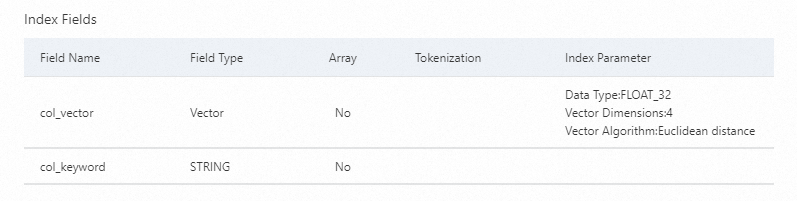
vector_query_table_indexis created. The search index consists of thecol_vectorfield of the Vector type and thecol_keywordfield of the String type. Thecol_vectorfield of the Vector type is mapped to the col_vector column of the String type in the data table.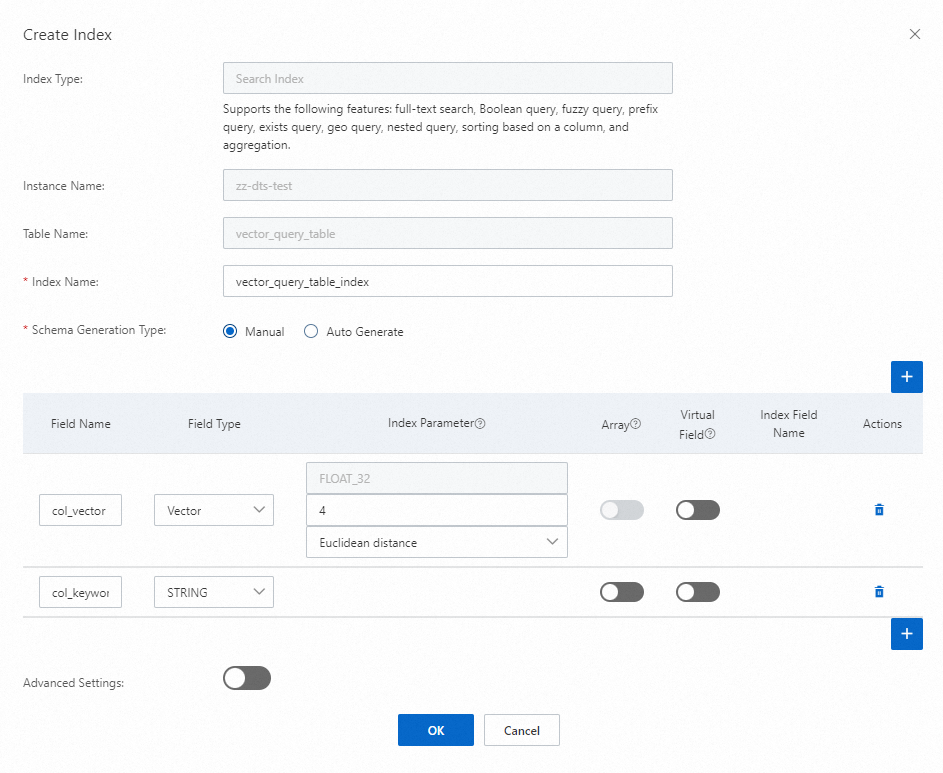
The following figure shows the schema of the search index.
Create a mapping table for the search index. For more information, see Use the SQL query feature in the Tablestore console and Use Tablestore SDKs to use the SQL query feature.
In this example, a mapping table named
vector_query_table__vector_query_table_indexis created for the search index. The data type of the field to which the Vector field namedcol_vectorin the mapping table mapped is MEDIUMTEXT in SQL. For more information, see Create mapping tables for search indexes.You can execute the following sample SQL statement to create the mapping table:
CREATE TABLE `vector_query_table__vector_query_table_index`(
    `col_vector` MEDIUMTEXT,
    `col_keyword` MEDIUMTEXT
)
ENGINE='searchindex',
ENGINE_ATTRIBUTE='{"index_name":"vector_query_table_index","table_name":"vector_query_table"}';
(Optional) After you create a mapping table for the search index, you can perform the following operations based on your business requirements.
Query information about a table
Execute the following SQL statement to query information about the mapping table for the search index:
DESCRIBE vector_query_table__vector_query_table_index;The following figure shows the query results.

Query data in a table
Execute the following SQL statement to query data in the mapping table for the search index:
SELECT * FROM vector_query_table__vector_query_table_index;The following figure shows the query results. For example, the
vector_query_table__vector_query_table_indexmapping table for the search index contains 10 rows of data.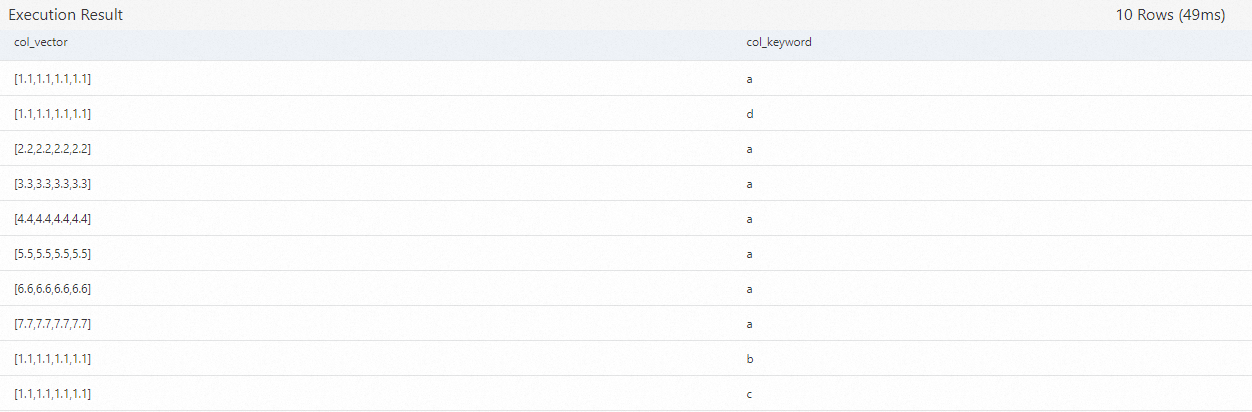
Perform a KNN vector query to query data. For more information, see Query data.
The following sample SQL statement provides an example on how to query the top 5 values in the col_vector column that have the highest similarity to
[1.5, 2.0, 2.5, 1.7]and display the relevance scores of the query results:SELECT *,SCORE() FROM vector_query_table__vector_query_table_index WHERE VECTOR_QUERY_FLOAT32(col_vector, "[1.5, 2.0, 2.5, 1.7]", 5) limit 5;The following figure shows the query results.

Limits
You can use the VECTOR_QUERY_FLOAT32 function only when you query data by using a mapping table that is created for a search index.
When you use the VECTOR_QUERY_FLOAT32 function, you must use the LIMIT clause. You cannot use the HAVING clause.
The VECTOR_QUERY_FLOAT32 function can only be used as a WHERE clause of a SELECT statement but cannot be used as a column expression of the SELECT statement, as an aggregate function, or for grouping or sorting.
You must use the SCORE() function together with the VECTOR_QUERY_FLOAT32 function. You cannot use the SCORE() function separately.
The SCORE() function can only be used as a column expression of a SELECT statement. It cannot be used as a WHERE clause of a SELECT statement, as an aggregation function, or for sorting.