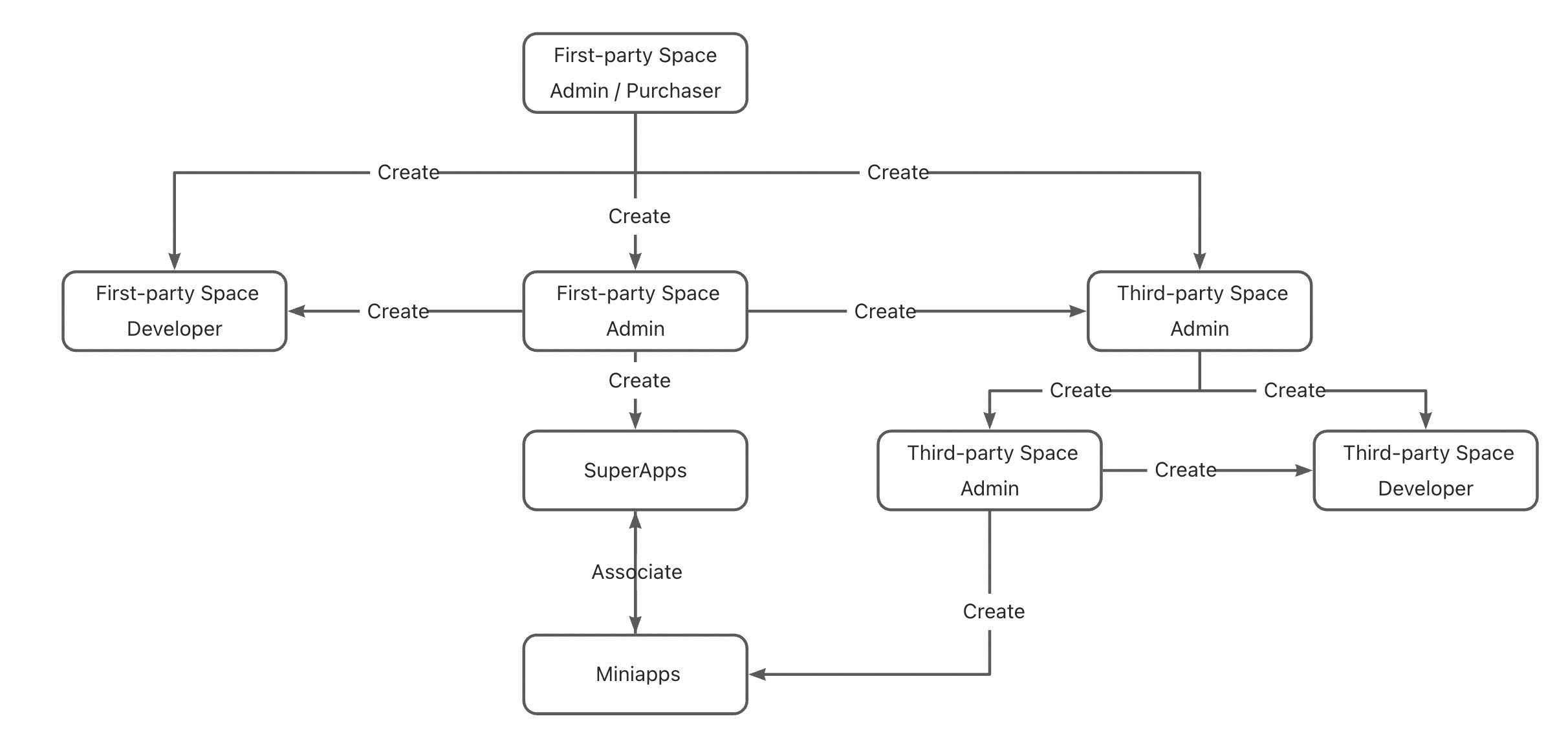
This document outlines the roles and permissions associated with the SuperApp Application Open Platform.
1. User Types
Admin (First-party Space Admin)
Overview: This is the role with the highest management permissions on the platform. It can be created by existing admins through invitation. There can be one or more admins within the system.
Permissions: Has full access to all platform content and operations, including all permissions of other roles.
Developer (First-party Space Developer)
Overview: This is the miniapp developer role on the platform. It can be created by a first-party space admin through invitation. There can be one or more developers within the system.
Permissions: Has permissions for miniapp upload, download, and other development-related operations, within the scope authorized by the admin.
Admin (Third-party Space Admin)
Overview: This is the role with the highest management permissions for a specific third-party space. It can be created via invitation by the current third-party space admin. Each third-party space may have one or more admins.
Permissions: Can operate all content within their assigned third-party space and has all permissions of other roles within that space.
Developer (Third-party Space Developer)
Overview: This is the miniapp developer role within a specific third-party space. It can be created via invitation by the third-party space admin. There can be one or more developers in the system.
Permissions: Has permissions for miniapp upload, download, and other development-related operations, within the scope authorized by the admin.
2. Roles and Permissions
2.1 Roles and Menu Permissions
Based on the roles assigned to users, the SuperApp Business Application Platform dynamically displays different menu options to match their responsibilities and operational scope.
Menu Name | Roles | First-party Space Admin | First-party Space Developer | Third-party Space Admin | Third-party Space Developer |
Overview | ✓ | ✓ | ✓ | ✓ |
Miniapps | ✓ | ✓ | ✓ | ✓ |
Members | ✓ | ✓ | ✓ | ✓ |
Approvals | ✓ | ✓ | ✓ | ✓ |
APP Settings | ✓ | - | - | - |
Miniapp Store | ✓ | ✓ | - | - |
Third-party Partner Invitation | ✓ | - | - | - |
2.2 Miniapp Roles and Permissions
In the process of miniapp management and release, there are clear distinctions between the permissions of different roles. The following table outlines the specific functional permissions associated with each role, to help clarify responsibilities and operational scope.
Function | Roles | Miniapp Admin | Miniapp Developer | First-party Space Admin | Third-party Space Admin | ||
Miniapp Admin | Non-Miniapp Admin | Miniapp Admin | Non-Miniapp Admin | |||
Create Miniapp | - | - | ✓ | ✓ | ✓ | ✓ |
Members | ✓ | - | ✓ | - | ✓ | - |
Add Version | ✓ | ✓ | ✓ | ✓ | ✓ | ✓ |
Request JSAPI Authorization | ✓ | ✓ | ✓ | ✓ | ✓ | ✓ |
Request Miniapp Redirect URL | ✓ | ✓ | ✓ | ✓ | ✓ | ✓ |
Global Settings | ✓ | - | ✓ | ✓ | ✓ | ✓ |
Miniapp Release Request | ✓ | - | ✓ | - | ✓ | - |
Miniapp Release Approval | - | - | ✓ | ✓ | - | - |
Miniapp Role Definitions:
Miniapp Admin: A role granted administrative permissions for a specific miniapp.
Miniapp Developer: A role granted developer permissions for a specific miniapp.
3. Role Relationship Diagram
The diagram below illustrates the relationships, responsibilities, and permissions of various roles during the creation and management of miniapps.