All Products
Search
Document Center

SuperApp:Overview

Last Updated:Jul 17, 2025

This document provides an introduction to the Overview page of the platform.

The Overview displays core information and key tasks for the current workspace. Users with different roles can view relevant content based on their permissions.

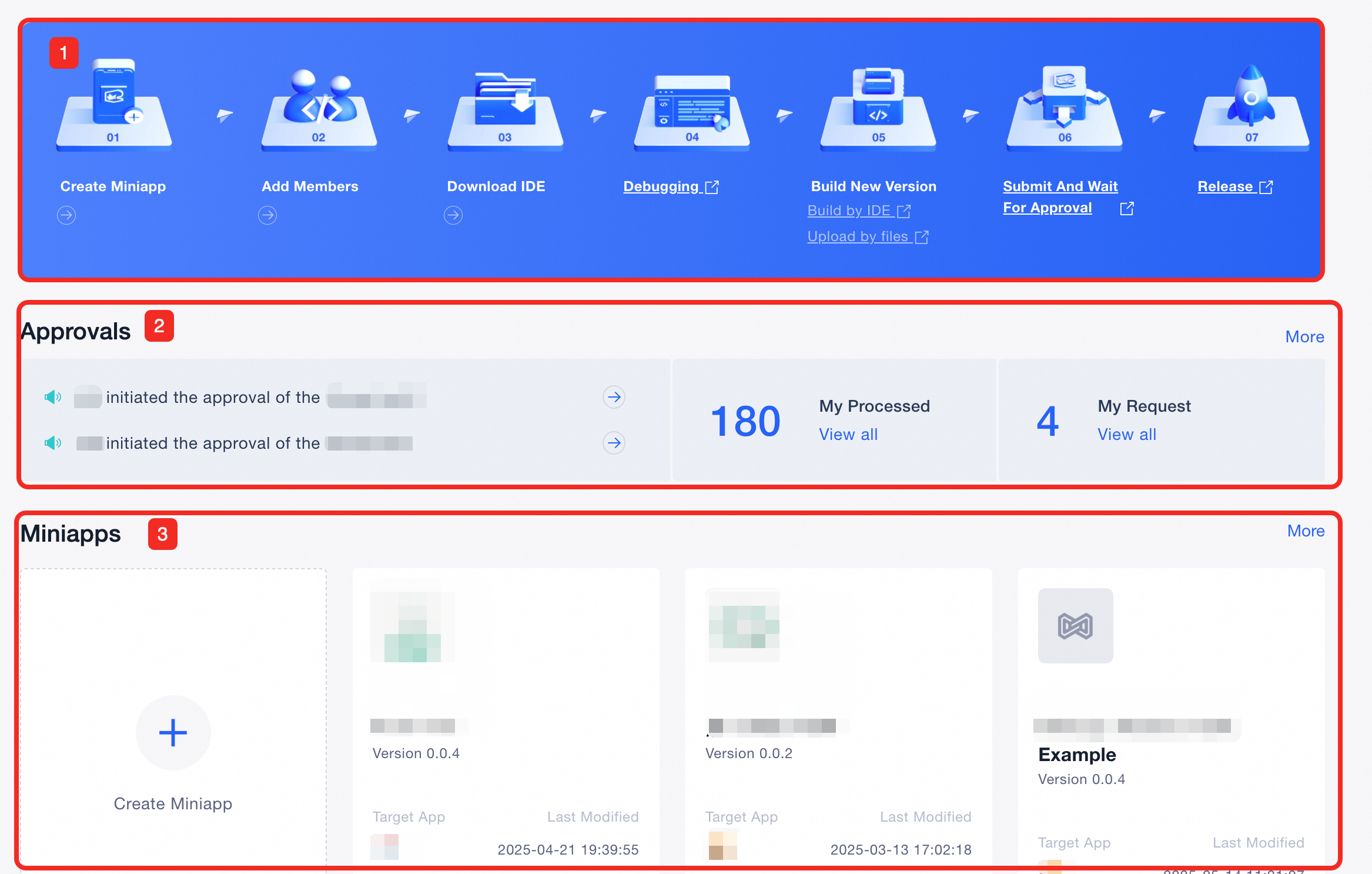
Admins can see the Miniapp development process, a list of Miniapps, and pending approvals or actions. Clicking「More」will redirect them directly to the corresponding management page.
image

Item Number

Description

1

View the Miniapp Development Process, Users can follow the guided workflow to create a Miniapp step by step.

  • Clicking Create Miniapp, Add Members, or Download IDE will redirect users to the corresponding operation pages.

  • Clicking DebuggingBuild New VersionSubmit And Wait For Approval, or Release will redirect users to the respective documentation for that step in the process.

2

View Current Approval Status.

  • Clicking Pending NotificationsView All, or More will redirect users to the corresponding approval lists in the Task Management section.

image

3

View Miniapp List in This Workspace

  • Users can view the target App associated with a specific Miniapp.

  • Users can also check the approval and release status of each Miniapp.

  • Clicking More will redirect the system to the Miniapp List page, where users can view detailed information about all Miniapps in this workspace.
