Create, edit, and delete miniapps on the Application Open Platform.
Only admins can create or delete miniapps.
Create a miniapp
Log on to the Application Open Platform console.
In the left-side navigation pane, click Miniapps. The Miniapp List page appears.
-
On the Miniapp List page, click Create Miniapp. The Create Miniapp panel appears.
-
Configure the miniapp parameters.
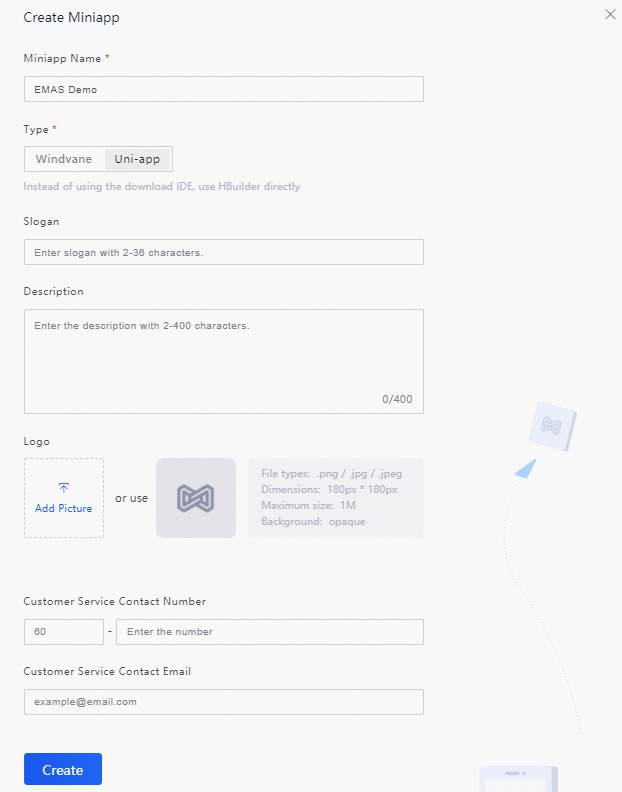
-
Click Create.
Edit the miniapp
-
On the Miniapp List page, click the miniapp name or click Detail in the Action column. The Versions tab appears.
-
Click the Information tab, and then click Edit in the upper-right corner. The Edit Miniapp panel appears.
-
In the Edit Miniapp panel, modify the miniapp parameters.
-
Click Update.

Delete the miniapp
You can delete only miniapps with no added versions.
-
On the Miniapp List page, click the miniapp name or click Detail in the Action column. The Versions tab appears.
-
Click the Information tab, and then click Delete in the upper-right corner. In the confirmation message, click OK.
